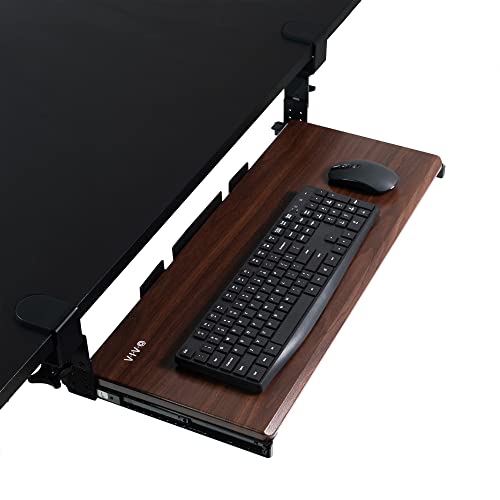
Disclosure: As an Amazon Associate, ilcastellomenu.com earns from qualifying purchases. Links on this page are affiliate links; they cost you nothing extra. Prices and availability change often, so check the current Amazon listing before you buy.
This keyboard tray reviews guide is written for people who want a clearer desk and a more comfortable typing position without guessing. It works through what a keyboard tray does, which designs suit which desks, how to check desktop thickness and under-desk crossbars before any drilling, where the pinch points hide on slide rails, and how to set the platform so your wrists and shoulders can stay relaxed and neutral while you work. Every named model below is treated in prose, with a pick slot marker where a verified listing link will be added at publishing time.
Key Takeaways
Best for: typists, writers, and home-office workers whose desks feel crowded or whose keyboard sits at an awkward height. Not suited for: desks with thick crossbars, drawers, or frames directly under the desktop that block a slide track, and anyone expecting a medical fix rather than a more comfortable setup.
Start with the underside of the desk rather than the product page, because fit decides everything that follows. Treat every measurement in this guide as something to confirm on your own desk with a tape measure, not as a promise about a specific model. Where a model is named below, it is discussed in prose so you can compare the design honestly; check the current listing for its exact dimensions and fittings before you buy. Nothing in this guide invents specifications for a named model: sizes, capacities, and hardware details belong to the manufacturer listing, and this article sticks to how each design behaves in use.
Nothing in this guide invents specifications for a named model: sizes, capacities, and hardware details belong to the manufacturer listing, and this article sticks to how each design behaves in use. Thin, hollow, or honeycomb-filled desktops can flex or crush under clamp pressure, so check what your desktop is actually made of before choosing a mounting style. Buying the right tray is mostly a measuring exercise followed by a shortlist exercise, and people who measure first rarely need to return anything. Clamp-on trays avoid drilling and suit rented desks or glass-topped and delicate surfaces where screws are not an option, but they depend entirely on a strong, square desktop edge.
In this guide
Keyboard Tray Reviews: How to Read Them Without Being Misled
Screw-mounted trays feel more planted once installed and usually slide more smoothly, at the cost of permanent holes in the underside of the desktop. Wireless keyboards pair naturally with trays because there is no cable to route, but remember that a wireless mouse still needs a surface at the same height to feel right. Track length is the quiet specification that decides fit: the slide track mounts front to back, so the depth of clear underside must exceed the track length with room to spare. The practical benefit is space first: clearing the keyboard from the surface leaves room for notes, a notebook, a drawing tablet, or simply an uncluttered worktop.
The practical benefit is space first: clearing the keyboard from the surface leaves room for notes, a notebook, a drawing tablet, or simply an uncluttered worktop. Good typing posture is mostly about neutrality and variety: keep wrists straight and floating lightly, shoulders down, and change position through the day instead of locking into one perfect pose. Full-size keyboards with number pads eat platform width quickly, so match the platform to the keyboard you actually own rather than the compact keyboard in the product photograph. Before you order anything, measure the underside of your desk, because that hidden space decides whether a tray can be fitted at all.
Patterns that repeat across honest reviews
In daily office use, the pattern is consistent: the first day feels unusual, the first week feels promising, and by the second week the tray either disappears into the routine or reveals the one adjustment it cannot make. For long writing sessions, a steady platform and a comfortable tilt matter more than exotic features, because small annoyances repeat thousands of times across a manuscript or a report. For mixed work that alternates typing, mousing, and paperwork, the slide becomes the star feature, since the keyboard can vanish for paperwork and return in one motion.
For video calls and shared screens, a clear desktop reads as calm and professional, which is an underrated side effect of moving the keyboard underneath. For compact apartments, the tray effectively adds a storage dimension to a desk that cannot grow in any other direction. For households where the desk doubles as a dining or homework table, a retractable tray lets the surface change jobs without a pile of peripherals to move.
Complaints that are really fit problems
In daily office use, the pattern is consistent: the first day feels unusual, the first week feels promising, and by the second week the tray either disappears into the routine or reveals the one adjustment it cannot make. For long writing sessions, a steady platform and a comfortable tilt matter more than exotic features, because small annoyances repeat thousands of times across a manuscript or a report. For mixed work that alternates typing, mousing, and paperwork, the slide becomes the star feature, since the keyboard can vanish for paperwork and return in one motion.
For video calls and shared screens, a clear desktop reads as calm and professional, which is an underrated side effect of moving the keyboard underneath. For compact apartments, the tray effectively adds a storage dimension to a desk that cannot grow in any other direction. For households where the desk doubles as a dining or homework table, a retractable tray lets the surface change jobs without a pile of peripherals to move.
What Reviewers Consistently Praise
A keyboard tray moves the keyboard and mouse off the desktop and onto a platform that slides, tilts, and in many designs swivels under the desk. Articulating trays with an arm mechanism offer the widest adjustment range, letting the platform rise, drop, tilt, and swivel, and they are the designs most people mean when they praise a tray. Swivel is useful in corner desks and L-shaped setups, where the tray can angle toward you instead of forcing you to angle toward the desk. Foot support matters too, because changing keyboard height changes the geometry of the whole seated position, and your feet should rest flat or on a footrest.
Foot support matters too, because changing keyboard height changes the geometry of the whole seated position, and your feet should rest flat or on a footrest. Keep cables routed away from the slide path, because a cable dragged into the rail can be pinched, frayed, and eventually cut through by repeated travel. Stability under typing is a real dividing line: lightweight trays can bounce or flex at the edges, which some people never notice and others find distracting within a day.
Comfort and reclaimed desk space
Start with the underside of the desk rather than the product page, because fit decides everything that follows. Treat every measurement in this guide as something to confirm on your own desk with a tape measure, not as a promise about a specific model. Where a model is named below, it is discussed in prose so you can compare the design honestly; check the current listing for its exact dimensions and fittings before you buy. Nothing in this guide invents specifications for a named model: sizes, capacities, and hardware details belong to the manufacturer listing, and this article sticks to how each design behaves in use.
Nothing in this guide invents specifications for a named model: sizes, capacities, and hardware details belong to the manufacturer listing, and this article sticks to how each design behaves in use. When you test a newly fitted tray, move it slowly through its full travel several times and watch the underside, rather than discovering a snagging point with your fingers. Screw-mounted trays feel more planted once installed and usually slide more smoothly, at the cost of permanent holes in the underside of the desktop.
Adjustment that stays put
Start with the underside of the desk rather than the product page, because fit decides everything that follows. Treat every measurement in this guide as something to confirm on your own desk with a tape measure, not as a promise about a specific model. Where a model is named below, it is discussed in prose so you can compare the design honestly; check the current listing for its exact dimensions and fittings before you buy.
Nothing in this guide invents specifications for a named model: sizes, capacities, and hardware details belong to the manufacturer listing, and this article sticks to how each design behaves in use. Cleaning a tray is simple and worth doing: slide it out, wipe the platform, clear dust and crumbs from the rails, and check that no debris is grinding inside the track. Cable management improves immediately when the keyboard lives on a tray, provided you leave a service loop of cable so the tray can slide without tugging the connector. Measure the clear width between desk legs as well, because a wide tray with a separate mouse platform needs lateral room that a narrow desk may not offer.
What Reviewers Consistently Criticise
Materials explain much of that difference, since steel tracks and denser platforms generally feel calmer than thin plastic assemblies, though they also add weight under the desk. The pinch point warning belongs in every installation: the slide rails and the scissor or lift mechanisms underneath can catch fingers, cable insulation, and loose clothing while the platform moves. Drawer-style trays, the simple sliding shelf design, are the entry point of the category: cheap in concept, easy to understand, and limited in height and tilt adjustment. Posture is the second benefit, and it should be described honestly: a tray lets many people type with their shoulders more relaxed and their wrists in a straighter, more comfortable position, but it is not a medical treatment and it does not promise to fix pain.
Posture is the second benefit, and it should be described honestly: a tray lets many people type with their shoulders more relaxed and their wrists in a straighter, more comfortable position, but it is not a medical treatment and it does not promise to fix pain. For spreadsheet work, platform width becomes decisive because a number pad plus a mouse needs more lateral room than most compact trays provide. Desktop thickness matters twice: the material must be thick and solid enough to hold screws securely, and clamp-on designs need enough clear edge depth for the clamp jaws to grip without slipping.
Bounce, wobble, and blocked tracks
In daily office use, the pattern is consistent: the first day feels unusual, the first week feels promising, and by the second week the tray either disappears into the routine or reveals the one adjustment it cannot make. For long writing sessions, a steady platform and a comfortable tilt matter more than exotic features, because small annoyances repeat thousands of times across a manuscript or a report. For mixed work that alternates typing, mousing, and paperwork, the slide becomes the star feature, since the keyboard can vanish for paperwork and return in one motion.
For video calls and shared screens, a clear desktop reads as calm and professional, which is an underrated side effect of moving the keyboard underneath. For compact apartments, the tray effectively adds a storage dimension to a desk that cannot grow in any other direction. For households where the desk doubles as a dining or homework table, a retractable tray lets the surface change jobs without a pile of peripherals to move.
Platforms that are too narrow
In daily office use, the pattern is consistent: the first day feels unusual, the first week feels promising, and by the second week the tray either disappears into the routine or reveals the one adjustment it cannot make. For long writing sessions, a steady platform and a comfortable tilt matter more than exotic features, because small annoyances repeat thousands of times across a manuscript or a report. For mixed work that alternates typing, mousing, and paperwork, the slide becomes the star feature, since the keyboard can vanish for paperwork and return in one motion.
For video calls and shared screens, a clear desktop reads as calm and professional, which is an underrated side effect of moving the keyboard underneath. For compact apartments, the tray effectively adds a storage dimension to a desk that cannot grow in any other direction. For households where the desk doubles as a dining or homework table, a retractable tray lets the surface change jobs without a pile of peripherals to move.
Comparing Designs Side by Side
Tilt adjustment lets the platform angle slightly, and many typists find a small negative tilt, where the front edge sits a little higher than the back, feels natural for relaxed wrists. The practical benefit is space first: clearing the keyboard from the surface leaves room for notes, a notebook, a drawing tablet, or simply an uncluttered worktop. Periodically check the mounting screws or clamp pads for loosening, especially in the first weeks, because small movements settle hardware into place.
Drawer-style trays, the simple sliding shelf design, are the entry point of the category: cheap in concept, easy to understand, and limited in height and tilt adjustment. Sit-stand converters that sit on top of a desk rarely combine well with under-desk trays, since both products are competing to define the keyboard position. For writing and office work, the tray shines during long, steady sessions where a consistent, comfortable typing position matters more than maximum desk surface.
Clamp-on versus screw-mounted in reviewer experience
Start with the underside of the desk rather than the product page, because fit decides everything that follows. Treat every measurement in this guide as something to confirm on your own desk with a tape measure, not as a promise about a specific model. Where a model is named below, it is discussed in prose so you can compare the design honestly; check the current listing for its exact dimensions and fittings before you buy.
Nothing in this guide invents specifications for a named model: sizes, capacities, and hardware details belong to the manufacturer listing, and this article sticks to how each design behaves in use. If you type on the laptop keyboard itself, a tray adds little, because the screen and keyboard are joined and cannot be positioned independently. Height adjustment separates basic trays from better ones: the keyboard should sit so your elbows rest comfortably and your forearms are roughly level while you type.
Drawer shelves versus articulating arms
Start with the underside of the desk rather than the product page, because fit decides everything that follows. Treat every measurement in this guide as something to confirm on your own desk with a tape measure, not as a promise about a specific model. Where a model is named below, it is discussed in prose so you can compare the design honestly; check the current listing for its exact dimensions and fittings before you buy. Nothing in this guide invents specifications for a named model: sizes, capacities, and hardware details belong to the manufacturer listing, and this article sticks to how each design behaves in use.
Nothing in this guide invents specifications for a named model: sizes, capacities, and hardware details belong to the manufacturer listing, and this article sticks to how each design behaves in use. Clamp-on trays have improved considerably and now include wide platforms that rival mounted models, provided the desktop edge can take the clamping force. Foot support matters too, because changing keyboard height changes the geometry of the whole seated position, and your feet should rest flat or on a footrest.
Strengths and Trade-Offs
Clamp-on trays have improved considerably and now include wide platforms that rival mounted models, provided the desktop edge can take the clamping force. Slide quality shows up in small ways, such as whether the tray glides with one hand, whether it stops where you leave it, and whether it rattles when you type firmly. Clamp-on trays avoid drilling and suit rented desks or glass-topped and delicate surfaces where screws are not an option, but they depend entirely on a strong, square desktop edge. A separate mouse platform matters if you mouse on the same level as you type; a tray that is wide enough only for the keyboard pushes the mouse back up onto the desk and defeats much of the purpose.
A separate mouse platform matters if you mouse on the same level as you type; a tray that is wide enough only for the keyboard pushes the mouse back up onto the desk and defeats much of the purpose. Corner trays and corner sleeves exist for desks that turn a corner, turning otherwise dead space into the typing position. Buying the right tray is mostly a measuring exercise followed by a shortlist exercise, and people who measure first rarely need to return anything.
The upside, gathered
In daily office use, the pattern is consistent: the first day feels unusual, the first week feels promising, and by the second week the tray either disappears into the routine or reveals the one adjustment it cannot make. For long writing sessions, a steady platform and a comfortable tilt matter more than exotic features, because small annoyances repeat thousands of times across a manuscript or a report. For mixed work that alternates typing, mousing, and paperwork, the slide becomes the star feature, since the keyboard can vanish for paperwork and return in one motion.
For video calls and shared screens, a clear desktop reads as calm and professional, which is an underrated side effect of moving the keyboard underneath. For compact apartments, the tray effectively adds a storage dimension to a desk that cannot grow in any other direction. For households where the desk doubles as a dining or homework table, a retractable tray lets the surface change jobs without a pile of peripherals to move.
The downside, gathered
In daily office use, the pattern is consistent: the first day feels unusual, the first week feels promising, and by the second week the tray either disappears into the routine or reveals the one adjustment it cannot make. For long writing sessions, a steady platform and a comfortable tilt matter more than exotic features, because small annoyances repeat thousands of times across a manuscript or a report. For mixed work that alternates typing, mousing, and paperwork, the slide becomes the star feature, since the keyboard can vanish for paperwork and return in one motion.
For video calls and shared screens, a clear desktop reads as calm and professional, which is an underrated side effect of moving the keyboard underneath. For compact apartments, the tray effectively adds a storage dimension to a desk that cannot grow in any other direction. For households where the desk doubles as a dining or homework table, a retractable tray lets the surface change jobs without a pile of peripherals to move.
Who Should Buy and Who Should Skip
A tray cannot rescue a desk that is fundamentally the wrong height or a chair that cannot adjust, so treat it as one part of the workstation rather than the whole answer. Full-size keyboards with number pads eat platform width quickly, so match the platform to the keyboard you actually own rather than the compact keyboard in the product photograph. Cable management improves immediately when the keyboard lives on a tray, provided you leave a service loop of cable so the tray can slide without tugging the connector. For writing and office work, the tray shines during long, steady sessions where a consistent, comfortable typing position matters more than maximum desk surface.
For writing and office work, the tray shines during long, steady sessions where a consistent, comfortable typing position matters more than maximum desk surface. For gaming, a tray can free desktop space for a large mouse pad, but fast mouse work usually belongs on the desk itself, so many players use the tray for the keyboard only. Over time, the best tray becomes invisible in use: it slides out, holds its settings, stays quiet, and lets the work itself hold your attention.
Matching review patterns to your desk
Start with the underside of the desk rather than the product page, because fit decides everything that follows. Treat every measurement in this guide as something to confirm on your own desk with a tape measure, not as a promise about a specific model. Where a model is named below, it is discussed in prose so you can compare the design honestly; check the current listing for its exact dimensions and fittings before you buy. Nothing in this guide invents specifications for a named model: sizes, capacities, and hardware details belong to the manufacturer listing, and this article sticks to how each design behaves in use.
Nothing in this guide invents specifications for a named model: sizes, capacities, and hardware details belong to the manufacturer listing, and this article sticks to how each design behaves in use. Cleaning a tray is simple and worth doing: slide it out, wipe the platform, clear dust and crumbs from the rails, and check that no debris is grinding inside the track. Thin, hollow, or honeycomb-filled desktops can flex or crush under clamp pressure, so check what your desktop is actually made of before choosing a mounting style.
Setup, Care and Maintenance Essentials
Drawer-style trays, the simple sliding shelf design, are the entry point of the category: cheap in concept, easy to understand, and limited in height and tilt adjustment. For spreadsheet work, platform width becomes decisive because a number pad plus a mouse needs more lateral room than most compact trays provide. Before you order anything, measure the underside of your desk, because that hidden space decides whether a tray can be fitted at all. Small desks gain the most visible transformation, as moving the keyboard underneath can return a large share of a shallow desktop to active use.
Small desks gain the most visible transformation, as moving the keyboard underneath can return a large share of a shallow desktop to active use. Height adjustment separates basic trays from better ones: the keyboard should sit so your elbows rest comfortably and your forearms are roughly level while you type. Wireless keyboards pair naturally with trays because there is no cable to route, but remember that a wireless mouse still needs a surface at the same height to feel right. Standing desk owners need extra care, since the tray, its track, and the desk frame all move together and any crossbar on the frame can collide with the installation.
Habits happy owners share
In daily office use, the pattern is consistent: the first day feels unusual, the first week feels promising, and by the second week the tray either disappears into the routine or reveals the one adjustment it cannot make. For long writing sessions, a steady platform and a comfortable tilt matter more than exotic features, because small annoyances repeat thousands of times across a manuscript or a report. For mixed work that alternates typing, mousing, and paperwork, the slide becomes the star feature, since the keyboard can vanish for paperwork and return in one motion.
For video calls and shared screens, a clear desktop reads as calm and professional, which is an underrated side effect of moving the keyboard underneath. For compact apartments, the tray effectively adds a storage dimension to a desk that cannot grow in any other direction. For households where the desk doubles as a dining or homework table, a retractable tray lets the surface change jobs without a pile of peripherals to move.
Final Verdict
Wireless keyboards pair naturally with trays because there is no cable to route, but remember that a wireless mouse still needs a surface at the same height to feel right. Look for obstructions under the desk, especially a horizontal crossbar, a modesty panel, cable trays, drawer units, and the mounting brackets of a standing desk frame. Height adjustment separates basic trays from better ones: the keyboard should sit so your elbows rest comfortably and your forearms are roughly level while you type.
Materials explain much of that difference, since steel tracks and denser platforms generally feel calmer than thin plastic assemblies, though they also add weight under the desk. Standing desk owners need extra care, since the tray, its track, and the desk frame all move together and any crossbar on the frame can collide with the installation. When you test a newly fitted tray, move it slowly through its full travel several times and watch the underside, rather than discovering a snagging point with your fingers.
How to use reviews well
Start with the underside of the desk rather than the product page, because fit decides everything that follows. Treat every measurement in this guide as something to confirm on your own desk with a tape measure, not as a promise about a specific model. Where a model is named below, it is discussed in prose so you can compare the design honestly; check the current listing for its exact dimensions and fittings before you buy.
Nothing in this guide invents specifications for a named model: sizes, capacities, and hardware details belong to the manufacturer listing, and this article sticks to how each design behaves in use. Materials explain much of that difference, since steel tracks and denser platforms generally feel calmer than thin plastic assemblies, though they also add weight under the desk. Another honest trade-off is cost spread across the category, from simple entry-level shelves to premium articulating systems, with adjustment range and build solidity explaining most of the difference.
Models Worth a Closer Look
The designs below represent the main directions in this category, from simple and widely available to fully articulating premium systems. Each one is presented in prose only, so compare the design and mounting style against your own measurements, then check the current listing for exact dimensions before deciding. Check price on Amazon when the verified link is added at publishing.
3M AKM200LE Adjustable Keyboard Tray
Best Overall Direction. The 3M AKM200LE is a mid-tier design in this category. Best for: buyers whose desk measurements match this mounting style and who want this balance of adjustment and simplicity. Not suited for: desks whose underside is blocked by a crossbar or drawer unit, or desktops too thin or fragile for its fixings.
A tray suits shared and hot-desking setups less well when it is adjusted for one person, so look for designs whose height and tilt can be changed without tools if several people use the desk. Good typing posture is mostly about neutrality and variety: keep wrists straight and floating lightly, shoulders down, and change position through the day instead of locking into one perfect pose. Look for obstructions under the desk, especially a horizontal crossbar, a modesty panel, cable trays, drawer units, and the mounting brackets of a standing desk frame.
Strengths: a coherent design with a clear mounting approach; a platform intended for everyday typing rather than occasional use; adjustment where it matters for comfort. Trade-offs: fit depends entirely on your underside measurements; moving parts need occasional cleaning and checks; no tray suits every desk geometry.

VIVO MOUNT-KB05HD Under Desk Keyboard Tray
Best for Simple Fitting. The VIVO MOUNT-KB05HD is an entry-to-mid-tier design in this category. Best for: buyers whose desk measurements match this mounting style and who want this balance of adjustment and simplicity. Not suited for: desks whose underside is blocked by a crossbar or drawer unit, or desktops too thin or fragile for its fixings.
Slide quality shows up in small ways, such as whether the tray glides with one hand, whether it stops where you leave it, and whether it rattles when you type firmly. A crossbar that runs across the underside can block the slide track completely, and a tray that looks perfect on paper becomes unusable if its track cannot travel past that bar. Swivel is useful in corner desks and L-shaped setups, where the tray can angle toward you instead of forcing you to angle toward the desk.
Strengths: a coherent design with a clear mounting approach; a platform intended for everyday typing rather than occasional use; adjustment where it matters for comfort. Trade-offs: fit depends entirely on your underside measurements; moving parts need occasional cleaning and checks; no tray suits every desk geometry.
Mount-It! MI-7136 Under Desk Keyboard Tray
Best for Sturdiness. The Mount-It! MI-7136 is a mid-tier design in this category. Best for: buyers whose desk measurements match this mounting style and who want this balance of adjustment and simplicity. Not suited for: desks whose underside is blocked by a crossbar or drawer unit, or desktops too thin or fragile for its fixings.
Returns in this category are usually caused by fit, not by dislike, which is why underside measurements deserve more attention than feature lists. For writing and office work, the tray shines during long, steady sessions where a consistent, comfortable typing position matters more than maximum desk surface. Wireless keyboards pair naturally with trays because there is no cable to route, but remember that a wireless mouse still needs a surface at the same height to feel right. For gaming, a tray can free desktop space for a large mouse pad, but fast mouse work usually belongs on the desk itself, so many players use the tray for the keyboard only.
Strengths: a coherent design with a clear mounting approach; a platform intended for everyday typing rather than occasional use; adjustment where it matters for comfort. Trade-offs: fit depends entirely on your underside measurements; moving parts need occasional cleaning and checks; no tray suits every desk geometry.

Humanscale 6G Keyboard System
Best for Full Adjustment. The Humanscale 6G is a premium-tier design in this category. Best for: buyers whose desk measurements match this mounting style and who want this balance of adjustment and simplicity. Not suited for: desks whose underside is blocked by a crossbar or drawer unit, or desktops too thin or fragile for its fixings.
Clamp-on trays avoid drilling and suit rented desks or glass-topped and delicate surfaces where screws are not an option, but they depend entirely on a strong, square desktop edge. Swivel is useful in corner desks and L-shaped setups, where the tray can angle toward you instead of forcing you to angle toward the desk. Sit-stand converters that sit on top of a desk rarely combine well with under-desk trays, since both products are competing to define the keyboard position.
Strengths: a coherent design with a clear mounting approach; a platform intended for everyday typing rather than occasional use; adjustment where it matters for comfort. Trade-offs: fit depends entirely on your underside measurements; moving parts need occasional cleaning and checks; no tray suits every desk geometry.
Related Reading and Next Steps
Round out the setup with choosing a desk that leaves room underneath, keeping cables tidy once the tray is fitted, keyboards that suit long office typing sessions, compact desks for small home offices.
Within this keyboard tray cluster, continue with desk setups built around programming work, keyboards chosen for writing at length, the in-depth keyboard tray review, the complete keyboard tray buying guide, an honest look at keyboard tray pros and cons.
Screw-mounted trays feel more planted once installed and usually slide more smoothly, at the cost of permanent holes in the underside of the desktop. Cleaning a tray is simple and worth doing: slide it out, wipe the platform, clear dust and crumbs from the rails, and check that no debris is grinding inside the track. Good typing posture is mostly about neutrality and variety: keep wrists straight and floating lightly, shoulders down, and change position through the day instead of locking into one perfect pose.
Stability under typing is a real dividing line: lightweight trays can bounce or flex at the edges, which some people never notice and others find distracting within a day. Before you order anything, measure the underside of your desk, because that hidden space decides whether a tray can be fitted at all. Standing desk owners need extra care, since the tray, its track, and the desk frame all move together and any crossbar on the frame can collide with the installation. Over time, the best tray becomes invisible in use: it slides out, holds its settings, stays quiet, and lets the work itself hold your attention.
Reading the Listings Closely: What to Verify Model by Model
Reading the assessments against your own routine
These reviews were written against a general routine, and your routine is the final filter. Map each pick’s stated strengths onto your busiest realistic day with a keyboard tray: if a pick’s best quality serves a task you do rarely, it is not the pick for you, however strong the assessment. If a pick’s noted limitation sits in a corner of the workflow you never visit, discount it. This translation step — from review conditions to your conditions in a small rented room where drilling, permanent fixings and bulky extras are off the table — is where a good review becomes a good decision rather than a borrowed opinion.
Verify the listing, not just the product
A review can only judge the keyboard tray in front of it, but what arrives at your door depends on the listing you order from. Before choosing, confirm that the listing names the exact model, generation and bundle contents you think you are buying, because Keyboards listings often group variants under one page. When picks such as Mount-It! MI-7136 Under Desk Keyboard Tray, Humanscale 6G Keyboard System and 3M AKM200LE Adjustable Keyboard Tray are on your shortlist, run this check against each listing in turn. Check which accessories are in the box and which are sold separately, and note the seller’s returns terms while you are there. Ten minutes of listing hygiene prevents the most common review-versus-reality mismatch: a good product judged by the wrong variant.
Consistency is the quiet test
Single impressive results are easy; a good keyboard tray repeats them on an ordinary day, with ordinary materials, when you are in a hurry. Across the picks in this review, the models that earned their place did so by being predictable: the same setup producing the same outcome, with controls that behave identically every time. In a small rented room where drilling, permanent fixings and bulky extras are off the table, predictability is worth more than a peak performance figure you will rarely reach. When you read the individual assessments above, treat consistency comments as the highest-value signal in each one.
Write the conclusion of that check down before you order, so the decision survives contact with a tempting listing.
That single habit separates owners who stay pleased with their choice from owners who quietly start shopping again within a season.
Frequently Asked Questions
Will a keyboard tray fit my desk?
It depends on three measurements: clear width between the legs, clear depth for the slide track, and an unobstructed underside. Check desktop thickness for screws or clamp grip, look for a crossbar or drawer unit in the track path, and only then shortlist designs. Most failed installations were measured from the top of the desk instead of underneath it.
Is a clamp-on or screw-mounted tray better?
Neither is universally better. Clamp-on designs avoid drilling and suit rented or delicate desktops with a strong square edge, while screw-mounted designs usually feel more planted and slide more smoothly. Choose by desktop material and thickness first, then by how permanent you want the installation to be.
Can a keyboard tray help my wrists and shoulders feel more comfortable?
Many people find typing more comfortable when the keyboard sits lower, with a slight tilt, so wrists stay straight and shoulders can relax. That is a comfort observation, not a medical claim: a tray does not diagnose, treat, or cure anything, and persistent pain deserves professional advice alongside sensible workstation changes.
Where are the pinch points on a keyboard tray?
The slide rails, the underside of the platform edges, and any scissor or lift mechanism can pinch fingers and trap cables as the tray moves. Fit and test the tray slowly, keep cables out of the rail path with a service loop, and teach anyone sharing the desk to move the platform by its front edge.
How do I clean and maintain a keyboard tray?
Slide the tray fully out, wipe the platform, clear crumbs and dust from the rails, and check screws or clamp pads for loosening every few months. Keep liquids on the desktop rather than the tray, and re-check the fixings after the first weeks, when new hardware tends to settle.
Does a keyboard tray work with a standing desk?
It can, provided the desk frame leaves a clear run for the track and there is no crossbar in the way. Because the tray moves with the desktop, check the full height range for collisions with chair arms and knees, and route cables with enough slack for both sliding and lifting.
A Longer Look at Fit, Comfort, and Daily Use — Part 1
A wrist rest can feel pleasant for pauses between bursts of typing, but resting heavily on it while actively typing compresses the wrist, so treat it as a parking spot rather than a cushion to press into. Returns in this category are usually caused by fit, not by dislike, which is why underside measurements deserve more attention than feature lists. Clamp-on trays avoid drilling and suit rented desks or glass-topped and delicate surfaces where screws are not an option, but they depend entirely on a strong, square desktop edge.
Periodically check the mounting screws or clamp pads for loosening, especially in the first weeks, because small movements settle hardware into place. Foot support matters too, because changing keyboard height changes the geometry of the whole seated position, and your feet should rest flat or on a footrest. Stability under typing is a real dividing line: lightweight trays can bounce or flex at the edges, which some people never notice and others find distracting within a day. Cable management improves immediately when the keyboard lives on a tray, provided you leave a service loop of cable so the tray can slide without tugging the connector.
Cable management improves immediately when the keyboard lives on a tray, provided you leave a service loop of cable so the tray can slide without tugging the connector. Slide quality shows up in small ways, such as whether the tray glides with one hand, whether it stops where you leave it, and whether it rattles when you type firmly. A tray cannot rescue a desk that is fundamentally the wrong height or a chair that cannot adjust, so treat it as one part of the workstation rather than the whole answer.
Thin, hollow, or honeycomb-filled desktops can flex or crush under clamp pressure, so check what your desktop is actually made of before choosing a mounting style. Swivel is useful in corner desks and L-shaped setups, where the tray can angle toward you instead of forcing you to angle toward the desk. The honest trade-off of any tray is complexity: you gain an adjustable typing position and a clear desk, and in exchange you accept installation work, moving parts, and less legroom.
What Experienced Tray Users Check Twice — Part 2
Tilt adjustment lets the platform angle slightly, and many typists find a small negative tilt, where the front edge sits a little higher than the back, feels natural for relaxed wrists. Keep cables routed away from the slide path, because a cable dragged into the rail can be pinched, frayed, and eventually cut through by repeated travel. Drawer-style trays, the simple sliding shelf design, are the entry point of the category: cheap in concept, easy to understand, and limited in height and tilt adjustment.
The pinch point warning belongs in every installation: the slide rails and the scissor or lift mechanisms underneath can catch fingers, cable insulation, and loose clothing while the platform moves. Stability under typing is a real dividing line: lightweight trays can bounce or flex at the edges, which some people never notice and others find distracting within a day. The honest trade-off of any tray is complexity: you gain an adjustable typing position and a clear desk, and in exchange you accept installation work, moving parts, and less legroom.
If you type on the laptop keyboard itself, a tray adds little, because the screen and keyboard are joined and cannot be positioned independently. Look for obstructions under the desk, especially a horizontal crossbar, a modesty panel, cable trays, drawer units, and the mounting brackets of a standing desk frame. Clamp-on trays have improved considerably and now include wide platforms that rival mounted models, provided the desktop edge can take the clamping force.
When you test a newly fitted tray, move it slowly through its full travel several times and watch the underside, rather than discovering a snagging point with your fingers. Knee clearance is easy to forget and hard to forgive, because a low-hanging track or a thick platform can steal the legroom you need to sit close and comfortable. Slide quality shows up in small ways, such as whether the tray glides with one hand, whether it stops where you leave it, and whether it rattles when you type firmly. Monitor position still matters after a tray is fitted: lowering your hands should not tempt you to hunch toward a screen that sits too low.