Disclosure: As an Amazon Associate, ilcastellomenu.com earns from qualifying purchases. Links on this page are affiliate links; they cost you nothing extra. Prices and availability change often, so check the current Amazon listing before you buy.
This how to use mouse jiggler guide was written for one reader: the person whose desk already works, mostly, and who wants to know whether a mouse jiggler fixes the one part that does not. It answers that question the slow, reliable way — what the product is, how the real options differ, where each one shines, where each one honestly falls short, and which buyer each verdict actually fits. No prices are printed, because listings change; no fixed ratings are quoted, because they age badly; and every named product below is treated in prose, with its positioning described in words, until its listing can be verified directly.
Key Takeaways
- Three families exist — physical rotating platforms, USB devices and software — and they are not interchangeable
- The legitimate uses are mundane: presentations, long renders and downloads, reading, and accessibility routines
- Check your workplace policy before any work-hours use; the policy, not the product page, decides
- Hardware earns its place where software cannot run or a physical switch is genuinely preferred
- Verdict in one line: a small, honest tool for a specific job — buy the simplest version that does yours
Best for: owners whose routine already contains the problem a mouse jiggler solves. Not suited for: buyers hoping a small accessory will reorganise a desk or a workflow it was never designed to touch.
In this guide
How to Use Mouse Jiggler: The Process in Brief
Desk accessories live or die on friction, and the mouse jiggler is best understood as a friction decision: what it removes, what it adds, and what it quietly rearranges. The products that age well in this category share a trait: they ask little, they interrupt nothing, and they are easy to clean, move and forgive. During a long session, the details that listings treat as footnotes — weight, footprint, cable behaviour, the feel of a contact seating properly — become the whole experience. During a shared desk, the details that listings treat as footnotes — weight, footprint, cable behaviour, the feel of a contact seating properly — become the whole experience. None of this makes the decision complicated; it makes it personal, which is why the sections that follow keep returning to fit, routine and honest limitation.
The mouse jiggler sits at the unglamorous end of the desk, which is precisely why it rewards careful reading: small hardware, used daily, exposes its compromises quickly. Watch for the small signals while you compare: how a product sits, how it is finished at the edges, and how much daily persuasion it seems to need. During a small desk with no spare room, the details that listings treat as footnotes — weight, footprint, cable behaviour, the feel of a contact seating properly — become the whole experience. Seen through a long session, build quality stops meaning glossy finish and starts meaning tolerances: parts that meet cleanly, sit flat and behave the same way every single time. That is the standard applied throughout what follows — not perfection, but a product that keeps its promises on an ordinary Tuesday.
The mouse jiggler sits at the unglamorous end of the desk, which is precisely why it rewards careful reading: small hardware, used daily, exposes its compromises quickly. Seen through a long session, build quality stops meaning glossy finish and starts meaning tolerances: parts that meet cleanly, sit flat and behave the same way every single time. Watch for the small signals while you compare: how a product sits, how it is finished at the edges, and how much daily persuasion it seems to need. With the end of a working day in mind, the sensible question is never which option is best in the abstract, but which set of trade-offs you will still be content with in six months. None of this makes the decision complicated; it makes it personal, which is why the sections that follow keep returning to fit, routine and honest limitation.
Think of the mouse jiggler less as a gadget and more as a habit made physical, because its value compounds only when the habit it supports is one you genuinely have. In practice, a shared desk is where the differences stop being theoretical, because your hand, your desk surface and your schedule all vote on the result. A short trial at your own desk, with your own mouse and your own lighting, will teach you more than any specification table ever published. With weeks of repetition rather than a first impression in mind, the sensible question is never which option is best in the abstract, but which set of trade-offs you will still be content with in six months. Buyers who frame the question this way rarely regret the purchase, because they bought a behaviour they wanted instead of a feature list they admired.
Three hardware families share this category, and separating them clears up most buying confusion. A physical jiggler is a small platform with a slowly rotating disc: the mouse sits on it and is physically carried through tiny movements. A USB jiggler is a compact device that plugs into a port and presents itself as a standard pointing device, producing gentle movement electronically. Software is the third route — no hardware at all, running on your own machine — and it is the honest baseline every hardware option in this guide is compared against.
One point deserves plain words rather than a footnote. A mouse jiggler is ordinary hardware with ordinary uses, and it is also hardware that touches on workplace expectations, so check the policy of your own workplace before using one in work hours, and let that policy settle the question. This review covers the devices as products — how they are built, how they behave and who they suit — and it does not promise that any device is invisible to any system, because that is neither a claim a reviewer can verify nor one a careful buyer should rely on.
What You Need
- The jiggler itself, in whichever of the three families you chose
- Your own mouse and the computer it will be used with
- A free port if you chose a USB device, or desk space if you chose a platform
- Ten unhurried minutes for a first setup and a short observation period
- Optional: a note of your current power and sleep settings, so changes are easy to review
There is a useful discipline in separating what a mouse jiggler actually does from what its product photography implies it might do for your whole setup. If an option only makes sense in the tidiest version of your workspace, it will struggle in the real one, and that struggle is predictable in advance. During daily handling, the details that listings treat as footnotes — weight, footprint, cable behaviour, the feel of a contact seating properly — become the whole experience. Seen through daily handling, build quality stops meaning glossy finish and starts meaning tolerances: parts that meet cleanly, sit flat and behave the same way every single time. Buyers who frame the question this way rarely regret the purchase, because they bought a behaviour they wanted instead of a feature list they admired.
Most people meet the mouse jiggler as a small answer to a small, recurring irritation, and that modest origin is exactly the right frame for judging it. With weeks of repetition rather than a first impression in mind, the sensible question is never which option is best in the abstract, but which set of trade-offs you will still be content with in six months. During the end of a working day, the details that listings treat as footnotes — weight, footprint, cable behaviour, the feel of a contact seating properly — become the whole experience. If an option only makes sense in the tidiest version of your workspace, it will struggle in the real one, and that struggle is predictable in advance. That is the standard applied throughout what follows — not perfection, but a product that keeps its promises on an ordinary Tuesday.
The mouse jiggler sits at the unglamorous end of the desk, which is precisely why it rewards careful reading: small hardware, used daily, exposes its compromises quickly. In practice, daily handling is where the differences stop being theoretical, because your hand, your desk surface and your schedule all vote on the result. The products that age well in this category share a trait: they ask little, they interrupt nothing, and they are easy to clean, move and forgive. Seen through a long session, build quality stops meaning glossy finish and starts meaning tolerances: parts that meet cleanly, sit flat and behave the same way every single time. None of this makes the decision complicated; it makes it personal, which is why the sections that follow keep returning to fit, routine and honest limitation.
Safety and Before You Start
Think of the mouse jiggler less as a gadget and more as a habit made physical, because its value compounds only when the habit it supports is one you genuinely have. During weeks of repetition rather than a first impression, the details that listings treat as footnotes — weight, footprint, cable behaviour, the feel of a contact seating properly — become the whole experience. With a small desk with no spare room in mind, the sensible question is never which option is best in the abstract, but which set of trade-offs you will still be content with in six months. Watch for the small signals while you compare: how a product sits, how it is finished at the edges, and how much daily persuasion it seems to need. Hold that thought and the rest of this guide becomes simple sorting: options that respect your routine on one side, options that fight it on the other.
The mouse jiggler sits at the unglamorous end of the desk, which is precisely why it rewards careful reading: small hardware, used daily, exposes its compromises quickly. With daily handling in mind, the sensible question is never which option is best in the abstract, but which set of trade-offs you will still be content with in six months. In practice, daily handling is where the differences stop being theoretical, because your hand, your desk surface and your schedule all vote on the result. If an option only makes sense in the tidiest version of your workspace, it will struggle in the real one, and that struggle is predictable in advance. Buyers who frame the question this way rarely regret the purchase, because they bought a behaviour they wanted instead of a feature list they admired.
A mouse jiggler earns its place quietly, through repetition, because the benefit it offers shows up in dozens of tiny moments rather than one dramatic transformation. During the end of a working day, the details that listings treat as footnotes — weight, footprint, cable behaviour, the feel of a contact seating properly — become the whole experience. During a small desk with no spare room, the details that listings treat as footnotes — weight, footprint, cable behaviour, the feel of a contact seating properly — become the whole experience. Price tiers in this category buy refinement more often than they buy transformation, so set expectations by tier and judge each option against its peers. That is the standard applied throughout what follows — not perfection, but a product that keeps its promises on an ordinary Tuesday.
A mouse jiggler earns its place quietly, through repetition, because the benefit it offers shows up in dozens of tiny moments rather than one dramatic transformation. During a small desk with no spare room, the details that listings treat as footnotes — weight, footprint, cable behaviour, the feel of a contact seating properly — become the whole experience. Watch for the small signals while you compare: how a product sits, how it is finished at the edges, and how much daily persuasion it seems to need. With a long session in mind, the sensible question is never which option is best in the abstract, but which set of trade-offs you will still be content with in six months. Hold that thought and the rest of this guide becomes simple sorting: options that respect your routine on one side, options that fight it on the other.
One point deserves plain words rather than a footnote. A mouse jiggler is ordinary hardware with ordinary uses, and it is also hardware that touches on workplace expectations, so check the policy of your own workplace before using one in work hours, and let that policy settle the question. This review covers the devices as products — how they are built, how they behave and who they suit — and it does not promise that any device is invisible to any system, because that is neither a claim a reviewer can verify nor one a careful buyer should rely on.
The Steps in Detail
Step: Place or connect the device on a clear, stable desk
A mouse jiggler earns its place quietly, through repetition, because the benefit it offers shows up in dozens of tiny moments rather than one dramatic transformation. With a long session in mind, the sensible question is never which option is best in the abstract, but which set of trade-offs you will still be content with in six months. If an option only makes sense in the tidiest version of your workspace, it will struggle in the real one, and that struggle is predictable in advance. In practice, a long session is where the differences stop being theoretical, because your hand, your desk surface and your schedule all vote on the result. The takeaway is not to overthink a modest purchase, but to match it to the desk and the days you actually have rather than the ones in the photographs.
The honest way to judge a mouse jiggler is to watch what it does across an ordinary week, not across a single enthusiastic evening at a freshly tidied desk. Seen through a shared desk, build quality stops meaning glossy finish and starts meaning tolerances: parts that meet cleanly, sit flat and behave the same way every single time. With the end of a working day in mind, the sensible question is never which option is best in the abstract, but which set of trade-offs you will still be content with in six months. Price tiers in this category buy refinement more often than they buy transformation, so set expectations by tier and judge each option against its peers. It is a small product category with an outsized lesson: the desk rewards honesty about how you work far more than it rewards optimism.
Step: Set the mouse and computer up exactly as you normally use them
Most people meet the mouse jiggler as a small answer to a small, recurring irritation, and that modest origin is exactly the right frame for judging it. Watch for the small signals while you compare: how a product sits, how it is finished at the edges, and how much daily persuasion it seems to need. In practice, a long session is where the differences stop being theoretical, because your hand, your desk surface and your schedule all vote on the result. With a shared desk in mind, the sensible question is never which option is best in the abstract, but which set of trade-offs you will still be content with in six months. Hold that thought and the rest of this guide becomes simple sorting: options that respect your routine on one side, options that fight it on the other.
A mouse jiggler earns its place quietly, through repetition, because the benefit it offers shows up in dozens of tiny moments rather than one dramatic transformation. The products that age well in this category share a trait: they ask little, they interrupt nothing, and they are easy to clean, move and forgive. In practice, weeks of repetition rather than a first impression is where the differences stop being theoretical, because your hand, your desk surface and your schedule all vote on the result. During weeks of repetition rather than a first impression, the details that listings treat as footnotes — weight, footprint, cable behaviour, the feel of a contact seating properly — become the whole experience. Buyers who frame the question this way rarely regret the purchase, because they bought a behaviour they wanted instead of a feature list they admired.
Step: Start the device and watch the first movements without touching anything
Desk accessories live or die on friction, and the mouse jiggler is best understood as a friction decision: what it removes, what it adds, and what it quietly rearranges. During daily handling, the details that listings treat as footnotes — weight, footprint, cable behaviour, the feel of a contact seating properly — become the whole experience. Seen through a small desk with no spare room, build quality stops meaning glossy finish and starts meaning tolerances: parts that meet cleanly, sit flat and behave the same way every single time. Watch for the small signals while you compare: how a product sits, how it is finished at the edges, and how much daily persuasion it seems to need. None of this makes the decision complicated; it makes it personal, which is why the sections that follow keep returning to fit, routine and honest limitation.
Think of the mouse jiggler less as a gadget and more as a habit made physical, because its value compounds only when the habit it supports is one you genuinely have. A short trial at your own desk, with your own mouse and your own lighting, will teach you more than any specification table ever published. During the end of a working day, the details that listings treat as footnotes — weight, footprint, cable behaviour, the feel of a contact seating properly — become the whole experience. Seen through daily handling, build quality stops meaning glossy finish and starts meaning tolerances: parts that meet cleanly, sit flat and behave the same way every single time. That is the standard applied throughout what follows — not perfection, but a product that keeps its promises on an ordinary Tuesday.
Step: Confirm the movement is gentle and the pointer stays usable
Step: Run a real task — a presentation, a download, a long read — and observe
Step: Adjust placement, timing or type if anything feels intrusive
A mouse jiggler earns its place quietly, through repetition, because the benefit it offers shows up in dozens of tiny moments rather than one dramatic transformation. If an option only makes sense in the tidiest version of your workspace, it will struggle in the real one, and that struggle is predictable in advance. During weeks of repetition rather than a first impression, the details that listings treat as footnotes — weight, footprint, cable behaviour, the feel of a contact seating properly — become the whole experience. During weeks of repetition rather than a first impression, the details that listings treat as footnotes — weight, footprint, cable behaviour, the feel of a contact seating properly — become the whole experience. It is a small product category with an outsized lesson: the desk rewards honesty about how you work far more than it rewards optimism.
Step: Build the switch-off into the end of the session, every session
The honest way to judge a mouse jiggler is to watch what it does across an ordinary week, not across a single enthusiastic evening at a freshly tidied desk. The products that age well in this category share a trait: they ask little, they interrupt nothing, and they are easy to clean, move and forgive. With a small desk with no spare room in mind, the sensible question is never which option is best in the abstract, but which set of trade-offs you will still be content with in six months. Seen through a shared desk, build quality stops meaning glossy finish and starts meaning tolerances: parts that meet cleanly, sit flat and behave the same way every single time. Buyers who frame the question this way rarely regret the purchase, because they bought a behaviour they wanted instead of a feature list they admired.
Desk accessories live or die on friction, and the mouse jiggler is best understood as a friction decision: what it removes, what it adds, and what it quietly rearranges. Price tiers in this category buy refinement more often than they buy transformation, so set expectations by tier and judge each option against its peers. In practice, daily handling is where the differences stop being theoretical, because your hand, your desk surface and your schedule all vote on the result. During a shared desk, the details that listings treat as footnotes — weight, footprint, cable behaviour, the feel of a contact seating properly — become the whole experience. Buyers who frame the question this way rarely regret the purchase, because they bought a behaviour they wanted instead of a feature list they admired.
Troubleshooting and Common Mistakes
The honest way to judge a mouse jiggler is to watch what it does across an ordinary week, not across a single enthusiastic evening at a freshly tidied desk. A short trial at your own desk, with your own mouse and your own lighting, will teach you more than any specification table ever published. During daily handling, the details that listings treat as footnotes — weight, footprint, cable behaviour, the feel of a contact seating properly — become the whole experience. During weeks of repetition rather than a first impression, the details that listings treat as footnotes — weight, footprint, cable behaviour, the feel of a contact seating properly — become the whole experience. None of this makes the decision complicated; it makes it personal, which is why the sections that follow keep returning to fit, routine and honest limitation.
Think of the mouse jiggler less as a gadget and more as a habit made physical, because its value compounds only when the habit it supports is one you genuinely have. During a small desk with no spare room, the details that listings treat as footnotes — weight, footprint, cable behaviour, the feel of a contact seating properly — become the whole experience. The products that age well in this category share a trait: they ask little, they interrupt nothing, and they are easy to clean, move and forgive. Seen through the end of a working day, build quality stops meaning glossy finish and starts meaning tolerances: parts that meet cleanly, sit flat and behave the same way every single time. Hold that thought and the rest of this guide becomes simple sorting: options that respect your routine on one side, options that fight it on the other.
Most people meet the mouse jiggler as a small answer to a small, recurring irritation, and that modest origin is exactly the right frame for judging it. Seen through a small desk with no spare room, build quality stops meaning glossy finish and starts meaning tolerances: parts that meet cleanly, sit flat and behave the same way every single time. With a shared desk in mind, the sensible question is never which option is best in the abstract, but which set of trade-offs you will still be content with in six months. Price tiers in this category buy refinement more often than they buy transformation, so set expectations by tier and judge each option against its peers. That is the standard applied throughout what follows — not perfection, but a product that keeps its promises on an ordinary Tuesday.
Most people meet the mouse jiggler as a small answer to a small, recurring irritation, and that modest origin is exactly the right frame for judging it. Seen through a small desk with no spare room, build quality stops meaning glossy finish and starts meaning tolerances: parts that meet cleanly, sit flat and behave the same way every single time. During weeks of repetition rather than a first impression, the details that listings treat as footnotes — weight, footprint, cable behaviour, the feel of a contact seating properly — become the whole experience. The products that age well in this category share a trait: they ask little, they interrupt nothing, and they are easy to clean, move and forgive. The takeaway is not to overthink a modest purchase, but to match it to the desk and the days you actually have rather than the ones in the photographs.
Think of the mouse jiggler less as a gadget and more as a habit made physical, because its value compounds only when the habit it supports is one you genuinely have. With a shared desk in mind, the sensible question is never which option is best in the abstract, but which set of trade-offs you will still be content with in six months. Watch for the small signals while you compare: how a product sits, how it is finished at the edges, and how much daily persuasion it seems to need. With the end of a working day in mind, the sensible question is never which option is best in the abstract, but which set of trade-offs you will still be content with in six months. That is the standard applied throughout what follows — not perfection, but a product that keeps its promises on an ordinary Tuesday.
Gear That Belongs in This Guide

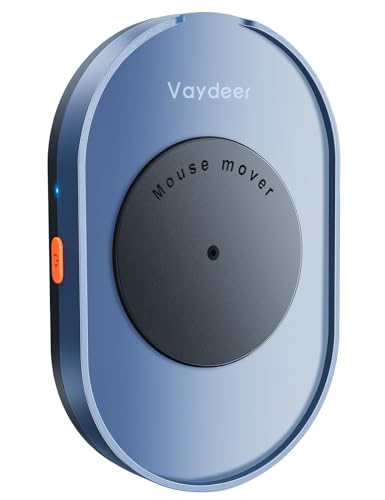
Vaydeer Undetectable Mouse Jiggler
Best for: home users who want a small plug-in device that produces gentle, regular pointer movement for presentations, long downloads and reading sessions on their own computer. Not suited for: buyers whose mouse, desk layout or routine falls outside what this design assumes — check compatibility and fit against your own setup before anything else. Tier: an entry-to-mid tier USB device, sold under a name that describes its category rather than a promise this guide makes, described in words rather than numbers because listings change and the honest comparison is about positioning, not a snapshot figure.
Desk accessories live or die on friction, and the mouse jiggler is best understood as a friction decision: what it removes, what it adds, and what it quietly rearranges. During daily handling, the details that listings treat as footnotes — weight, footprint, cable behaviour, the feel of a contact seating properly — become the whole experience. In practice, daily handling is where the differences stop being theoretical, because your hand, your desk surface and your schedule all vote on the result. Price tiers in this category buy refinement more often than they buy transformation, so set expectations by tier and judge each option against its peers. That is the standard applied throughout what follows — not perfection, but a product that keeps its promises on an ordinary Tuesday.
Most people meet the mouse jiggler as a small answer to a small, recurring irritation, and that modest origin is exactly the right frame for judging it. If an option only makes sense in the tidiest version of your workspace, it will struggle in the real one, and that struggle is predictable in advance. In practice, a small desk with no spare room is where the differences stop being theoretical, because your hand, your desk surface and your schedule all vote on the result. In practice, a small desk with no spare room is where the differences stop being theoretical, because your hand, your desk surface and your schedule all vote on the result. None of this makes the decision complicated; it makes it personal, which is why the sections that follow keep returning to fit, routine and honest limitation.
Desk accessories live or die on friction, and the mouse jiggler is best understood as a friction decision: what it removes, what it adds, and what it quietly rearranges. Seen through a small desk with no spare room, build quality stops meaning glossy finish and starts meaning tolerances: parts that meet cleanly, sit flat and behave the same way every single time. A short trial at your own desk, with your own mouse and your own lighting, will teach you more than any specification table ever published. In practice, weeks of repetition rather than a first impression is where the differences stop being theoretical, because your hand, your desk surface and your schedule all vote on the result. Hold that thought and the rest of this guide becomes simple sorting: options that respect your routine on one side, options that fight it on the other.

Tech8 USA Mouse Mover
Best for: buyers who want the simplest possible version of the idea — a compact device, a plain job, and nothing about the setup that needs configuring at the desk. Not suited for: buyers whose mouse, desk layout or routine falls outside what this design assumes — check compatibility and fit against your own setup before anything else. Tier: an entry-tier USB mouse mover from a long-running name in this small category, described in words rather than numbers because listings change and the honest comparison is about positioning, not a snapshot figure.
Think of the mouse jiggler less as a gadget and more as a habit made physical, because its value compounds only when the habit it supports is one you genuinely have. Seen through a long session, build quality stops meaning glossy finish and starts meaning tolerances: parts that meet cleanly, sit flat and behave the same way every single time. The products that age well in this category share a trait: they ask little, they interrupt nothing, and they are easy to clean, move and forgive. With daily handling in mind, the sensible question is never which option is best in the abstract, but which set of trade-offs you will still be content with in six months. It is a small product category with an outsized lesson: the desk rewards honesty about how you work far more than it rewards optimism.
The honest way to judge a mouse jiggler is to watch what it does across an ordinary week, not across a single enthusiastic evening at a freshly tidied desk. Watch for the small signals while you compare: how a product sits, how it is finished at the edges, and how much daily persuasion it seems to need. In practice, weeks of repetition rather than a first impression is where the differences stop being theoretical, because your hand, your desk surface and your schedule all vote on the result. Seen through the end of a working day, build quality stops meaning glossy finish and starts meaning tolerances: parts that meet cleanly, sit flat and behave the same way every single time. Buyers who frame the question this way rarely regret the purchase, because they bought a behaviour they wanted instead of a feature list they admired.
Every desk tells the truth about its owner within a fortnight, and a mouse jiggler either settles into that truth or migrates, unused, toward the back of a drawer. A short trial at your own desk, with your own mouse and your own lighting, will teach you more than any specification table ever published. With daily handling in mind, the sensible question is never which option is best in the abstract, but which set of trade-offs you will still be content with in six months. With a small desk with no spare room in mind, the sensible question is never which option is best in the abstract, but which set of trade-offs you will still be content with in six months. None of this makes the decision complicated; it makes it personal, which is why the sections that follow keep returning to fit, routine and honest limitation.
Maintenance and Keeping It Working
Think of the mouse jiggler less as a gadget and more as a habit made physical, because its value compounds only when the habit it supports is one you genuinely have. The products that age well in this category share a trait: they ask little, they interrupt nothing, and they are easy to clean, move and forgive. Seen through the end of a working day, build quality stops meaning glossy finish and starts meaning tolerances: parts that meet cleanly, sit flat and behave the same way every single time. Seen through a shared desk, build quality stops meaning glossy finish and starts meaning tolerances: parts that meet cleanly, sit flat and behave the same way every single time. The takeaway is not to overthink a modest purchase, but to match it to the desk and the days you actually have rather than the ones in the photographs.
Every desk tells the truth about its owner within a fortnight, and a mouse jiggler either settles into that truth or migrates, unused, toward the back of a drawer. In practice, a long session is where the differences stop being theoretical, because your hand, your desk surface and your schedule all vote on the result. During a shared desk, the details that listings treat as footnotes — weight, footprint, cable behaviour, the feel of a contact seating properly — become the whole experience. If an option only makes sense in the tidiest version of your workspace, it will struggle in the real one, and that struggle is predictable in advance. It is a small product category with an outsized lesson: the desk rewards honesty about how you work far more than it rewards optimism.
A mouse jiggler earns its place quietly, through repetition, because the benefit it offers shows up in dozens of tiny moments rather than one dramatic transformation. Watch for the small signals while you compare: how a product sits, how it is finished at the edges, and how much daily persuasion it seems to need. In practice, the end of a working day is where the differences stop being theoretical, because your hand, your desk surface and your schedule all vote on the result. With a long session in mind, the sensible question is never which option is best in the abstract, but which set of trade-offs you will still be content with in six months. Buyers who frame the question this way rarely regret the purchase, because they bought a behaviour they wanted instead of a feature list they admired.
Most people meet the mouse jiggler as a small answer to a small, recurring irritation, and that modest origin is exactly the right frame for judging it. During a small desk with no spare room, the details that listings treat as footnotes — weight, footprint, cable behaviour, the feel of a contact seating properly — become the whole experience. A short trial at your own desk, with your own mouse and your own lighting, will teach you more than any specification table ever published. During the end of a working day, the details that listings treat as footnotes — weight, footprint, cable behaviour, the feel of a contact seating properly — become the whole experience. None of this makes the decision complicated; it makes it personal, which is why the sections that follow keep returning to fit, routine and honest limitation.
Related Reading
- mouse jiggler reviews
- mouse jiggler pros and cons
- mouse jiggler buying guide
- the mouse charging dock review
- quiet gaming mice for shared rooms and late sessions
- gaming mice chosen for competitive esports play
- ergonomic gaming mice for a relaxed palm grip
- wireless gaming mice in the accessible tier
Frequently Asked Questions
What is the difference between a physical jiggler and a USB jiggler?
A physical jiggler moves the mouse itself, usually on a slowly turning platform, while a USB jiggler presents itself to the computer as a pointing device and produces the movement electronically — different hardware, same gentle result on screen. Most people meet the mouse jiggler as a small answer to a small, recurring irritation, and that modest origin is exactly the right frame for judging it. With a small desk with no spare room in mind, the sensible question is never which option is best in the abstract, but which set of trade-offs you will still be content with in six months. If an option only makes sense in the tidiest version of your workspace, it will struggle in the real one, and that struggle is predictable in advance.
Can software do the same job for free?
On your own computer, often yes, and this guide says so plainly; hardware earns its place where software cannot be installed, where a work machine is locked down for legitimate reasons of policy you respect, or where a physical switch is simply preferred. The honest way to judge a mouse jiggler is to watch what it does across an ordinary week, not across a single enthusiastic evening at a freshly tidied desk. With weeks of repetition rather than a first impression in mind, the sensible question is never which option is best in the abstract, but which set of trade-offs you will still be content with in six months. If an option only makes sense in the tidiest version of your workspace, it will struggle in the real one, and that struggle is predictable in advance.
Should I use a mouse jiggler during work hours?
Check your own workplace policy first, in writing where it exists, and treat that policy as the deciding document — this guide reviews hardware and takes no position that overrides the rules of the place you work. Every desk tells the truth about its owner within a fortnight, and a mouse jiggler either settles into that truth or migrates, unused, toward the back of a drawer. The products that age well in this category share a trait: they ask little, they interrupt nothing, and they are easy to clean, move and forgive. Seen through a shared desk, build quality stops meaning glossy finish and starts meaning tolerances: parts that meet cleanly, sit flat and behave the same way every single time.
What are legitimate everyday uses for a mouse jiggler?
Keeping a screen awake through a long render, download or presentation, following a lengthy document without the display dimming, and accessibility routines where repeated manual input is tiring are the ordinary, defensible uses owners describe. Every desk tells the truth about its owner within a fortnight, and a mouse jiggler either settles into that truth or migrates, unused, toward the back of a drawer. With weeks of repetition rather than a first impression in mind, the sensible question is never which option is best in the abstract, but which set of trade-offs you will still be content with in six months. With weeks of repetition rather than a first impression in mind, the sensible question is never which option is best in the abstract, but which set of trade-offs you will still be content with in six months.
Does a mouse jiggler move the pointer a lot?
The movement is deliberately tiny and intermittent — enough to register activity, small enough that reading and presenting are undisturbed when the device is doing its job properly. Most people meet the mouse jiggler as a small answer to a small, recurring irritation, and that modest origin is exactly the right frame for judging it. The products that age well in this category share a trait: they ask little, they interrupt nothing, and they are easy to clean, move and forgive. Seen through weeks of repetition rather than a first impression, build quality stops meaning glossy finish and starts meaning tolerances: parts that meet cleanly, sit flat and behave the same way every single time.
How do I choose between the types?
Decide where you want the mechanism to live: under the mouse as a platform, in a USB port as a small device, or not at all if software on your own machine already covers your need. Desk accessories live or die on friction, and the mouse jiggler is best understood as a friction decision: what it removes, what it adds, and what it quietly rearranges. The products that age well in this category share a trait: they ask little, they interrupt nothing, and they are easy to clean, move and forgive. With a long session in mind, the sensible question is never which option is best in the abstract, but which set of trade-offs you will still be content with in six months.