ilcastellomenu.com is reader-supported. When you buy through links on our site, we may earn an affiliate commission.
Where to Buy
A virtual tour is not a photograph of a house. It is the house, rebuilt inside a browser, and the buyer walks it at midnight in another time zone, opening the kitchen, drifting down the hall, standing in the garden doorway deciding whether the light feels like morning. The best cameras for real estate virtual tours are the ones that understand this difference, because a tour fails in ways a listing photo never can: a stitch line through the dining table, a doorway that swallows the room beyond it, a walkthrough video that sways like a boat. Agents feel these failures as silence — the enquiry that never arrives.
Be clear about the two products hiding inside the phrase. The first is the navigable tour: a chain of 360-degree panoramas, or a scanned 3D model, that the viewer drives themselves. The second is the guided walkthrough: a smooth video path through the property that the viewer watches. They reward different cameras. The navigable tour wants a true 360 capture or a patient mirrorless body on a panoramic head. The walkthrough wants stabilisation above all — a gimbal, a stabilised sensor, a lens wide enough to make a modest room legible without lying about its size.
Honesty is a technical specification here. A tour that stretches rooms will book viewings that end in the doorway with a disappointed laugh, and the agent’s name absorbs that laugh. The cameras below were chosen for truthful width: fields of view that show a whole room from one corner, geometry that keeps skirting boards straight, and colour that renders a north-facing bedroom as pleasantly cool rather than morgue blue. Every pick also had to survive a working week — batteries, card discipline and files that a tour platform ingests without a fight.
Six cameras made the cut, and they split the job rather than duplicating it. One genuine 360 camera anchors the navigable tour. Two full-frame mirrorless bodies handle premium walkthroughs and the stills that sell the tour itself. A gimbal camera walks the mid-market listing better than anything on a tripod. A smaller mirrorless body serves the agent who shoots alone between appointments. And one dedicated 3D scanning camera, discussed without a link because it sits outside our verified pool, represents the survey-grade end of the market for agencies that sell measured floor plans alongside the pretty pictures.
Key Takeaways
- A virtual tour is two products — a navigable 360 or 3D tour, and a guided video walkthrough — and they reward different cameras.
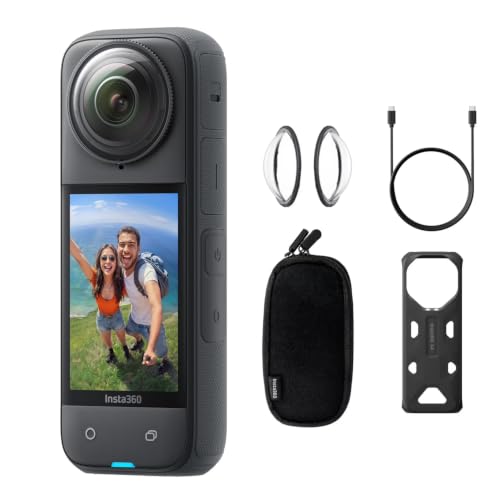
- The Insta360 X4 is the navigable-tour anchor: one position per room, whole-space capture, reframe later.
- The Canon EOS R6 Mark II and Sony Alpha 7 IV are the premium walkthrough bodies, stabilised and truthful at wide angles.
- The DJI Osmo Pocket 3 walks a mid-market listing more smoothly than any tripod-bound kit.
- The Canon EOS R10 is the solo agent’s body: light, quick, and honest in small rooms.
- Dedicated 3D scanners exist beyond this pool; they sell measurement, not just pictures.
In this guide
Quick Picks
| Camera | Badge | Why it earns its place |
|---|---|---|
| Insta360 X4 | Best for navigable 360 tours | Captures the entire room from one spot, so viewers can look anywhere a buyer would look. |
| Canon EOS R6 Mark II | Best premium walkthrough body | Stabilised full-frame video and Canon colour that keeps interiors warm and believable. |
| Sony Alpha 7 IV | Best hybrid tour and stills body | High-resolution stills for the listing, dependable video for the walkthrough, one body for both. |
| DJI Osmo Pocket 3 | Best walkthrough camera for most agents | A real mechanical gimbal in a coat pocket; doorways stop being an obstacle course. |
| Canon EOS R10 | Best for solo agents | Light enough to shoot a whole street of listings in a day without the files or the arms giving up. |
| Matterport Pro3 (prose-only) | Best for measured 3D scans | A LiDAR scanning camera for agencies selling verified floor plans with the tour. |
How Did We Choose Cameras for Virtual Tour Work?
We judged each camera against a real listing week: a two-bed flat with a galley kitchen, a family house with a dark hall, and a premium home where the tour is part of the sales theatre. Four tests decided everything. First, spatial truth — could the camera show a small room completely without stretching its far wall into another postcode? Second, movement quality, because a walkthrough is ninety percent motion and a nauseating tour is worse than none. Third, mixed-light behaviour: every interior is a fight between tungsten lamps and blue window light, and the winner is the camera whose white balance does not surrender halfway down the corridor. Fourth, pipeline friction — how the files behave in tour software, on an agent’s laptop, against a same-day publishing deadline.
We also weighted the unglamorous virtues. A tour shooter visits six properties a day in season; a camera that needs a rig, a cage and a prayer at every address loses to a slightly lesser camera that is simply ready. Battery swaps, card speed and the dignity of working one-handed while holding a door for the photographer behind you all counted. What did not count: headline resolution divorced from the platforms tours actually publish on, and stills specifications that flatter a camera whose video wobbles.
What Is the Difference Between a 360 Tour, a 3D Scan and a Walkthrough Video?
The 360 tour is a string of spherical photographs joined by hotspots. The viewer stands in each room and looks around freely, then clicks through a doorway to the next sphere. Its strength is agency — buyers inspect the corner behind the door, the view from the pillow, the ceiling height they cannot judge from a flat photo. Its weakness is the joins: stand in the wrong spot and the next room is a guess, and the camera itself must vanish from mirrors and windows by discipline and placement.
The 3D scan goes further, building a measurable model of the property. Dollhouse views, floor plans extracted from the scan, dimensions a buyer can check against their sofa — this is data wearing photography’s clothes, and it commands fees accordingly. It demands dedicated scanning hardware and patience: the scanner moves through the property in a grid, and a large house is an hour of methodical positions.
The walkthrough video is cinema’s answer: no viewer control, but total authorial control. The agent chooses the path, the pace, the reveal of the garden at the end. It plays inside listing portals and social feeds where navigable tours cannot go, and it forgives a property’s awkward layout by simply never showing the bad angle. Most strong agencies now ship both: the navigable tour for the serious browser, the walkthrough for the scroll. The picks below are organised so a small kit can cover the pair.
Why Does Stabilisation Matter More Than Resolution in a Tour?
Because the viewer’s body believes motion before their eyes believe detail. A walkthrough is a promise that the viewer is walking; every vertical wobble breaks the promise and reads, subconsciously, as a property that feels wrong. Tour platforms compress uploads hard, erasing the difference between very high and merely high resolution, but compression cannot repair a sway. This is why a pocket gimbal camera outranks larger bodies for the standard listing: its mechanical stabilisation holds the horizon like a steadicam operator with nowhere else to be.
Sensor-shift stabilisation in the full-frame bodies is the second-best answer and the best one when the same camera must also shoot the listing stills. It smooths the handheld walk convincingly at wide angles, where the geometry of stabilisation is kindest. What neither system forgives is the operator: the ninja walk — knees bent, steps rolled heel to toe, turns made with the hips — remains a skill, and the tour that masters it with a modest camera beats the tour that buys a flagship and strides.
Which Cameras Build Real Estate Virtual Tours Best?

Insta360 X4 — Best for navigable 360 tours
The X4 is the only camera in this guide that captures a room the way a buyer experiences it: all of it, in every direction, from a single position. Set it on a slim monopod in the middle of the room, step out of sight, trigger it from the phone, and the whole space — ceiling rose, floorboards, the view back through the door you entered by — is recorded in one spherical file. For the navigable tour, nothing else in the pool works this way, and the workflow difference is not incremental. A mirrorless body on a panoramic head takes a bracketed set per position and an evening of stitching; the X4 takes a breath.
Its second gift to tour work is the reframe. Because the sphere holds everything, the same capture yields the flat hero shots for the listing, a little-planet teaser for social media, and the walkthrough-style pan across the room — one visit, three products. Agents shooting volume listings, where the fee cannot carry an hour per property, build their whole tour offer on this arithmetic.
The limits are the physics of small twin lenses. Fine detail softens compared with a mirrorless still; a sunlit window and a shaded corner in the same sphere stretch its dynamic range; and the stitch line must be kept away from faces, text and the dining table’s edge by thoughtful placement. It is a tour camera first and a stills camera by courtesy. Paired with any of the mirrorless bodies below for the listing photographs, it is complete; asked to be the only camera, it leaves the premium end of the market unserved.
- Role: navigable 360 tour capture
- Capture: full spherical video and stills, single position per room
- Workflow: phone-triggered, platform-friendly files, reframe in the app
- Stabilisation: electronic, horizon-locked
- Best paired with: any mirrorless body for hero stills
Strengths
- One position captures the entire room
- Reframing turns one visit into several products
- Fast enough for volume listing work
Trade-offs
- Fine detail trails a mirrorless still
- Stitch placement needs care near furniture edges
- Extreme window-to-corner contrast challenges it
Placement is the craft: put the camera where a person would naturally stand to take the room in — just inside the door for small rooms, a step further in for large ones — at a height near a standing eye line. Too low and the tour feels like a child’s view; too high and buyers feel they are inspecting from a ladder. Keep the stitch seam aimed at the emptiest wall, and walk the property once with the camera before the real pass, checking mirrors, shower glass and the television screen for your own reflection wearing a hi-vis of embarrassment.
Best for: navigable tours, volume listings, agents who sell the tour as a standard inclusion. Not suited for: hero stills, print brochures, or rooms where fine material detail is the sales argument

Canon EOS R6 Mark II — Best premium walkthrough body
The R6 Mark II earns the premium walkthrough on two virtues that rarely share a body: stabilisation that genuinely walks, and colour that treats interior light kindly. Its sensor-shift system, coordinated with a stabilised wide lens, produces the slow, floating dolly movement that expensive listings are sold with — through the hall, a gentle arc into the kitchen, the garden revealed by a turn rather than a cut. Canon’s colour science flatters the warm end where homes live: oak reads as oak, cream walls stay cream instead of sliding green under mixed lamps.
Low light is the other half of the premium brief. The best rooms in a premium house — the panelled study, the cinema snug, the evening kitchen — are deliberately dim, and this body’s high-ISO video keeps them atmospheric rather than noisy. It also shoots the listing stills to brochure standard, so the premium package comes off one camera, one lens set, one colour signature across tour and photographs.
It asks for a professional’s habits in return: real lenses, charged batteries, a gimbal for the longest moves if the operator’s walk is not yet trustworthy, and a budget conversation with the agency. Overheating discipline on long summer shoots and a two-card workflow are part of the ownership contract. For the agent whose average listing justifies it, no other body in this guide closes a premium tour as completely.
- Role: premium walkthrough video and listing stills
- Stabilisation: sensor-shift, coordinated with stabilised lenses
- Low light: strong high-ISO video for evening interiors
- Lenses: RF wide zooms are the tour pairing
- Workflow: dual cards, professional file options
Strengths
- Walkthrough movement that feels like a dolly
- Interior colour that flatters without lying
- One body for tour and brochure stills
Trade-offs
- Demands lenses and batteries to match
- Long hot shoots need thermal discipline
- Overkill for standard listings
Walk it at the wide end honestly. The temptation at the premium end is the ultra-wide that makes a dressing room into a ballroom; resist past the point where door frames bow, because premium buyers are precisely the ones who will pace the room against the tour at the viewing. The R6 Mark II with a sensible wide zoom tells the truth beautifully, which is the only luxury that survives the second visit.
Best for: premium listings, twilight walkthroughs, agencies shooting tour and stills as one package. Not suited for: high-volume standard listings or an operator who wants to work entirely one-handed

Sony Alpha 7 IV — Best hybrid tour and stills body
The Alpha 7 IV is the photographer’s tour camera. Its stills resolution gives listing photographs with crop room to spare — straighten the verticals, tighten the composition, rescue the shot where the vendor’s car sat in the drive — while its video is more than sufficient for a stabilised walkthrough at the frame rates portals accept. Agencies whose photographer leads and whose tours grew out of a stills practice will find this body the natural centre of the kit.
Its autofocus deserves a word in a tour context: walking backwards ahead of nobody is easy, but the modern walkthrough often includes the agent on camera, opening the tour at the door and closing it in the garden. The Sony’s eye tracking holds a presenter through a walk-and-talk with a reliability that turns a two-person shoot into a one-person one, and its colour profiles give the finishing editor room to match the tour to the stills precisely.
The compromises are known quantities. Its stabilisation is good rather than class-leading, so the walk wants a gimbal for hero moves or a disciplined operator at wide angles. Rolling shutter asks for slow pans — which good tour craft demands anyway. And the menu system rewards an afternoon of customisation before the first listing, after which the custom buttons make it a fast, personal tool.
- Role: stills-led hybrid for tours and listing photography
- Stills: high resolution with generous crop room
- Autofocus: dependable eye tracking for presenter-led tours
- Stabilisation: good; gimbal recommended for hero moves
- Lenses: deep E-mount wide-angle choice
Strengths
- Listing stills with professional headroom
- Presenter tracking that enables solo shoots
- Huge lens ecosystem at every budget
Trade-offs
- Stabilisation trails the Canon and the gimbal camera
- Pans must stay slow and deliberate
- Menus reward setup time before first use
For the stills-led agency, the efficient pattern is one pass per room for the photographs, then the walkthrough as a single continuous take at the end, when the house is dressed, the lights are balanced and the photographer knows where the tripwires of reflection and clutter hide. The A7 IV’s shared colour and handling across both passes make the package feel authored rather than assembled.
Best for: photographer-led agencies, presenter-fronted tours, stills quality as the sales argument. Not suited for: pure video specialists or anyone who refuses to customise a menu system once

DJI Osmo Pocket 3 — Best walkthrough camera for most agents
If the R6 Mark II is the premium answer, the Pocket 3 is the correct one for the great middle of the market. Its camera rides a genuine three-axis mechanical gimbal, and that single fact rewrites the walkthrough: doorways become a glide instead of a negotiation, stairs stop bouncing, and the turn from hall to kitchen holds its horizon like a held breath. It fits in a coat pocket, powers on in seconds, and its rotating screen flips between the room and the agent’s own piece to camera without a second body or a monitor.
The workflow is the fastest in this guide. Agents shoot a listing between other appointments, walk the property twice — once for the path, once for the record — and the files are in the editing app before the drive back to the office. Its low-light behaviour, helped by a comparatively large sensor for its size, handles the standard interior honestly; its autofocus tracks a presenter; its built-in audio is serviceable for a doorstep introduction, with wireless microphone pairing available for the agent who narrates.
Its ceiling is real and should be respected. It is not the stills camera for the listing — the photographs still want a proper body, even if that body is the R10 below or the photographer’s existing kit. Fixed lens means the framing is what the room gives you, and premium buyers’ tours will eventually ask for the full-frame look. But as the walkthrough instrument for the everyday listing, nothing in this pool touches it, and many agencies will find it earns its fee back on the first street of houses.
- Role: guided walkthrough video
- Stabilisation: three-axis mechanical gimbal
- Screen: rotating, for room view and self view
- Audio: built-in, with wireless mic pairing
- Size: coat-pocket, seconds to deploy
Strengths
- The smoothest walkthrough per minute of setup
- Presenter pieces to camera without extra kit
- Fast enough to shoot between appointments
Trade-offs
- Not a listing stills camera
- Fixed lens framing
- Premium depth of field look is out of reach
Learn its one ceremony: the slow reveal. Enter each room at walking pace, let the gimbal settle, then drift — not pan — across the space, ending on the window or the garden door. Two rooms filmed this way teach the rhythm for every house after. The Pocket 3 forgives the beginner almost everything except hurry.
Best for: the standard listing walkthrough, solo agents, social-first marketing. Not suited for: listing stills, print work, or ultra-premium tours where full-frame rendering is expected

Canon EOS R10 — Best for solo agents
The R10 is the body for the agent who is the whole media department. It is light enough that a day of back-to-back listings does not end in a shoulder ache, quick enough that its autofocus simply keeps up with a walking shot, and honest enough in its video that a stabilised wide kit lens produces a walkthrough a portal viewer will happily watch to the end. Its stills are entirely respectable — the listing photographs from an R10, shot on a tripod at a sensible aperture, will not be the reason a house fails to sell.
Its particular tour virtue is forgiveness. The solo agent is also the person who forgot to charge something, who has twenty minutes in the property, who is learning the ninja walk while the vendor makes tea. The R10’s guided modes, its clear menus and its tolerance for being used at automatic settings without disgrace make it the body that gets the tour shot on the bad day as well as the good one. In a volume business, the bad-day camera is the business.
The boundaries are the APS-C format’s: low light asks more of it than of the full-frame bodies, so lamps go on and curtains open wide; stabilisation is lens-based, so the walk must be slower and the turns gentler; and the single card slot asks for a same-evening backup ritual. None of these stop a competent solo operation. All of them define the upgrade path — which, in this guide, is the R6 Mark II wearing the same lens-mount family’s colours.
- Role: solo agent’s combined stills and walkthrough body
- Format: APS-C, light body and lenses
- Autofocus: fast, dependable for walking shots
- Stabilisation: via stabilised lenses
- Workflow: simple menus, guided modes that genuinely help
Strengths
- All-day lightness for multi-listing rounds
- Forgiving for the agent learning the craft
- Stills and video from one affordable system
Trade-offs
- Low light needs the room’s help
- Single card slot demands backup discipline
- Walkthrough smoothness trails gimbal and flagship options
Pair it with the widest stabilised zoom the budget allows and a small tripod that lives in the car. The solo agent’s kit is a system of habits as much as hardware: same settings, same path through every house, same backup ritual at the desk. The R10 rewards exactly that kind of operator.
Best for: solo agents, new media departments, volume rounds of standard listings. Not suited for: twilight premium work or productions where a client watches the monitor over your shoulder
Matterport Pro3 — Best for measured 3D scans (prose-only)
The Pro3 represents the branch of tour work that is really surveying. Its LiDAR builds a dimensionally honest model of the property as it captures the imagery, and from that model come the floor plans with measurements a relocation buyer can trust, the dollhouse view that explains a split-level house in one glance, and documentation that facilities and insurance clients pay for by the square metre. We discuss it without a purchase link: it sits outside the camera pool this guide is verified against, and it is typically bought as part of a platform relationship rather than as a standalone camera.
Understand what it is not. It is not a walkthrough video camera, not a listing stills camera, and not fast in the way an agent between appointments means fast: a large property is a methodical grid of scan positions. Its value concentrates in agencies whose clients buy certainty — developers, relocation services, commercial landlords — and whose tour fee is priced as a document, not a gallery.
For the typical residential agency, the honest verdict is that the X4’s navigable tour delivers most of the buyer-facing benefit at a fraction of the commitment, and the Pro3 becomes relevant the day a client asks for measurements you can warrant. Knowing it exists, and what it is for, is part of specifying a tour service correctly; buying it speculatively is not.
- Role: LiDAR 3D scanning for measured models
- Output: dimensionally accurate model, floor plans, dollhouse views
- Pace: methodical grid of positions, slower than photo tours
- Buying route: platform relationship, outside this guide’s pool
- Audience: developers, relocation, commercial clients
Strengths
- Measurements a buyer can rely on
- Floor plans generated from the scan itself
- The definitive answer for complex, split-level spaces
Trade-offs
- No walkthrough video or listing stills role
- Slow, deliberate capture process
- Platform commitment beyond a camera purchase
If your agency reaches the client who needs it, the buying conversation belongs with the platform’s own channel and a demonstration on a real property — this class of tool is specified, not shopped. Until that client arrives, the spherical camera and a tape measure cover the residential world.
Best for: measured documentation, developer and relocation clients, commercial spaces. Not suited for: everyday residential listings, video walkthroughs, or agents who need to be in and out in twenty minutes
How Does Light Behave in a Tour, and How Do You Win?
A photograph can wait for the light; a tour walks through all of it in one take. The kitchen faces south and blazes, the hall borrows gloom, the bedroom sits in blue north shade, and the camera must cross all three without the viewer watching the exposure lurch like a lift between floors. This is the quiet reason the full-frame bodies earn their place at the premium end: their exposure transitions are gradual, their highlight roll-off forgives the window that blows out on a lesser sensor, and their white balance drifts instead of jumping. Set any camera to a fixed white balance for the whole walk — auto white balance is the single largest cause of the corridor that changes colour halfway down it.
The working routine is unglamorous and decisive. Open every curtain and blind before touching the camera, then switch on every lamp, including the ones that fight the daylight, because a tour lit by the house’s own lamps looks inhabited while a tour lit only by windows looks inspected. Expose for the windows and let the lamps warm the shadows; a slightly moody room reads as character, a blown window reads as a missing wall. Shoot the brightest room first while your exposure judgement is fresh, and if the property has one genuinely dark space — the windowless bathroom is the usual suspect — give it the brightest practical bulbs the vendor will allow and shoot it brief and bright rather than long and honest.
Twilight deserves its own paragraph because premium listings increasingly sell the evening house: lamps glowing, garden lights on, the sky at that blue minute. Any pick here can attempt it, but the stabilised full-frame bodies own it, holding a slow walk at sensitivities that would turn smaller sensors to porridge. Schedule the twilight tour as its own appointment, arrive before the light turns, and shoot the exterior first — the blue minute is shorter than every vendor believes.
What Should a Tour Cost, and Which Camera Pays for Itself First?
Agents ask the camera question and the business question in the same breath, and the honest answer connects them. A navigable 360 tour from the X4 can be shot inside a standard photography appointment, which is why it has become the default inclusion in competitive markets: the marginal cost per listing is small, the differentiation is visible, and the camera pays for itself within the first handful of instructions it helps win. The walkthrough from the Pocket 3 follows the same economics — one operator, no rig, files edited the same evening — and between them they describe the modern baseline: tour and walkthrough as standard, stills as the craft on top.
The full-frame bodies invert the arithmetic. They are bought to win the premium instruction, where the tour is part of a presentation the vendor has already judged against two rival agencies, and where a single won instruction at that level repays the body, the lens and the gimbal in one completion. This is why the guide resists crowning an overall winner: the correct first purchase is the one matched to the fee your market will bear. Volume market, X4 and Pocket 3. Premium market, the R6 Mark II or the A7 IV with the tour sold as theatre. The R10 sits between, for the agent building the media service that will eventually justify both.
One cost is routinely forgotten: the operator’s learning curve is part of the price. Budget the first ten tours as tuition — shot on friendly listings, reviewed ruthlessly, reshot where the vendor allows — whichever camera you choose. The agencies whose tours sell houses are not the ones with the best cameras; they are the ones whose twentieth tour shows what their first nineteen taught them.
How Do You Handle Small Rooms, Awkward Layouts and Honest Challenges?
Every agency has the listing that resists the tour: the flat where the bathroom fits one person and a grudge, the cottage with a staircase like a ladder, the open-plan conversion where one room must be sold as three. Small rooms are where the 360 camera quietly humiliates the walkthrough. A spherical capture from the doorway shows the whole of a box room truthfully — its actual size, its window, its one good wall — while a video walkthrough of the same room is four seconds of fisheye apology. For the smallest spaces, let the navigable tour carry the room and keep the walkthrough camera moving through it as a transition rather than a feature.
Awkward layouts reward sequencing over hardware. The split-level house that confuses buyers on paper becomes clear in a walkthrough that climbs the half-flights slowly, pausing at each landing to let the viewer rebuild their mental map, or in a scanned model whose dollhouse view explains in one image what the floor plan never could. The long thin flat wants the walkthrough shot from the far end back toward the door, so the space reads as depth rather than corridor. None of these decisions is a camera setting; all of them are why two agencies with identical kit produce tours of wildly different value.
Then there is the occupied house, which is most houses. Children, dogs, a vendor working from the spare room: the tour must be scheduled like a small film shoot, with a agreed hour when the property is empty and dressed, because a navigable tour cannot crop out the life in the corner of the room — the sphere sees everything, including the laundry airer the vendor swore was hidden. Set the expectation in writing at instruction: the tour appointment is a performance the house gives once, and its quality depends on the house being ready to give it.
What Does the Viewing Public Actually Do Inside a Tour?
Watch the analytics once and your shooting changes forever. Viewers enter through the principal room, not the hall, however the tour is sequenced — so the principal room’s capture must be the strongest in the set, redone without mercy if the light failed. They go to the kitchen second and the garden third, and they judge the bedrooms by a single glance each, looking for the window and the wardrobe wall. Bathrooms get seconds. The utility room gets skipped entirely unless it hides the boiler of a house whose buyers ask about boilers.
The walkthrough’s numbers tell a matching story: the first ten seconds decide whether the film is finished, which is why the doorstep introduction must be three sentences and the principal room must arrive before the viewer has time to reach for the timeline. Tours are not watched like cinema; they are interrogated like witnesses. Shoot for the interrogation — every room answering, in its first moment, the one question that room is always asked — and the completion rates take care of themselves.
How Do the Six Tour Cameras Compare?
| Camera | Tour type | Stabilisation | Stills role | Working pace |
|---|---|---|---|---|
| Insta360 X4 | Navigable 360 | Electronic, horizon-locked | Supporting | Fastest per room |
| Canon EOS R6 Mark II | Walkthrough | Sensor-shift plus lens | Brochure standard | Deliberate |
| Sony Alpha 7 IV | Walkthrough | Sensor-shift; gimbal for heroes | Highest resolution here | Deliberate |
| DJI Osmo Pocket 3 | Walkthrough | Mechanical gimbal | Not its job | Fastest overall |
| Canon EOS R10 | Walkthrough | Lens-based | Listing standard | Fast |
| Matterport Pro3 (prose-only) | Measured 3D scan | Fixed positions | Within the scan only | Slowest, most thorough |
Read the table as a division of labour rather than a league table. The X4 and the Pro3 serve the viewer’s own exploration; the other four serve the author’s path. Most agencies need one from each family before they need two from either, and the stills column decides which walkthrough body a photography-led team should build around.
How Should You Shoot a Virtual Tour, Room by Room?
Arrive as a guest and prepare as a stage manager. Blinds half-open in every room for even light, lamps on, toilet seats down, the vendor’s clutter triaged into one closed room the tour will skip honestly rather than disguise. Walk the route once without a camera, deciding the story: entrance, principal room, kitchen, the turn that reveals the garden, bedrooms in descending order, bathroom brief and bright, garden last if it is the prize, first if it is the apology.
For the navigable tour, place the 360 camera at standing eye height in the natural standing spot of each room, check the reflections, step out, shoot, and move on in a steady rhythm; consistency of height is what makes the finished tour feel like one walk rather than a series of teleportations. For the walkthrough, shoot the whole path in one take if the property allows, at the slowest pace you can bear, and then shoot it again — the second take is the one you publish, because the first taught your feet the route. Record the doorstep introduction last, when you know what the house actually offered, so the words match the film.
Sound deserves thirty seconds of the plan even though a tour is mostly watched quietly. The walkthrough’s doorstep introduction and any narrated version need a voice recorded close and dry — the wireless microphone on the Pocket 3 or a recorder in a pocket for the mirrorless bodies — because a voice bouncing off an empty house’s walls announces amateur hour before the pictures can object. Record thirty seconds of the house’s own silence too; editors call it room tone, and it is the paste that smooths every cut in the narration. If the agency offers a music-backed cut for social media, keep the voice version as the listing’s master: buyers hunting a home lean toward information, and the narrated tour is the one that gets sent to the partner who could not attend the viewing.
Back at the desk, the discipline is selection. Publish the tour the same day while the property is fresh in search results, name files by address rather than by camera gibberish, and keep the raw captures until the sale completes. Tours have a second life in price-reduction relaunches and in the agency’s own portfolio; the archive is an asset, treat it like one.
What Mistakes Make a Virtual Tour Sell the Wrong House?
The cardinal sin is the lying wide angle: the lens and the corner chosen to stretch a modest room into a hall. It books viewings, and viewings are not the goal — offers are, and offers die in the doorway of a room that shrank. Second is the seasick walkthrough, shot at a stride with a bouncing frame, which buyers abandon in the first corridor. Third is the invisible photographer: the mirror, the shower glass, the black television delivering a starring role to a person holding a camera at chest height like a votive offering.
Quieter mistakes cost nearly as much. Mixed lighting left uncorrected turns half the house jaundiced. A tour published without the garden in season, or with the Christmas tree still up in March, dates the listing against itself. And the navigable tour whose hotspots strand the viewer in the utility room with no route back teaches buyers that the house is confusing — a verdict they transfer, unfairly and permanently, to the property itself.
Which Tour Platform Will Your Files Live On, and Why Does It Matter Before You Buy?
The camera decision is quietly a platform decision. Navigable tours publish through hosting platforms that ingest spherical files and return the embed code the portals display; walkthroughs live as ordinary video on the listing and the agency’s channels. Before buying, confirm the mundane compatibilities: that your tour platform accepts the X4’s files without a conversion ritual, that your portal displays the embed at a size that does the property justice, and that your editing machine handles the full-frame bodies’ files without turning every export into a coffee break. None of this is exciting, and all of it decides whether the tour gets published on the day it matters or the week after the open house.
Branding lives here too. The agencies that win on tours put their own frame around them: the agency’s colours on the tour interface, the floor plan one click from the kitchen, the agent’s face and number at the exit door of the virtual house. Choose the platform that lets the tour look like your agency rather than the platform’s, and the camera feeding it becomes part of a brand instead of a gadget. Keep one more discipline: archive the raw captures under the property address, because the relaunch, the price reduction and the vendor’s next house all begin from files you already own.
How Do You Deliver, Relaunch and Reuse a Tour After the First Publish?
The tour’s first publication is the beginning of its working life, not the end. When a listing is reduced, the relaunch that performs is the one with a fresh front door: a re-cut walkthrough that opens on the garden instead of the hall, a new teaser reframed from the original 360 captures for the social feed, the tour link sent again to the registered buyers who viewed the photographs and never booked. Because the X4’s spheres hold the whole room, the reframe costs an afternoon in the app rather than a second visit; because the walkthrough was shot as a continuous path, a new edit is a rearrangement, not a reshoot. Agencies that archive raw captures by address own this second life; agencies that keep only the published edit rent it.
There is also the portfolio afterlife. A year of tours is the agency’s showreel at the next instruction pitch: the vendor choosing between three agents is shown, on a tablet, the tour their house will receive, shot in a house like theirs on a street like theirs. This is the moment the camera investment explains itself — and it argues for consistency. One tour style, one colour signature, one opening rhythm across the whole portfolio reads as a brand; a drawer of experiments reads as a hobby. Choose the kit you can standardise on, standardise on it, and let the archive compound.
Finally, retire tours honestly. When the property sells, the tour comes down with the listing; when it is withdrawn, the files stay archived against the vendor’s return, which in a real agency is a when, not an if. The discipline is dull and the compound interest is real: the best-tour agency in most towns is simply the one that has been shooting them, the same way, for longest.
Final Recommendation
Match the camera to the tour you actually sell. If your listings promise a navigable tour as standard, the Insta360 X4 is the foundation and everything else is refinement. If your brand is the cinematic walkthrough, the DJI Osmo Pocket 3 will carry the everyday list with a grace out of proportion to its size, and the Canon EOS R6 Mark II steps in when the listing is premium enough to bill for the difference. Photography-led teams should build on the Sony Alpha 7 IV; solo agents starting a media service from nothing should start with the Canon EOS R10 and a wide stabilised lens, and let the tour fees themselves fund the upgrade. Keep the Matterport Pro3 in mind as a direction, not a purchase, until a client asks for measurements with a straight face. Whichever you choose, walk slowly, frame honestly, and publish the same day — the tour that exists beats the tour that was going to be perfect.
Related guides
Frequently Asked Questions
Do buyers actually use virtual tours, or do they just look at photos?
Serious buyers use them as a filter. The photographs earn the click; the tour decides whether the viewing gets booked, especially for relocators and investors who cannot attend casually. Listings with tours also hold attention longer on the portals, which the portals’ own ranking quietly rewards.
Can one camera do both the 360 tour and the listing photos?
Not well. A 360 camera’s stills are extracted frames of a sphere — adequate for context, not for the hero image that sells the click. Pair the X4 with any competent mirrorless body, even an APS-C one like the R10, and each does the job it was built for.
How wide a lens is too wide for a walkthrough?
The moment verticals at the frame’s edge start to bow and a standard door looks like a barn entrance, the lens is flattering rather than describing. For full-frame bodies, the honest walkthrough range begins around the moderate wide end; go wider only for genuinely tiny rooms, and even then prefer standing further back over stretching the geometry.
Should the agent appear in the tour?
In the walkthrough, a brief doorstep introduction and a garden sign-off build trust and brand, and presenter tracking on bodies like the A7 IV makes it a solo job. In the navigable tour, the operator should be invisible — the viewer is the guest; nobody else should be home.
How long should a walkthrough video be?
Long enough to walk the house once at an unhurried pace — for most homes, somewhere between ninety seconds and three minutes. Cut the second corridor, never the garden reveal. If the property needs longer, the navigable tour is the better vessel for the extra space.
What do I do about mirrors and windows in a 360 tour?
Placement and posture. Set the camera so its reflection falls in the least-seen surface, trigger it from another room or from behind a door, and dress glass-heavy bathrooms with the door angled to break the reflection. A two-minute reflection check on the phone preview saves an hour of embarrassment later.
How many 360 positions does a typical house need?
One per room as a baseline, two for large or L-shaped spaces where a single standpoint hides a corner, and one for the garden taken from its most flattering standpoint rather than its centre. A three-bedroom house usually lands between nine and thirteen positions; more than that and the tour becomes a maze of clicks that viewers abandon before the bedrooms.
Do I need a tripod for tour work?
For the navigable tour, a slim monopod or a compact tripod that hides inside the sphere’s blind spot is close to essential — height consistency between rooms depends on it. For the walkthrough, the gimbal and stabilised bodies have retired the tripod to stills duty, where it still earns its place for the listing photographs. Buy the support for the job each camera actually does rather than a universal rig that serves neither well.
Can I shoot a tour on a phone instead?
A modern phone on a small gimbal produces a passable walkthrough for a rental or a room-to-let listing, and phone-based 360 capture exists for the very lightest use. The gap appears in mixed light, in stitch quality and in the stills the same visit must produce. For an agency selling tours as a service, the dedicated cameras in this guide repay their cost in consistency — every listing, every week, the same dependable result.
Related Guides
Tour shooters building out their kit usually continue into our guide to cameras for indoor real estate photography our guide to cameras and lenses for interior design photography our guide to cameras for recording video for YouTube


