ilcastellomenu.com is reader-supported. When you buy through links on our site, we may earn an affiliate commission.
Where to Buy
Resolution is the least interesting number in video, and this guide treats it that way. The best compact cameras for HD video are separated not by whether they can record high-definition frames — everything here can, several at 4K and beyond — but by the specifications underneath: the codec compressing those frames, the bitrate feeding it, the colour depth surviving a grade, the microphone input rescuing dialogue, and the thermal discipline that decides whether a camera records a whole ceremony or surrenders at the vows. Buyers who shop by those numbers buy once.
Scope matters, so let it be drawn sharply. This page is a specifications guide: it compares recording formats, data rates, ports and endurance, and it deliberately leaves shooting technique to its sibling, the companion guide on filming HD video with a compact camera, which covers settings, stabilisation in the field, field audio workflow and shooting process step by step. Read this page to choose the instrument by its numbers; read that one to play it. The two were written as a pair precisely so neither has to pretend the other’s half does not exist.
HD itself deserves a definition before the shopping begins. For most buyers the deliverable is 1080p for sharing, streaming and family archives, sometimes 4K for cropping freedom and future-proofing. A camera that records superb HD — high bitrate, clean low-light behaviour, honest colour — beats a camera that records mediocre 4K on every screen the footage will actually meet, and the picks below were judged by that standard rather than by the largest number on the box.
Key Takeaways
- Codec and bitrate shape HD quality more than resolution does.
- A microphone input is worth more than a second resolution badge.
- Heat limits, not card sizes, end most long recordings.
- Oversampled 4K makes the cleanest 1080p these compacts produce.
- Stabilisation method decides handheld footage more than sensor size.
- Match the recording specification to the screen that will show it.
In this guide
Quick Picks
| Camera | Badge | Why it earns its place |
|---|---|---|
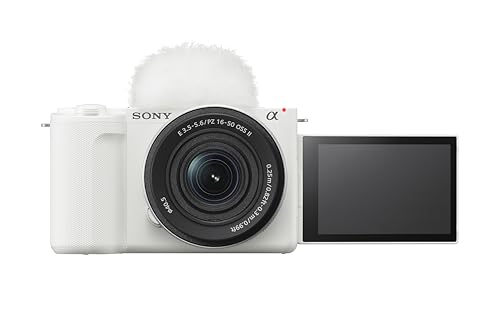
| Sony ZV-E10 II | The specification leader for creators | High-bitrate 4K, 10-bit colour and a microphone input in a compact interchangeable body built for video first. |
| DJI Osmo Pocket 3 | The stabilised recording instrument | A gimbal-mounted one-inch-class sensor recording long, level takes with a flat profile for grading. |
| Sony ZV-1F | The honest HD diary specification | Straightforward HD and 4K recording, face-first exposure and simple files that edit anywhere. |
| Canon PowerShot G7 X Mark III | The pocket 4K with a mic socket | Compact 4K recording plus a genuine microphone input — a rare pairing at this size. |
| GoPro HERO13 Black | The high-frame-rate action specification | Very high resolutions and frame rates, hardened for motion, with digital lenses for HD reframing. |
| Canon PowerShot V1 | The large-sensor video compact | A prose-only entry: a video-first compact with an unusually large sensor and active cooling for long takes. |
How Did We Compare Recording Specifications Instead of Brochure Numbers?
Five specification families decided this list. First, codec and bitrate: how efficiently the camera compresses motion, and how much data per second it is willing to spend doing so. High-bitrate recording preserves skies, water and foliage — the textures cheap compression dissolves into blocks — and it decides how gracefully footage survives editing, titles and re-export.
Second, colour information. Cameras recording 10-bit colour with a flat or log profile hold gradients and skin through a grade; 8-bit footage bands in skies and breaks when pushed. Buyers who never grade should still care modestly, because even a gentle contrast adjustment spends colour information the file either has or lacks.
Third, audio architecture: whether a microphone input exists, whether levels can be monitored with headphones, and how the built-in microphones behave when no external mic is attached. Dialogue carries most video’s meaning, and its specification is written in ports, not pixels.
Fourth, endurance engineering: recording limits, thermal behaviour, battery capacity and whether the body accepts continuous power. A camera that stops at twenty-nine minutes or overheats at forty has a specification no resolution figure can outrank for ceremonies, performances and interviews.
Fifth, stabilisation hardware and frame-rate range, treated as specifications rather than vibes: gimbal versus in-body versus electronic, each with measurable costs in crop, light or rolling-shutter behaviour, and slow-motion rates stated plainly for the buyers whose subjects move fast.
Why Does Bitrate Matter More Than Another Resolution Step?
Imagine two buckets carrying the same river. Resolution counts the buckets; bitrate measures the water. A 1080p recording granted a generous bitrate preserves the shimmer on a harbour and the weave of a jumper, while a starved 4K recording smears both into approximations that merely occupy more pixels. Compression artefacts — blocking in skies, crawling edges around hair — are bitrate failures wearing resolution’s clothing.
The practical consequence for HD buyers is liberating. A compact whose HD mode records at a healthy data rate, or whose 4K downsamples cleanly to HD in the edit, delivers visibly richer 1080p than a rival whose headline resolution is higher but whose encoder is stingier. Editors have known this for years; camera marketing relies on buyers never learning it.
Storage is the honest counterweight. Generous bitrates fill cards and drives proportionally faster, and a buyer recording hours of family HD weekly should weigh media cost alongside image fidelity. The picks below span that trade-off deliberately, from the ZV-E10 II’s rich files to the ZV-1F’s lighter ones, because the correct bitrate is the one your archive can afford to keep.
What Do Microphone Inputs and Monitoring Change on Paper?
Everything about how a recording will sound, which is to say most of how it will feel. A 3.5mm microphone input admits lapel microphones for interviews, shotgun microphones for events and wireless receivers for presenters — the entire professional audio ecosystem through one small socket. Cameras lacking it sentence their owners to built-in microphones, whose specification reads: whatever the room sounded like, including its echo, its air conditioning and the cameraman’s breathing.
Headphone monitoring is the quieter half of the specification and the one professionals refuse to surrender. Recording levels can look correct on a meter while a cable crackles or a lapel rustles against clothing; only ears on the actual signal catch those failures before they become the wedding video’s permanent soundtrack. Two picks below offer proper monitoring paths; the others ask buyers to trust meters and luck.
Built-in microphones still matter for the unplanned clip — the birthday song, the street performance — and they differ measurably. Directional capsules that favour the subject over the surroundings, wind protection that actually exists rather than being a menu promise, and automatic levels that do not pump audibly during quiet passages separate the thoughtful designs from the afterthoughts.
Which Compact Cameras Carry the Strongest HD Video Specifications?
Six bodies follow, each leading a different specification family: colour depth, stabilisation hardware, audio architecture, endurance or frame rates. The badge names the family; the review audits it.

Sony ZV-E10 II — The specification leader for creators
Read the ZV-E10 II’s recording sheet the way an editor reads it: 4K at high bitrates with 10-bit colour, oversampled from a larger sensor area so its HD derivatives arrive exceptionally clean, a proper microphone input, headphone monitoring, and picture profiles including log recording for owners who grade. Among compact bodies, that combination is the professional checklist nearly complete, missing mainly in-body stabilisation — a deliberate trade its maker made for size and price.
The interchangeable lens mount extends the specification beyond the box. A fast prime transforms its low-light HD; a wide zoom reframes interiors; the same body grows from diary camera to interview rig without replacement. Buyers comparing fixed-lens rivals should price that future into the comparison, because specifications on a mount compound while specifications in a sealed body only depreciate.
- Format: compact interchangeable-lens body, APS-C sensor
- Recording: high-bitrate 4K with 10-bit colour options
- Audio: microphone input plus headphone monitoring
- Profiles: flat and log recording for grading
- Role: the creator’s specification benchmark
Strengths
- Colour depth rivals larger production cameras
- Audio ports satisfy professional habits
- Lens mount future-proofs the purchase
Trade-offs
- No in-body stabilisation for handheld work
- Rich files demand generous storage
- Menus assume a video-first owner
Its defining assignment is the seated interview or tutorial, where a tripod removes the stabilisation question and its colour, audio and endurance specifications do the talking. Footage from that setup grades into professional timelines without apology, which is precisely what its specification sheet promised.
Handheld run-and-gun buyers should weigh the gimbal-bodied DJI below instead, and stills-led buyers should note how completely this body’s design votes for video. As a recording specification per unit of size, though, nothing else in this guide argues harder.
Best for: creators recording interviews, tutorials and graded HD productions. Not suited for: handheld shooters needing built-in stabilisation above all

DJI Osmo Pocket 3 — The stabilised recording instrument
The Pocket 3’s headline specification is mechanical: a three-axis gimbal that physically levels the sensor, recording 4K at frame rates up to fast slow-motion territory, with 10-bit flat-profile recording available for owners who grade. Where rivals stabilise by cropping and warping pixels, this body stabilises by moving hardware, and the difference survives in the corners of every walking shot.
Endurance tells the second half of its specification story. The small body manages heat and battery with a discipline born of DJI’s drone heritage, recording long continuous takes that embarrass larger compacts, and its fast charging restores most of a battery during a coffee stop. For travel and event HD — long, moving, unrepeatable — those numbers outrank exotic colour science.
- Format: gimbal camera, one-inch-class sensor
- Stabilisation: mechanical three-axis hardware
- Recording: 4K with high frame-rate options, flat profile
- Audio: strong built-in array, wireless mic ecosystem
- Role: the long-take moving HD instrument
Strengths
- Walking footage stays level without cropping
- Continuous recording endurance impresses
- Flat profile grades better than expected
Trade-offs
- Fixed framing limits compositional range
- No optical zoom for distant subjects
- Gimbal head needs protective packing
Its specification weakness is honest: a single fixed focal length and no interchangeable anything. What it records, it records superbly level and long; what it cannot frame, it cannot record at all. Buyers whose HD is movement — tours, walks, rides, processions — will forgive that instantly.
Compare it against the GoPro below as philosophy against philosophy: DJI chose a delicate precision instrument, GoPro chose armour. The specification sheets diverge accordingly, and so should the buyers.
Best for: travel, walking tours and long moving HD takes. Not suited for: zoom-dependent subjects or rough handling

Sony ZV-1F — The honest HD diary specification
The ZV-1F’s specification sheet is short, and its brevity is the point. It records HD and 4K at sensible bitrates with 8-bit colour, prioritises faces in exposure and focus automatically, captures usable directional audio from its built-in capsule, and writes files that every editor, laptop and platform accepts without conversion ceremonies. For diary HD — the largest real category of compact video — that sheet is not a compromise; it is a correct answer.
What it omits defines its honesty. No microphone input, no log profile to grade, no frame rates for athletes. Sony built it for the creator whose specification priorities are a wide lens that fits a face and a landmark into arm’s-length framing, reliable autofocus that never hunts during a sentence, and a record button that dominates the top plate like a promise.
- Format: fixed-lens pocket camera, one-inch-class sensor
- Recording: HD and 4K at diary-friendly bitrates
- Audio: directional built-in microphone, no input socket
- Focus: face and eye priority tuned for presenters
- Role: the uncomplicated HD diary recorder
Strengths
- Files edit anywhere without conversion
- Face exposure flatters presenters automatically
- Almost no specification learning curve
Trade-offs
- No microphone input for interviews
- 8-bit colour limits grading ambition
- Electronic stabilisation crops the frame
Its buyers should self-identify clearly: if your HD lives on social platforms and family screens, recorded in daylight and cafés, its specification is sufficient in the way a good notebook is sufficient — completely, until the day the work changes genre. That day, the ZV-E10 II above is the upgrade written in the same language.
Do not buy it for a wedding business or a documentary. Buy it for a diary that will actually be kept, recorded on a camera whose specification never once interrupts the keeping.
Best for: vloggers and families recording bright, presenter-led HD. Not suited for: graded productions or microphone-dependent interviews

Canon PowerShot G7 X Mark III — The pocket 4K with a mic socket
One line of the G7 X Mark III’s specification outweighs paragraphs elsewhere: a 3.5mm microphone input, in a pocket compact, beside 4K recording and Canon’s colour. That socket admits the lapel and shotgun microphones that transform pocket footage into presentable interviews and event records, and its rarity at this size makes the little Canon the specification connoisseur’s pocket pick.
The remaining sheet supports the headline honourably: a bright zoom that keeps indoor HD clean, vertical-video manners for platform-native recording, and clean output for live streaming duties that turned this family into a desk-side staple. Its recording limits and heat behaviour ask for honesty — long continuous 4K takes are not its sport — but for the clip-based rhythm of modern HD, its specification balances beautifully.
- Format: pocket compact, one-inch-class sensor
- Recording: 4K plus strong HD from a bright zoom
- Audio: microphone input — rare at this size
- Streaming: clean output for live and desk use
- Role: the pocket interview and event recorder
Strengths
- Mic input unlocks presentable dialogue
- Bright lens keeps indoor footage clean
- Canon colour pleases without grading
Trade-offs
- Long 4K takes test thermal limits
- No headphone monitoring while recording
- Stabilisation trails the gimbal rival
Picture a conference corridor interview: lapel mic clipped, pocket camera on a mini tripod, subject lit by a window. The Canon’s specification produces a clip an editor can publish, from a kit that arrived in a jacket. That is a genuinely rare capability statement, and it is why this older design still earns a current recommendation.
Buyers recording ceremonies end-to-end should read the endurance sections of the DJI and the prose-only Canon V1 instead. Buyers recording the world in publishable clips should keep this pocket’s number.
Best for: interviews, events and clips needing real microphone audio. Not suited for: uninterrupted long-form recording in warm rooms

GoPro HERO13 Black — The high-frame-rate action specification
The HERO13’s specification sheet reads like a laboratory dare: resolutions beyond 5K, frame rates that slow a diver’s entry into a held breath, digital lens options that reframe HD after the fact, and stabilisation software that irons mountain-bike violence into watchable flow. For HD specifically, its trick is abundance — record enormous, deliver a cropped, stabilised, reframed 1080p that no native-HD compact could have composed in the moment.
Hardness is a specification too. Waterproofing without a housing, replaceable lens protection, voice control for gloved or handlebar moments and a mounting ecosystem measured in thousands of accessories make it the only pick here whose recording specification survives being dropped off a kayak. Its image character — wide, deep-focus, vivid — announces its action heritage in every frame.
- Format: waterproof action camera
- Recording: very high resolution, high frame rates
- Stabilisation: advanced electronic, horizon-levelling
- Lenses: interchangeable digital and accessory optics
- Role: the motion and slow-motion HD recorder
Strengths
- Slow-motion rates dwarf rival compacts
- Reframing in the edit rescues composition
- Survives water, mud and gravity
Trade-offs
- Fixed ultra-wide character suits action only
- Low-light HD trails larger sensors
- Audio needs accessories for polish
Its HD case is strongest where other compacts cannot physically go: mounted on a chest through rapids, on a handlebar down a descent, on a helmet through a terrain park. In those habitats its specification is not better than the rivals’; it is the only one present.
Living-room buyers should resist its charisma. A GoPro recording a birthday party produces footage that looks like an expedition, and its low-light manners will disappoint beside the Sonys. Buy the specification your subjects demand, and let athletes keep theirs.
Best for: sport, water and slow-motion HD in hostile places. Not suited for: indoor family filming or interview polish
Canon PowerShot V1 — The large-sensor video compact
The PowerShot V1 appears in prose because it sits outside this guide’s verified link pool, and it matters to a specifications guide for two engineering decisions: an unusually large sensor for a compact video body, and active cooling — a fan — that lets it record long takes where passively cooled rivals throttle or stop. In specification terms, cooling is the least glamorous and most consequential feature a long-form HD buyer can purchase.
Its remaining sheet reads like a creator’s wishlist executed calmly: 4K recording with oversampling, a wide zoom designed for indoor framing, microphone and headphone provision, and Canon colour for owners who would rather publish than grade. It represents the direction compact video specifications are travelling — toward endurance and sensor size rather than ever-larger resolution numbers.
- Format: video-first compact, large sensor for the class
- Cooling: active fan for extended recording
- Recording: oversampled 4K, strong HD derivatives
- Audio: microphone input and headphone provision
- Role: the long-take indoor HD specialist
Strengths
- Cooling defeats the long-take problem
- Large sensor cleans up indoor HD
- Audio provision suits presenters fully
Trade-offs
- Covered here without a link, by pool rules
- Size exceeds true pocket compacts
- Stills play a supporting role
Its lesson for shoppers transcends its own availability: when comparing any two video compacts, ask what happens at minute forty in a warm room. The answer is a specification, whether or not the brochure prints it, and bodies engineered to answer it well deserve the premium their honesty costs.
Ceremony videographers, teachers recording full lessons and anyone whose HD arrives in hour-long chapters should weight this entry heavily — and should verify current availability and terms through normal retail channels, since this guide deliberately links only its verified pool.
Best for: long indoor recordings — lessons, ceremonies, talks. Not suited for: pocket-first buyers or stills-led use
How Do the Six HD Video Specifications Compare on Paper?
| Camera | Specification crown | Audio architecture | Endurance note |
|---|---|---|---|
| Sony ZV-E10 II | 10-bit colour, high bitrate | Mic input, headphone monitoring | Strong with continuous power |
| DJI Osmo Pocket 3 | Mechanical stabilisation | Good built-ins, wireless options | Long takes, fast charging |
| Sony ZV-1F | Simplicity, light files | Built-in capsule only | Clip rhythm, all day |
| Canon PowerShot G7 X Mark III | Mic input in a pocket body | Input yes, monitoring no | Watch heat on long 4K |
| GoPro HERO13 Black | Frame rates and reframing | Accessories elevate it | Battery swaps, hardened body |
| Canon PowerShot V1 | Cooling plus large sensor | Input and monitoring | Built for hour-long takes |
Specifications are promises with numbers attached; the rows above are ordered by the promise each body keeps best, not by any single figure of merit.
Why Does Oversampling Make HD From a 4K Camera Look Cleaner?
A sensor that reads a 4K-wide image and scales it down to HD averages away noise and sharpens detail in the process, because every output pixel summarises several captured ones. The resulting 1080p carries a density and calm that native HD recording from the same sensor rarely matches — one reason editors routinely shoot 4K for HD delivery even when no viewer will ever see the larger file.
The cost is written in heat and storage. Reading the full sensor at speed generates the thermal load that ends long takes, and the intermediate files swell archives. Buyers should therefore treat oversampled HD as a quality mode for important work, not a default for the school run — and should value cameras, like several picks here, that let the choice be made per assignment rather than imposed by design.
There is a cropping dividend too. A 4K master permits a punched-in HD reframing that rescues an off-centre subject or manufactures a second camera angle from a wide shot. Interview editors live on that dividend, and it quietly justifies 4K recording to buyers whose screens will never exceed HD.
How Long Can These Cameras Actually Record Before Heat Intervenes?
Honest endurance figures depend on ambient temperature, resolution, frame rate and whether the screen is flipped out as a heatsink or folded as insulation — which is why brochures speak in best cases. As a planning discipline, assume a passively cooled compact recording 4K in a warm room will need a pause somewhere within the span of a long ceremony, while HD recording at moderate frame rates extends that span considerably.
Three engineering answers exist in this guide. The prose-only V1 attacks heat actively with a fan. The Osmo Pocket 3 manages it through efficient design and a small sensor head separated from its battery handle. The interchangeable bodies shed heat through larger shells and accept continuous USB power, converting the battery question into a cable question for static work.
Buyers whose work is long-form should test endurance during the return window, in the warmest room available, at the settings the work demands. Fifteen minutes of specification reading cannot replace that single experiment, and a camera that fails it should go back while the paperwork is still friendly.
What Mistakes Do HD Video Buyers Keep Making on Specification Sheets?
Chasing the largest resolution number stands first, and this guide’s introduction exists to retire it. The second mistake is ignoring audio architecture until the first important interview sounds like it was recorded inside a wardrobe — ports are specifications, and they cannot be added later with enthusiasm.
Third, buyers forget the edit. A codec their laptop cannot play smoothly, or files so large their storage fills monthly, convert a specification victory into a workflow defeat. Download sample files from any finalist and edit them on your actual machine before money moves; the timeline’s behaviour is a specification too.
Finally, shoppers underweight stabilisation method. Electronic systems crop and can warp in low light, in-body systems vary by maker, and the gimbal’s mechanical honesty costs fragility. The correct choice depends on how the camera will move through your actual subjects, which is a question about your life, not the brochure.
Final Recommendation
By specification, the Sony ZV-E10 II leads this guide: its colour depth, bitrate, audio ports and lens mount form the most complete HD recording sheet in a compact body. Movement specialists should take the DJI Osmo Pocket 3 for its gimbal and endurance, pocket interviewers the Canon G7 X Mark III for its rare microphone socket, diary keepers the ZV-1F for its honest simplicity, and athletes the GoPro HERO13 for frame rates nothing else here approaches. The prose-only PowerShot V1 points at the future — cooling and sensor size — for long-form recordists.
Then, having chosen by numbers, learn to shoot by craft: the companion guide on this site devoted to filming HD video with a compact — settings, stabilisation in use, sound workflow and shooting process — is the deliberate second half of this one, and the pair together will serve a buyer better than either read alone.
A last word of specification hygiene: keep the sample files from your finalists, labelled by camera, and revisit them after a week of living with the decision. Numbers persuade in the shop and footage persuades at home, and the buyer who checks both rarely returns anything. The cameras above earned their places by surviving that double audit on paper; the one you choose should survive it on your own screen, with your own subjects, in your own light — after which the specification hunt is honourably over and the filming can finally begin.
How Do Frame Rates Change What an HD Camera Can Say?
Frame rate is time’s resolution. Standard rates — the mid-twenties and thirty frames per second — render motion the way audiences expect from film and television. Double rates smooth fast pans and sports, and permit half-speed slow motion that still looks fluid. The high rates on the GoPro’s sheet, several multiples of standard, turn a splash, a skateboard trick or a dog’s shake into a study of physics that ordinary HD cannot attempt.
Each step upward spends light and data. Higher rates demand faster shutters, which demand more illumination or higher sensitivity, and the files grow accordingly. A specification-literate buyer therefore asks not how high a camera’s frame rate climbs, but at which resolution and bitrate it climbs there — a camera that keeps its quality at elevated rates is engineered very differently from one that merely unlocks the number.
For HD delivery specifically, high-rate 4K recording downscaled in the edit produces slow motion of startling cleanliness. That pipeline — shoot large and fast, deliver small and smooth — is the action filmmaker’s standard method, and it explains why the GoPro’s apparently excessive sheet is, for its tribe, exactly sufficient.
What Should a Buyer Know About Rolling Shutter and Readout Speed?
Most compact sensors read their image line by line, top to bottom, and fast movement during that read skews verticals — the leaning goalposts and wobbling buildings of cheap action footage. Readout speed, rarely printed prominently, governs the severity. Newer stacked-sensor designs read dramatically faster and keep pans honest; older or budget designs ask their operators to pan slowly and forgive the rest.
The specification matters most to buyers filming vehicles, sports and architecture in motion. A camera with a slow readout can still produce beautiful locked-off HD, which is why interview-led buyers may ignore this section safely while motorsport buyers should weight it heavily. Sample footage of a fast horizontal pan tells the truth in two seconds; seek it out for any finalist.
Electronic stabilisation interacts with readout in ways brochures omit: warping corrections applied to skewed frames can produce the jelly-like artefacts that haunt cheap action video. Mechanical and in-body systems sidestep part of that problem by steadying the image before the sensor reads it — another reason the stabilisation method belongs on the specification sheet, not in the marketing adjectives.
How Do Storage and Codecs Decide the Real Cost of HD?
The camera’s price is the deposit; storage is the rent. High-bitrate recording consumes cards on the day and drives forever after, and a buyer recording weekly should multiply an hour’s file size by a year of Sundays before deciding which specification tier their archive can house. Efficient modern codecs shrink that rent considerably at equal quality, which is why codec generation — not just bitrate — deserves a line in any serious comparison.
Card speed is the hidden half of the specification. A camera recording at high data rates demands cards rated to sustain them; fit a slow card and the camera may refuse modes, corrupt takes or stop mid-ceremony. Budget for the fast media the specification requires, from the same purchase, and treat counterfeit cards — a genuine plague in this market — as a false economy that costs footage instead of money.
Backup discipline completes the arithmetic. Professional HD workflows copy cards to two destinations before formatting anything, and the cost of that redundancy belongs in the format decision. Lighter files, honestly recorded, survive in more copies than magnificent files hoarded in one fragile place — a truth the ZV-1F’s modest specification quietly honours.
Why Do Live Streaming and Clean Output Belong in a Recording Guide?
Because many compact HD cameras now earn their living attached to a computer: lessons, services, desk presentations and creator streams all pass through the camera’s live output rather than its card. Clean HDMI or USB output — the picture without menu overlays — and the ability to run indefinitely on external power convert a recording camera into a broadcast source, and those are specifications a buyer can verify on paper before purchase.
The G7 X family’s streaming popularity rests exactly there, and the ZV-E10 II’s creator design assumes the desk as much as the street. Buyers whose HD is performed live should rank output specifications alongside recording ones, and should test the full chain — camera, cable, software — during the return window, because compatibility is a property of systems, not of brochures.
Heat returns for a final appearance in this context: a camera that records bravely for twenty minutes may still falter through a two-hour streamed lecture in a warm room. Continuous-power endurance, tested at home, is the specification that separates a streaming tool from a streaming anecdote.
How Should a Specification-Literate Buyer Run a Fifteen-Minute Shop Test?
Record the same ten seconds three ways: the shop’s window display for dynamic range, a colleague walking toward the lens for autofocus behaviour, and a quiet corner conversation for the built-in microphones. Play all three back on the largest screen available and listen through headphones if the body permits monitoring. That quarter hour reveals more about codec, colour, focus and audio than a week of specification forums.
Then interrogate the endurance honestly: ask what the camera does at its highest settings in a warm room, and whether the retailer will honour a return if a home heat test disappoints. Retailers who sell to working videographers answer such questions without flinching, because their customers ask them weekly.
Finally, hold the camera through one full menu expedition — change the recording format, set a picture profile, format a card. Menus are specifications too, written in frustration or in grace, and the body whose logic you can operate half-asleep at a wedding is worth more than a rival whose numbers lead by a nose.
Why Does the Delivery Platform Rewrite the Specification You Need?
Footage destined for a cinema-sized television rewards bitrate, colour depth and low-light cleanliness, because the screen enlarges every compromise. Footage destined for phones, watched on trains at arm’s length, forgives nearly everything except bad audio and shaky framing — which is why diary cameras with modest sheets produce perfectly successful platform video.
Professional deliverables sit between those poles with contractual teeth: a client may specify codec, resolution and colour space outright, and a camera that cannot sign that contract cannot take the job regardless of its other virtues. Buyers drifting toward paid work should read the ZV-E10 II’s sheet as the entry ticket to that world and the others as excellent instruments for the worlds they were designed to serve.
The honest method is to name your screen first — the television, the platform, the client’s delivery sheet — and let it filter the table above. Specifications are only virtues in relation to a destination; everywhere else they are trivia with decimal points.
How Do Lenses Enter a Video Specification Conversation?
A recording specification assumes a lens, and the lens decides how much light reaches all that engineering. Fixed-lens compacts stake everything on one optical recipe: the G7 X’s bright zoom keeps its HD clean indoors, the ZV-1F’s wide prime frames presenters perfectly and nothing else, and the Osmo’s fixed view is the price of its gimbal. Interchangeable bodies defer the decision, letting a fast prime rescue low-light HD years after purchase.
Zoom range matters differently for video than for stills. A video zoom must hold focus and exposure while it travels — parfocal manners and quiet motors — and several stills zooms disappoint precisely there. Buyers planning to zoom during takes should test that behaviour explicitly, because the specification sheet rarely confesses it.
Character matters too, quietly. Video audiences forgive softness they would reject in a still, and they reward the gentle rendering of faces at close distances. The best HD specification in this guide would still be the wrong purchase behind a lens whose rendering its owner dislikes — a reminder that numbers shortlist cameras, and eyes finish the job.
What Happens to HD Quality When Light Runs Out?
Every specification in this guide was measured, by somebody, in good light. After dark, the sheet rewrites itself: sensors amplify their signal and noise joins the footage, autofocus slows its decisions, and bitrates that preserved a noon sky begin spending themselves on dancing grain. The cameras that hold HD together at night do so through sensor size and lens brightness — physics again — which is why the large-sensor entries here punch above their paper resolution when the sun leaves.
Buyers whose HD lives after dark — concerts, family evenings, city nights — should audition finalists in a dim room, not a bright shop. The difference between a compact that renders a candlelit face as a face and one that renders it as soup is the difference between an archive and an apology, and no daytime specification predicts it reliably.
There is a dedicated sibling guide on this site for compacts chosen around low light and evening filming, and readers whose work is mostly nocturnal should let that page arbitrate. This specifications guide simply insists the audition happen in the light — or the lack of it — where the footage will actually live.
How Does Autofocus Behaviour Count as a Video Specification?
Because in video, focus is a performance, not a result. A stills autofocus may hunt, overshoot and correct within a blink the viewer never sees; a video autofocus performs those same corrections on screen, in front of the audience, during the vows. The specifications that matter are therefore behavioural: how smoothly focus transitions between subjects, whether the speed and sensitivity of those transitions can be tuned, and whether eye detection holds a speaker through turns of the head.
Sony’s entries in this guide built their reputations on exactly that behaviour, and Canon’s face tracking serves its pocket honourably. Buyers should test focus the way editors judge it — record a person walking, turning, and being briefly occluded by a passer-by, then watch the footage rather than the focus box. Smoothness is a specification the eye can measure even when the brochure cannot print it.
Why Should a Buyer Care About a Camera’s Picture Profiles?
A picture profile is the camera’s opinion about colour, recorded into the file. Vivid profiles bake in a finished look for owners who publish straight from the card; flat and log profiles defer the opinion to the edit, preserving highlight and shadow information that baked-in contrast would discard. Neither is a moral position — they are workflow commitments with storage and time consequences.
The specification question is whether the camera offers the choice at all, and whether its flat options are honest recording formats or marketing garnish. The ZV-E10 II’s log recording with 10-bit colour is the genuine article; simpler bodies offer gentler flat settings that still repay a light grade. Buyers who will never open an editor should choose the profile that flatters straight from the camera and never apologise for it — Canon’s colour has built a thousand channels on exactly that honesty.
How Do Batteries and Power Options Limit a Recording Day?
Video drinks power in a way stills never approach: the sensor reads continuously, the screen glows, the stabilisation works without pause. Compact bodies carry compact batteries, so a recording day is planned in swaps — or it is planned around continuous power, where the body accepts it. Several picks here run indefinitely from USB power on a tripod, converting the interview-day question from how many batteries to where the nearest socket sits.
Heat and power conspire together, since a battery working hard warms the body that houses it. Dummy batteries and external power move that heat source outside the shell, a trick long-form recordists use to stretch takes in warm rooms. It is unglamorous engineering, and it decides real ceremonies.
Action buyers face the swap problem in its purest form: the GoPro’s endurance is measured in batteries carried, and its ecosystem of chargers and high-capacity cells belongs in the purchase budget from the start. A specification sheet that omits your power plan is a story half told.
Why Is This Guide Only Half of the HD Video Answer?
Because a specification can be perfect and the footage still fail — through settings chosen carelessly, sound recorded from the wrong side of the room, or stabilisation defeated by a walking style nobody warned the operator about. Choosing the instrument and playing it are separate crafts, and this site publishes them separately on purpose.
The companion guide to filming HD video with a compact camera takes the bodies shortlisted here and puts them to work: the settings that suit interviews versus movement, how stabilisation behaves in real hands, how to place microphones and light a face with a window, and the order of operations that turns a camera bag into a finished clip. Readers who finish this page knowing which camera they want should finish that one knowing how its first month should be spent.
That division also protects buyers from a subtle marketing trick: cameras demonstrated by experts make every specification look sufficient. Judge the sheet here, judge the craft there, and let neither do the other’s job.
What Does a Sensible HD Accessory Budget Look Like?
Fast cards first, in pairs, because the recording specification is fiction without media that sustains it. A microphone second, whenever the body accepts one, because audio upgrades footage more cheaply than any other purchase in this guide. Power third: spare batteries or a continuous-power solution matched to how the camera will actually be used. A small tripod or grip fourth, which stabilises more family footage per coin spent than any electronic system.
Notice what the list omits: filters, cages and exotic glass belong to later chapters of an owner’s story. The specification-minded buyer funds the chain that carries the signal — media, sound, power, support — before decorating the camera that records it, and the footage improves in exactly that order.
How Will You Know the Specification Hunt Is Finished?
When every remaining difference between finalists describes a job you do not do. If one camera’s advantage is slow motion and your subjects are grandparents, the contest is over. If another’s is colour depth and your footage publishes ungraded, the contest is over. Specifications end conversations when they are mapped honestly onto a life; they prolong them only while they float free as abstractions.
Buy the camera whose sheet matches the work, then spend the energy this guide has saved you on the companion craft of actually filming — where the footage, in the end, is decided.
How Do Warranty, Firmware and Ecosystems Extend a Specification?
A video camera’s sheet keeps changing after purchase, because firmware updates now deliver recording modes, autofocus behaviours and codec improvements to bodies already sold. Makers differ in how generously they maintain older models, and that maintenance record is a soft specification worth weighing: a camera whose maker keeps improving it may finish its second year with a better sheet than it started with.
Ecosystem depth compounds the effect. Microphones, cages, batteries, lenses and editing presets accumulate around popular bodies, lowering the real cost of every future upgrade. The Sony entries here benefit from the deepest such ecosystem in the compact class, which is a specification written in other people’s products — invisible on the box, decisive across a five-year ownership.
Frequently Asked Questions
Is 4K worth recording if my screen only shows HD?
Usually yes for important work: oversampled 4K produces cleaner HD, permits reframing in the edit, and archives footage in a resolution future screens will appreciate. For casual clips, native HD at a healthy bitrate looks excellent and treats storage kindly — the specification to respect is bitrate, not the badge. Test both modes on your own television before committing a whole project to either, because the difference that matters is the one visible from your own sofa.
What bitrate should I look for in HD recording?
Treat higher as better within your storage budget, and be suspicious of any camera that will not state its recording data rates plainly. Generous HD bitrates preserve skies, water and foliage through editing and re-export; starved ones dissolve those textures into blocks regardless of resolution claims. When two cameras state similar figures, prefer the one whose codec is newer, because each codec generation buys the same quality for fewer bits — or visibly better quality for the same storage your archive already budgets.
Why do some compact cameras stop recording after half an hour?
Two separate causes get confused: legacy recording limits written into some designs, and heat. Modern bodies increasingly record until the card or battery ends — provided temperatures cooperate. In warm rooms at high frame rates, thermal protection may still pause a take, which is why endurance testing matters for ceremony work. A camera that warns before it stops at least lets the operator plan a cut; one that simply dies mid-sentence teaches its owner to carry a second body forever after.
Does 10-bit colour matter if I never grade footage?
Less, but not zero. Even gentle exposure or contrast corrections spend colour information, and 10-bit files tolerate those adjustments without banding skies. Buyers who truly never adjust anything can prioritise other specifications; buyers who might learn to grade should buy the headroom now. Headroom, in the end, is what most premium specifications actually sell — the right to change your mind in the edit without the file objecting — and owners tend to value it most on the one irreplaceable clip they recorded slightly wrong.
Can I plug a microphone into any of these cameras?
No — and the difference is decisive. The ZV-E10 II, the G7 X Mark III and the prose-only V1 accept external microphones; the ZV-1F relies on its built-in capsule, the Osmo Pocket 3 leans on its array and wireless ecosystem, and the GoPro needs accessories. Interview-heavy buyers should filter by this specification first. A separate recorder can rescue a mic-less camera — record sound independently and synchronise in the edit — but that workflow costs time on every clip, which is why the socket, when the work is dialogue, outranks almost every other line on the sheet.
Which specification matters most for filming children and family events?
Autofocus reliability and stabilisation, followed closely by low-light cleanliness, because family HD happens indoors, in motion, without rehearsal. Resolution finishes a distant last — a sharp, level, well-exposed HD frame of a birthday beats a shaky 4K one every year the family replays it. Add quick startup to that list if the subjects are toddlers, whose best performances begin without warning and end before a slow camera finishes waking.
How do I read a memory card’s speed markings for long HD recording?
Ignore the large number printed on the card’s front: that figure is a read speed, measured in bursts. For long HD takes, find the V rating instead. V30, V60 and V90 each promise a minimum write speed the card can hold for a whole take, not merely its opening seconds. Match that floor to the camera’s highest HD bitrate, because a card that fades after a minute will end a ceremony recording as surely as a full card would.
Related Guides
Pair this page with filming HD video with a compact camera: settings, sound and shooting workflow, compare compact cameras that keep working after dark, or browse pocket cameras for beginners who travel when stills share the itinerary and the same pocket must serve both crafts on the same journey.


