ilcastellomenu.com is reader-supported. When you buy through links on our site, we may earn an affiliate commission.
Where to Buy a Camera Whose Video Is the Whole Point
A quick honesty note before anything else: this guide answers searches for the best digital cameras for videogrpahy — yes, that spelling, a typo of videography that thousands of people type every month and that we are keeping in the title so this page can be found by the people who need it. The subject, spelled properly, is videography: cameras chosen not as stills machines with a record button, but as moving-image instruments first. The six picks below were judged on the things that decide real video work — picture profiles with genuine grading room such as log and 10-bit recording, stabilisation that survives handheld shooting, audio paths that respect dialogue, and recording endurance that does not ambush a wedding speech or a documentary interview.
Videography splits early into temperaments, and this guide serves both. The solo creator films themselves, talks to the lens and edits at night; the dedicated videographer films other people, events and places, and may deliver graded footage to clients. Both need the same foundations — clean detail, honest colour science, focus they can trust — but they weight the extras differently: flip screens and product-focus tricks for the soloist, dual card slots, waveforms and timecode manners for the professional. The six picks spread across that spectrum deliberately, from creator-first bodies to a full-frame video anchor.
Specifications in video demand translation, because the numbers mislead politely. A camera advertising very high resolution may record it with heavy cropping, rolling shutter or time limits that matter enormously in practice; a humbler headline figure with full-width sampling, 10-bit colour and honest endurance is frequently the better instrument. This guide reads past the banner numbers to the recording behaviour underneath, and each pick’s section names plainly what its video can and cannot do, so the purchase is made on the footage rather than the brochure.
Key Takeaways
- Ten-bit colour and a log profile matter more to finished video than headline resolution.
- Stabilisation decides whether handheld footage looks professional or seasick.
- Dialogue is half the film; microphone and headphone connections are video features.
- Rolling shutter, crop factors and record limits hide beneath the banner specifications.
- Full-frame anchors grade beautifully; creator bodies film solo life more easily.
- Buy for the delivery you actually make — most videography is watched far below 8K.
In this guide
Quick Picks
| Camera | Badge | Why it earns its place |
|---|---|---|
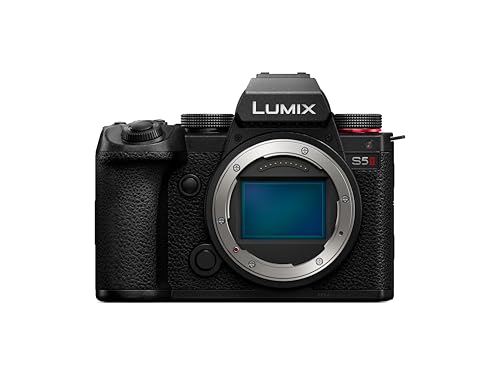
| Panasonic LUMIX S5II | The video-first full-frame anchor | Open-gate recording, serious stabilisation and cooling for long takes, built around filmmakers. |
| Sony Alpha 7 IV | The hybrid professional standard | Ten-bit colour, trusted autofocus and a lens ecosystem that covers every production. |
| Canon EOS R6 Mark II | The fast, fluid event camera | Swift readout, strong stabilisation and Canon colour for weddings and live work. |
| Fujifilm X-T5 | The filmic storyteller | Film simulations and F-Log character give footage a finished, cinematic identity. |
| Sony ZV-E10 II | The solo creator’s video body | Creator-first design, 10-bit options and autofocus that runs a one-person production. |
| Canon EOS R50 | The approachable first video camera | Friendly guidance and pleasing colour lower the entry cost to serious videography. |
How Did We Choose Cameras for Videography?
Our first filter was colour depth, because it decides what can be done to footage after the shoot. Cameras offering 10-bit recording and a genuine log profile earned their places here, since that combination preserves highlight detail, tolerates exposure imperfection and lets a colourist shape mood rather than merely rescue mistakes. Footage shot in flat 8-bit profiles can look charming straight from the camera, but it breaks — banding skies, tearing gradients — the moment a serious grade leans on it, and videographers discover that cliff exactly once.
The second filter was physical honesty during recording: stabilisation that works at walking pace without warping the frame’s edges, rolling shutter controlled enough that pans do not turn architecture to jelly, heat management that respects long takes, and screens that can be seen and angled for the low and high shots videography constantly demands. Audio connections were audited with the same rigour — a microphone input is table stakes, a headphone output is the mark of a camera that expects its sound to be monitored rather than hoped for.
Finally we protected the two audiences of this guide from each other’s cameras. Solo creators were not asked to carry professional bodies whose menus assume a crew; professionals were not offered charming toys whose recording limits would surface during a ceremony. Each pick declares its temperament in its badge and its verdict, and the comparison table maps them so the choice can be made by the work, not by the wish.
What Do Log Profiles and 10-Bit Colour Actually Buy a Videographer?
A log profile records the scene with deliberately flattened contrast and saturation, packing a wider range of brightness into the file than a standard profile dares. The footage looks washed out on the day — every beginner’s first log clip is a small heartbreak — but in the grade it unfolds: skies keep their gradations, faces keep their modelling, and the videographer gains the freedom to decide the image’s mood at the desk rather than accepting the camera’s guess on location. Ten-bit colour is log’s necessary partner, multiplying the available colour steps so those stretched gradients stay smooth instead of banding into visible steps.
The honest costs belong in the same paragraph. Log demands exposure discipline — expose too dark and the shadows dissolve into noise when lifted; it demands a colour workflow, whether a simple conversion LUT or a learned grading hand; and it punishes the videographer who must deliver footage untouched, for whom a good standard profile is genuinely the wiser choice. Several picks here hedge that bet beautifully, offering filmic standard profiles — Fujifilm’s simulations, Canon’s colour — alongside their log modes, so the same camera serves the quick delivery and the crafted one.
Judge your own practice before worshipping the specification. The wedding videographer grading every film benefits enormously; the creator publishing daily may find a pleasing standard profile and a faster turnaround worth more than theoretical latitude. Both readers are served below, and each pick’s section states which side of that line its colour story lives on.
How Does Stabilisation Really Behave When You Film Handheld?
Three technologies share the work, and knowing which one is saving your shot tells you its limits. In-body stabilisation moves the sensor to cancel small shakes and is the generalist’s blessing — superb for standing interviews and slow moves, increasingly strained by walking. Optical stabilisation in the lens partners with it and often handles the longer focal lengths better. Electronic stabilisation crops the image and warps the remainder into smoothness, powerful for movement but capable of strange jelly at the frame’s edges when pushed. The strongest handheld footage in this guide comes from cameras that blend the first two gracefully, with electronics kept as the garnish rather than the meal.
Technique remains the senior partner. The videographer’s walk — knees soft, steps rolled heel to toe, camera held close with elbows anchored — halves the work any stabilisation must do, and the gimbal, when a production justifies it, removes the problem mechanically at the price of setup and conspicuousness. Judge a camera’s stabilisation by filming your own corridor at your own walking pace before any important shoot; the brochure’s smooth sample was filmed by someone with twenty years of that walk in their legs.
Static shots deserve a sentence of protection from stabilisation itself: on a tripod, in-body systems should be switched off or set to their tripod behaviour, because a stabiliser hunting for movement that is not there can invent drift in a locked frame. Videography is full of such small reversals — features that serve one shot and sabotage another — and the cameras below were chosen partly for how clearly they let their owners command those choices.
Which Are the Best Digital Cameras for Videogrpahy Right Now?
Yes, the heading keeps the searchers’ spelling — the cameras, fortunately, are spelled by their makers. Two full-frame anchors, a filmic APS-C storyteller, Canon’s fast event body, and two creator-first cameras for solo production follow, in an order that runs from the professional anchor down to the friendliest first step.

Panasonic LUMIX S5II — The video-first full-frame anchor
Panasonic built the S5II the way a videographer would specify a camera after a decade of complaints: full-frame sensor with 10-bit log recording, open-gate capture that uses the whole sensor for flexible reframing, stabilisation among the finest fitted to any hybrid body, and a cooling fan that treats a two-hour interview as a normal afternoon. Its waveform and vectorscope tools, shutter-angle thinking and general menu logic all speak the language of film sets rather than photo outings, because this body was designed video-first and stills-second in a way few hybrids honestly are.
The practical consequences accumulate across a production day. Handheld b-roll stays usable without a gimbal for many shots; long-form recording — conferences, ceremonies, theatre — proceeds without thermal anxiety; the L-mount lens alliance offers glass from several makers at several budgets. Phase-detection autofocus, new in this generation, removed the old Panasonic hesitation about focus, and the result is the most complete video proposition in this guide at anything like its class.
- Format: full-frame mirrorless, L mount
- Colour: 10-bit log with professional monitoring tools
- Capture: open-gate full-sensor recording
- Cooling: active fan for extended takes
- Role: the dedicated videographer’s anchor
Strengths
- Video toolset rivals dedicated cinema bodies
- Stabilisation that rescues handheld production days
- Endurance engineered for ceremonies and interviews
Trade-offs
- Size and lens costs exceed the creator picks
- Stills, while strong, are not its first language
- Its depth of settings asks for a learned owner
Professionals reading this guide can stop deliberating early if the budget reaches: this is the anchor around which a small production business can be built, and its owners tend to add lenses and rigging rather than replacement bodies. The fan’s faint presence in silent rooms is the one field note worth knowing — in practice, microphones placed for dialogue sit far enough from the body that it vanishes from recordings.
Best for: dedicated videographers, events and long-form production. Not suited for: casual creators or minimal kits

Sony Alpha 7 IV — The hybrid professional standard
The Alpha 7 IV is the camera that a generation of working videographers standardised on, and its authority comes from balance rather than any single headline. Ten-bit recording with Sony’s S-Log3 gives graders serious material; the autofocus is the industry benchmark for faces, eyes and subjects that refuse to sit still; and the E mount’s lens catalogue — native, third-party, cinema-adjacent — is deep enough that no production need ever shop for a different system. It records long, behaves predictably, and slots into professional workflows involving several bodies without anyone apologising for it.
Its hybrid nature is genuine rather than diplomatic: the stills side is a fully professional instrument, which matters to the videographer who also delivers photographs — the wedding shooter above all — from the same bag. Breathing compensation with supported lenses keeps focus pulls cinematic, the colour science in standard profiles flatters skin for fast turnarounds, and the body’s dual card slots answer the professional’s first question about any camera that records unrepeatable events.
- Format: full-frame mirrorless, Sony E mount
- Colour: 10-bit recording with S-Log3
- Focus: benchmark eye and subject tracking
- Storage: dual card slots for production security
- Role: the professional hybrid standard
Strengths
- The deepest lens ecosystem in this guide
- Autofocus trusted on paid, unrepeatable work
- Equally serious for stills and video delivery
Trade-offs
- Some video modes carry frame crops to understand
- Rolling shutter asks for composed pans
- Menus reward customisation time invested upfront
There is a reason rental houses and second shooters converge on bodies like this: predictability is a production value. The Alpha 7 IV rarely produces the single most dazzling specification in a comparison, and consistently produces the footage, on the day, under pressure — which is the specification professionals actually purchase. Buy it as a business decision and it will behave like one.
Best for: working hybrids, weddings and production teams. Not suited for: minimalists or the very tightest budgets

Canon EOS R6 Mark II — The fast, fluid event camera
Canon’s R6 Mark II approaches videography from motion. Its sensor reads out quickly, which keeps rolling shutter on a short leash during pans and handheld movement; its stabilisation, coordinating body and lens systems, produces fluid footage that flatters walking shots and event coverage; and its autofocus locks onto heads, faces and eyes with the tenacity event work demands when the procession will not pause for a second attempt. Oversampled 4K from its full sensor width gives the image a crispness viewers register as production value.
Event videographers — weddings, performances, conferences — will recognise their requirements throughout its design: dependable recording, colour that makes skin look healthy under mixed venue lighting without a grading marathon, and a body whose stills side is equally professional for the hybrid delivery modern clients expect. Canon Log options serve the crafted film; the standard profiles serve the same-week delivery, and moving between those temperaments is painless.
- Format: full-frame mirrorless, Canon RF mount
- Readout: fast sensor for controlled rolling shutter
- Stabilisation: coordinated body and lens system
- Colour: Canon Log plus flattering standard profiles
- Role: the event and wedding videographer’s body
Strengths
- Movement and pans stay composed and clean
- Event-proof autofocus and stabilisation pairing
- Hybrid stills quality for dual delivery
Trade-offs
- Very long continuous recording deserves heat awareness
- RF lenses carry Canon’s premium pricing at the top end
- Professional video monitoring tools are leaner than Panasonic’s
Watch an R6 Mark II work a wedding and its argument makes itself: nothing in the day is repeatable, everything moves, and the camera’s combination of speed, steadiness and kind colour keeps converting chaos into footage. Videographers whose work is scheduled, lit and repeatable may prefer the Panasonic’s toolset; those whose work happens at them should start here.
Best for: weddings, events and fast-moving productions. Not suited for: studio-bound long-take specialists alone

Fujifilm X-T5 — The filmic storyteller
The X-T5 brings a different currency to videography: character. Fujifilm’s film simulations — colour personalities descended from a century of photographic film — give footage an identity straight from the camera that other systems chase in the grade, and its F-Log profiles serve the videographer who does want to grade, from a sensor whose stills resolution also permits generous cropping decisions. For music videos, travel films, weddings with an editorial eye and any production whose look is part of its signature, the X-T5 offers something rarer than specifications: a point of view.
Its physical dials, so beloved by photographers, serve video too — settings visible and changeable by touch, a body that keeps its state in the open. In-body stabilisation steadies handheld work respectably, the APS-C format keeps lenses compact for travel productions, and the whole kit travels lighter than the full-frame anchors while surrendering surprisingly little image. Videographers who came from film, or wish they had, tend to bond with this camera in a way that purely technical comparisons fail to predict.
- Format: APS-C mirrorless, Fujifilm X mount
- Colour: film simulations plus F-Log profiles
- Controls: tactile dials with visible settings
- Stabilisation: in-body for handheld scenes
- Role: the character-led filmmaker’s camera
Strengths
- Footage with an identity before grading begins
- Compact lenses suit travel and small crews
- High-resolution sensor aids reframing in post
Trade-offs
- Autofocus trails Sony and Canon for frantic subjects
- Long-take endurance is good, not class-defining
- APS-C gathers less light than the full-frame anchors
Choose it when the film’s look is a deliverable in itself. Clients and audiences may not know the words film simulation, but they recognise footage that feels like cinema rather than surveillance, and the X-T5 produces that feeling with unusual consistency. It is the aesthete’s pick in this guide, and its aesthetics are backed by genuinely capable video engineering rather than nostalgia alone.
Best for: music, travel and editorial filmmakers. Not suited for: sports-speed autofocus demands

Sony ZV-E10 II — The solo creator’s video body
Everything about the ZV-E10 II assumes the crew is one person. The articulating screen faces the performer; the product-showcase mode moves focus from face to object and back for the enormous reviewing and demonstrating economy; the internal microphone array is good enough to start with and the input waits for the upgrade; and 10-bit colour options mean the footage a solo creator shoots today can be graded properly as their craft grows. It is videography’s ideas — log, depth, focus craft — translated into a body that never asks its owner to hire anyone.
Its APS-C sensor and the E mount give it the growth story solo creators need: begin with the kit zoom, add the bright prime that transforms evening interiors, rent the exotic lens for the special project. Autofocus is Sony’s, which in practice means the soloist can perform rather than monitor — glance at the screen occasionally, trust the eye focus, and spend their attention on the content that actually differentiates one creator’s video from another’s.
- Format: APS-C mirrorless, Sony E mount
- Colour: 10-bit options with creator profiles
- Screen: fully articulating for solo framing
- Focus: product-showcase and eye autofocus
- Role: the one-person production company
Strengths
- Designed around solo workflows from the first sketch
- Autofocus that frees the performer to perform
- Lens ecosystem grows with the channel
Trade-offs
- No in-body stabilisation for walking footage
- Single card slot limits professional event use
- Smaller body heats sooner than the cooled anchors
Solo videographers should read the trade-offs in context: the missing stabilisation matters for walking formats, the single slot matters for paid unrepeatable events, and neither matters much for the studio-and-street rhythm of creator life. Within that rhythm this is the most completely considered camera in the guide, and the one most likely to still be central when its owner’s production has doubled twice.
Best for: solo creators, reviewers and demonstrators. Not suited for: paid wedding main-camera duty

Canon EOS R50 — The approachable first video camera
The R50 lowers videography’s front door. Its guided interface explains what settings do while you change them, its colour flatters faces without a grading suite, and its autofocus — inherited from Canon’s serious bodies — behaves far above the camera’s friendly price of admission. For the videographer at the beginning, whose questions are still forming, a camera that teaches while it records is worth more than a specification they cannot yet use, and the R50’s footage is good enough that the learning can happen across real, publishable projects rather than exercises.
It records capable 4K, offers Canon’s colour in standard profiles for immediate delivery, and grows through the RF mount as its owner’s ambitions clarify — the wide zoom for travel films, the fast prime for interviews. What it deliberately omits is the professional armoury: the deep log toolset, the dual slots, the cooled endurance. Those omissions are the price of its approachability, and for the first two years of most videographers’ lives they are omissions in name only.
- Format: APS-C mirrorless, Canon RF mount
- Guidance: plain-language interface that teaches
- Colour: flattering standard profiles for fast delivery
- Screen: vari-angle for solo and group framing
- Role: the first serious video camera
Strengths
- The kindest learning curve in this guide
- Footage that publishes well without grading
- Autofocus borrowed from professional siblings
Trade-offs
- Colour depth and log options are entry-level
- Stabilisation depends on the lens fitted
- Not built for paid, unrepeatable event recording
Every professional in this guide’s other sections started somewhere, and the ones who started well started with a camera that encouraged them weekly. The R50 is that encouragement in hardware form. Buy it to learn videography by making videography, and let its successor — quite possibly another pick from this page — be chosen later by the filmmaker it helped create.
Best for: beginners and fast-turnaround creators. Not suited for: professional event insurance or heavy grading
How Do the Six Videography Cameras Compare?
| Camera | Colour depth | Stabilisation story | Temperament |
|---|---|---|---|
| Panasonic LUMIX S5II | 10-bit log, open gate | Excellent in-body system | Production anchor |
| Sony Alpha 7 IV | 10-bit S-Log3 | In-body plus lens support | Professional hybrid |
| Canon EOS R6 Mark II | Canon Log options | Coordinated body-lens system | Event specialist |
| Fujifilm X-T5 | F-Log plus film simulations | In-body stabilisation | Filmic storyteller |
| Sony ZV-E10 II | 10-bit creator options | Lens and electronic help | Solo production |
| Canon EOS R50 | Standard profiles first | Lens-based stabilisation | Learning filmmaker |
Editing software deserves one honest paragraph in a camera guide, because it quietly shapes what these bodies can deliver. Any current editor handles the standard profiles from all six picks happily, while log and 10-bit workflows reward software with proper colour tools — scopes, node-based or equivalent correction, and sane handling of conversion LUTs. The camera decision should still come first, since footage quality is captured rather than edited into existence; but the videographer planning a log pipeline should confirm the whole chain, storage included, before the first important shoot rather than during it.
What finally separates a videographer from someone who merely owns a video camera is intention visible in the footage: frames that begin and end deliberately, sound that was monitored rather than discovered in the edit, light that was placed rather than found, and a backup that existed before it was needed. These six cameras remove every technical excuse for falling short of that standard, which is their real function in a working life — after them, the remaining difference is practice, and practice is the one upgrade no shop sells and no specification can counterfeit.
One more consideration hides inside the table’s colour column and deserves daylight before money moves: profiles are promises about post-production. A row boasting log is a row committing its owner to a grading step on every project, forever, while a row built on standard profiles commits its owner to getting the image right in the room. Neither promise is superior in the abstract — but they are different working lives, and the buyer should choose the life, not merely the logo.
A word about the row that surprises readers: the friendliest camera sits in a videography guide without apology, because the discipline’s bottleneck for most of humanity is not colour depth but courage — the willingness to film this week, publish, and film better next week. The R50 exists in this table to protect that courage, and its graduates populate the other rows within a few years.
Match temperament before technology. The camera whose working style resembles your shooting days will outperform the one whose specifications merely exceed them.
How Should a Videographer Record Sound That Deserves the Picture?
Film sound fails in predictable places: the microphone on the camera, three metres from the speaker, in a room with a refrigerator’s opinion. The videographer’s first law is proximity — a microphone near the mouth beats an expensive microphone near the camera every time — and the kit follows from it: a shotgun on a stand just out of frame for interviews, a wireless lapel for presenters and events, a recorder as backup on unrepeatable work. Every body in this guide accepts external microphones; the professional picks add the headphone monitoring that turns audio from a hope into a checked item.
Levels are set for the loudest expected moment, not the average one: laughter, applause and emphasis clip instantly and forever, while a slightly quiet recording can be raised in post with modern tools and dignity intact. Record a minute of the actual content in the actual room before the real take, listen on headphones, and hunt the hums — air conditioning, lighting buzz, the computer fan that only performs during recordings. Rooms introduce themselves on headphones; meet them before the talent arrives.
Sync and safety complete the craft. A clap or a slate at the head of each take aligns separate audio in seconds; a second recorder running quietly in a pocket or on a table has rescued more wedding vows than any plugin. Videographers are remembered for their pictures and rehired for their reliability, and audio reliability is the cheapest kind to buy.
How Do You Light Video When Faces Have to Look Good for Minutes?
Video lighting differs from photographic lighting in one brutal respect: the subject moves and time passes, so the light must flatter a range of positions and expressions rather than one frozen pose. Large, soft sources forgive that movement — a key light through diffusion, placed to model the face at roughly forty-five degrees, with a gentle fill so shadows stay kind when the subject turns. Hard small sources carve faces that look dramatic in a still and exhausting across a ten-minute interview.
Backgrounds need their own modest lighting plan, because video viewers read depth continuously. A practical lamp in frame, a wash on a wall, a window’s natural fall — something must separate the subject’s outline from the room behind, or the footage flattens into the video-call look that professional videography exists to escape. Keep the background dimmer than the face and its colour temperature deliberate: mixed warmth can be atmosphere, accidental green cannot.
Expose for the face and protect it across the take. Set exposure manually for anything longer than a clip — automatic exposure that breathes as the subject leans will undo good lighting in seconds — and use the monitoring tools the professional picks provide, waveforms and zebras, as instruments rather than decorations. Light is the cheapest production value in videography and the most commonly skipped; the cameras in this guide all reward it visibly.
What Shooting Settings Form a Sane Videography Baseline?
Begin from the grammar most footage is delivered in: the frame rate that matches your region and intent, a shutter near double that rate for natural motion blur, and sensitivity as low as the light honestly allows. That baseline produces the familiar cinematic texture audiences read as professional, and deviations from it — a fast shutter for a staccato action look, a slow one for dreamlike smear — become creative choices rather than accidents. Save the baseline into a custom mode on whichever pick you own, because productions begin faster when the camera wakes up already dressed.
Focus settings follow the subject’s predictability. Continuous autofocus with eye detection serves presenters, events and anything alive; manual focus with peaking serves the locked interview, the product shot and the deliberate rack focus, where an autofocus system’s helpfulness becomes interference. White balance belongs on manual for the same reason exposure does: a colour temperature that drifts mid-take announces itself in the edit as surely as a boom in frame.
Cards and batteries are settings too, in the operational sense. Format cards in camera at the day’s start, run matched pairs where dual slots exist, and treat recording media as the production’s negative — because it is. The videographer whose settings are boring and whose media discipline is absolute will out-deliver the gear poet on every schedule that matters.
How Does a Videographer Survive Long Events and Ceremonies?
By planning for the take that cannot be repeated. Continuous power or rehearsed battery swaps, media with hours of headroom, another viewpoint — even a modest locked-off camera — covering the moments the main camera might miss: these are the unglamorous decisions that separate event professionals from talented amateurs. The cooled S5II, the dual-slotted Alpha 7 IV and the swift R6 Mark II each answer parts of that brief, and their sections’ trade-offs should be read as an event checklist.
Position is the other survival skill. Arrive early enough to claim the angles that respect the ceremony and the sightlines — close enough for faces, wide enough for context, never between the couple and their families’ view. Know the order of events better than the guests do, pre-focus the processional route, and let stabilisation and autofocus earn their keep during the unscripted middle. Events reward the videographer who has already imagined the whole day once, quietly, before living it.
Afterwards, back up before sleep, before the highlight edit, before anything. Event footage exists exactly once in the world until the moment it exists twice, and professionals treat that interval as the most dangerous of the production. It is not a glamorous paragraph in a camera guide, but it has saved more videography careers than any lens ever made.
How Do Frame Rates Change the Feel of a Finished Film?
Frame rate is the audience’s oldest subconscious cue. The rate of cinema carries a gentle motion blur and a century of association with fiction and occasion; the higher rates of broadcast sport and news feel immediate, literal and present-tense; the very high rates exist to be slowed down, stretching a splash, a leap or a product’s falling drop into choreography. A videographer’s first mature decision on any project is which tense the film lives in, and every pick here covers the standard rates with the higher ones available for slow-motion passages where the production calls for them.
Mixed rates demand a plan rather than enthusiasm. Decide the delivery rate first, then let slow-motion material be shot at clean multiples of it, so the conformed footage plays smoothly in the edit. Audio, of course, is recorded at real speed regardless — another reason the separate-recorder habit from the sound section pays for itself on any production that slows time. Test the whole chain on unimportant footage: the camera that shoots a glorious slow-motion clip your editor cannot place in the timeline has given you a screensaver, not a scene.
Shutter discipline completes the grammar. The natural-blur rule — shutter near double the frame rate — is the baseline from which deliberate departures are made: faster for staccato energy in action and music, slower for the smeared dream of a night street. Audiences cannot name these choices and unfailingly feel them, which is precisely what makes them craft rather than settings.
How Should a Videographer Choose Lenses for Moving Pictures?
Video lenses are judged by behaviours stills never test. Focus breathing — the image subtly zooming as focus shifts — distracts in a rack focus and passes unnoticed in a photograph; the better video-oriented lenses suppress it, and Sony’s breathing compensation addresses it in software for supported glass. Focus throw matters similarly: a lens whose focus ring travels smoothly and repeatably serves manual pulling, while a twitchy fly-by-wire ring fights it. When you audition glass for videography, rack the focus and watch the frame’s edges before you count its sharpness.
The working kit mirrors the stills kit with one addition: consistency. A zoom that covers the day’s general work, a fast prime for darkness and interviews, and — for productions that live on detail — a macro or close-focusing option for the insert shots that give edits their texture. Aperture consistency across a zoom’s range simplifies exposure during zooms, and matched colour between lenses simplifies the grade. Every mount in this guide supports that kit at several budgets, which is one reason these six systems, and not others, are on the page.
Rent the exotic, own the essential. A specialist lens for the one production that demands it — the extreme wide for the property film, the long telephoto for the wildlife commission — is a line item; the standard zoom and fast prime are the business itself. Videographers who invert that rule own impressive cupboards and under-equipped working bags.
What Does a Sensible Colour Workflow Look Like From Shoot to Delivery?
It begins on location with unglamorous consistency: white balance set deliberately per scene, exposure judged by the monitoring tools rather than the screen’s mood, and a grey or colour reference filmed whenever the light changes fundamentally. Those ten-second habits save hours in the grade and rescue mixed-light sequences that would otherwise consume an evening. Log shooters expose protectively toward the highlights their profile preserves; standard-profile shooters expose finally, because their file is the finished image.
In the edit, the order of operations disciplines the result: correct first, create second. Bring every clip to an honest neutral — balanced, exposed, matched to its neighbours — before any look is applied, because a look laid over mismatched corrections multiplies the mismatch. Conversion LUTs for log footage are starting points for that correction, not the look itself, and the videographer who learns the difference stops asking why their footage looks like everyone else’s preset.
Delivery is a workflow stage, not an export button. Render at the specification the platform or client actually uses, watch the delivered file once on an ordinary screen with ordinary speakers, and archive the project with its media and its grade together. The cameras in this guide produce files that reward exactly this pipeline; the pipeline, faithfully run, is what separates videography from merely having filmed something.
How Do Gimbals, Tripods and Sliders Divide the Work of Camera Movement?
Each support owns a grammar. The tripod speaks in locked frames and deliberate pans — the interview, the ceremony, the considered landscape — and its stillness lends authority to everything shot from it. The gimbal speaks in journeys: tracking walks, orbiting products, gliding through spaces, and it demands rehearsal because its smoothness advertises every hesitation. The slider speaks in revelation, the short lateral move that turns a static scene into a discovered one, and a few feet of it can carry an entire product film’s production value.
Handheld, done well, is the fourth grammar — the human, present-tense movement of documentary — and the stabilisation in these cameras has made it respectable in rooms where it once looked amateur. The mature videographer chooses the grammar per scene rather than per fashion, and owns the humility to lock the camera off when the subject is more interesting than the movement. Audiences forgive a still camera watching something alive; they rarely forgive a dancing camera watching something dull.
Budget follows grammar honestly: a good tripod first, because it serves every production; the gimbal when movement becomes a signature; the slider when product and detail work justifies it. Supports outlive bodies — the tripod bought for the R50 will serve the S5II — which makes them the safest money in a growing videographer’s entire inventory.
How Should a Videographer Direct People Who Are Not Actors?
Most videography subjects are civilians — couples, executives, grandparents, experts who freeze when a lens appears — and directing them is half the craft the camera cannot do. The techniques are kind and mechanical: give the subject a task rather than a performance, talk to them from beside the camera so their eyeline stays natural, and let the first minutes be understood by everyone as rehearsal, during which the best material often quietly happens. Autofocus you can trust — a genuine virtue of the Sony and Canon picks — frees the videographer to be a host instead of a technician at exactly these moments.
Interviews deepen with questions that ask for stories rather than opinions. Ask for the day it happened, the room it happened in, the sentence that was said — specifics pull faces into memory, and memory photographs beautifully. Keep your own voice out of their answers where the edit will need clean sentences, nod instead of agreeing aloud, and let silences run a breath longer than comfort suggests; people fill thoughtful silence with the truest thing they say all day.
Finally, protect the subject’s dignity in the edit as fiercely as in the room. The stumble left in for comedy, the unflattering angle used because it was sharp — clients remember those choices, and reputations in videography are built from them. The camera records what it is given; the videographer’s character decides what the world is shown.
How Do You Price the Step From Hobbyist to Working Videographer?
The step is rarely a camera. The working videographer’s defining purchases are redundancy and reliability — the second body or at least a backup plan, dual-slot recording, monitored audio, insurance, and the media discipline described earlier — because clients buy certainty before they buy beauty. Of this guide’s picks, the Alpha 7 IV, R6 Mark II and S5II are built to anchor that certainty; the creator bodies can serve paid work within their limits, honestly declared to the client in advance.
Present the step to yourself as a checklist rather than a shopping spree: Can the day be recorded twice? Can the sound be heard while it happens? Can the footage survive a card’s death and still be delivered? When every answer is yes, the business is real, and the portfolio made on humbler bodies becomes its first advertisement. Videographers who buy the glamour first and the certainty later tend to learn the order from a client, which is the expensive classroom again.
What Mistakes Do Videographers Keep Making With Their Cameras?
Chasing resolution while neglecting colour, sound and light. The audience watches a film, not a specification, and a well-lit 4K production with clean dialogue defeats a brittle higher-resolution one in every memory that matters. This guide’s ordering of virtues — colour depth, stabilisation, audio, endurance, then resolution — is the mistake’s correction, printed in advance.
Shooting log without a grading plan. Flat footage delivered flat is not a look; it is an unfinished sentence, and beginners who enable log because professionals mention it often deliver their worst-looking work in its name. Use log when the grade is genuinely coming; otherwise let the excellent standard profiles on these cameras finish the image in camera and publish with pride.
And trusting a single card, a single battery or a single camera with an unrepeatable day. Redundancy is not pessimism — it is the professional’s definition of respect for the client and the occasion. The dual slots, cooled bodies and continuous-power options in this guide exist because the industry learned that sentence expensively, one lost ceremony at a time.
Final Recommendation
Choose the Panasonic LUMIX S5II if videography is the profession and long, crafted productions are the work; the Sony Alpha 7 IV if stills share the business and the deepest lens ecosystem matters; the Canon EOS R6 Mark II when the work moves and cannot be repeated; the Fujifilm X-T5 when the film’s look is its signature; the Sony ZV-E10 II when the crew is one person and the production is a channel; and the Canon EOS R50 when the craft is new and the camera must teach as it records. Spelled correctly or otherwise, that is the honest map of videography’s current best.
One sequencing note for buyers assembling a kit from zero: body and standard zoom first, because nothing else can be practised without them; microphone and headphones in the same season, because sound is half the deliverable; a tripod with a proper video head next, because movement grammar begins there; and only then the second lens, the gimbal and the lighting kit, each purchased against a production that visibly needed it. Videographers who grow in that order always own a working kit, while those who buy the glamorous periphery first own a cupboard that films nothing.
Whichever body you choose, spend the next money on sound and light before resolution, learn its colour profiles on unimportant footage before important clients, and back up like a professional from the first day. The best digital cameras for videogrpahy — videography — are finally not the ones with the longest specification lists, but the ones whose footage, graded and delivered, makes a viewer feel something on purpose.
Frequently Asked Questions
Do I really need 10-bit recording for videography?
If you grade your footage — especially log footage, skies, sunsets and anything with smooth gradients — yes, the difference between footage that bends and footage that breaks is 10-bit colour. If you deliver straight from the camera in standard profiles, 8-bit serves respectably, which is why the friendlier picks in this guide remain honest recommendations rather than compromises.
Is full frame necessary for professional-looking video?
No. Full frame buys low-light grace and shallow depth more easily, and the anchors here use both beautifully, but the APS-C picks — the X-T5’s filmic output, the ZV-E10 II’s creator footage — produce thoroughly professional results in ordinary light. Craft in lighting and sound outranks sensor size in every audience test ever informally conducted.
Which of these cameras is best for weddings specifically?
The Canon EOS R6 Mark II for its speed, stabilisation and kind colour under venue light, with the Sony Alpha 7 IV as the dual-slot hybrid alternative when stills share the delivery. The S5II anchors ceremonies and speeches superbly as a locked or roaming second body. All three were chosen with unrepeatable days explicitly in mind.
Can a beginner start with the professional picks, or should they climb?
They can start anywhere their budget allows, but beginners learn faster on cameras that forgive — the R50’s guidance, the ZV-E10 II’s creator design — because early videography’s bottleneck is decisions, not hardware. The professional bodies reward owners who already know which questions to ask them; the friendlier picks teach those questions.
Should videographers film everything in the highest resolution available?
Rarely. Higher resolutions multiply storage, editing load and heat while delivering detail most screens and platforms discard, and several cameras record their highest modes with crops or limits that complicate the shoot. Film at the resolution the delivery needs plus one honest step of headroom for reframing, and spend the saved capacity on longer recording, smoother workflows and the extra viewpoint that improves films far more than surplus pixels do.
What lens should a first videography kit contain?
A standard zoom covering wide-to-portrait lengths for general work, then a fast prime for low light and interviews — in that order, in whichever mount your chosen body dictates. That pairing covers the overwhelming majority of real productions, and every system in this guide offers both at several budgets.
Related Guides
And a last encouragement for the reader who arrived by typo and stayed for the craft: every videographer named in a credit sequence began with footage they would now hide, shot on a camera they have since outgrown, lit by a window and edited with more hope than skill. The distance between that footage and professional work is not a purchase — it is a few hundred deliberate shoots, each one answering a single named weakness. The six cameras above simply ensure that none of those shoots is wasted on equipment that cannot grow with the person holding it.
Videographers widening their kit should read our guide to cameras for streamers who broadcast live, compare the best cameras for starting vloggers filming solo when the production is a one-person channel, and browse cameras for travellers who shoot films on the road for the portable end of the craft.


