Heating and Cooling That Finally Speaks Apple’s Language
This article contains affiliate links, and if you buy through them we may earn an affiliate commission. That support keeps our research and guides free, and it never changes which products we recommend or the order in which they appear.
A thermostat is the one smart home device that touches your comfort every single day, in every season, whether you think about it or not. Get it right and your home quietly warms up before your alarm goes off, cools down while you are stuck in traffic, and stops wasting energy on empty rooms. Get it wrong and you are standing in a hallway at midnight, phone in hand, wondering why an app needs an account, a cloud server, and three firmware updates just to change the temperature by two degrees. For households built around the iPhone, the Apple Watch, and the Home app, the difference between those two experiences usually comes down to one question: how well does the thermostat actually speak HomeKit?
HomeKit support on a spec sheet can mean very different things in practice. At one end of the range you have thermostats that were designed around Apple’s platform from the start, with reliable Home app controls, Siri voice commands that work the first time, room sensors that show up as their own tiles, and automations that run locally in your home instead of depending on a distant server. At the other end you have models where HomeKit feels bolted on, where the connection drops every few weeks, where half the settings live only in a manufacturer app you never wanted, and where a “No Response” message in the Home app becomes a familiar sight. This guide is about finding the first kind.
We have organized the six picks below around the way Apple households actually live. Some of you want the flagship experience, with air quality readings, radar-based occupancy sensing, and a thermostat that doubles as a smart home hub in its own right. Some of you want the same dependable HomeKit core without paying for features you will never open. Some of you rent, some of you have radiators instead of a furnace, and some of you are replacing a thermostat in a house where the wiring behind the wall plate is older than you are. There is a pick here for each of those situations, and where a popular product does not belong in a HomeKit home, we say so plainly. The most famous example is Google’s Nest line: Nest thermostats are capable devices, but they are not native HomeKit products. They can be brought into the Home app through Matter on the newest models or through third-party bridges, which is a workaround rather than native support, and that distinction matters enough that we did not give Nest a pick slot in a guide specifically about HomeKit thermostats.
Before the individual reviews, it is worth understanding the handful of decisions that actually determine whether you will be happy with your purchase a year from now: whether the thermostat connects through native HomeKit or through Matter, whether it uses Thread or Wi-Fi, whether your home has the wiring the thermostat expects, and whether you own the Apple home hub that unlocks automations and remote access. Those topics come next, because a thermostat is a ten-year purchase, and the wrong ten minutes of shopping can mean a decade of small annoyances.
In this guide
What to Look for in a HomeKit Thermostat
Native HomeKit versus Matter, and why the distinction still matters
For years, “works with HomeKit” meant a thermostat carried Apple’s own platform support, added to the Home app by scanning a setup code, and controlled through Apple’s HomeKit framework. That model still exists and still works well. More recently, Matter has arrived as a shared smart home standard backed by Apple, Google, Amazon, Samsung, and hundreds of manufacturers, and newer thermostats increasingly connect to the Home app through Matter instead of, or alongside, traditional HomeKit support. If a thermostat reaches the Home app through Matter, it is still fully controlled by the Home app, Siri, and Apple automations, so from your side of the glass the day-to-day experience is very similar.
The practical differences show up at the edges. Matter devices can usually be shared with other platforms in the same home, which matters if your household mixes iPhones with an Android tablet on the kitchen counter. Matter over Thread tends to be very responsive and sips power on the network, while Matter over Wi-Fi is simpler to set up on an ordinary router. Native HomeKit models sometimes expose a few extra details in the Home app, and they have a longer track record, which means their quirks are known quantities. The safest long-term bet is a thermostat that gives you both paths or that commits clearly to Matter, because Matter is where the industry is heading, and a thermostat you install this year should still be receiving sensible support many winters from now. Every pick in this guide connects to Apple Home reliably today, and we note the connection type in each review so you can weigh it yourself.
Thread, Wi-Fi, and the mesh network in your walls
Thread is a low-power mesh network designed for smart home devices, and in Apple households it runs through a Thread border router, which today usually means a HomePod mini, a second-generation HomePod, or a recent Apple TV 4K. Thread devices pass messages between each other, so each powered device quietly strengthens the network for the next one, and commands tend to land quickly without hammering your Wi-Fi. Wi-Fi thermostats are simpler to understand and need no border router, but they depend entirely on your router’s reach and mood, and a thermostat mounted in a far hallway can become the flakiest device in the house if the signal there is weak.
Most wall thermostats are powered by your heating and cooling system rather than batteries, so either connection type can work well. What matters more is reliability: does the thermostat stay connected month after month, does it reconnect on its own after a power cut, and does it keep following its schedule even if the internet goes down? A good HomeKit thermostat keeps heating and cooling locally no matter what the network is doing. Your schedule, your setpoints, and your safety limits should live in the device on the wall, with the smart features layered on top, never the other way around.
You need an Apple home hub for the good stuff
This is the requirement that surprises people most often. A HomeKit thermostat can be controlled from your iPhone while you are home without any hub at all, but the features that make a smart thermostat feel magical, including remote access from outside the house, automations that run when nobody is home, and geofencing that reacts as you leave and return, require an Apple home hub. That hub can be a HomePod, a HomePod mini, or an Apple TV 4K, and it sits in your home, always on, executing your automations locally and relaying your commands securely when you are away.
If you already own a HomePod mini for music or an Apple TV 4K for streaming, you very likely already own your hub and need to buy nothing. If you own neither, factor a HomePod mini into the project, because a HomeKit thermostat without a hub is like a talented employee who is only allowed to work while you stand next to them. With a hub in place, you can ask Siri from the car to warm the house, have the temperature set back automatically when the last person leaves, and receive an alert if the house gets cold enough to threaten the pipes while you are on holiday. Those are the moments that justify the purchase, and every one of them flows through the hub.
The C-wire: the small wire that decides most installations
Behind almost every old thermostat is a bundle of wires, and the one that matters most for smart thermostats is the common wire, usually called the C-wire. Older thermostats often ran on batteries or stole tiny sips of power from the heating circuit, so many homes, especially those built before smart thermostats existed, simply do not have a C-wire at the wall. Most modern smart thermostats, including several picks in this guide, want a steady 24-volt supply through a C-wire to power their color screens, radios, and sensors. Without one, some models will still work using power-stealing tricks or an add-on adapter, but the history of smart thermostats is full of mysterious furnace short-cycling and clicking relays that traced back to marginal power.
Before you buy anything, turn off power to your system, pull your existing thermostat off its wall plate, and photograph the wires and their terminal labels. If you see a wire connected to a terminal marked C, you are in good shape. If you do not, check whether there is an unused spare wire tucked into the wall, which is common and makes the job easy, and check whether the thermostat you want includes or supports a power extender kit that creates a C-wire equivalent at the furnace control board. Several of our picks include such a kit in the box. Installing the kit means working at the furnace or air handler rather than just at the wall, which is still a doable weekend job for a careful homeowner, but it is honest to know that before the box arrives. If wiring makes you nervous, a heating professional can fit a thermostat quickly, and the cost of one visit is small compared with a decade of use.
Compatibility with your actual heating and cooling system
Not every thermostat works with every system, and the mismatch cases are predictable. Most picks here suit the common North American setup of a furnace or air handler with central air conditioning, including two-stage and variable systems in many cases, but heat pumps with auxiliary heat, dual-fuel systems, high-voltage baseboard heating, and millivolt systems each have their own requirements. Line-voltage electric baseboard heat is the big exclusion: a thermostat designed for 24-volt systems must never be wired into a 120- or 240-volt circuit, and homes with baseboard heaters need purpose-built line-voltage smart thermostats instead, which are a different product category entirely.
Radiator homes are the other special case, and they are the reason one of our picks is not a wall thermostat at all. If your heat arrives through radiators with thermostatic valves, a wall thermostat may control nothing useful, while smart radiator valves can zone each room individually. Check the manufacturer’s compatibility checker with your exact system type before ordering, and be honest about unusual setups like a boiler with separate air conditioning. Ten minutes of checking beats a return shipment and a cold weekend.
Room sensors, occupancy, and geofencing
The temperature at the thermostat is rarely the temperature where you actually live. Thermostats sit in hallways, away from the bedroom that runs cold and the nursery that runs warm, and a single sensor forces the whole house to compromise. Remote room sensors fix this by letting the thermostat average temperatures across rooms or prioritize the room you are in, and they are one of the most satisfying upgrades a smart thermostat can offer. Several picks below support wireless room sensors, and in our view a household with uneven temperatures should treat sensor support as a headline feature rather than a bonus.
Occupancy sensing and geofencing approach the same problem from the other direction: instead of asking where the heat should go, they ask whether anyone is home at all. Geofencing uses your phone’s location, handled through your Apple home hub, to set the temperature back when the last person leaves and restore it as someone returns. Occupancy sensors in the thermostat or its room sensors can catch the cases geofencing misses, like a guest at home while you are out. Used together, they trim energy waste without the chilly homecomings that made people hate programmable thermostats in the first place. Look for controls that let you tune how aggressive the setbacks are, because a house with pets, a home office, or a baby does not empty out on a commuter’s schedule.
Schedules, learning, and how much thinking you want to do
There are two philosophies in this category. Learning thermostats watch your adjustments for a week or two and build a schedule on their own, which suits people who will never open a scheduling screen. Traditional smart thermostats ask you to build the schedule yourself, in the Home app or the manufacturer’s app, and then follow it faithfully, which suits people who find an algorithm’s guesses irritating. HomeKit households have a third option that many people end up preferring: simple schedules on the thermostat itself, with Apple automations and scenes layered on top for the exceptions, like a “Movie Night” scene or a “Working Late” automation. Whichever style you choose, make sure the thermostat holds its schedule locally and keeps following it if the Wi-Fi drops, and be wary of models that lock basic scheduling behind a subscription. Paying monthly to change your own temperature is a business model you are allowed to refuse.
Displays, controls, and the people who do not use apps
A thermostat is a shared household appliance, and not everyone in the house wants to control it from a phone. Guests, grandparents, babysitters, and children all interact with the device on the wall, so the physical experience matters: a clear display that can be read from across the room, controls that respond predictably, and a way to hold a temperature without an account or an app. Some picks use touchscreens, some use dials or simple buttons, and some minimalist models hide almost everything behind the Home app, which is elegant until your mother-in-law is cold. Consider also lockouts and range limits if the thermostat will live in a rental property, a teenager’s zone, or a small business, and look at what the display shows at a glance. The best designs communicate the current temperature, the target, and whether the system is heating or cooling in about one second of looking.
Privacy and local control
A thermostat knows when you wake, when you leave, and when you come home, which makes it one of the most revealing devices in a house. One of the genuine advantages of the HomeKit route is Apple’s architecture: automations run on your home hub inside your house, remote access is encrypted end to end, and you are not required to hand your occupancy patterns to a manufacturer’s advertising ecosystem to unlock basic features. Matter continues that direction with local control as a design goal. You will still use a manufacturer app for setup and firmware updates on most models, so it is worth choosing brands with a decent record on updates and data practices, and worth turning off any optional data sharing you do not need during setup. A thermostat should report to you, not about you.
The Six Best HomeKit Thermostats, Reviewed
Each pick below earns its place for a different kind of Apple household. They are ordered by how we would guide most readers, starting with the most complete all-rounder, but the honest answer is that the right choice depends on your wiring, your heating system, and how much of the smart home you want the thermostat itself to carry.

Top pick
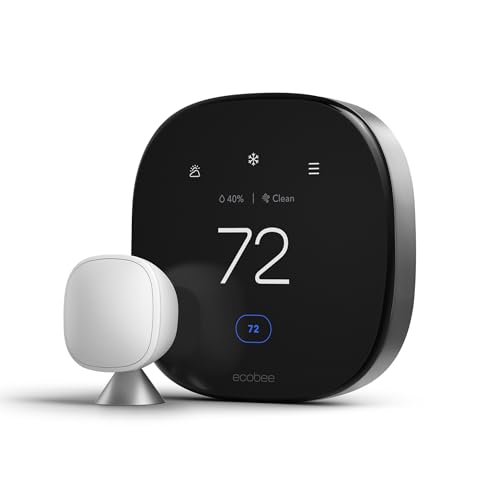
1. ecobee Smart Thermostat Premium: the complete HomeKit flagship
The ecobee Smart Thermostat Premium is the thermostat we would hand to an Apple household that wants one device to do nearly everything, and to do it without friction. It connects to HomeKit natively, responds to Siri cleanly, and presents itself in the Home app exactly the way you would hope, with its included SmartSensor appearing as its own temperature and occupancy source for automations. That sensor is the heart of the ecobee experience: place it in the bedroom that never matches the hallway, and the thermostat can average the two spaces or prioritize the bedroom at night, which solves the single most common complaint about central heating in one move.
The Premium also reaches beyond temperature. It monitors indoor air quality, including volatile organic compounds and estimated carbon dioxide, and it can remind you when your HVAC filter is due based on actual runtime rather than a calendar guess. Its occupancy radar is noticeably better at knowing a room is occupied than the passive infrared sensors in older thermostats, which makes its eco-saving setbacks smarter and its homecomings warmer. The metal body and large, crisp display feel a step above the plastic norm, and the built-in voice and media features mean the thermostat can double as a small smart speaker in a hallway, although Apple households with HomePods nearby may simply leave those extras off and enjoy the silence.
Strengths: Excellent native HomeKit behavior with fast, reliable responses. Included wireless SmartSensor with occupancy detection that genuinely fixes hot and cold rooms. Air quality monitoring and filter reminders based on real system runtime. Premium build, a clear display, and thoughtful touches like a freeze alert that warns you before pipes are at risk. Works with a wide range of systems, and ecobee’s power extender kit is included for homes without a C-wire.
Trade-offs: This is the most feature-dense thermostat here, and the density shows in the menus; expect a longer first evening of setup and tuning than with simpler rivals. The smart speaker extras overlap with HomePods most Apple homes already own. Air quality figures are estimates from a combined sensor rather than laboratory measurements, so treat them as trends, not gospel. It needs that C-wire or the extender kit, like most full-featured models.
Who it suits: Apple households with uneven room temperatures, anyone who wants air quality awareness alongside climate control, and buyers who prefer to purchase the full-featured model once rather than wonder what they are missing. If your home has a cold nursery, a hot home office, or a hallway thermostat that lies to the whole house, start here and check price on Amazon.
2. ecobee Smart Thermostat Enhanced: the sensible core of the range
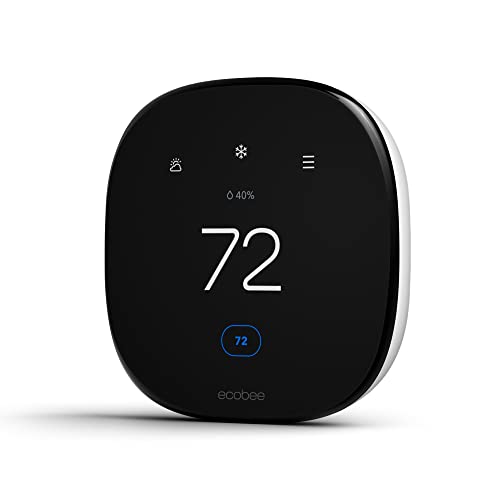
If the Premium is the flagship, the ecobee Smart Thermostat Enhanced is the same ship with a few decks removed, and for many homes that trade is exactly right. You keep the essentials that make ecobee the easiest recommendation in this category: native HomeKit support that behaves properly in the Home app, compatibility with ecobee’s wireless SmartSensors for room-by-room balancing, a clean color display, and the same broad HVAC compatibility backed by the included power extender kit for houses without a C-wire. What you give up are the Premium’s air quality sensing, radar occupancy, metal finish, and smart speaker abilities, none of which change how warm your house is.
In daily use the Enhanced feels calm and competent. Schedules are easy to build, the eco+ features trim heating and cooling when electricity is expensive or the house is empty, and Siri commands land without the delays that make people stop using voice control. Because it shares the ecobee platform, it also inherits years of firmware maturity, which in the thermostat world is a real feature: this is a device category where boring reliability beats exciting novelty every winter. The plastic body looks less jewel-like than the Premium’s, but on the wall, at arm’s length, most visitors will never know which model you bought.
Strengths: The same dependable HomeKit integration and sensor ecosystem as the flagship for less commitment. Supports SmartSensors, so cold-room households still get the fix that matters most. Included power extender kit softens the C-wire problem. Mature app and firmware with scheduling that stays local and sensible. A display and interface that guests can operate without instructions.
Trade-offs: No air quality monitoring and no radar occupancy, so its presence detection leans on sensors and schedules instead. The finish and screen feel a grade below the Premium. Like its sibling, the full feature set reveals itself slowly, and first-time setup asks more questions than minimalist rivals do. Households wanting Thread or Matter as the primary connection story should note ecobee’s current models connect over Wi-Fi.
Who it suits: The majority of HomeKit households, honestly. If you want room sensors, solid automations, and a thermostat that disappears into daily life after setup weekend, this is the balanced choice. It is also the natural pick for a second zone or a rental you manage yourself, where flagship extras would go unnoticed. Compare the current bundle options and check price on Amazon.

3. Honeywell Home X8S: premium sensor control from a heating household name
Honeywell has been on the wall of more homes than any smart brand, and the X8S Premium Smart Wi-Fi Thermostat with Sensor, in White, is where that heritage meets the modern Apple home most completely. It is sold with a sensor included, so the thermostat does not have to judge the whole house from one hallway: place the sensor in the room that matters and let the system balance toward where people actually live, so the living room wins during the evening and the bedrooms win overnight, which is the same cold-room medicine ecobee prescribes, delivered by the company your furnace installer probably already trusts.
The X8S’s personality is premium but practical rather than flashy. Wi-Fi connection keeps setup on an ordinary home network, the on-wall presentation in White suits light, modern hallways, and scheduling, geofencing-style routines, and everyday adjustments are handled through the maker’s app alongside your Apple Home setup. A thermostat that starts early so the house reaches its target on time is a quiet feature you feel every cold morning.
Strengths: Premium Honeywell Home model supplied with a sensor for room-aware control. Smart Wi-Fi connection that fits ordinary home networks and app-based scheduling. Room balancing that addresses the hallway-versus-bedroom problem directly. A familiar name with wide installer and parts support if anything ever goes wrong. Good fit across common furnace, air conditioning, and heat pump households — confirm your exact system before ordering.
Trade-offs: The premium positioning means it is not the budget route into smart heating. You will use the maker app for deeper settings, since the Home app does not expose everything on Wi-Fi thermostats of this type. Sensor placement takes an evening of thought to match your household’s rhythm. It is a wired wall thermostat, so check your wiring and C-wire situation first, exactly as with the other full-featured wall models here.
Who it suits: Households with a room or two that never match the rest of the house, buyers who value an established heating brand and installer familiarity, and Apple households that want a premium Wi-Fi thermostat with a sensor in the box rather than as a later add-on. If your installer recommends Honeywell and your phone is an iPhone, this is the meeting point, so check price on Amazon.

4. Sensi Touch 2: the understated touchscreen for traditional homes
The Sensi Touch 2, from Emerson’s long-running Sensi line, is the pick for people who want a smart thermostat that behaves like a thermostat first and a gadget second. It supports HomeKit, so Siri and the Home app handle the daily adjustments, but its soul is in the large, bright touchscreen on the wall, which is genuinely pleasant to use with cold fingers at 6 a.m. Sensi has built its reputation on respecting how heating systems actually work, and the Touch 2 carries features like cycle rate adjustment and humidity control support that HVAC-minded homeowners appreciate and gadget brands often skip.
There is also a privacy posture here worth naming. Sensi has made a point of not selling user data, and the Touch 2 does its job without demanding that your household’s comings and goings become a marketing asset. The feature set is deliberately narrower than ecobee’s: no remote room sensors, no air quality tricks, no speaker. Instead you get strong scheduling, geofencing through the app, usage reports that show how long your system ran and why, and compatibility with a wide spread of systems including many heat pump configurations. For a great many homes, that is not a compromise at all; it is the whole job description, done well.
Strengths: Native HomeKit support paired with one of the best on-wall touchscreen experiences available. A clear commitment to not selling personal data. HVAC-friendly depth, including humidity control and cycle settings that protect equipment. Usage reporting that makes energy bills easier to understand. Straightforward installation and setup that respects existing wiring realities.
Trade-offs: No remote room sensor ecosystem, so a chronically cold bedroom stays a compromise managed by scheduling rather than measurement. The design is clean but conservative. Geofencing and some conveniences live in the Sensi app rather than in HomeKit automations, which purists will notice. Like most full-color touchscreen models, it expects a C-wire for power.
Who it suits: Traditional homeowners who want HomeKit convenience without a gadget on the wall, anyone who values a strong privacy stance, and households whose temperatures are already fairly even from room to room. It is also a kind choice for parents’ homes, where the wall controls will be used more than the app. If that sounds like your household, check price on Amazon.
5. Meross Smart Thermostat: the value route into HomeKit heating
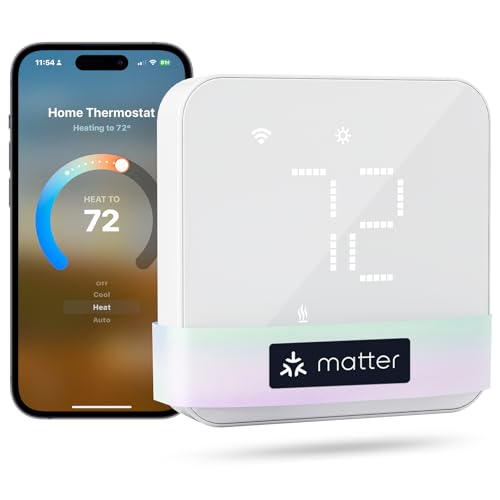
Meross has built a following by bringing HomeKit to product categories at prices the big brands ignore, and its smart thermostat applies the same formula to climate control. It supports HomeKit natively, along with other platforms, so you can add it to the Home app, command it with Siri, and fold it into automations without any bridge or workaround. For a renter-friendly upgrade, a guest house, a workshop, or a first step into smart heating, that combination of real HomeKit support and modest ambition is genuinely appealing.
Temper your expectations in the right places and the Meross is easy to like. The display is a simple glass panel with touch controls, the scheduling covers the patterns most homes actually use, and the app handles setup and remote control without drama. What you do not get is the deep ecosystem of the leaders: no remote room sensors, no learning behaviors worth the name, and a fit and finish that reminds you this is the budget shelf. Reliability reports from owners are generally positive for basic heating and cooling duty, but this is a younger product line than Honeywell’s or ecobee’s, and long-term firmware support is a reasonable thing to weigh if you are outfitting a whole house rather than one zone.
Strengths: True native HomeKit support at the most accessible level in this guide. Simple, clean design that suits modern interiors. Scheduling, remote control, and voice control cover the everyday essentials. A low-risk way to try HomeKit climate control in a single room or secondary property. Multi-platform support keeps mixed households included.
Trade-offs: No room sensors, no air quality features, and no learning schedule. Build quality and display sophistication sit a class below the leaders. The ecosystem and long-term support track record are thinner than the established heating brands. Check your system type carefully, since compatibility lists are narrower than ecobee’s or Honeywell’s, and confirm C-wire requirements before ordering.
Who it suits: Budget-conscious Apple households, landlords improving a single unit, and anyone heating a guest suite, studio, or home office who wants Siri control without flagship spending. It is also the natural experiment: install one, live with it for a season, and learn what your household actually uses before committing everywhere. Start by checking the current deal when you check price on Amazon.

6. Eve Thermo Control: the Matter-over-Thread answer for radiator homes
Every other pick in this guide assumes a central system with a wall thermostat, and for millions of homes, especially across Europe and in older buildings everywhere, that assumption fails. If your rooms are heated by radiators fitted with thermostatic valves, the device you actually need is a smart valve on each radiator, coordinated by a room temperature controller, and that is precisely the system Eve has built. Eve Thermo Control is a wireless room controller and temperature sensor that works with Eve Thermo radiator valves, connecting through Matter over Thread, which makes it a native citizen of an Apple home with a Thread border router like a HomePod mini or Apple TV 4K.
The experience is distinctly European in the best way: each room becomes its own zone, the controller on the wall or shelf shows and sets the target for its room, and the valves meter hot water radiator by radiator instead of heating the whole home to satisfy one hallway. Eve’s privacy stance is the strongest in this guide, with no cloud account and no tracking, because the system is designed to live entirely inside your home network and your Apple Home setup. Schedules are built in the Eve app or through HomeKit, and features like window-open detection, which pauses heating when a room is being aired out, show a real understanding of how radiator homes live. The trade to understand is that this is a different category: it will not help a forced-air house in Ohio, and it shines exactly where the other five picks cannot go.
Strengths: Matter over Thread connectivity that fits modern Apple homes beautifully and responds quickly. True per-room zoning for radiator systems, which no wall thermostat can offer. The strongest privacy position here: no Eve cloud, no account, no data harvesting. Window-open detection, frost protection, and schedules tuned to radiator heating. Battery-powered flexibility in placement, since it is a controller and sensor rather than a wired wall unit.
Trade-offs: Only relevant if your home heats through radiators with compatible valves, and you need Eve Thermo valves on the radiators for the system to work, so the real purchase is a small ecosystem, not a single device. It requires a Thread border router for full function. Boiler control, where one device fires the boiler for the whole home, depends on your existing setup and may need professional advice. Availability and support are strongest in Europe.
Who it suits: Apple households in radiator-heated homes and apartments, especially in Europe, who have watched wall-thermostat guides pass them by for years. If you want each bedroom and living room held at its own temperature, with Matter and Thread doing the networking and nobody’s cloud doing anything at all, this is your pick. Confirm your valve compatibility, then check price on Amazon.
Quick Comparison: The Six Picks Side by Side
The table below is deliberately qualitative. Thermostats are not ranked by a single number in real life; they are matched to wiring, heating systems, and households. Use it to narrow the field, then read the full review of the one or two models that fit your home.
| Model | Connection to Apple Home | Room sensors | Best for | Keep in mind |
|---|---|---|---|---|
| ecobee Smart Thermostat Premium | Native HomeKit over Wi-Fi | Yes, one included, occupancy aware | Uneven temperatures and air quality awareness | Most features to set up and learn |
| ecobee Smart Thermostat Enhanced | Native HomeKit over Wi-Fi | Yes, supported and expandable | Most households wanting the balanced choice | No air quality or radar occupancy |
| Honeywell Home X8S | Smart Wi-Fi | Yes, sensor included | Installer-trusted brand, room-aware priority | Deeper settings live in the maker app |
| Sensi Touch 2 | Native HomeKit over Wi-Fi | No | Traditional homes, privacy, great wall controls | Single-point temperature sensing |
| Meross Smart Thermostat | Native HomeKit over Wi-Fi | No | Value, rentals, and secondary spaces | Narrower compatibility and ecosystem |
| Eve Thermo Control | Matter over Thread | It is the room sensor and controller | Radiator homes needing per-room zones | Requires Eve Thermo valves and a Thread border router |
Installation Day: What to Expect
For the five wall thermostats in this guide, installation follows the same honest rhythm. Start by switching off power to your heating and cooling system at the breaker, not just at the thermostat, because the low-voltage wires you will handle can still blow a control board fuse if they touch carelessly. Photograph the existing wiring before you disconnect anything, label each wire with the terminal letter it came from, and only then remove the old unit. Smart thermostat makers include clear in-app wiring walkthroughs, and the job typically involves mounting the new wall plate, connecting the labeled wires, attaching the display, restoring power, and following the setup prompts to join your Wi-Fi and scan the HomeKit or Matter code into the Home app.
Three moments deserve extra care. The first is the C-wire check described earlier: if your photo shows no C terminal in use, decide before installation day whether you have a spare wire, will fit the included power extender kit at the furnace, or should book a professional. The second is system configuration: during setup you will be asked what kind of system you have, including whether it is a heat pump and whether it has auxiliary heat, and guessing here leads to strange behavior like the air conditioning and heat arguing with each other, so copy the answers from your old thermostat’s settings or your system documentation. The third is patience with first-run calibration: give any new thermostat a few days of normal living before judging its sensors and schedules, because both you and the thermostat are learning the house.
If the idea of furnace wiring makes your palms sweat, there is no shame in the professional route. Heating and cooling companies install smart thermostats constantly, and a pro visit can also confirm your system type, check your wiring, and set configuration options correctly the first time. Many buyers pair installation with an annual system service, which makes the marginal effort of the thermostat swap very small indeed.
best wireless routers for smart tv
Living with HomeKit: Automations, Scenes, and Siri
The first week with a HomeKit thermostat is about the schedule. The months after are about the automations, because that is where an Apple household pulls ahead of a merely programmable one. With a home hub in place, the patterns that prove themselves in real homes are consistent. A leaving-home automation drops the temperature a few degrees when the last person’s iPhone leaves the neighborhood, and a returning automation restores comfort when the first person approaches, so the house is right roughly when the door opens. A bedtime scene can set the sleeping temperature, lock the doors, and dim the lights in one breath to Siri. A vacation automation holds an energy-saving temperature with a safety floor, and sends you an alert if the house drifts toward pipe-threatening cold.
Room sensors deepen what automations can see. Because sensors from ecobee and Honeywell can inform your setup, you can build automations that react to the nursery being too warm or the office being occupied, rather than to the hallway alone. Temperature-based triggers are also quietly useful outside climate control: a sensor reading can warn you about a greenhouse, a server closet, or a wine cellar drifting out of range. Keep automations simple at first. Two or three that run flawlessly for a season teach you what your household actually wants, and a tangle of clever rules that fight each other teaches you only frustration.
Siri deserves a word of its own, because voice is how most family members will actually use the thermostat day to day. “Hey Siri, set the living room to 21” or “make it warmer in here” from a HomePod in the room is the kind of interaction that needs no training and no app, and it is where native, responsive HomeKit support earns its keep. If voice commands lag or fail, people stop trusting the system and return to walking to the wall, so when you set up your thermostat, test Siri from the rooms where you will actually speak to it, and confirm the thermostat sits in the Home app room you expect, since room assignment is what Siri hears.
laptop cooling pad buying guide
A Note on Nest and Other Non-Native Options
Because readers ask every time: Google Nest thermostats are polished, popular devices, and the newest Nest models can connect to Apple Home through Matter, which gives basic temperature control in the Home app. Older Nest models reach HomeKit only through third-party bridges or hubs that translate between platforms. Neither route is native HomeKit support, and the difference shows up in setup complexity, in which features survive the translation, and in who you call when something breaks. If you already own a Nest and love it, a Matter connection or a bridge may serve you perfectly well. If you are buying new specifically for a HomeKit home, every pick in this guide gives you a straighter line to the experience you are paying for, which is why Nest is a note here rather than a pick.
The same logic applies to deeply discounted no-name thermostats that advertise HomeKit in their listings. Platform support is a promise about software maintenance over years, and a thermostat is wired into the most expensive machinery in your home. Buy from brands that publish firmware updates, answer compatibility questions, and expect to exist in five years. The six names in this guide clear that bar in different ways and at different prices, which is exactly the spread a healthy category should offer.
Placement, Zoning, and the Second-Thermostat Question
Where a thermostat sits shapes what it believes about your house. The classic mistakes are consistent: a thermostat above a heat register cooks in rising warm air and short-cycles the system, one in direct afternoon sun thinks the house is a greenhouse, and one on an exterior wall reads the wall’s cold rather than the room’s air. If your existing thermostat lives in a bad spot, a system with wireless room sensors is the cheapest relocation ever invented, because you can leave the wiring where it is and let a sensor in a sensible room carry the vote. When you do move or add a thermostat, aim for an interior wall in a regularly used room, roughly chest height, away from kitchens, lamps, and drafts from stairwells and exterior doors.
Multi-zone homes raise a different question: one thermostat per zone, obviously, but should they match? Matching models simplify everything from setup to the family’s muscle memory, and platforms like ecobee’s make it easy to coordinate several units so they do not fight across an open-plan space. Mixed models are fine when zones genuinely differ, for example a flagship with sensors on the main floor and a simpler Sensi or Meross upstairs where temperatures behave. What matters is that every unit lands in the same Home app home, in correctly named rooms, because your automations and Siri commands are only as clear as your naming.
Finally, a word about the humble maintenance features that separate thoughtful thermostats from toys. Filter reminders based on runtime, humidity displays that help you protect wood floors and instruments, freeze alerts, and notifications when the system runs but the temperature does not move, which is often the first sign of a failing furnace or a refrigerant problem, all turn the thermostat into an early-warning system for the most expensive equipment you own. When you compare picks, weigh these quiet guardians alongside the headline features; they are the ones that will matter on a Sunday night in February.
One small behavior is worth setting deliberately on day one: what a temporary temperature change does. Every thermostat here lets you nudge the temperature and hold it, but the useful question is whether that hold lasts until you cancel it, for a fixed few hours, or only until the next scheduled change. Households with regular routines usually prefer “until the next schedule change,” because a late-night nudge then cannot silently become tomorrow’s all-day setting, while homes with irregular hours often prefer timed holds. Set this once, in the app of whichever pick you choose, and the thermostat will feel noticeably more intelligent for the rest of its life.
Frequently Asked Questions
Do I really need a HomePod or Apple TV to use a HomeKit thermostat?
For basic control from your iPhone while you are at home, no. For remote control away from home, geofencing, and automations that run when you are out, yes: an Apple home hub such as a HomePod, HomePod mini, or Apple TV 4K is required, because the hub is what runs your automations and connects your home securely to your phone. Most Apple households already own one of these devices, and if you do not, a HomePod mini is the usual starting point.
What if my home has no C-wire?
You have three good options. First, check for an unused spare wire in the wall cable, which is common and can be connected as a C-wire at both ends. Second, use a power extender kit, which ecobee includes in the box and which creates the needed power path at the furnace control board. Third, have a heating professional add or adapt the wiring during a short visit. What you should avoid is a thermostat that chronically power-steals on a system that dislikes it, since the symptoms, from clicking relays to short cycling, tend to appear on the coldest night of the year.
Is Matter better than native HomeKit for a thermostat?
For daily control through the Home app and Siri, the two feel very similar, and both are first-class ways into Apple Home. Matter adds easier sharing with other platforms in the same household and represents the industry’s shared future, while native HomeKit models carry longer track records and occasionally expose extra detail in the Home app. The better question is whether the specific thermostat is reliable, well supported, and compatible with your system; the badge matters less than the behavior.
Can a smart thermostat really lower my energy bills?
It can, mainly by not heating or cooling an empty or sleeping house as if it were full and awake. Setbacks when you leave, gentler temperatures overnight, and room sensors that stop the system from over-serving one hallway all trim runtime without sacrificing comfort, and usage reports from apps like Sensi’s or ecobee’s help you see the effect. The size of the saving depends on your climate, your home’s insulation, and how wasteful the old routine was, so be skeptical of any brand promising a specific percentage; the honest claim is that a well-set-up smart thermostat removes waste you can feel in the runtime numbers.
Which pick should a radiator-heated apartment choose?
The Eve system, built around Eve Thermo Control and Eve Thermo radiator valves, because it is the only option here designed for how radiator heat actually works: room by room, valve by valve. Wall thermostats control central systems and simply have nothing to operate in a typical radiator apartment. Confirm that your radiator valves are thermostatic and compatible, make sure you have a Thread border router such as a HomePod mini, and you can zone a bedroom cooler than a living room for the first time in the building’s history.
Whichever of these six earns its place on your wall or your radiator, the quiet truth of a good HomeKit thermostat is that you stop thinking about it entirely, because the house simply feels right when you wake, when you leave, and when you come home.