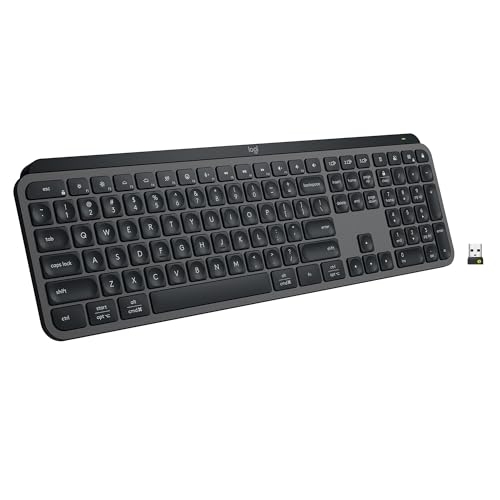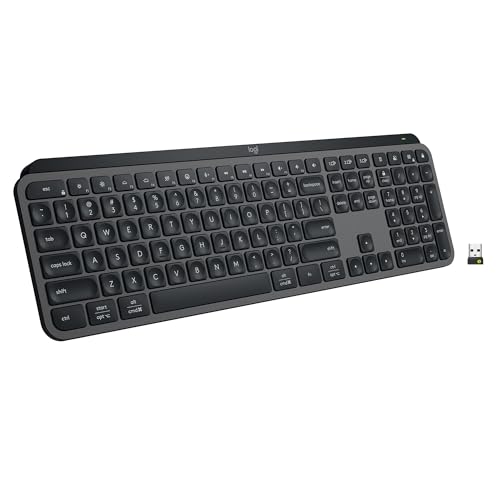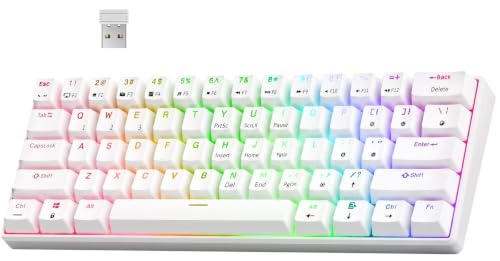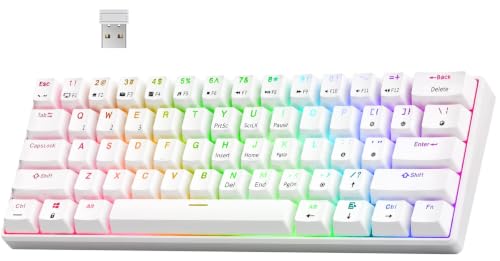
The 60 percent vs full size keyboard choice is the layout decision that shapes your desk more than any other. A full-size board gives you everything — letters, function row, navigation cluster, and number pad — on roughly the widest footprint a keyboard can have. A 60 percent board keeps only the letter block and asks you to reach everything else through a function layer, in exchange for a desk that suddenly feels twice as big.
Short verdict: full-size for number-heavy work and zero learning curve; 60 percent for gaming, minimal desks, and mouse freedom — provided you accept the layer learning curve. Most people who try to split the difference land on tenkeyless or 75 percent, and this comparison explains why both extremes still have devoted fans. If you are still mapping the size landscape, How to Choose a Keyboard sets this duel in context.
Disclosure: As an Amazon Associate, ilcastellomenu.com earns from qualifying purchases. Product details and availability can change; check the retailer listing before you buy.
Quick verdict: 60 percent vs full size keyboard
The trade is completeness against space. Full-size never asks you to remember a shortcut for Home, End, F5, or a number; 60 percent never asks your mouse hand to travel or your shoulders to splay around a wide board. Neither is a compromise-free win — each gives up something the other treats as sacred.
Your dominant activity decides. Data entry, accounting, and spreadsheet modelling live on the number pad. Competitive gaming lives on mouse space. Mixed users should read to the end, because the middle layouts exist precisely for them and are covered in the alternatives section.
In this guide
What you gain and lose: the key inventory
A full-size board carries around a hundred or more keys: the main block, F-row, navigation cluster with dedicated arrows, and the number pad with its own Enter and operators. Everything is one press away, legends are unambiguous, and any software shortcut designed around standard keys just works. For workflows built on Excel, CAD, or data entry — see Best Keyboards for Excel — that completeness is not nostalgia; it is throughput.
A 60 percent board keeps roughly sixty keys. Arrows, F-keys, navigation, and often some punctuation-adjacent functions move to a layer accessed by holding Fn. Well-designed layers mirror the original positions — arrows under the keys nearest their physical home, numbers along the top row — so the layout becomes learnable, but it is undeniably learned rather than instant, and the first two weeks involve hunting.
One specific loss catches people out: the right Shift and punctuation keys on some 60 percent boards are compressed or relocated to fit the block. Touch typists with strong muscle memory feel this immediately. Check the exact layout diagram of any 60 percent board against your typing habits before ordering — layouts vary more within this size than in any other.
Desk space, posture, and gaming
The space a 60 percent board returns is not cosmetic. Your mouse gains a wide, unobstructed sweep area — the reason compact boards dominate Best 60 Percent Keyboards for Gaming — and your keyboard and mouse sit closer together, letting your shoulders rest at a natural width. On a small desk, a 60 percent board can be the difference between a monitor at a healthy distance and one crowding your face.
Full-size boards push the mouse far to the right (or left), which over long days can mean a permanently extended arm. Left-handed number-pad users and anyone who centres the letter block rather than the whole board mitigate this, but the geometry is the geometry: width must go somewhere, and on a full-size setup it comes out of your posture budget.
Gamers feel the difference most acutely in low-sensitivity play, where large mouse movements are constant. Typists feel it in desk depth: a compact board leaves room for a notebook, a coffee, or a document stand in front of the monitor. Both are real ergonomic currencies; spend them where your day actually hurts.
Productivity and the layer learning curve
Layers are the tax 60 percent owners pay, and its size depends on your work. If your day is prose and code with occasional arrows, the tax is small and quickly forgotten — many programmers prefer arrows on a layer because their hands never leave the home row, a philosophy visible across Best Keyboards for Programmers. If your day is spreadsheets, forms, or software with F-key shortcuts, the tax is charged hourly and compounds.
Programmability softens the tax considerably. A board with QMK or VIA support lets you design the layer yourself — put the keys you miss exactly where your fingers expect them, add a one-press number pad layer, or build application shortcuts. The methods in How to Program a Keyboard turn a generic compact board into a personal one, and for many owners that process is the hobby’s front door.
Be honest about your willingness to adapt. A 60 percent board bought hopefully and abandoned in a drawer is worse value than the full-size board it replaced. Borrow, try a software simulation of layers, or start with 75 percent if you are compact-curious but commitment-shy.
Portability, looks, and cost
A 60 percent board slips into a laptop bag, weighs little, and anchors the minimalist desk aesthetic that fills social feeds. A full-size board is a fixed installation. If you hot-desk, travel, or work from cafés, the compact board’s portability is a lifestyle feature, not a spec.
Cost overlaps more than size suggests. Both categories span budget to flagship, though full-size spreads its price across more switches and material while compact boards concentrate spending on case quality and firmware. Value comparisons should therefore be made within your chosen size using the tier logic in Keyboard Buying Guide, not across sizes where the products are solving different problems.
Aesthetics deserve one honest sentence: many people simply prefer how a compact desk looks and feels, and enjoying your workspace is a legitimate buying reason. Just make sure the enjoyment survives contact with your actual workload in week three.
The middle path: TKL, 75 percent, and split solutions
Tenkeyless removes only the number pad, keeping F-row, navigation, and arrows as physical keys — the layout most mixed users settle on, well represented in best-tkl-keyboards-for-gaming. The 75 percent layout compresses everything into a near-compact block, sacrificing some key spacing and standardisation for a footprint close to 60 percent with almost no layer dependence. Both exist because the extremes of this comparison each hurt someone.
Another split solution is pairing a compact board with a separate number pad you pull out for spreadsheet sessions and park in a drawer otherwise. It costs a little more and delivers both worlds on demand — an underrated answer for accountants who game, and gamers who occasionally do their taxes.
Whichever size you land on, test it properly on arrival with how-to-test-a-keyboard, and give a new layout a genuine fortnight before judging it; layout adaptation is measured in weeks, not days.
Who should choose which
Choose full-size if numbers, F-keys, or dedicated navigation are daily tools, if you share the board with others who expect a standard layout, or if you simply never want to think about layers. Choose 60 percent if mouse space, portability, or a minimal desk leads your priorities and your work is typing- and gaming-centred. Choose the middle layouts if both paragraphs sounded like you — that recognition is the market telling you where you belong.
Living with a 60 percent board: the first month
Week one is friction: arrows vanish mid-edit, F-keys hide during a game’s menu, and your right hand keeps arriving at a number pad that is not there. This is normal and temporary, but it is not nothing — schedule the switch for a light week if your work allows, and keep the old board within reach for deadline moments rather than as a shameful secret. Tools you are learning are allowed a transition period.
Week two is where layer design proves itself. The combinations you use hourly become automatic; the ones you use rarely stay rare and lookup-worthy, which is fine. This is also when programmable-board owners should do their one serious customisation pass — moving the two or three functions that still annoy them to where their fingers keep looking for them. Data from your own hands beats any default layout.
By week four the board has either disappeared into your work or it has not, and both outcomes are verdicts worth honouring. Owners who adapted describe the desk space as un-give-uppable; owners who did not have learned their true layout floor, which is knowledge that makes their next purchase — probably a 75 percent — exactly right. No month spent learning your own preferences is wasted.
Full-size in the modern desk era
Full-size boards are sometimes discussed as relics, which undersells their modern constituency: finance, data, engineering, and administrative professionals whose throughput is measured in numbers entered, and whose software — spreadsheets, CAD, accounting suites — was designed around the pad. For them the number pad is not legacy; it is the interface, and a compact board is the exotic choice requiring justification.
Modern full-size boards have also absorbed the enthusiast era’s improvements: hot-swap sockets, gasket mounting, wireless modes, and respectable stock tuning are all available without surrendering a single key. The size debate is therefore purely about geometry and workflow now, not about which size gets the good technology — both do, which is how a healthy market should behave.
The genuine cost remains the mouse position, and full-size loyalists manage it knowingly: centring the letter block rather than the board, using the pad with the left hand, or choosing a board with the pad on the left. A cost managed is a cost chosen, and chosen costs are the definition of a setup that fits its owner.
Gaming on full-size, typing on 60 percent: the crossover cases
Plenty of gamers play happily on full-size boards — desk depth, not width, is their binding constraint, and their mouse sensitivity is high enough that sweep room is ample. Plenty of writers type novels on 60 percent boards, layers and all, valuing the centred posture and the travel-friendly size. These crossover owners disprove every absolute in the size debate and prove the only rule that survives: workflow details outrank category stereotypes.
If you are a crossover in the making, weight your secondary use at zero and your primary use at everything. The gamer who occasionally writes email should buy the gaming layout; the writer who occasionally games should buy the typing layout and accept the mouse compromise in the hobby hours. Regret concentrates in purchases that tried to serve the occasional use at the primary use’s expense.
And remember the escape hatch both directions: a separate number pad serves the compact board’s owner at tax time, and a compact travel board serves the full-size owner on the road. Ownership of a primary board does not forbid accessories; it merely gives them a sensible job description.
Number pads, macro pads, and the modular answer
The modular desk dissolves this comparison’s hardest edge: a compact board plus a separate number pad gives full-size data entry on demand and compact geometry the rest of the month, at the cost of one more device and its cable or charge. Macro pads extend the idea — a small grid of programmable keys carrying the shortcuts a compact board exiled to layers, placed wherever the hand prefers. For hybrid workers whose number work arrives in seasons — quarter-ends, tax time, inventory — modularity is not a compromise but a schedule made physical.
Judge modular setups by their transitions: if the pad lives in a drawer three metres away, it will not be fetched for a five-minute task, and the layer will be cursed instead. Kept at the desk’s edge, charged or wired, the pad becomes furniture and gets used. Modularity succeeds on logistics, not specifications.
What your software says about your size
Applications have layout opinions. Spreadsheet and finance tools assume a number pad; CAD assumes a full function row and navigation cluster; many creative suites scatter commands across F-keys and the pad. Games assume WASD and room to move. Before choosing a size, list your three most-used applications and audit which physical keys they touch hourly — that list, not preference surveys, predicts your layout satisfaction.
The audit often surprises: users discover their ‘typing job’ is actually a navigation job, or that their gaming never uses the keys they feared losing. Software is the silent third party in this comparison, and it votes with your fingers every day. Let it be heard before the purchase, not discovered after it.
Children, students, and other special cases
Smaller hands change the geometry argument: a compact board brings keys within reach that a full-size board sprawls, and students — who move between desks, libraries, and bags — gain the portability case in full. For a child’s first serious board or a student’s only board, compact sizes deserve a presumption in their favour that adult fixed-desk logic does not grant.
Shared institutional settings argue the opposite way: a standard full-size layout is the one every user already knows, needs no layer documentation, and survives being swapped between machines and people without a manual. Context is the whole of this comparison’s law — size is a fit between a body, a desk, a workload, and a setting, and any verdict ignoring one of the four is incomplete.
The two-week trial protocol for size decisions
If torn between sizes, trial deliberately: borrow or buy the compact candidate under a good return policy, use it exclusively for two weeks including your heaviest workload day, and log every moment you reached for a missing key — what it was, how often, whether the layer answered painlessly. Simultaneously log every moment the reclaimed desk space pleased you. Two honest logs, fourteen days, and the decision makes itself with evidence instead of vibes.
Run the same honesty in reverse if you trial full-size after compact life: log the number pad’s actual uses, not its theoretical ones. Many owners discover the pad served nostalgia more than throughput; others discover it was load-bearing all along. Either discovery is worth the trial’s price, because it prices your next decade of desk geometry correctly.

Scenario head-to-head: the spreadsheet week
Give both boards the same week of heavy spreadsheet work — budgets, reconciliations, data cleaning — and the full-size board’s case makes itself without argument. The number pad is not a convenience here; it is the difference between a hand that stays in one place entering figures at speed and a hand that travels the number row, breaking rhythm on every cell. Dedicated navigation keys matter nearly as much: Home, End, and the full cluster are woven through spreadsheet shortcuts, and reaching them through a layer dozens of times an hour converts a theoretical compromise into a measurable slowdown.
The 60 percent owner’s honest counter is that this week is not every week. If spreadsheets are a monthly afternoon rather than a daily job, the layer tax is a few hours a year, paid in exchange for fifty weeks of extra desk space and a closer mouse. The scenario therefore does not crown a winner; it prices the trade. Count your own spreadsheet hours before you let this scenario decide for you, and if the count is high, consider the hybrid the market offers precisely for you: a full-size board, or a compact board plus a standalone number pad that appears on spreadsheet days and lives in a drawer the rest of the year.
Scenario head-to-head: the competitive gaming desk
At a gaming desk the 60 percent board’s argument is ergonomic geometry. Removing the number pad and cluster lets the mouse hand sit closer to the body’s centreline, which keeps the shoulder in a neutral position through long sessions and frees a wide arc for low-sensitivity mouse movement. Tournament desks standardised on small boards for exactly these reasons, and the function row’s absence rarely matters because games bind actions where the player’s fingers already are.
The full-size board’s gaming counter-argument is narrower but real: games and streaming setups accumulate auxiliary bindings — push-to-talk, recording toggles, scene switches, music controls — and a full-size board offers a field of spare, dedicated, labelled keys for them. Streamers in particular can fill a number pad with production controls and feel its absence keenly on a compact board. The deciding question is whether your extra keys are in the game or around it: in-game actions favour the compact board’s geometry; around-the-game production favours the full-size board’s inventory.
The layer, examined honestly: what FN combinations cost and teach
Every 60 percent defence rests on the layer, so the layer deserves scrutiny rather than faith. A well-designed layer puts arrows under your fingers without moving your hand, and after two weeks that movement is genuinely automatic — owners are not exaggerating when they say they stop missing dedicated arrows. The costs live elsewhere: in combinations. Function keys become two-key presses, then three when an application wants a modified function key, and some shortcuts in professional software — the debugger controls in development tools are the classic case — become small chords that must be performed precisely, repeatedly, under concentration on something else.
The layer also has a discoverability cost. A dedicated key advertises itself; a layer function must be remembered or looked up, and boards vary in whether the layer is even printed on the keycaps’ fronts. For the board’s owner, memory solves this in weeks. For anyone else who touches the computer — a partner, a colleague, a child doing homework — the compact board is a locked door, and the full-size board’s boring completeness becomes a household feature. Weigh that if your desk is shared, and test your own adaptation honestly with the two-week protocol described earlier in this guide rather than assuming either outcome.
Posture and the mouse: the ergonomics that actually decide this
Strip away preference and the strongest objective argument in this comparison is shoulder geometry. A full-size board is wide enough that a right-handed mouse user must either angle the board, reach around it, or sit offset from the screen’s centre. Over years, that reach is the kind of low-grade strain that ergonomists flag: not an injury, but a daily tax on one shoulder. A compact board removes the tax at its source. Left-handed mouse users, it should be noted, experience the mirror image — a full-size board’s number pad sits on their mouse side’s opposite, and the width argument largely evaporates for them.
Keyboard width interacts with everything else on the desk. A compact board centres the letter cluster in front of you, which also centres you; a full-size board tempts you to centre the whole board, which offsets the letters — the keys you actually type on — to the left of your body’s midline. If you keep a full-size board, the correct setup is to centre the letter cluster and let the number pad overhang your mouse side’s space, accepting the reach, or centre yourself and angle the board. Many full-size owners have never been told this and have typed offset for years. Whichever size you choose, the setup detail matters as much as the purchase, and the compact gaming shortlists — such as 60 percent boards picked for gaming desks — assume the centred setup when they praise the space saved.
What the second peripheral does to the argument: number pads, macro pads, and stream decks
The modular answer deserves a full hearing because it dissolves the comparison for many buyers. A standalone number pad can sit to the right of the mouse, to the left of the board, or in a drawer — positions a fixed pad can never occupy. Left-side placement is a small revelation for spreadsheet users: the mouse hand never leaves the mouse while the left hand enters figures. A macro pad or control deck similarly absorbs the production bindings that made streamers cling to full-size boards, and does them better, with labelled, purpose-built controls.
The modular setup’s costs are clutter and connections: two or three devices to pair, charge, cable, and keep track of, on a desk that may have been simplified by the compact board in the first place. It suits a permanent desk and annoys a mobile one. But for the buyer torn exactly between these two sizes, the honest answer is often that the dilemma is artificial — the board should be the size of your daily typing, and the number pad should be an accessory sized to its own, rarer job.
Travel, LAN events, and the second location
A board that travels changes the comparison again. A 60 percent board fits the bag, the tray table, and the cramped venue desk; it pairs with a laptop without overwhelming it, and it is the only one of the two that a person realistically carries daily. Full-size travel is possible — cases exist — but it is a deliberate expedition rather than a habit, and habits are what travel gear must survive. If your work happens in two places and one board must serve both, the compact board’s portability may outweigh a home desk’s number pad, especially paired with the modular pad left permanently at the main desk.
The two-location life also exposes a subtlety: consistency. Using the same compact board in both places keeps your layer memory and feel identical everywhere, while a full-size board at home and a laptop keyboard away trains two partial habits. Travellers and hybrid workers consistently underrate this; the board you use everywhere beats the board that is ideal somewhere. Judge both sizes against your whole week, not against your best desk.
The verdict, restated for the buyers who actually face this choice
If your work is numbers, navigation, or other people’s convenience, buy full-size and set it up centred on the letters. If your desk is small, your mouse needs room, your shoulders matter, or your board travels, buy 60 percent and give the layer its honest two weeks. If you are torn, buy the size of your daily typing and modularise the rest. And if you are a first-time buyer with no data, borrow the data: the two-week trial protocol earlier in this guide exists because this particular decision is nearly impossible to make from specifications, and nearly obvious after a fortnight of your own hands. Readers still circling the wider question of size and layout will find the full framework in the guide to choosing a keyboard from first principles, where size is step one of four.
The number pad’s other lives: calculator, controller, and accessibility tool
The number pad is usually debated as a data-entry device, but it moonlights in roles the size debate forgets. It is a calculator keypad whose layout matches every calculator and phone pad the user has ever learned, which is why accountants defend it so fiercely. It is a media and presentation controller in disguise — many programs map transport and slide controls to it. In some games it becomes a secondary binding field or a flight-sim control cluster. And for users who remap heavily, it is a bank of seventeen-plus keys that can hold an entire macro layer in dedicated, labelled hardware, no combinations required.
Accessibility cuts in the full-size board’s favour in specific cases: users who operate a keyboard one-handed, or with limited reach in one direction, may rely on the pad’s compact grid of numbers and operators as their primary numeric interface, positioned where their stronger hand works. Conversely, users whose limitation is reach across a wide board may find the compact board’s everything-close geometry the accessible choice. There is no general answer here — which is itself the point. For users with specific physical needs, the size question should be settled by trialling both geometries with those needs in the foreground, not by any general verdict, including this guide’s.
Sound and feel differences nobody mentions in the size debate
Size changes a keyboard’s acoustics and flex in ways buyers rarely anticipate. A full-size case is a larger resonating body: it can sound deeper and more hollow, and its plate spans a longer distance, which on lesser builds introduces a faint flex or ping at the centre that compact boards, with their short spans, avoid almost by geometry. A compact board concentrates the same construction into a stiffer, denser object, and many owners perceive small boards as feeling more solid than large ones of equivalent build quality — an artefact of span, not of price.
Key feel is nominally identical, since the switches are the same, but the experience differs at the edges: the full-size board’s rarely used keys — the pad, the function row — often feel and sound slightly different from its letter keys simply because they are pressed a hundredth as often and never wear in the same way. None of this should decide the purchase ahead of layout and posture, but it explains a common mystery: two boards with identical switches and different sizes genuinely do not feel like the same product, and your hands are not imagining it.
The desk around the board: monitors, notebooks, and the space you actually reclaim
The space a compact board returns is only valuable if something claims it, so audit what actually happens to reclaimed desk. For many users the honest answer is: the mouse moves in, posture improves, and the rest fills with the notebook, phone, and coffee that were always competing for the surface. That is a good outcome — a working desk is a landscape, not a shrine — but it reframes the compact board’s benefit as comfort rather than minimalism. For the full-size owner, the symmetrical audit asks what the pad’s footprint displaces: often the mouse sits further right than shoulders prefer, or the monitor sits off-centre to accommodate the board’s width.
Measure your own desk before deciding, with the tape-measure honesty this guide recommends elsewhere: the letter cluster centred, the mouse where your hand falls naturally, and then see which board fits the remaining geometry. Desks under a certain width simply cannot host a full-size board, a centred monitor, and a healthy mouse position simultaneously — the arithmetic forbids it — while generous desks make the compact board’s space argument mostly aesthetic. Both are legitimate conclusions; the tape measure is what tells you which desk you own.
One year later: what owners of each size report changing
Follow owners for a year and patterns emerge that the first-week reviews miss. Full-size owners rarely change size, but a steady minority add a compact board as a second, travel, or gaming board — drifting, in effect, to the two-board answer. Sixty percent owners split: most stay, their layers long since automatic, and a minority quietly move up one size — not to full-size, but to a 75 percent board that restores dedicated arrows and a function row while keeping the narrow footprint. That migration path is worth knowing before you buy: if your hesitation about 60 percent centres on arrows and function keys rather than the number pad, the middle sizes exist precisely for you, and starting there may skip a purchase.
Almost nobody, in either camp, reports the switch feel as the reason for a change. Size decisions, once lived with, are about geography — reach, space, posture, the layer — which confirms where this comparison has pointed all along: choose the geography your week actually needs, and let the extensive guidance on switches and features in the full keyboard buying guide handle the rest of the board.
The function row’s quiet importance in professional software
The function row is easy to dismiss as legacy until your software’s shortcuts are enumerated honestly. Development environments drive debugging — step over, step into, continue, stop — from the function row, in sequences performed hundreds of times a day with attention on the code, not the keyboard. Spreadsheet and finance tools bind recalculation, naming, and editing functions there. Enterprise and terminal software carries decades of function-key conventions that no update will modernise. On a compact board every one of those becomes a chord, and chords performed occasionally are fine while chords performed rhythmically, mid-thought, are a tax that compounds with the software’s importance to your job.
The counterweight is that many users’ software genuinely never touches the row: writers, designers working in a few tools, most students, and most gamers can work a full day without a native function press. The row’s importance is therefore a property of your software list, not of keyboards in general. Write the list before you shop; it is five minutes of honesty that decides this section of the comparison more reliably than any review.
Two boards, one desk: the hybrid setups owners actually settle into
A significant number of owners resolve this comparison by refusing it: a compact board for daily typing and gaming, and the full-size board kept — not sold — for the tasks that want it, or the reverse. The hybrid works best when the boards have defined territories rather than competing for one: the compact board lives at the main desk, the full-size board serves the spreadsheet weekends, a second room, or a partner’s use. Defined territories prevent the daily friction of swapping cables and re-pairing, which is the friction that kills hybrid setups in their first month.
If you go hybrid, keep the switch feel consistent across both boards if you can. Alternating between layouts is a learnable skill; alternating between layouts and feels simultaneously is a slower one, and consistency of feel is what lets the geography become the only variable your hands track. The hybrid is not indecision — it is the recognition that the comparison’s two winners each won a different part of your week.
Cables, pairing, and the small logistics of each size
Size changes logistics in ways spec sheets omit. The compact board is the one that fits the laptop bag’s pocket, pairs with the tablet on the train table, and sits in front of a laptop without pushing it to an unusable distance — a genuinely common setup for students and hybrid workers, where the external board upgrades the laptop’s typing while the laptop’s screen stays close. The full-size board in the same roles is a commitment of luggage and desk depth that most people make exactly once.
At a fixed desk the logistics reverse in one respect: the full-size board’s weight and footprint make it the more stable, planted object, less likely to creep across the desk during intense use, while very light compact boards can wander on slick surfaces unless their feet and weight are up to the job. Check the underside and the weight if you type hard on a smooth desk; a board that travels during use will be blamed on your technique until the day you notice it has moved two centimetres left.
How the choice ages: five years of either board
Project both boards forward. The full-size board ages into the desk’s fixed furniture: its pad serves the tax software every spring, its function row serves every job change’s new software without adaptation, and its size becomes invisible through familiarity. Its risk is the desk shrinking around it — a smaller home, a shared workspace, a standing desk with a narrow tray — because furniture changes more often than keyboards do, and the board that fit the old room may govern the new one badly.
The compact board ages into portability and options: it follows you between desks and homes, pairs with devices not yet bought, and leaves room for whatever your desk becomes. Its risk is your work changing toward it — a new role heavy in data or enterprise software can make the layer tax a daily one, and the board that was freedom becomes the compromise. Neither risk is predictable in detail, which is why both boards hold resale value well: the market is full of people whose lives changed in the opposite direction from yours.
A worksheet: scoring your own week before you spend
Score each line from your actual last week, not your imagined one. Hours spent entering numbers or navigating spreadsheets at speed. Hours in software whose shortcuts live on the function row. Hours gaming where mouse room decided comfort. Times the board would have travelled if it could. People other than you who used the desk. Shoulder or wrist complaints at day’s end. Desk width, measured, with the monitor where it must be.
Add the first two lines: that is the full-size board’s claim on you. Add the next three: that is the compact board’s. The last two lines are vetoes, not scores — a shared desk with confused co-users vetoes the layer, and a desk too narrow for healthy geometry vetoes the width. If the claims are close and no veto fires, choose by the tiebreaker this guide keeps returning to: the trial. Two weeks on the size you are curious about teaches more than any worksheet, and the worksheet’s job is only to tell you which curiosity to test first.
The short answer for the impatient reader
If you have read this far while still undecided, the evidence of your own hesitation is itself diagnostic: buyers with a decisive need — the daily spreadsheet, the tiny desk — rarely hesitate. Hesitation usually means your week is genuinely mixed, and mixed weeks are served best by the flexible answers this guide has developed: the compact board plus a number pad that visits when needed, the middle sizes that restore arrows and function keys without the full width, or the two-board desk with defined territories. Choose the flexible answer without feeling you have failed to decide. In this comparison, flexibility is a decision, and for mixed weeks it is usually the correct one.
Gear mentioned in this guide
The products below are examples referenced in this guide. They were verified through the Amazon Creators API product pool for this site; use them as concrete reference points for the features discussed, not as a ranked list.
- RK ROYAL KLUDGE RK61 Wireless Mechanical Keyboard with Coiled Cable, White — Check on Amazon
- HyperX Alloy Origins 60 – Mechanical Gaming Keyboard, Ultra Compact 60% Form Factor, Double Shot PBT Keycaps, RGB LED Backlit, NGENUITY Software Compatible – Linear HyperX Red Switch,Black — Check on Amazon
- Razer BlackWidow V3 Mini HyperSpeed 65% Wireless Mechanical Gaming Keyboard: Green Mechanical Switches Tactile & Clicky – Doubleshot ABS Keycaps – Chroma RGB – Up to 200 Hr Battery – Snap Tap — Check on Amazon


Frequently asked questions
Is a 60 percent keyboard good for typing long documents?
Yes, once the layer is learned — the letter block itself is standard. Writers often appreciate hands staying centred. The adjustment is arrows and editing keys living on a layer, which bothers some typists permanently and others not at all.
Can I still use F-keys and arrows on a 60 percent board?
Yes, through the Fn layer — typically Fn plus the number row for F-keys and Fn plus a mapped cluster for arrows. Programmable boards let you move these to positions that suit your memory.
Why do gamers prefer smaller keyboards?
Mouse room. A compact board lets the mouse sweep widely at low sensitivity without hitting the keyboard, and lets both arms sit at a natural width during long sessions.
Is full-size better for Excel and accounting?
For heavy number entry, yes — a physical number pad with its own Enter and operators is measurably faster than a top row or a layer, which is why full-size and separate numpads persist in finance workflows.
What size should a beginner choose?
Tenkeyless or 75 percent is the safest start: near-complete keys with meaningful space savings and little learning curve. Move smaller only when you know you want the trade.
Do 60 percent keyboards cost less?
Not necessarily. You pay for case, switches, and firmware more than for key count, so compact flagships cost as much as full-size ones. Budget examples exist in both sizes.
Related Guides
Keep exploring with these guides and roundups from the same desk and audio cluster: