Knowing how to position a router is worth more than any setting in its menu, because Wi-Fi is radio: it weakens with distance, it is absorbed by water, metal and masonry, and it reflects and scatters around a home in ways you can exploit once you understand them. The short answer is central, high, and out in the open — but this guide explains the reasoning room by room, covers the special cases of two-storey homes, apartments and houses with thick walls, and shows how to test whether a new spot is actually better rather than guessing.
If the router is brand new, finish the basic install first with How to Set Up a Router, then return here to optimise placement. And if no position fixes a genuinely large or awkward home, that is a hardware question — Mesh Wi-Fi vs Router explains when a mesh system beats relocating a single router.
Disclosure: As an Amazon Associate, ilcastellomenu.com earns from qualifying purchases. Links to Amazon on this page are affiliate links; they cost you nothing extra. Listing details such as price and availability change often, so check the current Amazon listing before you buy.
How to position a router: the three rules of placement
Top pick
1. Central beats convenient
A router radiates in all directions, roughly like a bare light bulb. Put it in a corner and half its output lights the garden and the neighbours. The best position is as close to the centre of the home as the modem connection allows — often a hallway or living room rather than the spare room where the line happens to enter. If the modem socket is fixed in a bad spot, a longer Ethernet cable between modem and router is cheap and lets you move the router metres in any direction; the cable run does not degrade the connection at household distances.
2. High beats low
Wi-Fi travels slightly better downward and outward than through floor-level clutter. A router on a shelf or wall-mounted at head height clears sofas, tables and appliances that absorb signal at floor level. Under a desk, behind a TV stand, or on the floor in a corner are the three worst common positions. In a two-storey house, a high shelf on the ground floor — or a spot near the ceiling — serves both floors better than a low one, because the signal only has to cross one floor slab at a shallow angle for upstairs rooms.
3. Open beats hidden
Every enclosure costs signal. A closed cabinet, a metal AV rack, or a tangle of other electronics around the router all degrade coverage, and the heat build-up inside furniture also shortens the router’s life. Keep it on an open surface with air around it, at least a metre from large metal objects, mirrors, and the back of the TV itself. Antennas, where fitted, should point vertically for same-floor coverage; tilting one antenna at an angle can help devices on the floor above or below, since devices work best when their antennas are roughly aligned.
In this guide
What blocks Wi-Fi in a home
Materials matter more than distance. A useful mental ranking, from least to most obstructive: wooden doors and plasterboard stud walls barely slow Wi-Fi down; brick and concrete blockwork absorb considerably more; reinforced concrete floors, foil-backed insulation, metal doors, large mirrors, aquariums and water tanks are the worst offenders. This is why the router two rooms away through stud walls can outperform one a single room away through a concrete wall, and why homes with masonry throughout often need a different strategy entirely — the options are surveyed in Best Routers for Thick Walls and the concrete-wall roundup.
Other electronics interfere too. Microwave ovens leak energy in the 2.4 GHz band and can stall that band while running; baby monitors, older cordless phones and neighbouring networks crowd the same airspace. Keep the router a couple of metres from the microwave and from dense clusters of other wireless gear where you can.
Room-by-room placement advice
Apartments and small flats
In a flat, centrality is usually easy: the living room or hallway is within a room or two of everywhere. The bigger problem is neighbouring networks, so placement near your own main living space — and away from the wall shared with a neighbour’s router — helps. Compact-home router choices are rounded up in Best Routers for Small Apartments.
Two-storey and larger houses
Aim for the middle of the house on the ground floor, raised high, ideally near the stairwell: stairs are an open shaft that signal travels through far better than a floor slab. If the far upstairs rooms still struggle, the realistic fixes are a mesh node upstairs or a wired access point — moving the router a metre rarely rescues a structurally blocked room. Layouts like this are the core case in Best Routers for 2 Story House.
Home offices and gaming setups
If one room earns its living from the connection, bias placement toward it — or better, run an Ethernet cable to it and stop depending on Wi-Fi for the work machine entirely. A wired desk connection plus a centrally placed router for everything else beats a router exiled to the office and weak signal everywhere else. For desk setups that must stay wireless, a companion shortlist covers routers with strong single-room performance.
How to test whether a new position is better
Do not judge by the bars icon. Walk the home with a speed-test app and test in the rooms that matter — the desk, the sofa, the bedroom — at the times of day the network is busiest. Write down the results for the old position, move the router, and repeat in the same spots. You are looking for the weakest room improving, not the room next to the router getting faster; peak speed beside the router tells you almost nothing. Also test a real task — a video call from the worst room reveals stutter that a speed test’s single number can hide. If two positions tie, pick the one that is also convenient for cabling and out of sight of visitors’ curious children.
When placement is not enough
Sometimes the honest conclusion is that one radio cannot cover the building. The signs: multiple rooms below a usable signal despite central placement, thick masonry throughout, or a long thin floor plan. At that point the options, in order of preference, are a wired access point or mesh node in the weak area, a mesh kit replacing the router, or an extender as the budget option — extenders repeat signal and have real limitations, explained alongside the picks in Best Wi-Fi Extenders for Large Homes. What is mesh, and when it earns its keep, is covered in a companion explainer.
Common placement mistakes
- The corner by the modem socket. Convenient for cabling, worst for coverage; extend the Ethernet run instead.
- Inside furniture or behind the TV. Hidden costs signal and traps heat.
- On the floor. Furniture and occupants absorb the signal at that height.
- Next to the microwave or a metal cabinet. Interference and absorption in one spot.
- Antennas all folded flat. On multi-antenna routers, vertical (or one tilted for multi-floor homes) works best.
- Judging by one speed test beside the router. Test the worst room, at busy times, before and after.
Antennas, in more depth
External antennas radiate in a pattern shaped roughly like a doughnut around the antenna’s axis: signal is strongest perpendicular to the antenna and weakest off its ends. A vertical antenna therefore serves the same floor well and the floors directly above and below less well. On routers with several antennas, the common advice to fan them — most vertical, one tilted — is really about serving two floors at once: the tilted antenna’s doughnut tips toward the horizontal, throwing more energy up and down. Devices also have antennas, usually hidden and fixed in orientation; a laptop’s are in its screen, a phone’s in its frame. You cannot align those, which is why small position changes — rotating the router a quarter turn, moving it a shelf along — sometimes produce oddly large improvements in one particular seat. Treat antenna fiddling as fine-tuning after the big decisions (central, high, open) are made, and verify each change with a test in the room you are trying to fix rather than by the bars on a phone beside the router.
Difficult spots and special cases
The router must live by the TV
Sometimes the modem point, the TV and the router genuinely share one corner. Mitigate rather than surrender: raise the router on a shelf above or beside the TV rather than behind it, keep it out of the closed AV cabinet, and angle it so the rest of the room is in open air in front of it. The TV’s metal back panel blocks everything behind it, so accept that the room on the other side of that wall is served by whatever leaks around — or by a node.
Basements and garden offices
A router in a basement fights the ground floor slab and the earth itself; if the house above matters, the basement is the wrong home for it — run a cable up. For a garden office or outbuilding, indoor placement heroics rarely reach: the realistic options are a buried or external Ethernet run, a point-to-point wireless bridge, or an outdoor-rated access point, in roughly that order of reliability. Extenders marketed for range assume house walls, not thirty metres of wet garden.
Rentals and shared houses
Where you cannot drill or run cables, placement within your own rooms and a mesh node in the problem room usually beats negotiating over the hallway. In shared houses, agree the router’s spot as a household: the person in the far room has the strongest interest in centrality, and their dead zone is the system’s problem, not theirs.
Mapping your coverage properly
If you want evidence rather than impressions, do a simple survey. Sketch the floor plan, mark where people actually use Wi-Fi, and test each marked spot twice: once at a quiet time, once at the household’s peak hour, recording the result and a one-word note on what a real task (a call, a stream) felt like. Repeat after moving the router. Three patterns emerge from almost every survey: the dead spot is one specific room (a node or extender fixes it), everything is mediocre (the router is in a bad global position — centrality fixes it), or everything is fine except at peak hour (congestion, not coverage — a settings or hardware-capacity question). Knowing which pattern you have prevents buying the cure for a different disease, and the survey takes twenty minutes with a phone.
Working around a router that cannot move
Sometimes the router’s position is dictated — the modem point is in a utility cupboard, the landlord forbids cables, the only socket is behind the sofa. Work the problem from the other end. A mesh node or access point does not need the router to move; it needs one good location of its own, within honest earshot of the router’s signal, and it re-broadcasts from there. If even that is impossible, aim the problem room instead: a wired run to that single room — along skirting, through an existing conduit, or via powerline adapters as a last resort — fixes the room that matters without touching the router. And manage expectations by band: a distant room may never hold 5 GHz from a cupboard router, but a solid 2.4 GHz connection still runs calls, browsing and smart devices perfectly well. Position advice assumes freedom; constrained homes are an exercise in choosing which compromise serves the rooms that matter most.
Seasonal and situational placement traps
Coverage is not static, and a position that tested well in spring can disappoint in December. A tree in full leaf between the house and a garden office absorbs signal that winter branches let through. The room that becomes the guest room at holidays sits at the coverage edge nobody tested. Metal-heavy seasonal furniture — a large tree with dense decorations is not RF-neutral — rearranges reflections. None of this demands action, but it explains the otherwise baffling report that ‘the Wi-Fi got worse for no reason’: there is usually a reason, and it is usually physical and recent. When coverage changes, repeat the worst-room test before changing settings; settings are rarely what the season altered.
A note on routers outdoors and in lofts
Lofts tempt as a central high point and disappoint twice: heat in summer shortens the router’s life and throttles it, and the signal must immediately cross the ceiling it was placed above. A high shelf in the living space below beats the loft almost every time. Outdoors, ordinary routers are not rated for weather or temperature swings; if coverage must reach a garden room, the tool is an outdoor-rated access point or a node in the outbuilding fed by a cable or a proper wireless bridge — not the household router relocated to a windowsill and hoped for the best.
Position experiments worth trying this weekend
Three cheap experiments teach more than any article. First, the height test: put the router on the tallest shelf in its current room for a day and retest the worst room — height alone resolves a surprising share of marginal coverage, because it lifts the signal over the furniture layer where so much absorption lives. Second, the rotation test: turn the router ninety degrees and retest; antenna patterns are not spheres, and in some rooms the difference between orientations is the difference between a usable desk and a dead one. Third, the honest-room test: identify the room where Wi-Fi matters most and temporarily place the router there, however impractical, and measure. If the whole house improves, the permanent answer is a cable run or a node that recreates that geometry; if only that room improves, the house needs a second radio, not a braver first one. Each experiment costs nothing but an hour, and together they convert placement from folklore into measurement — which is the entire spirit of this guide.
Record the results the same way each time: same device, same spots, same test, ideally at a similar hour. Wi-Fi varies with the neighbourhood’s mood, and a single heroic reading proves little; the pattern across three spots and two attempts is the evidence worth acting on.
One last principle: position for the life you live now
Homes change faster than routers. The room that was a nursery becomes a study; the desk migrates to the spare room; the teenager’s gaming den colonises the far end of the house. A position chosen for a floor plan of three years ago quietly serves a household that no longer exists, and the symptom — one room, newly important, with terrible Wi-Fi — gets blamed on the router’s age. Add placement to the list of things revisited when the house’s use changes: when a room becomes an office, when a gamer moves in or out, when the living room becomes the cinema. The worst-room test takes ten minutes and the fix is often the same shelf, one room along. Position is not a decision made at installation; it is a standing answer to the question of where the household actually lives, and it deserves to be re-asked whenever the answer changes.
The short version
Central, high, open, away from metal, water and masonry where possible, near the stairwell in two-storey homes, and verified by testing the weakest rooms rather than the strongest. Placement is free performance: it cannot make a slow internet plan fast, but it routinely turns an unusable back bedroom into a perfectly good one — no purchase required.
Gear mentioned in this guide
You do not need new hardware for most of the steps in this guide, but the products below are the ones referenced above. Each was verified against Amazon’s Creators API product data for this site, so the link matches the exact model named.
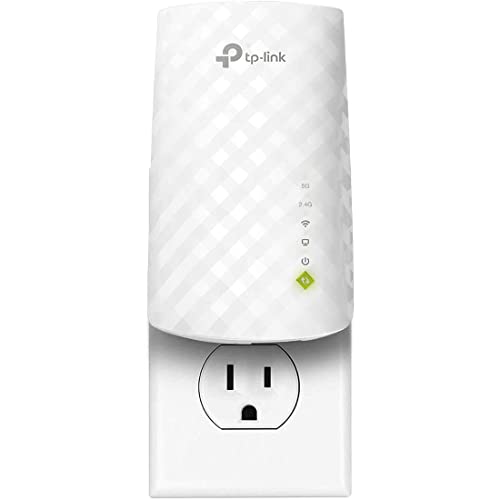
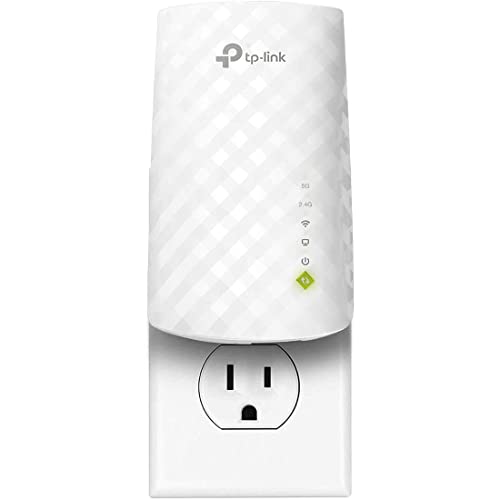
TP-Link WiFi Extender (RE220) with Ethernet Port, Dual Band 5GHz/2.4GHz
The TP-Link RE220 extender is the fallback for the single stubborn room that placement cannot rescue: it plugs into a wall socket partway toward the dead zone and repeats the signal, with an Ethernet port for a wired device at the far end. It supports TP-Link OneMesh with compatible routers.
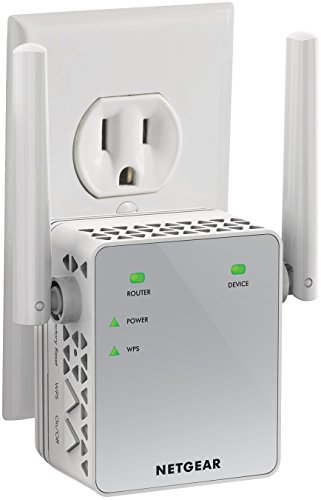
NETGEAR Nighthawk WiFi Extender EX3700, up to 1,000 sq ft, 750 Mbps
The NETGEAR EX3700 is a compact plug-in extender that works with any brand of router, useful when the dead zone is modest and you want a simple boost rather than a full mesh system.
Thinking in three dimensions: floors, stairwells and the vertical problem
Most placement advice is drawn on a floor plan, as if a home were flat. In a house with more than one storey, the vertical dimension is where coverage goes to die, because the signal has to cross floor structures that were never designed with radio in mind. A floor is not a ceiling-height version of a wall: it may contain joists, boards, underlay, carpet, and in newer builds, foil-faced insulation or the pipework of underfloor heating, each layer taking its share. The practical consequence is that a router placed directly below a bedroom can still deliver a weaker signal there than it does to a room further away on its own floor, because the horizontal path through stud walls is gentler than the vertical path through the floor build-up.
Stairwells are the exception, and they are the smart router’s friend. A stairwell is a vertical shaft of open air connecting the floors, often with only a banister and a couple of doors in the way. A router positioned near the stairwell on the ground floor — on a hall table or a landing shelf — can pour signal up the stairs to the floor above far more effectively than one buried in a corner lounge. If your home has a middle floor in a three-storey layout, that middle floor is usually the best home for a single router: one floor of separation in each direction, rather than two floors stacked against the top rooms. When you test positions, test the diagonal paths as well as the straight ones; moving a router two metres sideways sometimes matters more than moving it a whole room, because it changes which materials the signal crosses at an angle, and oblique paths through floors are longer and weaker than direct ones.
Basements and converted lofts sit at the extremes of this problem. A router in a basement starts with two handicaps: it is below most of the living space, and its signal must cross the ground floor structure to reach anyone. A router in a loft has the mirror-image issue, plus heat in summer that no electronics enjoy. If the internet connection enters the house in one of these spaces, remember that the modem and the router do not have to share it — a single Ethernet cable between floors relocates the router to where people actually live, and it is almost always a better spend than a more powerful router left in the wrong storey.
Positioning for the devices outside the house
The router’s audience no longer stops at the front door. Video doorbells, driveway cameras, smart locks, garden lighting and garage door controllers all live on the far side of an exterior wall, and exterior walls are the thickest, most insulated barriers in the building. A doorbell camera that drops its connection every evening is often not faulty and not too far away in metres — it is asking its signal to cross brick, insulation and a metal-framed door at a shallow angle from a router at the back of the house. When you choose a position, add the outdoor devices to your mental map: the router wants a line, as short and as perpendicular through walls as possible, towards the front door and towards any camera positions.
Height plays a part outdoors too. A router on a ground-floor shelf radiates in all directions, including into the garden, and a camera mounted high on a wall may sit in a weaker part of that pattern than a phone at waist height in the same spot. Before blaming a camera, stand where it is mounted, hold your phone at the same height, and check the signal there. Sometimes the honest fix is not moving the router at all but adding coverage aimed at the perimeter: a mesh node in the front room, or an access point near the door, serves doorbells and locks far better than a stronger router in the back room. For homes weighing that step up, the systems compared in Best Routers for 3000 Sq Ft House illustrate how multi-node layouts handle large footprints and grounds.
Weather and seasons shift outdoor coverage in ways that confuse people. Wet foliage absorbs more signal than dry foliage, a garden that works in winter can falter when the hedge leafs out in May, and a camera that was fine before the neighbours built an extension may now be shooting its signal through their new wall. None of this is a reason to chase perfection; it is a reason to leave a small margin. If an outdoor device is borderline on the day you position everything, it will be worse on the worst day of the year. Borderline outdoor devices deserve the extra node or the moved router now, not after a winter of missed recordings.
The neighbour factor: positioning in flats and terraces
In a detached house, your router mostly competes with your own walls. In a flat, a terrace or a semi-detached home, it also competes with everyone else’s routers, and position becomes partly a negotiation with networks you cannot see on a floor plan but can absolutely see in a Wi-Fi scanner. Two routers separated by a party wall, both shouting on the same channel, degrade each other more than either is degraded by its own home’s layout. If your flat’s only sensible router spot shares a wall with the neighbour’s obvious router spot — usually betrayed by their network being loudest exactly there — moving yours even a metre or two along the wall, or to the opposite side of your room, can be worth more than any setting you can change.
Vertical neighbours count as well. The flat below’s ceiling is your floor, and routers are often placed on floors and low shelves, which puts two networks a metre apart through the floorboards. Raising your router onto a shelf does more than improve your own coverage in this situation; it increases the separation from the network beneath you. Where your provider’s socket forces a position hard against a shared wall, a longer cable to the router — or accepting the gateway where it is and adding your own router further into the flat — reclaims the choice. Apartment-focused roundups such as Best Routers for Apartments assume exactly these constraints, favouring compact hardware that performs in crowded airspace over raw range you cannot use.
Be honest about what positioning cannot fix in dense housing. If a scanner shows thirty networks and every channel is busy at peak hours, placement tweaks yield small gains, and the bigger wins come from using the least crowded band available to your devices and wiring the stationary, demanding equipment — the desk computer, the television — so it leaves the airwaves to the devices that truly need mobility. Position still matters, but in a crowded block it ranks second to load management.
Hiding the router without strangling it
Routers are not beautiful, and the pressure to hide them is understandable. The good news is that most hiding places are fine, provided you respect two needs: the signal needs a reasonably clear exit, and the hardware needs air. A router on an open shelf behind a row of books loses little; the books are mostly paper and air. A router inside a closed, metal-framed media cabinet loses a great deal, and one inside a metal cabinet or behind a mirror — mirrors are backed with a metallic layer — can be muffled almost completely. Wooden cabinets with the door left ajar sit in between: workable for many homes, but test with the door in its normal state, because a position that only works with the cabinet open is not a position, it is a chore.
Heat is the slower, quieter problem. Routers are passively cooled, shedding warmth through their cases and vents, and an enclosed space that traps warm air shortens the hardware’s life and can cause the mysterious summer-afternoon dropouts that vanish when the cabinet door opens. If the router must live in an enclosure, choose the largest ventilated one available, keep the vents on the unit itself unobstructed, and never stack other warm equipment directly on top of it. A simple test: after an hour of busy use, the case should feel warm, not hot, and the air inside the enclosure should not feel like a cupboard where towels dry. Streaming boxes and games consoles generate their own heat, and the common habit of stacking the whole entertainment pile into one closed unit punishes every device in it.
Compromises that work in real homes include the top of a tall bookcase (high, open, and visually out of the eyeline), a shelf in a hallway cupboard with a louvred or fabric door, and a purpose-made wall mount behind a television that sits on a stand rather than flush to the wall — though behind-screen positions should be tested, because large screens contain metal and can shadow the signal to the room behind them. What never works, however tidy it looks, is the floor behind the sofa, the inside of a metal filing cabinet, or the cupboard under the stairs shared with the vacuum cleaner and a wall of paint tins, unless your testing honestly shows the rooms you care about are unaffected. Test first, tidy second.
Positioning around the desk that pays the bills
A home office changes the placement calculation, because one seat in the house now has business-grade requirements: stable video calls, dependable uploads, and no dropouts at the moment a large file is due. If the desk is fixed — and desks usually are, once monitors and drawers settle — then the router’s position should be judged partly by the path to that chair. A clear run down a hallway to the office door beats a shorter path that crosses the bathroom’s tiled walls and the kitchen’s appliances. Where the office is the furthest room from any sensible router spot, the professional answer is a cable: a single Ethernet run to the desk, even a flat cable along skirting and under a rug, converts the most demanding seat in the house into the most reliable one, and frees the Wi-Fi for everyone else.
If wiring the desk is impossible, position for the call, not the download. Video calls are sensitive to a weak, fluctuating signal far more than to raw speed; a steady moderate connection produces a better call than a fast one that fades whenever someone walks between the router and the office. That means favouring the position that gives the office a consistent signal through the working day — including when doors that are open during your evening tests are closed during calls. Test from the office chair, door shut, at the time of day when the neighbours are home and the airwaves are busy. The office sections in Best Routers for Working From Home show how hardware choices and placement together shape that working-day reliability.
Also consider the second worker. Many homes now have two people on calls simultaneously, often at opposite ends of the property, which pulls the ideal router position towards the middle even harder than a single office does. If one desk must lose, give the better coverage to the person whose work involves clients or teaching, and give the other the wired connection or the mesh node. Fairness in home networking is not identical signal everywhere; it is each person getting a connection that never becomes the story of their working day.
Planning placement for the home you will have next year
Router positions tend to fossilise. The unit goes where it first worked, furniture grows around it, and three years later the house has changed — a nursery became a study, a teenager acquired a console and a streaming habit, the spare room became a rental — while the router still serves the household that existed on installation day. Build a small review into your habits: when a room changes purpose, spend five minutes re-testing its signal and asking whether the router, a node, or a cable should move with the change. The most common trigger is a child moving into a bigger room or starting online schooling from a desk that was previously just a bed and a bookshelf.
Renovations deserve a mention in the plans before they start, because builders open walls and floors exactly once. If you are renovating anyway, a couple of Ethernet runs to the rooms most likely to need them — the office-to-be, the main television wall, the landing where a future access point could sit — cost little while the plaster is off and a great deal afterwards. Ask for the cables to be left coiled and labelled in a sensible central place near where the router lives. Even if you never terminate them, the option is banked. Similarly, if a loft conversion or extension is on the horizon, do not optimise today’s router position so completely around the current layout that the new room becomes an afterthought with no coverage and no cable path.
Finally, remember that placement advice expires as devices change. A home that gains a doorbell camera, a garden office or a second worker has new edges to its network. The router that was perfectly placed for the old household may be merely adequate for the new one, and adequacy shows up as small daily frictions — the call that glitches, the camera that misses a delivery — rather than a dramatic failure. Treat position as a setting you revisit, like the firmware, and the network will keep fitting the life lived on it.
When the router shares its spot with the rest of the tech pile
In many homes the router lands wherever the rest of the equipment already lives: beside the television, on top of the games console, next to the provider’s box, a speaker and a tangle of chargers. That corner is convenient for cables but it is one of the noisier radio environments in the house. Other electronics radiate interference, wireless speakers and soundbars run their own radios, and a television’s metal chassis and large panel can shadow everything behind it. If your router sits in the tech pile, give it a little territory of its own: thirty centimetres of separation from other boxes is a realistic goal, the router on top of the pile rather than underneath it, and never wedged directly behind the screen. These are small moves, but they are free, and in marginal rooms they are sometimes the whole difference between a signal that holds a call and one that does not.
The pile also concentrates heat and dust, and it encourages the worst placement habit of all: the router ending up at floor level behind furniture because that is where the sockets are. A short extension lead and a shelf transform the same corner. When you test positions, include the unglamorous option of the router alone on a small wall shelf near the television rather than in the cabinet beneath it; households are often surprised how much of their “range problem” was actually a furniture problem.
Frequently asked questions
How high should a router be placed?
Roughly head height on a shelf or wall mount is a good target. The practical rule is above the furniture line — high enough that sofas, tables and appliances are not sitting between the router and the rooms it serves.
Does a router need to be near the modem?
Only within Ethernet cable reach, and household cable runs of many metres are fine. The modem can stay by the entry point while a longer cable lets the router live somewhere central.
Will moving my router help if my internet plan is slow?
Placement fixes coverage and local speed between your device and the router; it cannot exceed the speed your plan delivers. If every room including beside the router tests at the same low speed, the plan or the line is the limit — see the companion explainer on router speed for matching router capability to plan speed.
Should router antennas point up or sideways?
Mostly vertical for devices on the same floor. If you need coverage on the floor above or below, tilting one antenna toward horizontal helps because device antennas then align better with the signal’s polarisation.
Is it bad to put a router in the bedroom?
Signal-wise it works fine; the blinking lights are the usual complaint. There is no established health reason to avoid it, but a hallway or living room is normally more central anyway.
Does a router work better on the floor above or below the rooms I use most?
On the same floor is best, and the floor below is usually the next best option, because a router placed low radiates upwards through one floor structure to reach you. A router in the loft or top floor serving rooms beneath it faces the same floor crossing, but adds heat in summer and often ends up there only because the cable entry is there. If you must choose between the basement and the top floor for a house whose life happens in the middle, choose whichever lets you run a cable to a better position — the cable matters more than the starting point.
How far can a router be from the modem?
As far as an Ethernet cable can run — up to 100 metres for a single standard cable, which covers any realistic home. The modem stays where the line enters; the router goes where the people are. Use one continuous cable rather than joining short ones with couplers where you can, route it away from tight pinches and hot pipes, and remember that flat cables are fine for gigabit speeds over household distances, which makes skirting-board and under-carpet routes practical in most rooms.
My signal is strong in every room except one. Is moving the router still the answer?
Probably not the whole answer. A single dead room usually has a local cause: a chimney breast, a run of foil-backed plasterboard, a large mirror or aquarium, or a bathroom’s dense tiling sitting exactly on the path. Moving the router a short distance sideways can change the angle enough to slip past the obstruction, so try small moves before large ones. If the room resists every angle, stop moving the main router — which the rest of the house depends on — and serve that room specifically, with a mesh node placed where it still hears the router well, or a cable and a small access point.
Should the router be visible from where I sit for the best signal?
Line of sight is the ideal but rarely the reality, and you do not need to see the router for it to work well. Each ordinary stud wall costs the signal a manageable amount, so a router one room away, out of sight, is normally fine. What you should avoid is a path that stacks several heavy obstacles — the classic bad line runs through the kitchen appliances, the tiled bathroom and the chimney breast in succession. Judge by testing from your chair, not by whether you can see the box.
Related Guides
- How to Set Up a Router — the full install walkthrough, placement included
- What is Mesh Wi-Fi — what mesh is, for homes one router cannot cover
- Mesh Wi-Fi vs Router — when to stop relocating and switch systems
- Best Routers for Coverage — router picks chosen for difficult homes