The DDR4 vs DDR5 motherboard question is decided the moment you choose a memory generation, because a motherboard accepts exactly one of them — the slots are keyed differently and the sticks are not interchangeable. So this is really a platform decision wearing a memory costume: DDR4 boards belong to mature, lower-cost platforms with years of proven parts, while DDR5 boards belong to the current platforms from both AMD and Intel and are the only route to the newest processors. This comparison lays out what the newer standard genuinely improves, what it does not, and the three common situations — new build, upgrade with existing memory, and budget build — where the right answer differs.
Quick verdict: for a new build on a current platform, DDR5 is the default, because that is where the processors and boards are. For a build reusing a good DDR4 kit you already own, a DDR4 board remains a perfectly rational, money-saving choice — the real-world performance gap is far smaller than the generational leap suggests. The details below explain why both of those statements are true at once.
Disclosure: As an Amazon Associate, ilcastellomenu.com earns from qualifying purchases. Product links on this page may earn us a commission at no extra cost to you, and that support helps us keep testing and writing guides like this one.
DDR4 vs DDR5 Motherboard: Side-by-Side
The table compares the standards as platforms, not individual products. Speeds shown are the standards’ typical ranges rather than any single kit’s rating.
| Criterion | DDR4 motherboard | DDR5 motherboard |
|---|---|---|
| Platforms | AMD AM4; Intel LGA1700 (DDR4 variants) and earlier | AMD AM5; Intel LGA1700 (DDR5 variants) and newer |
| Physical fit | 288-pin, notch position A | 288-pin, different notch — will not fit DDR4 slots |
| Typical speeds | Commonly 3200–3600 MT/s kits | Commonly 5200–6000+ MT/s kits |
| Latency character | Lower latencies at rated speed | Higher headline latency numbers, offset by bandwidth |
| Voltage | 1.2 V standard | 1.1 V standard, regulation moved onto the stick |
| ECC | Optional, board dependent | On-die ECC built into the standard (not full ECC) |
| Kit pricing pattern | Mature, inexpensive, wide used market | Costs more per kit, gap narrows over time |
| Upgrade path | End of the line — no newer CPUs coming | Current platforms with generations ahead |
In this guide
What DDR5 Actually Improves
DDR5’s headline gain is bandwidth: it moves far more data per second, through two independent sub-channels per stick and much higher transfer rates. Workloads that feed on bandwidth — integrated graphics, some simulation and data work, certain productivity loads — feel this directly. DDR5 also doubles the practical capacity per stick, so boards can reach higher total memory with fewer slots filled, and it moves voltage regulation onto the memory stick itself, which is part of why DDR5 boards and kits had to arrive together as a new ecosystem.
What DDR5 does not do is transform everyday responsiveness or gaming on a discrete graphics card. In most games, a well-chosen DDR4 kit and a comparable DDR5 kit sit within a few percent of each other, because the graphics card and processor dominate the result. The generational story is bandwidth and platform, not a night-and-day speed difference — which is exactly why reusing DDR4 stays respectable, a point the value section returns to.
The Platform Lock-In Is the Real Decision
You do not pick memory in a vacuum. AMD’s AM5 platform is DDR5-only, so choosing a current Ryzen processor chooses DDR5 for you. Intel’s LGA1700 generation was the exception that proves the rule: it shipped in both DDR4 and DDR5 board variants, forcing exactly this comparison on its buyers, while its successors are DDR5-only. And the older AM4 platform is DDR4-only, which is why it remains the budget builder’s friend — mature boards, inexpensive memory, and processors that still perform well, all proven over years. Our AM4 shortlists such as Best Am4 Motherboards for Gaming exist precisely because that ecosystem is still bought daily.
Frame the decision as ‘which platform, for how long?’ A platform with generations ahead of it amortises the DDR5 kit across future CPU upgrades; the kit is not a one-build purchase. A platform at the end of its life makes the DDR4 saving real but terminal — the next upgrade replaces board, CPU, and memory together. Neither framing is wrong; they suit different budgets and horizons, and How to Choose a Motherboard walks the same logic from the board side.
Performance in Games and Work, Honestly
Games: with a dedicated graphics card, expect small differences — occasionally in DDR5’s favour in CPU-limited titles, occasionally a wash. Buying DDR5 for gaming frame rates alone is weak reasoning; buying it because your chosen platform requires it is sound reasoning. Integrated graphics are the exception: an APU uses system memory as its graphics memory, so DDR5’s bandwidth lifts it noticeably, and APU builders should weight this section heavily.
Work: bandwidth-hungry professional loads — large data sets, some rendering and simulation pipelines, heavy multitasking with big in-memory workloads — benefit more clearly, and DDR5’s higher per-stick capacity simplifies reaching large totals. Office work, browsing, and media do not care which generation feeds them. Match the memory to the workload’s appetite, not to the calendar: a DDR4 workstation with enough capacity beats a DDR5 one starved of it, every working day.
Cost: Kits, Boards, and the Whole Platform
Compare platform totals, not kit prices. DDR4 kits cost less and DDR4 boards often cost less, and on the used market both are plentiful — a complete DDR4 platform can undercut its DDR5 equivalent by enough to step up a graphics card tier, which a gamer will feel far more than memory bandwidth. DDR5’s counter-argument is longevity: the kit carries forward. Also note early-platform lessons have settled: DDR5 pricing has fallen from its launch heights and board support for faster kits has matured, so the ‘wait for DDR5 to settle’ argument is weaker than it was at launch.
One cost trap to avoid: the bargain DDR5 kit with slow timings bought purely to say the build is DDR5. Memory speed and timings still matter within each generation; a poor DDR5 kit can surrender the standard’s advantages while keeping its price. Buy the platform’s known sweet-spot speed for your processor family, from the board’s qualified list — the checking method is in How to Check Compatibility of a Motherboard.
Who Should Choose Which
Choose DDR5 if: you are building new on AM5 or a current Intel platform; you use integrated graphics; your workloads are bandwidth- or capacity-hungry; or you keep platforms for many years and upgrade CPUs along the way. This is the default for a fresh build with no memory on the shelf.
Choose DDR4 if this sounds like you
Choose DDR4 if: you already own a good DDR4 kit and a platform that suits it; you are building to a strict budget where the platform saving buys a better graphics card; or you are assembling a second machine, a home server, or a living-room PC from the mature AM4 ecosystem, where the boards in collections like Best Motherboards for Ryzen 5 3600 remain excellent value. The honest summary: DDR4 is the value play with a known end date, DDR5 is the longevity play at a higher entry price — and both are correct answers for somebody.
Speeds, Timings, and What the Numbers on a Kit Mean
Memory kits advertise a transfer rate (the big number, in MT/s) and timings, of which CAS latency is the headline. Comparing across generations by either number alone misleads: DDR5’s rates are far higher while its CAS numbers are also higher, and the two roughly offset in real latency while bandwidth — the thing DDR5 actually sells — is not captured by either figure. Within a generation, the practical advice is stable: buy the recognised sweet-spot speed for your processor family, because controllers have speeds they hold happily and speeds they tolerate, and the board’s qualified list reflects that reality. Chasing the fastest kit on the shelf buys benchmark bragging and, occasionally, training headaches at boot.
Also understand what the profile is: XMP (Intel) and EXPO (AMD) are stored overclocking profiles — the kit’s rated speed is an overclock beyond the base standard, applied by one BIOS setting. A kit that will not hold its profile is not broken; it is at the edge of what that CPU and board combination can do, which is why qualified lists exist and why two sticks are easier to drive fast than four.
Capacity and Stick Count: the Quiet Deciders
Generation debates drown out a simpler truth: having enough memory matters more than which generation supplies it. A DDR4 system with double the capacity will outperform a starved DDR5 system in any workload that swaps to storage. Decide capacity by workload — mainstream gaming and office work sit comfortably at the common two-stick tier; creation, virtual machines, and heavy multitasking justify the next tier up — and then let the platform decision follow from budget and horizon. Stick count interacts with speed: two sticks are the stable, fast configuration on modern boards; four sticks often mean accepting a lower speed for the capacity, a trade worth making knowingly rather than discovering at the first failed boot.
DDR5’s higher per-stick capacities make big totals easier to reach with two sticks, one of its under-sung advantages for workstation builders. DDR4’s counter is the used market: capacity there is cheap and plentiful, which is a real strategy for a home server or a second machine.
Stability, Maturity, and the Early-Adopter Tax
Every platform generation has a settling period, and memory is where it shows: early DDR5 boards trained slowly, disliked certain kits, and improved visibly with each BIOS release. That period is largely history now — current DDR5 platforms are mature — but the general lesson survives for any future transition: the newest standard costs more, in money and in patience, at the start of its life and less with every passing year. DDR4 today is the settled end-state of that curve: every quirk documented, every kit characterised, every board’s behaviour known. There is genuine value in that boringness, particularly for a machine that must simply work — a family PC, a point-of-sale box, a server in a cupboard.
Weigh it honestly against the counter-truth: maturity is also an ending. No new processors will arrive for DDR4 platforms; the upgrade path is a museum. The decision is a bet on your own timeline, and both bets are defensible — which is why this comparison refuses to crown a universal winner.
The Environmental and Second-Life Angle
A DDR4 kit already in your drawer is memory that does not need manufacturing, shipping, or disposal. Reusing it in a platform that suits it is the sustainable choice as well as the frugal one, and the second-life ecosystem for DDR4 — home servers, media PCs, machines for relatives — is deep and useful. Conversely, a DDR5 kit bought today will enjoy that same second life for years, across the platform generations it can follow. Either way, memory is one of the longest-lived components in a PC; buy it once, buy it well, and let the generation question be settled by the platform it will serve, not by fashion.
Making the Call: a Short Decision Procedure
Strip the debate to its working parts with four questions. One: are you buying a processor anyway, and which platform is it on? If the answer is a current AMD chip or a newer Intel one, the question is already answered — DDR5 — and your remaining work is choosing a kit from the board’s qualified list at the platform’s sweet-spot speed. Two: do you own a DDR4 kit worth keeping, and is there a DDR4 platform that meets your performance goals? If yes to both, price the complete DDR4 build against the complete DDR5 build, honestly, including boards — and let the gap, judged against the small real-world performance difference, decide. Three: how long will this platform serve? Long horizons favour DDR5’s forward path; short, purpose-built machines favour DDR4’s maturity and price. Four: does your workload eat bandwidth or capacity — integrated graphics, data-heavy work, large memory totals? The stronger the appetite, the stronger DDR5’s case beyond mere fashion.
Run those four and the answer is rarely close. The builders who agonise over this choice are usually answering a different question — ‘which is better?’ in the abstract — when the productive question was always ‘which is better for this build, this budget, and this shelf of existing parts?’ Answer the second question and the first one stops mattering, which is the most useful thing a comparison can do for you.
What Happens to Your Old Kit: the DDR4 Afterlife
Deciding in favour of DDR5 does not sentence your DDR4 kit to a drawer. The mature platform’s ecosystem is an afterlife with real demand: home servers and NAS builds prize exactly DDR4’s cheap capacity; a media PC or a relative’s first computer built on AM4 remains a genuinely capable machine; and the used market for good DDR4 kits is liquid precisely because so many sensible builds still start there. Conversely, choosing DDR4 today with open eyes means accepting that the kit’s next home is another DDR4 machine — the same afterlife, entered knowingly. Either way, memory outlives platforms, and thinking of it as a component with a career rather than a consumable makes the generation decision calmer: you are not choosing forever, you are choosing the next posting.
One practical corollary: if you do move to DDR5, sell or redeploy the DDR4 kit promptly rather than ‘keeping it just in case’. Its value is highest while the platform it serves is still being actively built on, and a kit in a drawer is depreciating insurance against a scenario — your new platform failing so completely that you rebuild the old one — that essentially never occurs. Let it go and fund the new kit’s better timings.
The One Scenario Where the Answer Flips Mid-Build
There is a moment in many builds where the memory decision reopens: the parts are chosen, the DDR4 platform priced, and then a deal, a gift, or a changed requirement moves the processor — and with it, potentially, the entire platform. When that happens, resist the sunk-cost instinct to defend the original memory choice. The kit is the most liquid part of the build: it can be sold, returned, or redeployed with the least loss of anything on the list, precisely because memory is standardised and long-lived. Recompute the platform totals with the new processor as the fixed point, and let the memory follow the platform rather than anchoring it. The reverse flip happens too — a DDR5 plan that discovers a drawer containing a genuinely good DDR4 kit and an AM4-shaped hole in its life. Both flips are healthy. The unhealthy pattern is the one this comparison exists to prevent: a builder forcing a platform to justify a memory kit, or a memory kit to justify a platform, when the honest arithmetic pointed the other way.
The Verdict, Restated for the Impatient
Compress the whole comparison and it fits in a breath. DDR5 is the present and the future: required by the newest platforms, stronger in bandwidth and capacity, the default for a new build with nothing on the shelf. DDR4 is the value champion with an expiry date: dramatically cheaper as a complete platform, within a few percent for most gaming and everyday work, and the smart home for a good kit you already own. The generation itself will not make or ruin a computer; the platform wrapped around it — its processors today, its upgrade path tomorrow, its total price on the day — is the real decision, and the memory follows from it. Decide the platform by budget and horizon, check the kit against the board’s qualified list, and then stop revisiting the question: both answers, chosen for the reasons this article laid out, age well.
The builders who regret memory decisions are rarely those who picked the ‘wrong’ generation; they are those who picked a platform by accident while shopping for memory. You now know not to — which was the point.

Gear for This Guide
The products below come from our verified listings pool and are mentioned because they genuinely fit this topic, not because they are the newest or the most expensive option.
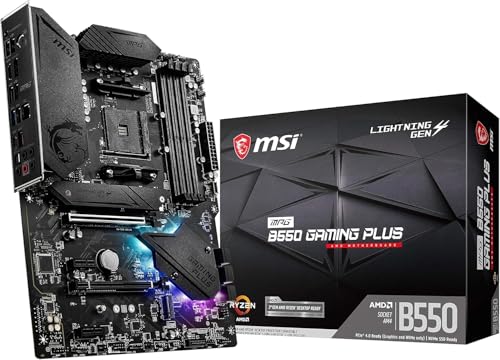
- MSI MPG B550 Gaming Plus Gaming Motherboard — the DDR4 side made concrete: an AM4 board whose DDR4 slots are exactly why the older standard remains a live option for value builds. Check on Amazon
Inside the Stick: The Architecture Changes That Actually Matter
The main comparison covers DDR5’s bandwidth headline. Three quieter engineering changes deserve their own examination, because each one surfaces in ownership in a way the headline does not. The first is the migration of voltage regulation onto the memory stick itself. DDR4 boards regulate memory voltage centrally, on the motherboard; DDR5 moves that job to a small power-management chip on every DIMM. The practical consequences run in several directions at once: the motherboard’s memory circuitry simplifies, the quality of voltage delivery now partly depends on the stick maker’s components, and a failed regulator takes one stick with it rather than presenting as a board fault. It also explains a subtle point in troubleshooting — a DDR5 stick that dies is more self-contained in its failure than a DDR4 stick ever was, and substitution testing identifies it cleanly.
The second change is on-die ECC, and it is the most misunderstood line in DDR5’s specification. Every DDR5 chip carries error-correction circuitry inside the die, checking data as it is stored and retrieved within the chip. This is real, and it improves the reliability of ever-denser memory cells. What it is not is the system-level ECC that workstations and servers mean by the term: it does not protect data in transit across the bus, and it does not report errors to the operating system. A buyer who needs genuine ECC — for a file server holding important data, for certain professional workloads — must still choose a board and kit that explicitly support ECC memory as a system feature, which is a platform question (some consumer platforms support it unofficially, some not at all) entirely separate from the DDR4-versus-DDR5 question. Conflating the two kinds of ECC has sold more than one buyer protection they did not receive.
The third change is the channel structure already touched on in this guide, worth one level deeper. A DDR5 stick presents itself to the processor as two narrower, independent sub-channels rather than one wide one. The processor can therefore keep more, smaller transfers in flight, which suits the way modern chips actually request data — many threads, many small asks — and it is a large part of why DDR5’s real-world advantage exceeds what its latency figures suggest it should be. The honest summary of all three changes: DDR5 is not merely DDR4 running faster. It is a redesign whose benefits concentrate in bandwidth, parallelism, and capacity, and whose costs concentrate in price and platform lock-in — which is exactly the trade the rest of this comparison keeps pricing from different angles.
Scenario Head-to-Heads: Five Machines, Judged Separately
The integrated-graphics build
This is DDR5’s clearest victory, and it is not close. A processor’s integrated graphics have no memory of their own; they borrow the system’s, and their performance is throttled directly by its bandwidth. Doubling that bandwidth with DDR5 lifts integrated graphics by margins that discrete-graphics gaming never sees from memory — the difference between a game being a slideshow and being playable at sensible settings. If your build has no graphics card, whether by budget or by design, the memory generation is a graphics decision, and DDR5 wins it outright.
The esports machine with a discrete card
At the other pole sits the competitive build chasing high frame rates at modest resolutions, where the processor matters enormously and memory bandwidth modestly. Here the honest verdict is that platform and processor choice dominate, and a mature DDR4 platform with a strong processor remains a legitimate esports machine — while a new buyer will land on DDR5 anyway, because that is where the current processors live. The generation is a passenger in this decision; let the processor shortlist drive.
The home-office fleet
For a household or small business equipping several ordinary machines — documents, browsing, video calls, light everything — the comparison resolves on logistics rather than performance. DDR4’s mature, inexpensive ecosystem keeps each seat’s cost down and spares are everywhere; DDR5 buys platform longevity and a longer support horizon. Offices that replace machines on a long cycle should weight the horizon; offices that equip to a budget today should weight the ecosystem. Neither answer is wrong, and mixing the two across a fleet is the only genuinely bad outcome, because it doubles the spare-parts shelf.
The creator workstation
Bandwidth-hungry work — large timelines, big datasets, virtual machines, simulation — is DDR5’s home ground twice over: the bandwidth itself, and the capacity story from this guide’s earlier section, where DDR5’s denser sticks reach large totals on two slots instead of four. A workstation buyer choosing DDR4 today is choosing a platform at the end of its road with a ceiling on both dimensions their work stresses. Verdict: DDR5, and among this list’s scenarios, the one where paying attention to kit speed and timings repays the most care.
The revival build around parts you own
The final scenario is the mirror of the workstation: a build whose budget is mostly already spent, sitting in your parts drawer — a good DDR4 kit, perhaps a capable older processor, a case and supply. Assembling those into a DDR4 machine for a family member, a spare room, or a home server is not settling; it is the highest-value move in this entire comparison, converting sunk parts into a working computer for the price of the missing pieces. DDR5 cannot compete with parts you already own, and no benchmark in this guide pretends otherwise.
The Two-Build Ledger: What Each Choice Costs Across a Decade
Single-build accounting dominates this debate, but platforms are rarely single-build purchases. Run the ledger across two machines — the one you build now and the one you build or upgrade in five years — and the generations’ economics clarify. The DDR5 buyer pays the new-platform premium once, now, and then carries the memory kit forward: the same sticks serve the next processor on the same socket family, and if the platform changes, DDR5 is the current standard the next board will also speak. The kit is bought once and amortised across a decade of computing, which reframes its price entirely — it is not a component of this build but a tenant of two.
The DDR4 buyer’s ledger splits by intention. If the DDR4 machine is the destination — a build meant to serve as-is for its whole life, common for family PCs, servers, and secondary machines — the ledger is excellent: the lowest platform cost, mature parts, and no stranded investment, because nothing was bought for a future that was never planned. If the DDR4 machine is a waypoint, with a platform upgrade expected in a few years, the ledger quietly doubles: the kit bought now will be retired early, the board has no forward path, and the saving that justified the platform evaporates into the next build’s full-price memory purchase. Neither generation is cheaper in the abstract. DDR5 is cheaper across a decade of continuous upgrading; DDR4 is cheaper for a machine bought to be finished. State which buyer you are — in writing, if the decision feels slippery — and the arithmetic does the rest.
Buying Memory Second-Hand, and Testing What You Buy
Both generations circulate heavily on the used market, and memory is among the safest components to buy used — it has no moving parts, no firmware to corrupt, and a failure rate low enough that manufacturers warranty it for life. It is not, however, a market to enter carelessly. The checks are specific. Match the kit’s identity exactly: two sticks sold as a kit were tested together at their rated profile, while two identical-looking single sticks bought separately carry a small but real risk of disagreeing at speed, particularly in DDR5’s more sensitive early generations and particularly at four-stick configurations. Read the label’s full part number rather than its headline speed, because makers sell near-identical kits with different chip configurations under the same speed rating, and the difference shows up precisely when you ask the kit to run at its profile on a board whose QVL lists one variant and not the other.
On arrival, test before the return window closes: install the kit, enable its profile, and run a proper memory diagnostic through several full passes — overnight is not excessive for a kit you cannot exchange later. A kit that passes at its rated settings in your board has told you everything a new kit would. A kit that fails belongs back with the seller while the failure is still their problem. The same protocol serves a DDR4 kit inherited from your own previous build: age alone does not degrade memory, but a kit that spent years at aggressive settings deserves one clean diagnostic pass before it anchors a new machine. Used memory, tested promptly, is the closest thing PC building has to a free lunch — and it is available in both generations, which is one more reason the platform, not the kit price, should drive this choice. For current new-kit shortlists across both generations, the roundup of the best motherboards for gaming tracks which boards pair with which memory to best effect.
A Worked Example: One Game Load, Two Memory Generations
Abstract bandwidth numbers persuade nobody; watch a single task instead. A modern game level loads tens of gigabytes of assets from the NVMe drive, decompresses them in memory, and stages them for the graphics card. On the DDR4 machine, the drive delivers its data, the processor decompresses into system memory at DDR4’s bandwidth, and the graphics card pulls what it needs across the PCIe bus. On the DDR5 machine the middle stage — the memory traffic — runs at roughly half again to twice the rate, depending on the kits. Where the load is limited by the drive, the two machines finish together; where it is limited by decompression and memory shuffling, the DDR5 machine pulls ahead; and in the common mixed case, the DDR5 machine wins by a margin you can measure with a stopwatch but might not feel with a kettle on. That is the whole comparison in one honest vignette: DDR5’s advantage is real, conditional, and sized by how much of your workload is memory traffic rather than something else. Integrated graphics remain the exception, because there the memory is the graphics card’s lifeline and every stage is a memory stage.
The Laptop and Mini-PC Footnote: When the Choice Is Made for You
Everything in this comparison assumes a desktop board with slots. Much of the computing world has quietly left that assumption behind. Laptops increasingly solder their memory to the board — in low-power LPDDR form, a close relative of the desktop standards — and mini-PCs split between soldered memory and compact SO-DIMM slots that follow the same DDR generations. In those machines the DDR4-versus-DDR5 question still exists, but it is asked once, at purchase, about the whole machine rather than about a board: a DDR4 laptop and a DDR5 laptop differ in platform generation, upgradeability (often none, on the soldered side), and lifespan exactly as their desktop counterparts do. The decision procedure from this guide transfers intact — choose the platform and its remaining life first, and let the memory generation be what it is — with one sharpening: where memory is soldered, capacity becomes the decision that cannot be revisited, and it deserves the deliberation desktop builders give to generation.
Should You Wait for the Next Generation?
Every memory standard has a successor in a laboratory, and DDR5’s is no exception — the industry has published the outlines of DDR6, and it will arrive on future platforms in due course. The question buyers actually mean is narrower: will waiting buy a meaningfully better machine soon? The historical rhythm answers it. New memory generations launch attached to new platforms, at high prices, with early firmware, and take a year or more to reach the maturity and value of the standard they replace — the early-adopter tax this guide described for DDR5 applies to its successor identically. Meanwhile the DDR5 platform available today is in its comfortable middle age: priced sanely, firmware mature, processors plentiful. A buyer with a working machine and no need can always wait for something; a buyer who needs a computer should buy the mature present rather than the announced future. When DDR6 platforms do arrive, this comparison will need a new edition — and its decision procedure, platform first and generation second, will not need changing at all.
First, Know What You Already Have: Identifying Your Current Memory
Half the readers of this comparison are not choosing in the abstract — they are standing in front of an existing machine, wondering whether its memory can move to a new board or whether a bigger kit is even the right purchase. Identification takes two minutes and three possible routes. The software route: your operating system’s task manager reports the memory’s generation and speed under its performance tab, and free system-information utilities report the full part number, from which every specification of the kit can be looked up exactly. The physical route: a stick’s label carries its generation, capacity, speed, and part number in plain print, and the notch position confirms the generation at a glance — but read the label with the machine off and the stick handled by its edges, as with any component.
The paper route is the one people forget: the existing motherboard’s manual and support page state its memory generation and its QVL, which together answer both halves of the practical question — what the machine has, and what it could take. Run this identification before any shopping, because the answer reorganises the whole decision. A reader who discovers a capable DDR4 kit in the current machine has just acquired the strongest argument in this comparison — reuse — while a reader who discovers a slow, small, single stick has learned that the current machine’s problem may be capacity and configuration rather than generation at all. Diagnosis before deliberation: it is the same discipline the testing guides in this series apply to faulty boards, applied here to a purchasing decision.
Frequently Asked Questions
Can I put DDR5 memory in a DDR4 motherboard?
No. The notch in the stick sits in a different position, so DDR5 memory will not physically seat in a DDR4 slot, and the electrical standards differ as well. Each motherboard supports one generation only — check the board’s spec sheet before buying memory.
Is DDR5 much faster than DDR4 for gaming?
With a dedicated graphics card, the difference is small — a few percent in CPU-limited games, often less. DDR5’s big gains are in bandwidth-hungry work and integrated graphics, where system memory doubles as graphics memory. Platform choice matters more than the memory generation itself.
Why do some Intel boards come in DDR4 and DDR5 versions?
Intel’s LGA1700 processors contain controllers for both standards, so board makers sold each model in two variants. You must pick one: the variant’s slots only accept its own generation. AMD’s AM4 is DDR4-only and AM5 is DDR5-only, so no such choice exists there.
Should I reuse my DDR4 kit in a new build?
If the kit is a good capacity and speed, reusing it on a DDR4 platform is one of the best savings in PC building, and the performance you give up versus DDR5 is modest for most uses. Just accept the platform end-date: the next major upgrade replaces board, CPU, and memory together.
Does DDR5 have lower latency?
Its rated latency figures in nanoseconds are typically a little higher than DDR4’s at their common speeds, while its bandwidth is far greater. In practice the two effects mostly offset in latency-sensitive tasks, which is why real-world results are close despite the very different spec sheets.
How much memory should a DDR5 build start with?
A two-stick kit remains the sweet spot for stability and dual-channel operation on either generation. Buy the platform’s recognised sweet-spot speed from the board’s qualified vendor list rather than the fastest kit advertised — stability at rated speed beats a headline number the board cannot hold.
Is DDR5 worth it for a basic office PC?
On performance, no — documents, browsing, and calls cannot tell the generations apart. On platform grounds, it depends on the machine’s expected life: a PC bought to serve many years benefits from being on the current standard, while a PC bought to a strict budget for ordinary work is exactly the build DDR4’s mature ecosystem serves best. The workload argues DDR4; the calendar argues DDR5; decide which argument is yours.
Does DDR5 memory run hotter than DDR4?
Slightly, at high speeds, because the on-stick power circuitry adds its own heat to the chips’ — which is why performance DDR5 kits wear substantial heat spreaders and why airflow over the memory area matters in tightly packed builds. At mainstream speeds in a normally ventilated case, temperatures are a non-issue on both generations and should not steer the choice.
Can I mix a DDR4 and DDR5 stick if I use an adapter?
No. Adapters that appear to promise this do not change the electrical and protocol differences between the generations, and no motherboard can speak both standards through one slot. Each board supports exactly one generation, physically and electrically. Treat any product suggesting otherwise as a novelty, not a component.
My DDR4 kit is rated faster than some DDR5 kits. Is it actually quicker?
In latency-sensitive moments it can be, which is why the honest comparisons in this guide refuse a blanket verdict. A top-tier DDR4 kit is a genuinely fast piece of memory that outperforms bargain DDR5 in several measures while trailing it in bandwidth. What it cannot do is move to a current platform — its speed is real, and so is its address. Both facts belong in the decision.
Will DDR4 become hard to find?
Gradually, as production shifts to the current standard — the same transition every memory generation has made. For the next several years the used market and remaining stock will keep DDR4 easy to source for repairs and additions, but new-kit selection will narrow and the best kits will disappear first. If your DDR4 machine will need a memory upgrade late in its life, buying that capacity sooner is a defensible hedge.
If I keep my DDR4 platform, what is the smartest memory upgrade?
Capacity and configuration before speed: moving from a single stick to a matched pair, or from a small kit to the capacity your work actually touches, transforms a machine in ways a faster kit of the same size never will. Buy the added memory as a kit rather than a lone stick where you can, enable its profile in the BIOS, and run a memory diagnostic afterwards — the platform may be mature, but the discipline costs nothing.
Does the memory generation affect how long the PC will feel fast?
Indirectly, yes. The generation itself adds little day-to-day speed, but it determines the platform’s remaining upgrade path — and machines feel fast for longer when their processor can be upgraded once mid-life. A DDR5 platform bought early in its life has that path ahead of it; a DDR4 platform’s path is behind it. Longevity, not bandwidth, is the strongest long-term argument in this whole comparison.