Disclosure: As an Amazon Associate, ilcastellomenu.com earns from qualifying purchases. Product links on this page may earn a commission at no extra cost to you.
If you have wondered what is a NAS hard drive, the short answer is that it is a hard drive designed specifically for network-attached storage: built to run continuously, to work shoulder-to-shoulder with other drives in a multi-bay enclosure, and to cooperate with RAID controllers instead of fighting them. It looks like any other 3.5-inch drive, and that is where the similarity to a desktop drive ends.
This explainer covers how NAS drives differ in design, firmware and ratings, the terms manufacturers use, and the situations where those differences matter. When you are ready to see the category in product form, Best Hard Drives for Home NAS shows the main lines, and the head-to-head in NAS Drive vs Regular Hard Drive argues the comparison in full.

Gear mentioned in this guide
The products below are examples that fit the situations described in this article. They are mentioned so you can picture the kind of hardware involved, not as a claim that one model suits every computer, console or NAS. Check the form factor, interface and capacity against your own system before you buy anything.
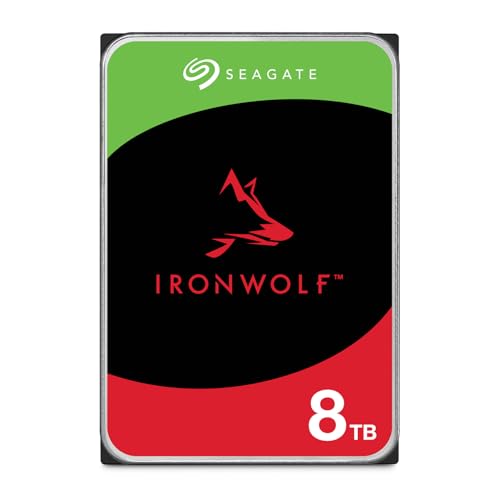
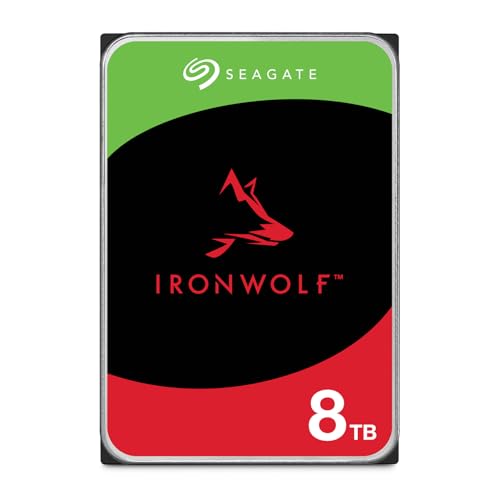
Seagate IronWolf 8TB NAS HDD — Seagate 8TB IronWolf Internal NAS Hard Drive | SATA 6 Gb/s (ST8000VNZ04) | 24/7 NAS-optimized HDD. AgileArray, All-CMR, RV sensors for multi-bay, 180TB/year. 3-Year Warranty + 3-Year Rescue. Check on Amazon

WD Red SA500 1TB NAS SSD — Western Digital 1TB WD Red SA500 NAS 3D NAND Internal SSD – SATA III 6 Gb/s, 2.5″/7mm, Up to 560 MB/s – WDS100T1R0A, Solid State Hard Drive. Check on Amazon
In this guide
The job a NAS drive is designed for
A NAS enclosure is a small, always-on computer whose drives serve an entire household or office: backups arrive at night, media streams in the evening, files sync during the day. The drives never truly rest, they share a warm, vibrating metal box, and if RAID is configured, each drive’s data is intertwined with the others’. A NAS hard drive is designed from that description outward. Its motor and bearings are specified for continuous rotation, its electronics are validated for enclosure temperatures, and its firmware assumes neighbours, arrays and a controller watching its behaviour.
Contrast that with a desktop drive, designed for one drive in a spacious case, working office hours, answering to no controller. Neither design is ‘better’ in the abstract; they are answers to different questions. The NAS premium buys fitness for the harder workplace, and the rest of this explainer itemises exactly what that fitness consists of, so you can decide whether your workplace is the hard one.
Key terms, translated
Duty cycle means the operating pattern the drive is built for — continuous for NAS drives, intermittent for desktop drives. Workload rating is the annual data throughput the drive is designed and warranted to sustain. Rotational vibration, or RV, describes the shaking drives inflict on each other in an enclosure; RV sensors let NAS drives compensate. TLER and ERC are names for the limited error-recovery timing that keeps arrays from dropping drives. CMR, conventional magnetic recording, is the recording method NAS lines use for predictable sustained writes. Each term names a real behaviour you will meet again in specification sheets.
Firmware: the difference you cannot see
The most important NAS feature is invisible. When any drive struggles to read a damaged sector, it wants to retry. A desktop drive retries for a long time, which is correct when it is the only copy of the data. A NAS drive in a RAID array retries briefly, then reports the error to the controller, which reconstructs that data from the array’s redundancy and carries on. If a drive retries too long, the controller may eject it from the array as unresponsive, degrading the array over a single bad sector. NAS firmware’s short, polite error timing prevents that cascade.
NAS firmware also integrates with the enclosure’s health monitoring, reporting SMART data in the form NAS software expects, and it tunes power and acoustic behaviour for a box that lives in a home rather than a data centre. Some NAS lines add features for surveillance workloads or for integration with the enclosure maker’s recovery services. None of this appears in a speed test, which is why NAS drives must be judged by design and validation rather than benchmarks.
Hardware: vibration, heat and continuous duty
In a four-bay enclosure, four motors spin at slightly different rhythms and the chassis hums with combined vibration. Hard drive heads float above platters at microscopic distances, so vibration is a genuine engineering problem, not a comfort issue. NAS drives address it with RV sensors that detect the shaking and let the drive adjust, plus mechanics validated for a specified number of bays. Entry NAS lines suit small enclosures; higher lines are built for larger chassis with more neighbours and more vibration to cancel.
Heat is the other constant. An always-on box in a cupboard asks its drives to live warm for years, so NAS drives are specified and tested for sustained enclosure temperatures, and NAS enclosures are designed with airflow paths their owners must keep unblocked. This is also why the health routine in How to Test the Health of a Hard Drive pays attention to temperature: a NAS drive running far hotter than its siblings is reporting an environment problem before it becomes a drive problem.
Common misconceptions about NAS drives
The first misconception is that NAS drives are faster. They are not built for speed; they are built for endurance, cooperation and consistency, and network connections usually limit transfer rates before the drives do. The second is that any drive becomes a NAS drive by being installed in a NAS. Installation changes nothing about a drive’s design brief, vibration tolerance or error timing. The third is that RAID plus NAS drives equals backup. RAID survives a drive failure; it does not survive deletion, theft, fire or ransomware, which is why NAS owners still keep an external or off-site copy, often on drives like those in Best Hard Drives for Backups.
A fourth misconception runs the other way: that NAS drives are exotic or fragile. They are mainstream products from the same manufacturers as desktop drives, with longer warranties reflecting their intended service. Used in a desktop they behave unremarkably, and used in a NAS they simply do the job they were designed for, quietly, for years — which is the entire point.
Recognising a NAS drive on a specification sheet
When a product page is long on adjectives and short on facts, these are the lines that identify a genuine NAS drive and the right tier for your enclosure.
Step 1: Look for the continuous-duty statement
The specification will describe the drive as designed for always-on, multi-user NAS environments, with a workload rating well above desktop lines. That statement, plus the warranty length that accompanies it, is the manufacturer’s own description of the drive’s intended life. If the page describes a quiet desktop upgrade instead, you are reading about a different product wearing similar clothes.
Step 2: Check the bay rating
NAS lines specify how many bays they are validated for, reflecting their vibration compensation. Match it to your enclosure, with headroom if you plan to expand. A drive rated for small enclosures in a large, fully populated chassis is the NAS equivalent of the original desktop-drive mistake, just at a higher price.
Step 3: Confirm CMR recording
NAS lines use conventional recording for predictable sustained writes, which matters most during array rebuilds. Manufacturers publish recording technology in specification documents even when retail boxes omit it. For any drive destined for RAID, confirm CMR explicitly rather than assuming it from the product family name.
Step 4: Verify the enclosure maker’s compatibility list
Synology, QNAP and other makers test drives in their enclosures and publish lists. A listed drive is validated as a system — firmware, thermals, behaviour — not just as a component. This check takes two minutes on the maker’s site and removes an entire category of surprise from a purchase that is supposed to reduce surprises.
Step 5: Note the health and recovery extras
Some NAS lines integrate with enclosure health dashboards or include data-recovery services for a period. These extras do not change the drive’s mechanics, but they change the ownership experience when something goes wrong. Factor them in when two drives are otherwise equal, and register the drive after purchase so the warranty clock is properly documented.
Common mistakes to avoid
Buying by capacity alone
Two drives of identical capacity can be designed for opposite lives. In NAS shopping, capacity is the last specification to settle, after duty, bay rating, recording technology and compatibility. Reversing that order is how desktop drives end up in arrays and how buyers pay twice: once for the wrong drive, once for its replacement.
Assuming a NAS drive makes backups optional
A NAS centralises data, which makes it a wonderful backup target for your computers and a dangerous single point for the household if its own contents exist nowhere else. The NAS itself needs a backup — an external drive, a second location, or cloud storage for the irreplaceable parts.
Blocking the enclosure’s airflow
NAS drives are specified for enclosure temperatures that assume the enclosure can breathe. A NAS sealed in an unventilated cupboard or buried under papers cooks its drives slowly. Give the box air, check temperatures in the dashboard, and treat rising temperatures as the maintenance prompt they are.
Practical tips that make a real difference
Stagger drive ages in an array
If you fill a NAS over time, slightly staggered purchases mean drives reach old age at different times instead of together. Combined with health monitoring, staggering turns array maintenance into occasional single-drive swaps rather than a fleet-wide cliff edge.
Let the NAS report to you
Turn on email or app notifications for health changes, completed backups and temperature warnings. A NAS is an appliance that knows when it is unwell; the only failure mode is an owner who never hears about it. Five minutes of notification setup completes what the NAS drives started.
What is a NAS hard drive’s warranty and rating really telling you?
A NAS drive’s paperwork is a compressed description of its intended life, and learning to read it turns marketing into information. The workload rating states the annual data volume the drive is designed and warranted to sustain; compare it across lines and you are comparing design briefs, not advertising. The duty statement — continuous operation — tells you the motor, bearings and electronics were specified for a life without rest. The bay rating tells you how much neighbourly vibration the drive’s compensation was validated to handle. The warranty term tells you how long the manufacturer will stand behind all of the above, in writing, with a replacement.
Read together, these four numbers let you place any drive on the map without a single benchmark. A drive with a high workload rating, continuous-duty statement, generous bay rating and long warranty is a heavy NAS citizen whatever its box art says. A drive missing most of them is a desktop drive whatever its listing implies. This literacy is the explainer’s real payload: NAS-ness is not a colour of label or a word in a product name, it is a set of verifiable specifications, and you now know which specifications they are and where they are published.
NAS drives and the surveillance and enterprise neighbours
The storage shelf has more specialised citizens than the NAS drive, and placing it among its neighbours sharpens the definition. Surveillance drives share the continuous-duty brief but tune for the camera recorder’s endless sequential writing, tolerating error-handling shortcuts that video survives and file data does not. Enterprise nearline drives extend the NAS concept to data-centre scale: higher workload ratings, larger bay counts, features for managed fleets, and prices that reflect professional procurement. Consumer NAS drives sit between desktop and enterprise, borrowing the duty and firmware lessons at household scale and price.
The practical lesson is that specialisation in storage is a spectrum of design briefs, not a ladder of quality. A surveillance drive is not a failed NAS drive and an enterprise drive is not a deluxe one; each is the correct answer to a specific recorder, array or fleet. Your enclosure’s compatibility list exists precisely to keep these cousins sorted. When a listing tempts you with a neighbouring specialisation at a bargain price, ask what its brief optimises and what it trades away, because the trade is always there, and it is always paid in the currency your workload values most.
A short history of why NAS drives exist at all
NAS drives became a distinct category when home and small-office network storage grew up. Early adopters filled enclosures with desktop drives and met the failure modes this batch keeps naming: arrays dropping drives over error-recovery timing, performance sagging in crowded chassis, drives worked beyond their duty brief expiring early. The enclosure makers and drive makers answered together, with validated compatibility lists on one side and, on the other, drives whose firmware timed errors for arrays, whose mechanics compensated for neighbours, and whose ratings promised continuous service. The category is therefore not a marketing invention; it is a fossil record of real failures, each specification a response to a way storage once went wrong.
That history explains the category’s conservatism. NAS lines change slowly, capacities climb steadily, and the marketing is comparatively quiet, because the buyers are people who read specification sheets and compatibility lists. It also explains why the advice around NAS drives sounds repetitive across every guide in this batch: the lessons were learned expensively, by other people’s arrays, and the entire point of the category is that you do not have to learn them again with yours.
How to explain a NAS drive to the person sharing your NAS
Most NAS boxes serve more than one person, and the other people deserve a working explanation that does not require this entire article. The short version travels well: these drives are built to work all day and all night, to share a box with other drives without disturbing them, and to ask the system for help quickly when they hit a problem instead of struggling alone. That is why they cost a little more and why the cheap desktop drive from the old computer is not going into the family archive, however tempting its free capacity looks on a Sunday afternoon.
The explanation matters because NAS discipline is a household behaviour: leaving the box’s vents clear, not unplugging it casually, mentioning odd noises or warning lights instead of ignoring them, and understanding why the blinking dashboard email is a prompt for action rather than trivia. A NAS drive is designed for its workplace; the household’s job is to keep the workplace worthy of the design. Five minutes of shared understanding at setup is worth more than any single specification on the drive’s sheet, because the sheet cannot move the laundry basket off the enclosure’s vents.
It is worth closing the explainer with the drive’s relationship to the data it will hold, because that relationship explains the category’s seriousness. A desktop drive’s failure is usually an inconvenience to one person; a NAS drive stands inside a system that a whole household or a small business has agreed to trust with the archive, the backups and the media library at once. The drive’s designers know the weight of that agreement, and the specifications this article has translated — duty, vibration, error timing, workload — are how they honour it in metal and firmware. When you choose a NAS drive, you are not buying a faster or fancier component. You are buying a component whose makers understood the promise your NAS makes to everyone who depends on it, and built accordingly.
Frequently asked questions
What does NAS stand for?
Network-attached storage: a dedicated storage device connected to your network, sharing files and services with every authorised device on it. A NAS hard drive is simply a drive designed for the continuous, multi-drive environment inside such a device, as opposed to the intermittent, single-drive environment of a desktop PC.
Can I use a NAS hard drive in my desktop?
Yes. It connects by standard SATA and works normally, though its firmware is tuned for arrays and it usually costs more than a desktop equivalent. People often repurpose retired NAS drives into desktops. The reverse substitution — desktop drives doing NAS duty — is the one that gives up design margins, not this direction.
How is a NAS drive different from a surveillance drive?
They are cousins: both are continuous-duty designs. Surveillance drives are tuned for the constant sequential writing of camera recorders and may deprioritise error correction that video can tolerate. NAS drives are tuned for mixed file workloads and RAID cooperation. Use each in its intended recorder or enclosure for the behaviour it was validated to deliver.
Do NAS drives need RAID to be worthwhile?
No. Even in a single-bay NAS, the continuous-duty design, workload rating and warranty suit an always-on box. RAID adds failure tolerance on top, but the drive’s design fitness matters from the first bay onward. That said, a single drive of any kind holding the only copy of your data is a risk no product line can fix.
Are NAS SSDs a thing?
Yes. NAS-rated SSDs exist for caching and for all-flash arrays, designed with endurance ratings for continuous shared workloads. They suit acceleration and demanding small-file duties, while HDDs still carry bulk capacity. Many home NAS setups mix both: SSDs for speed where it is felt, NAS HDDs for the terabytes where it is not.
How long should a NAS drive serve?
With continuous duty, plan in years of service and watch health indicators rather than a calendar alone. Many owners proactively replace NAS drives as they age past the middle of their expected life, especially in arrays, using the lifespan guidance in How Long do Hard Drives Last. The dashboard’s trend lines, not a birthday, should make the final call.
The bottom line
A NAS hard drive is a drive designed for a specific, demanding workplace: always on, surrounded by vibrating neighbours, and cooperating with an array controller. Its value is fitness for that workplace — in firmware, mechanics and ratings — and once you have read a specification sheet with those eyes, you will never mistake a desktop drive in a NAS listing for the real thing again.
Inside the enclosure: a day in the life of network storage
To understand what a NAS drive is, watch what its home asks of it across an ordinary day. Before anyone wakes, the NAS finishes the night’s scheduled work: the household’s backups land from three machines, the media library’s new additions are indexed, the array’s integrity scrub walks the surfaces checking that what was written months ago still reads as written. Breakfast brings phones syncing photographs over the home network. The working day adds a home office’s documents, opened, edited and saved by two people in different rooms, while a security camera writes its stream in an endless loop and a teenager’s game console pulls a large download through the same enclosure that is serving a film to the television by evening. Nothing in that day resembles a desktop drive’s life of single-user bursts and long sleeps. The NAS drive’s day is continuous, shared and layered — requests arriving in parallel from people, schedules and machines — and every design decision in its construction answers that day: the firmware that shares attention fairly, the mechanics rated for hours that never pause, the sensors that keep neighbouring drives honest company.
Scale the day down and the definition survives. Even a one-person household’s NAS runs its schedules at night, serves its owner from two or three devices in rotation, and never truly rests, because the enclosure’s promise is availability — files reachable from the sofa, the desk and the phone without waking a computer. A drive built for that promise is what the NAS label means, whether the enclosure has one bay or eight.
The parts you can point to, and what each is for
Open the specification of a NAS drive and several physical choices distinguish it from its desktop cousin. Rotational vibration sensors — small accelerometers on the circuit board — detect the shaking produced by neighbouring drives and feed corrections to the head-positioning system in real time, because in a crowded enclosure the heads must hold a track measured in millionths while the chassis hums around them. The motor and bearing assembly is specified for continuous rotation rather than the start-stop rhythm of desktop life, with the lubricant, balance and thermal design that implies. The top cover and casting are often stiffer, the better to keep the internal geometry stable in a warm, vibrating bay, and the drive’s power profile is tuned to spin up reliably in company, since enclosures stagger or simultaneous-start their bays in ways a lone desktop never asks.
None of these parts appears in the marketing headline, and all of them appear in the price. That is the honest summary of what a NAS drive is at the hardware level: not a faster drive, but a drive whose unglamorous components have been specified for a harder room. Judging one by its transfer speed is like judging a delivery van by its lap time; the figure is real, and it is not the point.
When a NAS drive is not the answer
Definitions sharpen at their edges, and this one has three worth marking. A drive in a USB enclosure attached to a router — the arrangement sometimes sold as a poor person’s NAS — lives a life closer to an external drive’s: one connection, intermittent duty, no array, no company. It gains little from NAS breeding, and a good desktop or external drive serves it honestly. A surveillance recorder’s drive, though it works continuously, answers a different master — an unbroken sequential write stream — and has its own dedicated lines for that reason; a NAS drive can do the job, but it is a guest in that role too. And a single drive inside a desktop that merely stores media for the household over a network share is a desktop drive with a sharing setting, not a NAS drive’s use case, until the machine starts running around the clock and other devices depend on it — at which point the honest owner re-reads this article and reconsiders the drive’s pedigree at its next replacement.
The pattern in all three edges is the one this guide has argued from the start: the label follows the life, not the network cable. Ask what life the drive will live — hours, company, redundancy, dependence — and the question of what a NAS drive is resolves into whether that life is the one it describes.
A short glossary for the NAS shelf
Array: several drives organised by the NAS to act as one store, with or without redundancy. RAID: the family of methods for that organisation, trading capacity for protection against a drive’s failure. Rebuild: the process of reconstructing a replaced drive’s contents from the survivors, the array’s hardest day. Scrub: a scheduled read-through that verifies stored data still matches its checksums. TLER and error recovery control: the firmware discipline that makes a drive report a bad patch quickly so the array can supply the data from elsewhere. RV sensor: the vibration sensor described above. Workload rating: the annual data volume the drive is designed and warranted to move. Hot swap: replacing a drive while the system runs, a property of the enclosure the drive must cooperate with. Keep this list beside the enclosure; the NAS’s own menus use the same vocabulary, and fluency in it is most of ownership.
How the category is evolving
The NAS drive’s world is shifting at both ends. At the small end, home enclosures grow more capable and more numerous, and the line between a NAS drive and a high-end desktop drive is patrolled by exactly the features in this article — workload ratings, vibration handling, error discipline — rather than by any single breakthrough. At the large end, the same design philosophy scales upward into enterprise drives whose capacities and ratings dwarf the home shelf, and downward pressure from solid-state storage keeps rearranging which tiers hold which data. What does not change is the definition’s core: a drive specified for continuous, shared, redundant service. Technologies will keep re-drawing the shelf; the job description written on this page will still describe the drives standing on it, because the job — be available, in company, around the clock, and fail honestly when you must — is a property of networks, not of any one recording technology.
For the reader speccing a home system today, our round-up of NAS hard drives for Synology and the broader guide to hard drives for RAID translate this definition into current product lines, enclosure by enclosure.
Questions the definition always raises
Is a NAS drive wasted in a single-bay enclosure?
No. It loses the array-specific benefits — there is no rebuild to protect and no neighbour to compensate for — but it keeps the continuous-duty design, the workload rating and the firmware’s honest error reporting, and a single-bay NAS still runs the around-the-clock life that defines the category. The premium buys less in one bay, but it does not buy nothing.
Can a NAS drive be too specialised for home use?
Only in the sense that its virtues may go unexercised: in an intermittent, single-user role it behaves as a well-built drive and its specialisations simply wait, unused, like a van’s cargo capacity on a shopping trip. There is no home scenario in which its design actively harms — the specialisation is all in durability and discipline, none of it in fragility or fussiness.
Why do some NAS drives omit their spin speed?
Because several NAS lines manage rotational speed as part of their power and acoustic tuning rather than fixing it as a headline figure, and the manufacturers prefer you to judge the drive by its transfer rates, acoustics and ratings. It is the category’s philosophy in miniature: the service characteristics are the specification, and the mechanical trivia serves them.
Does a NAS drive need special cables, bays or software?
No. It uses the same connections, mounts in the same trays and is managed by the same NAS software as any drive; its specialisation is internal. The one list to check is the enclosure maker’s compatibility list, which exists because firmware interactions matter in arrays — the drive’s presence on that list is part of what you are buying.
The definition, tested against four drives on a shelf
Imagine four drives in a row. The first is a desktop drive, rated for office hours, headed for a family PC that sleeps at night. The second wears the NAS badge, with its sensors, ratings and array-tuned firmware, headed for the enclosure that serves the whole house. The third is a surveillance drive, built to write an endless video loop. The fourth is an enterprise drive, the NAS idea carried to data-centre scale. A beginner sees four similar metal bricks; a reader of this article sees four answers to four questions about working life, each correct somewhere and wasted somewhere else. That act of seeing — past the shared shape to the intended service — is the entire content of the definition, and it generalises to every storage purchase you will ever make. The drives are not ranked. They are employed, and employment, in storage as elsewhere, is about the fit between the worker and the work.
So the shortest honest answer to the question this article’s title asks is a sentence long: a NAS hard drive is a hard drive designed — in its firmware, its mechanics and its warranted ratings — for the continuous, shared, redundant life inside a network storage enclosure. Everything else in these pages is that sentence, unfolded. Keep it, and the shelf will never confuse you again.
Choosing between the NAS tiers: standard, pro and enterprise echoes
Within the NAS category itself, manufacturers draw a second set of lines, and the home buyer benefits from reading them as a workload ladder. The standard tier is built for the home and small-office enclosure: a handful of bays, continuous duty, a workload rating sized for households that back up, stream and share in earnest. The pro tier raises the rating, lengthens the warranty and assumes more bays, more users and a heavier annual throughput — the small business whose NAS is genuinely infrastructure. Above them, enterprise drives assume rack environments, dozens of neighbours and duty that makes the home tiers look part-time, and they bring requirements of their own in power, cooling and cost that rarely belong in a house.
The honest guidance is to buy the tier your enclosure’s life matches and resist the upward drift, because the tiers’ premiums purchase ratings a home system will never approach. A household NAS that moves a fraction of its drives’ rated workload each year gains nothing measurable from a pro tier except the longer warranty — which is a legitimate thing to buy deliberately, priced as insurance, and a poor thing to buy accidentally, priced as performance. Read the ratings against your own measured traffic, as this site’s other guides advise, and the tier chooses itself.
What a NAS drive cannot do
Definitions include limits, and this drive has three that marketing prefers to leave in the footnotes. It cannot make a badly designed system safe: a NAS drive in an array with no backup is a well-engineered participant in an unsafe system, because RAID protects against a drive’s failure and against nothing else — not deletion, not ransomware, not fire, not the enclosure’s own controller dying in a mood. It cannot compensate for a hostile environment: an enclosure cooking in a sealed cabinet or shaking on top of a washing machine will spend any drive’s margins, NAS-bred or not. And it cannot report what its enclosure hides: sealed behind a bridge or a dashboard that summarises too aggressively, even the most communicative drive’s health data is only as available as the system lets it be, which is why enclosure choice and drive choice are one decision wearing two hats.
Hold those limits in view and the drive takes its proper place in your thinking: a component — an excellent, specialised, honestly specified component — inside a system whose safety comes from copies, environment and attention. That is not a deflation of the category. It is the definition, completed.
The five-minute version for the relative who just bought an enclosure
They will call you, enclosure in hand, asking which drives to put in it, and this is the answer that fits in the call. Buy the drives the enclosure maker lists as compatible, from the line built for network storage, all the same model, sized for the library you measured rather than the one you fear. Put them in, let the enclosure build its array, turn on the health reports and the scheduled checks, and connect a backup that does not live inside the same box. Then leave it alone. The drives you chose were designed, in every particular this article has described, to be forgotten in exactly that way — working continuously, in company, reporting honestly, for years. Forgetting them safely is not neglect. It is the product working as designed, and the definition, one last time, in its most practical form.
Why the category exists at all: the problem it solved
Wind back to the first generation of home network storage and the category’s origin explains its design. Early enclosures were filled with whatever desktop drives their owners had, and a pattern of failures taught the industry its lesson in public: drives dropped from arrays during rebuilds because their firmware retried errors too patiently, enclosures shook their residents into rising error counts, and drives rated for office hours aged in dog years under continuous duty. The NAS drive was the manufacturers’ answer, engineered item by item against that failure list — the timed error recovery, the vibration sensing, the workload ratings, the continuous-duty mechanics. Knowing the origin matters because it tells you the features are not decoration added to justify a badge; each one is a scar from a specific, documented way that ordinary drives died in extraordinary service. When a reviewer calls the category marketing, ask which item on the failure list they consider imaginary. The enclosure owners who lived through that generation rarely find one.
There is a final, quiet test of whether you have understood the category, and it takes place the next time you stand in front of any shelf of drives, for any purpose. If you find yourself asking first what life the drive will live — its hours, its company, its workload, its worst day — and only then which badge it wears, the definition has done its work. The badge is the summary. The life is the specification. Buy for the life, and the badge will take care of itself.
One enclosure, three generations: the definition at work over time
Watch a single household enclosure across a decade and the definition stops being abstract. Its first drives are chosen from this article’s logic, serve through the years when the household’s library is photographs and documents, and retire with clean logs and high hours. Their replacements, larger, join a life that now includes camera streams and a home business, and the tier steps up accordingly — not because bigger is better, but because the life grew heavier and the drives’ design brief follows it. The third generation arrives alongside a fast solid-state tier the first enclosure could not have imagined, and takes the purest form of the role yet: bulk, patience, redundancy. Three generations, three different product lines, one unchanging definition underneath — a drive designed for the life inside the box. That continuity is why the category will outlast any particular model you can buy today, and why learning the definition is worth more than memorising this year’s shelf.
Carry the definition with you and every adjacent question gets easier: whether the old desktop drive can fill the empty bay for a month (it can, as a guest, with backups verified), whether the surveillance drive on offer belongs in the NAS (it does not, quite), whether the enclosure’s compatibility list is worth its fussiness (it is, and now you know why). A good definition is a tool that keeps working after the article ends. This one asks to be used at every shelf, in every spec sheet, for every drive that will ever hold your household’s memory — which is to say, it asks very little, and it gives back years.
And when the next enclosure arrives — larger, quieter, smarter — the drives you choose for it will be chosen the same way: by the life inside the box, described honestly, matched deliberately. That is what a NAS hard drive is, and it is also how you will know one when you see it.
Everything else — the models, the tiers, the shelves that rearrange themselves each season — is commentary on that single, durable idea.
Learn the idea once, and you will never need to memorise a shelf again — the shelf will explain itself to you, drive by drive, in the language of hours, company and honest failure that this article set out to teach.
That fluency, in the end, is the real product on offer here.
Use it well, and use it for years.