Disclosure: As an Amazon Associate, ilcastellomenu.com earns from qualifying purchases. Links on this page are affiliate links; they cost you nothing extra. Prices and availability change often, so check the current Amazon listing before you buy.
These cfexpress card reviews exist because choosing professional media from a specification sheet is a reliable way to buy the wrong card confidently. Across the professional lines below, the differences that matter in the field are sustained behaviour, build, support and sourcing — not the biggest number on a box. Each card here is treated in prose, positioned honestly by tier, and judged on the work it is actually bought for: long bursts, long takes, fast offloads and years of uneventful service. Read the safety notes as part of the reviews, because with CFexpress media, how you buy and handle the card matters as much as which card you buy.
Key Takeaways
Key Takeaways: Every card below is a Type B professional card except where Type A is discussed for Sony owners — confirm your slot type first. The professional lines differ mainly in sustained-write positioning, build and support, not in whether they are ‘fast enough’. Buy genuine from authorised sellers, test before paid work, format in-camera, and back up the same day. There is no single winner; there is a right match for your camera, your modes and your risk tolerance.
In this guide
How These Cfexpress Card Reviews Were Put Together
Start with the physical fact that shapes everything else: CFexpress comes in sizes that do not swap. Type B is the larger card used by most brands’ flagship mirrorless and cinema bodies. Type A is the smaller card used by a smaller set of Sony bodies. They share a name and a technology family, but a Type A card rattles uselessly in a Type B slot and a Type B card simply does not fit a Type A slot. There is no adapter, no workaround and no firmware trick. Your camera decides the type for you, completely and permanently, so the first step of any purchase is reading the slot, not comparing brands.
Headline speeds are burst speeds, and honest buying means understanding the difference. The large numbers printed on CFexpress packaging describe short peaks under ideal conditions. What decides whether a camera clears its buffer smoothly, and whether a high-bitrate video mode records a full take without stopping, is sustained performance — what the card can keep doing minute after minute as it warms up and fills. Camera makers signal this through the recording modes they certify for a card, and card makers signal it through sustained-write positioning on their professional lines. Judge a card for video by its sustained reputation and your camera’s approved-media guidance, not by the biggest number on the box, and judge it for stills by how it behaves at the end of a long burst, not the start.
A note on method, because it shapes every verdict below. These reviews deliberately avoid ranking cards by printed peak figures, which are measured differently by different makers and describe bursts, not working days. Instead each card is assessed on its positioning: what its maker built it for, how its line is structured, what support stands behind it, and which shooters it suits. That is less tidy than a speed league table and considerably more useful, because the card that tops a benchmark chart can still be the wrong purchase for a videographer’s sustained takes or a photojournalist’s weather-beaten bag.

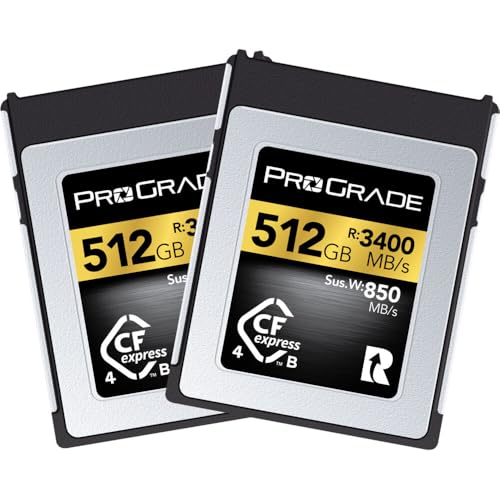
ProGrade Digital CFexpress Type B Gold
ProGrade Digital built its reputation with professional photographers and filmmakers, and the Gold series CFexpress Type B card is its mainstream professional line. In prose terms it sits in the premium tier: positioned for sustained professional work, sold through authorised channels, and backed by the company’s own recovery software ecosystem and support aimed at working shooters rather than casual users.
In daily handling the card behaves like professional media should: it formats cleanly in-camera, clears long bursts without the camera feeling held back, and offloads through a proper CFexpress reader at the pace a working day demands. None of that is glamorous, and that is exactly the point — media should disappear into the background of a shoot.
Who it suits is easy to describe: a shooter whose camera actually requires or rewards CFexpress, who records long clips or long bursts, and who would rather pay the premium tier once than troubleshoot media mid-assignment. Who should skip it is equally clear: anyone whose camera only takes SD cards, because this card will not fit that slot at all, in any adapter, ever.

Angelbird AV Pro CFexpress Type B
Angelbird designs its AV Pro line specifically around sustained recording, and that focus is the reason filmmakers keep naming it. The card is positioned in the premium tier, with an emphasis on stable performance across a long take rather than a short benchmark burst, plus a ruggedised build intended for sets, travel and repeated daily offloads.
In daily handling the card behaves like professional media should: it formats cleanly in-camera, clears long bursts without the camera feeling held back, and offloads through a proper CFexpress reader at the pace a working day demands. None of that is glamorous, and that is exactly the point — media should disappear into the background of a shoot.
Who it suits is easy to describe: a shooter whose camera actually requires or rewards CFexpress, who records long clips or long bursts, and who would rather pay the premium tier once than troubleshoot media mid-assignment. Who should skip it is equally clear: anyone whose camera only takes SD cards, because this card will not fit that slot at all, in any adapter, ever.

Lexar Professional CFexpress Type B Gold
Lexar’s Professional Gold series is the company’s flagship CFexpress Type B offering, aimed squarely at high-end stills bursts and high-bitrate video. It sits in the premium tier, benefits from Lexar’s long history in professional media, and is widely stocked by authorised photographic retailers, which makes sourcing a genuine card straightforward.
In daily handling the card behaves like professional media should: it formats cleanly in-camera, clears long bursts without the camera feeling held back, and offloads through a proper CFexpress reader at the pace a working day demands. None of that is glamorous, and that is exactly the point — media should disappear into the background of a shoot.
Who it suits is easy to describe: a shooter whose camera actually requires or rewards CFexpress, who records long clips or long bursts, and who would rather pay the premium tier once than troubleshoot media mid-assignment. Who should skip it is equally clear: anyone whose camera only takes SD cards, because this card will not fit that slot at all, in any adapter, ever.

SanDisk Extreme Pro CFexpress Type B
SanDisk brings the Extreme Pro name from its SD and CompactFlash lines into CFexpress Type B, and the card targets the same professional audience. It is positioned in the premium tier, pairs naturally with SanDisk’s own readers and workflow tools, and is one of the easiest genuine cards to source quickly from authorised sellers when a shoot cannot wait.
In daily handling the card behaves like professional media should: it formats cleanly in-camera, clears long bursts without the camera feeling held back, and offloads through a proper CFexpress reader at the pace a working day demands. None of that is glamorous, and that is exactly the point — media should disappear into the background of a shoot.
Who it suits is easy to describe: a shooter whose camera actually requires or rewards CFexpress, who records long clips or long bursts, and who would rather pay the premium tier once than troubleshoot media mid-assignment. Who should skip it is equally clear: anyone whose camera only takes SD cards, because this card will not fit that slot at all, in any adapter, ever.

Delkin Devices Black CFexpress Type B
Delkin’s Black series is the durability flagship of the Delkin range, marketed around a reinforced build and a replacement-focused support promise. It sits in the premium tier and appeals to photographers who shoot in harsh conditions — cold, wet, dusty locations where a card’s physical toughness matters as much as its electronics.
In daily handling the card behaves like professional media should: it formats cleanly in-camera, clears long bursts without the camera feeling held back, and offloads through a proper CFexpress reader at the pace a working day demands. None of that is glamorous, and that is exactly the point — media should disappear into the background of a shoot.
Who it suits is easy to describe: a shooter whose camera actually requires or rewards CFexpress, who records long clips or long bursts, and who would rather pay the premium tier once than troubleshoot media mid-assignment. Who should skip it is equally clear: anyone whose camera only takes SD cards, because this card will not fit that slot at all, in any adapter, ever.
The Type A Exception Sony Owners Must Read
Sony Tough CFexpress Type A
Sony’s Tough CFexpress Type A line serves the smaller Type A slot found in certain Sony bodies, and it deserves its own paragraph because everything above is Type B. The Tough positioning emphasises physical resilience in a very small card, and Sony’s combination slots on those bodies add a flexibility Type B owners do not get — the same slot can accept SD media for gentler work. If you shoot one of those bodies, your shortlist starts and ends with Type A cards like this one, and the Type B reviews above are useful only as a guide to what the wider format offers. Never order across the divide: the cards do not fit each other’s slots, in either direction, with any adapter.
Treat sourcing as part of the product. Fake professional media is a mature business, complete with convincing packaging, and a too-cheap CFexpress card from an unknown marketplace seller is one of the most expensive bargains in photography. The defence is boring and total: authorised sellers only, receipts kept, and a full test before the card ever sees paid work. Fill the card completely with real files, offload them, and open a sample from the beginning, middle and end. Counterfeits typically fail exactly there, revealing a fraction of the stated capacity. Discovering that at your desk costs an afternoon; discovering it after a wedding costs something you cannot refund.
Choosing Between These Cards
Choose capacity by session, not by aspiration. Think about your longest realistic stretch of shooting without a break — a ceremony, a match half, a flight, a time-lapse sequence — and size the card so that stretch fits with room to spare. Then think about failure: whatever is on the card when it is swapped is the most you can lose at once, which is why event photographers often cap a card at one part of the day. Larger capacities also take longer to offload and verify, which matters at the end of a long day. Two cards in rotation, clearly labelled and stored in a proper wallet, beat one giant card for most stills shooters most of the time.
The reader is half the system and the half most often bought carelessly. Match the reader to your card type, buy it from a reputable maker, and connect it with a quality cable to a full-speed port on your computer. That chain decides whether offloading a day of high-resolution stills and video is a coffee break or an evening. Photographers who standardise on one card type across bodies simplify everything here: one reader type, one card wallet, one formatting habit. Mixed fleets are manageable, but label cards and readers clearly, because reaching for the wrong reader at midnight in a hotel room is a small misery you can design out of your life.
Narrow the field in this order. First, type: your slot decides it. Second, work: sustained video modes point you to the lines positioned for sustained recording and named in your camera maker’s guidance; stills bursts are served well by every professional line here. Third, support and sourcing: the best card is a genuine one, bought where returns and warranty are painless. The companion how to choose a CFexpress card turns this into a step-by-step method, and shooters weighing the spend itself should read whether a CFexpress card is worth it before ordering.
Care Habits That Protect Every Card Above
Always format a card in the camera that will use it, and do it as a habit at the start of a shoot day, never as an afterthought. Formatting in-camera writes the exact file structure that body expects, clears the remnants of previous sessions, and surfaces early warnings — a card a camera refuses to format is a card telling you something important. What you should not build a workflow around is deleting images one by one in-camera: selective deletion fragments the card’s file system over time, slows the clearing of bursts, and dramatically raises the chance of deleting the one frame you meant to keep. Offload everything, back it up, verify the copies, and only then format the card in-camera for its next use.
Build the habit that protects everything else in this guide: the card’s job ends when the files are safely copied twice. Offload the same day you shoot, verify the copies actually open, and keep them on separate storage — a working drive and a backup drive at minimum. Only then does the card go back into the camera to be formatted. It is tempting to treat a large, expensive card as a little archive, but capacity is not safety: one lost camera bag takes the archive with it. The card is the last copy you should trust, and professionals plan as if it will fail, get lost, or be formatted by mistake — because across a career, one of those eventually happens.
New CFexpress owners often worry the first time a reader gets hot during an offload. That heat is the physics of moving data at professional speeds, and reader housings are deliberately made of materials that pull heat away from the electronics — the warm shell is the cooling system working. Cards themselves also warm during long recording and long transfers. Normal warmth needs no action beyond sensible airflow. Abnormal signs are different: repeated transfer errors, speeds collapsing mid-offload, or heat you cannot comfortably touch. Those point to a failing card, a poor cable, or a reader that needs replacing, and they are worth investigating before the kit goes out on paid work again.
One field habit worth copying: label every card. A small label or a numbered wallet slot turns ‘which card is full?’ from a guess into a glance, and prevents the catastrophic error of formatting the wrong card. Professionals rotate cards in a fixed order — shoot, offload, verify, format, back of the wallet — so the card’s position tells its state. Improvised systems fail at exactly the tired, rushed moments when errors happen.
Retirement is part of ownership. A card that produces a single unexplained error has given you information; believe it. Professional media is a consumable on a long fuse — it will not last forever, and the cost of replacing a suspect card is trivial next to the cost of the shoot it can ruin. Retired cards make fine test media for trying new firmware or practising a workflow.
Final Verdict
Across these reviews, the pattern is consistent: professional CFexpress lines are all genuinely good, and the failures owners report are overwhelmingly failures of type, sourcing or workflow rather than of the cards themselves. Pick the line whose positioning matches your dominant work, buy it genuine, test it at home, and run the boring discipline — in-camera formats, labelled rotation, same-day backups. Do that, and whichever of these cards you choose will repay you the same way: by never being the story of your shoot day.
Deeper Look at Ownership
Consider how a card behaves on its hundredth shoot, not its first. Professional media ownership is a long relationship measured in hundreds of insertions, thousands of files and dozens of thermal cycles. The makers’ professional lines are built and supported for exactly that horizon, which is why experienced shooters talk about their media the way they talk about their lenses — as infrastructure. When you evaluate any card in this cluster, evaluate the five-year version of the purchase: support, availability of replacements, and whether the line will still exist when you want a second identical card.
There is a quiet economics to fast offloads that rarely gets counted. A photographer who shoots forty event days a year and saves even twenty minutes an evening to faster media and a proper reader has bought back more than a full working day annually — time that can go to editing, clients or sleep. Media speed is usually discussed as a shooting specification, but for working professionals its largest dividend is paid at the desk, at midnight, when the day is not over until the progress bar says so.
Dual-slot bodies change the CFexpress conversation in a useful way. Writing the same files to two cards at once turns a card failure from a catastrophe into an inconvenience, and several flagship bodies let the second slot hold a different media type for overflow or separation of stills and video. If your body offers it, price the second card as insurance rather than capacity. But remember the limit of the trick: both cards leave in the same camera, so the same-day offload to separate storage remains the real archive.
Weather deserves a paragraph in any honest media guide. Professional CFexpress lines are built to shrug off the cold, heat, dust and knocks of location work far better than consumer media, but no card enjoys being inserted with wet or gritty contacts, and no camera slot enjoys it either. In rain, snow or desert dust, the discipline is simple: change cards under shelter, keep the wallet closed between swaps, and blow grit away before a card goes anywhere near the slot. Most ‘environmental failures’ are really handling failures at the moment of the swap.
The relationship between card and camera firmware is underappreciated until it bites. Bodies gain media compatibility through updates, and demanding video modes in particular can depend on both current body firmware and the specific card class. Before a major job on a new body-and-card pairing, check for firmware updates and read the maker’s current media notes. It is a fifteen-minute ritual that has saved more shoots than any accessory, and it costs nothing but the decision to do it before the day rather than during it.
Think carefully before mixing media generations in one wallet. An older card carried as an emergency spare is better than no spare, but a spare that cannot sustain your video mode or your burst pace is only half a spare. Label generations clearly, keep the demanding work on the cards bought for it, and let older media retire gracefully into gentler duties — second-body stills, travel backup, or the test card you reach for when trying new firmware.
Card wallets sound like a trivial accessory until you watch a professional work. The wallet is a system: full cards face one way, empty cards the other; the rotation order never changes; nothing lives loose in a pocket. That tiny choreography eliminates the two classic media errors — formatting a full card and shooting on a card you believed was empty — more reliably than any technology. Whatever you spend on CFexpress media, spend the small extra on the wallet and the labels that make the system visible at a glance.
A word about borrowing and lending media, because it happens on real sets. A borrowed card arrives with an unknown history, an unknown file system state and, occasionally, someone else’s files still on it. If you must use one, format it in your camera, run your test, and return it formatted. Better practice for anyone who works with others regularly: carry your own spare, and let your media discipline be the thing colleagues borrow — as a standard, not as a card.
Recovery software is the seatbelt of this category: you hope never to need it, and you buy from makers who include it anyway. Several professional media brands provide their own recovery tools, and they work best under two conditions — the card has not been written to since the loss, and the loss is discovered before a format. That is one more reason the offload-verify-format sequence matters: it is the workflow that keeps recovery possible when something does go wrong, instead of quietly overwriting the evidence.
Studio shooters sometimes ask why they should care about any of this when tethering exists. The honest answer is that tethered and card workflows protect against different failures: the tether shows you the file immediately, the card keeps recording when the cable, the laptop or the software has a bad moment. Many studios run both, treating the card as the silent backup of the tethered session. In that arrangement CFexpress earns its place not through speed but through capacity and indifference — it simply keeps up, all day, without being thought about.
Time-lapse and interval work write a distinctive signature: thousands of modest files over hours, often in cold or heat, often unattended. The media demand is less about peak pace than about unwavering consistency and capacity planning — a sequence that stops at ninety percent because the card filled is a ruined night. Size for the whole sequence with headroom, prefer proven cards over fresh experiments for unattended work, and let the camera’s power and the card’s capacity be planned as one system.
For hybrid shooters, the stills-versus-video tension is the daily reality CFexpress was built to dissolve. The same card that clears a burst at a press conference must then hold a long interview take without complaint, and the professional lines are positioned to do both without a media swap between assignments. That versatility is easy to underrate on a specification sheet and impossible to overrate on a day that keeps changing its mind about what it needs from you.
Resale and hand-me-down logic applies to media differently than to lenses. A used lens can be inspected; a used card’s history — its write cycles, its thermal past, whether it is even genuine — cannot. That is why this cluster consistently advises buying CFexpress new from authorised sellers even by photographers happily buying used bodies and glass. The saving on used media is small, the unknowns are large, and the files the card will hold are usually worth more than either.
Air travel concentrates every media risk into one journey: loss, theft, security handling, and the temptation to pack shot cards in checked luggage. The professional pattern is unvarying — shot media stays on your person, copies live in two different bags, and evenings end with an offload however tired the day was. CFexpress cards are small enough to make this easy, which removes the last excuse. The images are the trip; everything else in the bag is replaceable at a shop.
There is a temptation, once a very large card is in the camera, to treat capacity as a filing system — last week’s shoot still on the card, this week’s accumulating beside it. Resist it completely. A card holding multiple un-backed-up shoots multiplies every risk at once: one failure, one theft, one mistaken format, and several days of work share the same fate. The format-after-verified-offload habit exists precisely to keep the blast radius of any single accident down to hours, not days.
New owners often ask whether they should ‘rest’ cards or rotate them to spread wear. Rotation is good practice for a simpler reason than wear mathematics: a card used regularly is a card whose health you know, while a card that sits for a year and emerges for the biggest job of the season is an unknown. Keep your working set small, current and constantly exercised, and let every card in the wallet be one you used recently enough to trust without thinking.
The sound a workflow makes matters more than it should. Experienced shooters develop an ear for the normal rhythm of their camera — the burst, the brief clearing pause, the ready signal. A change in that rhythm is often the first symptom of media trouble, long before an error message. When the camera starts feeling hesitant in a way it did not last week, believe your hands: swap the card, note which one it was, and test it at your desk before it goes back into rotation.
Consider the second body problem. Many professionals run two bodies that may not share a card type, and the media plan has to survive the worst moment — main body down, second body up, light fading. Mixed-type fleets demand ruthless labelling and separate wallet sections, and they are the strongest practical argument for standardising bodies within a system when you next upgrade. Until then, the wallet system carries the load: no card should ever be identifiable only by the body it was last in.
Environmental extremes test media in ways benchmarks never will. Cold stiffens batteries long before it troubles a professional card, but the combination — a body working hard in deep cold — deserves a home test before an expedition depends on it. Heat is the mirror case: a camera recording long takes in direct sun is running its media at the top of its comfort, which is when sustained behaviour, not peak numbers, decides whether the take completes. Buy for the conditions you actually shoot in.
One under-discussed benefit of the professional media ecosystem is documentation. The major makers publish compatibility lists, care guidance and firmware notes that treat the card as part of a system rather than a commodity. When something does go wrong, that documentation — plus a receipt from an authorised seller — is what turns a support conversation from an argument into a replacement. File your receipts with the same care as your images; both are records you will be glad exist exactly once, on a bad day.
Beginners sometimes apologise for asking whether the expensive card is ‘really necessary’, as if the question were naive. It is the best question in the category. Necessity here is defined entirely by your camera’s slot and your shooting’s demands, and for a large share of photographers the honest answer is that excellent SD media serves them fully. The CFexpress premium buys specific capabilities — sustained pace, unlocked modes, professional build — and capabilities you will never use are not a bargain at any tier.
Look at the total kit you are actually assembling when judging any single card price. Body, lenses, media, reader, spare cards, storage at home: the card is one line among many, and usually not the largest. Shooters who economise hard on media while spending freely on glass have the ratio backwards, because the glass makes images the media can lose. Balanced kits spend in proportion to risk, and by that measure professional media, bought genuine and handled well, is among the best-value lines in the bag.
Finally, cultivate the habit of the post-shoot debrief, thirty seconds long. Which card is in which state? What gets offloaded tonight? Did anything feel unusual — a hesitation, a warm reader, a slow clear? That half-minute, repeated after every shoot, is where media disasters are actually prevented: not in the purchase, however careful, but in the unbroken chain of small attentions that follows it. Every guide in this cluster is, in the end, a description of that chain.
Ask any rental house what kills media and the answer is rarely exotic: it is the accumulation of small handling sins — cards pocketed loose, contacts touched, insertions forced at an angle in a hurry. CFexpress cards are tougher than the media they replaced, but the slot they enter is a precision connector in an expensive body. Slow down for the two seconds an insertion takes, keep the wallet between the card and the world, and your media will outlast several camera bodies. Treat cards casually and no tier of card, however premium, can protect you from yourself.
The offload is part of the shoot, and professionals schedule it that way. Build the transfer into the day’s plan — during the drive, during dinner, during the edit — rather than discovering at midnight that a full day of high-resolution files still sits on the card. This is where reader quality and cable quality quietly pay rent: a chain that runs at full pace without errors turns the offload into background, while a flaky chain turns it into a second job. Test the chain at home, replace weak links without sentiment, and never debut a new cable on a travel day.
There is a specific anxiety new CFexpress owners feel the first time they format a card holding a day’s work, and it is healthy. The cure is not courage; it is verification. Open the copied folder, count it against the camera’s file count, play a clip, zoom into a raw file — then format with a clear conscience. That two-minute verification is the hinge the whole safety system swings on, because every other habit assumes the copies are real. Skip it once and you have not saved two minutes; you have gambled a day.
Think about who else touches your media. Second shooters, assistants, partners digitising the family archive — every additional pair of hands is an argument for systems over memory. Labelled cards, a fixed rotation, a written offload checklist taped near the desk: these survive tired evenings and unfamiliar helpers in a way that ‘I always remember to…’ does not. The larger your operation grows, the more your media safety depends on making the right action the obvious action for whoever is standing at the reader.
Power cuts and sleeping laptops have corrupted more offloads than defective cards ever will. When you copy a card, let the copy finish, verify it, and only then let the machine sleep or the card leave the reader. Pulling a card mid-write — or letting a laptop die mid-copy — is how healthy media acquires an unhealthy file system. The fix costs nothing: plug in, copy, verify, eject properly, in that order, every time, including the times you are in a hurry, which are precisely the times it matters.
Metadata and file naming belong in a media conversation because the card is where your naming discipline begins. Consistent in-camera file naming, a sane folder habit, and an offload routine that renames and files by date and job will save you more hours across a year than any speed specification. Cards get formatted; archives are forever. The shooters with the calmest archives are not the ones with the fastest cards but the ones whose routine from card to archive never varies, shoot after shoot.
Consider keeping one card permanently assigned as your test and training card. New firmware to try? Use the test card. A new assistant learning the offload routine? Test card. A borrowed body to evaluate? Test card, formatted, with nothing on it you would mourn. This small fleet discipline keeps experiments away from working media and gives every new variable in your system a safe place to fail — because new variables do fail, and the only choice you get is where.
When a manufacturer announces a new card generation, resist the reflex to replace a working set. Media generations improve incrementally, while your current cards have the one specification no new card can match: a history you personally trust. Upgrade when capacity, a new body’s requirements, or a genuine failure pattern gives you a reason — and even then, introduce new cards one at a time through the full test, never as a whole untested fleet the week before a major job.
The psychology of the spare deserves respect. Shooters with no spare unconsciously ration their shooting — fewer bursts, shorter clips, a background worry that follows them through the day. Shooters with a genuine, tested spare in the wallet shoot the work in front of them. That difference never appears on a specification sheet, but it appears in contact sheets. When you total the cost of entering this format, count the spare not as an extra card but as the removal of a hesitation.
Humidity is the quiet traveller in every camera bag that has ever been to the coast. Cards tolerate a great deal, but a wallet that lives in a damp bag between shoots is asking for slow contact corrosion. Store media at home in a dry place, let cold kit warm up before opening it in a warm room so condensation forms on bags rather than electronics, and give cards that have been to the beach the same fresh-water respect you give the rest of the kit. Small climates, carefully managed, add years.
Do not overlook the humble act of reading your camera’s error messages properly. A media warning is specific information, not an annoyance to dismiss — note the exact wording, which card was mounted, and what you were doing. That note, taken in ten seconds, turns a later support call or forum question from guesswork into diagnosis. And if the same card’s name keeps appearing in your notes, the pattern is the diagnosis: retire it from paid work and let it live out its days as a test card.
Group shoots and workshops create a special media hazard: identical cards, several owners, one table. If you ever shoot alongside others, mark your cards unmistakably — a label with your name, not just a number — and keep your wallet on your person rather than on the shared table. More media has been lost to honest mix-ups than to theft, and the fix is entirely social: make your cards identifiable at a glance, and glance before every format, every time, whoever you believe the card belongs to.
A note on leaving cards in readers and cameras long-term. A card parked in a warm reader for weeks, or left in a body stored in a hot car, is living a harder life than a card in a wallet in a drawer. Media likes what electronics generally like: cool, dry, undisturbed. When a shoot ends and the offload is verified, the card’s home is the wallet, and the wallet’s home is with the kit you control — not in a vehicle, not in a reader, not in a pocket awaiting laundry day.
Budget honestly for the whole media line when you plan a kit, because partial systems fail at their gaps. A premium card with a bargain reader, or two fine cards and no wallet, or fast media feeding a single laptop drive with no backup — each is a chain with one weak link, and the work only ever discovers the weak link. The complete line is short: genuine cards, matching reader, good cable, wallet, labels, and two destinations for every file. Buy the line, not just the card.
It is worth saying plainly that none of the discipline in this cluster requires talent, only consistency. The photographers whose archives stretch back decades without a famous loss are not luckier than everyone else; they are more boring, in the specific way that matters. They buy genuine, they test, they format in-camera, they verify before they format, they back up the same day. CFexpress rewards that temperament perfectly, because the format itself — fast, tough, professional — removes every excuse the workflow ever had.
What a Longer Look Reveals: Verification Checks and Listing Details
Reading the assessments against your own routine
These reviews were written against a general routine, and your routine is the final filter. Map each pick’s stated strengths onto your busiest realistic day with a cfexpress card: if a pick’s best quality serves a task you do rarely, it is not the pick for you, however strong the assessment. If a pick’s noted limitation sits in a corner of the workflow you never visit, discount it. This translation step — from review conditions to your conditions in a room where noise, heat or clutter quickly becomes a problem for everyone else in it — is where a good review becomes a good decision rather than a borrowed opinion.
Verify the listing, not just the product
A review can only judge the cfexpress card in front of it, but what arrives at your door depends on the listing you order from. Before choosing, confirm that the listing names the exact model, generation and bundle contents you think you are buying, because SD Cards listings often group variants under one page. When picks such as ProGrade Digital CFexpress Type B Gold, Angelbird AV Pro CFexpress Type B and Lexar Professional CFexpress Type B Gold are on your shortlist, run this check against each listing in turn. Check which accessories are in the box and which are sold separately, and note the seller’s returns terms while you are there. Ten minutes of listing hygiene prevents the most common review-versus-reality mismatch: a good product judged by the wrong variant.
Consistency is the quiet test
Single impressive results are easy; a good cfexpress card repeats them on an ordinary day, with ordinary materials, when you are in a hurry. Across the picks in this review, the models that earned their place did so by being predictable: the same setup producing the same outcome, with controls that behave identically every time. In a room where noise, heat or clutter quickly becomes a problem for everyone else in it, predictability is worth more than a peak performance figure you will rarely reach. When you read the individual assessments above, treat consistency comments as the highest-value signal in each one.
Fit and feel, judged honestly
Specifications can tell you a cfexpress card will fit; only handling tells you whether it feels right doing it. Weight distribution, control placement, surface finish and the force needed for routine adjustments all shape whether you reach for the product gladly or work around it. When picks such as ProGrade Digital CFexpress Type B Gold, Angelbird AV Pro CFexpress Type B and Lexar Professional CFexpress Type B Gold are on your shortlist, run this check against each listing in turn. If your shortlist comes down to two similar models, this tactile layer is usually the honest tie-breaker, and it is personal: a control layout one reviewer calls cramped, a smaller-handed owner may call perfect. Where possible, judge fit against your own hands, desk and habits, not the reviewer’s.
The detail that dates a design
Every SD Cards generation has a detail that quietly dates it: a port standard on its way out, a control app that has stopped receiving updates, a consumable format being phased away. When reviewing a cfexpress card, that detail matters because it decides how gracefully the product ages. A model built on current standards and widely stocked consumables will still be serviceable when a flashier rival is orphaned by its own ecosystem. Check the age of the design, not just its feature list, and favour the product whose supporting ecosystem is still actively maintained.
Frequently Asked Questions
Which CFexpress card is best overall?
There is no honest single answer, because ‘best’ splits by work: sustained video modes favour the lines positioned for sustained recording and named in your camera’s guidance, while stills shooters are well served by every professional line reviewed here. Match the card to your modes first, then choose on build, support and genuine sourcing.
Do I need a special reader for CFexpress cards?
Yes. A CFexpress card needs a CFexpress reader matched to its type — Type B readers do not read Type A cards unless the reader is explicitly a dual-type model. Budget for the reader with the card, and use a quality cable, because cheap cables cause many ‘slow card’ complaints.
How can I tell if a CFexpress card is genuine?
Buy from authorised sellers, keep the receipt, and test the card fully before paid work: format in-camera, fill it with real shooting, offload, and open files from the beginning, middle and end. Counterfeits typically expose themselves on a full fill, revealing far less real capacity than stated.
Why do reviews avoid ranking by top speed?
Printed speeds are short-burst peaks measured differently by each maker. Working behaviour — clearing long bursts late in an event, holding a video mode for a full take — is governed by sustained performance, which is what these reviews judge. Your camera maker’s approved-media guidance is the most reliable shortcut for demanding video modes.
How many CFexpress cards should I own?
At least two for any serious work: one in the camera and a genuine spare, so a failure, a full card or a forgotten wallet never ends a shoot. Many professionals rotate two mid-sized cards rather than trusting one very large card with an entire day.
What should I do if a card shows an error mid-shoot?
Stop using it for anything important, finish on a different card, and investigate at your desk without writing to the suspect card again. Recovery works best on an untouched card. Retire any card that errors twice from paid work entirely.
Related Guides
Keep researching with these companion reads: cfexpress card buying guide, cfexpress card pros and cons, whether a CFexpress card is worth it, how to choose a CFexpress card, SD cards for videography, SD cards for the Sony a7S III, SD cards for the Sony a7R II, external hard drives for photography.