Disclosure: As an Amazon Associate, ilcastellomenu.com earns from qualifying purchases. Links on this page are affiliate links; they cost you nothing extra. Prices and availability change often, so check the current Amazon listing before you buy.
This guide is a how to choose a headphone stand resource for readers who want an honest answer before spending anything. A stand will not change how your headphones sound, and this how to choose a headphone stand guide will not pretend otherwise. What follows covers what a stand actually does, where it helps, where it disappoints, and how to choose one that treats your headband kindly.
Key Takeaways
- A stand is storage and surface protection, not a sound upgrade.
- Choose a wide, curved cradle to avoid denting headband padding.
- Weighted-base stability beats height and decoration.
- USB hubs and charging are conveniences to buy only when needed.
- Plan cable drape and boom-microphone clearance before you buy.
In this guide
How to Choose a Headphone Stand: What to Know Before Comparing
Under-desk hangers deserve a fair hearing in any honest guide. They free the entire desk surface, keep headphones out of sight, and suit minimal setups. Their weaknesses are reach, knee clearance, and the temptation to hang headphones where a cable dangles into leg space. If your knees or a PC tower live under the desk, test the hang position with tape before committing to adhesive or screws.
Adhesive mounting is convenient and unforgiving. It suits light headsets on clean, smooth undersides, and it fails when dust, texture, or heat weakens the bond. Screw mounting is permanent and dependable. Clamp mounting sits between the two, strong and removable, provided the desk edge is straight and thick enough. Match the mount to how long you expect the arrangement to last.
The cheapest useful stand is the one with a wide cradle, a stable base, and no promises it cannot keep. The most expensive stand is not automatically the kindest to your headband or the steadiest on your desk. Price tiers in this category buy materials, finish, hubs, charging, and brand support more than they buy better storage. Storage itself is a solved problem at modest cost when the basics are right.
When you read other reviews, watch for the same honesty tests used here. Does the reviewer mention cradle width, base behaviour when headphones are lifted one-handed, and cable routing, or only appearance and features? A stand lives or dies on those small interactions repeated hundreds of times. Photogenic is easy; repeatedly convenient is the real standard.
A good stand disappears into a routine. You finish a session, hang the headphones without looking, and start the next session by reaching to a known place. If you have to aim, balance, or steady the base with your other hand, the design is asking too much. Judge every candidate against that one-handed, half-distracted moment, because that is how it will actually be used.
Finally, keep the purchase in proportion. A headphone stand is a small piece of desk furniture that protects a much more valuable object and tidies a space you look at every day. Spend enough to get the cradle and base right, add powered extras only when they replace something already on your desk, and stop there. The best outcome is unremarkable: headphones stored safely, desk clear, nothing to think about.
A headphone stand has one honest job: it gives your headphones a deliberate home so they are not left flat on the desk, draped over a monitor, or balanced on a chair arm. It does not improve sound, it does not change tuning, and it does not make a modest headset sound premium. What it changes is storage, surface protection, and how quickly you can start and end a session without hunting for where you left your headphones.
How to Choose a Headphone Stand in 6 Steps
Cradle shape matters more than almost any headline feature. A narrow, hard hanger concentrates pressure on a small strip of headband padding, and over time that pressure can leave a visible dent or a flattened spot in the cushion. A wide, gently curved cradle spreads the contact across a broader area, which is kinder to leatherette and fabric headbands alike. If you remember one rule, remember that one.
Stability is a balance between base weight, base footprint, and height. A tall stand looks clean in photos, but height raises the centre of gravity, so a tall design needs a properly weighted base or a wide footprint to stay planted when you lift headphones off with one hand. A short, heavy stand feels boring on a product page and reassuring in daily use, because it does not skate across the desk.
Cable drape is the detail most buyers ignore until the first week. A wired headset leaves a cable that wants to fall, tangle, or pull the stand toward the desk edge. Good placement keeps the cable falling in a loose loop behind or beside the stand, not across your mouse path and not hanging where a chair wheel or a foot can catch it. Wireless headsets remove that problem, but they add a charging cable instead.
Stands with USB hubs or charging pads are conveniences, not audio upgrades. A hub can tidy a desk by giving you a nearer port for a dongle or a drive, and a charging stand can keep a wireless headset topped up where you store it. Neither changes how the headphones sound. Judge those extras as desk furniture with wiring, not as performance parts, and check that you actually need the ports before paying for them.
Material choice is mostly about feel, durability, and how the stand treats the desk beneath it. Metal stands tend to feel planted and resist flex, plastic stands can be light and easy to move but may slide unless the base is weighted or padded, and wood or wood-effect finishes suit a calmer desk at the cost of showing dust. A soft base pad matters, because a hard base dragged daily will mark a desk finish.
Fit starts with your actual headphones, not with the stand. Large over-ear models with thick headbands need a taller post and a cradle wide enough that the ear cups hang freely without pressing against the stem. Smaller on-ear models and lightweight gaming headsets are more forgiving. Measure the space your headphones need when they hang naturally, including the cable exit and any boom microphone that cannot fold away.
A boom microphone changes placement more than people expect. On many gaming headsets the mic arm sits low and forward, so a stand placed tight against a monitor or a wall can force the mic into an awkward angle every time you hang the headset. Leave clearance in front of the cradle, test the hang with the mic attached, and avoid stands whose stem sits exactly where your mic wants to rest.
Desk space is a real cost, and it should be counted honestly. A stand earns its footprint only if the headphones would otherwise occupy that space anyway, usually in a messier shape. On a small desk, a stand placed at the rear corner can actually return usable space by turning a sprawling headset and cable into one vertical column. On a very crowded desk, a clamp or under-desk hanger may be the smarter form.
There is a difference between a stand, a hanger, and a hook, and the words are often used loosely. A stand sits on the desk and can be moved in seconds. A clamp hanger grips the desk edge and frees the surface but depends on edge thickness and clearance below. A wall or under-desk hook saves the most space and offers the least flexibility. None is universally better; each trades surface space against permanence and reach.
Gear for This Guide
Desk space is a real cost, and it should be counted honestly. A stand earns its footprint only if the headphones would otherwise occupy that space anyway, usually in a messier shape. On a small desk, a stand placed at the rear corner can actually return usable space by turning a sprawling headset and cable into one vertical column. On a very crowded desk, a clamp or under-desk hanger may be the smarter form.
There is a difference between a stand, a hanger, and a hook, and the words are often used loosely. A stand sits on the desk and can be moved in seconds. A clamp hanger grips the desk edge and frees the surface but depends on edge thickness and clearance below. A wall or under-desk hook saves the most space and offers the least flexibility. None is universally better; each trades surface space against permanence and reach.
Cleaning a stand is trivial, which is exactly why people forget it. Dust settles on the cradle, transfers to the headband, and then travels to your hair and skin. A quick wipe of the cradle and base during your normal desk clean keeps that loop from forming. Smooth cradles clean fastest; textured, grooved, or fabric-wrapped surfaces need a brush or a slightly damp cloth and a little more patience.
Headband padding care and stand choice are linked. If you already own headphones with a soft suspension strap, the strap should rest on the cradle, not be folded, pinched, or hung by one edge. If your headphones use a solid padded band, spread the load and avoid leaving them on a narrow peg between long breaks. When you travel or store headphones for weeks, a case protects them better than any stand.
Children, pets, and shared desks change the risk calculation. A lightweight stand on a busy family desk will be knocked, and headphones hung high can fall further when they are knocked. In that setting a lower, heavier stand, or a clamp hanger tucked under the desk edge, survives daily life better than a tall display-style stand. Elegance matters less than what happens on the third accidental bump.
Common Mistakes
Gamers feel the benefit at session boundaries. Hanging a headset in the same spot after every session builds a habit that protects the headset from chair wheels, desk edges, and the classic accident of sitting on headphones left on a seat. The stand does not need lights or a hub to do that job well. It needs to be where your hand already expects it to be.
RGB lighting on a stand is decoration, and it should be bought as decoration. It can match a setup, it can also add a cable, a controller, and one more glow in a dark room. If you work in a bedroom or share a room, ask whether the light can be dimmed or switched off easily. A stand you unplug every night because the light annoys you has failed at its simplest job.
Weight in the hand is a useful in-store test that online shoppers can approximate by reading the design. A stand with most of its mass low in the base will feel calm when you set headphones down quickly. A stand that is mostly stem and cradle, with a thin base, will feel eager to tip when the headphones are placed off-centre. Place your headphones the way you actually will, slightly carelessly, not like a product photo.
Assembly should take minutes and stay invisible afterwards. Stands that screw together should thread smoothly and sit flat without rocking. If a stand rocks on a flat desk, check the base pad and the thread before blaming the desk. A small rock becomes a daily irritation and can walk the stand toward the edge over weeks of small vibrations from typing and desk bumps.
The edge of the desk is a tempting home and a risky one. A stand near the edge is easy to reach, but a cable pulled from the floor side can drag it, and a falling headset has further to go. A few inches of margin, with the cable routed inward, costs nothing and prevents the most common stand accident. Route first, admire second.
Two headsets need an honest plan. Some stands offer a second cradle or a wider top, but doubling the load doubles the stability demand and often crowds both headbands. Many dual-headset households are happier with two modest single stands placed apart than with one overloaded display piece. Measure combined width, keep work and gaming headsets separated if different people use them, and avoid stacking one headset on another.
Pro Tips
Travel is the one context where a desk stand mostly stops helping. A folding or flat-pack hanger can earn a place in a laptop bag for hotel desks, but a weighted desktop stand should stay home. If you split time between two desks, consider a simple stand at each desk rather than carrying one back and forth; the habit survives because the home for the headphones is always present.
Humidity and heat are quiet enemies that a stand neither causes nor cures. Keeping headphones off a desk near a radiator, a sunny window, or a steamy kitchen corner matters more than the stand material. Choose a shaded, dry spot, let damp pads air before a long hang after exercise or a hot commute, and never use a stand as a drying rack over a heat source.
Under-desk hangers deserve a fair hearing in any honest guide. They free the entire desk surface, keep headphones out of sight, and suit minimal setups. Their weaknesses are reach, knee clearance, and the temptation to hang headphones where a cable dangles into leg space. If your knees or a PC tower live under the desk, test the hang position with tape before committing to adhesive or screws.
Adhesive mounting is convenient and unforgiving. It suits light headsets on clean, smooth undersides, and it fails when dust, texture, or heat weakens the bond. Screw mounting is permanent and dependable. Clamp mounting sits between the two, strong and removable, provided the desk edge is straight and thick enough. Match the mount to how long you expect the arrangement to last.
Worked Examples
A good stand disappears into a routine. You finish a session, hang the headphones without looking, and start the next session by reaching to a known place. If you have to aim, balance, or steady the base with your other hand, the design is asking too much. Judge every candidate against that one-handed, half-distracted moment, because that is how it will actually be used.
Finally, keep the purchase in proportion. A headphone stand is a small piece of desk furniture that protects a much more valuable object and tidies a space you look at every day. Spend enough to get the cradle and base right, add powered extras only when they replace something already on your desk, and stop there. The best outcome is unremarkable: headphones stored safely, desk clear, nothing to think about.
A headphone stand has one honest job: it gives your headphones a deliberate home so they are not left flat on the desk, draped over a monitor, or balanced on a chair arm. It does not improve sound, it does not change tuning, and it does not make a modest headset sound premium. What it changes is storage, surface protection, and how quickly you can start and end a session without hunting for where you left your headphones.
The most underrated benefit is keeping ear pads and headband padding off a hard desk surface. Desks collect dust, crumbs, coffee rings, and the grit that works its way into pad seams over weeks of casual contact. Lifting headphones onto a cradle does not make them last forever, but it removes one daily source of abrasion and keeps pads cleaner between uses, especially in a shared or busy workspace.
Cradle shape matters more than almost any headline feature. A narrow, hard hanger concentrates pressure on a small strip of headband padding, and over time that pressure can leave a visible dent or a flattened spot in the cushion. A wide, gently curved cradle spreads the contact across a broader area, which is kinder to leatherette and fabric headbands alike. If you remember one rule, remember that one.
Stability is a balance between base weight, base footprint, and height. A tall stand looks clean in photos, but height raises the centre of gravity, so a tall design needs a properly weighted base or a wide footprint to stay planted when you lift headphones off with one hand. A short, heavy stand feels boring on a product page and reassuring in daily use, because it does not skate across the desk.
Models Worth a Closer Look

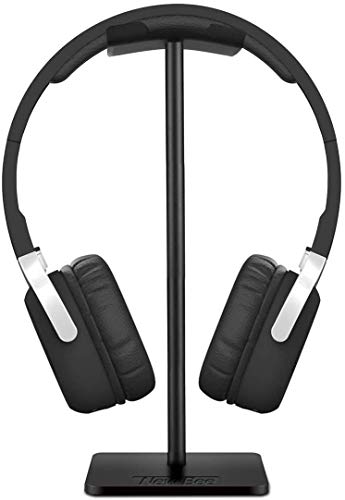
New bee Headphone Stand
The New bee Headphone Stand sits in the entry tier of this category, and it should be judged first on cradle shape, base stability, and how its cable or charging lead will live on your desk. Treat it as a prose-first candidate in this guide: check the current listing for the exact configuration, confirm the cradle suits your headband, and picture the one-handed hang at the end of a long session before you decide.
Best for: readers whose desk and headphones match the role described around this pick. Not suited for: anyone whose headband, boom microphone, or desk edge conflicts with the form described here. Strengths in this class are a calm base, a kind cradle, and tidy cable behaviour; the trade-off is always that a stand with more extras asks for more space, more wiring, and more money than simple storage requires.

Lamicall Headphone Stand
The Lamicall Headphone Stand sits in the mid tier of this category, and it should be judged first on cradle shape, base stability, and how its cable or charging lead will live on your desk. Treat it as a prose-first candidate in this guide: check the current listing for the exact configuration, confirm the cradle suits your headband, and picture the one-handed hang at the end of a long session before you decide.
Best for: readers whose desk and headphones match the role described around this pick. Not suited for: anyone whose headband, boom microphone, or desk edge conflicts with the form described here. Strengths in this class are a calm base, a kind cradle, and tidy cable behaviour; the trade-off is always that a stand with more extras asks for more space, more wiring, and more money than simple storage requires.
Corsair ST100
The Corsair ST100 sits in the premium tier of this category, and it should be judged first on cradle shape, base stability, and how its cable or charging lead will live on your desk. Treat it as a prose-first candidate in this guide: check the current listing for the exact configuration, confirm the cradle suits your headband, and picture the one-handed hang at the end of a long session before you decide.
Best for: readers whose desk and headphones match the role described around this pick. Not suited for: anyone whose headband, boom microphone, or desk edge conflicts with the form described here. Strengths in this class are a calm base, a kind cradle, and tidy cable behaviour; the trade-off is always that a stand with more extras asks for more space, more wiring, and more money than simple storage requires.
Satechi Headphone Stand
The Satechi Headphone Stand sits in the premium tier of this category, and it should be judged first on cradle shape, base stability, and how its cable or charging lead will live on your desk. Treat it as a prose-first candidate in this guide: check the current listing for the exact configuration, confirm the cradle suits your headband, and picture the one-handed hang at the end of a long session before you decide.
Best for: readers whose desk and headphones match the role described around this pick. Not suited for: anyone whose headband, boom microphone, or desk edge conflicts with the form described here. Strengths in this class are a calm base, a kind cradle, and tidy cable behaviour; the trade-off is always that a stand with more extras asks for more space, more wiring, and more money than simple storage requires.
Under-desk hangers deserve a fair hearing in any honest guide. They free the entire desk surface, keep headphones out of sight, and suit minimal setups. Their weaknesses are reach, knee clearance, and the temptation to hang headphones where a cable dangles into leg space. If your knees or a PC tower live under the desk, test the hang position with tape before committing to adhesive or screws.
Adhesive mounting is convenient and unforgiving. It suits light headsets on clean, smooth undersides, and it fails when dust, texture, or heat weakens the bond. Screw mounting is permanent and dependable. Clamp mounting sits between the two, strong and removable, provided the desk edge is straight and thick enough. Match the mount to how long you expect the arrangement to last.
The cheapest useful stand is the one with a wide cradle, a stable base, and no promises it cannot keep. The most expensive stand is not automatically the kindest to your headband or the steadiest on your desk. Price tiers in this category buy materials, finish, hubs, charging, and brand support more than they buy better storage. Storage itself is a solved problem at modest cost when the basics are right.
When you read other reviews, watch for the same honesty tests used here. Does the reviewer mention cradle width, base behaviour when headphones are lifted one-handed, and cable routing, or only appearance and features? A stand lives or dies on those small interactions repeated hundreds of times. Photogenic is easy; repeatedly convenient is the real standard.
A good stand disappears into a routine. You finish a session, hang the headphones without looking, and start the next session by reaching to a known place. If you have to aim, balance, or steady the base with your other hand, the design is asking too much. Judge every candidate against that one-handed, half-distracted moment, because that is how it will actually be used.
Finally, keep the purchase in proportion. A headphone stand is a small piece of desk furniture that protects a much more valuable object and tidies a space you look at every day. Spend enough to get the cradle and base right, add powered extras only when they replace something already on your desk, and stop there. The best outcome is unremarkable: headphones stored safely, desk clear, nothing to think about.
A headphone stand has one honest job: it gives your headphones a deliberate home so they are not left flat on the desk, draped over a monitor, or balanced on a chair arm. It does not improve sound, it does not change tuning, and it does not make a modest headset sound premium. What it changes is storage, surface protection, and how quickly you can start and end a session without hunting for where you left your headphones.
The most underrated benefit is keeping ear pads and headband padding off a hard desk surface. Desks collect dust, crumbs, coffee rings, and the grit that works its way into pad seams over weeks of casual contact. Lifting headphones onto a cradle does not make them last forever, but it removes one daily source of abrasion and keeps pads cleaner between uses, especially in a shared or busy workspace.
Cradle shape matters more than almost any headline feature. A narrow, hard hanger concentrates pressure on a small strip of headband padding, and over time that pressure can leave a visible dent or a flattened spot in the cushion. A wide, gently curved cradle spreads the contact across a broader area, which is kinder to leatherette and fabric headbands alike. If you remember one rule, remember that one.
Stability is a balance between base weight, base footprint, and height. A tall stand looks clean in photos, but height raises the centre of gravity, so a tall design needs a properly weighted base or a wide footprint to stay planted when you lift headphones off with one hand. A short, heavy stand feels boring on a product page and reassuring in daily use, because it does not skate across the desk.
Cable drape is the detail most buyers ignore until the first week. A wired headset leaves a cable that wants to fall, tangle, or pull the stand toward the desk edge. Good placement keeps the cable falling in a loose loop behind or beside the stand, not across your mouse path and not hanging where a chair wheel or a foot can catch it. Wireless headsets remove that problem, but they add a charging cable instead.
Stands with USB hubs or charging pads are conveniences, not audio upgrades. A hub can tidy a desk by giving you a nearer port for a dongle or a drive, and a charging stand can keep a wireless headset topped up where you store it. Neither changes how the headphones sound. Judge those extras as desk furniture with wiring, not as performance parts, and check that you actually need the ports before paying for them.
Material choice is mostly about feel, durability, and how the stand treats the desk beneath it. Metal stands tend to feel planted and resist flex, plastic stands can be light and easy to move but may slide unless the base is weighted or padded, and wood or wood-effect finishes suit a calmer desk at the cost of showing dust. A soft base pad matters, because a hard base dragged daily will mark a desk finish.
Fit starts with your actual headphones, not with the stand. Large over-ear models with thick headbands need a taller post and a cradle wide enough that the ear cups hang freely without pressing against the stem. Smaller on-ear models and lightweight gaming headsets are more forgiving. Measure the space your headphones need when they hang naturally, including the cable exit and any boom microphone that cannot fold away.
A boom microphone changes placement more than people expect. On many gaming headsets the mic arm sits low and forward, so a stand placed tight against a monitor or a wall can force the mic into an awkward angle every time you hang the headset. Leave clearance in front of the cradle, test the hang with the mic attached, and avoid stands whose stem sits exactly where your mic wants to rest.
Desk space is a real cost, and it should be counted honestly. A stand earns its footprint only if the headphones would otherwise occupy that space anyway, usually in a messier shape. On a small desk, a stand placed at the rear corner can actually return usable space by turning a sprawling headset and cable into one vertical column. On a very crowded desk, a clamp or under-desk hanger may be the smarter form.
There is a difference between a stand, a hanger, and a hook, and the words are often used loosely. A stand sits on the desk and can be moved in seconds. A clamp hanger grips the desk edge and frees the surface but depends on edge thickness and clearance below. A wall or under-desk hook saves the most space and offers the least flexibility. None is universally better; each trades surface space against permanence and reach.
Cleaning a stand is trivial, which is exactly why people forget it. Dust settles on the cradle, transfers to the headband, and then travels to your hair and skin. A quick wipe of the cradle and base during your normal desk clean keeps that loop from forming. Smooth cradles clean fastest; textured, grooved, or fabric-wrapped surfaces need a brush or a slightly damp cloth and a little more patience.
Headband padding care and stand choice are linked. If you already own headphones with a soft suspension strap, the strap should rest on the cradle, not be folded, pinched, or hung by one edge. If your headphones use a solid padded band, spread the load and avoid leaving them on a narrow peg between long breaks. When you travel or store headphones for weeks, a case protects them better than any stand.
Children, pets, and shared desks change the risk calculation. A lightweight stand on a busy family desk will be knocked, and headphones hung high can fall further when they are knocked. In that setting a lower, heavier stand, or a clamp hanger tucked under the desk edge, survives daily life better than a tall display-style stand. Elegance matters less than what happens on the third accidental bump.
For streamers and creators, a stand also works as a visual anchor. Headphones stored in the same place every session look intentional on camera and are always in reach when a recording starts. That is a legitimate reason to prefer a finish that matches your setup, provided the cradle and base are sound first. Looks should break a tie between two good stands, not rescue a wobbly one.
In an office, the argument is simpler: a stand signals the end of a call block and keeps a headset off shared surfaces. It also keeps the headset cable or charging lead in one predictable place, which reduces the small daily friction of untangling before a meeting. In hot-desking spaces, a personal stand only works if you can store it; a heavy premium stand is a poor traveller.
Gamers feel the benefit at session boundaries. Hanging a headset in the same spot after every session builds a habit that protects the headset from chair wheels, desk edges, and the classic accident of sitting on headphones left on a seat. The stand does not need lights or a hub to do that job well. It needs to be where your hand already expects it to be.
RGB lighting on a stand is decoration, and it should be bought as decoration. It can match a setup, it can also add a cable, a controller, and one more glow in a dark room. If you work in a bedroom or share a room, ask whether the light can be dimmed or switched off easily. A stand you unplug every night because the light annoys you has failed at its simplest job.
Weight in the hand is a useful in-store test that online shoppers can approximate by reading the design. A stand with most of its mass low in the base will feel calm when you set headphones down quickly. A stand that is mostly stem and cradle, with a thin base, will feel eager to tip when the headphones are placed off-centre. Place your headphones the way you actually will, slightly carelessly, not like a product photo.
Assembly should take minutes and stay invisible afterwards. Stands that screw together should thread smoothly and sit flat without rocking. If a stand rocks on a flat desk, check the base pad and the thread before blaming the desk. A small rock becomes a daily irritation and can walk the stand toward the edge over weeks of small vibrations from typing and desk bumps.
The edge of the desk is a tempting home and a risky one. A stand near the edge is easy to reach, but a cable pulled from the floor side can drag it, and a falling headset has further to go. A few inches of margin, with the cable routed inward, costs nothing and prevents the most common stand accident. Route first, admire second.
Two headsets need an honest plan. Some stands offer a second cradle or a wider top, but doubling the load doubles the stability demand and often crowds both headbands. Many dual-headset households are happier with two modest single stands placed apart than with one overloaded display piece. Measure combined width, keep work and gaming headsets separated if different people use them, and avoid stacking one headset on another.
More Practical Notes
A stand cannot fix a headset that is uncomfortable, a cable that is failing, or pads that are already flaking. Those are headphone problems, and money spent there usually returns more comfort than money spent on storage. Buy the stand after the headphones themselves are right, or buy a simple stand alongside them. That ordering keeps expectations honest and budgets pointed at what you actually wear for hours.
Travel is the one context where a desk stand mostly stops helping. A folding or flat-pack hanger can earn a place in a laptop bag for hotel desks, but a weighted desktop stand should stay home. If you split time between two desks, consider a simple stand at each desk rather than carrying one back and forth; the habit survives because the home for the headphones is always present.
Humidity and heat are quiet enemies that a stand neither causes nor cures. Keeping headphones off a desk near a radiator, a sunny window, or a steamy kitchen corner matters more than the stand material. Choose a shaded, dry spot, let damp pads air before a long hang after exercise or a hot commute, and never use a stand as a drying rack over a heat source.
Under-desk hangers deserve a fair hearing in any honest guide. They free the entire desk surface, keep headphones out of sight, and suit minimal setups. Their weaknesses are reach, knee clearance, and the temptation to hang headphones where a cable dangles into leg space. If your knees or a PC tower live under the desk, test the hang position with tape before committing to adhesive or screws.
Adhesive mounting is convenient and unforgiving. It suits light headsets on clean, smooth undersides, and it fails when dust, texture, or heat weakens the bond. Screw mounting is permanent and dependable. Clamp mounting sits between the two, strong and removable, provided the desk edge is straight and thick enough. Match the mount to how long you expect the arrangement to last.
The cheapest useful stand is the one with a wide cradle, a stable base, and no promises it cannot keep. The most expensive stand is not automatically the kindest to your headband or the steadiest on your desk. Price tiers in this category buy materials, finish, hubs, charging, and brand support more than they buy better storage. Storage itself is a solved problem at modest cost when the basics are right.
When you read other reviews, watch for the same honesty tests used here. Does the reviewer mention cradle width, base behaviour when headphones are lifted one-handed, and cable routing, or only appearance and features? A stand lives or dies on those small interactions repeated hundreds of times. Photogenic is easy; repeatedly convenient is the real standard.
A good stand disappears into a routine. You finish a session, hang the headphones without looking, and start the next session by reaching to a known place. If you have to aim, balance, or steady the base with your other hand, the design is asking too much. Judge every candidate against that one-handed, half-distracted moment, because that is how it will actually be used.
Finally, keep the purchase in proportion. A headphone stand is a small piece of desk furniture that protects a much more valuable object and tidies a space you look at every day. Spend enough to get the cradle and base right, add powered extras only when they replace something already on your desk, and stop there. The best outcome is unremarkable: headphones stored safely, desk clear, nothing to think about.
A headphone stand has one honest job: it gives your headphones a deliberate home so they are not left flat on the desk, draped over a monitor, or balanced on a chair arm. It does not improve sound, it does not change tuning, and it does not make a modest headset sound premium. What it changes is storage, surface protection, and how quickly you can start and end a session without hunting for where you left your headphones.
Doing It Properly: A Practical Routine for Your Headphone Stand
If a step produces an unexpected result, stop and return to the last point where everything behaved as expected, rather than layering new adjustments on top of confusion. Make one change at a time during the first days, so that when something improves or gets worse you know which change caused it. Treat any accessory bundled in the box as a starting point, and check whether it suits your setup before assuming the maker has solved that part for you. Start this final check away from the listings, with the space, the equipment and the routine you already have written down in plain terms.
As a concrete listing check, take the New bee Headphone Stand and the Lamicall Headphone Stand named earlier in this article and confirm, line by line, that each variant offered matches the size, connection and contents described for it here. Test in the order you actually work: power on, connect, adjust, run a real task, then tidy up, rather than judging the headphone stand on a single impressive first impression. Keep the instructions somewhere you can find them months later, since the setting or step you skip today is often the one a future problem sends you hunting for. Separate the features you will use in the first month from the ones that only sound reassuring, and let the first group carry far more weight in the decision. Work through the process in a calm order, preparing the space and the parts first, so each step starts from a tidy position rather than from the leftovers of the previous one.
Take a quick photo of the working setup before you change anything, so cable routes, positions and settings can be restored exactly if the new arrangement disappoints. Keep the packaging and any small adapters, feet, brackets or fasteners together until the headphone stand has survived a full week of ordinary use in its final position. Give a new headphone stand a fair trial in the position it was bought for before improvising workarounds, since many early complaints disappear once placement is corrected. Plan where the cables or materials connected to this headphone stand will run when the room is tidy, not just while you are testing on an empty surface.
Keep the area underneath and behind the headphone stand reachable for cleaning, since the spots you cannot reach become the spots where dust and lost small parts collect. Check the connection points you rely on every day, and note which ones are already occupied, shared or awkward to reach once furniture is back in place. Take a short break between setup and first proper use to look at the result with fresh eyes, checking alignment, access and cable routes one final time. Leave a little headroom in every direction that matters, whether that means physical space, connection capacity, adjustment range or simply time to do a task properly. When a specification is stated in unfamiliar terms, translate it into your own routine: how long, how often, how far, how loud in practice, before letting it sway you.
Frequently Asked Questions
Do headphone stands improve sound quality?
No. A stand changes storage, not sound. It keeps headphones off the desk surface, protects pads and headband padding from daily abrasion, and makes your setup tidier. Any claim that a passive stand improves audio should be treated with scepticism; powered extras such as hubs are conveniences, not audio upgrades.
Can a headphone stand damage the headband?
A narrow or hard hanger can, over time, because it concentrates pressure on a small strip of padding and may leave a dent. A wide, gently curved cradle spreads the load and is the safer choice. Check the hang after the first week and change position if you see a deep crease forming.
Are stands with USB hubs worth choosing?
Only if the hub replaces ports you already reach for. A hub can tidy a desk and keep a dongle close, but it adds a cable and cost, and it does not improve your headphones. Buy the hub as desk furniture, after the cradle and base have passed the basic tests.
Where should I place a headphone stand?
Place it within easy reach of your chair, a few inches from the desk edge, with the cable falling in a loose loop away from your mouse path and chair wheels. Leave clearance for a boom microphone and keep the spot shaded, dry, and away from direct heat.
Is a clamp hanger better than a desk stand?
Neither is universally better. A desk stand is movable and simple, while a clamp hanger frees the surface but depends on desk edge thickness and clearance below. Choose by space: crowded desks favour hangers, flexible setups favour stands, and shared desks often favour a low, heavy stand.
How do I clean a headphone stand?
Wipe the cradle and base with a soft cloth during your normal desk clean, and use a slightly damp cloth for textured surfaces. Dust on the cradle transfers to the headband, so a few seconds of cleaning keeps both tidier. Avoid harsh cleaners on coated or wood-effect finishes.
Related Guides
Related reading: our headphone stand review
Related reading: our headphone stand reviews roundup
Related reading: the headphone stand buying guide
Related reading: headphone stand pros and cons
Related reading: is a headphone stand worth it
Related reading: desk setups that leave room for a stand
Related reading: desk cable management options
Related reading: gaming desks with space to spare
Related reading: desks for gaming and work