Disclosure: As an Amazon Associate, ilcastellomenu.com earns from qualifying purchases. Links on this page are affiliate links; they cost you nothing extra. Prices and availability change often, so check the current Amazon listing before you buy.
This sd card reader review exists because the humble card reader has quietly become one of the most consequential tools in a photographer’s day. The camera gets the glory and the memory card gets the blame, but the reader is the bridge between a card full of irreplaceable work and the computer where that work becomes safe. When the bridge is slow, the evening after a shoot stretches. When the bridge is flaky, files arrive corrupted or not at all. And when the bridge is well chosen, offloading stops being a chore you schedule around and becomes a background task you barely notice. This review looks at what a good SD card reader actually does, where the real bottlenecks hide, and which readers earn a permanent place in a working kit bag.
The short version is this: the reader itself is rarely the bottleneck. Your card’s bus and your computer’s port decide most of your speed before the reader gets a say, and the reader’s real job is to stay out of the way — to support the fastest bus your cards use, to hold a connection without dropping it mid-transfer, and to survive being thrown in a bag every day. Judge readers on those terms and the field separates quickly. Judge them on headline promises alone and you will pay premium money for speed your cards cannot use.
Key Takeaways From This Sd Card Reader Review
- The card’s bus — UHS-I or UHS-II, told apart by the extra row of contacts on UHS-II cards — caps your transfer speed before the reader does. Match the reader to the fastest cards you own.
- The computer’s port matters just as much: a fast reader on a slow or shared port performs like a slow reader.
- Always eject or unmount the card in the operating system before pulling it out. Yanking a card mid-write can corrupt its file system and take the whole card’s contents with it.
- For paid work, verify offloads with checksums rather than trusting a progress bar; a copy that merely looks complete is not the same as a copy that is complete.
- A reader that runs very hot or drops its connection mid-transfer is telling you to retire it, not to work around it.
- Dual-slot readers earn their keep when you shoot two cards at once or offload while a second card waits; single-slot readers are smaller, cheaper in spirit, and entirely sufficient for one-card workflows.
Best for: photographers and videographers who offload cards daily and want the transfer step to disappear into the background. Not suited for: anyone whose camera records to a different card format entirely, or whose laptop’s built-in slot already matches their cards’ bus — for them a separate reader adds a cable, not speed.
In this guide
What an SD Card Reader Is and Where It Fits
An SD card reader is a small adapter with a simple job: it presents a memory card to a computer as a removable drive so files can be copied off it. Inside, a controller chip speaks the card’s language on one side and USB on the other, translating between the card’s bus protocol and whatever port you plug into. That translation role is why two readers that look identical on a desk can behave very differently in practice — the controller, the slot’s contact design, and the firmware deciding how the device presents itself all shape the result.
Readers come in a few broad shapes. Single-slot readers do one card format — usually full-size SD, sometimes microSD, sometimes both through a shared or separate slot — and prize small size and simplicity. Dual-slot readers accept two cards at once, which matters more than it first sounds: cameras that write to two cards for instant backup produce two cards that both need offloading, and a dual-slot reader handles them in one unattended pass instead of two babysat ones. Multi-format readers add slots for other card families alongside SD, which suits photographers whose kit spans generations of cameras. If your work is moving toward newer formats, our look at the cfexpress card review shows where the high end of card technology has gone, and it is worth knowing before you invest heavily in any one ecosystem.
Where the reader fits in the workflow is easy to underestimate because it sits at the least glamorous moment: after the shoot, before the editing. Yet that moment carries all the risk. Until files exist in two places, they exist in effectively none — a card can be lost, damaged, or corrupted, and the shoot cannot be repeated. A reader that offloads quickly and verifies reliably shortens the window in which your only copy of the work lives on a fingernail-sized piece of plastic. The cards themselves deserve the same care in choosing, which is why this review sits alongside our guide to the best sd memory cards for cameras — reader and card are two halves of one system.
It also helps to be honest about what a reader cannot do. It cannot make a slow card fast: a UHS-I card in the finest UHS-II reader still transfers at UHS-I pace, because the card’s own contacts and controller set the ceiling. It cannot fix a bottleneck at the computer end either — an old port, a congested hub shared with drives and docks, or a laptop throttling its ports will cap results no matter how good the reader is. Understanding that chain — card bus, reader, cable, port, destination drive — is the single most useful idea in this whole review, and it recurs in our companion piece on sd card reader reviews across the wider field.
Design, Build and Setup
The readers that survive professional use share a physical honesty: a rigid body that does not flex when you push a card home, a slot that grips the card firmly without forcing it, and a cable — attached or detachable — that does not wobble in the port. Flex is the enemy. Every insertion bends something slightly, and a reader built from thin, creaky plastic eventually develops the micro-movements that interrupt transfers. Metal-bodied readers shrug off bag life better and shed heat more calmly, and heat is not a cosmetic issue: sustained transfers warm the controller, and a reader that cannot shed that warmth will slow down or, worse, drop the connection near the end of a long copy.
Slot design deserves a closer look than it usually gets. A good slot guides the card straight onto the contacts with a positive, even resistance and a definite stop. A poor slot lets the card sit slightly askew, which on a UHS-II card can mean the second row of contacts — the entire reason the card is fast — never properly engages, and the reader silently falls back to slower behaviour. You will not get an error message; you will just get a mysteriously slow offload and a suspicion that the card underperforms. If a fast card feels slow, reseating it firmly is the first diagnostic, before blaming any component.
Setup, at least, is mercifully simple. Modern readers are class-compliant USB storage devices: plug one in and every current operating system recognises it without drivers. The card appears as a removable drive, and from there your import software — or a careful manual copy — takes over. Two setup habits are worth forming on day one. First, connect the reader directly to the computer rather than through an unpowered hub when you can; hubs share bandwidth and occasionally power-manage attached devices to sleep mid-transfer. Second, decide your offload ritual in advance — which folder, what naming, when the backup copy happens — because the reader makes copying fast, and fast copying of a disorganised mess just produces a bigger mess sooner. Our walkthrough of how to use an sd card reader step by step turns that ritual into a repeatable routine.
Cable choices matter more than marketing suggests. A short, captive cable cannot be lost and cannot be swapped for a random thin cable of unknown quality — a genuine advantage in a bag. A detachable cable lets you replace a damaged cable instead of the whole reader and lets you choose length for a desk setup, but it introduces one more connection that can work loose. Neither is automatically better; the right answer depends on whether the reader lives on a desk or in a pouch. What is never right is a cable so stiff it levers the reader off the desk edge by its own springiness, dragging the card connection with it.

The Benchmark: ProGrade Digital Dual Slot SD Card Reader
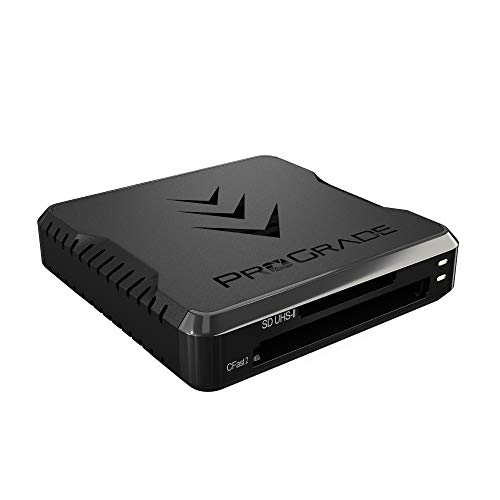
If one reader anchors this review, it is ProGrade Digital’s dual-slot design, a premium-tier reader built by a company founded by memory-card people and aimed squarely at working photographers. Both slots are built for the UHS-II bus, so two fast cards can offload together at the pace the cards themselves allow, and the body is the rigid, confidence-inspiring kind that does not creak in the hand. ProGrade also builds in small workflow courtesies that reveal who the reader is for — magnetic stacking with its sibling readers for multi-format desks, and a firm slot action that makes the UHS-II contact engagement feel deliberate rather than hopeful.
In real use, the dual-slot layout changes behaviour, not just speed. A wedding or event shooter returning with two cards from a dual-slot camera body can start both offloads and walk away; the evening’s ingest becomes one step instead of a relay. That is the honest case for premium readers generally — they do not make a single card dramatically faster than a competent single-slot reader does, because the card sets that pace. They make the whole fleet of cards faster to process, and they do it night after night without the user thinking about the tool. Treat it as the reference point: Best for: professionals offloading UHS-II cards in pairs. Not suited for: UHS-I-only shooters, who would pay for a second fast slot their cards cannot feed.
The Chain Explained: Card, Reader, Cable, Port, Drive
Every slow offload has a culprit, and it is almost never the component the owner suspects first. Work through the chain in order and the logic becomes clear. The card speaks first: its bus — UHS-I with one row of contacts, UHS-II with two — sets the maximum pace its controller can sustain, and no downstream component can raise that ceiling. The reader speaks second: it must support the card’s bus in the slot being used, and its controller must sustain the translation without pausing. A reader that advertises fast-bus support but houses a mediocre controller reveals itself in transfers that start briskly and sag.
The cable speaks third, and it is the chain’s most underestimated link. A damaged, overly long, or charge-only cable — some USB-C cables in every junk drawer are wired for power and slow data only — silently demotes the whole connection. If a reader underperforms, swapping the cable for a known data cable is the cheapest experiment in all of computing, and it solves an embarrassing share of mysteries. The port speaks fourth: ports differ by generation and by how the machine shares bandwidth internally, and a reader plugged into a hub is negotiating with every other device on that hub for room. Direct connection to the computer is the reference setup against which everything else should be judged.
The destination drive speaks last, and it is the culprit in a surprising number of “slow reader” complaints. A copy cannot land faster than the drive can write, and drives slow as they fill, as they fragment their free space across platters or cells, and when the same drive is simultaneously being read by editing software indexing the very files arriving. Test any suspect reader by copying to a different, emptier drive before condemning it. The chain mindset — five links, each capable of being the limit — turns troubleshooting from superstition into sequence, and it is the framework behind every judgement in this review.
Reading the Slot: Contacts, Wear and Silent Fallbacks
The slot is where the reader meets the card physically, and its condition explains a category of faults that software never reports. UHS-II’s speed lives in a second row of small contacts that must all meet their counterparts cleanly. A slot with a slightly bent contact, a film of grime, or a card inserted at a shallow angle can engage the first row and miss the second — and the system’s response is not an error but a quiet fallback to UHS-I behaviour. The transfer works. It is just slow, and the owner blames the card, the reader, or the computer in rotation, never suspecting that the two devices shook only half a handshake.
This is why experienced users develop insertion habits that look fussy and are actually diagnostic. Push the card home fully and evenly. If a fast card mounts slowly or transfers at half its expected character, eject properly, reseat the card with deliberate firmness, and try again before changing anything else. Keep slots covered or cased in transit so pocket debris never reaches the contacts. And treat a slot that increasingly needs this coaxing as a wear item announcing itself — contacts fatigue, springs soften, and a reader is far cheaper than the shoot its slot might one day fumble.
Performance in Real Use
Offloading a Full Day of Stills
The everyday test is the least dramatic and the most revealing: a card full of stills after a long day, copied to a working drive. Here a good reader simply disappears. The transfer starts, the rate settles to whatever the card sustains, and it finishes without negotiation. What separates readers in this test is not peak behaviour but consistency — no pauses while the controller thinks, no mysterious restarts, no second attempt needed. Consistency is a controller and firmware quality, invisible on a spec sheet, and it is the main thing long-term owners praise or curse. A reader that has never once interrupted a copy is worth more than a reader with a faster headline and a flaky temperament.
Video Offloads and Sustained Transfers
Video changes the test completely. Where stills are many small-to-medium files, video is a handful of enormous ones, and the transfer becomes a sustained endurance event rather than a sprint. This is where heat shows itself: a reader that handles a stills card happily may warm up over a long video copy and throttle or drop. It is also where the destination drive joins the chain — copying huge files to a nearly full or slow drive makes even a perfect reader look sluggish. Shooters working in high-resolution video should read this alongside our coverage of the best sd cards for 4k recording, because card, reader, and drive have to be specified as a set, and the slowest of the three is the speed you get.
Travel and Location Work
On location, the reader’s job description gains a line: survive. It will be plugged into unfamiliar power, balanced on hotel desks, and used by a tired person at midnight. The readers that excel here are the compact single-slot designs and the tougher dual-slot units, and the trait that matters is tolerance — of being packed carelessly, of ports at awkward angles, of cards inserted by feel in dim light. Travel also exposes the captive-versus-detachable cable question in its sharpest form, because a forgotten proprietary cable on a trip is a dead reader. Many travelling photographers carry a featherweight spare reader for exactly this reason; the spare is not about speed at all, it is insurance for the work.
Reliability Over Months, Not Minutes
The final performance dimension only appears with time. Slot contacts wear, cables fatigue at their strain reliefs, and firmware quirks that seemed like one-offs become patterns. The honest signals are simple: a reader that increasingly needs a reseat before it mounts, that disconnects when the desk is bumped, or that runs noticeably hotter than it used to is a reader in decline. Because a failing reader fails at the worst possible moment — holding your only copy of a card — the professional habit is to retire a suspect reader early and cheaply rather than nurse it. Our value analysis in is an sd card reader worth it makes the same point from the money side: the reader is inexpensive insurance compared with the work it carries.
Strengths and Trade-Offs
Strengths
- Speed that matches your cards: a UHS-II reader removes the reader from the bottleneck list entirely, so transfers run at the pace your fastest cards sustain.
- Workflow calm: dual slots and reliable mounting turn ingest into a single unattended step, which is worth more at midnight than any benchmark.
- Verified safety: a stable connection is what makes checksum-verified offloads practical — the copy finishes, the verification passes, and the card can be reformatted with a clear conscience.
Trade-Offs
- No rescue for slow cards: the reader cannot lift a UHS-I card past its own bus ceiling, so upgrading the reader alone disappoints anyone whose cards are the limit.
- Port dependence: results vary with the computer end of the chain — hubs, old ports, and shared bandwidth can quietly undo a premium reader.
- One more thing to carry and lose: every external reader is a cable, a dongle, a bag item; laptops with a good built-in slot of the right bus genuinely need one less.
How It Compares
Set against the wider field, the premium dual-slot approach is one philosophy among several, and the table below summarises the honest differences. All of these readers are— positioning by tier and role, not by numbers — because the pace any of them delivers in your hands depends on your cards and your port.
| Reader | Slots | Tier | Best role |
|---|---|---|---|
| ProGrade Digital Dual Slot | Two SD slots, both UHS-II | Premium | Working photographers offloading card pairs nightly |
| SanDisk Extreme Pro SD UHS-II reader | One SD slot | Mid-to-premium | Single-card shooters who want the fast bus without a second slot |
| Lexar Professional multi-card reader | Multiple formats | Mid | Mixed kits spanning SD and other card families |
| Anker USB-C SD and microSD reader | SD plus microSD | Entry | Travel, drones and action cameras, everyday carry |

SanDisk Extreme Pro SD UHS-II Card Reader
SanDisk’s single-slot reader is the straightforward answer for the many shooters whose cameras take one card at a time. It supports the UHS-II bus, comes from the same house as many of the cards it will read — a pairing that tends to behave predictably — and keeps the body small enough to live in a laptop sleeve. In the field it is the reader most likely to be recommended by a card-counter conversation, and its appeal is focus: one slot, done properly. Best for: single-card UHS-II shooters. Not suited for: dual-card bodies whose owners would spend their evenings swapping cards through one slot.

Lexar Professional Multi-Card Reader
Lexar’s Professional multi-card designs answer a different problem: the mixed kit. Photographers who run an SD body beside older gear, or who are mid-transition between card generations, end up with a pocketful of formats and a desk that wants one dock rather than three dongles. A multi-format reader with SD at its heart — and room for the other families in the bag — trades a little size for a lot of tidiness, and Lexar’s long history in cards makes its readers a natural default. Photographers weighing the newest format should also weigh whether a cfexpress card is worth it before committing the whole kit. Best for: mixed-format kits and transitional desks. Not suited for: minimalists who only ever touch SD and resent every extra gram.
Anker USB-C SD and microSD Reader
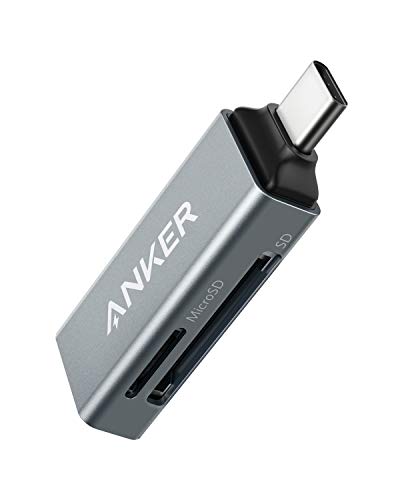
At the entry tier, Anker’s compact USB-C reader covers the two slots most casual kits actually use — full-size SD and microSD — in a body small enough to forget in a pocket, which is precisely its virtue. It is the drone-and-action-camera reader, the travel spare, the reader bought for a specific trip and kept forever. Its bus support suits everyday cards rather than the fastest UHS-II media, and that is a fair trade at its tier as long as you know it before a big offload, not during one. Best for: microSD-heavy kits, travel spares, and everyday carry. Not suited for: UHS-II professionals expecting their fastest cards to run at full pace.

Apple USB-C to SD Card Reader
Apple’s own USB-C to SD reader deserves mention as context, because for photographers inside Apple’s ecosystem it is often the default first purchase — the one bought with the laptop. It is a simple, single-slot reader for standard SD cards, finished to match the machines it plugs into, and entirely adequate for everyday UHS-I cards and casual offloads. Its limits define the upgrade path: photographers who move to UHS-II media or dual-card bodies outgrow it and step up to the readers above. As a known-quantity baseline it earns its place in this comparison precisely by showing what the baseline is. Best for: Apple laptop owners with UHS-I cards and light offload needs. Not suited for: UHS-II shooters, who need a reader built for the second row of contacts.
What Owners Get Wrong in the First Month
New reader owners repeat a handful of mistakes with remarkable consistency. The first is judging the reader by the first transfer, often made with the slowest card they own, through a hub, onto a nearly full drive — a test of everything except the reader. The second is formatting cards in the reader the moment files land, before any backup or verification exists; the reader makes the card available, and availability feels like safety, but a single verified copy on one drive is not safety yet. The third is treating the reader as the place cards live — leaving a card parked in the slot for days, where a desk bump, a curious pet, or a power hiccup can interrupt a mounted file system. Cards belong in cases, readers belong empty, and the meeting between them should be a deliberate, eject-ended appointment. Avoid these three habits and a reader’s first month sets the pattern for years of uneventful, trustworthy offloads.
Who Should Buy It, Who Should Skip It, and a Pre-Buy Checklist
Buy a dedicated, quality SD card reader if you offload cards more than occasionally, if your cards use the UHS-II bus and your laptop’s built-in slot does not, if you shoot dual cards for backup, or if your income depends on files arriving intact. In each case the reader removes friction or risk from a step you repeat constantly, and repeated steps are where small tools pay for themselves. The buying decision is really about your bus and your card count, which is why our broader roundup of the best and fastest sd cards for photography pairs naturally with this one — fast cards deserve a reader that does not waste them.
Skip it — or stay at the entry tier — if your laptop’s built-in slot already matches your cards, if you shoot rarely and transfer small numbers of files, or if your camera’s own USB connection already serves your pace and you are content with it. There is no virtue in owning a reader that duplicates a capability you already have; the money belongs in cards, drives, or the backup system the offloaded files land on.
Before buying, run this checklist. One: confirm your fastest cards’ bus — look for the second row of contacts that marks UHS-II. Two: confirm the reader supports that bus in the slot you will actually use, not just somewhere in the product family. Three: check your computer’s ports and be honest about hubs in the chain. Four: decide single versus dual slot from your camera bodies, not from aspiration. Five: choose cable style for where the reader will live. Six: plan the verification habit — if the work is paid, the reader is part of a checksum-verified offload, not a drag-and-pray.
Single Slot or Dual Slot: Deciding in Practice
The single-versus-dual question resolves itself the moment you count cards honestly. Photographers whose cameras write to one card, and who offload that card at day’s end, gain nothing from a second slot except desk presence — a good single-slot reader serves them completely, and the smaller body travels better. Photographers whose bodies write mirrored cards for instant backup produce pairs, and pairs are where dual-slot readers stop being a luxury: both cards mount together, both offloads run in one pass, and the evening’s ingest halves its supervision. There is also a subtler dual-slot use — one card offloading while the next card is already mounted and waiting — which matters on multi-card event days when the reader never really stops.
The trap is buying for the kit you imagine rather than the kit you own. A dual-slot UHS-II reader purchased “for the future” by a UHS-I single-card shooter delivers no present benefit at all, and by the time the future arrives, reader generations will have moved on. Buy for today’s cards, today’s bodies, and today’s ports; the reader is a matched component, not a monument. The same logic governs multi-format readers: valuable the day a second card family genuinely enters your bag, dead weight every day before.
microSD, Adapters and the Small-Card Question
Many kits now mix full-size SD with microSD — drones, action cameras, and recorders favour the small card — and readers handle this two ways: a dedicated microSD slot, or an adapter that dresses a microSD card as a full-size one. Dedicated slots are the cleaner solution; every adapter is another set of contacts between card and reader, another alignment to get right, and another small thing to lose in the field. Adapters bundled with cards are serviceable in a pinch, but a kit that offloads microSD weekly should read it natively. Whichever route you use, the same disciplines apply with extra force, because small cards are easier to fumble, easier to seat imperfectly, and far easier to lose between desk and case. The eject rule does not shrink with the card: unmount, wait, remove — every time.
One more consideration belongs on the checklist, and it is the one buyers most often skip: what happens when the reader disappoints. Readers are inexpensive, but a unit that misbehaves in its first weeks should go back while returning it is painless, which argues for testing promptly on arrival rather than discovering faults at the first real shoot. Buy from sellers with straightforward returns, keep the receipt with the card receipts, and treat the first month as a probation the reader has to pass. A reader that passes probation and is then handled with the eject-and-verify discipline will usually serve quietly for years — long enough that its eventual replacement will be chosen for a new bus or a new kit, not because the old one failed at a bad moment.
Setup, Care and Maintenance Essentials
Care for a card reader is mostly care for the whole offload chain, and it starts with the rule that outranks every other in this article: always eject or unmount the card before pulling it out. Use the operating system’s eject command and wait for confirmation. A card that is yanked while the computer is still writing — finishing a copy, updating the file system, writing thumbnails or metadata you never asked about — can have its file system corrupted mid-sentence, and the damage is rarely limited to the file being written. Whole cards have been lost to a one-second impatience. Ejecting takes two seconds. Make it muscle memory.
Second, verify important offloads properly. For paid or irreplaceable work, use import tools that verify with checksums — comparing the copied files against the card mathematically rather than trusting that a progress bar reached the end. Only after verification passes should the card be considered cleared, and even then the professional pattern is to keep the card untouched until the job is delivered and backed up in a second location. The reader’s part in this is simply to hold a stable connection from first byte to last; a reader that drops mid-transfer breaks the chain of trust and, as noted, should be retired, not tolerated.
Third, keep contacts clean and dry. Card contacts and slot contacts alike suffer from pocket lint, dust, skin oils, and the occasional splash. Store readers capped or in a pouch, keep cards in their cases rather than loose in a pocket, and never insert a wet or gritty card — grit dragged across contacts scores them, and the damage is permanent. If a connection becomes unreliable, inspect before you blame: a magnifier will often reveal the lint or the bent pin that explains everything.
Finally, respect heat and behaviour changes. Warmth during a long transfer is normal; a reader that becomes very hot to the touch, or that begins dropping connections it once held, is signalling end of life. Replace it. Readers are among the cheapest components in a photographic workflow and they guard the most expensive thing in it — the images themselves.
Setting Up a Desk Offload Station That Works Every Night
Because the reader is used at the same desk in the same tired state most nights, the setup around it deserves ten deliberate minutes once, rather than nightly improvisation. Give the reader a fixed home within cable reach of the computer’s best port — direct, not through the hub that also feeds drives, docks, and chargers — and route its cable so nothing drags it toward the desk edge. Keep the destination drive’s import folder one click away, keep a card case beside the reader so emptied and full cards never share a surface, and keep the workflow’s order physically obvious: cards in from the left, verified, cased on the right, or whatever geography your hands will remember at midnight.
The point of the station is to remove decisions from the moment when you are least fit to make them. The eject command, the verification pass, the backup copy — each should be the path of least resistance rather than an act of virtue. Photographers who build this little station rarely lose files and rarely think about readers at all, which is the highest compliment a transfer tool can earn. The reader at the centre of it matters — this review exists to choose it well — but the ritual around it is what turns a good reader into a safe workflow.
Testing a New Reader Properly Before Trusting It
A new reader should earn trust before it carries a paid shoot, and a fair test takes ten minutes. Use your fastest card, connected directly to the computer, copying to a drive with comfortable free space. Fill the test with realistic material — a mix of stills and at least one long video file, because sustained writes reveal what bursts conceal. Watch for the three failure signatures: a transfer rate that collapses partway and stays down, any disconnection or remounting, and heat that goes beyond gentle warmth. Then verify the copy with checksums, because a fast copy that fails verification is a failed copy wearing a costume. Finally, eject, remove, reinsert, and repeat once — a reader that behaves identically across both runs, and across a reseat, is a reader behaving like a tool rather than a gamble.
Run the same test again after the first month of real use. Early failures cluster in the first weeks of a product’s life, and a reader that passes its one-month re-test with unchanged behaviour has told you most of what ownership will be like. Keep the packaging until then; it costs nothing and converts a disappointing unit from an argument into a return. This small ceremony — test, trust, re-test — is the difference between hoping your offload chain works and knowing it does, and it applies to every reader named in this review and every one that replaces them.
It is also worth saying plainly what this review did not weigh: novelty. Card readers are a mature category, and the newest model is rarely the wisest buy — the wise buy is the proven design whose behaviour across thousands of owners is already known. Mature categories reward boring virtues: a controller that has been in service for years, a slot that has survived a million insertions in other people’s bags, a cable that has been bent around a million desk edges. When two readers meet your bus and slot requirements, choose the one with the longer, quieter track record, and spend the difference on the cards and drives that complete the chain.
Final Verdict
An SD card reader is a small purchase with an outsized job: it stands between your only copy of the work and everything that happens next. The right one is the one matched to your cards’ bus, your slot count, and your computer’s ports — with the build quality to repeat that performance nightly. The ProGrade dual-slot reader is the benchmark for working photographers with UHS-II card pairs; the SanDisk single-slot serves one-card shooters with the same seriousness; Lexar’s multi-format designs tidy mixed kits; and Anker’s little USB-C reader covers everyday and travel needs honestly. Choose by your chain, eject religiously, verify what matters — and the transfer step will quietly stop being a part of photography you think about at all.
Checking a Sd Card Reader Listing Against Reality: Variant, Contents and First Use
Judge the controls by whether you can use them without looking down or stopping your task, because that is how they will be used for most of their life. Check that nothing you place on, under or beside the sd card reader blocks airflow, movement, visibility or access that the design quietly depends on. If you work in more than one place, decide whether this sd card reader stays fixed in one spot or travels, and judge its size, weight and setup time accordingly. Plan where the cables or materials connected to this sd card reader will run when the room is tidy, not just while you are testing on an empty surface.
As a concrete listing check, take the ProGrade Digital Dual Slot SD card reader and the SanDisk Extreme Pro SD UHS-II card reader named earlier in this article and confirm, line by line, that each variant offered matches the size, connection and contents described for it here. Measure the place where a sd card reader will actually live, including the clearance you need to reach cables, doors, trays, vents or controls without moving everything else first. Check the underside, back or hidden face of the sd card reader as part of your inspection, because labels, vents, switches and fasteners often live where first impressions never look. If two options look identical on paper, choose the one whose controls, layout or handling you understood fastest, since clarity in daily use beats a longer feature list you never touch. When you check a single sd card reader closely, work from the outside in: condition and finish first, then controls and connections, then behaviour during a real task from start to finish.
Leave a little headroom in every direction that matters, whether that means physical space, connection capacity, adjustment range or simply time to do a task properly. Take a quick photo of the working setup before you change anything, so cable routes, positions and settings can be restored exactly if the new arrangement disappoints. Write down the oldest and the newest device you expect this sd card reader to work alongside, because compatibility problems usually appear at the edges of a setup rather than in the middle of it. Think about storage for the accessories this sd card reader brings with it, so spare parts and tools end up in one known place instead of scattered across drawers.
Give a new sd card reader a fair trial in the position it was bought for before improvising workarounds, since many early complaints disappear once placement is corrected. Look for the failure you would notice first if you chose badly: a port you cannot reach, a part that will not fit, a control you cannot see, or a routine that becomes slower instead of easier. Note the moment you first had to think about the sd card reader instead of your work, since that moment usually reveals more than any summary of features can. When a specification is stated in unfamiliar terms, translate it into your own routine: how long, how often, how far, how loud in practice, before letting it sway you. Picture the busiest version of your week and ask whether this sd card reader still fits when other people, other tasks and other equipment compete for the same space.
Avoid forcing a connector, bracket or moving part that resists you, because resistance is usually information about alignment or fit rather than an invitation to push harder. Run one deliberately awkward task early on, the kind you usually avoid, and see whether this sd card reader handles your edge cases or only your easiest work. Think about the longest session you realistically run, not the average one, since heat, noise, clutter and small annoyances all grow more noticeable over time.
Keep the instructions somewhere you can find them months later, since the setting or step you skip today is often the one a future problem sends you hunting for. Compare what the listing promised with what the box actually contained, item by item, and treat any mismatch as a reason to pause before the return window closes. A calm final test is to walk away mid-task, come back later, and see whether the setup still makes sense at a glance without reconstructing what you were doing. Keep the packaging and any small adapters, feet, brackets or fasteners together until the sd card reader has survived a full week of ordinary use in its final position. Look closely at seams, edges, hinges, threads or contact points when the sd card reader arrives, because build quality is easiest to judge before everyday wear hides the evidence.
Frequently Asked Questions
Does a faster reader make my existing cards transfer faster?
Only up to the ceiling your cards set. A reader that supports a faster bus removes itself as the bottleneck, so a UHS-II card finally runs at its own pace — but a UHS-I card gains nothing from a UHS-II reader, because the card’s single row of contacts defines its bus. Match purchases in order: cards first, then the reader that lets them breathe, then check the computer’s port is not quietly capping both.
Why do my transfers slow down partway through a big copy?
Usually heat or the destination. Long sustained transfers warm the reader’s controller and the card itself, and warm electronics protect themselves by easing off. A nearly full or slow destination drive produces the same symptom from the other end. Give the reader air, keep the destination drive healthy with free space, and split enormous offloads into card-sized chunks rather than multi-card marathons through a hub.
Is it really dangerous to pull the card out without ejecting?
Yes — it is the most common self-inflicted data loss in the whole workflow. The computer may still be writing file-system updates after a copy appears finished, and interrupting that write corrupts the card’s map of itself. Files that copied perfectly can become unreachable because the index pointing to them is damaged. Eject, wait for the confirmation, then remove the card. Two seconds, every time, no exceptions for being in a hurry.
How do I know if my card is UHS-I or UHS-II?
Turn it over. A UHS-II card has a second row of metal contacts below the familiar first row; a UHS-I card has only the one row. That extra row is the entire physical basis of the faster bus. Your camera manual and the card’s own markings confirm it too. The distinction decides which reader tier is worth buying, so check before spending — premium readers only earn their premium with UHS-II media.
When should I replace a card reader?
Replace it when its behaviour changes: repeated failures to mount without reseating, connections that drop when the cable moves, transfers that stall or corrupt, or heat well beyond the gentle warmth of a long copy. Any of these, appearing in a reader that once behaved, marks declining contacts or electronics. Because a failing reader endangers the only copy of your files, replacement at the first pattern — not the first disaster — is the professional standard.
Can I just use my camera as the card reader?
You can, and for occasional small transfers it is perfectly reasonable. The costs are practical: the camera is tied up and draining its battery during transfers, camera USB connections are often not the fastest path, and the workflow does not scale to multi-card evenings. A dedicated reader frees the camera to keep shooting or charge, and turns offloading into a desk task instead of a camera task. Most regular shooters make the switch once and never go back.
Related Reading
Continue with sd card reader reviews for the wider field compared, how to use an sd card reader for the step-by-step routine, and the best external hard drives for photography for the drives your offloaded files should land on.