Disclosure: As an Amazon Associate, ilcastellomenu.com earns from qualifying purchases. Links on this page are affiliate links; they cost you nothing extra. Prices and availability change often, so check the current Amazon listing before you buy.
This digital voice recorder buying guide is built around a simple truth: a digital voice recorder is easy to buy badly and easy to buy well. This digital voice recorder buying guide walks through the types, the criteria that actually decide satisfaction, and the main models in prose, so you can match a recorder to your rooms, your speakers and your habits instead of to a feature list.
Key Takeaways
- Start from your main job, not from a specification sheet.
- Microphone quality and placement beat almost every other factor.
- Check the file transfer route against your own computer before buying.
- Keep expectations qualitative: entry, mid and premium tiers differ mainly in refinement.
- Consent, placement and backup habits decide real-world results.
One honesty point belongs near the start of any discussion about recording people. Recording laws vary by place: many jurisdictions require the consent of everyone recorded, while others follow one-party consent rules, and workplaces, schools and call recordings can have their own additional rules on top of that. Check your local rules and get permission before recording conversations, meetings or calls. Saying plainly that you are recording, and why, is not just a legal precaution. People speak more naturally once the recorder is acknowledged and forgotten than they do when they discover it halfway through, and a recording made openly is one you can actually use, share and transcribe without worry.
In this guide
What a Digital Voice Recorder Does and the Main Types
Speech-First Recorders
Dictation and voice notes are the quiet everyday use that many recorders are actually bought for. Writers draft while walking, researchers think aloud after an interview, managers capture the action points of a call before they evaporate, and students talk through an argument before writing it. For this work the winning qualities are speed and simplicity: a device that starts recording with one obvious action, a microphone that handles a voice at arm’s length, and files that move easily to wherever the words will be used. Fancy features matter little here. What matters is that the recorder is with you, charged and empty enough, at the moment the thought arrives, because a thought not captured rarely returns in the same shape.
Meeting and Transcription Recorders
Many people record today in order to transcribe tomorrow, and that changes what good recording means. Transcription software, whether built into a service or run on your computer, works best with clear speech, one speaker at a time, consistent volume and as little background noise as you can manage. Cross-talk, laughter over speech and a recorder placed nearer a fan than a person all punish transcription accuracy far more than they punish a human listener. If you know a recording is headed for transcription, say names and key terms clearly, pause between speakers where the conversation allows it, and spell unusual names once. A few seconds of care at the microphone saves real time correcting the transcript afterwards.
Music and Field Recorders
Recording music, rehearsals and lessons is a different job from recording speech, and it is the one place where the gap between a basic voice recorder and a model designed with music in mind becomes obvious. Speech recorders are tuned to make voices intelligible, sometimes at the expense of fullness and dynamic range. A rehearsal recorder needs to handle a quiet passage and a loud chorus without distorting, place its microphones for a sense of space, and let you set levels rather than guessing. If music is your main purpose, weight your choice toward models built for it, place the recorder where a listener would enjoy sitting, and expect to experiment with position across several sessions before the results sound like the room felt.
Value Recorders
Value in this category is not about the cheapest box or the longest feature list. It is about cost per successful recording over the life of the device: the sessions captured cleanly, the interviews that did not need repeating, the lectures you could actually revise from. A recorder that fits your routine gets used hundreds of times and becomes cheap in the only sense that matters. A recorder that fights your routine, however impressive its specifications, is expensive at any price. Judge value after imagining a month of your real life with the device in it: your rooms, your speakers, your computer, your habits. That imagined month predicts satisfaction far better than a comparison table does.
Digital Voice Recorder Buying Guide: Top Picks at a Glance
Sony ICD-UX570
The Sony ICD-UX570 is a polished everyday recorder from Sony that suits people who record often and want a refined, compact device for interviews, classes and meetings. In prose terms it sits in the upper part of the mainstream range: the appeal is ease of use, a clear interface and a microphone setup aimed at clean speech in ordinary rooms. It is a sensible anchor model for anyone comparing the category, because it represents what a well sorted dedicated recorder feels like when the basics are done properly.
Badge in this guide: Best Overall. Treat that as a starting point for your shortlist rather than a verdict, and weigh it against your own rooms and routines using the criteria sections that follow.
Microphone placement matters more than the tier of recorder you buy. A modest recorder placed close to the speaker, on a stable surface, pointing toward the voice, will capture clearer speech than an expensive recorder left in a bag across the room. Distance adds room echo, keyboard noise, air conditioning hum and every cough between you and the speaker. Get the recorder near the person who matters, keep it off vibrating tables where possible, and do a short test recording before the real session starts. Thirty seconds of testing saves an hour of unusable audio later, and it also lets you hear whether a window, a fan or a projector is louder in the recording than it sounds in the room.

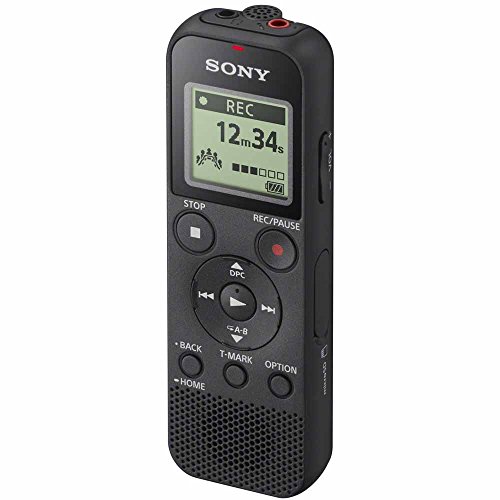
Sony ICD-PX370
The Sony ICD-PX370 is a straightforward Sony option positioned as an accessible entry point into dedicated recording. Its role in this line-up is the simple workhorse: press record, capture clear speech, move the files to a computer, repeat. For students, occasional interviewers and anyone upgrading from a phone for reliability rather than features, that simplicity is the point. It represents the sensible floor of the category, below which you are mostly relying on a phone, and above which you pay for refinement rather than basic capability.
Badge in this guide: Best Simple Starter. Treat that as a starting point for your shortlist rather than a verdict, and weigh it against your own rooms and routines using the criteria sections that follow.
Microphone placement matters more than the tier of recorder you buy. A modest recorder placed close to the speaker, on a stable surface, pointing toward the voice, will capture clearer speech than an expensive recorder left in a bag across the room. Distance adds room echo, keyboard noise, air conditioning hum and every cough between you and the speaker. Get the recorder near the person who matters, keep it off vibrating tables where possible, and do a short test recording before the real session starts. Thirty seconds of testing saves an hour of unusable audio later, and it also lets you hear whether a window, a fan or a projector is louder in the recording than it sounds in the room.
Olympus WS-883
The Olympus WS-883 is part of the long-running Olympus WS line, aimed squarely at lectures, meetings and dictation. Olympus built its reputation in this category on clear speech capture and practical touches for people who record words all day, and this model represents that tradition in the current range. It suits users who value a recorder shaped around meetings and spoken notes, with an interface that assumes you will be organising and reviewing recordings regularly rather than treating the device as a novelty.
Badge in this guide: Best for Lectures and Meetings. Treat that as a starting point for your shortlist rather than a verdict, and weigh it against your own rooms and routines using the criteria sections that follow.
Microphone placement matters more than the tier of recorder you buy. A modest recorder placed close to the speaker, on a stable surface, pointing toward the voice, will capture clearer speech than an expensive recorder left in a bag across the room. Distance adds room echo, keyboard noise, air conditioning hum and every cough between you and the speaker. Get the recorder near the person who matters, keep it off vibrating tables where possible, and do a short test recording before the real session starts. Thirty seconds of testing saves an hour of unusable audio later, and it also lets you hear whether a window, a fan or a projector is louder in the recording than it sounds in the room.
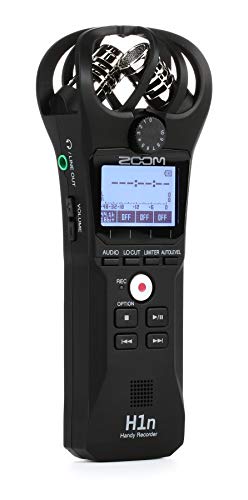
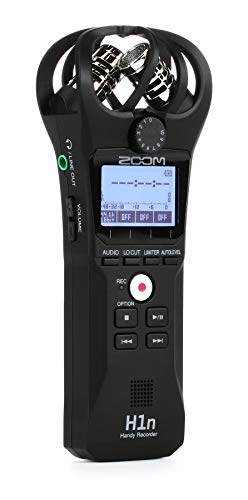
Zoom H1n
The Zoom H1n is the model in this group that leans toward music and field recording as well as speech. Zoom comes from the music and audio world, and the H1n reflects that heritage: it is the natural comparison point for anyone whose recording includes rehearsals, performances, lessons or ambient sound alongside interviews. For pure speech in quiet rooms it is more recorder than you strictly need, but for mixed use it represents the flexible end of the category, and it is the model musicians tend to ask about first.
Badge in this guide: Best for Music. Treat that as a starting point for your shortlist rather than a verdict, and weigh it against your own rooms and routines using the criteria sections that follow.
Microphone placement matters more than the tier of recorder you buy. A modest recorder placed close to the speaker, on a stable surface, pointing toward the voice, will capture clearer speech than an expensive recorder left in a bag across the room. Distance adds room echo, keyboard noise, air conditioning hum and every cough between you and the speaker. Get the recorder near the person who matters, keep it off vibrating tables where possible, and do a short test recording before the real session starts. Thirty seconds of testing saves an hour of unusable audio later, and it also lets you hear whether a window, a fan or a projector is louder in the recording than it sounds in the room.
Philips VoiceTracer
The Philips VoiceTracer is a family of recorders from Philips aimed at meetings, lectures and interviews, with some versions oriented toward transcription workflows. VoiceTracer models represent the office-minded end of the category: devices designed to sit on a meeting table, capture several voices clearly and feed an organised working process afterwards. If your recording life is mostly professional conversations that will be reviewed, shared or transcribed, this is the line built with you in mind, and it deserves a place on any serious shortlist for that work.
Badge in this guide: Best for Transcription Workflows. Treat that as a starting point for your shortlist rather than a verdict, and weigh it against your own rooms and routines using the criteria sections that follow.
Microphone placement matters more than the tier of recorder you buy. A modest recorder placed close to the speaker, on a stable surface, pointing toward the voice, will capture clearer speech than an expensive recorder left in a bag across the room. Distance adds room echo, keyboard noise, air conditioning hum and every cough between you and the speaker. Get the recorder near the person who matters, keep it off vibrating tables where possible, and do a short test recording before the real session starts. Thirty seconds of testing saves an hour of unusable audio later, and it also lets you hear whether a window, a fan or a projector is louder in the recording than it sounds in the room.
How Close Will the Recorder Sit to the Speaker?
Microphone placement matters more than the tier of recorder you buy. A modest recorder placed close to the speaker, on a stable surface, pointing toward the voice, will capture clearer speech than an expensive recorder left in a bag across the room. Distance adds room echo, keyboard noise, air conditioning hum and every cough between you and the speaker. Get the recorder near the person who matters, keep it off vibrating tables where possible, and do a short test recording before the real session starts. Thirty seconds of testing saves an hour of unusable audio later, and it also lets you hear whether a window, a fan or a projector is louder in the recording than it sounds in the room.
Background noise is the enemy every recorder owner eventually meets. Air conditioning, traffic, projectors, fridges, wind and other people’s conversations all compete with the voice you want, and no small recorder fully escapes physics. You fight noise with distance first, placing the recorder close to the speaker and away from the noise source, with direction second, and with settings last. Closing a window, moving away from a kitchen, or shifting a chair can improve a recording more than any menu option. When you review a recording and it sounds poor, ask where the recorder was before you blame the recorder, because placement explains most disappointing audio and it is the cheapest thing to fix.
How Will You Actually Use the Files?
Getting files off the recorder and into your working life should be effortless, and for heavy users it decides whether the recorder gets used or abandoned. Direct USB connection, a removable card you can read on a computer, or a companion app all work, provided the route fits your habits. What matters is that transfer is quick enough to happen the same day, that file names or a quick renaming routine tell you what each recording is, and that the originals stay untouched while copies are edited, shared or transcribed. Try the transfer with your own computer and your own software before committing to a model for serious work, because small incompatibilities are tolerable once and maddening weekly.
Many people record today in order to transcribe tomorrow, and that changes what good recording means. Transcription software, whether built into a service or run on your computer, works best with clear speech, one speaker at a time, consistent volume and as little background noise as you can manage. Cross-talk, laughter over speech and a recorder placed nearer a fan than a person all punish transcription accuracy far more than they punish a human listener. If you know a recording is headed for transcription, say names and key terms clearly, pause between speakers where the conversation allows it, and spell unusual names once. A few seconds of care at the microphone saves real time correcting the transcript afterwards.
How Much Simplicity Do You Need?
Physical controls deserve more respect than they usually get in buying advice. A record button you can find by feel, a hold switch that prevents pocket accidents, and a screen you can read at a glance are worth more in the field than a long feature list you navigate through menus. Voice activation can help for hands-free capture but can also clip the first word of a sentence or trigger on room noise, so test it before trusting it with anything important. The best recorder for you is the one whose basic operations you can perform calmly, in a hurry, in poor light, without the manual, because real recording moments rarely arrive with time to browse settings.
How Long Are Your Sessions?
Battery behaviour shapes real-world usefulness more than brochures suggest, and the honest way to judge it is by pattern rather than by any single figure. A recorder used for long days needs either generous endurance, replaceable cells you can swap in the field, or charging that fits your routine without thought. What matters is the match between the device and your longest realistic session, with margin to spare, because the recording you lose to a flat battery is always the important one. Build the charging or battery swap into your preparation ritual, check the indicator when you check placement, and treat a nearly empty recorder the way you would treat a nearly full one: as a problem to solve before the session, not during it.
Storage is rarely the limit people imagine for speech, but managing it is a real habit. Long sessions at high quality settings produce large files, cards and internal memory fill quietly over weeks of use, and a recorder that stops mid-session for lack of space is an avoidable embarrassment. The practical approach is routine: transfer files promptly, keep the recorder’s memory mostly clear, and carry a spare card if your model uses one and your work justifies it. Prompt transfer is also your backup, your filing system and your chance to label recordings while you remember them, so the storage habit and the safety habit are the same habit wearing two hats.
How to Prioritise by Use Case
Interviews are where a dedicated recorder earns its keep most clearly. The conversation flows without a phone screen lighting up, the device sits unobtrusively between you, and you can give the other person your full attention instead of watching a battery icon. Place the recorder closer to the person you are interviewing than to yourself, since your questions can be reconstructed but their answers cannot. Ask a warm-up question while you check that levels look sensible, avoid tapping the table near the recorder, and let silences run a moment longer than feels natural, because people often add their most useful sentence after a pause. When it ends, stop the recording politely and back the file up before you travel home.
Lectures reward preparation more than equipment. Sit as close to the lecturer as the room allows, because every row back adds echo and audience noise. Arrive early enough to place the recorder, check the level with the lecturer’s first words, and confirm it is actually recording before the substance starts. A recorder on a desk in front of you captures your own page turns and whispers surprisingly well, so keep it pointed toward the front and resist handling it during the session. Afterwards, transfer and label the file while the topic is fresh, and note the moments that mattered, because finding one sentence in a long lecture recording without markers is slow work.
Meetings are the hardest common job for a small recorder, because they combine several speakers, uneven distances, side conversations and rooms that were designed for looking at screens rather than for sound. Place the recorder in the middle of the table rather than in front of one person, ask people to say their name when they first speak if a transcript or detailed notes will follow, and accept that a single small recorder has limits in a large boardroom. For recurring important meetings, the routine matters as much as the device: same position, same settings, a test before people settle, and files transferred and named the same day. Consistency turns a pile of recordings into a usable record of decisions.
First Setup and Care Essentials
Recording level is the setting beginners ignore and experienced users check first. Too low and the voice is buried under hiss when you turn it up later; too high and loud moments distort in a way no software can truly repair. Automatic level control suits unpredictable situations and speakers who move, while manual control rewards a steady setup and a test recording. Either way, the discipline is the same: record a short sample in the actual room, listen to it on headphones, adjust, and only then begin. Headphones are the honest tool here, because a recorder’s small speaker flatters bad recordings and hides problems that will be obvious to anyone who listens later.
Back up important recordings as a habit, not as an afterthought. A lost recorder is lost audio, and a recorder that is dropped, left in a taxi or wiped by mistake takes the only copy with it unless you have moved the files somewhere else. Copy recordings to a computer or another storage location the same day, keep the original file untouched, and work on a duplicate when you edit or transcribe. Name files with the date, the speaker and the topic while you still remember them, because a folder of files named only by number becomes a puzzle within a month. The recorder captures the moment; the backup is what lets you keep it.
Mistakes to Avoid
The common buying mistakes are consistent: choosing by feature list instead of by main job, ignoring the transfer route until the first important file is stuck on the device, expecting one small recorder to master a large echoing room, and forgetting that recording people carries consent responsibilities. A subtler mistake is buying for the recording life you wish you had rather than the one you actually lead. If your real pattern is two lectures a week and a monthly interview, buy for that pattern and you will be satisfied; buy for imaginary field expeditions and you will own an impressive device that stays at home.
Final Recommendation
Shortlist by job, verify the practicalities, and choose the recorder you will actually carry. The models in this guide cover the sensible ground from simple starter to music-capable all-rounder. Whichever you choose, the return on your money is decided by three habits: place it close, test it first, back it up the same day.
Before You Shortlist: Measure, Match and Check the Fit
Run the two-week test on paper
Imagine the digital voice recorder arriving today and simulate the next two weeks of use in detail: where it sits, what you do with it on a normal weekday, what happens on the busiest day, and where it goes when guests arrive or the room is cleaned. This simple rehearsal exposes storage gaps, missing accessories and workflow clashes that specification tables never show. If the simulation produces friction in a workspace that gets packed away and rebuilt more often than it stays in place, adjust the shortlist now, while the fix is a different model rather than a return label and a refund wait.
Decide your return-risk tolerance in advance
Some digital voice recorder choices are easy to judge from a listing and some only reveal themselves in the hand, in the room, or in your software. If your shortlist includes a model you are judging on feel, fit or noise, buy from a seller whose returns process you have actually read, and keep the packaging intact until the first full week of use is done. Knowing your exit route in advance lets you choose the bolder option on the shortlist without gambling, and it removes the pressure to keep a digital voice recorder that is merely acceptable.
Start with the space, not the shortlist
Before comparing a single digital voice recorder, measure the space it has to live and work in, and write the numbers down. Footprint is only the start: allow for cables, ventilation, doors or lids that swing open, and the room your hands need to load, adjust or clean it. In a workspace that gets packed away and rebuilt more often than it stays in place, a model that fits on paper can still fail in practice because access is blocked or a cable run has nowhere tidy to go. Measuring first turns the Sound Cards shortlist from a wish list into a filtered list where every remaining option is physically plausible.
Check compatibility against what you already own
A digital voice recorder rarely works alone, so list the devices, mounts, media, software or accessories it must cooperate with, and check each pairing against the listing details rather than assuming standards guarantee harmony. Connector versions, physical clearances, supported formats and control apps are the usual friction points. When picks such as Philips VoiceTracer, Sony ICD-UX570 and Sony ICD-PX370 are on your shortlist, run this check against each listing in turn. Where a listing is vague about a pairing you depend on, treat that silence as a risk to resolve before ordering, not a detail to discover afterwards. Compatibility failures are the most common reason a well-reviewed digital voice recorder gets returned.
Separate the headline feature from the daily feature
Every Sound Cards range has one headline feature that dominates the marketing and one unglamorous feature you will use every single day. For a digital voice recorder, the daily feature is usually the control you touch most, the consumable you replace most, or the connection you make and break most often. Weight your shortlist by the daily feature first and let the headline feature break ties, because novelty fades within weeks while a clumsy daily interaction stays annoying for the life of the product.
Plan the consumables and spares shelf
Ownership of a digital voice recorder usually involves a small ecosystem of consumables, refills, replacement parts or spares, and availability matters as much as the unit itself. Check that the refills your shortlisted models need are standard, stocked by more than one seller, and replaceable without tools you do not own. A model tied to a single obscure consumable becomes a liability the moment that line is discontinued, whereas a digital voice recorder built around common refills stays useful for years. Keep one spare of the fastest-wearing part from day one.
Five honest minutes at this stage is worth more than five hours of comparison browsing.
Frequently Asked Questions
What is the most important feature in a voice recorder?
For speech, microphone quality combined with placement matters most, followed by controls you can operate calmly and a transfer route that fits your computer. Feature lists are long, but most recordings succeed or fail on distance, background noise and whether the device was actually recording. Judge those first and let extra features break ties between otherwise suitable models.
Do I need a recorder with a lot of storage?
Speech recordings are modest in size at sensible quality settings, and prompt transfer keeps any recorder clear. Storage becomes a consideration for very long sessions, high quality music recording or users who archive on the device, which is poor practice anyway. A recorder that is emptied and backed up regularly rarely runs out of room, whatever its capacity.
Is voice activation useful?
It can be, for hands-free situations and long, sparse recording, but it can clip first words and trigger on room noise. Test it in your real environment before trusting it with anything important. For interviews, meetings and lectures, most experienced users record continuously and edit later, because a little extra file is cheaper than a missing sentence.
Should students buy a dedicated recorder or use a phone?
A phone covers casual revision and the occasional class. A dedicated recorder earns its place across a full course of lectures: no interruptions, better placement options, simpler organisation and no drain on the phone. Students who record daily usually find the dedicated device pays for itself in reliability within a term, while occasional recorders can honestly stay with the phone.
What should I know about recording lectures and meetings legally?
Rules vary by place and by institution. Many jurisdictions require the consent of everyone recorded, and schools and employers may have their own policies about recording classes and meetings. Check your local rules and any institutional policy, and get permission where it is required. Recording openly, with the purpose stated, avoids most problems before they start.
Which tier should a first-time buyer choose?
An entry or mid-tier speech recorder suits most first-time buyers whose work is interviews, lectures and notes. Move up a tier for daily professional use, difficult rooms or music. The honest test is frequency: the more often you record, the more refinement is worth paying for, because small frictions multiply across hundreds of sessions.
Related Guides
digital voice recorder review digital voice recorder reviews digital voice recorder pros and cons related guide related guide related guide
Recording level is the setting beginners ignore and experienced users check first. Too low and the voice is buried under hiss when you turn it up later; too high and loud moments distort in a way no software can truly repair. Automatic level control suits unpredictable situations and speakers who move, while manual control rewards a steady setup and a test recording. Either way, the discipline is the same: record a short sample in the actual room, listen to it on headphones, adjust, and only then begin. Headphones are the honest tool here, because a recorder’s small speaker flatters bad recordings and hides problems that will be obvious to anyone who listens later.
Listening back is part of recording, not an optional extra. Check recordings on headphones soon after making them, while a re-record or a follow-up question is still possible. Learn what your recorder sounds like in a quiet room, a car, a hall and a cafe, so surprises become rarer. Keep a simple log for important sessions: where the recorder sat, what the room was like, what you would change. That log, dull as it sounds, is how casual users become reliable ones, and it is why two people with the same recorder get very different results. Skill compounds in this hobby faster than equipment upgrades do.
A few accessories genuinely help, and many do not. A small tripod or stand lifts the recorder off table vibrations and points it properly. An external microphone, where the model supports one, can transform an interview by sitting on the speaker rather than across the table. A windscreen helps outdoors more than any setting. A simple case protects the recorder in a bag, and spare charging or battery supplies suit long days. Beyond that, be sceptical: elaborate kits for a simple device usually gather dust. Buy the recorder, learn its limits in your real rooms, and add only the accessory that fixes a problem you have actually had.
A voice recorder lives a rougher life than most electronics. It is carried in pockets and bags, set down on cafe tables, lent to colleagues and pulled out in rain, hurry and poor light. A body that feels solid, buttons that survive daily use, and a case or pouch in the bag are practical virtues, not luxuries. Consider also the small things: a lanyard loop, a tripod thread for a small stand, a speaker loud enough to check a recording on the spot. None of these headline a product page, yet together they decide whether the recorder is a trusted tool two years from now or a drawer object with a flat battery and a forgotten password.
Recordings create responsibilities as well as convenience. A recorder full of meetings, interviews and personal notes is a sensitive object: it can hold other people’s words, confidential plans and private thoughts. Protect it accordingly. Use any locking or password features your model offers where appropriate, be thoughtful about which recordings are shared and with whom, keep transfers to services you trust, and delete recordings you no longer need rather than letting them accumulate indefinitely. And return to the starting point: record openly, with permission where the law or simple courtesy requires it, because a recording made fairly is one you never have to worry about explaining.
Storage is rarely the limit people imagine for speech, but managing it is a real habit. Long sessions at high quality settings produce large files, cards and internal memory fill quietly over weeks of use, and a recorder that stops mid-session for lack of space is an avoidable embarrassment. The practical approach is routine: transfer files promptly, keep the recorder’s memory mostly clear, and carry a spare card if your model uses one and your work justifies it. Prompt transfer is also your backup, your filing system and your chance to label recordings while you remember them, so the storage habit and the safety habit are the same habit wearing two hats.
Battery behaviour shapes real-world usefulness more than brochures suggest, and the honest way to judge it is by pattern rather than by any single figure. A recorder used for long days needs either generous endurance, replaceable cells you can swap in the field, or charging that fits your routine without thought. What matters is the match between the device and your longest realistic session, with margin to spare, because the recording you lose to a flat battery is always the important one. Build the charging or battery swap into your preparation ritual, check the indicator when you check placement, and treat a nearly empty recorder the way you would treat a nearly full one: as a problem to solve before the session, not during it.
Background noise is the enemy every recorder owner eventually meets. Air conditioning, traffic, projectors, fridges, wind and other people’s conversations all compete with the voice you want, and no small recorder fully escapes physics. You fight noise with distance first, placing the recorder close to the speaker and away from the noise source, with direction second, and with settings last. Closing a window, moving away from a kitchen, or shifting a chair can improve a recording more than any menu option. When you review a recording and it sounds poor, ask where the recorder was before you blame the recorder, because placement explains most disappointing audio and it is the cheapest thing to fix.
Getting files off the recorder and into your working life should be effortless, and for heavy users it decides whether the recorder gets used or abandoned. Direct USB connection, a removable card you can read on a computer, or a companion app all work, provided the route fits your habits. What matters is that transfer is quick enough to happen the same day, that file names or a quick renaming routine tell you what each recording is, and that the originals stay untouched while copies are edited, shared or transcribed. Try the transfer with your own computer and your own software before committing to a model for serious work, because small incompatibilities are tolerable once and maddening weekly.
Many people record today in order to transcribe tomorrow, and that changes what good recording means. Transcription software, whether built into a service or run on your computer, works best with clear speech, one speaker at a time, consistent volume and as little background noise as you can manage. Cross-talk, laughter over speech and a recorder placed nearer a fan than a person all punish transcription accuracy far more than they punish a human listener. If you know a recording is headed for transcription, say names and key terms clearly, pause between speakers where the conversation allows it, and spell unusual names once. A few seconds of care at the microphone saves real time correcting the transcript afterwards.
Dictation and voice notes are the quiet everyday use that many recorders are actually bought for. Writers draft while walking, researchers think aloud after an interview, managers capture the action points of a call before they evaporate, and students talk through an argument before writing it. For this work the winning qualities are speed and simplicity: a device that starts recording with one obvious action, a microphone that handles a voice at arm’s length, and files that move easily to wherever the words will be used. Fancy features matter little here. What matters is that the recorder is with you, charged and empty enough, at the moment the thought arrives, because a thought not captured rarely returns in the same shape.
Recording level is the setting beginners ignore and experienced users check first. Too low and the voice is buried under hiss when you turn it up later; too high and loud moments distort in a way no software can truly repair. Automatic level control suits unpredictable situations and speakers who move, while manual control rewards a steady setup and a test recording. Either way, the discipline is the same: record a short sample in the actual room, listen to it on headphones, adjust, and only then begin. Headphones are the honest tool here, because a recorder’s small speaker flatters bad recordings and hides problems that will be obvious to anyone who listens later.
Listening back is part of recording, not an optional extra. Check recordings on headphones soon after making them, while a re-record or a follow-up question is still possible. Learn what your recorder sounds like in a quiet room, a car, a hall and a cafe, so surprises become rarer. Keep a simple log for important sessions: where the recorder sat, what the room was like, what you would change. That log, dull as it sounds, is how casual users become reliable ones, and it is why two people with the same recorder get very different results. Skill compounds in this hobby faster than equipment upgrades do.
A few accessories genuinely help, and many do not. A small tripod or stand lifts the recorder off table vibrations and points it properly. An external microphone, where the model supports one, can transform an interview by sitting on the speaker rather than across the table. A windscreen helps outdoors more than any setting. A simple case protects the recorder in a bag, and spare charging or battery supplies suit long days. Beyond that, be sceptical: elaborate kits for a simple device usually gather dust. Buy the recorder, learn its limits in your real rooms, and add only the accessory that fixes a problem you have actually had.
A voice recorder lives a rougher life than most electronics. It is carried in pockets and bags, set down on cafe tables, lent to colleagues and pulled out in rain, hurry and poor light. A body that feels solid, buttons that survive daily use, and a case or pouch in the bag are practical virtues, not luxuries. Consider also the small things: a lanyard loop, a tripod thread for a small stand, a speaker loud enough to check a recording on the spot. None of these headline a product page, yet together they decide whether the recorder is a trusted tool two years from now or a drawer object with a flat battery and a forgotten password.
Recordings create responsibilities as well as convenience. A recorder full of meetings, interviews and personal notes is a sensitive object: it can hold other people’s words, confidential plans and private thoughts. Protect it accordingly. Use any locking or password features your model offers where appropriate, be thoughtful about which recordings are shared and with whom, keep transfers to services you trust, and delete recordings you no longer need rather than letting them accumulate indefinitely. And return to the starting point: record openly, with permission where the law or simple courtesy requires it, because a recording made fairly is one you never have to worry about explaining.
Storage is rarely the limit people imagine for speech, but managing it is a real habit. Long sessions at high quality settings produce large files, cards and internal memory fill quietly over weeks of use, and a recorder that stops mid-session for lack of space is an avoidable embarrassment. The practical approach is routine: transfer files promptly, keep the recorder’s memory mostly clear, and carry a spare card if your model uses one and your work justifies it. Prompt transfer is also your backup, your filing system and your chance to label recordings while you remember them, so the storage habit and the safety habit are the same habit wearing two hats.
Battery behaviour shapes real-world usefulness more than brochures suggest, and the honest way to judge it is by pattern rather than by any single figure. A recorder used for long days needs either generous endurance, replaceable cells you can swap in the field, or charging that fits your routine without thought. What matters is the match between the device and your longest realistic session, with margin to spare, because the recording you lose to a flat battery is always the important one. Build the charging or battery swap into your preparation ritual, check the indicator when you check placement, and treat a nearly empty recorder the way you would treat a nearly full one: as a problem to solve before the session, not during it.
Background noise is the enemy every recorder owner eventually meets. Air conditioning, traffic, projectors, fridges, wind and other people’s conversations all compete with the voice you want, and no small recorder fully escapes physics. You fight noise with distance first, placing the recorder close to the speaker and away from the noise source, with direction second, and with settings last. Closing a window, moving away from a kitchen, or shifting a chair can improve a recording more than any menu option. When you review a recording and it sounds poor, ask where the recorder was before you blame the recorder, because placement explains most disappointing audio and it is the cheapest thing to fix.
Getting files off the recorder and into your working life should be effortless, and for heavy users it decides whether the recorder gets used or abandoned. Direct USB connection, a removable card you can read on a computer, or a companion app all work, provided the route fits your habits. What matters is that transfer is quick enough to happen the same day, that file names or a quick renaming routine tell you what each recording is, and that the originals stay untouched while copies are edited, shared or transcribed. Try the transfer with your own computer and your own software before committing to a model for serious work, because small incompatibilities are tolerable once and maddening weekly.