Disclosure: As an Amazon Associate, ilcastellomenu.com earns from qualifying purchases. Links on this page are affiliate links; they cost you nothing extra. Prices and availability change often, so check the current Amazon listing before you buy.
This gpu water block buying guide guide starts with the fact that shapes every decision in this category: a gpu water block is built for one exact circuit board, lives inside a full custom loop, and rewards careful planning far more than impulse. Whether you arrived here comparing specific blocks, weighing the idea for the first time, or standing over a card with a screwdriver in hand, the sections below walk through fitment, warranty honesty, loop requirements, leak testing, coolant and metals in the order you will actually meet them, so the choice you make is one you can defend after the loop is filled and running.
Gpu Water Block Buying Guide: The Short Answer
The short answer is that fitment, loop capacity and honest maintenance matter more than any single feature. Confirm your exact board, size the radiators properly, keep metals and coolant compatible, and leak-test with the PC powered off before you judge any block a success.
In this guide
Key Takeaways
- Confirm fitment for your exact card model and board revision in the maker’s configurator; a near-match does not fit.
- A block alone does nothing without a pump, radiator, tubing, fittings and coolant forming a complete loop.
- Opening the card may affect warranty depending on maker and region; read your terms and keep the stock cooler.
- Leak-test with the PC powered off, using a jumpered power supply or a leak tester, before first power-on.
- Use distilled water or proper loop coolant, never tap water, and keep loop metals compatible to avoid corrosion.
Keep related reading close as you plan: gpu water block review and liquid cpu cooler review cover the loop side of the build, while best pc cases for custom loops helps if your case choice is still open.
What a Gpu Water Block Does and the Main Types
Acrylic, acetal and metal tops each bring a personality to a block. Clear acrylic shows the coolant and any growth or debris early, which is a genuine maintenance advantage, but it demands care: it can crack if fittings are overtightened and it dislikes certain cleaning chemicals. Acetal is tougher and more forgiving of heavy-handed fitting work, at the cost of hiding the water channels from view. Metal-topped designs lean into a clean industrial look and shrug off handling. None of these choices changes the cold plate doing the real work underneath, so choose the top for your maintenance habits and your tolerance for risk, not for imagined performance gaps.
Metals matter because water connects everything in a loop electrically as well as thermally. Most modern blocks use nickel-plated copper for the cold plate, and nickel plating does not love every other metal or every coolant chemistry. Mixing aluminium parts into a copper and nickel loop invites galvanic corrosion, where one metal slowly sacrifices itself and sheds particles that clog the micro-fins you paid for. The qualitative rule is easy: keep loop metals compatible, favour nickel-plated copper and brass, avoid aluminium components unless the entire loop was designed around them, and use a coolant formulated to protect the metals you actually own.
Single-slot ambitions are a real reason some builders water-cool. A thick air cooler can swallow neighbouring expansion slots, while a blocked card with a slim profile can free space for a capture card, extra storage or a second device, or simply let a compact case breathe. If slot count drives your decision, confirm the blocked card’s final thickness including its terminal and fittings, not just the bare block, because fittings are usually what collide with the card below. Measure the space you actually have, with the motherboard you actually own, before promising yourself a layout that the plumbing may not allow in practice.
Top Picks at a Glance
Corsair Hydro X Series XG7
Best for: Builders already inside the Corsair Hydro X ecosystem who want the GPU block, fittings and coolant to come from one catalogue.
Not suited for: Anyone whose exact card model is not confirmed for this block in the maker’s configurator, or anyone building without the rest of a custom loop around it. Positioned in the premium tier, it asks you to verify fitment for your precise board revision before anything else, to plan the tubing route around its terminal, and to budget for pads, fittings and coolant as part of the same purchase. Treat the configurator result for your full card name as the deciding document, keep the factory cooler safe for warranty service, and leak-test the finished loop with the PC powered off before the card ever sees power in its new form.
Optimus GPU Water Block
Best for: Enthusiasts chasing maximum machining quality and cooling headroom on a flagship card they plan to keep for years.
Not suited for: Anyone whose exact card model is not confirmed for this block in the maker’s configurator, or anyone building without the rest of a custom loop around it. Positioned in the premium tier, it asks you to verify fitment for your precise board revision before anything else, to plan the tubing route around its terminal, and to budget for pads, fittings and coolant as part of the same purchase. Treat the configurator result for your full card name as the deciding document, keep the factory cooler safe for warranty service, and leak-test the finished loop with the PC powered off before the card ever sees power in its new form.

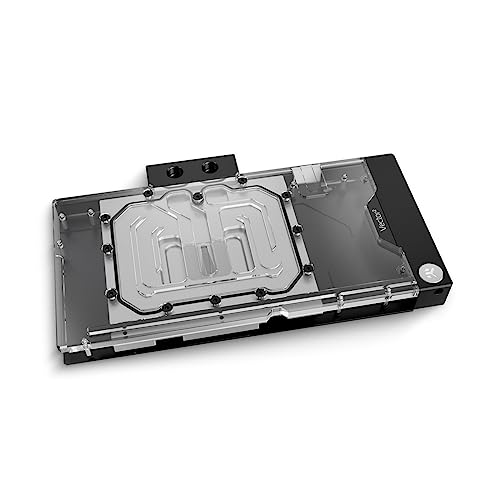
EKWB EK-Quantum Vector
Best for: Builders who want a widely documented block family with a large library of card-specific variants and a strong configurator to check against.
Not suited for: Anyone whose exact card model is not confirmed for this block in the maker’s configurator, or anyone building without the rest of a custom loop around it. Positioned in the premium tier, it asks you to verify fitment for your precise board revision before anything else, to plan the tubing route around its terminal, and to budget for pads, fittings and coolant as part of the same purchase. Treat the configurator result for your full card name as the deciding document, keep the factory cooler safe for warranty service, and leak-test the finished loop with the PC powered off before the card ever sees power in its new form.

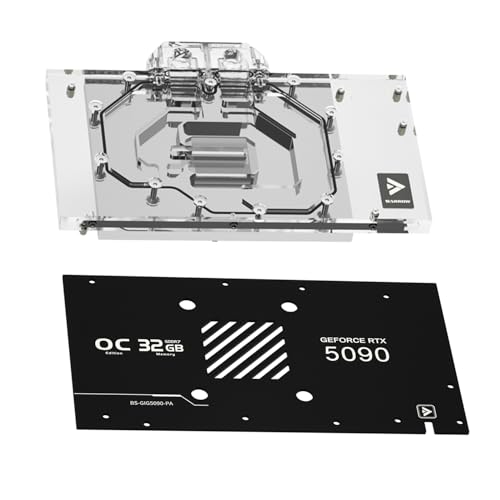
Barrow GPU Water Block
Best for: Value-focused builders who already know their exact board revision and are confident checking dimensions themselves.
Not suited for: Anyone whose exact card model is not confirmed for this block in the maker’s configurator, or anyone building without the rest of a custom loop around it. Positioned in the entry to mid-range tier, it asks you to verify fitment for your precise board revision before anything else, to plan the tubing route around its terminal, and to budget for pads, fittings and coolant as part of the same purchase. Treat the configurator result for your full card name as the deciding document, keep the factory cooler safe for warranty service, and leak-test the finished loop with the PC powered off before the card ever sees power in its new form.
Expectations about temperature should stay grounded. A good loop typically delivers its biggest wins in sustained-load behaviour and noise rather than in a single headline number, and results vary with radiator size, fan setup, room temperature and the card itself. Anyone promising a precise temperature for your build, sight unseen, is selling something. What you can reasonably expect is a card that stays closer to its best behaviour for longer, in a system that sounds calmer doing it, provided the loop around the block is sized and built properly. Judge the purchase on that whole picture, and on whether you will enjoy owning and maintaining the loop itself.
Fitment is the single fact that decides everything else about a GPU water block. A block is machined for one printed circuit board layout, not for a graphics card name in general. Two cards can share the same GPU chip and the same box branding while using completely different boards, different voltage regulator placement and different mounting hole positions. Reference boards follow the chip maker’s own layout, while partner brands routinely design custom boards with taller components, moved capacitors and extra power stages. A block made for the reference board will not seat on most custom boards, and a near-match does not fit at all: the cold plate either bridges a component it should clear or misses a hot component it was meant to cool.
How Much Radiator Does Your Loop Need?
Hard tubing looks spectacular and forgives nothing. Rigid runs demand precise measuring, careful bending or many angled fittings, and they make later maintenance slower because sections must come out whole. Soft tubing is kinder to beginners, tolerates small measurement errors, and lets you remove a card without dismantling half the loop. Neither choice changes how the block itself performs. Many experienced builders quietly recommend soft tubing for a first loop and hard tubing for a second, once the builder knows their case, their route and their own patience. Choosing the forgiving option first is not a compromise; it is how people finish builds instead of abandoning them.
Fitment is the single fact that decides everything else about a GPU water block. A block is machined for one printed circuit board layout, not for a graphics card name in general. Two cards can share the same GPU chip and the same box branding while using completely different boards, different voltage regulator placement and different mounting hole positions. Reference boards follow the chip maker’s own layout, while partner brands routinely design custom boards with taller components, moved capacitors and extra power stages. A block made for the reference board will not seat on most custom boards, and a near-match does not fit at all: the cold plate either bridges a component it should clear or misses a hot component it was meant to cool.
Noise is often the deciding benefit people actually live with. Radiator fans can be larger and slower than the small fans on a graphics card shroud, and they respond to water temperature rather than spiking with every momentary jump in GPU load. The result is a system that sounds steadier: fewer sudden ramps, less high-pitched whine under load, and a room that stays comfortable during long sessions. Coil whine, it should be said, is electrical and a block does not cure it; some owners notice it more once fan noise drops away. Honest expectations here prevent the most common disappointment reported by first-time loop builders.
For the wider loop picture, see gpu water block reviews, liquid cpu cooler buying guide and best cpu coolers for desktops before you finalise a parts list.
How Do You Confirm Exact Fitment?
Terminal design sounds minor until you try to plumb a tight case. The terminal is where fittings attach, and blocks offer different port positions and sometimes replaceable terminals that route tubing from the top, the side or even the back of the card. In a compact build the difference between a port that points where your tubing run wants to go and one that fights it is the difference between a clean loop and a compromised one. Plan the tubing route on paper before ordering, count every fitting the route needs, and remember that each adapter and rotary you add is another joint to check during the leak test.
Expectations about temperature should stay grounded. A good loop typically delivers its biggest wins in sustained-load behaviour and noise rather than in a single headline number, and results vary with radiator size, fan setup, room temperature and the card itself. Anyone promising a precise temperature for your build, sight unseen, is selling something. What you can reasonably expect is a card that stays closer to its best behaviour for longer, in a system that sounds calmer doing it, provided the loop around the block is sized and built properly. Judge the purchase on that whole picture, and on whether you will enjoy owning and maintaining the loop itself.
Draining and filling deserve as much respect as the glamorous parts. Filling a loop means coaxing air out of radiators and blocks, tilting the case gently, cycling the pump, and topping up as bubbles work their way to the reservoir over hours and days. A block mounted with its ports in an awkward orientation can trap a pocket of air that quietly hurts performance until it clears. Plan a fill port you can reach, a drain you can open over a container, and enough spare coolant for the top-ups of the first week. These unglamorous details separate a loop that feels finished from one that feels permanently provisional.
Which Materials and Coolants Belong Together?
Noise is often the deciding benefit people actually live with. Radiator fans can be larger and slower than the small fans on a graphics card shroud, and they respond to water temperature rather than spiking with every momentary jump in GPU load. The result is a system that sounds steadier: fewer sudden ramps, less high-pitched whine under load, and a room that stays comfortable during long sessions. Coil whine, it should be said, is electrical and a block does not cure it; some owners notice it more once fan noise drops away. Honest expectations here prevent the most common disappointment reported by first-time loop builders.
Terminal design sounds minor until you try to plumb a tight case. The terminal is where fittings attach, and blocks offer different port positions and sometimes replaceable terminals that route tubing from the top, the side or even the back of the card. In a compact build the difference between a port that points where your tubing run wants to go and one that fights it is the difference between a clean loop and a compromised one. Plan the tubing route on paper before ordering, count every fitting the route needs, and remember that each adapter and rotary you add is another joint to check during the leak test.
Fitment is the single fact that decides everything else about a GPU water block. A block is machined for one printed circuit board layout, not for a graphics card name in general. Two cards can share the same GPU chip and the same box branding while using completely different boards, different voltage regulator placement and different mounting hole positions. Reference boards follow the chip maker’s own layout, while partner brands routinely design custom boards with taller components, moved capacitors and extra power stages. A block made for the reference board will not seat on most custom boards, and a near-match does not fit at all: the cold plate either bridges a component it should clear or misses a hot component it was meant to cool.
How to Prioritise by Use Case
Terminal design sounds minor until you try to plumb a tight case. The terminal is where fittings attach, and blocks offer different port positions and sometimes replaceable terminals that route tubing from the top, the side or even the back of the card. In a compact build the difference between a port that points where your tubing run wants to go and one that fights it is the difference between a clean loop and a compromised one. Plan the tubing route on paper before ordering, count every fitting the route needs, and remember that each adapter and rotary you add is another joint to check during the leak test.
Metals matter because water connects everything in a loop electrically as well as thermally. Most modern blocks use nickel-plated copper for the cold plate, and nickel plating does not love every other metal or every coolant chemistry. Mixing aluminium parts into a copper and nickel loop invites galvanic corrosion, where one metal slowly sacrifices itself and sheds particles that clog the micro-fins you paid for. The qualitative rule is easy: keep loop metals compatible, favour nickel-plated copper and brass, avoid aluminium components unless the entire loop was designed around them, and use a coolant formulated to protect the metals you actually own.
The reason builders accept all this effort is thermal headroom delivered quietly. A good block spreads its contact across the GPU die, the memory modules and the voltage regulators, carrying heat into the water from every part that the factory cooler had to handle with a shared heatsink and small fans. Under sustained load the card can hold its boost behaviour longer and with less fan noise, because the radiator fans doing the final work are larger, slower and further from your ears. The gain is most obvious in long sessions, small cases and warm rooms, where air coolers run out of cool air to breathe long before they run out of heatsink.
First Setup and Care Essentials
Coolant choice is simpler than marketing suggests. Use distilled water as the base or a premixed coolant made for PC loops, with corrosion inhibitors and biocide appropriate to the metals in your loop. Never use tap water: its mineral content deposits inside the fine fins of a block, feeds growth, and conducts electricity far more readily than a proper coolant. Change coolant on the maker’s suggested schedule, inspect it for cloudiness or particles when you do, and treat any visible debris as a sign to flush the loop and find the source rather than simply topping up and hoping the problem goes away quietly.
The reason builders accept all this effort is thermal headroom delivered quietly. A good block spreads its contact across the GPU die, the memory modules and the voltage regulators, carrying heat into the water from every part that the factory cooler had to handle with a shared heatsink and small fans. Under sustained load the card can hold its boost behaviour longer and with less fan noise, because the radiator fans doing the final work are larger, slower and further from your ears. The gain is most obvious in long sessions, small cases and warm rooms, where air coolers run out of cool air to breathe long before they run out of heatsink.
Expectations about temperature should stay grounded. A good loop typically delivers its biggest wins in sustained-load behaviour and noise rather than in a single headline number, and results vary with radiator size, fan setup, room temperature and the card itself. Anyone promising a precise temperature for your build, sight unseen, is selling something. What you can reasonably expect is a card that stays closer to its best behaviour for longer, in a system that sounds calmer doing it, provided the loop around the block is sized and built properly. Judge the purchase on that whole picture, and on whether you will enjoy owning and maintaining the loop itself.
Mistakes to Avoid
The order of components in a loop matters far less than newcomers fear. Water moving through a loop equalises temperature quickly, so whether the GPU block sits before or after the CPU block changes results by very little in a healthy loop. What matters is a route that is short, neat, easy to fill and easy to drain, with the reservoir feeding the pump reliably. Spend your planning effort on radiator capacity, clean airflow through those radiators, and a drain point at a low spot in the loop. A loop that is easy to drain is a loop that actually gets its coolant changed on schedule.
Thermal pads are the unsung half of every block installation. The cold plate touches the GPU die through paste, but memory and voltage regulators meet the block through pads of specific thicknesses, and each contact point may need a different one. Pads that are too thick hold the plate off the die; pads that are too thin leave memory uncooled. Follow the block maker’s pad map exactly, cut pads before you strip the card so the job stays calm, and never reuse compressed old pads and assume they will seal like new ones. Keeping a small stock of spare pad material in common thicknesses turns a mid-build surprise into a five-minute pause.
Single-slot ambitions are a real reason some builders water-cool. A thick air cooler can swallow neighbouring expansion slots, while a blocked card with a slim profile can free space for a capture card, extra storage or a second device, or simply let a compact case breathe. If slot count drives your decision, confirm the blocked card’s final thickness including its terminal and fittings, not just the bare block, because fittings are usually what collide with the card below. Measure the space you actually have, with the motherboard you actually own, before promising yourself a layout that the plumbing may not allow in practice.
At a Glance: The Blocks in This Guide
| Block | Positioning | Best for |
|---|---|---|
| Corsair Hydro X Series XG7 | premium | Builders already inside the Corsair Hydro X ecosystem who want the GPU block, fittings and coolant to come from one catalogue. |
| Optimus GPU Water Block | premium | Enthusiasts chasing maximum machining quality and cooling headroom on a flagship card they plan to keep for years. |
| EKWB EK-Quantum Vector | premium | Builders who want a widely documented block family with a large library of card-specific variants and a strong configurator to check against. |
| Barrow GPU Water Block | entry to mid-range | Value-focused builders who already know their exact board revision and are confident checking dimensions themselves. |
Backplates are more than decoration, though they are partly decoration. A well-made backplate protects the rear of the board, adds rigidity to a heavy card, and can help draw some heat away from the back of the board, especially around memory on cards that place modules or hot components there. It also changes how the card looks through a case window, which matters to many builders and should be admitted honestly rather than disguised as pure performance. Check whether a block includes a backplate, offers one separately, or reuses the factory plate, because that detail changes both the parts list and the finished appearance of the build.
Second-hand blocks can be good value and demand extra suspicion. A used block may carry stained channels, tired seals, missing pads or screws, and corrosion started by a previous owner’s coolant habits. If you buy used, insist on clear photographs of the fin stack and sealing surfaces, budget for fresh pads, paste and possibly a new seal, and clean the block thoroughly before it meets your loop. The saving can be real, especially on blocks for slightly older cards. Just remember that a block is a pressure boundary holding water above your hardware; the parts that make it safe are exactly the parts that wear, and they deserve replacement rather than optimism.
Final Verdict
Judged honestly, the gpu water block buying guide question is never really about one block in isolation. It is about whether your exact card has a confirmed block, whether the loop around it is sized and built with care, and whether you will enjoy the maintenance rhythm that custom water asks of its owners. If those three answers are yes, a good block is one of the most satisfying upgrades in PC building: quieter, cooler under sustained load, and deeply personal to assemble. If any answer is no, the honest move is to wait, choose a different cooling path, or pick a card with confirmed support. Round out your reading with gpu water block pros and cons, how to choose a gpu water block, how to install gpu water block and how to install liquid cpu cooler, then order once, with the configurator result for your full card name saved where you can find it again.
Deeper Detail: Planning the Loop Around the Block
Coolant choice is simpler than marketing suggests. Use distilled water as the base or a premixed coolant made for PC loops, with corrosion inhibitors and biocide appropriate to the metals in your loop. Never use tap water: its mineral content deposits inside the fine fins of a block, feeds growth, and conducts electricity far more readily than a proper coolant. Change coolant on the maker’s suggested schedule, inspect it for cloudiness or particles when you do, and treat any visible debris as a sign to flush the loop and find the source rather than simply topping up and hoping the problem goes away quietly.
Noise is often the deciding benefit people actually live with. Radiator fans can be larger and slower than the small fans on a graphics card shroud, and they respond to water temperature rather than spiking with every momentary jump in GPU load. The result is a system that sounds steadier: fewer sudden ramps, less high-pitched whine under load, and a room that stays comfortable during long sessions. Coil whine, it should be said, is electrical and a block does not cure it; some owners notice it more once fan noise drops away. Honest expectations here prevent the most common disappointment reported by first-time loop builders.
Thermal pads are the unsung half of every block installation. The cold plate touches the GPU die through paste, but memory and voltage regulators meet the block through pads of specific thicknesses, and each contact point may need a different one. Pads that are too thick hold the plate off the die; pads that are too thin leave memory uncooled. Follow the block maker’s pad map exactly, cut pads before you strip the card so the job stays calm, and never reuse compressed old pads and assume they will seal like new ones. Keeping a small stock of spare pad material in common thicknesses turns a mid-build surprise into a five-minute pause.
Deeper Detail: Living With the Loop Month After Month
Noise is often the deciding benefit people actually live with. Radiator fans can be larger and slower than the small fans on a graphics card shroud, and they respond to water temperature rather than spiking with every momentary jump in GPU load. The result is a system that sounds steadier: fewer sudden ramps, less high-pitched whine under load, and a room that stays comfortable during long sessions. Coil whine, it should be said, is electrical and a block does not cure it; some owners notice it more once fan noise drops away. Honest expectations here prevent the most common disappointment reported by first-time loop builders.
Terminal design sounds minor until you try to plumb a tight case. The terminal is where fittings attach, and blocks offer different port positions and sometimes replaceable terminals that route tubing from the top, the side or even the back of the card. In a compact build the difference between a port that points where your tubing run wants to go and one that fights it is the difference between a clean loop and a compromised one. Plan the tubing route on paper before ordering, count every fitting the route needs, and remember that each adapter and rotary you add is another joint to check during the leak test.
Coolant choice is simpler than marketing suggests. Use distilled water as the base or a premixed coolant made for PC loops, with corrosion inhibitors and biocide appropriate to the metals in your loop. Never use tap water: its mineral content deposits inside the fine fins of a block, feeds growth, and conducts electricity far more readily than a proper coolant. Change coolant on the maker’s suggested schedule, inspect it for cloudiness or particles when you do, and treat any visible debris as a sign to flush the loop and find the source rather than simply topping up and hoping the problem goes away quietly.
Deeper Detail: When a Block Is the Wrong Answer
Thermal pads are the unsung half of every block installation. The cold plate touches the GPU die through paste, but memory and voltage regulators meet the block through pads of specific thicknesses, and each contact point may need a different one. Pads that are too thick hold the plate off the die; pads that are too thin leave memory uncooled. Follow the block maker’s pad map exactly, cut pads before you strip the card so the job stays calm, and never reuse compressed old pads and assume they will seal like new ones. Keeping a small stock of spare pad material in common thicknesses turns a mid-build surprise into a five-minute pause.
Second-hand blocks can be good value and demand extra suspicion. A used block may carry stained channels, tired seals, missing pads or screws, and corrosion started by a previous owner’s coolant habits. If you buy used, insist on clear photographs of the fin stack and sealing surfaces, budget for fresh pads, paste and possibly a new seal, and clean the block thoroughly before it meets your loop. The saving can be real, especially on blocks for slightly older cards. Just remember that a block is a pressure boundary holding water above your hardware; the parts that make it safe are exactly the parts that wear, and they deserve replacement rather than optimism.
Lighting and appearance are legitimate criteria, provided they come after fitment and loop health. Addressable lighting in a block top, a choice of finishes, and a window-friendly design are part of why custom loops are a hobby and not just an engineering exercise. The honest ordering is: exact fit first, loop capacity second, materials and coolant compatibility third, and only then the look. A beautiful block on the wrong board is a paperweight; a plain block on the right board, in a healthy loop, will make you happy every single day. Builders who keep that order rarely regret a purchase in this category.
Deeper Detail: Checking Your Work Before First Power-On
Expectations about temperature should stay grounded. A good loop typically delivers its biggest wins in sustained-load behaviour and noise rather than in a single headline number, and results vary with radiator size, fan setup, room temperature and the card itself. Anyone promising a precise temperature for your build, sight unseen, is selling something. What you can reasonably expect is a card that stays closer to its best behaviour for longer, in a system that sounds calmer doing it, provided the loop around the block is sized and built properly. Judge the purchase on that whole picture, and on whether you will enjoy owning and maintaining the loop itself.
Metals matter because water connects everything in a loop electrically as well as thermally. Most modern blocks use nickel-plated copper for the cold plate, and nickel plating does not love every other metal or every coolant chemistry. Mixing aluminium parts into a copper and nickel loop invites galvanic corrosion, where one metal slowly sacrifices itself and sheds particles that clog the micro-fins you paid for. The qualitative rule is easy: keep loop metals compatible, favour nickel-plated copper and brass, avoid aluminium components unless the entire loop was designed around them, and use a coolant formulated to protect the metals you actually own.
Acrylic, acetal and metal tops each bring a personality to a block. Clear acrylic shows the coolant and any growth or debris early, which is a genuine maintenance advantage, but it demands care: it can crack if fittings are overtightened and it dislikes certain cleaning chemicals. Acetal is tougher and more forgiving of heavy-handed fitting work, at the cost of hiding the water channels from view. Metal-topped designs lean into a clean industrial look and shrug off handling. None of these choices changes the cold plate doing the real work underneath, so choose the top for your maintenance habits and your tolerance for risk, not for imagined performance gaps.
Deeper Detail: Planning the Loop Around the Block
Backplates are more than decoration, though they are partly decoration. A well-made backplate protects the rear of the board, adds rigidity to a heavy card, and can help draw some heat away from the back of the board, especially around memory on cards that place modules or hot components there. It also changes how the card looks through a case window, which matters to many builders and should be admitted honestly rather than disguised as pure performance. Check whether a block includes a backplate, offers one separately, or reuses the factory plate, because that detail changes both the parts list and the finished appearance of the build.
Thermal pads are the unsung half of every block installation. The cold plate touches the GPU die through paste, but memory and voltage regulators meet the block through pads of specific thicknesses, and each contact point may need a different one. Pads that are too thick hold the plate off the die; pads that are too thin leave memory uncooled. Follow the block maker’s pad map exactly, cut pads before you strip the card so the job stays calm, and never reuse compressed old pads and assume they will seal like new ones. Keeping a small stock of spare pad material in common thicknesses turns a mid-build surprise into a five-minute pause.
Maintenance is the ongoing price of admission. A custom loop is a small plumbing system living inside an expensive computer, and it rewards owners who inspect it. Look at the coolant level and clarity whenever you clean your case filters, glance at fittings for residue that hints at a slow weep, and plan a coolant change as routine work rather than an emergency response. Blocks can be opened and their fin stacks cleaned if debris accumulates, though that is careful work with small screws and seals. Builders who enjoy this rhythm keep loops for years; builders who resent it usually return to air cooling at the next upgrade, and both reactions are perfectly reasonable.
Deeper Detail: Living With the Loop Month After Month
Noise is often the deciding benefit people actually live with. Radiator fans can be larger and slower than the small fans on a graphics card shroud, and they respond to water temperature rather than spiking with every momentary jump in GPU load. The result is a system that sounds steadier: fewer sudden ramps, less high-pitched whine under load, and a room that stays comfortable during long sessions. Coil whine, it should be said, is electrical and a block does not cure it; some owners notice it more once fan noise drops away. Honest expectations here prevent the most common disappointment reported by first-time loop builders.
Acrylic, acetal and metal tops each bring a personality to a block. Clear acrylic shows the coolant and any growth or debris early, which is a genuine maintenance advantage, but it demands care: it can crack if fittings are overtightened and it dislikes certain cleaning chemicals. Acetal is tougher and more forgiving of heavy-handed fitting work, at the cost of hiding the water channels from view. Metal-topped designs lean into a clean industrial look and shrug off handling. None of these choices changes the cold plate doing the real work underneath, so choose the top for your maintenance habits and your tolerance for risk, not for imagined performance gaps.
Expectations about temperature should stay grounded. A good loop typically delivers its biggest wins in sustained-load behaviour and noise rather than in a single headline number, and results vary with radiator size, fan setup, room temperature and the card itself. Anyone promising a precise temperature for your build, sight unseen, is selling something. What you can reasonably expect is a card that stays closer to its best behaviour for longer, in a system that sounds calmer doing it, provided the loop around the block is sized and built properly. Judge the purchase on that whole picture, and on whether you will enjoy owning and maintaining the loop itself.
Sizing and Compatibility Checks to Run Before You Decide
Plan the consumables and spares shelf
Ownership of a gpu water block usually involves a small ecosystem of consumables, refills, replacement parts or spares, and availability matters as much as the unit itself. Check that the refills your shortlisted models need are standard, stocked by more than one seller, and replaceable without tools you do not own. A model tied to a single obscure consumable becomes a liability the moment that line is discontinued, whereas a gpu water block built around common refills stays useful for years. Keep one spare of the fastest-wearing part from day one.
Run the two-week test on paper
Imagine the gpu water block arriving today and simulate the next two weeks of use in detail: where it sits, what you do with it on a normal weekday, what happens on the busiest day, and where it goes when guests arrive or the room is cleaned. This simple rehearsal exposes storage gaps, missing accessories and workflow clashes that specification tables never show. If the simulation produces friction in a workspace that gets packed away and rebuilt more often than it stays in place, adjust the shortlist now, while the fix is a different model rather than a return label and a refund wait.
Decide your return-risk tolerance in advance
Some gpu water block choices are easy to judge from a listing and some only reveal themselves in the hand, in the room, or in your software. If your shortlist includes a model you are judging on feel, fit or noise, buy from a seller whose returns process you have actually read, and keep the packaging intact until the first full week of use is done. Knowing your exit route in advance lets you choose the bolder option on the shortlist without gambling, and it removes the pressure to keep a gpu water block that is merely acceptable.
That single habit separates owners who stay pleased with their choice from owners who quietly start shopping again within a season.
Treat it as part of the purchase itself, not as homework to do after the box arrives.
None of this requires expertise — only the willingness to check your own routine before trusting a generic recommendation.
Frequently Asked Questions
Will any GPU water block fit my graphics card?
Almost certainly not, unless it was made for your exact board. Blocks are machined for a specific printed circuit board layout, and partner cards that share a GPU chip often use custom boards that a reference block cannot seat on. Use the block maker’s configurator with the full model name and revision of your card. If your exact card is not listed, treat that as a no, because a near-match does not fit and forcing the issue risks damaging the card.
Does removing the stock cooler void my warranty?
It depends on the card maker and on your region, and there is no single answer anyone can honestly give for every card. Some makers allow cooler removal provided the card is not damaged, while others take a stricter line, and consumer protection law varies by country. Read the warranty terms for your specific card before you start, keep every original screw, pad and bracket, and store the factory cooler so the card can be restored to stock form if it ever needs service.
Can I use a GPU water block without a full custom loop?
No. A block only moves heat from the card into water; it cannot shed that heat to the room by itself. You need a pump, at least one radiator with fans, tubing, fittings and coolant working together as a loop. Planning a block purchase means planning the whole loop, including how you will fill it, drain it and leak-test it. If you want liquid cooling without building a loop, a sealed all-in-one solution for the processor is a different product category entirely.
How do I leak-test safely before switching the PC on?
Fill the loop first, then run only the pump while the rest of the PC stays completely unpowered, either by jumpering the power supply or with a dedicated leak tester. Inspect every fitting with dry tissue, give the loop real time under pressure, and fix any weep before connecting power. A leak onto dry hardware is a nuisance; a leak onto live hardware can destroy it. Recheck fittings after the first few heat cycles too, because joints can settle as materials warm and cool.
What coolant should I use, and can I use tap water?
Never use tap water. Its minerals deposit inside the fine fins of a block, encourage growth and conduct electricity far more readily than a proper coolant. Use distilled water with suitable inhibitors, or a premixed coolant made for PC loops and matched to the metals in your system. Follow the maker’s change schedule, watch for cloudiness or particles, and flush the loop if you see debris rather than simply topping up and hoping for the best.
Do nickel-plated blocks corrode?
Nickel-plated copper is the standard cold plate material in quality blocks and performs well with compatible metals and a suitable coolant. Problems begin when aluminium parts are mixed into a copper and nickel loop, because dissimilar metals in water invite galvanic corrosion that sheds particles and clogs fine fins. Keep loop metals compatible, avoid aluminium components unless the whole loop was designed for them, and choose a coolant formulated to protect the metals you actually own.
Related Guides
gpu water block review gpu water block reviews gpu water block pros and cons how to choose a gpu water block how to install gpu water block liquid cpu cooler review liquid cpu cooler buying guide how to install liquid cpu cooler best pc cases for custom loops best cpu coolers for desktops best pc cases for aio