Disclosure: As an Amazon Associate, ilcastellomenu.com earns from qualifying purchases. Links on this page are affiliate links; they cost you nothing extra. Prices and availability change often, so check the current Amazon listing before you buy.
Weighing up pc power supply pros and cons sounds odd until you realise the real question underneath it: what do you gain, and what do you give up, when you fund this component properly instead of treating it as an afterthought? This article lays out the honest advantages of a quality unit, the genuine downsides of buying one, and the trade-offs in between, so the decision is yours and it is informed. One warning outranks every other piece of advice in this article, so it comes first and without decoration. Never open a power supply case. The capacitors inside can hold a dangerous charge even after the unit has been unplugged for some time, and there is nothing inside that a home user can safely service, clean or adjust. Work on a power supply means working around the outside of a sealed unit: choosing it well, installing it carefully with the machine unplugged and switched off at the supply and at the wall, using only its own cables, and replacing it when it reaches the end of its life.
Quick Verdict on PC Power Supply Pros and Cons
The balance, in one paragraph. A quality power supply buys stability, protection, quiet and longevity, and it asks for money up front, patience in choosing, and discipline about cables in return. That trade suits anyone keeping a machine for years, anyone whose work or ranked matches cannot shrug off a random restart, and anyone planning upgrades. It suits less well the builder assembling a short-lived machine from parts on hand, though even there the safety arguments in this article deserve a hearing before the cheapest possible unit goes in the basket.
The second warning concerns cables, and it causes more destroyed hardware than almost any other mistake in this category. Modular cables are not interchangeable between brands, and they are not reliably interchangeable between different models from the same brand either. The plug may fit the socket perfectly while the wiring behind it is arranged differently, and the first press of the power button can send power where no power should go. Only ever use the cables that came in the box with your exact unit. If a cable is missing or damaged, the safe options are the maker’s own replacement for that exact model, or a new unit.
Connector count sounds dull until the moment it decides whether your build works. Count what your machine actually needs before you buy: the main motherboard connector, processor power for the motherboard, PCIe power for the graphics card, and SATA power for drives and accessories, plus any extras for fan hubs or capture hardware. Newer graphics cards and motherboards have introduced newer connector styles alongside the long-standing ones, so read the requirements of the exact parts you own rather than assuming a unit from a few years ago covers a brand-new card. Adapters are a compromise to avoid where a native cable exists.
Protections are the invisible half of a good power supply. A well-designed unit watches for conditions such as over-current, over-voltage, under-voltage, short circuits and excessive temperature, and it shuts itself down before a fault can travel into the expensive parts of your machine. You will never see these systems work on a good day, which is exactly the point. When a listing or manual is vague about protections, or a brand cannot explain them plainly, that vagueness is information. Makers who engineer their protections carefully tend to document them carefully, and that documentation habit correlates with care everywhere else in the design.
In this guide
The Pros, Examined One by One
Capacitor quality and operating temperature are the quiet determinants of lifespan. Heat is the enemy of every electronic component, and the inside of a power supply is a warm place even in a tidy build. Units designed with higher-temperature-rated components and honest airflow tend to age more gracefully, holding their stability years after cheaper designs begin to drift. You cannot inspect this from outside the case, and you should never try, which is why independent teardowns and long-term reviews from reputable testers matter so much for this category. Their lab work substitutes for the inspection you must not do yourself.
Cable design affects both the build experience and the finished result. Fully modular units let you attach only the cables your machine needs, which keeps the case tidy and the airflow honest, and makes later changes far less painful. Semi-modular units hard-wire the essentials and detach the rest, a sensible middle ground. Non-modular units cost less but leave you tucking away a bundle of unused leads. Flat ribbon-style cables route neatly along case panels, while sleeved round cables can look smarter through a window but fight you in tight corners. None of this changes the electricity; all of it changes your afternoon.
Voltage stability under changing load is the performance measure that actually matters here. A processor and graphics card do not draw power politely or evenly; they surge and relax many times per second, and the supply must hold its outputs steady through every surge. Poor regulation shows up as instability that looks like a software problem: a crash in one game, a reboot during export, a freeze nobody can reproduce. That is why experienced builders suspect the power supply early when a machine is unreliable in ways that defy pattern, and why replacing a tired unit so often cures a haunted PC.
Think about the total cost of ownership rather than the sticker alone. A power supply typically survives long enough to serve two or three builds, which spreads its cost across many years and many other purchases. A cheap unit that fails early, or that takes another component with it, is the most expensive outcome in the category. Efficiency also compounds quietly: a unit that wastes less power as heat saves a little money every single day and asks less of your case cooling while doing it. None of this argues for buying the flagship; it argues for buying the solid middle and keeping it for a long time.
Dust is a slow, patient threat to any power supply. The intake fan draws in whatever the room offers, and over months a filter or grille can clog until the unit is breathing through a blanket. Fit the case’s dust filter if one is provided, keep a tower off thick carpet or raise it on a stand, and vacuum the exterior grilles gently as part of your normal cleaning routine. Never push anything inside the grille and never open the case to reach the dust you can see through the fan opening. External housekeeping is safe and useful; internal housekeeping is neither.
Diagnosing a suspected power supply problem starts with observation, not disassembly. Note when the trouble happens: only under heavy load, only from a cold start, only after the room warms up, or entirely at random. Swap nothing inside the unit, and change one variable at a time outside it. Test with a different wall outlet and a different mains lead if you have one, remove any overclock, and simplify the build to essentials if you are comfortable doing so. If the machine stabilises when a known-good borrowed unit is fitted, you have your answer. If you are not comfortable swapping parts, a reputable local repair shop is money well spent.
The second-hand market for power supplies deserves extra caution. A used unit carries an unknown history of heat, dust, overloads and cable mixing, and its original modular cables are frequently missing, which tempts exactly the dangerous cable borrowing you must avoid. Warranty rarely transfers cleanly, and the savings over a new mid-range unit are modest. If you do inherit a unit with a second-hand case or a hand-me-down build, inventory its cables against the maker’s documentation for that exact model, and replace the unit rather than improvise if anything is missing. Some components are fine bought used; this is the one to buy new.
The Cons, Stated Honestly
The second-hand market for power supplies deserves extra caution. A used unit carries an unknown history of heat, dust, overloads and cable mixing, and its original modular cables are frequently missing, which tempts exactly the dangerous cable borrowing you must avoid. Warranty rarely transfers cleanly, and the savings over a new mid-range unit are modest. If you do inherit a unit with a second-hand case or a hand-me-down build, inventory its cables against the maker’s documentation for that exact model, and replace the unit rather than improvise if anything is missing. Some components are fine bought used; this is the one to buy new.
Planning a power supply purchase around a future graphics card upgrade is sensible, within limits. Graphics cards are usually the largest and most variable load in a gaming machine, so leaving sensible headroom for the class of card you realistically expect to buy next is wise. Leaving headroom for a fantasy build you will never assemble is not. Be honest about your upgrade history: if you tend to buy mid-range cards and keep them for years, size for that pattern with a comfortable margin. If you genuinely chase flagship cards each generation, size for that instead, and accept the cost as part of that hobby.
Case layout and power supply placement interact more than first-time builders expect. A bottom-mounted unit with its own filtered intake is largely isolated from the heat of the graphics card, while older top-mounted designs breathe the warmest air in the case. Cable length matters in tall cases, where a processor power lead that reaches in a compact case may fall short or arrive under tension. Check lead lengths against your case dimensions before ordering, particularly for the processor power cable, which often has the least forgiving route. A build that goes together without strain is a build that stays together without surprises.
Reading a maker’s product page critically is a learnable skill. Look for specifics: named protections, a stated warranty process, a fan curve description, a cable list with lengths, and a clear statement of which standards the unit meets. Be wary of pages that lead with glowing lighting effects and vague superlatives while saying nothing about protections or warranty. For a component whose job is to be invisible, substance in the documentation is the closest thing to a showroom inspection you will get. Cross-check the same model across the maker’s regional sites if anything seems inconsistent, and favour the version of the facts the maker repeats everywhere.
Lighting and displays have arrived in this category too, with illuminated logos and even small screens showing power draw on flagship units. There is nothing wrong with enjoying them in a windowed showpiece build, and a live readout of consumption can satisfy curiosity and help you understand your machine’s habits. Just be clear-eyed that none of it improves the electricity, and that the money usually buys a great deal more stability, quiet or warranty when spent lower in the range. Buy the engineering first; let the decoration be the reward for a build that already works beautifully, not a substitute for one that does.
Regional details matter more than shoppers expect. Mains voltage and plug styles differ between countries, and while many modern units handle a wide input range automatically, the mains lead in the box is region-specific. Buy from your own region’s normal retail channels so the lead, the warranty service and the returns process all match where you live. A bargain imported unit can become no bargain at all when a warranty claim involves international shipping. Also check that the unit’s switch and socket arrangement suits your desk setup, especially if the machine lives in a media cabinet or a rack with limited rear access.
Installation planning begins before the old unit, if there is one, comes out. Photograph every cable connection with your phone, label anything ambiguous, and lay the new unit’s cables out on the desk so you can see what you have. Work with the machine completely unplugged, the power supply switch off, and the wall switch off too, and give the machine a minute after unplugging before you touch anything inside. Pressing the case power button once while unplugged helps discharge the motherboard’s remaining charge. Keep screws in a small dish, work on a clear surface, and never rush the last cable because the light is going.
What the Trade-Offs Mean for You
Installation planning begins before the old unit, if there is one, comes out. Photograph every cable connection with your phone, label anything ambiguous, and lay the new unit’s cables out on the desk so you can see what you have. Work with the machine completely unplugged, the power supply switch off, and the wall switch off too, and give the machine a minute after unplugging before you touch anything inside. Pressing the case power button once while unplugged helps discharge the motherboard’s remaining charge. Keep screws in a small dish, work on a clear surface, and never rush the last cable because the light is going.
After any installation or swap, the first power-on is a test, not a celebration. Reconnect only the essentials, double-check that every plug is fully seated with its latch engaged, and confirm no spare modular cable ends are touching anything metal. Switch on at the wall, then at the supply, then press the case button and simply watch and listen for a minute. A healthy machine settles into a calm idle; a machine that clicks repeatedly, cycles on and off, or smells wrong should be switched off at the wall and re-checked calmly. Most first-boot problems are a half-seated connector, and patience finds them faster than panic.
Environmental responsibility is a fair part of the decision too. A durable, efficient unit that serves for a decade across several builds generates far less waste than a sequence of disposable cheap units, and its efficiency saves energy every day of that decade. When a unit does reach the end of its life, treat it as electronic waste through your local recycling scheme rather than household rubbish, and never strip it for parts or scrap yourself, because of the stored-charge hazard described earlier. The cables, by contrast, can go with the unit so the next owner is never tempted to mix them into a different supply.
Comparing two good units often comes down to temperament rather than specifications. One maker voices its fan curve for silence and accepts warmer operation; another prioritises cool running and accepts a little more fan presence. One includes softer, more flexible cables; another includes more connectors. Neither is wrong. Match the temperament to your room and your habits: the bedroom build, the living-room media machine and the workshop workstation each want a slightly different personality from the same category of product. Reviews that describe behaviour in real rooms are more useful here than laboratory numbers quoted without context.
A power supply interacts with your home’s wiring in ways worth a sentence or two. Older circuits shared with kettles, heaters or laser printers can dip under combined load, and a quality unit rides through brief dips more gracefully than a marginal one. A surge-protected outlet strip is a cheap, sensible companion for any desktop machine, and an uninterruptible supply is worth considering where outages are common and your work is unsaved more often than you would like. None of this replaces buying a sound unit; it simply gives that unit a fair environment to work in, the same as good cooling and clean filters do.
Corsair RMx Series
Corsair’s RMx Series sits in the part of the market most builders actually live in: a mainstream, fully modular range with a reputation built on quiet operation and unremarkable, dependable behaviour across many build generations. In prose terms it is a mid-to-premium tier choice, the sort of unit a builder buys once and carries through two or three machines. Its appeal is balance rather than spectacle. The cables are flexible and easy to route, the fan behaviour is tuned for silence at desktop loads, and the range covers the sizes most gaming and workstation builds realistically need.
Treat modular cables as matched parts, not as interchangeable spares. The connectors that plug into your components are standardised at the component end, but the pin layout at the power supply end is not standardised at all. A modular cable from one brand, or even from a different model line from the same brand, can fit the socket while wiring the pins completely differently, and mixing cables in that way can destroy a graphics card, a drive or a motherboard the moment you press the power button. Use only the cables that came in the box with your exact unit, label any spares you keep, and never borrow a modular cable from a friend’s build.
Best for: builders whose priorities match what the Corsair RMx Series is known for, and who want a unit that can move into their next build without drama. Not suited for: anyone whose case cannot fit its form factor, whose connector needs it does not cover natively, or who is stretching a tight budget past the point where the essentials elsewhere in the build are properly funded. As with every pick in this guide, use only the modular cables supplied with this exact unit, and check the current listing for the configuration that matches your machine before ordering.

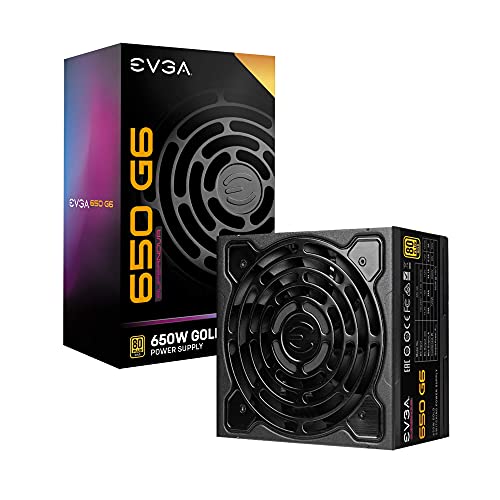
EVGA SuperNOVA G6
EVGA’s SuperNOVA G6 line aims at the enthusiast mainstream, pairing fully modular cabling with a compact body that helps in smaller cases where every bit of cable room matters. It sits in the mid-to-premium tier and has been a common recommendation for gaming builds that need tidy cable management without stepping up to flagship pricing. The ownership story is straightforward: install it, route only the cables you need, and let it disappear into the background of the build. Builders who change cases or downsize machines often shortlist this range precisely because its tidy dimensions travel well.
Fan behaviour shapes how a build feels day to day more than most specifications do. Many modern units offer a semi-passive mode in which the fan stays still under light load and only spins up when the work, and therefore the heat, actually arrives. That silence is lovely for desktop work and media playback. The trade-off is that the unit soaks up more heat before cooling begins, and in a cramped or dusty case that bargain is less attractive. A conventional always-on fan at a gentle speed is the plainer, more predictable choice, and plenty of experienced builders prefer predictability over a headline feature.
Best for: builders whose priorities match what the EVGA SuperNOVA G6 is known for, and who want a unit that can move into their next build without drama. Not suited for: anyone whose case cannot fit its form factor, whose connector needs it does not cover natively, or who is stretching a tight budget past the point where the essentials elsewhere in the build are properly funded. As with every pick in this guide, use only the modular cables supplied with this exact unit, and check the current listing for the configuration that matches your machine before ordering.
How the Alternatives Compare in Context
Keep the paperwork and the spare cables together for the life of the unit. The box, or a labelled bag inside it, should hold the manual, the receipt, every unused modular cable, and any adapters the maker included. That habit protects you twice: the cables stay matched to their unit, which is a safety matter, and a warranty claim becomes a ten-minute task instead of an archaeological dig. When the unit eventually moves to a new build or a new owner, everything it needs travels with it. Future you, mid-upgrade on a Sunday evening, will be quietly grateful for this small discipline.
Finally, calibrate your expectations about what an upgrade here feels like. A better power supply does not add frames, shorten load times or sharpen a display. What it adds is absence: the absence of random restarts, of a fan you can hear through headphones, of anxiety when a storm rolls over the house or a new game stresses the machine. In a hobby that celebrates visible upgrades, this one is deliberately invisible, and that invisibility is the product. Judge it over months of uneventful computing, not over the first afternoon, and you will understand why experienced builders fund this component properly and then forget about it.
The power supply is the one component every other component depends on, yet it is often the last part chosen and the first part blamed unfairly. It converts the alternating current from your wall outlet into the steady direct current your motherboard, processor, graphics card, storage drives and fans actually run on. When that conversion is clean and stable, the whole machine feels uneventful in the best possible way: it boots reliably, holds its clocks under load, and shuts down only when you ask it to. When the conversion is poor, the symptoms are vague and maddening, from random restarts to coil whine and drives that vanish mid-session.
Start any evaluation with safety, because a power supply is mains equipment and not a toy. Never open a power supply case, not to clean it, not to fix a fan, and not to satisfy curiosity. Inside the case, large capacitors can hold a dangerous charge long after the unit has been unplugged from the wall, and that stored energy does not care that the switch is off. There are no user-serviceable parts inside. If a unit rattles, smells of hot electronics, sparks, or has a damaged cable or housing, the correct move is to stop using it and replace it, not to investigate it with a screwdriver.

ASUS ROG Thor
The ASUS ROG Thor range is the showpiece end of the category, a premium-tier line built for windowed, themed builds where the power supply is part of the display. It adds presentation features such as illuminated elements and a live power-draw readout to a foundation that still has to do the serious work of feeding a high-end gaming machine. None of the theatre changes the electricity, and the honest way to view this range is as a flagship purchase for builders who have already funded every functional part of the machine properly. Within that brief, it is a coherent and enjoyable choice.
Think about the total cost of ownership rather than the sticker alone. A power supply typically survives long enough to serve two or three builds, which spreads its cost across many years and many other purchases. A cheap unit that fails early, or that takes another component with it, is the most expensive outcome in the category. Efficiency also compounds quietly: a unit that wastes less power as heat saves a little money every single day and asks less of your case cooling while doing it. None of this argues for buying the flagship; it argues for buying the solid middle and keeping it for a long time.
Best for: builders whose priorities match what the ASUS ROG Thor is known for, and who want a unit that can move into their next build without drama. Not suited for: anyone whose case cannot fit its form factor, whose connector needs it does not cover natively, or who is stretching a tight budget past the point where the essentials elsewhere in the build are properly funded. As with every pick in this guide, use only the modular cables supplied with this exact unit, and check the current listing for the configuration that matches your machine before ordering.
Seasonic FOCUS GX
The Seasonic FOCUS GX range represents one of the oldest names in power supplies selling under its own badge, and that heritage shows in the priorities: electrical stability, conservative design and long, clearly documented warranty support. Positioned in the mid-to-premium tier, it suits builders who read teardowns and value a maker that also manufactures for other brands. The units are fully modular, the documentation is thorough, and the ownership experience reported over years of use is one of quiet competence. For a build you intend to keep and upgrade around a fixed core, this is a natural shortlist entry.
Form factor is a fit question before it is a feature question. Most mainstream cases accept the common ATX format, while compact small-form-factor cases need smaller units with shorter bodies and different mounting. Check the case maker’s stated clearance, including how much room the cables need to exit the unit and bend without strain, because a supply that technically bolts in but leaves no room for its own cables is not really compatible. Also confirm where the fan intake will face once installed, since a unit starved of air by a solid panel or thick carpet will run hotter and louder than it should.
Best for: builders whose priorities match what the Seasonic FOCUS GX is known for, and who want a unit that can move into their next build without drama. Not suited for: anyone whose case cannot fit its form factor, whose connector needs it does not cover natively, or who is stretching a tight budget past the point where the essentials elsewhere in the build are properly funded. As with every pick in this guide, use only the modular cables supplied with this exact unit, and check the current listing for the configuration that matches your machine before ordering.
How to Buy Smart
Headroom deserves honest treatment in both directions. A power supply that is far too small for the machine will struggle under peak load, run hot and loud, and may trigger protective shutdowns during the exact moments a game or render pushes hardest. A power supply that is wildly oversized for the machine wastes money that would have done more good spent on storage, memory or cooling, and it may loaf along so lightly that you paid for capacity you will never touch. The sensible target sits in the middle: comfortable headroom above your realistic peak draw, with room for one sensible upgrade, and nothing beyond that.
The 80 Plus programme is best understood as a set of efficiency tiers rather than a quality ranking. In plain terms, a more efficient unit wastes less electricity as heat for the same work, which usually means a quieter fan, a cooler case interior and a slightly kinder electricity bill over years of use. The tiers step upward from the entry certification through bronze, silver, gold, platinum and titanium, and each step promises better conversion efficiency under the programme’s test conditions. What the badge does not tell you is how well built the unit is, how complete its protections are, or how it behaves after years of heat cycles, so treat the tier as one useful clue, never as the whole verdict.
Form factor is a fit question before it is a feature question. Most mainstream cases accept the common ATX format, while compact small-form-factor cases need smaller units with shorter bodies and different mounting. Check the case maker’s stated clearance, including how much room the cables need to exit the unit and bend without strain, because a supply that technically bolts in but leaves no room for its own cables is not really compatible. Also confirm where the fan intake will face once installed, since a unit starved of air by a solid panel or thick carpet will run hotter and louder than it should.
Connector count sounds dull until the moment it decides whether your build works. Count what your machine actually needs before you buy: the main motherboard connector, processor power for the motherboard, PCIe power for the graphics card, and SATA power for drives and accessories, plus any extras for fan hubs or capture hardware. Newer graphics cards and motherboards have introduced newer connector styles alongside the long-standing ones, so read the requirements of the exact parts you own rather than assuming a unit from a few years ago covers a brand-new card. Adapters are a compromise to avoid where a native cable exists.
Setup and Care That Reduce the Cons
Noise is not only about the fan. Electrical whine, often called coil whine, can appear when a power supply and a graphics card interact under rapidly changing loads, and it can come and go with frame rates and menus. It is annoying rather than dangerous, but it is hard to predict from a specification sheet and hard to return a product over. Buying from ranges with a reputation for quiet operation, keeping receipts, and testing a new unit under your real workloads early in the return window are the practical defences. Positioning the case under a desk rather than beside your ears also does more than many upgrades.
Warranty length and the process behind it tell you how a maker expects its own product to age. A long warranty on a power supply is meaningful because the unit is expected to outlive several other components, often moving from one build into the next. Read what the warranty actually requires: proof of purchase, registration, shipping the unit at your cost, and whether the replacement is new or refurbished. A slightly shorter warranty from a maker with a painless, well-documented process can be worth more in real life than a longer promise wrapped in friction. Keep the receipt with the box, not in a drawer you will clear out.
Capacitor quality and operating temperature are the quiet determinants of lifespan. Heat is the enemy of every electronic component, and the inside of a power supply is a warm place even in a tidy build. Units designed with higher-temperature-rated components and honest airflow tend to age more gracefully, holding their stability years after cheaper designs begin to drift. You cannot inspect this from outside the case, and you should never try, which is why independent teardowns and long-term reviews from reputable testers matter so much for this category. Their lab work substitutes for the inspection you must not do yourself.
Cable design affects both the build experience and the finished result. Fully modular units let you attach only the cables your machine needs, which keeps the case tidy and the airflow honest, and makes later changes far less painful. Semi-modular units hard-wire the essentials and detach the rest, a sensible middle ground. Non-modular units cost less but leave you tucking away a bundle of unused leads. Flat ribbon-style cables route neatly along case panels, while sleeved round cables can look smarter through a window but fight you in tight corners. None of this changes the electricity; all of it changes your afternoon.
Bottom Line
Think about the total cost of ownership rather than the sticker alone. A power supply typically survives long enough to serve two or three builds, which spreads its cost across many years and many other purchases. A cheap unit that fails early, or that takes another component with it, is the most expensive outcome in the category. Efficiency also compounds quietly: a unit that wastes less power as heat saves a little money every single day and asks less of your case cooling while doing it. None of this argues for buying the flagship; it argues for buying the solid middle and keeping it for a long time.
Dust is a slow, patient threat to any power supply. The intake fan draws in whatever the room offers, and over months a filter or grille can clog until the unit is breathing through a blanket. Fit the case’s dust filter if one is provided, keep a tower off thick carpet or raise it on a stand, and vacuum the exterior grilles gently as part of your normal cleaning routine. Never push anything inside the grille and never open the case to reach the dust you can see through the fan opening. External housekeeping is safe and useful; internal housekeeping is neither.
Diagnosing a suspected power supply problem starts with observation, not disassembly. Note when the trouble happens: only under heavy load, only from a cold start, only after the room warms up, or entirely at random. Swap nothing inside the unit, and change one variable at a time outside it. Test with a different wall outlet and a different mains lead if you have one, remove any overclock, and simplify the build to essentials if you are comfortable doing so. If the machine stabilises when a known-good borrowed unit is fitted, you have your answer. If you are not comfortable swapping parts, a reputable local repair shop is money well spent.
Related Guides and Further Reading
For further reading around this build, see choosing a case that leaves room for cables, cases with proper power supply shrouds and airflow, cooling the rest of the build properly.
For further reading around this build, see seasonal deals on coolers worth comparing, motherboard choices that shape connector needs, complete gaming PC deals for context on total budgets.
For further reading around this build, see our companion guide on pc power supply review, our companion guide on pc power supply reviews, our companion guide on pc power supply buying guide.
For further reading around this build, see our companion guide on is a pc power supply worth it, our companion guide on how to choose a pc power supply, our companion guide on how to install pc power supply.
Weighing a Pc Power Supply in Real Life: Recurring Benefits, Recurring Annoyances
Living with a pc power supply usually means accepting one recurring small friction in exchange for removing a larger one, and naming that exchange clearly makes the decision easier. Consider who else will use, move or clean around this pc power supply, because a choice that only works for one careful owner often frustrates everyone else in the household or team. Think about the next purchase this one commits you to, whether that is matching accessories, consumables, a bigger surface or a different connection, and count that commitment honestly. Allow a short settling period for your own habits to adapt, but set a firm date to decide, well inside the return window, whether this pc power supply has earned its place.
As a concrete listing check, take the Corsair RMx Series and the EVGA SuperNOVA G6 named earlier in this article and confirm, line by line, that each variant offered matches the size, connection and contents described for it here. Revisit the decision after the novelty fades: the right pc power supply should feel almost boring in use, doing its job without negotiation every single time. When a specification is stated in unfamiliar terms, translate it into your own routine: how long, how often, how far, how loud in practice, before letting it sway you. Keep a short note of what worked, what annoyed you and what you adjusted, because that note is more useful than memory when you later replace or add another pc power supply. Notice which benefits depend on your habits rather than on the product itself, because those are the ones that vanish when you are busy, tired or sharing the setup.
Think about storage for the accessories this pc power supply brings with it, so spare parts and tools end up in one known place instead of scattered across drawers. Treat any accessory bundled in the box as a starting point, and check whether it suits your setup before assuming the maker has solved that part for you. Check the underside, back or hidden face of the pc power supply as part of your inspection, because labels, vents, switches and fasteners often live where first impressions never look. Separate the features you will use in the first month from the ones that only sound reassuring, and let the first group carry far more weight in the decision.
Keep the packaging and any small adapters, feet, brackets or fasteners together until the pc power supply has survived a full week of ordinary use in its final position. Avoid forcing a connector, bracket or moving part that resists you, because resistance is usually information about alignment or fit rather than an invitation to push harder. Some trade-offs appear on day one and never change, while others only emerge after weeks of use, so separate the immediate compromises from the slow, cumulative ones. A calm final test is to walk away mid-task, come back later, and see whether the setup still makes sense at a glance without reconstructing what you were doing. Keep liquids, loose papers and anything that sheds dust or fibres at a sensible distance, unless the pc power supply was clearly designed to work right beside them.
Measure the place where a pc power supply will actually live, including the clearance you need to reach cables, doors, trays, vents or controls without moving everything else first. Clean and inspect the area around a pc power supply on a simple schedule, since dust, loose fasteners and tangled leads cause many problems that get blamed on the product itself. Look for the failure you would notice first if you chose badly: a port you cannot reach, a part that will not fit, a control you cannot see, or a routine that becomes slower instead of easier.
Frequently Asked Questions
Can I open my power supply to clean the dust out of it?
No, and this answer has no exceptions for careful or experienced home users. Inside the sealed case, large capacitors can hold a dangerous charge long after the machine has been unplugged, and there are no user-serviceable parts waiting for you in there. Clean the exterior grilles and the case dust filter, keep the machine off thick carpet, and let that be the whole of your maintenance. If dust or noise inside the unit itself ever becomes a genuine problem, the safe and correct response is to replace the unit, not to open it.
Can I use modular cables from my old power supply in a new one?
No. Modular cables are not interchangeable between brands, and they are not reliably interchangeable between different models from the same brand. The connector at the power supply end is not standardised, so a cable that fits can still be wired differently, and using it can destroy a graphics card, a drive or a motherboard instantly. Use only the cables that came in the box with your exact unit, keep the spares labelled in that unit’s box, and if a cable is missing, obtain the maker’s own replacement for that exact model or replace the unit.
How much headroom should I leave above what my PC needs?
Leave comfortable headroom, not extravagant headroom. A unit sized only just above your machine’s realistic peak draw will run hot, loud and close to its limits, and may shut the machine down during demanding moments. A unit sized far beyond any plausible need wastes money that would serve you better elsewhere in the build. Aim for the middle: clear margin over your real peak, plus room for the one upgrade you are genuinely likely to make, such as a step up in graphics card. Honesty about your actual upgrade habits is what makes this judgement work.
What do the 80 Plus tiers actually tell me?
They describe conversion efficiency: how much of the electricity drawn from the wall becomes useful power for your components and how much is lost as heat. The tiers step upward from the entry certification through bronze, silver, gold, platinum and titanium, and higher tiers generally mean a cooler, quieter unit and a little less wasted electricity over years of use. What the badge does not certify is build quality, protection circuitry or lifespan, so read it as one useful clue among several. A well-built unit from a reputable maker at a middle tier beats a mystery unit wearing a higher badge.
What are the signs that a power supply is failing?
The classic pattern is instability that resists other explanations: restarts under load with no error message, a machine that powers off during games or renders, difficulty starting from cold, new electrical whining, or a burning smell, which means switching off at the wall immediately and retiring the unit. Because these symptoms overlap with software and overheating problems, change one variable at a time and keep notes. If a known-good replacement unit makes the machine boring again, you have found your culprit. Never investigate a suspect unit by opening it; observation and substitution are the whole diagnostic toolkit at home.
Should I buy a power supply second-hand to save money?
It is the one component where the saving is rarely worth the risk. A used unit arrives with an unknown history of heat, dust and overloads, its warranty position is usually unclear, and its original modular cables are often missing, which tempts exactly the dangerous cable mixing that destroys hardware. A new mid-range unit from a reputable maker costs less than the components a bad used unit can take with it, and it will likely serve several builds. If a used unit comes with a second-hand case, inventory its cables against the maker’s list for that exact model before trusting it.