Disclosure: As an Amazon Associate, ilcastellomenu.com earns from qualifying purchases. Links on this page are affiliate links; they cost you nothing extra. Prices and availability change often, so check the current Amazon listing before you buy.
Is an sd card reader worth it when your laptop may already have a slot, your camera has a cable, and your phone pretends cards do not exist? The short answer: worth it if you shoot regularly, if your cards are faster than your laptop’s built-in slot, or if your living depends on files arriving intact — because a reader matched to your cards removes the slowest, riskiest step between shooting and safety. Not worth it if you transfer a handful of photos a few times a year through a built-in slot that already matches your cards; then a reader is a drawer item solving a problem you do not have. Everything below is the long answer, profile by profile, cost by cost.
Key Takeaways: Is an Sd Card Reader Worth It?
- The reader is rarely the bottleneck — your card’s bus and your computer’s port cap speed first — so a reader is worth it when it removes a mismatch, not as a generic speed charm.
- Its deepest value is risk reduction: fast, stable, verified offloads shorten the window when your only copy of the work lives on one small card.
- Dual-card shooters and UHS-II owners gain the most; occasional shooters with a matching built-in slot gain the least.
- The hidden costs are small but real: a cable to manage, a dongle to carry, and the discipline of ejecting properly every single time.
- A reader that runs very hot or drops connections mid-transfer has negative value — retire it immediately, whatever it cost.
In this guide
What You Actually Get
Strip away the marketing and a dedicated SD card reader buys you four concrete things. The first is bus access. Many laptops ship with a built-in slot limited to the older UHS-I bus, and some ship with no slot at all. If your cards carry the second row of contacts that marks UHS-II, a built-in UHS-I slot silently runs them at the older pace — no warning, no error, just evenings that take longer than they should. A reader built for UHS-II hands your cards back their own speed. This is the single most common situation in which the answer to “worth it” is an unqualified yes, and it is invisible until someone checks the contacts on the card.
The second thing you get is independence from the camera. Transferring through the camera ties up the body, drains its battery, and often runs at whatever pace the camera’s own port allows. A reader turns offloading into a desk task that proceeds while the camera charges, gets cleaned, or goes back out. For anyone who shoots in sessions — events, travel days, client work — that separation of shooting from copying is worth more than raw speed, because it returns the camera to being a camera.
The third is capacity for pairs and volume. Dual-card bodies write mirrored cards precisely so that no single card failure can take the shoot; honouring that safety means offloading both, and a dual-slot reader does it in one unattended pass. Even single-card shooters feel the volume argument on heavy days: a reader that mounts instantly and holds its connection makes large offloads a background task instead of a supervised one. Our deep-dive sd card reader review documents how that calm compounds across a working season.
The fourth is a stable platform for verified copying. Paid work should be offloaded with checksum verification — the copy mathematically compared against the card — and verification demands a connection that does not waver from first byte to last. A good reader provides that stability as a matter of design. A flaky connection does not merely slow you down; it makes the professional standard impractical, and impractical standards get skipped, and skipped verification is how corrupted files get discovered at delivery time instead of at offload time.
The Time Maths, Done Honestly
Worth-it arguments about speed are usually made with imaginary numbers, so make yours with a stopwatch and your own cards instead. Time one real offload through your current path — built-in slot or camera cable — from inserting the card to a verified copy on your drive. Then consider what changes with a bus-matched reader: the transfer portion shrinks to whatever your cards sustain, and the human portion shrinks too, because a reader that mounts instantly and never renegotiates does not need supervising. Multiply the saving by your offload frequency. A weekly shooter saving a modest slice of an evening gains a few evenings a year. A professional offloading nightly, in pairs, gains working weeks across a career — and gains them at the tired end of the day, where time is worth most.
The honest maths also exposes when speed is not the argument at all. If your current path already runs at your cards’ pace — UHS-I cards in a healthy UHS-I slot — the stopwatch will show a reader saving you nearly nothing, and any worth-it case must rest on convenience, camera independence, or the spare-reader insurance logic. That is a perfectly respectable case for some owners and a weak one for others, but it should be made as itself, not dressed in speed claims the stopwatch refutes. Measure first; the measurement is the review your own kit writes for you.
The Risk Maths: What an Offload Is Really Worth
The second calculation is about risk, and it is asymmetric in a way that settles many arguments. On one side sits the reader’s cost: small, known, and paid once. On the other sits the value of what passes through it: a wedding that cannot be restaged, a client’s product shoot, a once-a-decade family trip, your own portfolio’s best year. The reader’s contribution to protecting that value is specific — it shortens the single-copy window, it provides the stable connection that makes checksum verification practical, and it separates the card from the camera so each can be protected independently.
Framed that way, the question inverts. It is not “is this small tool worth its price” but “is the small price worth shaving risk off the most valuable files you own.” For paid work the inversion is decisive, and it is why professionals treat readers the way pilots treat checklists — not as expenses to minimise but as procedures to standardise. For purely casual shooting the same maths yields a calmer answer: the files matter less, the window matters less, and an entry-tier reader or even the built-in slot carries the risk comfortably. Both answers come from the same equation; only the value of the files changes.
The Real Costs Beyond Money
The money cost of a reader is the least interesting thing about it — every tier of this category costs little against a camera body or a fast card. The real costs are measured in attention and logistics. There is a cable to keep with the reader, and a reader separated from its cable is a paperweight; the discipline of storing them together is a small, perpetual tax. There is a dongle to carry, one more item in the bag checklist, one more thing to leave in a hotel room — which is why experienced travellers carry a cheap spare and count the spare as part of the true cost of the system.
There is a learning cost, small but real: the offload discipline itself. A reader rewards owners who eject properly before removal, who verify important copies, who keep contacts clean and dry — and it punishes, through corrupted file systems and scored contacts, owners who treat it like a thumb drive from a conference tote. None of this is difficult, but all of it is habit, and habits take a few weeks to set. Buyers who know themselves to be rough with small electronics should factor in a case and a spare rather than pretend the main unit will be cherished.
There is also an opportunity cost in choosing wrongly. A premium dual-slot reader bought by a UHS-I single-card shooter is money parked in capability that will never be used — money that would have bought a second card, which delivers real backup safety, or a better destination drive, which speeds every copy regardless of reader. The worth-it question is therefore never “reader or nothing”; it is “reader or the other things this money and attention could buy,” and the honest comparisons are made against cards, drives, and backup storage — the rest of the chain covered in the best sd memory cards for cameras and our drive coverage.
Who It Pays Off For
The Working Photographer on Deadline
For the professional, the calculation is not close. Evenings are billable in everything but name; a reader that returns an hour a week of ingest time pays for itself in the first month, and the risk argument pays sooner — the first time a verified offload catches a bad copy while the card is still in hand, the reader has justified a decade of its own replacements. Dual slots, UHS-II support, and build quality are not luxuries at this level; they are the difference between a transfer step and a transfer system. Worth it, at the premium tier, without serious argument.
The Serious Hobbyist With Fast Cards
The keen amateur who has invested in UHS-II cards for burst shooting or video is the reader’s second-clearest customer, because without the reader the card investment is partially stranded — the cards’ speed exists only inside the camera. A mid or premium single-slot reader unlocks what the cards already offer, and the hobbyist’s growing archive gains the verified-offload habit before the archive contains anything irreplaceable. Worth it, at the tier that matches the cards; the roundup in sd card reader reviews sorts the candidates by exactly this fit.
The Traveller, Drone Pilot and Action Shooter
For kits built on small cameras and microSD cards, a compact reader pays off in a different currency: independence from hotel computers, from borrowed laptops, from the hope that something at the destination has a slot. The traveller’s reader is small, cheap, and duplicated — one in the camera bag, one in the luggage — and its worth is measured in trips not ruined. Worth it at the entry tier, bought in pairs, treated as consumable insurance.
The Hybrid Shooter: Stills, Video and a Growing Archive
One more profile belongs in the pays-off column, because it is where much of modern photography actually lives: the hybrid shooter whose stills are modest but whose video files are enormous, and whose archive grows faster than their organisational habits. For this owner the reader’s worth concentrates in the long copy — sustained transfers where heat, connection stability, and destination discipline decide whether an evening’s footage lands safely or becomes a midnight troubleshooting session. A reader built for sustained work, paired with the checksum habit, converts the riskiest offload in the kit into the most routine one. Worth it, and worth it at a tier chosen for endurance rather than for slots.
The same owner’s archive point deserves emphasis: files verified at offload stay verified, and an archive built on verified copies never needs the retrospective audit that unverified archives eventually demand. The reader, in other words, is not only a transfer tool but the front door of the archive — and doors are worth building properly when everything you value walks through them.
Who Should Skip It
The Occasional Shooter With a Matching Built-In Slot
If your laptop has a built-in SD slot, your cards are UHS-I, and you transfer modest numbers of photos a few times a month, a separate reader duplicates a capability you already own. Your offload is already as fast as your cards allow, and the reader would spend its life in a drawer, emerging only to be one more thing to find. Skip it, and put the money toward a second card or a backup drive — purchases that add safety rather than redundancy.
The Phone-First Photographer
If your photography lives on your phone and your camera is a sometimes thing whose files you move rarely and casually, the camera’s own cable or a wireless transfer serves the actual need. A reader solves an offload problem at a scale you do not have. Skip it until the shooting habit changes; the reader will still be there, in a newer generation, when it does.
The Shooter Whose Camera Uses Another Format Entirely
Cameras recording to newer card families need their own readers, and an SD reader — however excellent — is worthless to a kit that never touches SD. Photographers mid-transition should think in ecosystems: our analysis of whether a cfexpress card is worth it and the cfexpress card review covers the other side of that decision. Buy the reader for the cards in your bag today, not for a format you admire from a distance.
The Shared Desk and the Family Archive
One more skip-or-buy profile resists the usual categories: the household where one computer serves everyone’s cameras. Here a reader earns its place not through speed but through universality — it reads the cards from the family camera, the dashcam, the trail camera, and the borrowed camcorder without asking which laptop has which slot. A mid-tier reader living in a labelled drawer becomes household infrastructure, and infrastructure is judged by whether anyone ever has to think about it. Worth it, modestly and durably, for the desk that serves many hands.
What Readers Cannot Fix, Restated as a Buying Filter
Every worth-it case in this article assumes the rest of the chain is sound, so end the analysis with the filter that protects the purchase: name your current bottleneck before buying anything. If transfers are slow because the destination drive is nearly full, a reader changes nothing. If they are slow because the cards are UHS-I, a reader changes nothing. If they fail because a hub sleeps mid-copy, the fix is a direct port, not a reader. The reader fixes exactly one class of problem — a mismatch or absence at the card-to-computer bridge — and it fixes that class completely. Buy it for that, with the bottleneck named and confirmed, and the purchase will never be the one you describe to other photographers with a shrug.
Conversely, when the bridge is the bottleneck, few purchases in photography deliver so much for so little. The files arrive at their own speed, the camera is free, the verification passes, the card goes back in its case — and the whole anxious middle of the photographic process quietly becomes the part you think about least. That transformation, for the owners whose profiles fill the pays-off column, is worth many times the small sum on the receipt.
The Strengths and Trade-Offs of Owning One
Strengths
- Your cards run at their own speed: a bus-matched reader removes the silent UHS-I ceiling that built-in slots impose on UHS-II media.
- The camera goes back to work: offloading stops occupying the body and its battery, so shooting and copying proceed in parallel.
- Verified offloads become practical: a stable connection makes checksum verification a routine instead of a gamble, protecting paid and irreplaceable work.
Trade-Offs
- Another small thing to manage: cable, case, spare — the system around the reader needs the same tidiness the reader itself rewards.
- No help for slow links elsewhere: a great reader cannot fix a slow card, an old port, or a nearly full destination drive; the chain still rules.
- Discipline is part of the deal: eject-before-removal and clean contacts are habits the purchase quietly commits you to keeping.
The Cost of the Wrong Reader
Worth-it analysis usually compares buying against not buying, but the third option — buying wrong — has its own ledger. The over-bought reader wastes money quietly: premium slots and buses that no card in the bag can use, sitting in a drawer as a monument to aspiration. The under-bought reader wastes something worse: time and trust, nightly. A reader that cannot support your cards’ bus re-imposes the ceiling you paid to remove; a reader with a flaky connection converts every offload into a supervised task and every verification into a coin toss; a reader that runs very hot over long copies is quietly ageing your cards’ contacts and your own patience together.
The subtlest wrong purchase is the almost-right one — the reader that supports the fast bus in a slot configuration your workflow cannot use, or the multi-format dock bought for a second format that never actually arrived. These are not bad products; they are mismatches, and mismatches are what the decision checklist exists to prevent. The discipline is to describe your kit as it is — card buses, card counts per day, ports available, offload frequency — before looking at a single product, and to let that description, written down, veto any reader that does not match it. Our roundup of sd card reader reviews across every tier is organised by exactly those descriptions, so the vetoing is easy.
Try Before You Commit: Borrowing the Answer
Uniquely among camera accessories, the reader question can often be answered by experiment before money moves. Borrow a reader — from a camera club, a colleague, a rental counter’s demo — and run your own stopwatch test through your own chain: your fastest card, your port, your destination drive, your real files. One evening of evidence outweighs a month of reviews, including this one, because the chain that decides your result is yours alone. If the borrowed reader transforms your offload, buy its tier with confidence. If it changes nothing, you have learned that your bottleneck lives elsewhere — in the cards, the port, or the drive — and the money belongs there instead. Either outcome is a bargain: the experiment costs nothing and the answer is permanent.
Alternatives to Consider
Before buying, weigh the honest alternatives, because “worth it” only means something against them. The first is the setup you already have: built-in slot or camera cable, costing nothing. It is the right answer more often than accessory marketing admits — specifically whenever it already matches your cards’ bus and your volume is low. Test it properly before replacing it: if your transfers already run at your cards’ pace and finish reliably, a reader adds convenience, not capability.
The second alternative is spending the same money elsewhere in the chain. A second memory card buys shooting safety; a faster or larger destination drive buys speed on every copy from every source; backup storage buys the second copy that turns an offload into an archive. For many hobbyists one of these is worth more than a reader, and our guides to the best and fastest sd cards for photography and the best external hard drives for photography help rank them. The third alternative is waiting: if a camera upgrade is imminent, its card format decides the reader, and buying after the body beats buying twice.
Wireless transfer deserves its honest sentence among the alternatives. Camera Wi-Fi and app-based transfer are genuinely convenient for a handful of images destined for a phone, and for that job no reader competes. But wireless moves files at a pace and with a reliability suited to selections, not archives: full cards, video files, and verified copies belong on the wired path. Treat wireless as the postcard service and the reader as the freight service, and the two stop competing — most working kits end up using each for what it is.

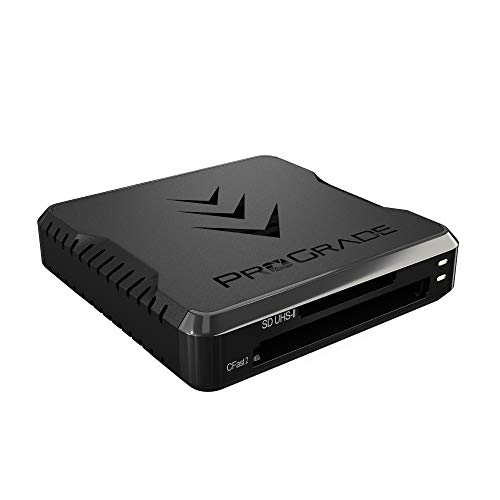
If You Buy: ProGrade Digital Dual Slot SD Card Reader
The premium answer for dual-card UHS-II professionals: two fast slots, serious build, and the calm nightly behaviour that makes verified pair offloads a single step. It is worth its tier precisely for the owners described above — and only for them. Best for: working photographers with mirrored UHS-II cards. Not suited for: UHS-I or single-card kits.

If You Buy: SanDisk Extreme Pro SD UHS-II Card Reader
The focused single-slot answer: full UHS-II support in a sleeve-sized body, from the house whose cards fill half the bags in the world. For one-card shooters it is the tier where worth-it is easiest to reach. Best for: single-card UHS-II shooters. Not suited for: mirrored-pair workflows.
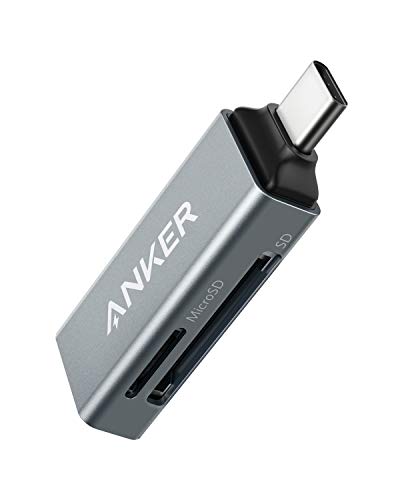
If You Buy: Anker USB-C SD and microSD Reader
The entry answer and the universal spare: SD plus microSD in a pocket body, priced in spirit so that buying two — bag and luggage — is the obvious travel strategy. Best for: travellers, drone and action kits, and as everyone’s backup reader. Not suited for: nightly UHS-II volume.
Worth It, Tier by Tier
Because the category’s tiers buy different things, the worth-it verdict differs by tier and should be reached separately for each. At the entry tier, the purchase buys basic bus access and a spare’s insurance; the sum involved is small enough that the verdict is yes for almost anyone who offloads monthly, and the more useful question is whether one or two should be bought. At the mid tier, the purchase buys finish, reliability, and honest UHS-II support in a single slot; the verdict turns on offload frequency, and weekly shooters land on yes while monthly shooters can stay below. At the premium tier, the purchase buys the second fast slot, professional build, and thermal calm under sustained loads; the verdict is yes exactly when card pairs or nightly volume exist, and no — however lovely the object — when they do not.
Notice that none of the tiers buys speed beyond your cards. That single fact disciplines the whole ladder: climb it for slots, build, and endurance, never for velocity your media cannot express. Buyers who internalise that rule rarely regret a reader purchase at any tier, because they bought the thing the tier actually sells. Buyers who climb the ladder chasing speed their cards do not have will be disappointed at every rung, and will blame a category that was honest with anyone reading its verdicts by fit rather than by flagship.
The Environmental and Longevity Footnote
A small consideration, worth a paragraph in an honest accounting: a well-built reader is one of the longest-lived items in a photographic kit, outlasting cameras and cards alike because its job changes slowly. Buying the durable version once — and keeping it cased, clean, and dry — is both the economical and the lighter-footprint choice, while a trail of disposable readers bought yearly costs more in every currency. Longevity is also why the retirement signals matter in reverse: a reader that has served for years and begins dropping connections has not betrayed you; it has completed a service life, and replacing it promptly is maintenance, not failure.
How to Get the Most Value If You Buy
Value from a reader is extracted through routine, not features. Set up a fixed offload station — reader on a direct port, destination folder ready, card case beside it — so the correct sequence is the easy sequence. Adopt the eject discipline from the first day: unmount, wait for confirmation, then remove the card, because the one time you yank a card mid-write and corrupt its file system will cost more than the reader did. For anything paid or irreplaceable, verify with checksums and hold the card unformatted until a second copy exists elsewhere; our walkthrough of how to use an sd card reader turns this into a step-by-step habit.
Maintain the small things. Keep the reader cased so its slot stays free of lint and grit, keep its contacts and your cards’ contacts clean and dry, and store reader and cable together so the pair is never separated by a drawer. Watch its behaviour the way you watch any tool that guards valuable things: mounting that needs coaxing, connections that drop mid-transfer, heat beyond gentle warmth — each is a retirement signal, and replacing a reader at the first pattern is far cheaper than learning why at the worst moment. Finally, re-run the worth-it question whenever your kit changes: a new body or faster cards can flip the answer in either direction, and the reader should always be the one your current chain actually needs.
What Changes After You Buy: The First Month
New owners consistently report the same sequence. In the first week, the reader is a novelty judged on speed — usually with the slowest card they own, through whatever port is nearest, producing a verdict about everything except the reader. By the second week, the routine forms: a fixed place for the reader, the cable kept with it, the eject habit setting in, the first verified offload completed and the card formatted without the old flicker of doubt. By the end of the first month, the reader has disappeared — and disappearance is the product. The transfer step stops being an event in the photographic process and becomes plumbing.
Two first-month mistakes are worth pre-empting. The first is formatting cards the moment files land, before the backup copy exists; the reader makes cards feel dealt-with, and that feeling outruns the actual safety by one step. Keep the order sacred: copy, verify, back up, then format — ideally in the camera, where the card will be used. The second is judging the purchase during an unrepresentative week. A reader bought for a heavy season should be judged in that season; a reader bought for travel, at the destination. Give the tool its real working conditions before deciding whether it earned its place, and re-run the decision checklist in this article against the month you actually lived.
The Hand-Me-Down and Second-Hand Question
Readers circulate — upgraded kits pass them to beginners, studios retire them to spares — and the worth-it calculus for a free or nearly free reader differs from a new one in one respect only: trust must be earned by testing rather than assumed from a warranty. Run the standard probation: your fastest card, a direct port, a long mixed copy, checksum verification, an eject and reseat, then the same again. A hand-me-down that passes behaves like any good reader and is worth exactly what a good reader is worth. One that drops a connection, runs very hot, or needs coaxing to mount is worth nothing at any price, because the files it will eventually fumble are not priced in the same currency. Test, then trust — the rule costs ten minutes and is the entire difference between a bargain and a liability.
The Reader as the Front Door of Your Backup System
Step back from the accessory and look at the system it belongs to. Every sound backup practice in photography begins with the same event: files leaving the card and arriving, verified, in managed storage. The reader is the physical instrument of that event. A slow reader delays it — and delayed offloads are offloads that happen after the card has been back in a camera, or in a pocket, or in the wash of a busy week. A flaky reader undermines it, because verification skipped twice becomes verification skipped as policy. A good reader makes the event fast, boring, and repeatable, and boring repeatable events are what archives are built from.
This framing explains an otherwise puzzling pattern: photographers who would never economise on backup drives happily economise on the reader that feeds them, then wonder why the backup ritual feels fragile. The ritual is only as strong as its first step. If your backup system matters to you — and the drives in our photography storage coverage exist because it should — then the reader deserves to be specified with the same seriousness as the drives at the system’s end. Worth it, in this framing, is not really about the reader at all. It is about whether the front door of the archive is built like the archive deserves.
There is a corollary for beginners, and it is encouraging: the reader is the cheapest place in the entire system to buy professional-grade behaviour. Professional cards, drives, and backup services all cost real money; a professional-grade offload habit — good reader, eject discipline, checksum verification — costs very little and can be adopted on a student’s budget in an afternoon. Few purchases in photography close the gap between amateur and professional practice so completely for so little, which is its own quiet answer to the question this article’s title asks.
The Decision Checklist
Answer honestly; the pattern of answers is the verdict. Do your cards carry a second row of contacts — UHS-II — while your current transfer path does not support it? Do you offload cards at least weekly? Does your camera write mirrored pairs? Does your income or your heart depend on any of the files? Is your camera currently tied up during transfers when it could be charging or shooting? Do you travel with cards and no guaranteed slot at the destination?
Three or more yes answers: a dedicated reader is worth it, at the tier your cards dictate. One or two: worth it at the entry or mid tier, or as a spare-first strategy. Zero: skip it with a clear conscience and spend the money in the chain where your yes answers live — cards, drives, or backup. The checklist’s virtue is that it prices your actual workflow rather than your aspirations, and it will still be correct when you re-run it after your next camera purchase.
Finally, consider the reader’s place in the order of purchases for a growing kit, because timing is a form of worth. The sensible sequence runs: camera, a fast card matched to it, a second card for safety, storage the files can land on, backup for that storage — and the reader slots in the moment the built-in path becomes the visible friction, which for UHS-II owners is immediately and for UHS-I owners may be never. There is no prize for buying the whole list at once and no shame in the reader being the last piece; the chain forgives any order except one — spending on the reader while the only copy of your files still lives on a single drive. Fix the safety gaps first, optimise the bridge second, and every purchase in the sequence will feel, correctly, like it was worth it.
The gift and hand-me-down angle completes the picture. A reader is one of the safest gifts in photography — universally useful to anyone with a card-based camera, impossible to buy in the wrong size, and cheap enough to give at the good tier rather than the apologetic one. If you are equipping a young photographer, the reader plus a card case plus ten minutes teaching the eject-and-verify routine transfers more real capability than another lens filter ever will. Tools that carry habits with them are the ones that keep giving, and the humble reader, of all the objects in the bag, is the one whose habits protect everything else in it.
One closing observation from years of watching photographers make this exact decision: nobody who bought a bus-matched reader for a real offload habit has ever been observed regretting it, while the landscape is littered with two specific regrets — the premium reader bought for cards that never materialised, and the cheap reader bought three times because the first two were treated as disposable. Both regrets are failures of the same skill, which is describing your own kit honestly before shopping. This article’s checklist exists to build that description. Build it, trust it, and the worth-it question answers itself so clearly that the purchase becomes the least interesting part of the process — exactly as it should be.
And if the checklist leaves you balanced exactly on the fence, let the tie be broken by trajectory rather than by taste. Kits grow toward more files, faster cards, and higher stakes far more often than they shrink toward less. The reader bought slightly early becomes the reader that was simply there when the new body arrived; the reader deferred past the point of need becomes the story about the evening a card waited, unoffloaded, while a laptop slot negotiated with it at the old bus’s pace. On a true fence, buy the reader — at the tier your current cards dictate, with a case, and with the routine this article describes. Fences in this category resolve, with experience, almost always in the same direction.
Worth-it verdicts age, and this one should be revisited on a schedule rather than treated as scripture. Every camera change, every card upgrade, every shift from hobby to paid work rewrites the inputs. The reader that was a luxury beside a first camera becomes infrastructure beside a professional body; the premium tier that was over-buying for UHS-I becomes the baseline for UHS-II pairs. Revisit the question at each kit change with the same checklist, and your reader shelf will always match your photography — which is the only definition of “worth it” that survives contact with a growing craft.
So the answer, in one breath: an sd card reader is worth it for the photographer whose cards, volume, or stakes have outgrown the built-in path — which describes most people who shoot on purpose — and it is not worth it for the occasional shooter whose existing slot already matches their cards. The distance between those two owners is not talent or budget; it is simply how often the transfer step appears in their lives and what rides on it. Measure your own step, and you will know.
Is the Payoff Real? Testing Whether a Sd Card Reader Earns Its Place
If the benefit depends on a habit you do not yet have, be sceptical, since products rarely create routines on their own and often end up waiting in a drawer or corner. Keep a short note of what worked, what annoyed you and what you adjusted, because that note is more useful than memory when you later replace or add another sd card reader. Prefer a setup you can explain to another person in a minute, because simple arrangements are easier to troubleshoot, share and repeat than fragile clever ones. Keep the packaging and any small adapters, feet, brackets or fasteners together until the sd card reader has survived a full week of ordinary use in its final position.
As a concrete listing check, take the ProGrade Digital Dual Slot SD card reader and the SanDisk Extreme Pro SD UHS-II card reader named earlier in this article and confirm, line by line, that each variant offered matches the size, connection and contents described for it here. Revisit the decision after the novelty fades: the right sd card reader should feel almost boring in use, doing its job without negotiation every single time. Keep the area underneath and behind the sd card reader reachable for cleaning, since the spots you cannot reach become the spots where dust and lost small parts collect. When you compare notes with other owners, match their comments to setups like yours, because advice from a very different room, workload or routine can mislead. Compare it honestly with the workaround you use now, describing that workaround in the same detail, because vague dissatisfaction makes almost any purchase look worthwhile.
Decide in advance what good enough looks like for your use, so a minor cosmetic flaw does not distract you from performance that genuinely meets the brief. Think about the next purchase this one commits you to, whether that is matching accessories, consumables, a bigger surface or a different connection, and count that commitment honestly. Recheck the return window and the condition requirements before you discard any packaging, especially for a sd card reader whose fit only becomes clear after several real sessions. Write down the oldest and the newest device you expect this sd card reader to work alongside, because compatibility problems usually appear at the edges of a setup rather than in the middle of it.
Separate the features you will use in the first month from the ones that only sound reassuring, and let the first group carry far more weight in the decision. Consider who else will use, move or clean around this sd card reader, because a choice that only works for one careful owner often frustrates everyone else in the household or team. Set a review date a month after buying, and judge the sd card reader by whether you would choose it again knowing exactly how your routine actually uses it. Check that nothing you place on, under or beside the sd card reader blocks airflow, movement, visibility or access that the design quietly depends on. Plan where the cables or materials connected to this sd card reader will run when the room is tidy, not just while you are testing on an empty surface.
When something behaves oddly, return to the basics first: power, connection, position, cleanliness and the last setting you changed, in that order, before assuming a fault. Leave a little headroom in every direction that matters, whether that means physical space, connection capacity, adjustment range or simply time to do a task properly. Picture the busiest version of your week and ask whether this sd card reader still fits when other people, other tasks and other equipment compete for the same space.
Make one change at a time during the first days, so that when something improves or gets worse you know which change caused it. Add up the hidden costs of ownership in time and attention, including setup, cleaning, storage and the accessories you will inevitably want, before deciding it earns its keep. Notice how the sd card reader behaves when you are tired or in a hurry, since products that demand perfect technique tend to fail exactly when you have least patience. Look closely at seams, edges, hinges, threads or contact points when the sd card reader arrives, because build quality is easiest to judge before everyday wear hides the evidence. If two options look identical on paper, choose the one whose controls, layout or handling you understood fastest, since clarity in daily use beats a longer feature list you never touch.
Ask what you would do on the day this sd card reader stops working as expected, and whether you could swap, reset, clean or return it without dismantling half your setup. Check the underside, back or hidden face of the sd card reader as part of your inspection, because labels, vents, switches and fasteners often live where first impressions never look. Write the exact model name and variant from the packaging into your notes, so replacement parts, accessories and support conversations start from certainty rather than guesswork.
Frequently Asked Questions
Is an sd card reader worth it if my laptop has a built-in slot?
It depends entirely on whether that slot matches your cards. If your cards are UHS-I and the slot is healthy, the built-in path already gives you everything a reader would, and the answer is no. If your cards are UHS-II, the built-in slot very likely caps them at the older bus without telling you, and a reader that supports the second contact row becomes one of the best-value upgrades in your kit. Check the card’s contacts first; they settle the question.
Will a card reader make my transfers noticeably faster?
Only if something in your current path is slower than your cards — an old built-in slot, a camera cable transfer, a congested hub. A reader removes mismatches; it does not add speed beyond your cards’ own ceiling, because the card’s bus and the computer’s port set the limits the reader works within. Where a mismatch exists, the improvement is dramatic and obvious. Where none exists, expect convenience and reliability gains instead, and judge the purchase on those.
Is a premium reader worth it over a cheap one?
At the premium tier you are buying slots, build, and calm — a second fast slot for card pairs, a body that survives nightly bag life, thermal behaviour that holds up over long video offloads. If your workflow uses those things weekly, the premium is worth it. If you offload one UHS-I card on Sundays, the premium buys capability you will never switch on, and the honest recommendation is the entry reader plus a second card with the difference.
What is the risk of not using a proper offload routine?
The risk concentrates in one moment: files existing only on the card while the copy is unverified. Pull a card without ejecting and the file system can corrupt, stranding even files that copied cleanly. Trust an unverified copy and a silent error can surface at delivery. A good reader plus the eject-and-verify routine shrinks that window to nearly nothing, which — more than speed — is what the purchase really buys a working photographer.
Should I buy a reader or a faster memory card first?
Cards first, almost always. A faster card improves capture inside the camera — bursts, video headroom — and defines the ceiling everything else works under; a reader only lets an existing ceiling be reached. The exception is the owner whose fast cards are already bought and stranded behind a slow slot: for them the reader is the unlock, and it should jump the queue. Sequence the chain from the camera outward and the order rarely stays mysterious for long.
When is a card reader definitely not worth it?
When your transfers are rare, small, and already as fast as your cards allow; when your camera records to a different format entirely; or when the money is needed more urgently for the second copy of your files that does not yet exist. A reader optimises a step in a workflow — if the workflow barely happens, or its weakest point is plainly elsewhere, the worth-it answer is an honest no, and the category will happily sell you one later when the answer changes.
Related Reading
Compare the field in sd card reader reviews, go deep on the benchmark in our sd card reader review, and check card choices for video in the best sd cards for 4k recording.