Disclosure: As an Amazon Associate, ilcastellomenu.com earns from qualifying purchases. Links on this page are affiliate links; they cost you nothing extra. Prices and availability change often, so check the current Amazon listing before you buy.
Key Takeaways From These Tablet Stand Reviews
These tablet stand reviews compare the main stand styles side by side rather than crowning one winner for everyone. The pattern across the field is consistent: stability follows size matching, hinges separate lasting stands from short-lived ones, and case fit causes more disappointment than any other single factor. Best for shoppers choosing between styles. Not suited to anyone who wants a single universal answer, because the right stand depends on your tablet, your case and your rooms.
In this guide
The Field at a Glance
Across these tablet stand reviews, stands fall into folding travel plates, fixed desktop holders, adjustable desktop stands, raised riser-style stands and floor stands for reading away from a desk. Each style trades stability, height, portability and footprint differently, and the reviews below judge each pick against the job its style is actually for.
Hinge stiffness is the quiet difference between a stand that stays useful and one that slowly becomes annoying. On cheaper stands the hinge can loosen over time, so the tablet gradually sinks from the angle you set, especially with a heavier device. A hinge that feels firm when new, moves in controlled steps or with steady resistance, and does not creak or slip under a firm tap will usually age better. If a stand needs two hands and real effort to adjust when new, note that too, because hinges rarely get easier with use, and daily adjustment should feel easy, not like a workout.
Charging access is easy to overlook until the battery runs low mid-session. Check where the charging port sits when the tablet is in the stand in the orientation you use most. Some stands block a bottom port in landscape, others route a cable neatly behind the cradle, and some raised designs leave plenty of room underneath. If you often work while plugged in, picture the cable path before you buy: a cable that bends sharply against the desk or pulls sideways on the port will annoy you every single day, while a clean route disappears from your attention completely.
Think about posture in comfort terms only. Raising a tablet closer to a natural viewing height can simply feel more comfortable during long reading, video or recipe sessions, and it can reduce how much you hunch over a flat-lying screen. A stand is not a medical device and it does not treat or prevent anything; it is a comfort and convenience accessory. Pair it with sensible habits anyway: take breaks, change position, keep the screen at a distance that feels easy on your eyes, and stop adjusting your whole room around one fixed setup if a simpler change feels better.
Tablet Stand Reviews: The Main Picks Compared
Each pick below represents a real stand line and a distinct style. They are presented prose-only while verification is pending, with qualitative tier positioning and no linked claims.
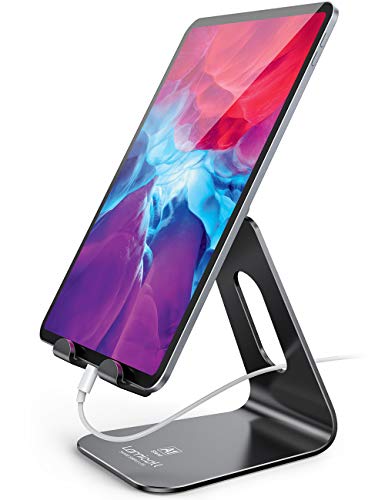
Lamicall Tablet Stand
The Lamicall Tablet Stand is a widely sold adjustable desktop stand known for a simple folding hinge and a clean, minimal profile. In everyday use it suits readers who want a stand that sets up quickly, holds a steady viewing angle and folds or parks neatly when the session ends. Judge it against your own tablet first: check that your device, in its usual case, sits securely on the cradle ledge, that the base feels planted on your desk or counter, and that the charging port stays reachable in the orientation you use most. Positioned qualitatively, it sits in the mid tier of this category: not the simplest folding plate and not a heavy specialist mount, but a general-purpose option for daily viewing, reading, calls and kitchen use away from water and heat. Check price on Amazon.
Video calls expose weaknesses that reading never does. A stand that is fine for watching can bounce noticeably when you gesture, type or bump the desk during a call, and a camera angle set too low is unflattering and tiring for the other side. A taller or more adjustable stand helps frame the shot, but only if the base stays planted. Before an important call, set the stand up, join a test call or open the camera preview, and check both the framing and the wobble. Five minutes of testing beats discovering the problem live in front of colleagues or family.

SAIJI Tablet Stand
The SAIJI Tablet Stand is a larger desktop stand family aimed at bigger tablets and desk setups that need a broader, heavier base. In everyday use it suits readers who want a stand that sets up quickly, holds a steady viewing angle and folds or parks neatly when the session ends. Judge it against your own tablet first: check that your device, in its usual case, sits securely on the cradle ledge, that the base feels planted on your desk or counter, and that the charging port stays reachable in the orientation you use most. Positioned qualitatively, it sits in the mid tier of this category: not the simplest folding plate and not a heavy specialist mount, but a general-purpose option for daily viewing, reading, calls and kitchen use away from water and heat. Check price on Amazon.
Think about posture in comfort terms only. Raising a tablet closer to a natural viewing height can simply feel more comfortable during long reading, video or recipe sessions, and it can reduce how much you hunch over a flat-lying screen. A stand is not a medical device and it does not treat or prevent anything; it is a comfort and convenience accessory. Pair it with sensible habits anyway: take breaks, change position, keep the screen at a distance that feels easy on your eyes, and stop adjusting your whole room around one fixed setup if a simpler change feels better.
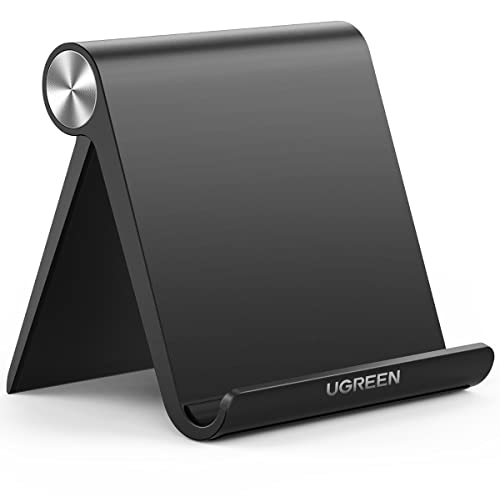
UGREEN Tablet Stand
The UGREEN Tablet Stand is a compact folding stand from a well-known accessories maker, aimed at travel bags and small desks. In everyday use it suits readers who want a stand that sets up quickly, holds a steady viewing angle and folds or parks neatly when the session ends. Judge it against your own tablet first: check that your device, in its usual case, sits securely on the cradle ledge, that the base feels planted on your desk or counter, and that the charging port stays reachable in the orientation you use most. Positioned qualitatively, it sits in the mid tier of this category: not the simplest folding plate and not a heavy specialist mount, but a general-purpose option for daily viewing, reading, calls and kitchen use away from water and heat. Check price on Amazon.
Kitchen use is one of the best reasons to own a stand, and one of the easiest places to damage a tablet. A stand lifts the screen off a wet or floury counter and keeps it visible while your hands are busy, which is genuinely useful for recipes and timers. Keep the stand and tablet well away from sinks, splashes, steam and direct heat from hobs and ovens, wipe the stand down after messy sessions, and never leave a tablet charging unattended near water. Treat the kitchen stand as a viewing aid you move into place for cooking, then move back out of the splash zone afterwards.

LISEN Tablet Stand
The LISEN Tablet Stand is a stand line that leans into taller, raised designs for people who want the screen lifted higher on the desk. In everyday use it suits readers who want a stand that sets up quickly, holds a steady viewing angle and folds or parks neatly when the session ends. Judge it against your own tablet first: check that your device, in its usual case, sits securely on the cradle ledge, that the base feels planted on your desk or counter, and that the charging port stays reachable in the orientation you use most. Positioned qualitatively, it sits in the mid tier of this category: not the simplest folding plate and not a heavy specialist mount, but a general-purpose option for daily viewing, reading, calls and kitchen use away from water and heat. Check price on Amazon.
Think about posture in comfort terms only. Raising a tablet closer to a natural viewing height can simply feel more comfortable during long reading, video or recipe sessions, and it can reduce how much you hunch over a flat-lying screen. A stand is not a medical device and it does not treat or prevent anything; it is a comfort and convenience accessory. Pair it with sensible habits anyway: take breaks, change position, keep the screen at a distance that feels easy on your eyes, and stop adjusting your whole room around one fixed setup if a simpler change feels better.
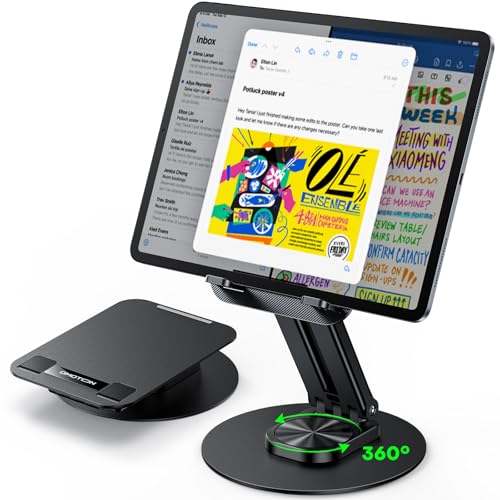
OMOTON Tablet Stand
The OMOTON Tablet Stand is a stand family known for simple aluminium-style desktop holders often used at kitchen counters and desks. In everyday use it suits readers who want a stand that sets up quickly, holds a steady viewing angle and folds or parks neatly when the session ends. Judge it against your own tablet first: check that your device, in its usual case, sits securely on the cradle ledge, that the base feels planted on your desk or counter, and that the charging port stays reachable in the orientation you use most. Positioned qualitatively, it sits in the mid tier of this category: not the simplest folding plate and not a heavy specialist mount, but a general-purpose option for daily viewing, reading, calls and kitchen use away from water and heat. Check price on Amazon.
Kitchen use is one of the best reasons to own a stand, and one of the easiest places to damage a tablet. A stand lifts the screen off a wet or floury counter and keeps it visible while your hands are busy, which is genuinely useful for recipes and timers. Keep the stand and tablet well away from sinks, splashes, steam and direct heat from hobs and ovens, wipe the stand down after messy sessions, and never leave a tablet charging unattended near water. Treat the kitchen stand as a viewing aid you move into place for cooking, then move back out of the splash zone afterwards.

KABCON Tablet Stand
The KABCON Tablet Stand is a stand line offering both desktop and floor-style options for reading and viewing away from a desk. In everyday use it suits readers who want a stand that sets up quickly, holds a steady viewing angle and folds or parks neatly when the session ends. Judge it against your own tablet first: check that your device, in its usual case, sits securely on the cradle ledge, that the base feels planted on your desk or counter, and that the charging port stays reachable in the orientation you use most. Positioned qualitatively, it sits in the mid tier of this category: not the simplest folding plate and not a heavy specialist mount, but a general-purpose option for daily viewing, reading, calls and kitchen use away from water and heat. Check price on Amazon.
Kitchen use is one of the best reasons to own a stand, and one of the easiest places to damage a tablet. A stand lifts the screen off a wet or floury counter and keeps it visible while your hands are busy, which is genuinely useful for recipes and timers. Keep the stand and tablet well away from sinks, splashes, steam and direct heat from hobs and ovens, wipe the stand down after messy sessions, and never leave a tablet charging unattended near water. Treat the kitchen stand as a viewing aid you move into place for cooking, then move back out of the splash zone afterwards.
How the Styles Differ in Daily Use
Viewing and Reading
Most styles pass the viewing test when sized correctly; the differences are angle range and how the stand behaves on soft surfaces.
Desk use rewards a different set of priorities. If the tablet is a second screen beside a keyboard, you want an angle that matches your monitor roughly, a base that does not slide when you tap, and a footprint that does not eat the space your keyboard and notebook need. If you type on the tablet itself with a separate keyboard, the stand becomes the screen half of a small workstation, and stability matters even more because every tap on a nearby desk travels through the surface. Readers comparing setups may also find our guide to portable keyboards for iPad useful alongside this one.
Video calls expose weaknesses that reading never does. A stand that is fine for watching can bounce noticeably when you gesture, type or bump the desk during a call, and a camera angle set too low is unflattering and tiring for the other side. A taller or more adjustable stand helps frame the shot, but only if the base stays planted. Before an important call, set the stand up, join a test call or open the camera preview, and check both the framing and the wobble. Five minutes of testing beats discovering the problem live in front of colleagues or family.
Interactive Use
Tapping, typing around the tablet and stylus work punish light bases and loose hinges, which is where heavier desktop styles justify themselves.
Drawing and note-taking with a stylus need a low, firm angle rather than a tall viewing angle. Pressing on the screen with a pen pushes the tablet backwards, so a stand that flexes or slides will fight you the whole session. Some stands fold down to a shallow tilt that works well for sketching, while tall viewing stands are poor for it. If stylus work is your main use, prioritise a stand that locks or rests firmly at a low angle and has a ledge that keeps the tablet from creeping forward under pressure, and test it with the heaviest strokes you normally make.
Travel changes the calculation completely. A folding stand that disappears into a bag, opens in seconds and works on a train tray or a cafe table earns its place even if it is less rock-solid than a heavy desk stand. Weight, folded thickness and how quickly it sets up matter more than ultimate stability, because the alternative on the road is usually propping the tablet against a bag or a cup. Just be honest about the trade: the lightest travel stands are the ones most likely to wobble with a large tablet, so match the travel stand to the device you actually carry.
Calls and Kitchen Use
Height helps calls, while counters reward compact footprints and easy cleaning, always away from water and heat.
Materials tell you a lot about how a stand will age. Metal-bodied stands tend to feel firmer and resist flex, while plastic stands can be lighter and kinder to bag weight but may creak or flex under a big tablet. Rubber or silicone padding where the tablet rests protects the device from scratches and adds a little grip, and padding under the base stops the stand skating across a smooth desk. Check that padding is firmly attached; peeling pads are a common early failure on cheaper stands and they change both the grip and the angle once they start to lift.
Cleaning and care are simple but not optional. Dust and kitchen grease collect in hinges and cradle ledges, grit in the ledge can scratch a tablet edge, and a sticky hinge usually just needs a wipe rather than force. Clean the contact points with a soft, slightly damp cloth, dry everything before use, and never force a stiff hinge with the tablet mounted. Store a folding stand flat rather than half-open under weight in a bag, because a hinge left strained under load is a hinge that loosens faster. Small habits like these are most of what separates a stand that lasts from one that sags.
Strengths and Trade-Offs Across the Field
Strengths
- A style exists for every main use, from travel to floor reading.
- Adjustable stands cover several uses with one purchase.
- Even simple stands beat improvised propping for safety.
Trade-offs
- Portability and stability pull in opposite directions.
- Taller stands need heavier bases to stay planted.
- Case fit varies by model, not by brand promise.
Who Each Style Suits and Who Should Skip It
Travel users should favour folding plates matched honestly to their tablet size. Desk workers should favour firm adjustable stands. Cooks should favour compact, easy-clean holders. Anyone with a large tablet in a thick case should start from cradle depth and base weight, not from looks. Our tablet stand buying guide turns these judgements into a step-by-step shortlist.
A stand also has to fit the room it lives in. On a small desk, a wide base can crowd out everything else; on a shared family counter, a stand that folds away keeps surfaces clear. If the tablet is shared between people with different habits, an easily adjustable stand avoids the daily argument about angle. Storage matters too: a stand that lives in a drawer because it is bulky will not be used, while one that folds flat or looks tidy enough to leave out gets used every day. The best stand is the one that is already where you need it.
Finally, judge a stand by the session it enables, not by its listing photos. The right stand disappears: the screen sits where you want it, stays there, charges when it needs to, and packs away without thought. The wrong stand nags constantly through wobble, slipping, blocked ports and awkward angles. Most returns happen because of fit issues that a few honest questions prevent: how big and heavy is my tablet, how thick is my case, where do I use it most, and do I tap, type, draw or only watch. Answer those first and the shortlist usually shrinks to one or two obvious candidates.
Setup, Care and Maintenance Essentials
Whichever style you choose, seat the tablet fully, test the angle with real taps, keep hinges and ledges clean, and store folding stands flat.
Stability is the first thing to judge, and it is mostly about matching the stand to the device. A stand sized for a small tablet can tip or wobble when a large, heavy tablet is placed on it, especially in portrait orientation or when you tap near the top of the screen. A broader base, a lower centre of gravity and a cradle that holds the tablet low all help. Test any new stand on a hard, flat surface first, tap the corners of the screen the way you normally would, and only then trust it on a softer surface such as a bed or a sofa arm.
A thick protective case changes the fit more than most buyers expect. Many stands rest the tablet against a front lip on the cradle, and a chunky case, a case with a built-up bumper, or a folio cover folded behind the tablet can be too deep for that lip to hold securely. If you use a rugged case, look for stands described as having a deeper cradle ledge, or plan to remove the case while the tablet is on the stand. A stand that fits a bare tablet perfectly can feel loose and unsafe with a thick case in place, and that is a fit issue, not a defect.
Final Verdict
Read as a field, tablet stands reward buyers who match style to use. Pick the style for your main session, check size, case and port fit, and the specific model choice becomes much easier.
More Practical Notes
Charging access is easy to overlook until the battery runs low mid-session. Check where the charging port sits when the tablet is in the stand in the orientation you use most. Some stands block a bottom port in landscape, others route a cable neatly behind the cradle, and some raised designs leave plenty of room underneath. If you often work while plugged in, picture the cable path before you buy: a cable that bends sharply against the desk or pulls sideways on the port will annoy you every single day, while a clean route disappears from your attention completely.
Think about posture in comfort terms only. Raising a tablet closer to a natural viewing height can simply feel more comfortable during long reading, video or recipe sessions, and it can reduce how much you hunch over a flat-lying screen. A stand is not a medical device and it does not treat or prevent anything; it is a comfort and convenience accessory. Pair it with sensible habits anyway: take breaks, change position, keep the screen at a distance that feels easy on your eyes, and stop adjusting your whole room around one fixed setup if a simpler change feels better.
Kitchen use is one of the best reasons to own a stand, and one of the easiest places to damage a tablet. A stand lifts the screen off a wet or floury counter and keeps it visible while your hands are busy, which is genuinely useful for recipes and timers. Keep the stand and tablet well away from sinks, splashes, steam and direct heat from hobs and ovens, wipe the stand down after messy sessions, and never leave a tablet charging unattended near water. Treat the kitchen stand as a viewing aid you move into place for cooking, then move back out of the splash zone afterwards.
Desk use rewards a different set of priorities. If the tablet is a second screen beside a keyboard, you want an angle that matches your monitor roughly, a base that does not slide when you tap, and a footprint that does not eat the space your keyboard and notebook need. If you type on the tablet itself with a separate keyboard, the stand becomes the screen half of a small workstation, and stability matters even more because every tap on a nearby desk travels through the surface. Readers comparing setups may also find our guide to portable keyboards for iPad useful alongside this one.
Video calls expose weaknesses that reading never does. A stand that is fine for watching can bounce noticeably when you gesture, type or bump the desk during a call, and a camera angle set too low is unflattering and tiring for the other side. A taller or more adjustable stand helps frame the shot, but only if the base stays planted. Before an important call, set the stand up, join a test call or open the camera preview, and check both the framing and the wobble. Five minutes of testing beats discovering the problem live in front of colleagues or family.
Drawing and note-taking with a stylus need a low, firm angle rather than a tall viewing angle. Pressing on the screen with a pen pushes the tablet backwards, so a stand that flexes or slides will fight you the whole session. Some stands fold down to a shallow tilt that works well for sketching, while tall viewing stands are poor for it. If stylus work is your main use, prioritise a stand that locks or rests firmly at a low angle and has a ledge that keeps the tablet from creeping forward under pressure, and test it with the heaviest strokes you normally make.
Travel changes the calculation completely. A folding stand that disappears into a bag, opens in seconds and works on a train tray or a cafe table earns its place even if it is less rock-solid than a heavy desk stand. Weight, folded thickness and how quickly it sets up matter more than ultimate stability, because the alternative on the road is usually propping the tablet against a bag or a cup. Just be honest about the trade: the lightest travel stands are the ones most likely to wobble with a large tablet, so match the travel stand to the device you actually carry.
Materials tell you a lot about how a stand will age. Metal-bodied stands tend to feel firmer and resist flex, while plastic stands can be lighter and kinder to bag weight but may creak or flex under a big tablet. Rubber or silicone padding where the tablet rests protects the device from scratches and adds a little grip, and padding under the base stops the stand skating across a smooth desk. Check that padding is firmly attached; peeling pads are a common early failure on cheaper stands and they change both the grip and the angle once they start to lift.
Cleaning and care are simple but not optional. Dust and kitchen grease collect in hinges and cradle ledges, grit in the ledge can scratch a tablet edge, and a sticky hinge usually just needs a wipe rather than force. Clean the contact points with a soft, slightly damp cloth, dry everything before use, and never force a stiff hinge with the tablet mounted. Store a folding stand flat rather than half-open under weight in a bag, because a hinge left strained under load is a hinge that loosens faster. Small habits like these are most of what separates a stand that lasts from one that sags.
A stand also has to fit the room it lives in. On a small desk, a wide base can crowd out everything else; on a shared family counter, a stand that folds away keeps surfaces clear. If the tablet is shared between people with different habits, an easily adjustable stand avoids the daily argument about angle. Storage matters too: a stand that lives in a drawer because it is bulky will not be used, while one that folds flat or looks tidy enough to leave out gets used every day. The best stand is the one that is already where you need it.
What a Longer Look Reveals: Verification Checks and Listing Details
The detail that dates a design
Every Desks generation has a detail that quietly dates it: a port standard on its way out, a control app that has stopped receiving updates, a consumable format being phased away. When reviewing a tablet stand, that detail matters because it decides how gracefully the product ages. A model built on current standards and widely stocked consumables will still be serviceable when a flashier rival is orphaned by its own ecosystem. Check the age of the design, not just its feature list, and favour the product whose supporting ecosystem is still actively maintained.
What the box should contain — and what it should not need
Unboxing is a small but telling review checkpoint for a tablet stand: the essentials for the first session should be in the box, the instructions should match the actual unit, and nothing vital should depend on an immediate second purchase. If a pick requires an accessory to perform its core job, that dependency is flagged in its assessment above, because it changes both the real cost and the first-day experience. Equally, beware bundles padded with extras you will never use; in a small rented room where drilling, permanent fixings and bulky extras are off the table, unused bundle clutter is a cost paid in storage, not a bonus.
Reading the assessments against your own routine
These reviews were written against a general routine, and your routine is the final filter. Map each pick’s stated strengths onto your busiest realistic day with a tablet stand: if a pick’s best quality serves a task you do rarely, it is not the pick for you, however strong the assessment. If a pick’s noted limitation sits in a corner of the workflow you never visit, discount it. This translation step — from review conditions to your conditions in a small rented room where drilling, permanent fixings and bulky extras are off the table — is where a good review becomes a good decision rather than a borrowed opinion.
Verify the listing, not just the product
A review can only judge the tablet stand in front of it, but what arrives at your door depends on the listing you order from. Before choosing, confirm that the listing names the exact model, generation and bundle contents you think you are buying, because Desks listings often group variants under one page. When picks such as Lamicall Tablet Stand, SAIJI Tablet Stand and UGREEN Tablet Stand are on your shortlist, run this check against each listing in turn. Check which accessories are in the box and which are sold separately, and note the seller’s returns terms while you are there. Ten minutes of listing hygiene prevents the most common review-versus-reality mismatch: a good product judged by the wrong variant.
Consistency is the quiet test
Single impressive results are easy; a good tablet stand repeats them on an ordinary day, with ordinary materials, when you are in a hurry. Across the picks in this review, the models that earned their place did so by being predictable: the same setup producing the same outcome, with controls that behave identically every time. In a small rented room where drilling, permanent fixings and bulky extras are off the table, predictability is worth more than a peak performance figure you will rarely reach. When you read the individual assessments above, treat consistency comments as the highest-value signal in each one.
Fit and feel, judged honestly
Specifications can tell you a tablet stand will fit; only handling tells you whether it feels right doing it. Weight distribution, control placement, surface finish and the force needed for routine adjustments all shape whether you reach for the product gladly or work around it. When picks such as Lamicall Tablet Stand, SAIJI Tablet Stand and UGREEN Tablet Stand are on your shortlist, run this check against each listing in turn. If your shortlist comes down to two similar models, this tactile layer is usually the honest tie-breaker, and it is personal: a control layout one reviewer calls cramped, a smaller-handed owner may call perfect. Where possible, judge fit against your own hands, desk and habits, not the reviewer’s.
Frequently Asked Questions
Will a tablet stand fit my tablet if it is in a thick case?
It depends on the depth of the cradle ledge. Slim cases usually sit fine, but thick rugged cases and bumpers can be too deep for a shallow front lip, leaving the tablet feeling loose. Check the stand description for case-friendly wording, measure your cased tablet against any stated ledge depth, and be ready to remove a very bulky case during stand use if the fit feels insecure.
Can I charge my tablet while it is on a stand?
Usually yes, provided the stand does not block the charging port in the orientation you use. Portrait often leaves a bottom port clear, while some landscape setups route the cable behind the cradle. Before buying, picture the cable path for your normal setup, and avoid any stand that would force a sharp bend in the cable or pull sideways on the port during long plugged-in sessions.
Why does my tablet wobble when I tap the screen?
Wobble usually means the stand is undersized for the tablet, the hinge is too loose, or the base is too light for how high the screen sits. A stand sized for a small tablet will struggle with a large one. Moving the tablet lower in the cradle, using a firmer surface, and choosing a broader, heavier base for larger devices all reduce wobble noticeably.
Is a tablet stand safe to use in the kitchen?
Yes, with basic care. A stand is genuinely useful for recipes because it lifts the screen off a messy counter and keeps it readable. Keep both stand and tablet away from sinks, splashes, steam and direct heat, wipe the stand after messy cooking, and do not charge a tablet unattended near water. Move the stand out of the splash zone once you finish cooking.
Do tablet stands work for drawing with a stylus?
Some do and some do not. Stylus work needs a low, firm angle that resists the pressure of the pen without sliding or flexing. Tall viewing stands are usually poor for drawing. Look for a stand that settles securely at a shallow tilt with a ledge that stops the tablet creeping forward, and test it with firm strokes before committing to long sketching sessions.
How do I stop a stand hinge from getting loose?
You cannot fully prevent wear, but you can slow it. Avoid forcing a stiff hinge, keep grit and grease out of the joint with a regular wipe, do not leave a folding stand stored half-open under weight, and avoid hanging extra load on the tablet while it is mounted. A hinge that felt firm and controlled when new will generally stay serviceable far longer than one that felt loose on day one.
Related Reading
Keep exploring this corner of your setup with these related guides on this site: best keyboards for an iPad Pro setup portable keyboards for iPad SD cards for tablets home office desks for small spaces a single in-depth tablet stand review tablet stand pros and cons how to use a tablet stand. Each one covers a neighbouring decision, from keyboards that pair with a stand to storage and desk choices that shape how a tablet fits into daily work and leisure.