Disclosure: As an Amazon Associate, ilcastellomenu.com earns from qualifying purchases. Links on this page are affiliate links; they cost you nothing extra. Prices and availability change often, so check the current Amazon listing before you buy.
This universal remote review starts from the living-room floor, not the spec sheet: four remotes deep in the cushions, the television on the wrong input, and volume answering to a soundbar nobody can find the handset for. A universal remote promises to end that small nightly chaos with one controller for the TV, the streamer, the soundbar and the disc player. This review examines what that promise is worth in real homes, how the main approaches differ, where setup delights and where it frays, and who should buy with confidence — and who should keep their original remotes and their money.
Key Takeaways
- One remote should run the whole viewing routine — power, input, navigation and volume — not just the television.
- Your exact device list matters more than any headline compatibility claim; check every device, including the old ones.
- Activities that start the whole system with one press are the feature households actually fall in love with.
- Logitech Harmony remotes are discontinued; treat them as second-hand enthusiast buys, not default recommendations.
- Setup done slowly, one device at a time, is the difference between delight and a drawer full of regret.
- Best for households juggling three or more devices who want one activity button to start watching. Not suited to single-TV rooms where the original remote already does everything calmly.
In this guide
Universal Remote Review: The Main Options at a Glance
The models below represent the main styles on the market rather than a ranked league table. Each is treated in prose, in plain language about who it suits, because honest positioning helps you more than invented precision. Read them as archetypes: find the description that sounds like your household, then use the criteria sections that follow to test that instinct before you spend anything.

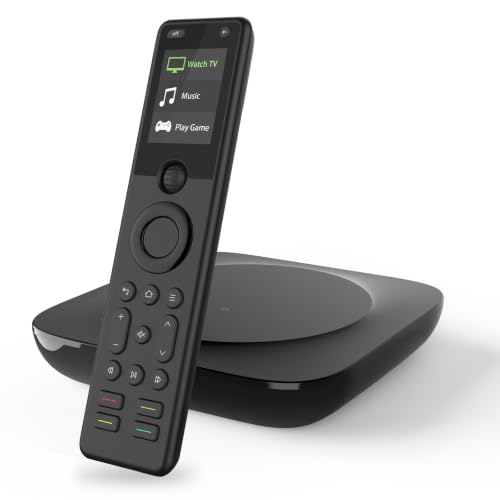
SofaBaton X1S
The SofaBaton X1S is a hub-based smart remote with an app-driven setup, a scroll wheel and activity-style control aimed at multi-device living rooms. Judge it on how it handles your exact device list, how its setup route fits your patience, and how gracefully it recovers when a device was left on or an input lands wrong. In daily use, the questions that matter are unglamorous: does volume always land on the right speakers, can a guest start a film without instructions, and does the layout make sense in the dark? If the answer to those is yes for your room, this style deserves a place on your shortlist; if any answer is no, keep reading the criteria sections before deciding.
Strengths in daily use tend to cluster around consistency: the same press producing the same result every evening, a layout your thumb learns within a week, and setup tools that let you fix a small problem without starting again. The trade-offs are equally consistent — every universal remote asks for one patient setup session, every database has gaps at the edges of a system, and every household must agree where the remote lives. None of those trade-offs is a reason to walk away; they are simply the price of admission, and knowing them in advance is what separates satisfied owners from disappointed ones.
SofaBaton U2
The SofaBaton U2 is a direct-control universal remote that keeps setup on the handset and suits viewers who dislike phone apps. Judge it on how it handles your exact device list, how its setup route fits your patience, and how gracefully it recovers when a device was left on or an input lands wrong. In daily use, the questions that matter are unglamorous: does volume always land on the right speakers, can a guest start a film without instructions, and does the layout make sense in the dark? If the answer to those is yes for your room, this style deserves a place on your shortlist; if any answer is no, keep reading the criteria sections before deciding.
Strengths in daily use tend to cluster around consistency: the same press producing the same result every evening, a layout your thumb learns within a week, and setup tools that let you fix a small problem without starting again. The trade-offs are equally consistent — every universal remote asks for one patient setup session, every database has gaps at the edges of a system, and every household must agree where the remote lives. None of those trade-offs is a reason to walk away; they are simply the price of admission, and knowing them in advance is what separates satisfied owners from disappointed ones.

GE Universal Remote
The GE Universal Remote is a simple, widely available replacement-style remote in the entry tier, aimed at a TV plus one or two extra devices. Judge it on how it handles your exact device list, how its setup route fits your patience, and how gracefully it recovers when a device was left on or an input lands wrong. In daily use, the questions that matter are unglamorous: does volume always land on the right speakers, can a guest start a film without instructions, and does the layout make sense in the dark? If the answer to those is yes for your room, this style deserves a place on your shortlist; if any answer is no, keep reading the criteria sections before deciding.
Strengths in daily use tend to cluster around consistency: the same press producing the same result every evening, a layout your thumb learns within a week, and setup tools that let you fix a small problem without starting again. The trade-offs are equally consistent — every universal remote asks for one patient setup session, every database has gaps at the edges of a system, and every household must agree where the remote lives. None of those trade-offs is a reason to walk away; they are simply the price of admission, and knowing them in advance is what separates satisfied owners from disappointed ones.
Philips Universal Remote
The Philips Universal Remote is a familiar big-brand replacement remote in the entry tier, with straightforward code entry and clear labelling. Judge it on how it handles your exact device list, how its setup route fits your patience, and how gracefully it recovers when a device was left on or an input lands wrong. In daily use, the questions that matter are unglamorous: does volume always land on the right speakers, can a guest start a film without instructions, and does the layout make sense in the dark? If the answer to those is yes for your room, this style deserves a place on your shortlist; if any answer is no, keep reading the criteria sections before deciding.
Strengths in daily use tend to cluster around consistency: the same press producing the same result every evening, a layout your thumb learns within a week, and setup tools that let you fix a small problem without starting again. The trade-offs are equally consistent — every universal remote asks for one patient setup session, every database has gaps at the edges of a system, and every household must agree where the remote lives. None of those trade-offs is a reason to walk away; they are simply the price of admission, and knowing them in advance is what separates satisfied owners from disappointed ones.
Inteset INT-422
The Inteset INT-422 is a learning, backlit universal remote favoured by home-theatre enthusiasts who want custom key mapping. Judge it on how it handles your exact device list, how its setup route fits your patience, and how gracefully it recovers when a device was left on or an input lands wrong. In daily use, the questions that matter are unglamorous: does volume always land on the right speakers, can a guest start a film without instructions, and does the layout make sense in the dark? If the answer to those is yes for your room, this style deserves a place on your shortlist; if any answer is no, keep reading the criteria sections before deciding.
Strengths in daily use tend to cluster around consistency: the same press producing the same result every evening, a layout your thumb learns within a week, and setup tools that let you fix a small problem without starting again. The trade-offs are equally consistent — every universal remote asks for one patient setup session, every database has gaps at the edges of a system, and every household must agree where the remote lives. None of those trade-offs is a reason to walk away; they are simply the price of admission, and knowing them in advance is what separates satisfied owners from disappointed ones.
Universal Remote Review: How to Judge Any Model in Ten Minutes
Give any candidate remote a ten-minute judgement before you read another word of marketing. First, list your devices and check each one is genuinely supported, including how your streaming devices accept commands. Second, picture the start of a film night and count the presses the activity needs. Third, find the volume and mute buttons with your eyes closed, because that is how you will use them. Fourth, ask what happens when something goes wrong mid-sequence — is recovery one obvious press or a menu expedition? Fifth, confirm the maker still maintains the product. A remote that passes those five tests in your imagination will very likely pass them on your sofa.
Troubleshooting the Failures Everyone Meets
If one device refuses every code in the list, do not assume the remote is useless. Try the automatic code search if the handset offers one, then try learning the essential commands from the original remote if learning is supported. Sometimes only a few keys matter — power, volume and input — and a hybrid arrangement where the universal remote handles daily driving while the original lives in a drawer for deep settings menus is a perfectly respectable outcome. Perfection is optional; a calm living room is the actual goal, and partial control that works every day beats total control that works most days.
Players notice input behaviour that film viewers never would. A universal remote will never replace a controller, but it often starts the session: powering the display, selecting the console input, setting the receiver to game mode territory and handing volume to the right speakers. Delays or missed steps in that chain feel worse mid-evening than they look on a checklist. If gaming is central in your home, test the start-up activity with the console fully asleep, and make sure returning to television afterwards is a single press rather than an archaeological dig through menus.
The practical takeaway is simple: test this aspect against your own room and your own devices before you commit, write down what you find, and let that evidence — not packaging, not habit, not hope — drive the final choice between the handful of remotes still on your shortlist.
Care, Batteries and Keeping It Working
A universal remote replaces a pile of separate handsets with one controller that can operate a television, a soundbar or AV receiver, a streaming box or stick, and often a disc player or games console as well. It does not add any new picture or sound quality by itself. What it adds is order: one power sequence, one volume control, and one place to look when the coffee table starts disappearing under plastic. Understanding that modest, practical promise is the key to judging every model fairly, because the best universal remote is the one that disappears into your routine rather than the one with the longest feature list.
Voice control tempts many buyers and divides households just as quickly. Speaking to a remote is wonderful when your hands are full or when searching for a film title letter by letter would take minutes. It is less wonderful in a quiet house at midnight, or for viewers who simply dislike talking to objects. Remember that voice features usually belong to the streaming device or television rather than the universal remote itself, so check which microphone you will actually be speaking into and which assistant ecosystem it answers to before counting voice as a reason to buy.
The practical takeaway is simple: test this aspect against your own room and your own devices before you commit, write down what you find, and let that evidence — not packaging, not habit, not hope — drive the final choice between the handful of remotes still on your shortlist.
Choosing Kindly: Older Viewers and Shared Homes
Button layout decides whether a remote feels friendly after a week or frustrating after a month. The controls you touch constantly — volume, channel or navigation, back, home and playback — should fall under your thumb without looking down, and they should feel different enough to identify by touch in a dark room. Backlighting helps, but shape and spacing help more. Crowded grids of identical small buttons look impressive in photographs and fail in real sofas, especially for older viewers, children, or anyone picking the remote up one-handed while holding a drink or a phone.
Think about what your system will look like in two years. Televisions get replaced, streamers multiply, and a soundbar today can become a full receiver setup tomorrow. A remote with a maintained device database, learning capability or app-based reprogramming adapts to those changes without starting again, while a fixed-code bargain may need replacing alongside the television. You do not need to future-proof obsessively — nobody can — but favouring products whose makers still publish updates and support pages is simple prudence, and it costs nothing to check before you commit.
The practical takeaway is simple: test this aspect against your own room and your own devices before you commit, write down what you find, and let that evidence — not packaging, not habit, not hope — drive the final choice between the handful of remotes still on your shortlist.
Streaming Sticks, CEC and the Infrared Problem
The second-hand market needs a cool head. Logitech has discontinued the Harmony line, so Harmony remotes and hubs now appear as used or leftover stock with no long-term guarantee that supporting services will run forever. A bargain Harmony can still delight an enthusiast who understands that risk, but it is a poor default recommendation for a family that wants set-and-forget reliability. For most buyers, choosing a currently supported product from a maker still actively maintaining its database and app is the safer route, even when a discontinued flagship looks more impressive on paper.
For older viewers and anyone with limited grip or vision, the best universal remote is the kindest one. Large, well-spaced buttons, high-contrast labels, a simple activity layout and forgiving setup matter far more than app dashboards. Consider how the remote behaves after a mistake: does one wrong press strand the viewer on a blank input, or can they recover by pressing the same clear activity button again? Recovery is the feature. A remote that forgives errors will be used confidently, and confident use is the whole point of consolidating control in the first place.
The practical takeaway is simple: test this aspect against your own room and your own devices before you commit, write down what you find, and let that evidence — not packaging, not habit, not hope — drive the final choice between the handful of remotes still on your shortlist.
What a Universal Remote Actually Does — and What It Does Not
Activities, sometimes called macros or scenes, are the real product you are buying. One press should turn on the television, wake the streamer or console, set the right input, and hand volume control to the soundbar or receiver. Done well, guests and family members stop needing instructions, and the phrase just press watch becomes true. Done badly, an activity is a fragile chain that fails whenever one device was left on, a console updates, or someone used a different remote in between. Judge any remote by how gracefully it recovers when the chain breaks, not by how slick the first demo feels.
Input switching causes more universal remote misery than any other single issue. Your television may have several HDMI sockets plus built-in apps, and each source device expects the screen to land on its input when it wakes. Discrete input commands, where they exist, are gold: they send the TV straight to a named input instead of cycling blindly. If your TV only cycles, a good macro leaves enough delay for the screen to wake before stepping through inputs. Test the full start-up sequence from a cold, everything-off state, because that is the moment the system must get right without help.
The practical takeaway is simple: test this aspect against your own room and your own devices before you commit, write down what you find, and let that evidence — not packaging, not habit, not hope — drive the final choice between the handful of remotes still on your shortlist.
Comparing Ecosystems, Not Just Handsets
Streaming has quietly changed what a universal remote must do. Many modern sticks and boxes use Bluetooth or radio-frequency remotes rather than infrared, and some accept control over the network through HDMI-CEC from the television itself. Before buying, check how each of your streaming devices can actually be controlled. A basic infrared remote may still work if the television passes commands along via CEC, but that chain can be inconsistent between brands. Hub-based and app-assisted remotes generally bridge these gaps more reliably, which is why stream-heavy households often outgrow the simplest handsets first.
Comparing universal remotes fairly means comparing ecosystems, not just handsets. Ask how devices are added, whether the code or device database is still maintained, whether setup needs a phone or a computer, and what happens if the maker shuts a server down. Ask whether the remote works acceptably when the internet is down — your evening film should not depend on a distant data centre. Finally ask how the remote handles the odd devices: the old DVD player, the imported streamer, the projector. Mainstream televisions are easy for everyone; the edges of your system reveal the truth.
The practical takeaway is simple: test this aspect against your own room and your own devices before you commit, write down what you find, and let that evidence — not packaging, not habit, not hope — drive the final choice between the handful of remotes still on your shortlist.
Projector Rooms and Tricky Infrared Paths
When a command works from two steps away but fails from the sofa, suspect the infrared path before blaming the remote. Sunlight through a window, some LED lighting, glass cabinet reflections and even a soundbar sitting in front of the TV sensor can all interfere. Fresh batteries matter too, because weak cells shorten range long before the remote dies completely. Move closer, shade the sensor, and test again in the evening. Methodical checks like these solve most complaints, and they cost nothing, which makes them a better first step than returning a remote that was never faulty.
Manufacturers describe compatibility in different ways, so treat headline claims with care and think in terms of your actual devices instead. Write down every piece of kit you want controlled, with its exact brand and model from the label on the back or the settings screen. A remote that handles your television and soundbar but not your ageing disc player has not really solved your problem, and a remote that covers everything except volume on the receiver will annoy you every single evening. Your device list, not marketing copy, is the specification that counts.
The practical takeaway is simple: test this aspect against your own room and your own devices before you commit, write down what you find, and let that evidence — not packaging, not habit, not hope — drive the final choice between the handful of remotes still on your shortlist.
The Guest Test: Will Everyone Else Cope?
Most universal remotes speak infrared, the same invisible light signals your original remotes use, which means they usually need a reasonably clear line of sight to each device. Hub-based systems add a small base station that blasts infrared around the cabinet and can also relay commands over your home network or Bluetooth to certain streaming devices. That difference in architecture matters more than button count. A simple infrared handset is cheap, instant and dependable in one room, while a hub earns its place when equipment hides behind cabinet doors or when you want one button to start a whole viewing session.
A universal remote succeeds socially, not just technically. The true test is whether a partner, a grandparent, a babysitter or a houseguest can watch something without a tutorial or a phone call to you. That argues for fewer, clearer activities, sensible button labels, and restraint with custom pages and hidden long-press tricks that only you understand. If you love tinkering, keep your experiments on a second profile or a spare page and leave the main layout boring. Boring is a compliment for shared technology: predictable, forgiving, and identical every evening of the year.
The practical takeaway is simple: test this aspect against your own room and your own devices before you commit, write down what you find, and let that evidence — not packaging, not habit, not hope — drive the final choice between the handful of remotes still on your shortlist.
Voice Control: Delight, Gimmick or Both?
Weight and balance sound trivial until you live with them. A remote that is too light can feel toy-like and slides off cushions; one that is too heavy tires the wrist during long browsing sessions and hurts more when dropped on a bare foot. Rounded backs sit better in the palm than sharp slabs. If you can, imagine using the remote with your eyes on the screen, because that is how it will actually be used: glancing down occasionally, pressing by memory most of the time, and expecting the same button to do the same thing every night.
Plan your first setup session properly and it will probably be your only one. Gather every original remote, fit fresh batteries where needed, and work in good light with the equipment powered on. Add devices one at a time and test the handful of commands that matter — power, volume, input switching, navigation and playback — before moving on. Rushing to program everything and testing at the end is how small mistakes hide inside macros, leaving you unsure which step went wrong when the television lands on the wrong input for the third time.
The practical takeaway is simple: test this aspect against your own room and your own devices before you commit, write down what you find, and let that evidence — not packaging, not habit, not hope — drive the final choice between the handful of remotes still on your shortlist.
Strengths and Trade-Offs in Balance
Strengths
- One handset ends the nightly hunt and the coffee-table clutter in a single stroke.
- Volume and mute can be locked to the soundbar or receiver across every activity.
- A good activity button makes the whole system usable by guests, children and babysitters.
- A maintained database or learning function lets the remote adapt when you replace a device.
Trade-Offs
- First setup takes a patient session, and rushing it is the main cause of failure.
- No database covers every obscure or ageing device; some systems end up hybrid.
- App-based models add accounts and updates to objects that used to be simple.
- Discontinued lines such as Harmony carry long-term support risk on the second-hand market.
Common Mistakes to Avoid
Programming everything before testing anything, so small err
Programming everything before testing anything, so small errors hide inside activities and take an evening to unpick. Every one of these mistakes is avoidable with ten slow minutes of checking, and every one of them appears in disappointed owner stories far more often than any genuine product defect. The category rewards patience at the start and repays it for years.
Forgetting the streaming stick
Forgetting the streaming stick: buying an infrared-only remote for a Bluetooth-controlled box and discovering the gap on film night. Every one of these mistakes is avoidable with ten slow minutes of checking, and every one of them appears in disappointed owner stories far more often than any genuine product defect. The category rewards patience at the start and repays it for years.
Leaving volume control attached to the television speakers i
Leaving volume control attached to the television speakers instead of locking it to the soundbar or receiver. Every one of these mistakes is avoidable with ten slow minutes of checking, and every one of them appears in disappointed owner stories far more often than any genuine product defect. The category rewards patience at the start and repays it for years.
Throwing the original remotes away on day one, instead of ke
Throwing the original remotes away on day one, instead of keeping them labelled in a drawer for rare settings menus and setup rescue. Every one of these mistakes is avoidable with ten slow minutes of checking, and every one of them appears in disappointed owner stories far more often than any genuine product defect. The category rewards patience at the start and repays it for years.
Judging by button count or database size rather than by your
Judging by button count or database size rather than by your own device list, your room and your household. Every one of these mistakes is avoidable with ten slow minutes of checking, and every one of them appears in disappointed owner stories far more often than any genuine product defect. The category rewards patience at the start and repays it for years.
One safety note belongs in every universal remote guide. Keep spare and loose batteries, particularly small coin or button cells, stored out of reach of young children, and fit battery covers fully after every change. A swallowed button battery is a medical emergency, so treat storage and disposal with the same seriousness you would give to medicines. Keep rechargeable remotes and their docks on stable surfaces away from drinks, and never leave a remote with a damaged battery compartment in a toy box or play area.
Final Verdict
Best for households juggling three or more devices who want one activity button to start watching. Not suited to single-TV rooms where the original remote already does everything calmly. Whichever route you choose, buy from a maker that still supports its products, set the remote up slowly, test the full start-up sequence from cold, and keep the original handsets until the new routine has survived a week of real family use. Do that, and the universal remote stops being a gadget and becomes what it should have been all along: invisible infrastructure for relaxed evenings.
Related Reading
For more on our universal remote reviews roundup, see our universal remote reviews roundup.
For more on universal remote buying guide, see universal remote buying guide.
For more on the pros and cons ledger, see the pros and cons ledger.
For more on is a universal remote worth it, see is a universal remote worth it.
For more on how to choose a universal remote, see how to choose a universal remote.
For more on how to set up a universal remote, see how to set up a universal remote.
For more on our indoor TV antenna review, see our indoor TV antenna review.
For more on the indoor TV antenna buying guide, see the indoor TV antenna buying guide.
For more on how to set up an indoor TV antenna, see how to set up an indoor TV antenna.
If one device refuses every code in the list, do not assume the remote is useless. Try the automatic code search if the handset offers one, then try learning the essential commands from the original remote if learning is supported. Sometimes only a few keys matter — power, volume and input — and a hybrid arrangement where the universal remote handles daily driving while the original lives in a drawer for deep settings menus is a perfectly respectable outcome. Perfection is optional; a calm living room is the actual goal, and partial control that works every day beats total control that works most days. Keep this in perspective as you read on: small, repeatable conveniences compound across hundreds of evenings, which is why owners who set a universal remote up properly tend to describe it as one of the best-value objects in the house, while owners who rushed setup describe the same product as a disappointment. The difference is rarely the hardware.
Players notice input behaviour that film viewers never would. A universal remote will never replace a controller, but it often starts the session: powering the display, selecting the console input, setting the receiver to game mode territory and handing volume to the right speakers. Delays or missed steps in that chain feel worse mid-evening than they look on a checklist. If gaming is central in your home, test the start-up activity with the console fully asleep, and make sure returning to television afterwards is a single press rather than an archaeological dig through menus. Keep this in perspective as you read on: small, repeatable conveniences compound across hundreds of evenings, which is why owners who set a universal remote up properly tend to describe it as one of the best-value objects in the house, while owners who rushed setup describe the same product as a disappointment. The difference is rarely the hardware.
A universal remote replaces a pile of separate handsets with one controller that can operate a television, a soundbar or AV receiver, a streaming box or stick, and often a disc player or games console as well. It does not add any new picture or sound quality by itself. What it adds is order: one power sequence, one volume control, and one place to look when the coffee table starts disappearing under plastic. Understanding that modest, practical promise is the key to judging every model fairly, because the best universal remote is the one that disappears into your routine rather than the one with the longest feature list. Keep this in perspective as you read on: small, repeatable conveniences compound across hundreds of evenings, which is why owners who set a universal remote up properly tend to describe it as one of the best-value objects in the house, while owners who rushed setup describe the same product as a disappointment. The difference is rarely the hardware.
Voice control tempts many buyers and divides households just as quickly. Speaking to a remote is wonderful when your hands are full or when searching for a film title letter by letter would take minutes. It is less wonderful in a quiet house at midnight, or for viewers who simply dislike talking to objects. Remember that voice features usually belong to the streaming device or television rather than the universal remote itself, so check which microphone you will actually be speaking into and which assistant ecosystem it answers to before counting voice as a reason to buy. Keep this in perspective as you read on: small, repeatable conveniences compound across hundreds of evenings, which is why owners who set a universal remote up properly tend to describe it as one of the best-value objects in the house, while owners who rushed setup describe the same product as a disappointment. The difference is rarely the hardware.
Button layout decides whether a remote feels friendly after a week or frustrating after a month. The controls you touch constantly — volume, channel or navigation, back, home and playback — should fall under your thumb without looking down, and they should feel different enough to identify by touch in a dark room. Backlighting helps, but shape and spacing help more. Crowded grids of identical small buttons look impressive in photographs and fail in real sofas, especially for older viewers, children, or anyone picking the remote up one-handed while holding a drink or a phone. Keep this in perspective as you read on: small, repeatable conveniences compound across hundreds of evenings, which is why owners who set a universal remote up properly tend to describe it as one of the best-value objects in the house, while owners who rushed setup describe the same product as a disappointment. The difference is rarely the hardware.
Think about what your system will look like in two years. Televisions get replaced, streamers multiply, and a soundbar today can become a full receiver setup tomorrow. A remote with a maintained device database, learning capability or app-based reprogramming adapts to those changes without starting again, while a fixed-code bargain may need replacing alongside the television. You do not need to future-proof obsessively — nobody can — but favouring products whose makers still publish updates and support pages is simple prudence, and it costs nothing to check before you commit. Keep this in perspective as you read on: small, repeatable conveniences compound across hundreds of evenings, which is why owners who set a universal remote up properly tend to describe it as one of the best-value objects in the house, while owners who rushed setup describe the same product as a disappointment. The difference is rarely the hardware.
The second-hand market needs a cool head. Logitech has discontinued the Harmony line, so Harmony remotes and hubs now appear as used or leftover stock with no long-term guarantee that supporting services will run forever. A bargain Harmony can still delight an enthusiast who understands that risk, but it is a poor default recommendation for a family that wants set-and-forget reliability. For most buyers, choosing a currently supported product from a maker still actively maintaining its database and app is the safer route, even when a discontinued flagship looks more impressive on paper. Keep this in perspective as you read on: small, repeatable conveniences compound across hundreds of evenings, which is why owners who set a universal remote up properly tend to describe it as one of the best-value objects in the house, while owners who rushed setup describe the same product as a disappointment. The difference is rarely the hardware.
For older viewers and anyone with limited grip or vision, the best universal remote is the kindest one. Large, well-spaced buttons, high-contrast labels, a simple activity layout and forgiving setup matter far more than app dashboards. Consider how the remote behaves after a mistake: does one wrong press strand the viewer on a blank input, or can they recover by pressing the same clear activity button again? Recovery is the feature. A remote that forgives errors will be used confidently, and confident use is the whole point of consolidating control in the first place. Keep this in perspective as you read on: small, repeatable conveniences compound across hundreds of evenings, which is why owners who set a universal remote up properly tend to describe it as one of the best-value objects in the house, while owners who rushed setup describe the same product as a disappointment. The difference is rarely the hardware.
A Closer Hands-On Check: Putting a Universal Remote Through Real Tasks
Judge the controls by whether you can use them without looking down or stopping your task, because that is how they will be used for most of their life. Separate the features you will use in the first month from the ones that only sound reassuring, and let the first group carry far more weight in the decision. Prefer a setup you can explain to another person in a minute, because simple arrangements are easier to troubleshoot, share and repeat than fragile clever ones. Check the connection points you rely on every day, and note which ones are already occupied, shared or awkward to reach once furniture is back in place.
As a concrete listing check, take the SofaBaton X1S and the SofaBaton U2 named earlier in this article and confirm, line by line, that each variant offered matches the size, connection and contents described for it here. Decide in advance what good enough looks like for your use, so a minor cosmetic flaw does not distract you from performance that genuinely meets the brief. Look closely at seams, edges, hinges, threads or contact points when the universal remote arrives, because build quality is easiest to judge before everyday wear hides the evidence. Treat any accessory bundled in the box as a starting point, and check whether it suits your setup before assuming the maker has solved that part for you. When you check a single universal remote closely, work from the outside in: condition and finish first, then controls and connections, then behaviour during a real task from start to finish.
Keep the instructions somewhere you can find them months later, since the setting or step you skip today is often the one a future problem sends you hunting for. Think about the next purchase this one commits you to, whether that is matching accessories, consumables, a bigger surface or a different connection, and count that commitment honestly. Look for the failure you would notice first if you chose badly: a port you cannot reach, a part that will not fit, a control you cannot see, or a routine that becomes slower instead of easier. When you compare notes with other owners, match their comments to setups like yours, because advice from a very different room, workload or routine can mislead.
A calm final test is to walk away mid-task, come back later, and see whether the setup still makes sense at a glance without reconstructing what you were doing. Leave a little headroom in every direction that matters, whether that means physical space, connection capacity, adjustment range or simply time to do a task properly. A fair test repeats the same task at least twice, once while you are paying attention and once while you work normally, because concentration can hide clumsy design. Notice the small sounds, lights and movements during normal use, because those everyday details decide whether a universal remote feels settled or constantly demands attention. Start this final check away from the listings, with the space, the equipment and the routine you already have written down in plain terms.
Make one change at a time during the first days, so that when something improves or gets worse you know which change caused it. Give a new universal remote a fair trial in the position it was bought for before improvising workarounds, since many early complaints disappear once placement is corrected. If the universal remote will be shared, agree on one home position and one simple reset routine, so each person does not undo the previous person’s adjustments.
If you work in more than one place, decide whether this universal remote stays fixed in one spot or travels, and judge its size, weight and setup time accordingly. Note the moment you first had to think about the universal remote instead of your work, since that moment usually reveals more than any summary of features can. When a specification is stated in unfamiliar terms, translate it into your own routine: how long, how often, how far, how loud in practice, before letting it sway you. Plan where the cables or materials connected to this universal remote will run when the room is tidy, not just while you are testing on an empty surface.
Frequently Asked Questions
Will a universal remote work with my streaming stick or box?
It depends on how the streamer accepts commands. Infrared models need a line of sight and a device that listens for infrared; many sticks use Bluetooth instead, but televisions can often pass commands along through HDMI-CEC, and hub-based remotes bridge the gap more reliably. Check your exact streamer model against the remote maker’s support information before buying, and test navigation, home and back commands during setup, not just power.
What happens if my device is not in the code list or database?
Try the automatic code search if the remote offers one, then try learning the essential commands from the original remote if learning is supported. Many households run a happy hybrid: the universal remote handles power, volume, input and playback, while the original stays in a drawer for rare deep settings. That outcome is a success, not a failure — daily calm is the goal.
Is the Logitech Harmony line still a good buy?
Harmony remotes were excellent, but Logitech has discontinued the line, so new stock is leftover and most listings are second-hand, with no guarantee about how long supporting services will continue. An informed enthusiast may still enjoy one at the right price. For a family wanting set-and-forget reliability, a currently supported product from an active maker is the safer default recommendation.
How long does setup usually take?
Plan one unhurried session rather than a stopwatch target. Simple code-entry setups for a TV and soundbar can be quick, while multi-device activities with a receiver, console and streamer deserve a slow evening of adding, testing and adjusting delays. Working device by device and testing as you go is faster in the end than programming everything and debugging it afterwards.
Can one universal remote control equipment behind cabinet doors?
A basic infrared handset needs a reasonably clear path to each device sensor, so closed doors usually defeat it. Hub-based systems solve this by placing a hub or small infrared blasters inside the cabinet, and some devices can also be controlled over the network or Bluetooth. If your kit lives out of sight, treat hub control as a requirement, not an upgrade, and test every device with the doors closed.
What should I do with my old remotes afterwards?
Keep them, labelled, in one drawer with spare batteries stored safely away from young children. You will want an original occasionally for deep settings menus, firmware updates or rescuing a setup that has gone sideways. Once the universal remote has run the house happily for a few months, you can retire the originals to a box — but there is no prize for throwing them away early.