Disclosure: As an Amazon Associate, ilcastellomenu.com earns from qualifying purchases. Links on this page are affiliate links; they cost you nothing extra. Prices and availability change often, so check the current Amazon listing before you buy.
Key Takeaways
This indoor tv antenna buying guide guide starts with the fact every honest discussion of indoor reception has to respect: the antenna is only half of the system, and your home is the other half. It works through the decisions in the order they should be made: your stations first, your room second, the product last. Everything that follows is built around that partnership, so you can judge designs, positions and accessories by what they will actually do in a real room, with real walls, real weather and a real weakest channel that refuses to behave. No headline range figure, no packaging promise and no neighbour’s success story can substitute for a patient trial at your own address, and this guide will keep returning to that standard.
Key Takeaways: check which real channels your stations use; favour placement freedom over headline range claims; start unamplified unless a test proves otherwise; keep the cable chain short and simple; and budget your patience for an afternoon of position trials, because that afternoon decides more than the model does.
In this guide
What an Indoor TV Antenna Does and the Main Types
Outdoor and attic antennas sit outside this guide’s scope for a deliberate reason: they involve heights, weatherproofing and work that carries real risk, and they are not necessary for the large share of homes within reasonable reach of their transmitters. The indoor question is narrower and more practical: given a safe, reversible, renter-friendly setup inside one room, how much television can you reliably get? For many households the answer is all of their local networks in clear quality. For others the honest answer is some, and knowing which group you are in, cheaply and safely, is exactly what an indoor antenna trial is for.
Loop and traditional indoor designs trade discretion for capability. A loop handles a broad frequency mix gracefully and can be rotated in fine increments, which makes hunting for a clean spot satisfying and precise. Classic designs with extendable elements remain the honest choice where a needed station sits on a VHF channel that flat panels barely notice, even if they look like technology from another era. Choosing between discretion and capability is a genuine lifestyle decision: the antenna lives in your room every day, and the right answer balances the channels you need against the object you are happy to look at.
Amplified models package a flat or loop antenna with a powered amplifier, usually drawing power from a USB port on the television or a small adapter. The convenience is real and so is the diagnostic confusion: when reception disappoints, you must work out whether the antenna, the position or the amplifier is at fault. Models that let you remove or bypass the amplifier make that diagnosis easy and are the safer buy. Remember too that a USB-powered amplifier stops working when the television is off, which matters if you record programmes with a separate tuner box while the screen sleeps.
Weather and seasons nudge reception at the margins. Rain, temperature inversions and the difference between bare winter branches and full summer foliage can all shift a marginal channel between watchable and unwatchable. A setup that works beautifully in one month may need a small adjustment in another, especially for your weakest station. Building your expectations around that reality prevents frustration: aim for a placement where your important channels have margin to spare, not a placement where they barely lock on a good day, because the barely-locking placement is the one that will fail during the programme you most want to watch.
Top Picks at a Glance

Mohu Leaf — flat paper-thin panel
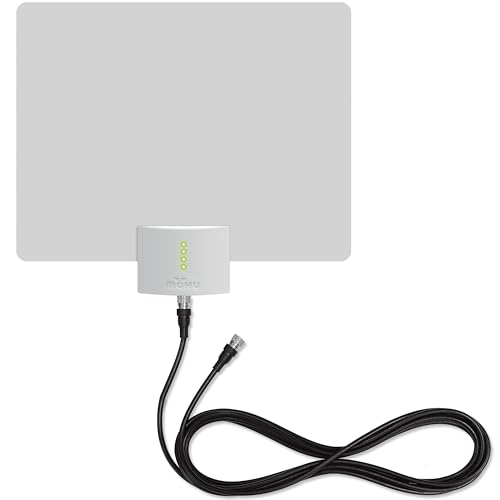
The Mohu Leaf is the design most people picture when they imagine a modern flat indoor antenna: a thin, lightweight panel that pins to a wall, hides behind a picture frame or sits flat behind the television itself. Its appeal is discretion. In a living room where a traditional set of ears would look cluttered, the Leaf largely disappears, and that matters more than many buyers expect because the antenna you are willing to leave in its best position is the antenna that actually performs. Treat it as an entry-to-mid tier option judged on placement flexibility and tidiness rather than on any promise about distance, because no flat panel can repeal the physics of your street, your walls and the direction of your local transmitters.
Distance to the transmitter sets the broad expectation, but it is a crude guide on its own. A home far from the towers with a clear view across flat land can outperform a home much closer in but sitting in a valley, behind a ridge or inside a metal-clad building. Online reception maps that use your address give a more useful picture than any headline range figure printed on a box, because they account for terrain and transmitter direction. Use them to learn two things before you buy: roughly how strong your signals should be, and, just as importantly, which compass direction your antenna should favour.
Best for: viewers who want a entry tier starting point with honest expectations and room to experiment with placement. Not suited for: homes whose must-have station sits on a difficult low VHF channel or far behind serious terrain obstruction, where no indoor design can promise success. Check price on Amazon if a listing is linked at publication; otherwise treat this as a prose-only recommendation and compare the current listing carefully before buying.

Antennas Direct ClearStream Eclipse — loop design with a removable, paintable surface
The Antennas Direct ClearStream Eclipse takes a different shape: a loop rather than a sheet, with a surface designed to blend against a wall and a form that can sit on a stand as well as hang. Loop designs have a long history in indoor reception because the shape handles a broad mix of broadcast frequencies gracefully, and the Eclipse packages that idea in something that looks deliberate rather than improvised. It suits viewers who want placement options beyond the wall directly behind the TV, including a shelf or a window-adjacent spot reached with its cable. Judge it as a mid tier all-rounder whose real test is a patient afternoon of position trials in your own room.
Height is the indoor antenna owner’s best friend. Signals generally improve as the antenna rises, because it clears furniture, people and the clutter of everyday objects that absorb and scatter them. A panel placed high on a wall, near the ceiling line on the transmitter side of the room, will very often outperform the same panel sitting on a low media unit, even when the horizontal position barely changes. This is also why the cable length supplied with an antenna matters in practice: it decides which of the good positions you can actually reach while still connecting to the television without strain or an unsightly tight diagonal across the room.
Best for: viewers who want a mid tier starting point with honest expectations and room to experiment with placement. Not suited for: homes whose must-have station sits on a difficult low VHF channel or far behind serious terrain obstruction, where no indoor design can promise success. Check price on Amazon if a listing is linked at publication; otherwise treat this as a prose-only recommendation and compare the current listing carefully before buying.
Winegard FlatWave — flat panel from a long-established antenna maker
The Winegard FlatWave comes from one of the oldest names in antennas, and that heritage shows in a straightforward flat-panel design with an amplified sibling in the same family for homes that need a little help with weaker signals. The unamplified thinking behind the base design is sound: start simple, place carefully, and only add amplification when a specific weak channel justifies it, because an amplifier boosts noise along with signal. As a mid tier pick it suits buyers who like the flat format but want a clear upgrade path inside one product family if their first placement tests show a marginal channel worth chasing.
Local news, weather and emergency information are where an indoor antenna quietly earns its keep. When broadband fails or a streaming service stumbles, broadcast television keeps working, delivered by transmitters with their own backup power and decades of engineering for exactly those moments. Viewers who cut the cord for cost reasons often rediscover that their morning news, local sport and public broadcasting were the programmes they valued most, and those are precisely the programmes an antenna delivers without any subscription, account or password. It is a resilient, boring, dependable layer of a home entertainment setup, and boring dependability has real worth.
Best for: viewers who want a mid tier starting point with honest expectations and room to experiment with placement. Not suited for: homes whose must-have station sits on a difficult low VHF channel or far behind serious terrain obstruction, where no indoor design can promise success. Check price on Amazon if a listing is linked at publication; otherwise treat this as a prose-only recommendation and compare the current listing carefully before buying.

RCA indoor flat antenna — simple flat and amplified indoor models
RCA indoor antennas are the familiar, widely available option found in almost every electronics aisle, spanning simple flat panels and amplified models with traditional styling cues. Their strength is accessibility and simplicity: unbox, connect, scan, and learn what your address can actually receive before spending more on anything else. That makes an RCA model a sensible entry tier experiment for a second television, a spare room or a first cord-cutting trial, where the goal is information about your location as much as channels. If the experiment succeeds, you have learned your room; if it disappoints, you have spent the least possible to find out.
Weather and seasons nudge reception at the margins. Rain, temperature inversions and the difference between bare winter branches and full summer foliage can all shift a marginal channel between watchable and unwatchable. A setup that works beautifully in one month may need a small adjustment in another, especially for your weakest station. Building your expectations around that reality prevents frustration: aim for a placement where your important channels have margin to spare, not a placement where they barely lock on a good day, because the barely-locking placement is the one that will fail during the programme you most want to watch.
Best for: viewers who want a entry tier starting point with honest expectations and room to experiment with placement. Not suited for: homes whose must-have station sits on a difficult low VHF channel or far behind serious terrain obstruction, where no indoor design can promise success. Check price on Amazon if a listing is linked at publication; otherwise treat this as a prose-only recommendation and compare the current listing carefully before buying.
Which Frequencies Do Your Stations Use?
Weather and seasons nudge reception at the margins. Rain, temperature inversions and the difference between bare winter branches and full summer foliage can all shift a marginal channel between watchable and unwatchable. A setup that works beautifully in one month may need a small adjustment in another, especially for your weakest station. Building your expectations around that reality prevents frustration: aim for a placement where your important channels have margin to spare, not a placement where they barely lock on a good day, because the barely-locking placement is the one that will fail during the programme you most want to watch.
Distance to the transmitter sets the broad expectation, but it is a crude guide on its own. A home far from the towers with a clear view across flat land can outperform a home much closer in but sitting in a valley, behind a ridge or inside a metal-clad building. Online reception maps that use your address give a more useful picture than any headline range figure printed on a box, because they account for terrain and transmitter direction. Use them to learn two things before you buy: roughly how strong your signals should be, and, just as importantly, which compass direction your antenna should favour.
How Much Placement Freedom Do You Need?
Windows deserve special attention in any placement plan. Glass blocks far less signal than brick, masonry or metal, so a position on or near a window facing the transmitters is frequently the best seat in the house for an indoor antenna. It is not a guarantee, because modern energy-efficient glazing can carry metallic coatings that behave more like a wall than like glass, but it is always worth testing. If the window position transforms your weakest channel, you then have a pleasant problem: how to make that position permanent and tidy, with cable routed along skirting or behind furniture rather than taped across the glass forever.
Orientation is a dial, not a switch. Flat panels are directional to a degree: their broad face should generally look toward the transmitters, but reflections in real rooms mean the best angle is sometimes a few degrees off the obvious one. Work in small turns, rescanning or at least re-checking your weakest channels after each adjustment, and resist the urge to judge a position by your strongest station, which will work almost anywhere. Judge every position by the channel you care about that is hardest to receive, because that channel is the honest referee of every placement experiment you run.
Do You Need an Amplifier?
Amplifiers are the most misunderstood accessory in indoor reception. An amplifier can help when a signal arrives usable but weak, or when a long cable run or a splitter steals strength on the way to the tuner. It cannot create a signal that never arrived, and it cannot clean up a signal already corrupted by reflections; amplifying a distorted signal simply gives you a louder distorted signal. Worse, in strong-signal areas an amplifier can overload the tuner and make reception worse, sometimes wiping out channels that worked perfectly without it. Treat amplification as a targeted medicine for a diagnosed weakness, not as a vitamin to take just in case.
If your antenna offers a detachable or switchable amplifier, use that flexibility as a diagnostic tool. Test your problem channel with the amplifier in and out of the chain, at the same position, and believe the result rather than the marketing. Some homes find one weak network improves while everything else stays the same; others find the amplifier only adds instability. Where the amplifier sits also matters: amplification near the antenna, before the cable run, is the arrangement that can genuinely help a weak signal survive the journey, while amplification near the television mostly raises the noise that the cable already collected.
How Will You Mount and Hide It?
Keep the antenna away from large metal objects and dense electronics where you can. Radiators, metal shelving, large appliances and even the television’s own chassis can distort the pattern of signals arriving at the panel, and switching power supplies and LED lighting can add electrical noise at exactly the wrong frequencies. A little separation often cleans up a picture that seemed hopeless. Equally, remember that people are mostly water and absorb signal too: a position that tests perfectly in an empty room may wobble when the sofa fills up, which is another reason to leave margin on your weakest channels.
Looking after an indoor antenna is mercifully simple. Dust the panel or loop occasionally with a dry cloth, since a heavy layer of grime does nothing for either appearance or the small chance of moisture clinging to connectors. Check the coaxial connection at the television and at the antenna a couple of times a year; a connector that has worked loose through furniture moves and cleaning is a frequent, invisible cause of a channel that slowly got worse. Keep the cable’s route gentle, without tight kinks or pinches under heavy furniture legs, because a damaged cable can quietly undo a good antenna’s work.
Flat panel antennas are the dominant indoor style for good reason: they are thin, light, easy to mount with removable strips or pins, and visually quiet enough for design-conscious rooms. Their limitation is physics; a thin sheet has little depth to work with and modest ability on the longest wavelengths, so low VHF stations are their known weak spot. Within the style, differences between brands are real but second-order: cable length, mounting options and build quality matter more day to day than small claimed performance gaps, because placement freedom is what converts a design into channels at your specific address.
How to Prioritise by Use Case
Live sport is the other stronghold. Broadcast coverage of major events arrives uncompressed or lightly compressed compared with many streams, so the picture can look noticeably crisper, and it arrives without the delay that makes group chats and neighbourhood cheers spoil a goal or a touchdown seconds before your stream shows it. For households whose viewing centres on local teams, national broadcasts and big shared events, an antenna covers a surprising share of the calendar. It will not replace specialist sports subscriptions for out-of-market games, and honesty about that boundary is part of judging the purchase fairly.
Picture quality surprises many first-time users. Because broadcast signals are not squeezed through the same bottlenecks as internet streams, a well-received local channel can look sharper than the same channel delivered by an app, especially on a large screen. There is no buffering wheel, no resolution that quietly drops when the household’s other screens wake up, and no data cap anxiety. The trade is choice: you receive the channels your location offers, in the order the broadcaster sends them, with no on-demand library attached. Many homes pair an antenna for live and local viewing with one streaming service for everything else, and find the combination covers nearly all of what they actually watch.
Local news, weather and emergency information are where an indoor antenna quietly earns its keep. When broadband fails or a streaming service stumbles, broadcast television keeps working, delivered by transmitters with their own backup power and decades of engineering for exactly those moments. Viewers who cut the cord for cost reasons often rediscover that their morning news, local sport and public broadcasting were the programmes they valued most, and those are precisely the programmes an antenna delivers without any subscription, account or password. It is a resilient, boring, dependable layer of a home entertainment setup, and boring dependability has real worth.
First Setup and Care Essentials
Windows deserve special attention in any placement plan. Glass blocks far less signal than brick, masonry or metal, so a position on or near a window facing the transmitters is frequently the best seat in the house for an indoor antenna. It is not a guarantee, because modern energy-efficient glazing can carry metallic coatings that behave more like a wall than like glass, but it is always worth testing. If the window position transforms your weakest channel, you then have a pleasant problem: how to make that position permanent and tidy, with cable routed along skirting or behind furniture rather than taped across the glass forever.
If your antenna uses removable adhesive strips for mounting, plan the final position before committing them, and keep a note of the position that won your tests so a decorator, a cleaner or an enthusiastic toddler cannot erase your hard-won knowledge. Photograph the winning placement and jot the compass direction it faces. When the antenna inevitably gets knocked, remounted or moved for a party, that small record turns a weekend of re-testing into a two-minute restoration. Good reception is partly a product and partly a piece of household knowledge; write the knowledge down.
Looking after an indoor antenna is mercifully simple. Dust the panel or loop occasionally with a dry cloth, since a heavy layer of grime does nothing for either appearance or the small chance of moisture clinging to connectors. Check the coaxial connection at the television and at the antenna a couple of times a year; a connector that has worked loose through furniture moves and cleaning is a frequent, invisible cause of a channel that slowly got worse. Keep the cable’s route gentle, without tight kinks or pinches under heavy furniture legs, because a damaged cable can quietly undo a good antenna’s work.
Mistakes to Avoid
Over-amplifying and over-splitting complete the set of classic errors. Each addition to the chain feels like an upgrade and quietly taxes the signal: another split, another long cable, an amplifier added on suspicion rather than evidence. Keep the chain as short and simple as your rooms allow, add one element at a time, and test after each change so you know which addition helped and which hurt. A simple setup you understand will serve you better for years than a complicated one assembled from guesses, because when something changes you will know exactly where to look first.
Forgetting to rescan after the seasons change, after furniture moves or after a broadcaster shuffles its frequencies is a quiet source of missing channels. Broadcasters occasionally reorganise the real channels behind the familiar virtual numbers, and a television that is never told to look again will faithfully show you an outdated map. A fresh scan takes minutes and costs nothing, so build the habit: rescan after any move of the antenna, after any major room change, and whenever a channel vanishes unexpectedly. Half of all antenna troubleshooting is a scan and a small move; the other half is patience.
Chasing headline range figures is the second classic error. The distance numbers on packaging assume conditions your home may not share: clear terrain, an elevated antenna and a favourable transmitter. They are best treated as rough size classes rather than promises. A buyer who chooses by the biggest number often pays for capability their walls will never let them use, while neglecting the features that decide real outcomes, like cable length and mounting flexibility. Buy placement freedom and honest suitability for your stations’ frequencies first; let range claims come a distant third in the decision.
Final Recommendation From This Indoor TV Antenna Buying Guide
Buy for your address, not for a specification sheet. Confirm your stations’ frequencies, choose the style that fits those frequencies and your room, prize cable length and mounting options over range claims, and run an honest multi-position trial before judging the result. That process, followed patiently, is the whole secret of indoor reception, and it costs nothing but an afternoon.
Distance to the transmitter sets the broad expectation, but it is a crude guide on its own. A home far from the towers with a clear view across flat land can outperform a home much closer in but sitting in a valley, behind a ridge or inside a metal-clad building. Online reception maps that use your address give a more useful picture than any headline range figure printed on a box, because they account for terrain and transmitter direction. Use them to learn two things before you buy: roughly how strong your signals should be, and, just as importantly, which compass direction your antenna should favour.
If your antenna offers a detachable or switchable amplifier, use that flexibility as a diagnostic tool. Test your problem channel with the amplifier in and out of the chain, at the same position, and believe the result rather than the marketing. Some homes find one weak network improves while everything else stays the same; others find the amplifier only adds instability. Where the amplifier sits also matters: amplification near the antenna, before the cable run, is the arrangement that can genuinely help a weak signal survive the journey, while amplification near the television mostly raises the noise that the cable already collected.
A second television is the lowest-risk place to start. Bedroom, kitchen and home-office sets are often watched for news, morning programmes and background sport, exactly the content broadcast does best, and they are the sets most likely to be stranded when a household trims its subscriptions. An inexpensive antenna on a secondary set teaches you your home’s reception honestly, at the smallest possible cost, before you reorganise the main living-room setup around it. If the experiment thrives, expanding it is easy; if your address turns out to be difficult, the lesson arrived cheaply and the antenna can move to a relative’s easier address instead.
Most local stations broadcast on a mix of VHF and UHF frequencies, and the distinction matters indoors. UHF signals are shorter and generally easier for compact indoor designs to capture, while low VHF signals are long waves that small flat panels struggle with. If one of your must-have networks sits on a low VHF channel, a flat panel may disappoint no matter where you put it, and a design with longer elements may serve you better. Checking which real channels your local stations use, rather than the virtual numbers shown on screen, is the single most informative step you can take before choosing any model.
Amplifiers are the most misunderstood accessory in indoor reception. An amplifier can help when a signal arrives usable but weak, or when a long cable run or a splitter steals strength on the way to the tuner. It cannot create a signal that never arrived, and it cannot clean up a signal already corrupted by reflections; amplifying a distorted signal simply gives you a louder distorted signal. Worse, in strong-signal areas an amplifier can overload the tuner and make reception worse, sometimes wiping out channels that worked perfectly without it. Treat amplification as a targeted medicine for a diagnosed weakness, not as a vitamin to take just in case.
Picture quality surprises many first-time users. Because broadcast signals are not squeezed through the same bottlenecks as internet streams, a well-received local channel can look sharper than the same channel delivered by an app, especially on a large screen. There is no buffering wheel, no resolution that quietly drops when the household’s other screens wake up, and no data cap anxiety. The trade is choice: you receive the channels your location offers, in the order the broadcaster sends them, with no on-demand library attached. Many homes pair an antenna for live and local viewing with one streaming service for everything else, and find the combination covers nearly all of what they actually watch.
Going Deeper: Reading Your Own Results
Broadcast television signals travel in roughly straight lines from the transmitter, and almost everything between that tower and your sofa weakens, bends or reflects them. Hills, tall buildings, metal roofing, foil-backed insulation, brick and even dense wet foliage all take a share. That is why two houses on the same street can have completely different experiences with the same antenna, and why honest advice about indoor antennas always starts with your address rather than with a product. The antenna matters, but it is the junior partner in the relationship; location, height and orientation do most of the work, and the best buying decision is the one that gives you the most freedom to experiment with all three.
Every time you move the antenna, run a fresh channel scan on the television. A scan is how the tuner rebuilds its map of what exists at the new position, and skipping it is the most common reason a good move looks like a bad one: the channel was there, but the television was never told to look again. Keep a simple written note of each position you try and which channels it delivered. After four or five positions a pattern emerges, the best compromise reveals itself, and you stop guessing. That notebook page is worth more than any accessory you could buy for the antenna.
Live sport is the other stronghold. Broadcast coverage of major events arrives uncompressed or lightly compressed compared with many streams, so the picture can look noticeably crisper, and it arrives without the delay that makes group chats and neighbourhood cheers spoil a goal or a touchdown seconds before your stream shows it. For households whose viewing centres on local teams, national broadcasts and big shared events, an antenna covers a surprising share of the calendar. It will not replace specialist sports subscriptions for out-of-market games, and honesty about that boundary is part of judging the purchase fairly.
Forgetting to rescan after the seasons change, after furniture moves or after a broadcaster shuffles its frequencies is a quiet source of missing channels. Broadcasters occasionally reorganise the real channels behind the familiar virtual numbers, and a television that is never told to look again will faithfully show you an outdated map. A fresh scan takes minutes and costs nothing, so build the habit: rescan after any move of the antenna, after any major room change, and whenever a channel vanishes unexpectedly. Half of all antenna troubleshooting is a scan and a small move; the other half is patience.
Most local stations broadcast on a mix of VHF and UHF frequencies, and the distinction matters indoors. UHF signals are shorter and generally easier for compact indoor designs to capture, while low VHF signals are long waves that small flat panels struggle with. If one of your must-have networks sits on a low VHF channel, a flat panel may disappoint no matter where you put it, and a design with longer elements may serve you better. Checking which real channels your local stations use, rather than the virtual numbers shown on screen, is the single most informative step you can take before choosing any model.
Every time you move the antenna, run a fresh channel scan on the television. A scan is how the tuner rebuilds its map of what exists at the new position, and skipping it is the most common reason a good move looks like a bad one: the channel was there, but the television was never told to look again. Keep a simple written note of each position you try and which channels it delivered. After four or five positions a pattern emerges, the best compromise reveals itself, and you stop guessing. That notebook page is worth more than any accessory you could buy for the antenna.
Picture quality surprises many first-time users. Because broadcast signals are not squeezed through the same bottlenecks as internet streams, a well-received local channel can look sharper than the same channel delivered by an app, especially on a large screen. There is no buffering wheel, no resolution that quietly drops when the household’s other screens wake up, and no data cap anxiety. The trade is choice: you receive the channels your location offers, in the order the broadcaster sends them, with no on-demand library attached. Many homes pair an antenna for live and local viewing with one streaming service for everything else, and find the combination covers nearly all of what they actually watch.
Forgetting to rescan after the seasons change, after furniture moves or after a broadcaster shuffles its frequencies is a quiet source of missing channels. Broadcasters occasionally reorganise the real channels behind the familiar virtual numbers, and a television that is never told to look again will faithfully show you an outdated map. A fresh scan takes minutes and costs nothing, so build the habit: rescan after any move of the antenna, after any major room change, and whenever a channel vanishes unexpectedly. Half of all antenna troubleshooting is a scan and a small move; the other half is patience.
Going Deeper: Lesson 1 From Real Rooms
Signal strength at your address is only half the story; signal quality decides whether a channel actually decodes. A television tuner needs a signal that is clean enough to interpret, and reflections inside a room can corrupt an otherwise strong signal as echoes confuse the receiver. This is why a channel can show a healthy strength reading yet still break into blocks, and why moving an antenna a short distance sideways sometimes fixes a channel that pointing it more carefully did not. Indoor reception rewards small, patient experiments: move, rescan, note the result, and let the room teach you where its clean spots are.
Height is the indoor antenna owner’s best friend. Signals generally improve as the antenna rises, because it clears furniture, people and the clutter of everyday objects that absorb and scatter them. A panel placed high on a wall, near the ceiling line on the transmitter side of the room, will very often outperform the same panel sitting on a low media unit, even when the horizontal position barely changes. This is also why the cable length supplied with an antenna matters in practice: it decides which of the good positions you can actually reach while still connecting to the television without strain or an unsightly tight diagonal across the room.
Picture quality surprises many first-time users. Because broadcast signals are not squeezed through the same bottlenecks as internet streams, a well-received local channel can look sharper than the same channel delivered by an app, especially on a large screen. There is no buffering wheel, no resolution that quietly drops when the household’s other screens wake up, and no data cap anxiety. The trade is choice: you receive the channels your location offers, in the order the broadcaster sends them, with no on-demand library attached. Many homes pair an antenna for live and local viewing with one streaming service for everything else, and find the combination covers nearly all of what they actually watch.
The most common mistake is judging an antenna in its first position. Buyers unbox it, place it where it looks best, scan once, and return it when a favourite channel is missing, never learning that a position a short distance away, higher and turned slightly, would have delivered everything. The first position is a hypothesis, not a verdict. Give the antenna a fair trial across several positions, scanning after each move and judging by your weakest wanted channel, before deciding the product has failed. In indoor reception, the product and the placement are a team, and sacking one without testing the partnership is how good antennas end up back in the box.
If your antenna offers a detachable or switchable amplifier, use that flexibility as a diagnostic tool. Test your problem channel with the amplifier in and out of the chain, at the same position, and believe the result rather than the marketing. Some homes find one weak network improves while everything else stays the same; others find the amplifier only adds instability. Where the amplifier sits also matters: amplification near the antenna, before the cable run, is the arrangement that can genuinely help a weak signal survive the journey, while amplification near the television mostly raises the noise that the cable already collected.
Loop and traditional indoor designs trade discretion for capability. A loop handles a broad frequency mix gracefully and can be rotated in fine increments, which makes hunting for a clean spot satisfying and precise. Classic designs with extendable elements remain the honest choice where a needed station sits on a VHF channel that flat panels barely notice, even if they look like technology from another era. Choosing between discretion and capability is a genuine lifestyle decision: the antenna lives in your room every day, and the right answer balances the channels you need against the object you are happy to look at.
Before You Shortlist: Measure, Match and Check the Fit
Run the two-week test on paper
Imagine the indoor tv antenna arriving today and simulate the next two weeks of use in detail: where it sits, what you do with it on a normal weekday, what happens on the busiest day, and where it goes when guests arrive or the room is cleaned. This simple rehearsal exposes storage gaps, missing accessories and workflow clashes that specification tables never show. If the simulation produces friction in a desk or bench that doubles as a workspace for two completely different hobbies, adjust the shortlist now, while the fix is a different model rather than a return label and a refund wait.
Decide your return-risk tolerance in advance
Some indoor tv antenna choices are easy to judge from a listing and some only reveal themselves in the hand, in the room, or in your software. If your shortlist includes a model you are judging on feel, fit or noise, buy from a seller whose returns process you have actually read, and keep the packaging intact until the first full week of use is done. Knowing your exit route in advance lets you choose the bolder option on the shortlist without gambling, and it removes the pressure to keep a indoor tv antenna that is merely acceptable.
Start with the space, not the shortlist
Before comparing a single indoor tv antenna, measure the space it has to live and work in, and write the numbers down. Footprint is only the start: allow for cables, ventilation, doors or lids that swing open, and the room your hands need to load, adjust or clean it. In a desk or bench that doubles as a workspace for two completely different hobbies, a model that fits on paper can still fail in practice because access is blocked or a cable run has nowhere tidy to go. Measuring first turns the Monitors shortlist from a wish list into a filtered list where every remaining option is physically plausible.
Check compatibility against what you already own
A indoor tv antenna rarely works alone, so list the devices, mounts, media, software or accessories it must cooperate with, and check each pairing against the listing details rather than assuming standards guarantee harmony. Connector versions, physical clearances, supported formats and control apps are the usual friction points. When picks such as Mohu Leaf, Antennas Direct ClearStream Eclipse and Winegard FlatWave are on your shortlist, run this check against each listing in turn. Where a listing is vague about a pairing you depend on, treat that silence as a risk to resolve before ordering, not a detail to discover afterwards. Compatibility failures are the most common reason a well-reviewed indoor tv antenna gets returned.
Frequently Asked Questions
Do I need an amplifier with an indoor antenna?
Only if a specific test says so. An amplifier helps when a usable signal is being weakened by a long cable run or a splitter, but it cannot create a missing signal or repair one corrupted by reflections, and in strong-signal areas it can overload the tuner and remove channels that worked without it. Start without amplification, test your problem channels carefully, and add an amplifier only when it demonstrably improves the channel you are chasing. If a model lets you remove or bypass its amplifier, that flexibility makes the experiment safe and reversible.
How often should I rescan for channels?
Rescan whenever you move the antenna, whenever a channel disappears unexpectedly, and a few times a year as routine maintenance. Broadcasters occasionally move the real frequencies behind the familiar on-screen numbers, and your television will keep showing an outdated map until a scan rebuilds it. A scan takes only a few minutes and is the cheapest troubleshooting step there is, so it should always come before buying accessories, amplifiers or a replacement antenna. Many reception problems that feel like hardware failures are simply a stale channel map.
Can one indoor antenna feed two televisions?
It can, but splitting the signal divides its strength, and long cable runs to a second room divide it further. A setup that works beautifully on one television may leave the second with your weakest channels missing. Test the full arrangement with both sets connected before committing to cable routes, and judge the result on the second television, not the first. In many homes a second inexpensive antenna in the other room is simpler, cheaper in frustration, and more reliable than distributing one signal around the house.
What should I do if a flat panel misses a channel I need?
First confirm which real channel the station uses, because a low VHF assignment explains the miss and points to a different antenna style rather than a better position. If the station is on UHF or high VHF, work through positions methodically: higher, nearer a window on the transmitter side, turned in small increments, rescanning after each move and noting results. If several honest positions fail, accept the information your home is giving you. Indoor antennas are a trial with a clear answer, and a channel that will not lock indoors is data, not a personal failure.
Does an indoor antenna need internet or a subscription?
No. Broadcast television is transmitted free over the air, and an indoor antenna simply receives it; there is no account, no subscription and no internet connection involved in watching it. You will not find an on-demand library or catch-up catalogue attached, which is the honest trade: live and local programming, news, weather and major events, delivered reliably and independently of your broadband. Many households pair an antenna for that live layer with a streaming service for everything else, and find the combination covers nearly all of their real viewing.
Will an indoor TV antenna work at my address?
Nobody can promise that from a product page, because reception depends on your distance from the transmitters, the terrain and buildings in between, and the construction of your own home. What can be said is that homes within reasonable reach of their local towers, with a window or wall facing the right direction, very often receive all of their major local networks clearly. The honest way to find out is a low-cost trial: place the antenna high, scan, test several positions, and judge by your weakest wanted channel rather than your strongest.
Related Guides
indoor tv antenna review indoor tv antenna reviews indoor tv antenna pros and cons TV wall mount review TV wall mount buying guide how to choose a TV wall mount wall mounts for dual monitors routers for Android TV boxes cable TV converters for monitors