ilcastellomenu.com is reader-supported. When you buy through links on our site, we may earn an affiliate commission.
Where to Buy
An Amcrest NVR is a commitment to a particular philosophy of home security: your footage lives on your own hard drive, recording around the clock, with no subscription deciding what you may watch. If you are choosing the best cameras for an Amcrest NVR, the first thing to understand is that “works with” is a spectrum, not a badge. At one end sit cameras that speak the open languages an NVR understands — ONVIF profiles and RTSP streams — and can be recorded, searched, and played back inside the Amcrest world like natives. At the other end sit excellent cameras from closed cloud ecosystems that will never send a frame to your recorder, however good they are, and can only serve as independent companions covering corners the wired system cannot reach.
This guide is honest about that spectrum, because the commonest disappointment in NVR ownership is buying a well-reviewed camera that turns out to speak only its own manufacturer’s cloud. Every pick below is labelled by its real relationship to your recorder: the streamers that can feed it, and the companions that cannot but earn their place anyway — for the rental flat you cannot wire, the outbuilding beyond cable range, or the quick indoor check-in that does not need to be on the permanent record. Read the integration notes as carefully as the badges; in this category, compatibility is the product.
Two more principles shaped the list. First, an NVR system is only as good as its worst night: infrared reach, motion detection that the recorder can actually use, and behaviour when the internet drops matter more than daytime sharpness, because the recorder’s promise is that nothing depends on a distant server. Second, power and connection type decide placement more than any specification — a camera that needs a wire is a camera with a geography. The six picks divide those realities deliberately, so that a whole property, not just its easy walls, can be covered.
Finally, a word of respect for the recorder you already own: an NVR rewards owners who treat it as infrastructure. Update its firmware, give it a healthy drive, put it on a small battery backup, and it will quietly out-serve any subscription. The cameras below were chosen to be worthy of that infrastructure — and labelled plainly where they stand outside it.
How to read the six reviews that follow: each opens with the pick’s integration class, because that fact reorganises everything else about it — how it records, what it costs to own, and which ring of the property it belongs in. A companion camera with a glowing review is not a failed NVR camera; it is a successful companion, and it will only disappoint an owner who bought it for the recorder’s job. Keep the rings separate in your mind as you read, and the shortlist becomes a plan rather than a pile.
Key Takeaways
- ONVIF and RTSP are the two languages that decide whether a camera can record to your Amcrest NVR — verify them per model and firmware before buying.
- Cloud-ecosystem cameras (however good) cannot feed an Amcrest recorder; buy them only as deliberate standalone companions.
- Continuous recording changes the power maths: wired and plugged-in cameras suit NVR life better than batteries for main positions.
- Match camera resolution and stream settings to your NVR’s channel and bandwidth limits, not to the camera’s maximum.
- The TP-Link Tapo C210 is the easiest indoor feeder for an Amcrest setup; the Reolink Argus PT Ultra covers the wide outdoor angles.
In this guide
Quick Picks
| Pick | Badge | Why it earns its place |
|---|---|---|
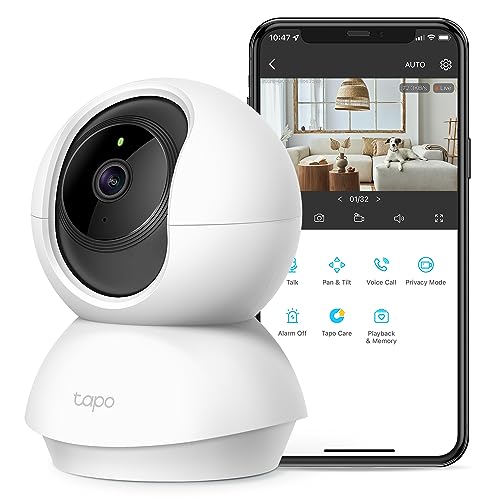
| TP-Link Tapo C210 | Best Indoor NVR Feeder | Pan-and-tilt coverage with ONVIF/RTSP streaming support that lets an Amcrest recorder treat it as a real channel. |
| REOLINK Argus PT Ultra | Best Wide Outdoor Coverage | A battery pan-tilt camera for the angles wiring cannot reach — best used with its maker’s app alongside the NVR system. |
| Wyze Cam v4 | Best Budget Extra Angle | A tiny, sharp, inexpensive camera for adding viewpoints; check the current RTSP options for your firmware before relying on it as a channel. |
| eufy Indoor Cam E220 | Best Indoor Picture Quality | Crisp 2K-class indoor imaging and pan-tilt tracking, with RTSP-to-recorder options on supported setups. |
| Blink Outdoor 4 | Best Wire-Free Companion | Years-class battery life for the far fence and outbuildings — a standalone cloud camera that complements, but cannot feed, the NVR. |
| Arlo Essential Indoor Pan Tilt | Best Premium Indoor Companion | Polished app, privacy-minded design, and smooth pan-tilt for the rooms you check live rather than record centrally. |
A note on why two famous ecosystems appear here despite being unable to feed the recorder at all. Real buying searches for this keyword land on households mid-journey: an Amcrest already under the stairs, a Blink already on the fence from last year, a partner who loves the Arlo app. A guide that pretended those cameras do not exist would be pure and useless. Instead, this one assigns them their honest roles and spends its strictness where strictness pays — on the feeder picks, where compatibility claims were checked hardest and hedged where the evidence is firmware-dependent. Purity is a fine editorial value; a working property is a better one.
How We Chose These Picks
Compatibility evidence came first: we favoured cameras whose makers document ONVIF or RTSP streaming, because those are the paths an Amcrest recorder can actually ingest, and we marked down — but did not automatically exclude — closed ecosystems whose cameras are strong enough to justify a companion role. Second came the recorder’s realities: continuous-stream stability matters more than event clips, so cameras designed for always-on operation scored above battery models for main positions. Third, night performance and motion behaviour, since an NVR’s value is proven at 3 a.m. Fourth, total honesty of ownership — subscription pressure, app quality, and what happens to the camera if the maker changes its cloud terms. Where a pick cannot feed the NVR, the review says so in its first paragraph, not its last.
How Does an Amcrest NVR Actually Talk to a Camera?
Strip away the marketing and an NVR does one job: it listens for video streams on your network and writes them to disk, channel by channel, while offering search and playback on top. For a camera to be listened to, it must offer a stream in a dialect the recorder understands. The two dialects that matter are RTSP — a direct streaming protocol, essentially the camera publishing a video address the NVR can subscribe to — and ONVIF, the industry standard that wraps streaming together with discovery, settings, and pan-tilt control, so the recorder can find the camera, configure it, and drive it from one interface. An ONVIF camera on an Amcrest system behaves like a citizen; an RTSP-only camera behaves like a guest with a fixed seat — recordable, but configured at the camera’s own app and controlled from there.
Everything else is a walled garden. The big cloud ecosystems stream to their own servers in their own formats, and no setting on your Amcrest will persuade them otherwise; the footage exists only inside their apps, under their subscription terms. That is not a moral judgement — those apps are often excellent — but it is an architectural fact, and it is why this guide sorts picks by integration class rather than by review scores. Before any purchase, the ritual is the same: find the camera’s current documentation, confirm ONVIF or RTSP in writing for that exact model, and check whether a recent firmware changed the answer, because in this industry, firmware giveth and firmware taketh away.
What Should You Check Before Adding Any Camera to Your Recorder?
Run the checklist in order. Channels: your NVR has a fixed number, and a camera you cannot add is a decoration. Resolution and bandwidth: recorders have decoding ceilings, so a very high-resolution camera may need its sub-stream — the lower-resolution secondary feed most cameras offer — used for live view while the main stream records, or settings trimmed to what the recorder handles gracefully. Power: decide per position whether you are wiring power, using the camera’s adapter near an outlet, or accepting a battery camera’s event-based life outside the recorder. Network: Wi-Fi cameras join your router, not the NVR’s ports, so their reliability is your router’s reliability — place a camera where the signal is boring and strong, not heroic and marginal.
Then the unglamorous verifications. Confirm the camera’s ONVIF is enabled — many ship with it off, behind a device password you set in the maker’s app — and that pan-tilt via ONVIF, if you need it, is actually exposed. Set the camera to a fixed address on your network so the recorder’s channel does not lose it at the next router reboot. And record the credentials somewhere you will find them in three years, because the day you replace the router is the day undocumented passwords become archaeology. NVR ownership rewards this clerical virtue more than any other kind.

TP-Link Tapo C210 — Best Indoor NVR Feeder
The Tapo C210 is the pick we reach for when someone asks the simplest version of this guide’s question: what indoor camera can my Amcrest actually record? TP-Link documents RTSP and ONVIF support across the Tapo line through a camera-account setup in the app, which means the C210 can be added to a recorder as a genuine channel — continuous recording, central playback, the works — while its pan-and-tilt head covers a whole room from one shelf. For the money, no other arrangement buys so much honest integration.
As a camera in its own right it is well judged for indoor duty: clear imaging in normal light, infrared for the night hours, motion tracking that follows a subject across the room, and two-way audio for the quick check-in. The Tapo app is one of the calmer ones in the category, local recording to its own card provides a belt-and-braces backup to the NVR, and the whole thing sets up in minutes. On the recorder side, expect to enable the streaming account, assign a fixed address, and add it as an ONVIF channel — a ten-minute ritual this guide’s checklist walks through.
The limits are indoor limits: no weather resistance, a plug that tethers placement to outlet geography, and night range sized for rooms rather than yards. Resolution is sensible rather than spectacular, which your recorder’s bandwidth will quietly thank you for. As the default indoor feeder for an Amcrest system — the hallway, the nursery corridor, the shop floor — the C210 is the list’s most defensible purchase.
- Type: indoor pan-and-tilt Wi-Fi camera
- Integration: ONVIF / RTSP streaming documented via camera account
- Imaging: clear HD-class video with infrared night vision
- Audio: two-way talk through the app
- Backup: local card recording alongside the NVR
Strengths
- Genuine recorder integration at a budget price
- Pan-and-tilt covers a room from a single position
- Calm app and painless setup
Trade-offs
- Indoor only; needs an outlet within cable reach
- Night range is room-sized, not yard-sized
- Streaming features depend on correct account setup
Best for: indoor channels on an Amcrest system — halls, entries, shops. Not suited for: outdoor mounting or wire-free placement.

REOLINK Argus PT Ultra — Best Wide Outdoor Coverage
Read this pick’s role carefully, because it is the list’s clearest lesson in architecture: the Argus PT Ultra is a battery-powered pan-and-tilt camera for the positions wiring cannot reach — the far gate, the barn corner, the tree by the driveway — and battery cameras live event-based lives inside their maker’s app rather than streaming continuously to a recorder. Reolink’s ecosystem is one of the more open ones, and its powered cameras are NVR staples; this battery model is best understood as the wide-angle scout that extends an Amcrest-centred property beyond the cable map, watched through Reolink’s app alongside the recorder’s channels.
Judged on that job, it is excellent. The pan-and-tilt range sweeps a yard from one mounting point, the imaging is sharp in daylight with colour night capability in lit areas, smart detection separates people and vehicles from weather and wildlife, and the battery-plus-optional-solar arrangement keeps it alive in places no outlet will ever see. For large properties, it converts three fixed cameras’ worth of coverage into one well-placed unit.
The trade-offs are the battery camera’s constitution: motion-triggered recording means the seconds before a trigger belong to the camera’s judgement, continuous recording is not its language, and a very busy position will drain it faster than a quiet one. If your need is a recorded channel, buy a powered camera — several Reolink siblings exist for exactly that. If your need is eyes on the unreachable angle, the Argus PT Ultra is the strongest tool here.
- Type: battery outdoor pan-and-tilt camera
- Integration: maker-app based; companion to the NVR, not a channel
- Power: rechargeable battery, solar panel option
- Detection: person and vehicle smart alerts
- Coverage: wide pan-and-tilt sweep from one mount
Strengths
- Covers wide outdoor angles no cable run would justify
- Sharp imaging and smart detection in its class
- Solar option makes remote positions nearly maintenance-free
Trade-offs
- Event-based recording; not a continuous NVR channel
- Busy positions shorten battery intervals
- Full features live in Reolink’s app, beside your recorder’s interface
Best for: gates, barns, and wide yards beyond wiring. Not suited for: anyone expecting it to record to the Amcrest as a channel.

Wyze Cam v4 — Best Budget Extra Angle
The Wyze Cam v4 is the camera you buy three of: the garage corner, the side door, the basement window well — the secondary angles that a system grows into once the main doors are covered. Its imaging punches far above its size and price class, with colour night capability in modest light, and its tiny body mounts almost anywhere with almost no visual footprint. In an NVR household, treat it as a flexible extra: Wyze’s streaming options have varied by model and firmware over the years, so verify the current RTSP position for the exact unit in hand before designing a channel around it — and enjoy it through the Wyze app regardless, where it is entirely at home.
That verification caveat is not a dismissal; it is the correct relationship with a fast-moving budget ecosystem. What the v4 guarantees is a sharp, cheap, cheerful camera with local card recording, decent smart detection through the app, and a setup measured in minutes. Many Amcrest owners run a couple as app-based supplements for indoor and covered-outdoor spots, checking them live while the recorder handles the perimeter’s permanent record.
Its compromises are ecosystem compromises: the richest detection features lean on Wyze’s optional subscription, the camera is rated for covered outdoor use rather than open weather heroics, and its long-term streaming posture is a question to re-ask at each firmware generation. As a budget extra angle bought with open eyes, it is the easiest money in this guide. As the foundation of a recorded channel, confirm before you commit.
- Type: compact indoor / covered-outdoor camera
- Integration: verify current RTSP support per firmware before channel use
- Imaging: sharp for its class, colour night view in low light
- Recording: local card plus cloud options in the app
- Size: among the smallest cameras here
Strengths
- Image quality far beyond its price and size
- Cheap enough to cover secondary angles generously
- Minutes-fast setup and a friendly app
Trade-offs
- Streaming-to-NVR support must be verified per firmware
- Best features lean on an optional subscription
- Covered placement only for outdoor use
Best for: budget extra angles and indoor supplements. Not suited for: a guaranteed recorded channel without verification first.

eufy Indoor Cam E220 — Best Indoor Picture Quality
Where the Tapo wins on integration value, the eufy E220 wins on the picture itself: its 2K-class imaging resolves faces, plates, and package labels across a room with a clarity the HD-class indoor cameras cannot match, and its pan-and-tilt tracking follows movement smoothly rather than in hops. For the indoor position where identification matters most — the entry hall, the till, the nursery — that clarity is the feature. eufy has supported RTSP streaming toward NAS and recorder setups on this line, so an Amcrest owner can often bring it onto the recorder; as with every pick here, confirm the current app’s streaming settings on your firmware before the install day.
The ownership story is eufy’s traditional strength: local-first recording to the camera’s own storage, an app that does not treat a subscription as the price of basic competence, and thoughtful touches like pet and sound detection for the household angles. Set up as either an NVR channel or a local-recording independent, it behaves like a grown-up camera.
Its limits are the indoor camera’s usual ones — a plug, no weather rating, night range for rooms — plus the homework clause that applies across this category: streaming features live in app settings that updates can rearrange, so document your working configuration once it works. For the single most important indoor view in the house, the E220’s lens is the one we would want the recorder watching.
- Type: indoor pan-and-tilt Wi-Fi camera
- Integration: RTSP streaming supported on this line; verify in current app
- Imaging: 2K-class clarity for identification detail
- Storage: local-first, with recorder and app options
- Detection: person, pet, and sound alerts
Strengths
- Sharpest indoor picture in this roundup
- Smooth subject tracking across the room
- Local storage philosophy suits NVR households
Trade-offs
- Indoor only, outlet-tethered
- Streaming setup lives in app menus that can move
- Night range sized for interiors
Best for: the key indoor identification view — entry, till, nursery. Not suited for: outdoor or wire-free positions.

Blink Outdoor 4 — Best Wire-Free Companion
Let the framing be unmistakable: Blink cameras record to Blink’s cloud through Blink’s app, and no configuration will make one a channel on your Amcrest — this pick exists because real properties have positions where that trade is correct. The far fence line, the rental outbuilding, the tree overlooking the boat: places where running cable is a weekend project and a battery that lasts for seasons is a superpower. The Outdoor 4 is the category’s endurance champion, sipping power, waking for motion, and reporting through an app your household probably already understands.
As a companion to an NVR system it plays a specific role — the tripwire beyond the perimeter. The recorder owns the house and its approaches with continuous evidence; the Blink watches the distant approaches where an event alert, even a cloud one, arrives in time to matter and points you to the recorder’s timeline for the rest of the story. Used that way, the two systems stop competing and start cooperating.
The costs of the architecture are real: a subscription unlocks the recorded history, live view is a rationed pleasure, and image quality is honest rather than rich. If a position matters enough to need evidence-grade continuous recording, it matters enough to wire. But for the long tail of positions that need awareness rather than evidence, nothing on this list competes with a camera you install in ten minutes and ignore for a year.
- Type: battery outdoor camera, cloud ecosystem
- Integration: none with the NVR — standalone companion by design
- Power: very long battery life from AA lithium cells
- Recording: cloud clips with subscription; sync module local options vary
- Install: minutes, anywhere, no cables
Strengths
- Season-spanning battery life for impossible positions
- Ten-minute installation anywhere on the property
- Simple app the whole household can use
Trade-offs
- Cannot record to the Amcrest under any configuration
- Recorded history leans on a subscription
- Image quality is adequate, not evidence-rich
Best for: distant tripwire positions beyond the wired perimeter. Not suited for: any position needing continuous recorded evidence.

Arlo Essential Indoor Pan Tilt — Best Premium Indoor Companion
Arlo’s indoor pan-tilt is the polished guest in this roundup: it will not join your recorder’s channel list — Arlo’s world is its own cloud and app — but for the rooms a household checks live rather than records centrally, it offers the most finished experience here. The pan-and-tilt movement is smooth and quiet, the app is the category’s benchmark for clarity, and the design includes privacy thinking that suits bedrooms and nurseries: a camera that can be told, plainly, when it is off duty.
Think of its role as the concierge camera. The NVR and its feeders keep the permanent record of entries and perimeters; the Arlo watches the dog’s room, the elderly parent’s kitchen, the holiday home’s interior between visits — places where a live look and a gentle alert beat an archive. Arlo’s detection, refined over generations, separates people, animals, and vehicles with a reliability that keeps notifications trustworthy, which is the whole game for a companion camera: an alert you believe is worth ten you ignore.
The premium is literal as well as experiential — the camera and its full-featured life lean on Arlo’s subscription, and owners allergic to monthly fees should choose the Tapo or eufy instead. But for the household that wants one beautiful, trustworthy live-view camera inside an otherwise self-hosted system, this is the considered choice, bought with the architecture understood.
- Type: indoor pan-and-tilt camera, cloud ecosystem
- Integration: none with the NVR — premium live-view companion
- App: polished interface with refined detection
- Privacy: physical/app privacy controls for private rooms
- Audio: clear two-way talk
Strengths
- Smoothest pan-tilt and app experience in the roundup
- Detection you can trust enough to act on
- Privacy-minded design for sensitive rooms
Trade-offs
- No path to recording on the Amcrest
- Full value leans on a subscription
- Premium price for a companion role
Best for: live-check indoor rooms in an NVR household. Not suited for: subscription-averse buyers or recorded channels.
How Do PoE, Plug-In Wi-Fi, and Battery Cameras Differ in NVR Life?
Power is destiny in a recording system. Power-over-Ethernet cameras — the traditional NVR natives, wired to the recorder or a switch with a single cable carrying both data and power — are the reliability aristocracy: no Wi-Fi to fade, no batteries to die, no adapters to unplug accidentally, and a stream that runs for years without a thought. If you are wiring a property from scratch, PoE positions for the core record are the professional answer, and Amcrest’s own ecosystem speaks this language natively. Their cost is the cable run itself, which ranges from trivial in a new build to a weekend of crawling in an old one.
Plug-in Wi-Fi cameras — the Tapo, eufy, and Wyze in this guide — are the pragmatic middle: continuous power from an ordinary outlet, data over your wireless network, and placement limited only by the intersection of outlet geography and signal strength. For most existing homes they are how the inner ring actually gets built, and their weakness is shared fate with the router — which argues for a decent router, sensibly placed, as part of the security budget. Battery cameras, as established, live outside the record entirely: they are sensors with lenses, reporting events from positions the other two classes cannot economically reach. A mature Amcrest household usually ends with all three classes in their rings, and the wisdom is in the assignment, not the allegiance.
What About Privacy and Security of the System Itself?
A self-hosted recorder is a privacy position as much as a product: your footage lives on your drive, under your roof, and that is precisely why many owners chose the architecture. Honour the position with basic hygiene. Change every default password — camera, recorder, and router — because default credentials are the one genuinely documented way these systems get watched by strangers. Keep the recorder’s remote access behind the maker’s current app and firmware rather than exposed ports forwarded by hand, a practice from a braver internet era. Put cameras on a separate network segment if your router makes it easy, so the chatty devices of the house keep their distance from the serious ones.
Then think about the household’s own privacy with the same care: indoor cameras in living spaces deserve household agreements, guest awareness, and — for the companion cameras with privacy modes — the discipline of actually using them. A security system that makes its own family uneasy has failed at its only job. The picks in this guide were assessed partly on this axis: local-first storage options, honest privacy controls, and apps that do not hold basic dignity hostage to a subscription all counted in their favour.
How Should You Maintain the System Once It Is Installed?
NVR systems fail quietly, so maintenance is a calendar, not a mood. Monthly: search the archive for a random yesterday and confirm playback works end to end; glance at each channel’s night image, because infrared failure announces itself only in the dark. Quarterly: clean the outdoor lenses and check mounts against weather’s slow loosening; review which cameras’ detection zones have drifted into nuisance — the swaying branch that generates forty events a day teaches owners to ignore alerts, and alert fatigue is a security hole with a human shape. Annually: check the drive’s health report, reconsider retention against your storage, and re-run the intruder walk at night with fresh eyes.
Keep a one-page system document as you go — camera positions, addresses, credentials’ location, the recorder’s settings that took an evening to perfect. It feels like bureaucracy in month one and like genius in year three, when the router dies on a Sunday. The Amcrest at the centre of the system is infrastructure, and infrastructure rewards exactly this temperament: boring, documented, and checked before it is needed.
The Six Picks, Compared at a Glance
| Camera | Feeds the Amcrest? | Power | Placement | Recording style | Choose it if… |
|---|---|---|---|---|---|
| TP-Link Tapo C210 | Yes — ONVIF/RTSP | Plug-in | Indoor | Continuous via NVR | you want a real indoor channel, cheaply |
| REOLINK Argus PT Ultra | No — companion app | Battery / solar | Outdoor, wide | Event clips | the angle is beyond wiring |
| Wyze Cam v4 | Verify per firmware | Plug-in | Indoor / covered | Card + app | you need extra angles on a budget |
| eufy Indoor Cam E220 | RTSP on this line — verify | Plug-in | Indoor | Local / NVR | the indoor view must identify faces |
| Blink Outdoor 4 | No — cloud only | Battery, seasons-long | Outdoor, distant | Cloud clips | the position needs awareness, not evidence |
| Arlo Essential Indoor Pan Tilt | No — cloud only | Plug-in | Indoor | Cloud + live view | you want the polished live-check camera |
The first column is the whole guide in miniature. Two picks are recorder citizens, one is a verify-first maybe, and three are companions whose value is real but architectural — they extend awareness, not the archive. Buy down the column with your eyes open and an Amcrest system becomes a layered property defence; buy by review scores alone and you will own excellent cameras that ignore your recorder.
How Should You Lay Out a Whole Property Around an NVR?
Think in rings. The inner ring is the record: doors, entries, the garage, the till — positions that get wired or plugged-in ONVIF cameras, continuous recording, and retention measured in weeks. The middle ring is awareness: side passages, the garden, the driveway’s far half — covered by a mix of recorder channels where wiring is sane and strong companions where it is not. The outer ring is the tripwire: gates, outbuildings, the far fence — battery companions whose alerts tell you when to consult the inner rings’ evidence. Most disappointment in home security comes from asking one ring to do another’s job; most satisfaction comes from this division of labour, which is why this guide’s picks deliberately span all three.
Within the inner ring, placement craft matters more than camera choice: mount at a height that captures faces rather than hats, angle across the approach rather than along it, overlap fields of view at the corners so no subject crosses a seam unseen, and light the scene or choose cameras whose infrared suits the distance. Then test at night, on foot, playing the intruder — the recorder will show you your own system’s blind spots with embarrassing honesty, and an evening spent fixing them is worth more than any upgrade.
What Mistakes Do Amcrest Owners Make When Adding Cameras?
Buying by resolution leads the list: stacking maximum-resolution cameras onto a recorder whose decoding and bandwidth ceilings were designed for moderation produces stuttering live views and dropped frames — match streams to the recorder, using sub-streams for live view, and the system turns calm. Second is assuming a famous brand implies compatibility; the cloud ecosystems’ fame is precisely their independence. Third is forgetting the network: six Wi-Fi cameras on a tired router is a distributed denial-of-service attack on your own security system, so wire what you can and give the rest a strong, boring signal. Fourth is skipping the battery backup, so the recorder sleeps through the outage that mattered. And fifth is never testing playback — the archive you have not searched is a hope, not a system. Search it monthly; know it works.
What Does a Worked Example Look Like — a Three-Bedroom House?
Concrete beats abstract, so here is the guide’s philosophy installed in an ordinary house. The front door and driveway — the evidence positions — get a wired or plug-in ONVIF camera each, recording continuously to the Amcrest, angled across the approach at face height. The back door joins them as a third recorded channel; the hallway inside gets a Tapo C210, its pan-tilt covering the interior approaches, and the living room gets the eufy E220 where its clarity can identify rather than merely detect. That is the record: five channels, all citizens of the recorder, retention set for a fortnight.
Then the companions, bought a month later with the gaps now visible. The side gate, unwired and thirty metres from the house, takes the Argus PT Ultra on a post, sweeping the whole side yard and reporting through its app. The far shed takes a Blink Outdoor 4, because nothing has ever happened there and awareness is enough. The dog’s room takes the Arlo pan-tilt, checked live at lunchtime and set to privacy mode when the family is home. Total architecture: a recorded core that would satisfy an insurer, an aware perimeter that satisfies the owners, and not one camera pretending to be what it is not. Scale the rings to your property; the proportions travel.
How Will You Know the System Is Actually Working?
By rehearsing the bad day before it happens. Stage the test on a quiet evening: walk the property as a stranger would, at stranger hours, then sit down with the recorder and reconstruct yourself. Can you find the approach, the face, the departure? Is the timeline continuous where it should be, the night image legible, the alert trail sensible? Every gap you find is a placement or settings lesson bought cheaply. Repeat after any change — a new camera, a moved router, a grown hedge — because systems drift and only rehearsals notice.
The second test is social: can another adult in the household find a clip, alone, in under two minutes? Security footage that only its installer can operate is a diary, not a system. Teach the search once, write the steps on the system document, and the Amcrest becomes what it was bought to be — the household’s quiet, competent memory, indifferent to subscriptions and ready at 3 a.m.
What Should You Spend Where — Recorder, Cameras, or Network?
Owners consistently misprice the system by pricing only the visible boxes. The recorder and its drive are the foundation — buy the channel count and storage for the property you will have in three years, because recorders are annoying to replace and drives are cheap insurance. The cameras divide by ring: spend properly at the evidence positions, where identification quality is the entire point, and economise cheerfully at the awareness positions, where a detected shape and a timestamp do the work. The network is the invisible third: a tired router under six streaming cameras is the false economy that presents as “unreliable cameras,” and a modest spend on wireless coverage for the camera positions repays itself in every channel’s stability.
Finally, budget a small reserve for the second month — the extra camera for the blind spot the rehearsal revealed, the longer cable, the better mount. Every real installation discovers its true shape only after the first rehearsal, and the owners who planned a contingency finish their systems; the owners who spent to the last coin in week one live with the gap. In security, as in the rest of this guide’s philosophy, the honest plan beats the impressive one.
How Do Subscriptions Fit an NVR Household, Honestly?
With suspicion, but not with dogma. The recorder’s founding promise — your footage, your drive, no rent — should govern the core: any camera whose basic recording requires a monthly payment is architecturally opposed to the system you built, and this guide’s feeder picks were chosen to keep the core rent-free. At the companion layer, the calculus softens: a modest subscription that buys trustworthy detection and painless history for a distant tripwire camera may be rational, provided it is a choice rather than a trap discovered after installation. The sin is not the subscription; it is the surprise. Read every pick’s ongoing costs before the box is opened, decide which layer of your property justifies rent, and let the recorder’s silent, subscription-free competence remain the standard the companions are measured against.
What Changes When the Household Grows — a Shop, a Rental, a Parent’s House?
The architecture scales by repetition, not reinvention. A small shop wants the same rings compressed: recorder channels at the door and till (the eufy E220’s clarity earns its place over a till), a Tapo covering the floor, companions only where the stockroom’s odd corners defeat wiring. A rental property argues for restraint and disclosure — cameras outside only, documented for tenants, with the recorder’s local storage a selling point precisely because no cloud account intermediates the landlord’s access. A parent’s house inverts the emphasis: the companion cameras, with their gentle apps and live check-ins, become the core, and the recorder serves quietly at the doors. In each case the questions from this guide still organise the purchase — what records, what merely watches, what speaks ONVIF, what never will — and the answers, honestly labelled, are the whole craft of building these systems well.
A Short Glossary, Because This Category Runs on Acronyms
NVR: the network video recorder itself — the box with the hard drive that listens for streams and keeps them. ONVIF: the open standard that lets cameras and recorders of different brands discover, configure, and control each other; the closest thing this industry has to a common language. RTSP: the streaming protocol underneath — the camera publishing a live video address that a recorder or app can tune into. PoE: power over Ethernet, one cable carrying both network and electricity to a wired camera. Sub-stream: a camera’s second, lower-resolution feed, used for live viewing so the main stream can be reserved for recording. Channel: one camera’s seat at the recorder’s table; your NVR’s channel count is its hard ceiling. Keep these six in mind and every product page in the category becomes readable — including the silences, which are where the incompatible cameras hide.
One Last Test Before Any Camera Is Ordered
Write the sentence the purchase must satisfy — “this camera will record continuously to my Amcrest as channel seven,” or “this camera will watch the far gate through its own app” — and check the product against the sentence, not against its reviews. If the sentence names the recorder, the documentation must name ONVIF or RTSP for that exact model, in the maker’s own current materials; a forum post from two firmwares ago is a lead, not a proof. If the sentence names a companion role, judge the camera as this guide judged its three companions: on detection you can trust, an app the household will open, and ownership costs stated plainly. Purchases made against a written sentence almost never come back as returns. Purchases made against a star average come back as this guide’s reader mail.
Final Recommendation
Build the record first: Tapo C210s at the indoor positions and the eufy E220 where identification matters most, verified as ONVIF/RTSP channels on your Amcrest, with Wyze v4s as budget extras once their streaming position is confirmed on your firmware. Then extend awareness honestly — the Argus PT Ultra for the wide unwired angles, a Blink Outdoor 4 for the distant tripwire, the Arlo pan-tilt for the rooms you check live. That layered system, bought with the architecture understood, is what an Amcrest NVR was always meant to anchor: evidence at the core, awareness at the edges, and no subscriptions standing between you and your own footage.
Frequently Asked Questions
Will any Wi-Fi camera work with my Amcrest NVR?
No — only cameras that offer ONVIF or RTSP streaming can be recorded by it, and many popular cameras offer neither, streaming exclusively to their makers’ clouds. “Wi-Fi” describes how a camera reaches your network, not whether it will share its stream once there. The verification ritual in this guide — find the model’s documented streaming support, for the current firmware — is the only reliable test, and it takes five minutes that save a return.
What is the difference between ONVIF and RTSP for my purposes?
RTSP gives the recorder the video itself; ONVIF gives it the video plus discovery, settings, and control — including, on supported cameras, pan-and-tilt from the recorder’s interface. An ONVIF camera is the fuller citizen. An RTSP-only camera still records perfectly well, but you will configure it and drive it from its own app. For fixed cameras the difference is small; for pan-tilt positions, ONVIF support is worth preferring.
Can I mix camera brands on one Amcrest system?
Yes — that is the quiet superpower of the ONVIF standard, and this guide’s feeder picks come from two different makers for exactly that reason. The recorder does not care about brands; it cares about streams, resolutions, and bandwidth. Mix deliberately: choose each position’s camera for the position, keep total stream load within the recorder’s comfort, and document each camera’s address and credentials as you add it.
Why does my recorder’s live view stutter with several cameras?
Usually because every channel is pulling its main, maximum-resolution stream for live display. Switch live view to the cameras’ sub-streams — the lower-resolution secondary feeds designed for monitoring — while recording continues on the main streams. If stutter persists, total bandwidth or the network path is the ceiling: wire the recorder, relieve the Wi-Fi, and trim the most extravagant stream settings. The recorder is rarely the villain; arithmetic is.
Do battery cameras ever make sense with an NVR?
As companions, often; as channels, essentially never — continuous streaming is precisely what battery cameras are designed not to do. Their role in an NVR household is the one this guide gives them: awareness at the unwired edges, alerting you to consult the recorded core. Owners who accept that division get the best of both architectures; owners who fight it get dead batteries and gaps in the record.
How long should my NVR keep footage?
Long enough to cover your realistic discovery time — most households learn about an incident within days, but package disputes, neighbour questions, and insurance timelines argue for two to four weeks at the positions that matter. Retention is a settings-and-drive-size equation: lower the frame rate and resolution at low-value positions before shortening the archive at high-value ones, and let motion-based recording stretch quiet indoor channels further.
My camera connected once, then vanished from the recorder. What happened?
The commonest cause is an address change: the camera took a new IP from the router after a reboot, and the recorder kept knocking on the old door. Give every camera a fixed or reserved address and the haunting stops. The second cause is a credential change — a password updated in the maker’s app but not in the channel settings — and the third is a firmware update that reset the streaming toggles. Work the three in that order and most resurrections take ten minutes; document the fix on your system page so the next one takes two.
Should I record continuously or only on motion?
Continuously, at the evidence positions — that is the recorder’s founding advantage, because motion detection, however good, is a judgement call made by a camera in the dark, and the seconds it judges wrongly are unrecoverable. Motion recording earns its place at quiet indoor channels and as a retention-stretcher where storage is tight, and many owners run a hybrid: continuous at the perimeter, motion inside. What no position should rely on is a companion app’s event clips as its only record of anything that matters.
Can my Amcrest record cameras at another property over the internet?
Technically, streams can travel — practically, this is where home systems go to become unreliable and insecure. Upload bandwidth at the remote property, address management, and the security exposure of reachable camera streams all argue for the boring professional answer: a recorder at each property, each minding its own cameras, with remote viewing done through the apps rather than remote recording done through hope. The layered architecture in this guide replicates cleanly per building; let it.
Is a higher-resolution camera always better on a recorder?
No — resolution is a budget spent from three accounts at once: the recorder’s decoding capacity, your storage’s retention days, and the network’s bandwidth. Past the point where faces and plates are legible at your mounting distances, extra resolution buys cropping room you may never use at prices you pay daily. Set each channel’s resolution by its job — identification positions high, awareness positions modest — and the whole system runs calmer and keeps its archive longer.
Related Guides
Keep building the system with our guide to the best cameras for Android-based monitoring setups, our roundup of the best cameras for airplane spotting, and our picks of the best cameras for an Alaska trip.


