ilcastellomenu.com is reader-supported. When you buy through links on our site, we may earn an affiliate commission.
Where to Buy
Home video has a reputation problem: hours of shaky birthdays, muffled recitals, and relatives filmed from too far away in the dark. The best cameras for home video are the ones that break that reputation — cameras whose footage families actually gather to watch, because the faces are sharp, the voices are clear, and the camera work feels like memory rather than surveillance. The difference is rarely budget. It is autofocus, light, sound, and a camera that invites being picked up.
Where to buy depends on which home you film. There is the performance home: recitals, matches, school plays, where the subject is across a hall and the light is theatrical. There is the everyday home: kitchens, gardens, grandparents, and the dog, where the subject is close and the light is whatever the windows allow. And there is the creating home, where someone is filming tutorials, music, or a family channel and needs the footage to hold up in public. This guide ranks for all three homes and labels each camera with its rooms.
Three virtues dominate the judging. Autofocus that finds and keeps faces, because home video is portraiture in motion and a soft face is a failed film. Low-light grace, because homes are lit for living rather than filming and the best moments refuse to wait for a lighting rig. And sound that honours voices — the song, the joke, the small person’s narration — because in twenty years the voices are what everyone will lean toward the television to hear.
Convenience is the fourth virtue, and it is not a lesser one. A home-video camera lives or dies by the pick-up test: is it charged, is it quick, does it hand its footage to the television or the family archive without a ceremony? Cameras that fail that test become cupboard residents while phones inherit the memories. Every pick here passes the test in its own way — gimbal, compact, or system — and the guide’s workflow sections keep them passing it for years.
Finally, a word about the archive you are building, probably without deciding to. Home video shot this decade becomes the family’s primary source material for the rest of the century. The cameras below were chosen partly for the dignity of their files — pleasing colour without grading, formats that behave in ordinary software, and footage that will still open when the children in it are grandparents. Sentiment, it turns out, has technical requirements.
Key Takeaways
- Face-tracking autofocus is the home-video feature that matters most.
- Homes are dim by filming standards: low-light grace beats headline resolution.
- Voices are the archive’s treasure — film close, or add a microphone.
- The pick-up test decides everything: charged, quick, and easy to offload.
- Pleasing colour straight from the camera keeps footage watchable for decades.
- Film in short, deliberate clips and the family archive stays alive.
In this guide
Quick Picks
| Pick | Badge | Why it is here |
|---|---|---|
| Canon EOS R50 | Best home-video camera for most families | Subject-detect autofocus, lovely colour, and a viewfinder-plus-screen flexibility that covers every room and recital. |
| DJI Osmo Pocket 3 | Top everyday camera for home video | A pocket gimbal that makes daily family footage smooth, warm, and effortlessly watchable. |
| Sony ZV-E10 II | Best creator camera for the home studio | A video-focused mirrorless with strong autofocus, product modes, and microphone options for the home studio corner. |
| Nikon Z30 | Best long-recording camera for home events | Cool, continuous recording and a presenter’s screen — the recital, service, and lecture camera. |
| Sony ZV-1F | Best simple home-video camera for beginners | A fixed-lens, flip-screen camera with face tracking that a complete beginner can film well with today. |
| Canon PowerShot G7 X Mark III | Best compact for home video and photos together | A pocketable compact whose video and stills both excel — the two-in-one for smaller homes and budgets of space. |
How Did We Choose Cameras for Home Video?
We judged in the living room, mentally, at the worst hour: a winter evening, lamps on, a child performing something unrepeatable at the far end of the carpet. Could the camera find her face, hold it through the dance, expose her kindly against the bright window, and record her voice over the room’s echo? That scene — not a specification sheet — ranked this list.
Recording stamina came second, because home events run long. Recitals, matches, and services punish cameras that overheat, stop at arbitrary limits, or eat a battery per half. We favoured cameras known for cool, continuous recording and honest battery behaviour, and we labelled the clip-based cameras as clip-based, because a vlogger’s rhythm and an event camera’s rhythm are different crafts.
Sound was weighed as a picture-quality feature. Built-in microphones were imagined at real distances — across the kitchen, down the hall — and cameras offering microphone inputs or wireless options earned credit for the upgrade path. A home-video camera that cannot grow better ears will age faster than its sensor does.
Handling closed the assessment: screens that flip for the self-filmed family update, stabilisation for the walking tour of the new house, controls a grandparent can operate when the camera is handed over. Home video is a family practice with many operators, and the camera must survive being everyone’s.

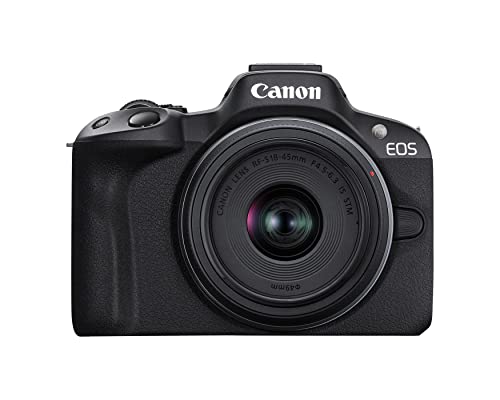
Canon EOS R50 — Best home-video camera for most families
The R50 is the home-video camera for the family that films everything and photographs half of it. Its autofocus recognises people, animals, and vehicles and then simply stays with them — the toddler crossing the garden, the cat crossing the performance, the striker crossing the pitch — while the operator thinks about framing instead of focus. Canon’s colour flatters skin in the mixed light homes actually have, so footage looks kind without a colourist’s intervention.
The vari-angle screen covers the family update filmed at arm’s length and the low angle at the toddler’s height; the viewfinder covers the sunny garden and the school field where screens wash out. Recording is well-mannered for event work, lenses can be added as the family’s ambitions clarify — a bright prime transforms the evening living room — and the stills are superb, so the same body takes the photographs the video cannot.
It asks for a bag rather than a pocket and a spare battery for the longest days. Those are fair terms for the most complete home-video instrument in this guide. Families choosing one camera to document a childhood — the performances and the Tuesdays alike — should start here and, in most cases, stop.
- Type: interchangeable-lens mirrorless with viewfinder
- Autofocus: detection and tracking for people and animals
- Screen: vari-angle for self-filming and low angles
- Video: clean, well-coloured recording for events and everyday
- System: lenses to add as family filming grows
Strengths
- Focus stays on faces through household chaos
- Colour makes home light look kind
- Equally strong at the family’s still photographs
Trade-offs
- Bag-sized rather than pocket-sized
- Longest event days want a spare battery
- Kit lens is the beginning, not the best, of the system
Best for: families wanting one camera for home video and photographs across a whole childhood.
Not suited for: filming that must fit in a coat pocket.

DJI Osmo Pocket 3 — Top everyday camera for home video
Most home video is not events; it is Tuesdays. The Pocket 3 is the Tuesday camera: out of a pocket in seconds, stabilised so the walk down the hall with the birthday cake looks like a dolly shot, and warm in the lamplight where family life actually happens. Its face tracking keeps the small narrator centred while the parent filming can watch the child instead of the screen — a division of attention every parent recognises as the difference between recording a childhood and witnessing one.
The rotating screen and compact manners make it the camera grandparents accept and teenagers borrow, which multiplies the household’s footage in the best way: more operators, more angles, more of the family in the film including its usual cameraman. Files move to the phone in moments for the evening share with relatives, and the footage cuts together with a consistency that makes the annual family film a pleasure to assemble.
Long formal events are not its stage — a whole recital belongs to the tripod-friendly systems — and it is not waterproof for the pool party’s inside shots. As the everyday instrument of a family’s moving memory, though, nothing here is as likely to be present, charged, and used. Presence, again, is the specification that decides archives.
- Stabilisation: mechanical gimbal for household movement
- Sensor: 1-inch class for lamplight and evenings
- Screen: rotating display for family self-filming
- Tracking: face following for children and narrators
- Charging: USB from household power banks
Strengths
- Daily footage becomes smooth and warm
- Small enough to witness rather than interrupt
- Whole family can operate it confidently
Trade-offs
- Not the tool for a full-length formal recital
- Not waterproof for pool filming
- Stills serve the story, not the album
Best for: families filming everyday life, celebrations, and the annual film.
Not suited for: long formal events from the back of a hall.

Sony ZV-E10 II — Best creator camera for the home studio
Some homes contain a studio corner: the desk where tutorials are filmed, the music room, the kitchen where a cooking channel is quietly growing. The ZV-E10 II is built for that corner. Its autofocus is among the most obedient here — faces, eyes, and products presented to the lens all held without hunting — and its creator touches, from background blur control to product showcase focus, exist to make one person with a tripod look like a small crew.
Audio ambition is properly served: a directional built-in microphone for the casual pieces and a proper input for the day the home studio graduates to a real microphone, which for serious creators is the day the channel starts sounding like itself. The interchangeable lenses let the corner grow — a bright prime for the evening music session, a wider zoom for the room tour — on the same body.
It lacks a viewfinder, which field photographers will miss, and its talents are wasted on purely occasional filming. For the household where home video includes an audience beyond the family — students, customers, subscribers — it is the most capable and the most future-proofed camera in this guide, and its footage has a polish that announces the difference.
- Type: video-focused interchangeable-lens mirrorless
- Autofocus: face, eye, and product showcase modes
- Audio: directional microphone plus external input
- Controls: background blur and creator-oriented features
- System: E-mount lenses for a growing home studio
Strengths
- Creator footage looks produced, not improvised
- Autofocus serves presenters and products alike
- Microphone path grows with the channel
Trade-offs
- No viewfinder for bright-day work
- Occasional filmers will not use its depth
- Best results reward a small lighting habit
Best for: home creators filming tutorials, music, and channels from a studio corner.
Not suited for: purely occasional family filming.

Nikon Z30 — Best long-recording camera for home events
Some home videos are long: the whole recital, the full service, the grandparent’s life story told in one sitting. The Z30 specialises in length. It records continuously without the heat drama that interrupts lesser cameras mid-performance, its screen articulates for the presenter and the self-filmed family message, and its microphone input welcomes the audio seriousness that long-form recording deserves — a small recorder or microphone near the stage transforms a distant performance into a document.
Nikon’s colour is kind to faces under hall lighting, and the Z-mount kit lenses cover the walk-around filming between events. For the family archivist — the person who films the school play every year and the interviews every visit — the Z30’s patience is its genius: set it on the tripod, frame the stage, and trust it to still be recording at the curtain call.
There is no viewfinder, and its stills, while respectable, play second fiddle to its video. It is also the pick most likely to live on a tripod rather than in a pocket, which defines its household role precisely. Every documenting family eventually discovers it needs a camera that can be trusted with duration. This is that camera.
- Type: video-first mirrorless for long sessions
- Recording: continuous, cool-running event capture
- Screen: fully articulating for presenters
- Audio: microphone input for stage and interview sound
- System: Z-mount lenses for events and everyday
Strengths
- Records the whole event without interruption anxiety
- Presenter screen and kind colour for people
- Audio input serves serious documentation
Trade-offs
- No viewfinder for outdoor stills
- Tripod-based habits suit it best
- Stills are a supporting function
Best for: families documenting recitals, services, lectures, and long interviews.
Not suited for: pocket filming of everyday moments.

Sony ZV-1F — Best simple home-video camera for beginners
The ZV-1F is the home-video camera for the household that wants good footage without a learning curve, a lens collection, or a settings evening. Its wide lens suits rooms, its screen flips for the family update, and its face-and-eye autofocus quietly performs the one job beginners cannot — keeping the subject sharp while life moves. The background-blur button gives portraits a produced softness, and the directional microphone favours the voice at the table over the room around it.
It is the camera to hand to anyone: the teenager filming the dog’s biography, the grandparent recording a message, the parent who has never owned a camera and should not need a course to film a birthday. Everything records to a card the family reviews together, and the footage’s colour is cheerful straight from the camera, which keeps the archive watchable without an editor in the family.
The fixed lens cannot reach the far end of a sports hall, and event-length recording belongs to the Z30. Within the home’s walls and garden, though, the ZV-1F’s combination of kindness and competence is unmatched here. It is the camera most likely to turn a non-filming household into a filming one, which is the largest upgrade any camera can deliver.
- Lens: fixed wide-angle for rooms and people
- Screen: fully articulating for self-recording
- Focus: face and eye autofocus, always on duty
- Audio: directional built-in microphone
- Operation: beginner-proof with automatic excellence
Strengths
- Good footage from the first day, by anyone
- Face tracking removes the beginner’s main failure
- Cheerful colour needs no editing
Trade-offs
- No zoom for halls and pitches
- Long events belong to other picks
- Fixed lens sets a ceiling on versatility
Best for: beginner households filming everyday life and celebrations at home.
Not suited for: distant stage and sports filming.

Canon PowerShot G7 X Mark III — Best compact for home video and photos together
The G7 X Mark III serves the household that wants one small camera on the shelf that does both family crafts well. Its video is rich — the larger sensor flatters evening rooms and gives clips a depth small compacts cannot — and its stills are the best in this guide’s compact class, so the birthday is filmed and photographed by the same pocketable instrument without compromise theatre.
The tilting screen handles the overhead baking shot and the group selfie; the zoom reaches the school stage’s front rows from a parent’s seat; and the camera can stream or record vertically when the family’s sharing habits demand it. In a smaller home, or a household rationing gadgets, that completeness in one body is a genuine domestic virtue.
Battery life wants a spare for event days, and the autofocus, while good, is less clairvoyant than the mirrorless systems with a moving child in bad light. Those are the honest terms for the best compact in the guide. Families who photograph as much as they film, and who value the shelf space a system consumes, will find it the most harmonious purchase here.
- Sensor: 1-inch class for rich video and stills
- Lens: zoom for stages and group shots
- Screen: tilts for overhead and selfie angles
- Video: strong recording including vertical formats
- Size: pocketable two-in-one for the household shelf
Strengths
- Films and photographs excellently in one body
- Evening rooms flatter its larger sensor
- Zoom reaches across halls and gardens
Trade-offs
- Spare battery for the longest days
- Autofocus trails the mirrorless trackers
- Extending lens needs household care
Best for: households wanting one pocketable camera for home video and photographs.
Not suited for: specialist long-event recording.
How Do You Film Children So the Footage Ages Well?
Get down. The single decision that separates home video families rewatch from home video they endure is camera height: film children from their eye level, kneeling, sitting on the floor, letting the world arrange itself at their altitude. Adult-height footage documents children; child-height footage remembers being one. The screens and gimbals in this guide all serve that descent — use them at knee height and the archive transforms.
Let them talk. The performances will date charmingly, but the narration — the small voice explaining the drawing, the game, the grievance — is the material that will stop a room in thirty years. Film conversations deliberately: at the table, on the walk, in the car before the journey starts. Ask real questions and keep filming through the answers. The cameras here all record voices well at conversational distance; the historian’s instinct to let people speak is the home videographer’s greatest technique.
Include the ordinary at full value. The breakfast routine, the school run, the grandparent’s kitchen choreography — these unrepeatable dailinesses are what time actually steals, and they are filmed, if at all, on ordinary days with the camera that lives within reach. This is the deepest argument for the pick-up test in the choosing section: the archive of a childhood is built from Tuesdays, and Tuesdays are filmed by the camera that was charged, near, and easy.
How Do You Keep a Family Video Archive Alive?
Name, copy, and show: the archive’s three sacraments. Name files or folders by date and event while the event is still news, because ‘the recital’ becomes ambiguous by the second child. Copy everything to two places — the family drive and a second home for the data, whether cloud or a relative’s shelf — because the drive that holds a childhood should never be a single point of failure. And show the footage: the annual film, the birthday slideshow, the clip sent to the grandparent. Archives that are watched get maintained; archives that are merely stored get lost with the next computer.
Edit less than you fear and more than you plan. Raw event footage has documentary value and should be kept whole in the archive. Alongside it, keep the short cut — the three minutes that carry the day — because the short cut is what the family will actually play at gatherings. The two versions serve different centuries: the cut serves memory, the raw serves history, and hard drives are finally large enough to honour both.
Review the system yearly, at a natural moment — the new year, the school summer. Check the copies open, migrate anything stranded on old cards, and confirm the archive’s index still matches its contents. An hour a year is the entire maintenance cost of a family’s moving memory, and it is the best-value hour in this whole guide.
Which Home Videos Matter Most in Twenty Years?
Not the performances, surprisingly. The recital will be treasured, but the footage families describe as priceless, decades on, is the unrepeatable ordinary: a grandparent’s laugh in their own kitchen, the house before the renovation, the dog’s whole personality in one garden afternoon, a parent’s voice reading a story they read ten thousand times. None of it can be scheduled, which is why the everyday cameras in this guide — the Pocket 3 above all — carry an archival importance out of proportion to their size.
Voices appreciate fastest. Faces change gradually and photographs mark the change; voices vanish entire, and a generation raised on silent photographs would trade much of the album for one clear recording of a great-grandparent telling any story at all. Film the conversations. Sit the elders down with tea and the Z30 or the Pocket 3 and ask about the street they grew up on. It is the highest-yield filming a family can do, and it is available this weekend.
Places are the third treasure. The childhood home filmed room by room, the garden across one year of seasons, the street before it changes — these become documents no one commissioned and everyone consults. Walk the camera slowly, narrate what the lens cannot know, and let the ordinary rooms have their close-ups. The archive’s future viewers will bless the boring footage most, because boring is what time makes priceless.
How Do You Film Music at Home?
Music is home video’s hardest regular assignment: the sound is the subject, the light is usually evening, and the performers range from a toddler with a saucepan to a genuinely good family band. The camera’s job divides in two — hold the picture steady and kind, and get the sound honestly. For the picture, the tracking picks here free the operator to listen; for the sound, distance is again the enemy, and a small recorder near the instrument outperforms every camera microphone ever built into a body across a room.
The ZV-E10 II and Z30 earn their keep here through their microphone inputs: a modest external microphone transforms a practice-room recording into something the family musician can share without apology. Frame wider than instinct suggests — instruments, hands, and the listener’s face are the story — and let whole pieces play without interruption. The cut can come later; the performance cannot.
For the youngest musicians, lower every standard except one: film from their height, keep the whole song, and never let the camera’s needs rehearse the joy out of the occasion. The archive of a musical childhood is built from kitchen concerts, and its technical imperfections are, in retrospect, indistinguishable from its charm.
How Do You Film Sport and Movement at Home?
The garden match, the driveway skateboard, the dog’s daily championships: movement at home wants tracking autofocus, a shutter brisk enough to keep motion legible, and an operator who stands still. The R50’s subject detection was practically designed for the family dog’s career, and the mirrorless picks generally hold moving subjects with an authority the fixed-lens cameras admire from a distance. Film from the side of the action rather than its path, let the subject cross the frame, and resist the zoom — movement plus zooming is the recipe for footage nobody can watch.
School and club sport, filmed from the sideline, adds distance to the problem and rewards the zoom lenses on the G7 X Mark III and the systems. Arrive with the battery full and the card empty; sport produces footage in torrents and highlights in seconds, and the discipline is to keep filming through the unpromising passages because the goal never announces itself. Afterwards, cut kindly: the three minutes of glory are the family’s film, and the full match is the archive’s.
Slow motion, where the cameras offer it, is the home videographer’s one special effect worth its storage: the dive into the pool, the candle-blowing, the dog’s leap rendered at the speed of wonder. Use it sparingly, at the moments of genuine physical joy, and it will punctuate the family film like italics rather than shouting like capitals.
How Do You Set Up a Corner for Filming at Home?
The home studio corner is mostly light and background, arranged once and used for years. A window to the side for the day, a dimmable panel for the evening, a background that is either tidy or deliberately characterful, and a chair or mark where the subject sits — this is the entire architecture. The ZV-E10 II and Z30 were chosen partly for how little else they demand: their autofocus, colour, and audio paths assume the corner exists and reward it immediately.
Soundproof the corner with softness rather than construction: the rug, the curtains, the bookshelf wall all drink echo, and a room that sounds warm makes every microphone in this guide sound more expensive. Record a test sentence in the finished corner and play it on the television; the ear will find the remaining echo faster than any meter, and a moved bookshelf fixes most of it.
Keep the corner ready. The camera on its tripod, the light in place, the microphone charged: a corner that needs twenty minutes of assembly will be used monthly, and one that needs twenty seconds will be used weekly. Home video’s economics are decided by friction, and the corner’s whole design is a war on friction waged with furniture.
How Do You Include Everyone in the Family Film?
Every family archive has a missing person: the one who filmed. Correcting that absence is a deliberate practice, not an accident of timers. Hand the camera over — the picks here behave in other hands, which was a choosing criterion — put the Pocket 3 on its small tripod and let it track the whole table, and use the articulating screens for the pieces where the filmer joins the filmed. The annual film should contain its maker laughing, or it is a documentary about a family with a ghost.
Interview each other, lightly, as a habit: the birthday questions, the first-day-of-school debrief, the grandparent’s story hour. People who are asked on camera become people who answer on camera, and the archive gains the voices and opinions that candid footage, however beautiful, rarely captures in sentences. Keep the questions kind and the sessions short, and the family’s filmed oral history assembles itself across the years.
Finally, show the films. The projector evening, the grandparents’ tablet, the clip in the family chat on the day itself: audiences are what turn recording into remembering. A family that watches its films films more, and better, because the practice has a purpose everyone has felt. The archive’s engine is not the camera. It is the showing.
What Should You Film Before It Changes?
Homes change by renovation and by life, and both changes are unphotographable afterwards. Before the builders arrive, walk the camera through every room at the pace of memory. Before the child leaves for university, film the ordinary evening entire. Before the grandparent’s house is sold, record its sounds as much as its rooms — the gate, the stairs, the kettle’s particular rattle — because sound is the sense that ambushes memory hardest, decades later, in an empty room.
Routines deserve the same respect as rooms. The school run, the Sunday kitchen, the way the dog is greeted: film them once a year, briefly, from the same position if you can bear the poetry of it. A family’s time-lapse of itself, assembled from annual routines, is the most moving home video there is, and it costs ten minutes a year plus the discipline of the archive sections in this guide.
None of this requires the best camera in the list. It requires the present one — charged, near, and forgiven its imperfections. The families who film the ordinary before it changes are never the families with the finest equipment. They are the families who understood, in time, what the equipment was for.
How Do You Film Grandparents and Elders Well?
With the camera small, the questions large, and the afternoon unhurried. The Pocket 3 on the table or the Z30 on its tripod, set before the conversation begins and ignored thereafter, lets the elder’s world arrange the frame: the hands, the photographs produced from the drawer, the window light they have sat beside for forty years. Film the room as faithfully as the face, because the room is half the testimony.
Ask about objects and places rather than dates. Dates are the archive’s job; the voice’s job is the street as it smelled, the job as it felt, the song as it went. Record whole stories without rescuing their pauses — the pauses are where the next memory is being fetched, and the family, watching in thirty years, will wait through every one of them gladly.
How Do You Film a Birthday So It Feels Like Being There?
Arrive as a guest with a camera, not a crew with a guest list. Film the preparations — the cake’s construction, the balloons’ casualties — because birthdays begin before the guests do. During the party, work in short, deliberate clips from inside the gathering’s height and warmth, and let the tracking autofocus of the R50 or the Pocket 3’s gimbal carry the technique while you carry the conversation.
The candle moment gets one rehearsal: position chosen during the preceding course, exposure set for the darkened room and the cake’s small suns, and a second operator — every household has a teenager — filming the faces from the other side. Then sing, loudly, from behind the camera. A birthday film whose maker can be heard singing is a document; one filmed in silence is a report.
How Do You Film in a Small, Dim House?
Small rooms forgive the wide lenses and punish everything else, so the fixed-wide picks — the ZV-1F above all — come into their inheritance: the whole kitchen in frame, the subject close enough for the built-in microphone to honour. Dim rooms ask for the light trick every section of this guide repeats: one small panel, placed once, transforming the evening from cave to parlour for every camera in the list.
Accept the house’s geography as the film’s style. Shoot through doorways for depth, use the hallway’s length for the toddler’s runs, and let mirrors and windows complicate the frame honestly rather than fighting them. The homes in family films are remembered as they were, and a small dim house filmed with affection outranks a mansion filmed with equipment, in every archive, every time.
How Do You Start a Family Filming Habit?
Attach it to an existing ritual rather than inventing a new one: the Sunday walk gets a Pocket 3 clip, the birthday gets its film, the first day of school gets its doorstep minute. Habits ride on habits, and a camera that joins the family’s existing ceremonies will be used for years, while a camera waiting for special occasions discovers how rare they are. Keep the camera charged and in the same place — the habit’s physical address matters as much as its intention.
Lower the standard until the habit sets. A month of imperfect clips beats a weekend of perfect ones followed by silence, because the archive is built by accumulation and the skill arrives as a side effect of the pile. Review monthly, star kindly, and let the family see itself improving. By the second year the filming is simply what the family does, and the camera has become what it was bought to be: furniture of the memory.
How Do You Choose Between a Gimbal Camera and a Mirrorless for Home Video?
Ask where your filming lives. If it moves — through houses, gardens, holidays, and childhoods at walking pace — the Pocket 3’s stabilisation and size make it the camera that is present, and presence is the archive’s first law. If it sits — at recitals, interviews, desks, and stages — the mirrorless picks’ lenses, audio paths, and event stamina serve the seated crafts better, and the R50 adds the family’s still photography to the bargain.
Many households end with both, bought in the order their filming reveals itself: the gimbal first for the everyday years, the system when the recitals and projects begin demanding it. Bought in either order, the pair covers the house completely. What neither order survives is buying the impressive camera for a filming life you do not lead — the archive records the life, and the camera must be chosen by it.
How Do You Film a New Baby’s First Weeks?
Gently, briefly, and at the household’s pace rather than the camera’s ambition. The Pocket 3 and the ZV-1F serve these weeks best: quiet, quick, kind in lamplight, and small enough to be a guest in a room where everyone is tired and everything is new. Film the ordinary miracles in short clips — the grip, the yawn, the grandparent’s first hold — and let the long unbroken footage be of voices: the household’s soundscape in the weeks when the world rearranged itself.
Resist directing a single moment. The first weeks are not improved by production, and the parents in the footage will thank the camera that witnessed rather than organised. Keep the files with the same care as the archive sections teach, because these particular clips appreciate faster than any other footage a family owns. In twenty years they will be the crown jewels, and they were made by the smallest cameras in this guide, used softly.
How Do You Film a Family Reunion?
Treat it as a documentary with a hundred directors. Set the Z30 or the R50 on a tripod for the group pieces and the speeches, roam with the Pocket 3 for the kitchen and the garden, and interview the elders in the quiet room while the young are loud elsewhere — the reunion is the oral historian’s harvest festival, and it will not reassemble this cast on request. Photograph the group formally, early, before the light and the party change everyone.
Share the footage while the reunion’s warmth lasts: the short cut within the week, while names and jokes are still attached to faces. Reunions filmed and never shown become obligations; reunions filmed and shown become the reason the next one happens. The archive’s job is memory, but its first job is momentum — the family that watches itself together stays together on film and, not coincidentally, in fact.
How Do You Film Pets as Family Members?
Pets are family with shorter tenancies, and the archive should treat them with full honours: their routines, their voices, their absurd and beloved geographies of the house. The R50’s animal detection exists because Canon understands this constituency; the Pocket 3 at floor level films the world at their altitude, which is where their story happens. Film the greeting at the door, the patrol of the garden, the exact spot of sun they have owned for years.
Include them in the formal record too — the family portrait with the dog arranged, badly, in the front. Years later, those are the frames that stop the room. A childhood’s archive without its animals is a cast list missing the members who never once asked to be elsewhere, and the cameras in this guide, tracking and patient, make their inclusion effortless.
One Last Word on Pressing Record
Every section of this guide reduces, in the end, to a thumb on a button at the right second. The cameras were chosen to make that second likely: charged, near, quick, forgiving. The archive will not be built by the perfect film you plan for the reunion; it will be built by the hundred imperfect clips of ordinary days, each one a small act of attention. Press record at the breakfast table tomorrow. The future is already grateful, and it has not even seen the footage yet.
A Final Thought on Sound
When in doubt, spend the next unit of effort on the voice rather than the picture. Audiences forgive a soft frame in a heartbeat and abandon a lost voice in seconds, and families are the least forgiving audience of all because they know exactly what the voice should sound like. Move closer, quiet the room, test the playback — the small liturgy this guide repeats because it is, in the end, most of what home video is for.
How Do the Six Home-Video Cameras Compare?
Divide the table by household: the all-round family, the everyday filmer, the home creator, the event archivist, the beginner household, and the two-in-one compact buyer each have a row. Most families recognise themselves in one row immediately — trust that recognition over specification envy.
| Pick | Role | What to know |
|---|---|---|
| Canon EOS R50 | The family standard | The default recommendation for the documenting household. |
| DJI Osmo Pocket 3 | The everyday camera | It documents Tuesdays, which is where childhood lives. |
| Sony ZV-E10 II | The home-studio camera | For households whose videos have an audience. |
| Nikon Z30 | The duration camera | It is still recording at the curtain call. |
| Sony ZV-1F | The kindness camera | It makes beginners look competent immediately. |
| Canon PowerShot G7 X Mark III | The two-in-one compact | The shelf holds one camera; it does both crafts. |
Pairs emerge naturally: the R50 with the Pocket 3 covers a childhood completely, and the Z30 joins any household that discovers a taste for documenting whole events. Buy the row that matches this year’s filming, and let the archive’s growth argue for the second camera later.
How Do You Film a Family Event Well?
A working routine for the recital, the match, and the milestone birthday — the events families most regret filming badly.
Arrive early and choose the seat for the camera
The aisle seat at a parent’s height, with the stage’s light falling toward you, beats the centre seat behind a tall stranger. Test the view, the focus, and the sound with the warm-up act, not the main performance.
Set focus on faces and leave it there
Enable face and eye tracking, then resist refocusing manually through the event. Modern tracking, left alone, outperforms a nervous hand — and the operator gets to watch the performance with their own eyes, which is also the point.
Film the room, not just the stage
Thirty seconds of the audience, the programme, the proud grandparent, the small sibling asleep by the finale: context is what turns a performance recording into a family document. Shoot it before and after, when nobody’s moment can be missed.
Protect the sound
Sit closer rather than zooming harder, shield the microphone from shuffling programmes, and — for the events that matter most — place a small recorder or microphone near the stage with permission. Distance is audio’s enemy and no lens fixes it.
Copy the footage the same night
The event is not documented until it exists twice. Copy the card before bed, however tired the evening, and let the morning bring the first showing rather than the first backup.
Rehearse the routine at a small event before the irreplaceable one. The school concert in spring is the training ground for the wedding in summer, and the camera — like the family — performs better the second time.
What Mistakes Ruin Home Videos?
Filming from the back of the room
Distance murders faces and voices together. A camera at the back records the backs of heads watching your child. Sit closer, arrive earlier, or accept the aisle — proximity is the whole technique.
Zooming constantly
The nervous zoom — in, out, in again — makes footage unwatchable and seasick. Frame once, hold, and let the subject move inside the picture. If a closer view is needed, move the camera between pieces, not during them.
Ignoring the light’s direction
A subject against a bright window becomes a silhouette with a voice. Move so the window lights the face, or expose for the face and let the window blow out gracefully. Faces are the film; backgrounds are negotiable.
Recording everything and watching nothing
The unedited, unshown archive is a debt the family carries guiltily. Film deliberately, cut kindly, show annually — the practice that keeps home video a joy rather than an obligation with a lens.
Letting one card hold one childhood
A single card or drive with a family’s only copy is an accident scheduling itself. The same-night copy rule is the cheapest, saddest-to-learn lesson in this guide; learn it here instead.
Final Recommendation
For most families, the Canon EOS R50 is the home-video answer: focus that minds the faces, colour that minds the feelings, and stills that make it the household’s whole camera. The DJI Osmo Pocket 3 is its everyday companion and, for many households, the better first purchase — the camera that films the Tuesdays the childhood is actually made of.
Creators should build on the Sony ZV-E10 II, event archivists on the Nikon Z30, beginners on the kind ZV-1F, and compact households on the G7 X Mark III. Each leads its room of the house honestly, and the table above will route you to yours.
Whichever you choose: kneel to their height, let them talk, copy the card tonight. Home video done that way stops being the family’s guilty archive and becomes its treasure — the room in the house where everyone is still young, whenever you need to visit.
Frequently Asked Questions
Do I need 4K for home video?
Not for watchability — well-made HD from these cameras fills a family television beautifully. Higher modes help when you crop, stabilise, or future-proof an irreplaceable event. Choose the camera for its focus, light, and sound first; resolution is the fourth consideration, whatever the boxes claim.
Which camera is best for school plays?
The Nikon Z30 for the whole performance from a tripod, or the Canon EOS R50 for handheld versatility with tracking. Both want the aisle seat and an early arrival; no camera yet made fixes the back row.
How can I improve the sound of home videos?
Get closer, first and always. Then add a microphone where the camera allows one — near the subject, not on the camera across the room. Even a small recorder placed by the stage transforms a recital from a silent film with echoes into a document.
Can one camera serve video and the family photographs?
Yes — the R50 and the G7 X Mark III were chosen partly for exactly that double duty. Dedicated video picks like the Pocket 3 and Z30 film better than they photograph; the all-rounders give up a little specialism for a whole second craft.
How should we store years of family footage?
Two copies in two places, folders named by date and event, and an annual check that everything still opens. Add the short cuts beside the raw events. An hour of housekeeping a year keeps the archive immortal; neglect makes it archaeological.
Related Guides
Continue with our guides to HD cameras, vlogging, and recording family events: Best Cameras for HD Best Cameras for Video Blogs Best Cameras for Recording Church Services


