ilcastellomenu.com is reader-supported. When you buy through links on our site, we may earn an affiliate commission.
Where to Buy
A client once asked a videographer friend what camera shot a wedding film he admired, and the honest answer was: the one that did not overheat during the vows. If you are comparing the best cameras for 4k videography, that story is the whole guide in miniature — 4K is printed on every box now, so the specification that matters is never whether a camera records 4K, but how it records it: for how long, in what heat, with what autofocus, behind what lens choice, and with how much of your attention left over for the actual filming.
This guide therefore ranks by working behaviour rather than headline resolution. We weighed sustained recording in real rooms, autofocus that tracks a face without hunting while its owner is mid-sentence, stabilisation that survives a walk, audio inputs that respect external microphones, and screens you can judge exposure on without a monitor. A camera that wins those categories at 4K will make better films than a camera that wins a resolution chart and loses the afternoon.
Your subject decides your shortlist more than your ambitions do. Talking-head and tutorial work rewards flip screens, product-showcase autofocus and tolerant recording limits. Event and documentary work rewards battery stamina, dual media peace of mind and stabilisation. Narrative work rewards colour depth and lens choice. The six picks below are arranged as answers to those different jobs, and the badges say plainly which job each camera does best — read for your actual work, not for the camera you would buy in a fantasy league.
One more framing before the picks: glass and light outrank bodies in video, ruthlessly. A mid-tier camera below, behind a fast prime and one decent light, will embarrass a flagship recording under ceiling fluorescents through a slow kit zoom. Buy the body that leaves budget for its lens and its light, and treat this guide’s order as a matching exercise — the best 4K camera is the one whose strengths point at your subjects and whose weaknesses point at things you never film.
A note on delivery before we begin: almost nobody’s audience watches a 4K master. They watch a compressed stream on a phone, a television across a room, a laptop on a train. The reason to record 4K is upstream of all that — reframing freedom, cleaner downscaling, stabilisation headroom and an archive that survives the next decade’s screens. Creators who understand that buy cameras for capture quality rather than playback bragging, and they are the readers this guide was written for.
Key Takeaways
- Every serious camera records 4K now — judge sustained recording, heat and autofocus instead.
- Match the body to the job: studio talking-head, events, narrative and travel reward different strengths.
- Flip screens, microphone inputs and headphone monitoring matter more than resolution charts.
- Leave budget for a fast lens and one good light; they improve footage more than a body upgrade.
- Stabilisation decides how much of your footage is usable handheld — test your walking style against it.
In this guide
Quick Picks
| Camera | Badge | Why it earns its place |
|---|---|---|
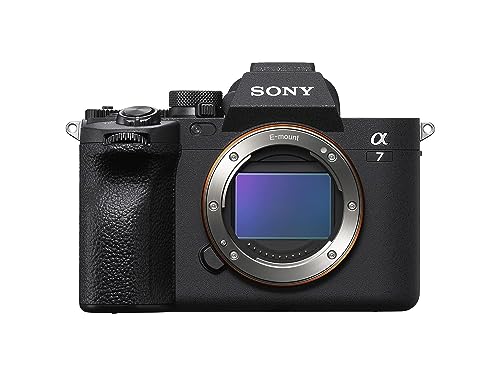
| Sony Alpha 7 IV | Best 4K all-rounder for serious creators | Full-frame depth, autofocus you can trust with faces, and a lens system with no dead ends. |
| Panasonic LUMIX S5II | Best for long takes and colour depth | Active cooling, open-gate options and colour tools that narrative shooters actually use. |
| Canon EOS R6 Mark II | Best hybrid for weddings and events | Superb autofocus, strong stabilisation and stills speed — the two-camera-day answer. |
| Sony ZV-E10 II | Best 4K camera for solo creators | Built for one-person filming: product autofocus, flip screen, and no viewfinder distractions. |
| Fujifilm X-T5 | Best for filmmakers who love dials and film colour | Fujifilm’s film simulations in 4K, tactile controls, and a stills soul with real video depth. |
| DJI Osmo Pocket 3 | Best pocket 4K camera for moving creators | A gimbal, a camera and a stabiliser in one pocketable unit — footage smooth beyond its size. |
How Did We Choose These 4K Videography Picks?
We started from failure modes. Videographers lose work to overheating shutdowns, autofocus that breathes or hunts mid-take, rolling-shutter wobble on pans, audio ruined by camera-handling noise through an internal microphone, and recordings that stop at the exact moment something unrepeatable happens. Each candidate was interrogated against those failures first; only cameras with good answers earned the right to be compared on image quality, where the modern field is honestly close.
Second, we weighted the ecosystem around the sensor: the lenses a system offers for video work — quiet focusing, minimal breathing, sensible apertures — and the practicalities of power, media and monitoring. A videography camera is a small production company in a box, and its supporting departments matter. Bodies whose systems offer strong native video glass and sane accessory paths scored ahead of technically equal orphans.
Finally, we insisted the list span the real shapes of video work rather than six versions of the same camera. There is a full-frame colour-and-depth choice, a hybrid built for long takes, a creator camera tuned for solo filming, a dial-led stills-and-video hybrid, a gimbal camera that redefines the category, and the pool’s most complete all-rounder. If your job exists, one of these is shaped like it.
We also scored the unglamorous logistics of a filming day: how the camera behaves on a cage or a gimbal plate, whether its ports survive being used, how its batteries are shared across a kit, and whether its menus let an operator change the three settings that matter without a spelunking expedition. Videography is a logistics discipline wearing an art’s clothes, and bodies that respect the logistics earned places here over bodies with prettier sample reels.
Which Are the Best Cameras for 4K Videography When Recording Matters?
Each pick below is examined as a filming tool: how it behaves at minute forty of a take, how its autofocus treats faces, and what it asks of you in return. Badges name the job; the text argues the case.

Sony Alpha 7 IV — Best 4K all-rounder for serious creators
The Alpha 7 IV is the camera working creators reach for when the brief is simply ‘make it look professional’, and its 4K video earns that reputation the unglamorous way: autofocus that finds an eye and stays there while its owner talks, gestures and leans; colour that grades willingly; and full-frame depth of field that separates a presenter from a background without theatrical apertures. For interviews, brand films, property walkthroughs and wedding work, it is the pick that asks the fewest apologies in the edit.
Its hybrid nature is the strategic point. This is a serious stills camera that films seriously, inside the deepest lens ecosystem in mirrorless — including a wide bench of video-friendly primes and zooms with quiet, linear focusing. A creator whose work splits between photography and film, which is most creators now, consolidates two kits into one body and one lens shelf. The supporting details respect video too: proper microphone input, headphone monitoring, and a fully articulating screen for solo framing.
Know its compromises. The 4K recording at its highest frame rates uses a cropped region of the sensor, which changes your lens maths for slow-motion work, and long takes in warm rooms deserve the usual full-frame respect for heat — test your typical take length before a paid day. Neither point dethrones it for the majority of creator work, but narrative shooters chasing maximum codec depth should read the Panasonic’s section before deciding.
For multi-camera creators the A7 IV carries a quieter advantage: it cuts and grades comfortably alongside Sony’s dedicated cinema bodies, sharing colour logic and lens mounts, so a growing production can promote it to B-camera rather than replacing it when a cinema body arrives. Equipment that gets promoted instead of discarded is the cheapest equipment there is, and this body’s long second life in professional kits is a large part of why it anchors professional recommendations year after year.
Wedding filmmakers add one more A7 IV habit worth copying: its custom modes let a shooter store a ceremony configuration and a reception configuration — frame rate, profile, focus behaviour — and swap between them with a dial rather than a menu dive while the day moves at its own speed. Preparation of that kind is invisible in the delivered film and decisive in its making; the camera’s support for it is a professional feature in the truest sense.
- Format: full-frame mirrorless, Sony E mount
- Video focus: real-time eye autofocus for people
- Audio: microphone input and headphone output
- Screen: fully articulating touchscreen
Strengths
- Eye autofocus that presenters can trust
- Deep E-mount lens choice for video
- Excellent stills camera in the same body
Trade-offs
- Highest-rate 4K uses a sensor crop
- Long hot-room takes need heat awareness
- Menu depth rewards setup time invested
Best for: creators and small production outfits whose work mixes interviews, brand film and photography in one kit.
Not suited for: shooters who need uncropped high-frame-rate 4K as their main mode, or minimalists who want a camera that is only a camera.

Panasonic LUMIX S5II — Best for long takes and colour depth
The S5II is the videographer’s camera on this list — the one designed by people who clearly film long, grade seriously and resent babysitting a body. Its built-in cooling fan is the headline working feature: sustained 4K recording stops being a negotiation with ambient temperature, which makes this the natural choice for ceremonies, stage performances, conferences and any job where the take lasts as long as the event does. Reliability of that kind does not photograph well in advertisements, but it is what professionals are actually buying.
Colour and capture flexibility back the cooling up. Panasonic’s colour science has a loyal following among filmmakers for skin tones that survive grading, and the camera’s open-gate recording uses the full sensor area — a gift for creators who must deliver the same shoot in landscape for one platform and vertical for another. In-body stabilisation is among the most composed in the class for handheld work, smoothing the walking shots that expose lesser systems.
The trade-offs are ecosystem-shaped. The L-mount alliance offers good glass from several makers, but the native bench is younger than Sony’s or Canon’s, and the autofocus — hugely improved in this generation with phase detection — still trails the very best for erratic sports-style subjects. For the event, documentary and narrative work this camera is aimed at, those are acceptable prices for its stamina and colour. For creator-solo work, compare the ZV-E10 II below before committing.
Interview shooters should note the S5II’s particular kindness to their format: the fan’s own noise is engineered to stay out of recordings’ way, the stabilisation forgives the handheld cutaway, and the colour keeps skin tones believable under the mixed lighting of real rooms rather than studios. A two-hour conversation recorded without a thermal interruption, a media panic or a colour rescue is this camera’s party trick — invisible in showreels, decisive in client work.
The S5II’s waveform and monitoring tools deserve a sentence for advancing shooters: judging exposure by measured values rather than by a small screen’s optimism is the step that separates consistent videography from hopeful videography, and Panasonic builds those tools into this body with a seriousness inherited from its cinema line. Beginners can ignore them for a month; the day they learn them, their footage’s consistency changes permanently, and the camera is ready before they are.
- Format: full-frame mirrorless, L mount
- Cooling: built-in fan for sustained recording
- Recording: open-gate full-sensor modes available
- Stabilisation: in-body, strong for handheld video
Strengths
- Fan cooling ends most overheating anxiety
- Open-gate suits multi-format delivery
- Filmmaker-loved colour and grading headroom
Trade-offs
- Lens bench younger than rival systems
- Autofocus not the class best for chaos
- Slightly utilitarian control feel
Best for: event, documentary and narrative videographers who record long takes and grade their footage properly.
Not suited for: solo creators who prioritise the smallest setup, or shooters deeply invested in another lens mount already.

Canon EOS R6 Mark II — Best hybrid for weddings and events
Wedding and event shooters live a double life — stills at noon, film at dusk, both at the first dance — and the R6 Mark II is built precisely for that double shift. Its 4K video is detailed and clean, its subject-detection autofocus recognises people, animals and vehicles with the calm of a camera that has seen chaos before, and its in-body stabilisation cooperates with Canon’s RF lenses to keep handheld footage composed when there is no time for a tripod and no second chance at the moment.
Canon’s colour, particularly skin tones straight out of camera, is the quiet reason many event filmmakers stay in this system: footage that needs less rescue in the grade is footage delivered faster, and event economics run on delivery speed. The RF lens range behind it includes the fast primes and constant-aperture zooms this work actually uses, with focusing behaviour tuned for video. Stills performance — burst speed, buffer, low-light files — is strong enough that the same body headlines the photography side of the day without compromise.
Heat is the managed variable: early conversation around this body family centred on recording limits in warm conditions at the highest quality settings, and while this generation improved matters considerably, a professional films a test day in summer conditions before trusting any body to a ceremony. Treat that as due diligence rather than disqualification — for the mixed stills-and-film professional, this remains the most natural single-body answer Canon makes.
Battery and media logistics on long event days are where the R6 Mark II quietly earns professionals’ loyalty: its power management stretches across a ceremony-and-reception arc with sensible spares, and its dual slots let stills and video — or overflow and backup — be organised the way a working shooter actually thinks. None of that appears in highlight reels, and all of it decides whether the highlight reel exists. Event work is a logistics contest judged by artists, and this body is equipped for both halves.
Portrait and brand shooters add a Canon-specific pleasure: the R6 Mark II’s colour in mixed light — window daylight against warm practicals, the real-world interview situation — stays believable with minimal correction, which is why so much client work is shot on this family despite spec-sheet rivals. Footage that needs less rescue is footage delivered sooner and billed happier; in commercial videography, that is not a soft virtue but the business model.
- Format: full-frame mirrorless, Canon RF mount
- Focus: deep-learning subject detection
- Stabilisation: in-body, coordinated with RF lenses
- Role: high-speed stills and 4K video hybrid
Strengths
- Autofocus that thrives at events
- Pleasing skin tones with minimal grading
- Stills performance matches its video
Trade-offs
- Verify long-take heat behaviour for your climate
- RF lenses are a premium-priced family
- Two card slots use different formats
Best for: wedding and event professionals shooting stills and film interchangeably all day.
Not suited for: studio-only videographers who would trade its speed for the Panasonic’s cooling and open gate.

Sony ZV-E10 II — Best 4K camera for solo creators
The ZV-E10 II starts from a question most cameras never ask: what if the operator is also the talent, the lighting department and the editor? Everything about it answers that brief. The screen flips for self-framing, the product-showcase mode snaps focus to whatever you hold up, the autofocus tracks your face while you talk with your hands, and the whole package is small enough to live on a desk or in a tote rather than demanding a camera bag’s ceremony. For tutorial, review, cooking, craft and commentary channels, this is the shape of the tool.
Image quality is not the sacrifice it once was in this class: the APS-C sensor records detailed 4K with Sony’s current colour and autofocus inheritance, and E-mount gives it the same lens library as the Alpha above, from cheap wide primes for desk setups to serious glass as a channel grows. Creator-facing touches — a proper microphone input, a wind-screened internal microphone arrangement, easy vertical-shooting support — remove the small frictions that make beginners postpone filming.
Be clear about what it is not. There is no viewfinder, which stills photographers will feel immediately; no in-body stabilisation, so handheld walking shots lean on lens stabilisation or a gimbal; and its control layout assumes menus and touch more than dials. None of that matters at a desk or on a tripod, which is where its owners live. Judge it as a filming appliance for solo creators, and it is arguably the most fit-for-purpose camera in this guide.
Desk creators in particular should weigh the ZV-E10 II’s small mercies: it wakes fast, its tally of what is recording is unambiguous, its screen brightness survives a bright room, and its files are modest enough that a modest computer edits them without complaint. Content businesses are won on publishing rhythm, and a camera that shaves friction from every session compounds into extra videos per month — the metric that actually grows a channel, ahead of any resolution figure.
The ZV-E10 II also moonlights well as a streaming and webinar camera, which matters to creators whose income mixes recorded and live work: clean output, dependable long-session behaviour and a lens bench that includes the wide primes a desk setup wants. One body covering the channel and the livestream simplifies a small studio’s economics considerably — another way this creator-first design keeps paying its owner back in currencies other than image quality.
- Format: APS-C mirrorless, Sony E mount
- Design: vlogging-first, no viewfinder
- Focus: face/eye tracking plus product showcase mode
- Screen: vari-angle, touch-focused operation
Strengths
- Purpose-built for filming yourself
- Product showcase focus delights reviewers
- Small, light and tripod-happy
Trade-offs
- No in-body stabilisation
- No viewfinder for stills work
- Dial-light, menu-led handling
Best for: YouTubers, tutors, reviewers and streamers-adjacent creators who film themselves at a desk or in a small studio.
Not suited for: hybrid stills shooters, or handheld walk-and-talk filmmakers unwilling to add a gimbal.

Fujifilm X-T5 — Best for filmmakers who love dials and film colour
The X-T5 makes the most characterful 4K footage in this guide without a grading suite, because Fujifilm’s decades of film-stock knowledge live inside it as simulations you can bake into your recordings. Creators whose aesthetic leans warm, nostalgic or simply non-clinical can shoot finished-looking video straight out of camera — a workflow advantage that compounds across a channel’s worth of uploads. Under the charm sits substance: a high-resolution APS-C sensor, respectable 4K recording and in-body stabilisation in a body that still handles like a photographer’s camera.
Handling is the second argument. Dedicated dials for shutter, ISO and exposure compensation mean video settings are visible and changeable by touch, and the stills experience — this is a superb photography camera — never feels like an afterthought bolted to a video tool. Fujifilm’s X-mount lens range is mature, compact and full of primes that suit APS-C filming, and the whole outfit stays smaller than the full-frame picks while giving up little that most viewers will ever see.
Its limits are the familiar APS-C and Fujifilm ones: autofocus, while much improved, is not the set-and-forget face machine the Sonys offer for chaotic subjects; the lens ecosystem, though lovely, is APS-C only; and low-light video at high sensitivities concedes ground to the full-frame bodies. For creators whose brand is a look — travel, lifestyle, food, craft — those trades buy the most distinctive footage per hour of effort in this guide.
Travel filmmakers get a particular gift from the X-T5: footage with a finished look in the camera means the laptop can stay closed in the evenings, and a trip’s films can be cut roughly on a tablet from files that already agree with each other colour-wise. That workflow lightness is worth real money to creators whose office is a night train. The camera asks for deliberate handling and rewards it with the most personal footage in this guide — a trade its owners describe with unusual affection.
Fujifilm’s community is an X-T5 feature no box lists: an unusually large culture of shooters publishing their film-simulation recipes — exact in-camera settings for particular looks — means a beginner can borrow a master’s colour and then deviate from it knowingly. For filmmakers whose brand is a palette, that shared library shortens the road to a signature look by months. Cameras are bought; cultures are joined, and this one is generous.
- Format: APS-C mirrorless, Fujifilm X mount
- Colour: film simulations available for video
- Controls: dedicated top dials for key settings
- Stabilisation: in-body stabilisation fitted
Strengths
- Finished-looking colour straight from camera
- Tactile dials suit deliberate filming
- Outstanding stills camera alongside video
Trade-offs
- Autofocus trails Sony for erratic subjects
- APS-C concedes low-light ground to full frame
- Lens system is APS-C only
Best for: lifestyle, travel and food creators whose visual identity benefits from Fujifilm colour, and photographers who film.
Not suited for: solo presenters needing the most hands-off autofocus, or low-light event specialists.

DJI Osmo Pocket 3 — Best pocket 4K camera for moving creators
The Pocket 3 breaks this guide’s pattern deliberately, because for a large class of 4K videography — travel days, walking tours, market visits, behind-the-scenes diaries — the best camera is the one already stabilised, already charged and already in your jacket. Its three-axis gimbal produces walking footage with a glide that no in-body stabilisation in this guide can match, from a device smaller than most phones are wide. The rotating screen flips between horizontal and vertical framing in a twist, which the multi-platform era quietly demands.
Quality is the surprise that converted sceptics: a one-inch-type sensor records 4K with detail and low-light composure far beyond action-camera expectations, autofocus tracks faces and subjects willingly, and DJI’s colour profiles give editors something real to grade. Audio through its wireless microphone ecosystem is a particular strength — pair the transmitter and a talking head sounds broadcast-clean while the camera floats at arm’s length. For solo travel creators, this is not a toy second camera; it is frequently the main one.
Respect its boundaries. The fixed lens fixes your framing choices, weather sealing is not its story, battery life is built into the body rather than swapped in the field (a handle extends it), and nobody is shooting a wedding ceremony on it from the back of a church. It complements an interchangeable-lens kit or headlines a lightweight one. Judged on footage-per-gram and setup-seconds-per-shot, nothing else in this guide is close.
The Pocket 3 also deserves mention as the finest second camera in this guide for owners of the bigger bodies: it lives in the kit bag’s corner, deploys in seconds for the walking transition, the venue reveal, the journey montage, and returns footage stable enough to intercut without apology. Many professionals who would never headline it quietly shoot a fifth of their delivered film on one. In videography, the camera that is present wins frames no flagship can contest.
Real-estate and venue shooters have quietly adopted the Pocket 3 for walkthroughs, and their reasoning generalises: the gimbal glide through doorways and around furniture produces the floating, professional movement clients read as expensive, from a device that needs no rigging, no balancing and no second operator. Whenever the brief is movement through space rather than faces in conversation, this little camera keeps embarrassing far larger rigs — plan kits accordingly.
- Format: pocket gimbal camera, fixed lens
- Sensor: one-inch type, gimbal-stabilised
- Screen: rotating touchscreen for vertical/horizontal
- Audio: wireless microphone ecosystem support
Strengths
- Gimbal smoothness no IBIS matches
- Genuinely pocketable, instant to deploy
- Excellent wireless audio options
Trade-offs
- Fixed lens limits framing choice
- Internal battery needs a handle for long days
- Not a ceremony-distance tool
Best for: travel vloggers, walking-tour creators and anyone whose 4K work happens on the move and alone.
Not suited for: interchangeable-lens purists, or long-form event recording from a fixed distant position.
What Actually Separates Good 4K From Great 4K Footage?
Bit depth and colour sampling, described plainly: basic 4K records colour information economically, which looks fine until you grade it — then skies band, skin tones tear and white-balance corrections run out of road. Cameras offering 10-bit recording keep vastly more colour information and survive real grading, which is why serious videographers treat 10-bit as the true starting line and the resolution figure as marketing. If your workflow is shoot-and-upload, 8-bit serves honestly; if you colour your work, buy for bit depth before you buy for anything else.
Rolling shutter is the second invisible spec. Most video sensors read their image line by line, so fast pans skew vertical lines and quick movements wobble — the ‘jello’ viewers feel without naming. Sensor readout speed varies enormously between models and rarely appears on boxes. The practical test: film a brisk pan across a fence or building edge and a passing cyclist. Bodies that hold geometry together in that test will serve action, sports and energetic travel work; bodies that wobble should live on tripods, where they can be excellent.
Audio decides perceived quality more than resolution does — viewers forgive soft pictures and abandon bad sound. Every pick here accepts an external microphone, and using one is the single largest quality jump available to a beginner: a modest wireless or shotgun microphone close to the speaker beats any camera’s internal microphones across a room. Equally, monitor with headphones whenever the take matters. The headphone socket is not a luxury feature; it is the difference between discovering a buzzing cable at the shoot and discovering it in the edit.
Finally, light. 4K sensors are honest, and honesty under bad light looks like noise, hunting autofocus and grey skin. One affordable panel or a window used deliberately transforms footage more than any body upgrade in this guide. Budget the light with the camera, learn to expose faces rather than rooms, and the resolution you already own will suddenly look like the upgrade you were shopping for.
Monitoring deserves its own warning: the screen on the back of every camera here will flatter your exposure if you let it, because screens are bright, small and viewed in hope. Learn to trust the histogram and zebras over the picture’s apparent brightness, set the screen brightness manually so it stops adapting to the room, and judge colour on the most honest display you own during tests. More good footage is ruined by confident screens than by weak sensors, and the fix is a habit, not a purchase.
Frame-rate literacy closes the guide: choose the cadence per project and keep it consistent within a production, because mixed cadences are the amateur’s tell in any edit. Standard rates for narrative and speech, higher rates for the subjects this guide’s sibling article on 60fps covers in depth, and slow motion as punctuation rather than wallpaper. A camera’s menu will offer everything; the filmmaker’s job is refusal, exercised tastefully and in advance.
Lenses for video deserve the guide’s final word, because a videography lens is judged by behaviours stills never test: focus breathing as the plane shifts, the noise of its focusing motor near a microphone, the smoothness of its aperture changes mid-take. Within each system here, certain lenses are designed or selected for those behaviours, and a videographer building a kit should audition for them deliberately — borrow, rent, or test in the shop with the camera recording. The body gets the credit in conversation; the lens does half the work in the footage, and at 4K its manners are visible in every frame.
How Do You Set Up a 4K Camera for Clean, Consistent Footage?
Set your frame rate by destination before anything else: match the cadence your platform and region expect, and keep shutter speed near double the frame rate for natural motion blur — the convention that makes footage look filmed rather than surveilled. Lock white balance manually for each scene instead of letting auto balance drift mid-take; a take whose colour wanders is a take you will fight in the edit. These three settings, decided deliberately, separate intentional footage from default footage more than any menu deeper in the camera.
Expose for the subject’s face and protect highlights. Use zebras or a histogram if your camera offers them, expose skin tones to a consistent level scene after scene, and accept darker backgrounds as style rather than error. Turn off every automatic exposure behaviour you do not need during a take — auto ISO has its place in changing light, but for controlled scenes, fixed settings give the editor matching shots instead of a puzzle. Consistency across a day’s footage is the unglamorous definition of professional video.
Build an audio routine and never skip it: microphone close to the mouth, levels peaking safely below clipping, thirty seconds of room tone recorded at each location, and a headphone check before the first real take. Record a short test, play it back, and listen for the hums, echoes and handling noise your ears filtered out live. Two minutes of routine saves the most common catastrophe in videography — beautiful pictures of people you cannot hear.
Manage media and power like a professional from day one. Cards fast enough for your bit rate, formatted in camera, rotated and backed up the same day; batteries counted against your longest planned take, not your average one; and a small kit — blower, cloth, spare card, spare cable — that lives with the camera. 4K files are large and shoots are unrepeatable; the creators whose footage survives are the ones whose boring systems never give it a chance to disappear.
Add a pre-shoot checklist culture to the routine: the same five checks, in the same order, every time — media formatted and sufficient, batteries counted, frame rate and shutter paired, white balance locked for the scene, audio tested with headphones. Professional videographers are not more talented at remembering; they are more systematic about not needing to. Print the list, tape it inside the kit bag, and let boredom be the guardian of your footage’s survival.
Colour consistency across a shoot day is the last routine: pick one picture profile per production, resist the temptation to experiment mid-day, and shoot a few seconds of a known reference — a grey card, a familiar face — at each new location. Editors bless the videographers who do this, because matching shots becomes arithmetic instead of archaeology. The cameras here all offer profiles worth committing to; commitment, as ever, is the operator’s contribution.
Rehearse the whole production once at home, end to end, before the first real shoot: set up, record a minute, offload it, watch it large, listen on headphones. Every videographer has a story of the shoot that taught them their cable, card or setting was wrong; the rehearsal moves that lesson to a day when it costs nothing. The cameras in this guide reward rehearsed owners disproportionately, because their depth is real but not self-explanatory — an hour of practice converts their menus from obstacles into instruments.
What Changes When the Six Filming Picks Stand Together?
| Camera | Badge | Format / type | Standout trait | Watch out for |
|---|---|---|---|---|
| Sony Alpha 7 IV | Best 4K all-rounder for serious creators | Format: full-frame mirrorless, Sony E mount | Eye autofocus that presenters can trust | Highest-rate 4K uses a sensor crop |
| Panasonic LUMIX S5II | Best for long takes and colour depth | Format: full-frame mirrorless, L mount | Fan cooling ends most overheating anxiety | Lens bench younger than rival systems |
| Canon EOS R6 Mark II | Best hybrid for weddings and events | Format: full-frame mirrorless, Canon RF mount | Autofocus that thrives at events | Verify long-take heat behaviour for your climate |
| Sony ZV-E10 II | Best 4K camera for solo creators | Format: APS-C mirrorless, Sony E mount | Purpose-built for filming yourself | No in-body stabilisation |
| Fujifilm X-T5 | Best for filmmakers who love dials and film colour | Format: APS-C mirrorless, Fujifilm X mount | Finished-looking colour straight from camera | Autofocus trails Sony for erratic subjects |
| DJI Osmo Pocket 3 | Best pocket 4K camera for moving creators | Format: pocket gimbal camera, fixed lens | Gimbal smoothness no IBIS matches | Fixed lens limits framing choice |
Full frame versus APS-C is the comparison readers expect, so here it is plainly: the full-frame picks buy low-light cleanliness and shallower depth of field; the APS-C picks buy size, price and lens compactness, and at 4K in decent light the visible difference is smaller than forum arguments suggest. The Pocket 3 sidesteps the debate with a fixed lens and a gimbal, trading flexibility for a smoothness neither camp matches. Choose by your light and your luggage, not by sensor prestige.
The other axis is cooling and stamina. The S5II’s fan makes it the default for uninterrupted long-form recording; the hybrids ask for heat awareness proportional to your climate and take length; the creator bodies assume tripod-paced work. None of this appears in resolution tables, and all of it decides real shoots — which is why this guide keeps returning to behaviour over specifications.
What Mistakes Ruin Otherwise Good 4K Shoots?
Filming everything at the highest frame rate ‘for safety’ is the beginner’s tax: enormous files, cropped sensors on some bodies, and footage whose slow-motion smoothness makes ordinary scenes feel like insurance advertisements. Choose frame rate per shot with intent — standard rates for standard scenes, high rates only for moments you genuinely plan to slow down. Your storage, your editor and your audience will all notice the discipline.
Trusting autofocus without testing it is the second tax. Every system here is good; none is psychic. Rehearse the exact movement your subject will make — the lean-in, the walk-away, the product lift — and watch what the camera does before the take counts. Where autofocus hunts, the fixes are craft, not settings-diving: smaller focus areas, slower transitions, better light, or the humility of manual focus with a magnified screen for static subjects.
The third mistake is buying the body with the last of the budget. The picks above all deserve a lens faster than a kit zoom, a microphone, and light — in that order — and a creator who funds those will out-film a flagship owner who did not. Treat the camera as roughly half the purchase. The other half is invisible in spec sheets and obvious in every frame you deliver.
A fourth mistake is neglecting the second system every videographer actually runs: data. A day of 4K is a pile of large files that must be copied, verified, backed up and organised before the next day begins, and beginners who treat that as optional eventually lose the shoot that mattered. Build the evening offload into the filming day itself, keep two copies before any card is formatted, and name files like someone who will search them in three years — because that someone is you.
Final Recommendation
For most readers, the decision resolves by job description. Solo creators filming themselves: the ZV-E10 II, with the Pocket 3 if your channel moves. Long-form and narrative work: the S5II. Mixed professional stills and film: the R6 Mark II for event pace, the Alpha 7 IV for the deepest all-round ecosystem. A look that grades itself: the X-T5. None of these choices is a consolation prize; each is the best answer to a different working life.
Whichever you choose, spend your first week on tests, not content: heat, autofocus, audio and colour, in your rooms, with your subjects. A 4K camera you understand will out-produce a theoretically better one you are still negotiating with — and in videography, the footage is the only specification that ever reaches the audience.
One last piece of arithmetic for the undecided: the camera is the smallest part of a videography budget over three years, behind lenses, audio, light, media and storage. Choose the body whose system makes those surrounding purchases cheapest and happiest — the mount you will enjoy feeding — and the resolution argument resolves itself. All six cameras here will be outclassed by their successors soon enough; the kit and the craft you build around them will not be.
If you are torn between two picks, decide by the footage you shot last month rather than the footage you imagine next year: the camera that serves your demonstrated subjects, rooms and collaborators is the camera that will be used, and used cameras are the only ones that improve their owners. Ambition can rent its exceptions. Buy for your actual practice, master the body completely, and let the work itself argue for the next purchase when it genuinely outgrows this one.
And if the choice still feels heavy, remember that every working videographer you admire has a shelf of former cameras behind the current one — the body is a chapter, not a marriage. Buy the chapter your work is actually in, shoot it thoroughly, and let it teach you what the next chapter needs. That sequence, repeated, is a career.
Related guides
- Best Cameras for Home Video: Family Films That Deserve Rewatching
- Best Cameras for Amateur Photographers: First Serious Cameras That Teach as They Shoot
Frequently Asked Questions
Is 4K worth it if my audience watches on phones?
Yes, for production reasons rather than display ones. Shooting 4K lets you crop and reframe for vertical and square deliveries without losing sharpness, stabilise in post with room to spare, and future-proof a library as screens improve. The master file’s resolution is your editing freedom, whatever the final viewing device — creators who shoot 4K and deliver lower resolutions keep options that filming at delivery resolution forecloses.
How long can these cameras record 4K continuously?
It varies by body, settings and temperature, which is precisely why the guide foregrounds it. The fan-cooled Panasonic is built for effectively uninterrupted recording in normal conditions; hybrid bodies may impose limits at their highest quality settings in warm rooms; creator bodies assume shorter takes. Test your own longest realistic take, in your own climate, before any paid work — that single test is worth more than any published figure.
Do I need a gimbal for smooth 4K footage?
Only if your footage walks. In-body stabilisation handles standing, slow movement and deliberate pans well on the mirrorless picks; sustained walking, stairs and run-and-gun movement are where a gimbal — or the Pocket 3’s built-in one — earns its keep. Buy stabilisation for the shots you actually film: a tripod and good IBIS cover more creators than the gimbal market admits.
What memory cards does 4K video need?
Cards rated for sustained video writing at your chosen bit rate — look for the video speed class markings rather than headline read speeds, and buy from reputable sellers because counterfeit cards fail exactly when footage matters. High-bit-rate modes on some bodies want the faster card formats. Treat cards as consumable production supplies: rotate them, retire the tired ones, and never format the only copy of a shoot.
Can I use photo lenses for video?
Mostly yes, with caveats the guide flagged: some stills lenses focus noisily, breathe visibly as focus shifts, or step their aperture in visible clicks. Within each system here, certain lenses are tuned for video behaviour — quieter, smoother, less breathing — and those deserve priority as your kit matures. Start with the lens you have, learn its tells on test footage, and upgrade against evidence rather than anxiety.
Which of these is best for live streaming too?
The creator-shaped picks lead: clean HDMI output, webcam-style USB streaming support and desk-friendly ergonomics make the ZV-E10 II the natural streaming base, with the Pocket 3 as a mobile option. The professional hybrids stream capably too but are built for recording first. If streaming is a major channel, test the full chain — camera, capture path, software — because streaming reliability is a system property, not a camera feature.
Keep that rehearsal habit for every new lens and location as well; professionals test continuously, not because they doubt their equipment, but because certainty is cheaper than reshoots, and in videography reshoots are the one currency that cannot always be bought at any price.
How do you stop a 4K camera overheating during long recording sessions?
Heat is the quiet limit on serious 4K work, and managing it starts before anyone presses record. Raise the camera off a hot surface, open any tilting screen away from the body so warmth can escape, and shade the rig from direct sun with a hat, umbrella or piece of card rather than draping fabric over vents. Where menus offer a higher temperature threshold for warning shutdowns, choosing it for controlled indoor shoots can buy useful extra minutes, provided you monitor the body and let it rest between takes.
Recording habits matter just as much. Splitting an event into shorter clips instead of one marathon file reduces sustained sensor and processor load, gives memory cards natural breathing points, and limits how much material vanishes if a file ever corrupts. Powering from a dummy battery or external supply removes one internal heat source entirely, since a hard-working battery warms the grip area considerably. For ceremonies, stage shows or interviews that genuinely run long, test your exact frame rate, codec and ambient conditions at home first, timing how long your setup records before warnings appear, then plan a second body or scheduled pauses around that honest figure rather than discovering the ceiling mid-vow or mid-solo.
Storage choices play a supporting role too. Faster cards run cooler under sustained writes on some bodies, and formatting in camera before a big job clears fragmented space that makes the processor work harder. Treat overheating as a logistics problem with known answers, not as bad luck.
Ambient conditions deserve a line in your shoot plan as well. A stuffy marquee in midsummer, a kitchen filmed for a cookery sequence, or a stage washed in theatrical lighting can push a body towards its limit far sooner than the same settings outdoors on a breezy morning. Carry a small fan for static setups, schedule demanding scenes earlier in the day, and agree hand signals with your subject so a forced cooling pause never looks like panic. Videographers who rehearse these contingencies quietly tend to finish long recordings with their dignity, and their footage, intact.
Related Guides
Keep exploring with our guide to affordable 4K cameras for YouTube and our roundup of the best cameras for vlogging and our explainer on cameras and software for beginner photography.


