ilcastellomenu.com is reader-supported. When you buy through links on our site, we may earn an affiliate commission.
Where to Buy
Every podcast begins with the same quiet negotiation: the phone already in your pocket shoots video, costs nothing extra, and uploads in seconds — so why do so many shows end up buying a camera? The best cameras for podcasting vs phone is really a question about thresholds. Below a certain ambition, the phone wins outright and this guide will say so plainly. Above it, a dedicated camera stops being a luxury and becomes the difference between a show that looks borrowed and a show that looks owned.
The phone’s case is stronger than camera people admit. Its computational video is forgiving of bad light, its screen is its own monitor, and for a solo host recording twenty minutes at a desk it may be the most rational tool in the room. Where it frays is duration and intention: hour-long conversations in warm rooms, a second angle for a co-host, a background that should melt away instead of staying clinically sharp, and files that must survive an editor’s colour pass rather than a platform’s compression alone.
So this comparison is structured as an honest contest, not a sales pitch. Each of the six cameras below is judged against the phone a podcaster already owns: what it adds that the phone cannot imitate, what it costs in effort that the phone never demands, and the point in a show’s life at which the trade turns favourable. Two of the six are webcams, included because for many desk-bound shows they are the true middle path between handset and mirrorless.
One boundary before the contest starts: audio decides whether viewers stay, and no camera in this guide fixes a bad microphone. The camera question is about the image’s authority — depth, colour, reliability across a long recording — and about a workflow that treats the show as a programme rather than a video call that happened to be recorded. Judge every verdict here on those terms and the phone-versus-camera argument resolves itself show by show.
A word about who this guide trusts: not the spec sheet, and not the show with the biggest studio. It trusts the recordings — the episodes that survived a warm room, a long guest and an editor’s honest scrutiny. That is the contest the phone has been winning quietly for years at the small end, and losing just as quietly at the serious end, and the six verdicts below simply draw the border where it actually runs.
Key Takeaways
- A modern phone is a legitimate podcast camera for short, solo, well-lit shows — upgrading before it limits you wastes money.
- A dedicated camera wins on depth of field, long-session reliability, clean output to a switcher, and files that grade properly.
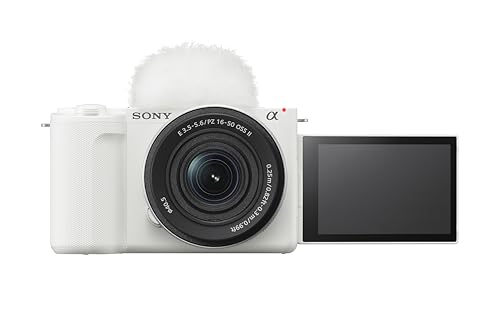
- The Sony ZV-E10 II is the natural first step up: creator-focused video with interchangeable lenses at a sane system cost.
- The Panasonic LUMIX S5II is the two-person studio answer, built for long, unattended, professional-looking recordings.
- Webcams such as the OBSBOT Tiny 2 and Logitech Brio 4K are the honest middle path for desk shows that stream more than they edit.
- Buy the camera when the phone fails a specific test — heat, duration, background, second angle — not when a sponsor’s studio merely looks impressive.
In this guide
Quick Picks
| Camera | Badge | Why it earns its place |
|---|---|---|
| Sony ZV-E10 II | Best first step up from a phone | Creator video, interchangeable lenses and reliable long takes in a compact body. |
| Panasonic LUMIX S5II | Best for a two-person studio | Full-frame depth, cooling for long sessions and a professional video toolset. |
| Canon EOS R50 | Best value mirrorless for podcast video | Friendly handling, warm colour and clean 4K in a body a beginner can run alone. |
| Sony ZV-1F | Best fixed-lens simplicity | A pocketable wide-angle camera that frames a desk host with zero lens decisions. |
| OBSBOT Tiny 2 | Best webcam for streamed shows | A tracking webcam that follows a standing or moving host without a camera operator. |
| Logitech Brio 4K | Best plug-and-stay webcam | A dependable 4K webcam for the show that records at the same desk every week. |
How Did We Compare These Cameras Against a Phone?
Each camera was run in the podcast’s real conditions rather than a reviewer’s studio: a ninety-minute two-person conversation in a small treated room, a solo desk recording under ordinary ceiling light, and a streamed episode where the camera had to behave as a live source for an entire evening. The comparison baseline was a current flagship phone on a tripod in the same chair, same light, same microphone — the honest control in this experiment, because it is the alternative every reader actually owns.
Depth and separation were scored by eye at viewing distance: could the background fall away enough that the host owns the frame, and did skin tones stay human when the phone’s processing would have sharpened every pore into evidence? Long-session behaviour mattered equally — a camera that stops, dims or demands attention at minute forty has failed the podcast’s first requirement, which is to be forgotten by the people talking.
Workflow was the third axis: how the files or the live feed reach the edit, whether a second angle can be added without a new religion of cables and software, and how much of the show’s look survives contact with a platform’s compression. Podcast images are watched small and long; consistency across an episode beat peak sharpness in every judgement that follows.
A note on what was excluded and why: pure cinema bodies and broadcast cameras were left out deliberately. A podcast studio is a conversation with a camera present, not a film set, and tools that need a crew, a rig and a colourist to justify themselves answer a question this keyword did not ask. The six below all let one or two people run a show alone.
One more criterion ran underneath all three axes and deserves naming: forgiveness. Podcast hosts are not actors hitting marks; they lean, slump, laugh forward and retreat from a point. A camera whose focus and exposure forgive that movement — holding the face through the lean, keeping the skin sane when the laugh carries it toward the light — protects the conversation’s spontaneity, and spontaneity is the product. The phone forgives by processing; the cameras here were chosen for forgiving by optics and by design.
Why Does a Phone Start to Limit a Growing Podcast?
The first limit is optical and cannot be patched in software for long. A phone’s small sensor and wide lens keep nearly everything in focus, which reads as a video call: the bookshelf, the door frame and the host all compete at equal sharpness. Audiences may never name the effect, but they feel the difference between a call and a programme, and a camera’s shallow depth is the cheapest production value in the medium — the background retires, the face advances, and the show acquires a set it never built.
The second limit is thermal and temporal. Phones are sprinters: brilliant for minutes, increasingly reluctant across an hour in a warm room, where recording can throttle, dim or stop — sometimes silently, which is the podcast’s nightmare, discovered at the edit with a guest already gone. Dedicated cameras are built around sustained recording as a normal state rather than an achievement, and the studio picks here treat a two-hour conversation as a light morning’s work.
The third limit is the phone’s other life. It rings, it notifies, it is needed for notes, messages and the journey home, and every podcast recorded on it is one interruption away from a visible flinch. A camera has one job and no opinions about your messages; that singleness sounds trivial until a season of episodes depends on it. Growth, in short, is when the show’s needs stop fitting inside a device designed for everything else.
What Does a Dedicated Camera Actually Add to the Picture?
Separation first: a larger sensor behind a fast lens gives the host a plane of focus and lets the room become atmosphere. Second, colour with headroom — files that tolerate an editor warming the skin, taming a mixed-light room, or matching two angles shot an hour apart, where phone footage arrives pre-cooked by computational decisions that cannot be unmade. Third, honesty in low light: podcasts are recorded in living rooms and spare bedrooms at night, and a camera’s larger sensor holds those rooms together without the waxy smoothing phones apply when the light gives up.
There is also the matter of the lens as a permanent decision about how a show looks. A phone’s framing is fixed by its hardware generation; a camera system’s framing is chosen — a wider lens for the energetic two-shot, a longer one for the intimate interview — and can evolve as the show finds its visual voice. Podcasters who rebrand visually almost always do it through glass, not bodies.
Finally, a camera adds ritual, which sounds soft and is not. A device that lives on the studio tripod, framed and lit and waiting, turns recording from an arrangement into a habit. Shows survive on habits; the camera that is always ready gets used on the tired Thursday when the phone would have stayed in a pocket and the episode would have slipped a week.
Which Cameras Beat a Phone for Podcasting, and for Which Shows?
Six answers, ordered by the size of the step up they represent — from the webcam that simply out-sits a phone at a desk, to the full-frame body that turns a spare room into a studio. Each verdict names the phone habit it replaces.

Sony ZV-E10 II — Best first step up from a phone
The ZV-E10 II is where most phone podcasters should land first, because it was designed by people who studied exactly this migration. Its video is clean and flattering without the phone’s over-processed edge, its autofocus finds a face and stays there through the gestures and leans of real conversation, and its interchangeable mount means the lens that frames your desk today can be joined by the lens that frames your two-shot next season.
Against the phone, its decisive wins are endurance and separation. It records long conversations as a matter of course, powered from the desk so batteries stop being a plot point, and a modest fast lens behind its sensor gives the background blur that instantly separates a programme from a call. The files grade like camera files — because they are — so a two-camera edit can match this body against a bigger sibling later without a visible seam.
Its creator touches suit the solo host particularly: product-showcase thinking translates into a camera that refocuses gracefully when you hold a book or a prop to the lens, and the whole body is small enough that the studio can live on a shelf rather than colonise a room. For a show recorded by one person wearing every hat, that compactness is a workflow feature, not a compromise.
- Format: APS-C mirrorless, interchangeable lenses
- Focus: face and eye tracking for video
- Power: USB powering for long desk sessions
- Video: creator-focused 4K recording
- Handling: compact, solo-operator friendly
Strengths
- The natural graduation from phone footage
- Lens choice lets the show find its look
- Long takes without thermal drama
Trade-offs
- No in-body stabilisation for handheld use
- A fast lens is a second purchase
- Rolling-shutter care with fast pans
Solo hosts should budget the lens decision as part of this camera, not an afterthought: the framing and blur that justify leaving the phone behind live in the glass, and a single well-chosen fast prime will do more for the show’s look than any setting buried in the body.
There is a social dividend to this body in a two-host show that spec sheets never mention: because it is small and unintimidating, guests relax in front of it. A podcast lives on unguarded conversation, and a camera that does not loom is quietly a performance tool — the ZV-E10 II gets out of the way of the talk it was bought to record.
Best for: solo and duo shows making their first dedicated-camera step. Not suited for: handheld vloggers who need stabilisation in the body

Panasonic LUMIX S5II — Best for a two-person studio
The S5II is the answer for the show that has become a studio: two hosts, a treated room, lights that stay up between sessions. Its full-frame sensor delivers the richest separation in this guide — the two-shot where both faces hold focus and the room dissolves behind them — and its active cooling treats a three-hour recording day as routine, which is precisely the reliability a booked guest deserves.
Panasonic’s video heritage shows in the details podcasters actually use: dependable autofocus that no longer carries the old caveats, monitoring tools that let a producer watch exposure like a professional, and colour that editors describe as honest. Matched against a phone on the second chair, the difference is not subtle — one side of the conversation looks filmed, the other looks phoned in, and audiences read the mismatch as a difference in status between the hosts.
It is the largest commitment here in size, cost and learning curve, and the guide makes no apology for placing it second rather than first: this is the camera a show buys when the format is proven, the audience is real, and the image has become part of the programme’s identity. Bought at that moment, it tends to serve for years without a successor being discussed.
- Format: full-frame mirrorless
- Cooling: active, for extended recording
- Focus: phase-detection autofocus
- Video: professional monitoring and colour tools
- System: L-mount lenses from several makers
Strengths
- The deepest, calmest two-shot in this guide
- Long studio days without heat anxiety
- Files an editor can grade with confidence
Trade-offs
- Size and cost beyond a starter studio
- Menus reward an afternoon of setup
- Overkill for a solo desk show
Studios running two angles should note the quiet advantage of Panasonic colour consistency across its range: a second, smaller Panasonic body later will match this one in the edit with far less wrestling than a mixed-brand pairing usually demands.
Producers running a guest schedule should weigh the S5II’s unattended virtues: once framed, lit and set, it asks for nothing across a long recording day, and that indifference is what lets a host stop performing for the equipment and start listening to the person opposite. Listening, visibly, is half of what a podcast audience is watching.
Best for: established two-host shows with a permanent set. Not suited for: beginners still testing whether video suits the show

Canon EOS R50 — Best value mirrorless for podcast video
The R50 argues that the step up from a phone should feel easy. Canon’s colour — warm, kind to skin, forgiving of the mixed light in real rooms — gives a new video podcaster flattering footage on day one, and the body’s guided, unintimidating handling means the camera disappears from the host’s attention faster than any rival at its level. A host thinking about the conversation is the whole point; the R50 protects that.
Its video is honest rather than exhaustive: clean 4K for the main angle, reliable face tracking through a lively discussion, and a compact body that mounts happily on the small tripod a desk studio actually has room for. Against a phone it wins the same foundational victories as the Sony — separation with a fast lens, sustained recording, files that grade — while asking the least new learning of any interchangeable-lens body here.
Where it concedes ground is the professional margin: fewer video tools for a producer to monitor with, and a system whose smaller lenses suit the desk better than the film set. For a podcast — a genre whose ceiling is set by conversation, not cinematography — those concessions rarely bind, and the money saved buys the microphone upgrade that matters more.
- Format: APS-C mirrorless, compact
- Colour: warm, skin-friendly Canon rendering
- Focus: face detection for video
- Video: clean 4K main-angle recording
- Handling: guided modes for new operators
Strengths
- Flattering footage with the least learning
- Small enough for a permanent desk rig
- Leaves budget for the microphone that matters
Trade-offs
- Fewer pro monitoring tools
- Smaller lens range for video specialists
- Not the long-session cooling champion
Canon shooters coming from the phone should resist buying a cage of accessories in the first month. The R50’s virtue is simplicity: body, one fast lens, desk power, and a season of episodes will teach you precisely which accessory — if any — the show actually needs.
The R50 also makes a gentle introduction to the discipline of the second angle: its files are forgiving enough that a borrowed or older Canon body can join it later without an edit full of mismatched colour, which is how many two-camera podcast studios are actually assembled — gradually, and within one brand’s way of seeing.
Best for: new video podcasters who want an easy, flattering start. Not suited for: producers needing deep monitoring and colour tools

Sony ZV-1F — Best fixed-lens simplicity
The ZV-1F removes the two decisions that stall phone graduates: which lens, and how to frame. Its fixed wide lens is chosen for exactly the distance between a desk chair and a tripod, its face priority keeps the host presented properly, and the whole camera is small enough to live in the drawer of the desk it films. For the podcaster whose show is one person, one chair, one idea per episode, it is the camera as appliance — in the complimentary sense.
Compared with a phone, it buys consistency. The phone’s framing and processing shift with every update and every accidental mode; the ZV-1F produces the same honest, wide, well-exposed picture every session, with a background defocus mode that gestures toward separation even within its small sensor’s limits. Its files are modest next to the mirrorless picks, but they are stable, matchable and free of the computational surprises that make phone footage age strangely in an archive.
Its ceiling is equally clear: the fixed lens cannot grow into a two-shot across a table, and its small sensor will not deliver the S5II’s dissolved background or low-light calm. It is a deliberate, bounded tool — the right first camera for a show whose format is settled and solo, and the wrong one for a show still discovering what it wants to be.
- Format: compact with fixed wide lens
- Framing: designed for desk-distance solo hosts
- Focus: face-priority autofocus
- Defocus: background blur mode
- Size: drawer-small, tripod-light
Strengths
- Zero lens decisions, instant framing
- The same picture every single session
- Small enough to keep permanently ready
Trade-offs
- Fixed lens caps the show’s growth
- Small sensor limits low-light grace
- No path to a second framing
Desk hosts who talk with their hands should give the ZV-1F’s wide framing a week before judging it: the generous field suits gesturing and props, and many solo shows discover the wide, energetic frame suits their tone better than the tight portrait they imagined.
Consider also what the ZV-1F does to a show’s archive discipline: because it records to ordinary cards in ordinary files with no modes to mis-set, a season of episodes comes out uniform almost by accident. Uniformity is an underrated production value in a medium consumed in playlists, where episode nine should not look like a different programme from episode two.
Best for: solo desk podcasters with a settled format. Not suited for: shows planning co-hosts, guests or multiple angles

OBSBOT Tiny 2 — Best webcam for streamed shows
The Tiny 2 answers the podcast variant the phone handles worst: the show that is streamed live from a desk or a small stage, where the camera must also be the operator. Its gimbal tracking follows a host who stands, gestures and walks to a whiteboard, reframing smoothly in a way no fixed phone or webcam can imitate, and its image quality sits clearly above the built-in cameras and ageing webcams most streamers tolerate.
For a recorded show, its case is narrower but real: a solo host who wants a second, moving angle without a second mirrorless body can let the Tiny 2 provide the cutaway that keeps a long monologue visually alive. Its gesture controls — start, stop, zoom by hand signal — suit the one-person production where the host is also the crew, and its setup is measured in minutes rather than the mirrorless learning curve.
Honesty requires its limits in the same breath: a webcam’s sensor cannot melt a background like the S5II or grade like the ZV-E10 II, and its picture, however smart, remains a webcam’s picture. It beats a phone at the live desk through tracking and convenience, not through cinematography — and for the streamed, solo, energetic show, that is the victory that counts.
- Format: PTZ tracking webcam
- Tracking: motorised follow for moving hosts
- Control: gesture and app control
- Connection: USB to streaming software
- Use: live-first, second-angle capable
Strengths
- Follows a standing host like a cameraman
- Minutes to set up, nothing to learn
- A moving second angle for solo shows
Trade-offs
- Webcam-class depth and grading headroom
- Needs streaming software to shine
- Not a low-light camera
Streamers should place the Tiny 2 at eye level and light the face, not the room: its tracking is the star, but its small sensor still rewards the same front light that flatters every camera in this guide, and no gimbal compensates for a face lit from behind.
Teachers, fitness hosts and anyone whose podcast involves demonstration will feel the Tiny 2’s advantage most: the frame follows the explanation instead of imprisoning it, and a show that can move is a show that can teach. If your episodes are conversations, it is a second angle; if they are demonstrations, it may be the main event.
Best for: live-streamed and solo energetic shows. Not suited for: cinematic two-shots or heavily graded edits

Logitech Brio 4K — Best plug-and-stay webcam
The Brio 4K is the conservative’s answer to the phone: a fixed, dependable eye above the monitor that produces a clean 4K picture, handles a bright window behind the host with unusual grace for its class, and never once asks to be charged, updated mid-session or borrowed back for a phone call. For the interview show recorded over video calls — where the host’s own camera is the programme’s shop window — it upgrades the one image the audience stares at for an hour.
Its strengths are the unglamorous ones that decide seasons: it wakes when the computer wakes, its framing and field of view can be set once and forgotten, and its exposure behaviour in mixed home-office light is calmer than the aggressive processing a phone applies to the same room. Guests on their own webcams will still vary; the host’s image, at least, becomes a constant.
Like the OBSBOT it cannot manufacture depth of field or cinematic colour, and it ties the show to the desk it is mounted on. Within that desk’s borders it is the lowest-effort genuine upgrade in this guide — the camera for the podcaster whose bottleneck is consistency and professionalism, not cinematography.
- Format: fixed 4K webcam
- Light handling: strong in mixed office light
- Framing: adjustable field of view, set once
- Connection: USB, always ready
- Use: desk and remote-interview shows
Strengths
- Always mounted, always ready, never borrowed
- A calm, professional host image for calls
- The simplest real upgrade in this guide
Trade-offs
- No tracking movement
- No cinematic separation
- Desk-bound by design
Remote-interview hosts get a second dividend from the Brio: it makes your side of the call look produced even in episodes where the guest’s connection is poor, and that asymmetry — the host as the visual anchor — is exactly how professional interview programmes read.
The Brio’s adjustable field of view deserves a practical note: set it once to exclude the door and the laundry of a real home office, and the frame you keep is the frame every episode inherits. Podcast polish is often just this — the permanent removal of everything that should never have been in shot.
Best for: desk-bound hosts and remote-interview shows. Not suited for: multi-angle studios or standing presenters
How Should a Phone Podcaster Set Up the First Camera Session?
Keep the phone rolling for the first episode with the new camera, side by side on the same conversation. The comparison teaches more than any review: watch where the camera’s separation flatters, where its exposure needs help, and how its files behave in your edit — then retire the phone angle with evidence rather than faith. Most hosts also discover their lighting, not their sensor, was the real ceiling, because a camera reveals a badly lit room more honestly than a phone’s flattery did.
Set the camera’s few decisions once and write them on a card taped to the tripod: frame rate matched to your edit, white balance fixed rather than wandering, focus set to face tracking, exposure compensation for your room’s window. A podcast studio runs on defaults; every setting re-decided per episode is a chance for one episode to look like a different show. The card is the studio’s memory, and it frees the host’s mind for the only unreproducible part of the programme — the conversation.
Record a deliberate test of duration before a guest depends on it: a full-length dummy session, in the warm room, with the lights on. You are testing heat, power, storage and your own confidence in one pass, and any weakness found on a dummy run is a gift. Podcast reliability is not a specification; it is a rehearsal habit.
While the two cameras roll side by side, pay particular attention to the moments nobody plans: the laugh that throws a head back, the lean-in for the serious answer, the guest’s hands arriving in frame with a prop. Those are the moments a podcast is remembered by, and they are exactly where focus forgiveness and exposure calm — the qualities this guide ranked — stop being specifications and become the show itself. Note which device handled them without being noticed, because noticed is the one thing a podcast camera must never be.
When Should a Show Stay on the Phone Deliberately?
When the show is young and its format unproven, the phone is not a compromise — it is correct prioritisation. Episodes one to twenty are about finding the conversation, the cadence and the audience; a camera bought in that phase often photographs a show that pivots away from the framing it was bought for. The phone’s zero marginal cost keeps the experiment honest, and its footage, in good light at a desk, is genuinely publishable.
The phone also remains the right tool for the field episode: the interview recorded in a guest’s own space, the conference corridor, the location segment where a mirrorless rig would change the conversation’s temperature. Many established shows keep the phone as their second instrument permanently — the camera for the studio, the handset for the world — and the discipline is knowing which episode belongs to which.
The trigger to upgrade is specific failure, not general envy. When episodes are lost to heat or interruption, when a co-host makes the single wide frame untenable, when the show’s visual sameness starts costing it the browse-and-click moments that grow an audience — then the camera stops being gear and becomes the fix for a named problem. Buy for the named problem and the purchase will always feel cheap; buy for the feeling and it never will.
What Should a Two-Host Show Know Before Buying Its First Pair?
Buy matched colour before matched bodies. Two angles that disagree about what the room’s light looked like will fight in every edit, and the fight is won at purchase: same brand where possible, same picture settings always, and a grey-card habit at the start of each session that gives the editor a shared truth to grade from. The pairs suggested in this guide — Panasonic with Panasonic, Canon with Canon — exist because colour consistency is a system property, not a setting.
Frame the pair as a conversation, not as coverage: one honest two-shot that establishes the relationship, one tighter angle that can carry a speaker — and resist the urge to cut so restlessly that the edit feels nervous. Podcast cutting is hospitality; the audience should feel seated at the table, not channel-surfing past it. The cameras here were all judged partly on how calmly they let an editor stay in a shot.
Finally, rehearse the pair together, because two cameras multiply small failures: one body’s card, the other’s power, both their clocks. The dummy-session rule doubles in importance, and the shows that run pairs happily are the ones that built a pre-recording checklist and actually enjoy using it — ritual again, doing the quiet work that talent gets credited for.
How Do the Six Podcast Cameras Compare Against Each Other — and the Phone?
Read the table as a ladder of commitment: each rung trades money and effort for separation, reliability and control, and the right rung is the one just above your show’s actual failures — not the top of the ladder.
| Camera | Step up from a phone | Working character | Best matched show |
|---|---|---|---|
| Sony ZV-E10 II | The balanced first step | Compact, capable, growable | The graduating solo or duo show |
| Panasonic LUMIX S5II | The full studio step | Deep, cooled, professional | The established two-host programme |
| Canon EOS R50 | The friendly first step | Warm, simple, forgiving | The new video podcaster |
| Sony ZV-1F | The simplest step | Fixed, wide, instant | The settled solo desk show |
| OBSBOT Tiny 2 | The live step sideways | Tracking, nimble, streamed | The energetic streaming host |
| Logitech Brio 4K | The steady step sideways | Fixed, calm, dependable | The remote-interview host |
Notice what the table does not contain: a row where the phone wins on image quality. It never does, at any rung — its victories are cost, convenience and immediacy, which are real victories that this guide has credited throughout. The comparison that matters is therefore never camera versus phone in the abstract; it is this camera, this show, this season.
A final pairing worth naming: many shows end with a mirrorless main angle and a webcam or the retired phone as the second angle. Multi-camera podcasting does not require matched bodies — it requires matched exposure and colour discipline, which the setup section’s written defaults provide. Growth by addition, rather than replacement, is how most real studios in this genre actually evolve.
If the ladder metaphor leaves one reader behind, it is the podcaster whose show is audio-first and whose video is a courtesy stream for the loyal. For that show the honest recommendation sits off the ladder entirely: the Brio above the monitor, the phone in a pocket, and the budget spent where the audience actually lives — in the sound. A guide that cannot say ‘do not buy the camera’ has no business recommending one, so let it be said here, in the comparison itself, without embarrassment.
How Much Should a Podcast Spend Before the Camera Earns It Back?
The honest arithmetic starts with the show’s trajectory rather than its wishes. A podcast with a growing audience and a sponsor conversation in progress can justify the studio rung quickly, because the image has become part of what is being sold. A podcast still negotiating its format should let the phone carry the risk. The cameras in this guide do not expire; the ZV-E10 II bought in month eight is the same camera as in month one, but the show that buys it in month eight knows what it is for.
Think of the purchase as removing a ceiling rather than buying a look. If episodes are being lost, guests are being squeezed into one wide frame, or clips for promotion look visibly poorer than rival shows in the same feed, the ceiling is costing audience — and audience is the currency podcasts are paid in. If none of those is true, the ceiling is theoretical, and theoretical ceilings are the most expensive kind to renovate.
Resale and system logic soften the decision usefully: interchangeable-lens bodies hold their value and their usefulness across a show’s pivots, because the lens mount outlives formats. The fixed tools — the ZV-1F and the webcams — are cheaper certainties for shows whose shape will not change. Match the permanence of the tool to the permanence of the format and the money question mostly answers itself.
What Changes in the Edit When You Leave the Phone Behind?
Editors notice the camera upgrade in places audiences never see. Files from a dedicated body carry consistent colour from first minute to last, where a phone’s processing drifts as it heats and as its computational mood changes with the light. Matching a guest’s angle, cutting on a laugh, or rescuing an underexposed passage all become calmer operations — the grade is a decision instead of a negotiation with an algorithm’s earlier decisions.
The second change is the crop reserve. A podcast edit lives on reframing: punching in for the moment that matters, lifting a vertical clip for promotion, tightening a two-shot when a guest leans out of it. Camera files — shot at honest resolution with real lenses — tolerate that handling; phone files, already sharpened and compressed by the device’s own opinions, show their workings sooner. The editor’s freedom is a genuine part of what the upgrade buys.
Finally there is synchronisation and scale: dedicated cameras record the clean, continuous takes that multi-angle edits and proper audio sync are built on, hour after hour, season after season. A show is an archive as much as a feed, and the camera’s boring reliability in the edit is what that archive is made of.
How Do Clips and Vertical Video Change the Camera Argument?
Podcasts are increasingly discovered in thirty-second vertical slices, and that discovery layer quietly rewrites the camera brief. A clip must survive being cropped from the centre of a horizontal frame, enlarged, captioned and compressed — a gauntlet that punishes soft, over-processed footage and rewards the clean resolution and honest skin tones a dedicated camera provides. Shows that grow through clips are, whether they know it or not, shooting for the crop.
The practical consequence is framing discipline: hosts centred with headroom the vertical crop can spend, backgrounds that stay calm when magnified, and exposure held steady because a clip has no surrounding episode to excuse a flicker. The mirrorless picks here give an editor that material as a matter of course; the phone gives it only on its best days, in its best light, before it warms up.
None of this obliges a young show to upgrade for the sake of clips alone — a phone clip of a great moment outperforms a cinematic clip of a dull one every time. But when a show’s growth engine is the clip feed, the camera stops being studio furniture and becomes distribution equipment, and it should be budgeted with the seriousness that word implies.
Why Does Lighting Decide More Than the Camera Body?
Every comparison in this guide was shot under the same modest light, and the lesson deserves its own heading because it saves readers money: the gap between a phone and a camera narrows under good light and widens under bad, but the gap between bad light and good light dwarfs both. A soft source in front of the face, the background a little darker than the subject, and one practical lamp for depth will improve a phone episode more than a body upgrade in a room lit by a ceiling bulb alone.
That is not an argument against the camera — it is the order of operations. Light first, because it is cheap and universal; then the camera, whose larger sensor and real lens multiply whatever light the room provides. Podcasters who reverse the order spend flagship money to photograph their lighting problems in higher resolution, and the disappointment that follows has ended more upgrade paths than any camera’s actual limits.
The cameras above were ranked with this honestly in mind: the webcams’ tolerance of ordinary office light, the mirrorless bodies’ grace when the room is dim, and the full-frame Panasonic’s composure at night are all, in the end, judgements about how each tool cooperates with imperfect light — because imperfect light is where podcasts live.
What Mistakes Do Podcasters Make When Leaving the Phone Behind?
Buying the camera before the microphone. The audience forgives a modest image for an hour and a harsh voice for about a minute; every show that reversed this order has a beautiful archive of episodes nobody finished. If the budget forces a sequence, audio first, light second, camera third — this guide exists for the moment the third step is genuinely due.
Expecting the camera to fix the room. A larger sensor reveals more, including the clutter, the echoing wall in frame and the window blowing out behind the host. The shows that look transformed after upgrading usually changed the background and the light in the same weekend; credit the camera alone and you will chase the next body for a result that was always set design.
Recording the first guest on untested settings. New-camera eagerness has ended more interviews than any technical fault: the wrong frame rate, the card that filled, the focus mode that hunted a bookshelf. The dummy-session rehearsal described earlier is unglamorous and absolute — no guest should ever be a camera’s first long recording.
Matching a sponsor’s studio instead of your own format. A show that is two friends at a table gains nothing from a rig designed for a solo cinematic monologue, and vice versa. The verdicts in this guide are format-first for a reason: name your show’s shape honestly, and the right camera is usually the one whose badge describes that shape.
Selling the phone’s role entirely. The handset remains the field recorder, the behind-the-scenes camera and the emergency backup that has saved more than one season. Upgrading the studio should demote the phone, not exile it — a show with a backup is a show that has never lost an episode.
Judging the upgrade by the first frame instead of the fiftieth episode. A new camera flatters on day one by novelty alone; its real worth is the uniform, unremarkable reliability of a season — the episode recorded tired, in a hurry, in bad light, that still looks like the show. Buy for the fiftieth episode and the first will take care of itself.
Final Recommendation
For most shows making the move, the Sony ZV-E10 II is this guide’s recommendation: the balanced step — real separation, real endurance, a lens system to grow with — at a commitment a growing show can justify. The Canon EOS R50 is its friendly rival for hosts who value warmth and simplicity, and the Panasonic LUMIX S5II is the destination when the show becomes a studio with two chairs and a reputation. The ZV-1F, OBSBOT Tiny 2 and Brio 4K serve the solo, the streamed and the desk-bound with equal honesty.
And keep the phone’s dignity in the verdict: it carried the show’s first season, it remains the field instrument, and for a young podcast it may still be the correct camera today. The upgrade is not a repudiation of the phone — it is the moment the show outgrows it, recognised clearly and answered at exactly the rung the failure demands.
One closing test, offered to any host still undecided: record your next episode on the phone as usual, then borrow or rent the rung of camera your failures point to and record the following episode on it, same room, same light. Watch both at the size your audience watches, and listen to which one you stop noticing. The camera you forget is the camera your show needed — and if you forget the phone just as completely, keep the phone and spend the money on the conversation instead.
Frequently Asked Questions
Is a phone actually good enough to start a video podcast?
Yes — for a solo, desk-based show in decent light, a current phone produces publishable video, and the format-finding early episodes benefit from its zero cost and zero setup. Treat it as the show’s first camera rather than a placeholder, light the face properly, and let specific failures — heat, duration, a second host — tell you when it stops being enough.
What is the single biggest visual difference a camera makes?
Separation: a larger sensor with a fast lens lets the background fall softly out of focus so the host owns the frame. It is the difference audiences feel between a video call and a programme, and no phone processing reproduces it convincingly for long, because the phone’s small sensor keeps the whole room sharp by physics, not by choice.
Do I need 4K for a podcast that is mostly watched on phones?
The delivery may be small, but 4K capture buys editing freedom: the ability to crop a wide two-shot into a solo close-up, reframe a lean or a gesture, and export vertical clips for promotion without a second recording. Most shows in this guide’s testing shot 4K and delivered lower — the reserve is the point, not the badge.
Can a webcam really replace a mirrorless camera for podcasting?
For a desk-bound or streamed solo show, a good webcam can be the rational main camera — always ready, no lenses, no recording limits imposed by a body across the room. What it cannot do is melt a background or grade like a mirrorless file. If your show’s look is conversational rather than cinematic, the webcam’s convenience may be worth more than the mirrorless depth.
How do I record a two-person podcast with one camera?
Frame a genuine two-shot — both hosts in one composition, seated close enough that the frame feels intimate rather than distant — and resist cropping it into fake singles in the edit beyond what the resolution honestly allows. The S5II’s full-frame width and the ZV-E10 II’s lens choice both serve this; a second angle can be added later, and many strong shows run a single honest two-shot for years.
Will a dedicated camera improve my audio too?
No — and it may tempt you to neglect it, which is the classic sequencing mistake. Camera microphones, even on creator bodies, are for reference and synchronisation. The show’s sound comes from the microphones near the hosts’ mouths and the room’s treatment; budget and attention for audio should precede and outlast any camera decision in this guide.
Related Guides
Podcasters weighing the wider creator toolkit often move next to our guide to cameras for open broadcaster software and streaming setups our guide to affordable 4K cameras for YouTube our guide to cameras for periscope-style live streaming


