ilcastellomenu.com is reader-supported. When you buy through links on our site, we may earn an affiliate commission.
Where to Buy
Buy the cameras from sellers whose return window covers your rehearsal period, and run the full-length private stream inside that window — a multi-camera rig is a system, and systems should be auditioned as systems, at performance length, before they are committed to. That single habit converts most of this category’s famous regrets into returns, and its successes into studios.
Amazon stocks every camera in this guide, along with the capture cards, arms, and cables that a multi-camera desk actually runs on — and buying the cameras and the connective tissue in one basket is genuinely wise, because a multi-camera setup fails at its joints more often than at its lenses. If you are choosing the best camera for beginner streaming multiple cameras, the beginner part matters as much as the multiple part: a multi-camera stream is a small television studio that one person must operate while also being the talent, and the right first cameras are the ones that forgive that divided attention — cameras that connect simply, focus themselves, match each other tolerably, and never, ever require a menu dive mid-sentence.
There is a confidence dividend, too, that beginners rarely budget for and always report afterwards: a streamer who trusts the studio performs better in it. Knowing the angles are locked, the colours agree, and the switching hand knows its work frees exactly the attention the audience came for. Equipment that returns confidence is not a luxury in a one-person production; it is the cast’s morale department, and it is worth buying properly the first time.
Why multiple cameras at all? Because a second angle is the cheapest production value in streaming. The face camera carries the conversation; the second camera — overhead on the desk, wide on the room, close on the hands, the instrument, the artwork, the game board — carries the information, and cutting between them makes a stream feel produced rather than merely broadcast. Beginners sometimes buy one expensive camera when their stream actually needs two modest ones, and this guide is written against that instinct: it builds a small studio from cameras that each do one job well, in an order a beginner can grow along.
The six picks divide into two families. The webcams and streaming cameras — Logitech’s pair, Elgato’s Facecam, OBSBOT’s tracking camera — are the plug-and-play core: USB, automatic, ready in an afternoon. The mirrorless pair — Canon’s R50 and Sony’s ZV-E10 II — are the graduation path: the main camera you grow into when the channel earns it, which also serve, connected by capture card or USB, as the finest second angles a beginner studio will ever own. Every camera here appears in this site’s verified pool and carries a link under its exact pool name, because in a setup with this many moving parts, verified identity is worth more than novelty.
One promise before the picks: this guide will tell you what else you need — the switcher software, the capture path, the lighting order of operations — because a camera recommendation for a multi-camera beginner that ignores the system around the cameras is a recommendation to be confused expensively, in public, live.
Key Takeaways
- The best camera for beginner streaming multiple cameras is a system, not a single camera: start with two matched, simple angles.
- The Logitech Brio 4K is the natural main camera; the StreamCam is its easiest second angle.
- The OBSBOT Tiny 2’s tracking makes it a second camera that behaves like a cameraman.
- Software switching (OBS and its kin) is free and sufficient — hardware switchers can wait for a reason.
- Match your cameras’ colour and frame rate before you match anything else; mismatched angles look broken even when each looks fine alone.
- All six picks are pool-verified and linked.
In this guide
Quick Picks
| Pick | Badge | Why multi-camera beginners reach for it |
|---|---|---|
| Logitech Brio 4K | Best Main Webcam | The sharp, reliable face camera around which a beginner studio is built. |
| Elgato Facecam | Best Fixed-Focus Streaming Cam | Built purely for streaming: honest colour, no autofocus hunting, software that behaves. |
| OBSBOT Tiny 2 | Best Tracking Second Angle | A pan-tilt camera that follows you like a crew member you never have to feed. |
| Logitech StreamCam | Best Easy Second Angle | The simple, vertical-friendly second view for desk, product, and room angles. |
| Canon EOS R50 | Best Upgrade Main Camera | The mirrorless step up: beautiful video, easy manners, a lens system to grow into. |
| Sony ZV-E10 II | Best Growth Pick | The creator mirrorless for the channel that is becoming a production. |
How Did We Choose These Picks?
We also gave weight to an unglamorous form of evidence: the installed base. Cameras that a million desks already run have had their quirks found, documented, and answered in public, and a beginner — whose troubleshooting budget is the scarcest resource in the whole studio — benefits from that crowd more than from any marginal specification. Every pick here stands in that public light, which is a deliberate conservatism this guide is proud of.
We judged these cameras as components of a beginner’s working studio, which inverted several usual priorities. Connection simplicity came first: a camera that arrives over USB, is recognised by the streaming software without a ritual, and stays connected across a month of streams outranks a finer camera that needs a capture card, a dummy battery, and a prayer. For the mirrorless pair, we therefore checked the whole chain — clean output, USB streaming support, overheating manners across a long stream — rather than the sensor alone.
Consistency came second, because multi-camera streams are judged at the cut. Cameras that let you lock exposure and white balance, and that hold a stable frame rate, cut together cleanly; cameras that auto-everything drift apart in colour and brightness until the two angles look like two different rooms. Every pick here allows the manual locks a small studio depends on. Third came the autofocus and tracking behaviour that lets a solo streamer be talent and crew simultaneously — the OBSBOT’s whole existence is this criterion wearing a product’s clothes.
Finally, we weighted the growth path. A beginner studio is a draft of a future one, and the picks were chosen so that nothing bought in year one is wasted in year two: the Brio becomes the second angle when the R50 becomes the main, the StreamCam becomes the overhead when the Sony arrives. Studios grow by promotion, not replacement, and this guide is sequenced to make that true.
Which Cameras Build the Best Beginner Multi-Camera Studio?

Logitech Brio 4K — Best Main Webcam
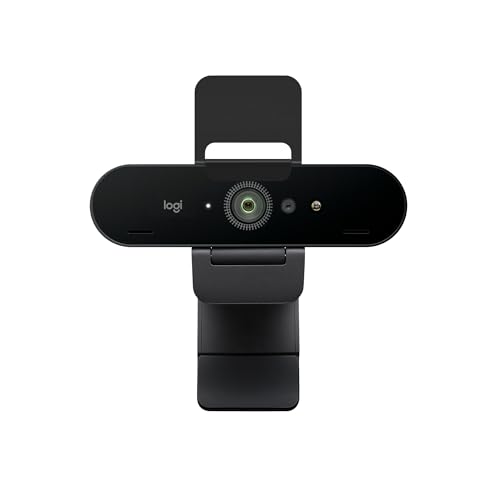
The Brio is the webcam the streaming world treats as its reference point, and as a main camera for a beginner studio it earns the role on reliability before brilliance. Its 4K sensor gives the software room to crop and reframe — a digital zoom that behaves like a second, tighter angle, which in a two-camera stream is a genuine production trick — and its autofocus and exposure behaviour are the calm, unshowy kind that lets a streamer forget the camera exists. It connects by USB, is recognised by everything, and has survived years of all-day streaming duty in offices and studios that would have exposed a lesser webcam’s limits by spring.
In a multi-camera build, the Brio’s job is the face: mounted at eye level, lit decently, locked in exposure once the room is set. Its field of view options let it sit closer than most webcams without turning the frame into a fishbowl portrait, and its colour, while a touch eager, matches its Logitech sibling below with less argument than most mixed-brand pairings demand. Privacy shutter and build quality are the small civilities of a camera that lives on a monitor for years.
Its ceilings are a webcam’s ceilings — low light is survived rather than enjoyed, and no webcam’s depth of field will ever flatter like a mirrorless lens. But as the foundation camera of a beginner studio, the one that must never be the problem, the Brio has no serious rival at its station.
- Connection: USB, recognised by all major streaming software
- Sensor: 4K, enabling crop-and-reframe flexibility
- Focus: autofocus with calm exposure behaviour
- Mount: monitor clip and tripod thread
- Role: the main face camera of the studio
Strengths
- The most dependable main webcam a beginner can buy.
- Resolution headroom doubles as a tighter second framing.
- Years of proven all-day streaming endurance.
Trade-offs
- Low light is managed, not mastered.
- No mirrorless-style background separation.
- Premium webcam pricing.
Best for: the main angle of almost any beginner multi-camera setup.
Not suited for: cinematic shallow-focus looks as the channel’s signature.

Elgato Facecam — Best Fixed-Focus Streaming Cam
The Facecam was designed by a streaming company that had watched a thousand webcams misbehave, and its defining decision is a refusal: no autofocus. A fixed-focus lens, sharp across the desk-depth range a streamer actually occupies, means the picture never hunts, never breathes, never decides mid-sentence that the bookshelf was the subject. For a beginner operating a studio alone, that refusal is a gift — one entire category of live embarrassment, deleted at the factory.
Its sensor and processing were tuned for the streamer’s actual light — a face, a room, a key light of some description — and its companion software gives the manual locks this guide keeps preaching: exposure, white balance, and the rest, saved and recalled like a professional tool. In a multi-camera rig it is a superb citizen: predictable, consistent, identical today to yesterday, which is precisely what cutting between angles requires.
It asks for light in return — fixed focus and streaming-tuned exposure assume you have taken the lighting half-seriously — and it offers no 4K cropping tricks. Paired with a decent key light, though, the Facecam produces the most broadcast-looking webcam picture in this guide, and in a two-camera beginner studio it is the connoisseur’s main camera and the Brio’s strongest argument.
- Connection: USB
- Focus: fixed — no hunting, ever
- Software: full manual control with saved settings
- Sensor: tuned for face-and-room streaming light
- Role: main camera for lit studios, or a rock-steady second angle
Strengths
- Absolute focus consistency — the professional’s quiet priority.
- Manual locks that make multi-camera matching easy.
- Broadcast manners from a streaming-native maker.
Trade-offs
- Wants a proper key light to show its best.
- No 4K reframing headroom.
- Fixed focus means your chair position is part of the setup.
Best for: beginners with a lit desk who value consistency over tricks.
Not suited for: dim rooms and streamers who roam far from the desk.

OBSBOT Tiny 2 — Best Tracking Second Angle
The Tiny 2 is the camera that changes what a solo streamer can stage. Mounted on a two-axis gimbal, it pans and tilts to follow its subject — the streamer standing, demonstrating, moving between a desk and a whiteboard — with a smoothness that reads, on the viewer’s side, as a camera operator. As a second angle in a beginner studio it is transformative in a specific way: it makes the wide, moving shot possible for a crew of one, and it reframes itself when the streamer gestures or tells it to, by hand signal or software.
Its picture quality is strong for its class, its tracking is the product’s whole soul and it shows, and its software adds the framing presets a small studio lives by — desk mode, whiteboard mode, close and wide — recalled at a click between segments. In the multi-camera grammar, the Tiny 2 is the angle that moves, and movement is what separates a produced stream from a video call with ambitions.
The cautions are a gimbal’s cautions: it is a precision device that wants a stable mount and a moment of setup respect, and its framing intelligence occasionally needs the streamer’s guidance when a scene confuses it. Neither diminishes its standing here. For the teaching, demonstrating, and presenting streamers who are this keyword’s core audience, it is the single most capability-adding second camera a beginner can buy.
- Connection: USB
- Movement: two-axis gimbal with AI subject tracking
- Control: gesture, software, and preset framings
- Picture: strong quality for its class, good in moderate light
- Role: the moving wide or demonstration angle
Strengths
- A second angle that operates itself.
- Makes standing and demonstrating segments possible solo.
- Preset framings recall a whole studio geography instantly.
Trade-offs
- A precision instrument — mount it stably and treat it kindly.
- Tracking can need guidance in visually busy scenes.
- Costs like the small robot it is.
Best for: teachers, demonstrators, and presenters streaming solo.
Not suited for: purely seated, static desk streams where its talent idles.

Logitech StreamCam — Best Easy Second Angle
The StreamCam is the diplomat of this studio: a compact, friendly webcam designed for creators, with a mount that rotates between landscape and vertical, exposure and focus behaviour tuned for faces at desk distance, and a temperament that makes it the easiest second camera a beginner will ever add. Its classic jobs in a multi-camera rig are the ones that need a pleasant, uncomplicated eye — the room-wide angle, the product or hands view from a small arm, the guest’s-eye shot — and it performs them without ever becoming the setup’s problem.
Paired with the Brio, it shares a maker’s colour instincts, which softens the matching work that mixed-brand rigs demand; paired with anything, it connects by USB and behaves. Its resolution class is a step below the Brio’s, which in a second angle — usually shown smaller, cut to briefly, or framed wide — is a trade the viewer’s eye will never catch. Vertical orientation serves the streamer who clips highlights for vertical platforms, a workflow this camera was plainly designed by people who understood.
It is not a main camera for a flagship channel, and it does not pretend to be. It is the second angle as it should be: cheap in attention, kind in operation, and present in every stream without a single story about the day it misbehaved.
- Connection: USB
- Orientation: landscape and vertical mounting
- Focus: autofocus tuned for desk distances
- Colour: Logitech family look, matches the Brio kindly
- Role: room, desk, product, and guest angles
Strengths
- The lowest-friction second camera in the guide.
- Vertical mode serves the clips workflow natively.
- Shares colour manners with the Brio main camera.
Trade-offs
- A resolution class below the Brio.
- Not a prestige main camera.
- Low light is adequate rather than strong.
Best for: the second angle in a Logitech-based beginner studio.
Not suited for: carrying a channel alone as the only camera.

Canon EOS R50 — Best Upgrade Main Camera
When a channel outgrows webcams — when the audience is real, the look matters, and the stream’s face deserves a lens’s flattery — the R50 is the graduation this guide recommends. A compact mirrorless with Canon’s famously kind colour for skin, a vari-angle screen, and autofocus that finds an eye and keeps it, it produces the shallow-depth, broadcast-rich picture that webcams imitate and cannot reach. Connected for streaming via USB or a capture card, with the power and heat disciplines its manual describes, it runs long streams like the professional tool it is in miniature.
As part of a multi-camera studio, its arrival reorganises the hierarchy in the healthy way: the R50 becomes the main, the Brio retires to the second angle it can serve for years, and the stream gains the visual signature that separates channels in a viewer’s memory. Canon’s lens ecosystem means the look can grow — a faster prime for the evening streams, a wider lens for the room — without replacing the camera.
The honest costs are a mirrorless camera’s costs: the capture-or-USB chain to learn, batteries or a mains adapter to arrange, a price in a different conversation from the webcams’. That is why it is fifth here and not first: it is the right second purchase for a growing beginner, sequenced after the studio exists and earns it.
- Connection: USB streaming or HDMI via capture card
- Sensor: APS-C mirrorless with interchangeable lenses
- Autofocus: eye-tracking, streaming-proven manners
- Screen: vari-angle for self-framing
- Role: the upgraded main camera; the studio’s visual signature
Strengths
- A genuine photographic look no webcam can counterfeit.
- Kind colour and autofocus that serve a solo streamer.
- A lens system that lets the studio’s look evolve.
Trade-offs
- Needs the capture/power chain planned like a grown-up.
- A different price conversation from the webcams.
- More camera than a first month of streaming requires.
Best for: the growing channel’s main camera, bought as the first upgrade.
Not suited for: day-one beginners who need plug-and-play above all.

Sony ZV-E10 II — Best Growth Pick
The ZV-E10 II is Sony’s creator line distilled: an APS-C mirrorless built around video, with product-showcase focus modes, background-defocus made simple, and the autofocus depth of Sony’s system behind it. For the streamer whose content involves objects — reviews, unboxings, crafts, instruments, anything the hands must present to the lens — its focus behaviour is a production assistant: show the product, and the camera attends to it; return to your face, and it returns with you. In a multi-camera studio that talent makes it both a superb main and a uniquely capable demonstration angle.
Its streaming chain mirrors the Canon’s — USB or capture card, power planned, long-stream manners proven across the creator economy — and its lens ecosystem is the deepest in mirrorless, which matters to a channel planning years. Colour matching against the Logitech angles takes a settings session, as any cross-brand marriage does, and this guide’s matching advice below was written with exactly this wedding in mind.
Choose between the Sony and the Canon by the work: the Canon for the kindest out-of-box face, the Sony for product-led content and the deepest lens future. Either graduates a beginner studio into a production, and neither will be the last camera its owner buys — they will be the first ones that felt like a career.
- Connection: USB streaming or HDMI via capture card
- Sensor: APS-C mirrorless, creator-tuned
- Focus: product-showcase and eye autofocus modes
- Lenses: the deepest mirrorless ecosystem
- Role: growth-path main camera, especially for product content
Strengths
- Made for creators who show things to the camera.
- Autofocus intelligence that replaces a crew member.
- A lens future with no ceiling in sight.
Trade-offs
- The full mirrorless chain of power and capture to manage.
- Colour matching with webcam angles takes a session.
- Overkill for a stream that is happily webcam-shaped.
Best for: product-led and growth-minded streamers stepping up.
Not suited for: beginners who have not yet streamed their tenth hour.
How Do the Six Picks Compare?
| Pick | Type | Connection | Strongest suit |
|---|---|---|---|
| Logitech Brio 4K | Webcam | USB | Main face camera |
| Elgato Facecam | Streaming cam | USB | Locked-down consistency |
| OBSBOT Tiny 2 | PTZ tracking | USB | Self-operating moving angle |
| Logitech StreamCam | Webcam | USB | Easy second angle |
| Canon EOS R50 | Mirrorless | USB / capture | Upgrade main camera |
| Sony ZV-E10 II | Mirrorless | USB / capture | Product-led growth |
Read the table as a career ladder. The first four rungs are USB-simple and can be climbed in an afternoon; the top two are the mirrorless graduation, bought when the channel’s growth argues for them. A beginner who buys in this order owns, at every stage, a complete studio — never a pile of parts awaiting a missing piece.
What Should a Beginner Look for in a Multi-Camera Streaming Setup?
Ergonomics is the chain nobody lists: cameras at eye level, the switching control where the hand already rests, cables routed where feet and chair wheels cannot find them. A studio that fights its operator’s body loses a little of the show every hour, and the fixes are all cheap, physical, and permanent — an arm here, a cable channel there, a monitor raised to the height the neck requested months ago.
Think in chains, not cameras. Every angle in your studio is a chain — camera, connection, software input, scene — and the setup is only as calm as its least reliable link. That is why this guide privileges USB-native cameras for beginners: each USB angle is a short chain with no capture card to configure, no HDMI handshake to negotiate, no dummy battery to seat. Add the mirrorless later, one chain at a time, when the studio’s routines are already habits and one new complexity cannot sink the show.
Matching is the second discipline. Lock every camera’s frame rate to the stream’s, lock exposure and white balance once the lights are set, and accept a slightly imperfect individual picture in exchange for angles that agree with each other — the viewer’s eye forgives a modest image and never forgives a cut between two colour temperatures. Lighting is the third discipline and the cheapest image quality in the entire system: one decent key light improves every camera in this guide more than any upgrade among them, which is why the buying order in the next section puts light before the second camera’s glamour.
Finally, audio — the multi-camera beginner’s forgotten half. Viewers tolerate a modest picture and abandon a bad microphone in minutes, and a studio budget that spends everything on angles and nothing on sound has bought a silent film with excellent coverage. The cameras here are chosen partly for how gracefully they coexist with a proper USB or XLR microphone taking priority in the software, because in the hierarchy of a stream, the voice is the programme and the cameras are its illustration.
How Do You Set Up a Multi-Camera Stream, Step by Step?
Label everything as you build — cables at both ends, scenes by their jobs, the saved profile with the date it was proven. The studio you can rebuild from its labels after a computer failure is a professional studio; the one that lived in your head was a performance that closed without notice. Beginners who label from the first afternoon are, in the only sense that matters, not beginners for long.
Build it in passes, testing each before adding the next. Pass one: the main camera alone — Brio or Facecam — framed at eye level, exposure and white balance locked under your key light, streamed privately or recorded until the picture bores you with its reliability. Pass two: the second angle, mounted where the content wants it — overhead for hands and desk work, wide for standing segments, the Tiny 2 where movement lives — added as a second scene in your software, with a hotkey or a cheap control surface assigned to the cut, because a switch you must mouse-hunt for is a switch you will not use live.
Pass three is the rehearsal the beginners skip and the professionals never do: a full private stream at performance length, in which you discover the USB port that sleeps, the cable that is one metre short of the overhead arm, the angle whose colour argues with the main. Fix those in the quiet, label every cable at both ends, save the software’s profile, and write the setup’s one-page liturgy — the order of switching on, the checks, the settings — on paper that lives at the desk. A multi-camera studio run by one person is a ritual before it is a technology, and the ritual is what makes it look easy from the audience’s side.
What Mistakes Do Beginners Make With Multiple Cameras?
The first is buying angles before light and sound — three cameras in a dim room with a laptop microphone is a well-covered bad stream. The second is mismatching by neglect: auto-exposure hunting on one camera, a different frame rate on another, white balances drifting apart until the cut itself becomes the show’s most noticeable event. Locks exist on every camera in this guide; the mistake is not using them. The third is complexity debt — adding the third angle, the hardware switcher, and the mirrorless in the same month, so that every stream becomes a debugging session with an audience.
Fourth is forgetting the computer’s side of the bargain: multiple USB cameras want sensible ports and bandwidth, mirrorless chains want a capture device that is known to behave, and the whole studio wants a test at full length before it wants a premiere. And fifth, the subtlest, is staging for the cameras you wish you had — standing segments with no tracking angle, product work with no overhead — rather than letting the studio you own dictate a format it can perform beautifully. Grow the format with the rig, one honest angle at a time.
Final Recommendation
And a note on timing, because beginners reliably get it backwards: buy the foundation before you announce the launch date, not after. A studio assembled under a deadline debuts its debugging in public, while a studio assembled in a quiet week — rehearsed privately, lit patiently, switched by a hand that has practised — debuts as if it had always existed. The audience cannot see your preparation, but they can always see its absence, and the difference between the two is the whole subject of this guide.
Start with the Logitech Brio 4K as your main and the Logitech StreamCam as your second angle: an afternoon’s setup, a matched pair, a complete little studio that will carry your first hundred streams. Choose the Elgato Facecam as the main if your desk is lit and you value locked-down consistency, and add the OBSBOT Tiny 2 the moment your format involves standing, teaching, or demonstrating — it is the closest thing to hiring a cameraman in this guide. Graduate to the Canon EOS R50 or the Sony ZV-E10 II as the main camera when the channel’s growth makes the argument for you, promoting the Brio to second angle with honour. That sequence — matched webcams, a tracking angle if you move, a mirrorless when you have earned it — is the beginner multi-camera path with the fewest regrets in it, and every camera on it stays useful for years.
What Does Each Classic Multi-Camera Format Need?
Formats are shopping lists in disguise. The talking-head-plus-desk format — commentary, teaching, crafts, coding, art — needs the main face camera and one overhead or desk angle; the StreamCam on a small arm is the classic second, and the whole format is achievable in this guide’s first two rungs. The interview and podcast format needs two face angles that match, which is the Brio-and-Facecam pairing’s home ground, with matching discipline mattering more than any other variable in the building. The demonstration format — cooking, instruments, repairs, fitness, anything taught by a moving body — is the Tiny 2’s reason to exist, paired with a static wide that establishes the room.
The gaming format adds a capture of the screen itself, which is software’s work, and asks the cameras only for the face and perhaps the hands on the controller — the Brio’s crop trick quietly provides a tighter face framing without a third device. The music format wants the face and the instrument in two honest angles and cares about audio above every camera question in this guide. Name your format before you name your cameras, and the shortlist assembles itself from the six reviews above — which is exactly how a beginner should shop, and exactly backwards from how the marketplace invites you to.
How Do Light and Sound Outrank the Second Camera?
It is this guide’s duty to say plainly what camera guides resist saying: for most beginner streams, the order of purchases that viewers actually perceive is microphone first, key light second, main camera third, and second camera fourth. The reasoning is sensory. A stream is experienced mostly as a voice with a picture attached; a face lit by one decent light, from a modest camera, reads as professional, while a mirrorless picture under a ceiling bulb reads as a video call. Every camera in this guide was chosen to perform honourably under a beginner’s first real light, and several — the Facecam explicitly — are designed on the assumption that you will provide one.
This is not an argument against the multi-camera ambition that brought you here; it is the sequencing that makes the ambition land. Build the voice and the light, add the main camera, and then let the second angle arrive into a studio whose foundations make it look like a production decision rather than a decoration. Streamers who follow that order are consistently mistaken for larger operations than they are, which is the entire commercial point of a multi-camera setup in the first place.
How Does the Studio Grow From Two Cameras to a Production?
Growth, done well, is a sequence of promotions. Stage one is this guide’s foundation: Brio main, StreamCam second, OBS switching, one key light, a real microphone. Stage two answers the format’s loudest complaint — for demonstrators, the Tiny 2’s tracking; for everyone, a third angle only when a recurring shot is being improvised badly. Stage three is the mirrorless graduation, R50 or ZV-E10 II as main, with the Brio promoted to the second angle and the StreamCam to the overhead or the guest seat — a four-role studio in which nothing bought earlier has been discarded, which is the signature of a well-grown rig.
Stage four, which many channels never need, adds the production layer: a hardware control surface for the switching hand, a second computer or capture chain for a co-host, lighting that paints a background rather than merely lighting a face. Notice that cameras stop leading the list — by stage four the studio’s limits are workflow and light, and its purchases follow. The beginner who understands this arc buys differently from the first day: fewer, better-matched cameras, each with a named job and a named future, which is precisely the discipline the six picks were sequenced to teach.
What About Streaming From Two Rooms, or With a Co-Host?
The two-room stream — studio and workshop, desk and stage, kitchen and table — is the multi-camera idea stretched across architecture, and its honest beginner answer is a second small studio rather than a longer cable: the StreamCam or the Tiny 2 on a modest second machine or a long, tested USB run, switched as a source like any other. Chasing one computer’s ports across a house with consumer cabling is how reliable studios become folklore. The co-host variation is simpler and kinder: a second face angle at conversational distance, matched to the main with the locks this guide preaches, and audio given the budget and attention the format deserves, because two voices expose a bad microphone arrangement twice as fast.
Remote guests, the modern co-host, arrive by software rather than by camera, and the studio’s job reduces to framing your own side beautifully — which returns the decision, as every path in this guide eventually does, to the main camera, the light, and the locks.
How Do You Direct Yourself While Streaming?
The multi-camera streamer’s secret skill is not technical at all: it is directing a show you are also starring in. The craft has learnable rules. Cut on the idea, not on the clock — change angles when the subject changes, when you move from talking to showing, when a segment turns a page — because cuts that follow the content feel like television, while cuts that follow a timer feel like surveillance. Hold each angle long enough for the viewer to settle; a second angle shown for two seconds is a blink, not a shot. And build the show’s geography early — the opening minutes should visit every angle once, teaching the audience the studio’s map, after which every return to an angle feels like a place they know.
The tools serve the craft in that order: hotkeys or a small control deck under the switching hand, scenes named by their job rather than their camera, and transitions kept short and identical, because a studio’s professionalism is measured by its consistency under improvisation. Practise the direction in the private rehearsal streams this guide prescribed, until the switching hand works the way a pianist’s left hand does — present, accurate, and beneath notice. That is the moment a multi-camera setup stops being equipment and becomes a voice.
What Should the Second-Hand and Budget-Conscious Beginner Know?
The previous generation of every family in this guide circulates used in quantity, and the beginner on a budget should know the category’s unusual mercy: webcams and streaming cameras age slowly, because their job — a clean USB picture at desk distance — was solved years ago and improves by increments. A used Brio-generation camera from a reputable seller, tested on arrival across a full evening’s stream, is a rational foundation. The mirrorless pair, with their batteries, shutters, and sensor histories, reward the dealer’s warranty more; buy those used only with a return window and a rehearsal stream inside it.
Cables and arms are the budget’s quiet tax, and they should be counted in the plan from the start: the overhead arm for the second angle, the longer USB leads, the mounts that put cameras at eye level rather than on a stack of books — although the stack of books, it must be said, has framed more great first streams than any arm in this guide’s price class. Spend on the cameras and the light; improvise the furniture; upgrade the furniture when the channel’s income files the request.
How Do You Know When the Studio Is Finished?
When the technology leaves your attention. The finished beginner studio — and finished is a stage, not a destiny — is the one you can start in five minutes, run for three hours without a technical thought, and strike without a ritual of relief. Every camera in this guide was chosen to be capable of disappearing into that state: the webcams by their simplicity, the Facecam by its refusals, the Tiny 2 by its self-sufficiency, the mirrorless pair by their manners across long streams. If a component keeps demanding attention — a connection that drops, a colour that drifts, a battery that negotiates — it is not a component; it is a hobby wearing a component’s clothes, and the studio will not be finished until it is replaced or disciplined.
After that, growth returns to being a creative decision rather than a technical rescue, which is the true destination of the beginner this keyword describes. The cameras above were sequenced to get a streamer there with the least money spent twice — and in a field where almost everyone spends some money twice, that is the highest compliment a buying guide can honestly pay its own recommendations.
The Shopping List, in the Order to Buy It
For the reader who wants the guide as a sequence: first, the microphone your format demands and one decent key light, because the viewers will judge those before any camera. Second, the main camera — Brio for most, Facecam for the lit and consistency-minded. Third, the second angle — StreamCam for desk and room, Tiny 2 if you stand and show. Fourth, the connective tissue the angles require: the arm, the longer cables, the powered hub if the computer asks for one, and a small control surface when the mouse starts costing you cuts. Fifth, and only when the channel’s growth signs the request, the mirrorless main — Canon for the kindest face, Sony for the product-led future — with its power solution and, when you are ready, its capture card.
Bought in that order, every purchase is used the week it arrives and remains used for years. Bought in any other order, the studio accumulates ornaments. The discipline is not austerity — the full list is a genuinely capable small television station — it is sequence, and sequence is what separates a studio that grows from a pile that accumulates.
What Does a Stream From This Studio Actually Look Like?
Picture the finished article from the viewer’s chair. The stream opens on the main camera: a face at eye level, lit like a person rather than a suspect, the background calm. Ninety seconds in, the host stands to demonstrate, and the cut goes — cleanly, on the movement — to the Tiny 2, which follows like a colleague. Hands and materials fill the StreamCam’s overhead angle for the detailed passage; the cut back to the face lands exactly as the explanation resumes. Nothing hunts for focus, nothing changes colour at the joins, the voice is closer than the room. A new viewer, asked afterwards how many people run the show, guesses two or three. There is one, and a desk of equipment that was bought in the right order — which is the entire promise of the keyword, kept.
A Note on the Typo Twin, and on Choosing Once
Search engines will offer this guide’s reader a near-identical keyword with a misspelling in it, and the honest answer is that the advice does not change by a single camera: streaming with multiple cameras, spelled however the internet spells it tonight, is the same studio, the same order of purchases, and the same six cameras in the same roles. We mention it only because beginners sometimes wonder whether the differently-spelled question hides a different discipline. It hides the same one, and you are already reading its guide.
That sameness is, in the end, the reassurance this category offers. Multi-camera streaming feels from the outside like a hundred competing systems; from the inside, once the chains are short, the locks are set, and the light is honest, it is one small set of decisions made once and then forgotten in favour of the actual work — talking, teaching, showing, playing — that the cameras were bought to serve. Choose from this list, in this order, and then go and be interesting on more than one angle. The interesting was always the hard part, and no camera in any guide can buy it for you.
Related guides
- Best Cameras for Beginner Cinematography: 6 Cameras to Learn Filmmaking On
- Best Cameras for Artwork Capture: Colour-True Reproduction and Studio Copy Work
Frequently Asked Questions
How many cameras does a beginner actually need?
Two. A main face camera and one working second angle — overhead, wide, or tracking — deliver nearly all of multi-camera’s production value. A third angle adds polish in specific formats; a fourth adds mostly complexity. Grow to two first, master the cut, and let a recurring staging problem, not enthusiasm, argue for each addition.
Do I need a capture card for these cameras?
Not for the four USB cameras — they connect directly and are recognised by streaming software as webcams. The mirrorless pair can stream over USB within their makers’ specifications, or through a capture card for their fullest quality and reliability; many growers start on USB and add the card when they add the camera. Either way, no capture hardware is needed to begin.
What software switches between multiple cameras?
OBS Studio is the standard answer — free, powerful, and the platform every camera in this guide is tested against by its maker and its community. Alternatives from the streaming platforms and the camera makers’ own ecosystems exist, but a beginner’s first hundred hours are best spent in the software with the deepest well of tutorials, which is OBS and its scene-and-hotkey system.
How do I make two different cameras match in colour?
Lock both cameras’ white balance to the same manual setting under your actual lights, lock exposure, and then adjust in small steps while watching both angles side by side in the software — never by judging each alone. Same-brand pairs like the Brio and StreamCam start closer; cross-brand pairs like a Logitech and the Sony converge after one patient session and stay converged while the locks hold.
Can my computer run three or four USB cameras at once?
Usually, with sensible management: spread cameras across different USB controllers or a quality powered hub, avoid running every camera at its maximum resolution simultaneously unless the machine is strong, and test the full rig at streaming length before going live. Most beginner studios run two or three angles comfortably on a modern laptop; the rehearsal, not the specification sheet, is the authority.
What frame rate and resolution should a multi-camera stream use?
Match every camera to one shared setting — the stream’s own — rather than letting each run at its personal best. Consistency across angles matters more than any individual number: a stream whose cameras agree at a modest setting looks produced, while a stream whose cameras disagree at glorious settings looks broken at every cut. Set the software’s output first, then set each camera to feed it identically, lock the choices, and spend the saved attention on your content.
Should I buy a hardware switcher as a beginner?
Almost never at the start. Software switching in OBS is free, flexible, and sufficient for every setup in this guide, and a hardware switcher becomes interesting only when a format outgrows it — multiple computers, cameras beyond USB’s comfort, or a production with a separate operator. Spend the switcher’s budget on light and sound first; your viewers will notice those purchases in the first minute.
Related Guides
One last word to the beginner standing at the first purchase, possibly overwhelmed by a guide that keeps adding disciplines to a shopping trip: the whole apparatus described here, at its foundation level, is two cameras, a light, a microphone, and free software, set up in an afternoon and rehearsed in an evening. Everything after that is growth at your own pace, argued for by your own format, funded by your own audience. Start with the foundation, stream this week, and let the show itself write the rest of the shopping list — it will, in handwriting you will recognise as your own ambitions, one honest angle at a time.
Stream this week, with the foundation you have, rather than next month with the studio you are imagining — audiences are built by broadcasts, not by equipment lists, and every camera recommended here was chosen to make the first broadcast the easy part.
A multi-camera studio grows in every direction from here. See also our guide to the best beginner cameras for video, the best affordable 4K cameras for YouTube, and our roundup of the best action cameras for vlogging.


