ilcastellomenu.com is reader-supported. When you buy through links on our site, we may earn an affiliate commission.
Where to Buy
First, a small act of honesty: “sarting” is a typo. Almost everyone who typed this search meant starting — as in, starting a YouTube channel from zero — and that is exactly the reader this guide is written for. So: the best cameras for sarting youtube, read as the best cameras for starting YouTube, are not the cameras with the longest spec sheets. They are the cameras that get out of a beginner’s way. Your first fifty videos will be limited by your ideas, your lighting and your willingness to publish, not by your sensor. The right first camera is the one you can switch on, frame, focus and forget — because every minute spent fighting a menu is a minute not spent becoming a person who makes videos.
That philosophy shapes everything below. Beginners quit channels for predictable reasons: footage that hunts for focus while they talk, audio that sounds like a bathroom, screens they cannot see themselves in, files that demand a colour-grading course before they look decent. A starter camera earns its place here by removing those failure points one by one. Reliable face autofocus. A screen that flips toward you. A microphone input for the day you outgrow the built-in mics. Colours that look pleasant straight out of the camera, because you have a channel to build, not a post-production degree to earn.
The six picks divide into three honest camps. The two interchangeable-lens cameras — Sony’s ZV-E10 II and Canon’s EOS R50 — are the grow-with-you choices, built for creators and happy to accept better lenses as your channel matures. The two fixed-lens compacts — Sony’s ZV-1F and Canon’s PowerShot G7 X Mark III — trade that growth for pocketability and simplicity. And the two wildcards, DJI’s Osmo Pocket 3 and GoPro’s HERO13 Black, exist for channels that move: walking tours, travel, workshops, gyms, kitchens filmed from a chest strap. None of them requires you to know what an f-stop is on day one. All of them will still be useful on day three hundred.
One more beginner truth before the rankings: your phone is a legitimate camera, and if buying dedicated hardware means delaying your first upload by two months, upload with the phone. But the moment you know you are serious — the moment filming feels like a habit rather than an experiment — a purpose-built camera changes the daily experience completely. It lives on the tripod, charged and ready. It does not ring mid-take. Its battery does not die because you were scrolling at breakfast. That separation of roles is worth more to a new channel than any resolution figure.
Key Takeaways
- “Sarting” is a typo for “starting” — this guide ranks cameras for brand-new YouTube channels, judged on how little they obstruct a beginner.
- The Sony ZV-E10 II is the strongest start-and-grow pick: creator-first controls, excellent autofocus and a lens mount your channel can mature into.
- The Canon EOS R50 is the friendliest interchangeable-lens route, with guided menus and colours that flatter skin straight out of the camera.
- The DJI Osmo Pocket 3 removes the tripod-and-framing problem entirely for walking, travel and desk-to-street channels.
- Fixed-lens compacts like the Sony ZV-1F and Canon G7 X Mark III suit talking-head and vlog formats where simplicity beats flexibility.
- Buy for the failure you actually fear — bad focus, bad audio, bad framing — not for the biggest number on the box.
In this guide
Quick Picks
| Camera | Badge | Why it earns its place |
|---|---|---|
| Sony ZV-E10 II | Best overall starter | A creator-built mirrorless camera whose autofocus and product-showcase smarts forgive beginner mistakes daily. |
| Canon EOS R50 | Friendliest first mirrorless | Guided menus, lovely colour and a vari-angle screen make it the least intimidating way into interchangeable lenses. |
| Sony ZV-1F | Simplest talking-head camera | A fixed wide lens, one-button background blur and face priority — built for sitting down and pressing record. |
| Canon PowerShot G7 X Mark III | Best pocket vlogging compact | A bright zoom lens and vertical-video friendliness in a camera that genuinely fits a jacket pocket. |
| DJI Osmo Pocket 3 | Best for moving channels | A mechanical gimbal and face tracking that follow you around the room, the street or the workshop. |
| GoPro HERO13 Black | Best for action-first channels | Waterproof, mountable everywhere and stabilised beyond reason — for channels that happen outdoors. |
How We Chose These Picks
We ranked these cameras the way a new channel actually experiences them: alone, at a desk or in a kitchen, with nobody to pull focus or check the framing. Every pick had to pass four beginner tests. First, can one person frame themselves confidently, using a flip screen, a tracking system or a phone preview? Second, does the autofocus lock onto a face and stay there while the presenter talks, gestures and holds products up to the lens? Third, does the footage look publishable without colour grading — because a beginner’s editing time is already consumed by cutting silences and adding captions. Fourth, is there a microphone input or a credible audio upgrade path, since viewers forgive soft video far sooner than echoing sound.
We also asked a question most buying guides skip: what does this camera do to the presenter’s confidence? A beginner filming alone has no crew to reassure them, so the camera itself must supply the reassurance — a tally light confirming it is recording, a screen that proves the framing, autofocus that visibly locks on and stays. Cameras that left the solo presenter guessing were marked down even when their image quality was excellent, because a presenter who trusts the machine performs better, films more often and improves faster. Confidence is a feature. On a new channel, it might be the feature.
We weighted forgiveness over ceiling. A professional camera with a higher ultimate image quality but a menu system that punishes exploration scores lower here than a slightly humbler camera that a nervous beginner will actually enjoy using every day. We also considered the ecosystem each camera commits you to: lens mounts, accessory costs, and whether the camera remains useful as a second angle or travel body once the channel upgrades. Cameras were excluded for failing the solo test — no way to see yourself, autofocus that wanders, or overheating behaviour that would interrupt the long, rambling first takes every beginner records. What survived is a shortlist where each model is the right answer for a recognisable kind of new channel.
What Does a Beginner Actually Need From a First YouTube Camera?
Strip away the marketing and a starter camera does four jobs. It frames you — hence the flip screen or tracking gimbal on every pick here. It focuses on you — modern face and eye detection is the single greatest gift camera makers have given solo creators, because it replaces the camera operator you do not have. It hears you — or at least lets you plug in something that does, which is why a microphone jack matters more than a second card slot at this level. And it produces footage that looks good with the default picture settings, because your first audience is judging your ideas through the image, and a grey, flat, ungraded log file makes good ideas look amateur.
What a beginner does not need is equally clarifying. You do not need the largest sensor, because your lighting will limit you long before your sensor does; a modest lamp pointed at your face improves a small-sensor image more than a sensor upgrade improves a badly lit one. You do not need a dozen lenses — one versatile zoom or one well-chosen fixed lens covers years of talking-head and vlog work. You do not need to record everything at the highest frame rate and resolution your camera offers, because giant files slow down editing, fill drives and teach you nothing. And you do not need to match the gear of the channels you admire, because they bought their cameras with the revenue of the audience you are only beginning to build. Buy for your next fifty videos, not for the studio tour you will film in three years.
There is one more need that beginners rarely articulate until they have suffered without it: speed of starting. The gap between “I should film that idea” and a rolling camera is where most early videos go to die. A setup that lives assembled — camera on tripod, microphone attached, battery charged — can be recording in under a minute, and that minute is short enough that inspiration survives it. A setup stored in three cupboards takes ten minutes to assemble, and by minute six the idea feels smaller and the sofa feels larger. Judge every pick below partly by how it supports the assembled-and-ready lifestyle: small cameras and gimbals excel here, mirrorless systems demand a dedicated corner, and the GoPro simply lives wherever the activity lives. Your filming corner, however humble, is your studio. Treat its readiness as sacred.
Which of These Cameras Fits the Channel You Are Actually Starting?

Sony ZV-E10 II — Best overall starter
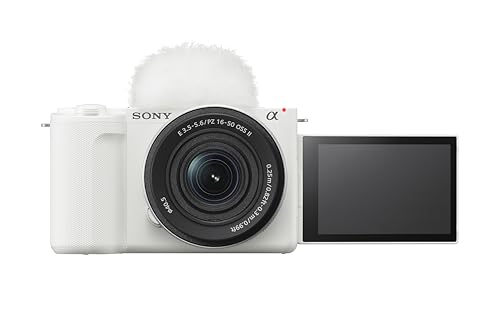
Sony designed the ZV line by watching what vloggers actually did with general-purpose cameras, then deleting everything else. The ZV-E10 II is the purest expression of that idea in an interchangeable-lens body: a dedicated button for background blur, a product showcase mode that snaps focus to whatever you hold up to the lens, a tally light so you always know when you are recording, and autofocus that treats your face as the most important object in the universe. For a new creator, that last trait is the whole ballgame. You can pace, gesture, lean in for emphasis and hold a book cover six inches from the glass, and the camera simply handles it while you think about what you are saying.
The second paragraph of any ZV-E10 II story is about growth. Because it takes Sony E-mount lenses, the camera you buy for your first talking-head videos can later accept a fast prime for a softer background, a wider zoom for room tours, or a macro for product close-ups — each upgrade arriving when the channel justifies it, not before. Its 4K footage is crisp and its colour science in the standard profile is kind to skin without grading. The honest beginner frictions are a menu system that rewards a weekend of exploration, a kit zoom that is merely fine rather than exciting, and the fact that it has no viewfinder worth mentioning — irrelevant for video, worth knowing if you also plan to shoot stills seriously. As a first serious camera for a channel you intend to keep, it is the pick we would hand to a friend.
- Sensor: APS-C
- Lens mount: Sony E (interchangeable)
- Screen: fully articulating touchscreen
- Microphone input: yes, plus headphone output
- Signature help: Product Showcase focus mode, background-defocus switch
Strengths
- Autofocus that finds faces and held-up products and simply refuses to let go.
- A lens mount with years of affordable upgrades in every direction your channel might grow.
- Creator-specific hardware — tally light, defocus button, directional microphone options — instead of repurposed stills features.
Trade-offs
- The menu system is deep, and a total beginner should budget an evening to set it up once, properly.
- No meaningful viewfinder, so it is a video-first tool rather than a hybrid photographer’s camera.
- The standard kit zoom is the weakest part of the package and the first thing most owners upgrade.
Best for: new creators who know the channel is a long-term project and want one camera that grows with it. Not suited for: anyone who wants to unbox, press one button and never open a settings menu.
A word about the ZV-E10 II’s stills side, because many new YouTubers also become their channel’s thumbnail photographer. The camera handles thumbnail photography perfectly well — you will pose, grimace and point at imaginary text with it weekly — and its vertical shooting support makes Shorts a first-class citizen rather than an afterthought. That dual citizenship, main videos plus thumbnails plus Shorts from one body, is precisely the kind of unglamorous versatility that keeps a one-person channel moving.

Canon EOS R50 — Friendliest first mirrorless
If the Sony is the capable choice, the Canon EOS R50 is the kind one. Canon has spent decades making cameras that explain themselves, and the R50’s guided interface literally shows you what a setting does before you commit to it — a small kindness that matters enormously when you are learning alone at midnight. Its colour science is the other half of the appeal: Canon skin tones are famously forgiving, and for a presenter-led channel, looking healthy and natural with zero grading is a genuine competitive advantage. The vari-angle screen flips to face you, the autofocus tracks faces and eyes with calm reliability, and the whole body feels like a camera designed by people who remember being beginners.
Where the R50 differs from the Sony is in philosophy rather than quality. Canon’s RF-S lens range is younger and slimmer than Sony’s E-mount catalogue, so the upgrade path exists but offers fewer bargains along the way. In exchange you get a proper viewfinder for stills, a slightly more traditional control layout that teaches transferable camera skills, and an overall experience that feels less like operating a gadget and more like learning an instrument. For channels fronted by one presenter at a desk — tutorials, commentary, education, reviews — that calm competence is exactly right. It is also the pick we would suggest for a teenager or student starting a channel, because the guided menus shorten the distance between unboxing and uploading.
- Sensor: APS-C
- Lens mount: Canon RF (interchangeable)
- Screen: vari-angle touchscreen
- Microphone input: yes
- Signature help: guided shooting interface, Canon colour science
Strengths
- The most approachable menu and guidance system in this group — it teaches while you shoot.
- Straight-out-of-camera colour that flatters presenters without any grading work.
- Dependable face and eye autofocus with a real viewfinder for photography on the side.
Trade-offs
- The RF-S lens ecosystem is still growing, so exotic or bargain lens options are fewer than Sony’s.
- Rolling shutter is visible in fast pans, so whip-pan transitions are best avoided.
- Like most compact mirrorless bodies, long recording sessions reward a spare battery.
Best for: first-time camera owners who want to learn real camera craft without being punished for it. Not suited for: creators who already know they will chase specialised lenses on a tight budget.

Sony ZV-1F — Simplest talking-head camera
The ZV-1F is what happens when a manufacturer asks what a talking-head camera would look like if every decision were made for the user. The lens is fixed, wide and permanently focused on the zone where a seated or arm’s-length presenter lives. There is a button that blurs the background. There is a mode that keeps your face bright even when the room is not. The screen flips, the microphone array points at you, and the entire proposition is: sit down, press the red button, talk. For a certain kind of channel — commentary, study tips, language lessons, reaction and advice formats — this radical simplicity is not a limitation but the entire point, because the camera disappears and only the habit of publishing remains.
The fixed lens deserves an honest paragraph. You cannot zoom optically, you cannot swap to a faster lens for dim rooms, and the wide fixed framing means your background is always part of the shot — tidy it or embrace it. Low light is handled adequately rather than brilliantly, and a desk lamp will do more for this camera than any setting buried in its menus. What you receive in return is a camera with almost no wrong answers: nothing to misconfigure, nothing to upgrade, nothing to research at 2 a.m. instead of scripting. Channels die from friction, and the ZV-1F is engineered, quite deliberately, to have almost none. If your format is a person talking to other people, it may be all the camera you need for your first two hundred videos.
- Sensor: 1-inch class
- Lens: fixed wide-angle, no optical zoom
- Screen: fully articulating touchscreen
- Microphone input: yes
- Signature help: one-button background defocus, face-priority exposure
Strengths
- Near-zero setup: the camera makes the technical decisions so the beginner can make the creative ones.
- Wide fixed lens is perfectly matched to desk recording and arm’s-length vlogging.
- Compact and light enough that filming never feels like an event requiring preparation.
Trade-offs
- No optical zoom and no lens upgrades — the framing you buy is the framing you keep.
- Modest low-light ability makes a simple lamp a near-mandatory companion purchase.
- Digital stabilisation crops the frame, so walk-and-talk footage is steadier handheld at a desk than on the move.
Best for: seated presenters, commentators and teachers who value a frictionless daily filming habit. Not suited for: channels built on varied locations, zoomed detail shots or cinematic shallow-focus looks.

Canon PowerShot G7 X Mark III — Best pocket vlogging compact
The G7 X line became the default vlogger’s compact years ago, and the Mark III shows why the formula endured: a genuinely bright zoom lens in a body that disappears into a jacket pocket, Canon’s people-pleasing colour, and a screen that flips up over the top for the classic walk-and-talk framing. Where the ZV-1F locks you into one wide view, the G7 X Mark III lets you punch in for a tighter talking-head shot or pull back for a room tour, which makes it the more flexible diary-style camera. It was also designed with vertical video and live streaming in mind earlier than most rivals, which suits beginners whose YouTube ambitions include Shorts from the very first week.
Its compromises are the classic compact compromises, and a beginner should meet them with eyes open. Autofocus, while serviceable for faces at conversational distance, is a generation behind the mirrorless picks here and can hesitate when you move quickly toward or away from the lens. The small body warms up on long 4K sessions, so it prefers the natural rhythm of vlogging — short clips, many breaks — over hour-long continuous recording. Battery life is pocket-camera battery life. None of this stops it being the camera most likely to actually be in your bag when life happens in front of you, and for lifestyle, travel and day-in-the-life channels, presence beats perfection every single time.
- Sensor: 1-inch class
- Lens: built-in zoom with a bright maximum aperture
- Screen: tilts up for self-framing
- Microphone input: yes
- Signature help: vertical video support, live-streaming readiness
Strengths
- A bright zoom lens that handles cafés, streets and living rooms without a lens swap.
- True pocket size — the camera that gets carried is the camera that gets used.
- Canon colour and a flip-up screen keep the classic vlogging workflow effortless.
Trade-offs
- Autofocus is a step behind the mirrorless picks and can hunt during energetic movement.
- Extended 4K recording can run into heat limits; it prefers vlog-length clips.
- Small batteries mean spares are a practical necessity for full filming days.
Best for: lifestyle and travel vloggers who film their actual lives rather than a set. Not suited for: marathon recording sessions or presenters who need flawless tracking autofocus.

DJI Osmo Pocket 3 — Best for moving channels
Every other camera in this guide assumes you will sit reasonably still, or hold the camera and accept the shake. The Osmo Pocket 3 rejects the premise. Its camera rides on a three-axis mechanical gimbal, so footage glides when you walk, turns when you turn, and its face tracking will physically rotate the camera head to keep you framed while you move around a kitchen, a workshop or a market stall. For cooking channels, craft channels, real-estate walkthroughs, travel diaries and any format where the presenter demonstrates with their hands in changing locations, this little wand solves problems that no amount of mirrorless technique solves at any price.
The rotating touchscreen is the second half of the magic: flick it horizontal for landscape filming, vertical for Shorts, and the camera understands. Its larger sensor than most pocket rivals gives it respectable low-light manners for its size, and DJI’s wireless microphone pairing is the slickest audio upgrade path in this entire guide — clip on the transmitter and your voice stays consistent whether you are at the counter or across the room. The limits are real: the fixed wide view cannot punch in for detail without walking closer, the gimbal is a delicate mechanism that dislikes being dropped or pocketed carelessly, and it is a video specialist rather than a stills camera. But for a moving channel, beginners consistently underestimate how much of their early frustration is camera shake and lost framing — and this is the one pick that deletes both.
- Sensor: 1-inch class on a 3-axis gimbal
- Lens: fixed wide-angle
- Screen: rotating touchscreen (landscape/portrait)
- Audio: built-in array plus wireless microphone pairing
- Signature help: mechanical stabilisation, ActiveTrack face following
Strengths
- Gimbal-smooth walking footage that no electronic stabilisation in this guide can match.
- Face tracking that physically follows you — a genuine solo-operator replacement.
- Starts up and starts recording in seconds, which quietly doubles how often you film.
Trade-offs
- The gimbal head is fragile compared with a solid camera body; it wants its case.
- Fixed wide framing means detail shots require moving yourself, not the lens.
- It is a video tool first — stills photographers should look at the mirrorless picks.
Best for: cooking, craft, travel and walkthrough channels where the presenter moves and demonstrates. Not suited for: static desk channels, or anyone rough on their gear.
There is also a confidence argument for the Pocket 3 that spec sheets never capture. Filming in public with a full camera rig attracts attention and self-consciousness; filming with a device the size of a chocolate bar attracts almost none. Beginners consistently report that the Pocket’s discretion is what got them filming outside the house weeks earlier than they otherwise would have — and those early, awkward public videos are where a channel’s voice is usually found. Small is not a compromise here. For a certain kind of creator, small is the feature that makes everything else possible.

GoPro HERO13 Black — Best for action-first channels
Some channels do not happen at a desk. They happen on a mountain bike, under a car, inside a beehive inspection or strapped to the chest of someone learning to surf. For those channels the HERO13 Black is not one option among many; it is close to the definition of the category. It is waterproof without a case, built to survive being dropped on rock, stabilised to a degree that makes rough trails look like dolly shots, and supported by a mount ecosystem so deep that if a surface exists, someone sells a way to attach this camera to it. The newer lens-mod system widens its creative range further, from ultra-wide immersion to macro tinkering.
A beginner choosing the GoPro as a main camera should understand its personality. It is a specialist that tolerates desk work rather than a desk camera that tolerates adventure: the fixed wide lens makes everything feel distant, the tiny screen is a framing aid rather than a monitor, and its audio at arm’s length is the weakest here until you add the media mod or an external solution. Heat and battery discipline matter on long static recordings. But judge it by its native habitat and nothing else in this guide is close. If your channel’s promise is “come with me while I do this”, the GoPro is the camera that can actually come — into rain, dust, salt water and situations that would retire every other pick on this page.
- Sensor: action-camera class with tall, flexible framing
- Lens: fixed ultra-wide, swappable lens mods available
- Screen: front and rear displays
- Build: waterproof and ruggedised without housing
- Signature help: HyperSmooth stabilisation, huge mount ecosystem
Strengths
- Survives water, drops and weather that would end every other camera in this guide.
- Stabilisation turns running, riding and shaking into smooth, watchable footage.
- Mounts for helmets, chests, handlebars, dashboards and dogs — if it moves, it can carry one.
Trade-offs
- The ultra-wide fixed view is a poor match for intimate talking-head framing.
- Built-in audio at distance is the weakest here; plan on an upgrade path for narration-heavy formats.
- Long static recordings demand battery and heat management a desk camera never asks for.
Best for: sport, outdoor, automotive and hands-on channels filmed in motion and in weather. Not suited for: seated presenters who need flattering framing and pristine voice audio.
How Do the Six Starter Cameras Compare Side by Side?
| Camera | Type | Framing help | Audio path | Best first channel |
|---|---|---|---|---|
| Sony ZV-E10 II | Mirrorless, interchangeable lens | Flip screen, product showcase focus | Mic input + headphone | Reviews, tutorials, growing channels |
| Canon EOS R50 | Mirrorless, interchangeable lens | Vari-angle screen, guided menus | Mic input | Education, commentary, learning shooters |
| Sony ZV-1F | Fixed-lens compact | Flip screen, face-priority exposure | Mic input | Talking-head and advice formats |
| Canon G7 X Mark III | Pocket zoom compact | Flip-up screen | Mic input | Lifestyle and travel diaries |
| DJI Osmo Pocket 3 | Gimbal camera | Tracking gimbal, rotating screen | Wireless mic pairing | Cooking, craft, walkthroughs |
| GoPro HERO13 Black | Action camera | Front screen, voice control | Media mod / external | Sport and outdoor adventure |
What Mistakes Do New YouTubers Make When Buying Their First Camera?
The classic error is buying for the channel you fantasise about rather than the one you will film this month. A cinema-grade body purchased for a commentary channel delivers no benefit, while its weight, cost and complexity quietly discourage filming. Buy for your actual format. The second mistake is spending the entire budget on the camera and nothing on the unglamorous trio that transforms footage: a tripod so the camera has somewhere to live, a basic light so your face is brighter than your background, and any microphone that gets closer to your mouth than the camera is. Viewers experience those three purchases as “quality” far more directly than a sensor upgrade.
There is a quieter mistake hiding behind the shopping itself: researching as a substitute for publishing. Camera comparison is comfortable — it feels like progress and risks nothing. Scripting a video and filming your own face is uncomfortable and risks everything, which is exactly why it is the real work. Set a deadline for the purchase decision, honour it, and move the same research energy into titles, hooks and the first ten seconds of your videos, where new channels are actually won and lost. The creators you admire are not the ones who chose perfectly. They are the ones who chose quickly and then made two hundred videos.
Third, beginners over-record: maximum resolution, maximum frame rate, hour-long unbroken takes. The files become unmanageable, editing becomes archaeology, and uploading slows to a crawl. Record at the quality your channel needs, in takes you can find your way around. Fourth, they ignore the return policy window — film real test videos in your real room during the first week, because a camera that annoys you in week one will be hated by month three. Finally, the subtlest mistake: waiting. Every camera in this guide is good enough to start a successful channel, and the algorithm does not know what you filmed on. Publish the imperfect video. The second one will be better, and there is no other route to the hundredth.
How Should a Beginner Set Up and Start Filming in the First Week?
Day one is for foundations: charge everything, format the card in-camera, set the camera to its standard picture profile, enable face or eye autofocus, and turn on the recording tally or indicator so you always know your state. Place the camera at eye level — a stack of books under a tripod works — because looking slightly across or down at the lens reads as natural, while filming up at yourself from a desk does nobody any favours. Put your key light in front of you and slightly to one side, close the curtains behind you if the window is blowing out the background, and record a two-minute test talking about anything. Watch it fully. That uncomfortable viewing teaches more than a week of tutorials: you will hear your room’s echo, see your framing habits and learn your camera’s real behaviour in your real space.
Across the rest of the week, build the habit loop rather than the perfect setup. Film at the same time in the same spot so preparation shrinks to minutes. Keep a one-page settings card taped near the camera — your resolution, your autofocus mode, your microphone level — so every session starts identical and your footage stays consistent while your presenting improves. Check focus and audio with a ten-second test before every real take; the two disasters of beginner filming, the soft take and the silent take, are both prevented by ten seconds of suspicion. And end each session by copying the footage off the card and backing it up before you format anything. Channels are built from archives that survive.
What Else Belongs in a Starter Kit Besides the Camera?
Beginners research cameras for weeks and tripods for four minutes, which is precisely backwards relative to how much each affects the finished video. A tripod that wobbles, slips or cannot reach eye level will sabotage every camera in this guide equally, so buy one with a fluid, positive lock and legs that do not flex when extended. Lighting is the second under-researched purchase. A single soft light source placed close to your face — close is what makes it soft — will lift a modest camera’s image beyond what an expensive camera achieves in a dim room, and it makes autofocus more confident and skin tones more honest at the same time. If you film in a room with a window, the window is your first light: face it, never sit with it behind you, and film earlier in the day when it is bright but not blasting.
Audio accessories deserve a plan rather than a panic buy. Start with whatever gets a microphone closest to your mouth: that might be a wired lavalier clipped to your collar, a shotgun microphone on top of the camera for seated work, or the wireless pairing the Pocket 3 makes so painless. Then add the boring infrastructure that protects the habit — a spare battery so a dead cell never cancels a session, two memory cards rotated so one is always empty, and a small bag or shelf where the whole kit lives assembled. The goal is a setup whose preparation time approaches zero. Every cable you must hunt for is a small tax on your willingness to film, and new channels die from accumulated small taxes far more often than from any single technical limitation.
Finally, software is part of the kit even though it never appears in unboxing videos. Pick one editor and learn its ten core operations properly — import, cut, trim, captions, audio levels, colour basics, export — rather than sampling five editors superficially. Your camera choice should serve that editor: files that import without conversion drama, footage that looks right with a single adjustment. Every pick in this guide produces editor-friendly files by design, which is not an accident of the shortlist but one of its criteria.
How Long Can a Beginner Realistically Record in One Session?
New creators imagine filming in long, inspired sittings; the reality of a first channel is ninety ragged minutes of false starts, re-takes and thinking aloud, from which twelve usable minutes are eventually rescued. That reality imposes three practical demands. Battery endurance matters, and every camera here benefits from a spare — mirrorless bodies and compacts alike will not survive a full afternoon of experimentation on one cell, and the Pocket 3 and GoPro reward owners who treat batteries as consumables to rotate rather than heirlooms to nurse. Heat matters too: compact bodies recording high-resolution video in a warm room may pause to cool, which is why the workflow advice in this guide favours filming in takes. Structure your sessions as a series of short recordings — one idea, one take, a breath — and heat limits, card management and your own concentration all improve together.
Storage is the third demand, and it scales with ambition. High-resolution footage accumulates at a pace that shocks every beginner exactly once: a month of enthusiastic filming can fill a laptop drive. Build the unglamorous habit early — offload after every session, keep one backup copy before formatting the card, and name folders by date and topic so future-you can find the B-roll that present-you is sure will be needed. None of the six cameras here makes storage unusually painful; all of them produce standard, editor-friendly files. The discipline is yours to supply, and it is worth more than any feature difference between the picks.
How Does Each Type of Camera Change Your Daily Filming Workflow?
The mirrorless pair ask the most of you and repay the most. Owning the ZV-E10 II or EOS R50 means owning a small system: lenses to cap, batteries to rotate, a sensor to keep dust-free. In exchange, your filming workflow becomes a craft you can refine for years — swapping to a wider lens for a room tour, adding a fast prime when you want the background to melt, tethering for a product shoot. Beginners who enjoy gear as a hobby in itself tend to thrive here; the camera gives their curiosity somewhere productive to go. Beginners who find equipment fiddly should be honest about that temperament, because the best camera is the one whose workflow you do not resent.
The compacts invert the bargain. The ZV-1F and G7 X Mark III reduce filming to an act closer to opening a notebook: out of the bag, screen flipped, record. There is nothing to configure wrongly and nothing to upgrade, which means your workflow improvements must come from you — better scripts, better light, better titles — rather than from purchases. Many creators find that constraint liberating; it removes shopping as a form of procrastination. The Pocket 3 creates a third workflow entirely: filming becomes mobile by default, the camera follows you, and the editing question shifts from “is it stable?” to “did I capture the moment while moving through it?” The GoPro, finally, makes filming an act of placement — mount it, start it, go and do the thing — and its workflow rewards people whose content is an activity first and a performance second. None of these workflows is superior. They are four different relationships with a camera, and choosing among them honestly is the real purchase decision underneath the spec sheets.
Which Pick Handles a Small, Dim Room Best?
Most first channels are filmed in bedrooms, spare corners and kitchens after dark, so this question deserves its own answer. Sensor size and lens brightness decide the physics: the two mirrorless cameras, with their larger APS-C sensors and the option of fast prime lenses, hold the clear advantage once the sun goes down, holding clean, detailed images at sensitivities where small-sensor cameras begin to smear detail. The Pocket 3 punches above its size thanks to its relatively large sensor and the fact that its gimbal lets you use slower, cleaner settings while moving. The compacts and the GoPro ask for help: give them a lamp, a window or a practical light in frame and they respond gratefully; leave them in a grey, top-lit room and no setting will rescue the footage.
The practical advice is unglamorous. Before upgrading any camera for low light, spend a filming session experimenting with the light you already own: move the lamp closer, turn off the overhead light that casts eye-socket shadows, angle yourself toward the window. Beginners routinely discover that their “bad camera” was a bad lighting arrangement, and that discovery is free. If, after that session, your room still defeats the camera, the mirrorless pair — or a fast prime added to either — is the honest upgrade path, which is one more reason they top this ranking for channels filmed at home after work.
What Happens When the Channel Outgrows Its First Camera?
It is worth knowing, before you buy, that none of these cameras becomes waste when you upgrade. The natural history of a growing channel is that the first camera gets promoted, not replaced: the mirrorless body that started the channel becomes the second angle for interviews or the overhead rig for desk work; the compact becomes the travel and B-roll camera that lives in a bag; the Pocket 3 becomes the walk-and-talk specialist alongside a larger main camera; the GoPro keeps doing GoPro things forever, because nothing else survives its working conditions. Buying any of the six is therefore not a bet that it will be your camera forever. It is a bet that it will be useful for years in some role — and that is a much safer bet to place.
The upgrade path also argues for choosing an ecosystem with your eyes open. A creator who starts on the ZV-E10 II and later buys a larger Sony body keeps every lens, battery habit and menu instinct. The R50 owner who graduates within Canon’s RF system enjoys the same continuity. This is not a reason to agonise — both ecosystems are healthy and neither will strand you — but it is a reason to treat the first camera as the founding member of a small fleet rather than a disposable starter gadget. Buy the founder well, and the fleet builds itself one justified purchase at a time, each paid for by a channel that actually exists.
Final Recommendation
If you want one answer: buy the Sony ZV-E10 II. It is the camera most precisely aimed at a new YouTube channel that intends to become an old one — autofocus that forgives, a mount that grows, and creator features that solve beginner problems before you know their names. Choose the Canon EOS R50 instead if you are a genuine first-time camera owner who wants the machine to teach you as you go, or if Canon’s colour simply looks like you. Pick the ZV-1F if your format is a person talking and your priority is a filming habit with near-zero friction; the G7 X Mark III if your life is the content and your pocket is the camera bag. Let the Osmo Pocket 3 tempt you if your channel moves through kitchens, streets and workshops, and the HERO13 Black if it moves through weather. But whichever box arrives, open it the same day, film something imperfect, and upload it. Starting — even spelled “sarting” — is the entire skill. The camera is just how you practise it in public.
Related guides
Frequently Asked Questions
Is a phone good enough, or do I really need a dedicated camera to start?
A modern phone is good enough to start, and starting matters more than equipment. A dedicated camera earns its money when filming becomes a habit: it lives ready on the tripod, its battery is not shared with your life, its autofocus and flip screen are built for solo work, and it frees your phone to be a phone. Many successful channels began on phones and upgraded at video fifty — a perfectly respectable path.
Which matters more for a beginner: the camera or the microphone?
The microphone, once the camera clears a basic competence bar — and every camera here clears it. Viewers will watch slightly soft video with clear, close, pleasant audio; they abandon sharp video with echoing, distant sound within seconds. If the budget forces a choice, take the simpler camera and put a basic microphone near your mouth.
Do I need 4K to start a YouTube channel?
No. A well-lit, well-focused 1080p video beats a murky 4K one on every screen your audience owns. 4K’s real beginner benefit is editing headroom — the ability to crop in for a closer framing without visible quality loss. Treat it as a convenience your camera happens to offer, not a requirement for legitimacy.
How many lenses does a new creator need?
One. The kit zoom or the single prime you start with will cover talking-head, vlog and product work for a long time. A second lens should be bought to solve a specific, recurring frustration you can name — backgrounds not blurred enough, room shots not wide enough — never because a video told you a real creator owns three.
Can I live-stream with these cameras too?
Most of them, yes — the compacts and mirrorless picks here support streaming via USB or capture setups, and the G7 X Mark III was designed with streaming in mind. Check the specific model’s webcam and clean-output support against your streaming software before you buy if live shows are central to your plan.
What else should a beginner buy alongside the camera?
A tripod that reaches eye level, one affordable light you can place close to your face, a microphone that sits nearer your mouth than the camera does, a spare battery, and a card reader. That kit, plus any camera in this guide, is a complete starter studio — everything beyond it is an upgrade you should earn with published videos.
Should I buy used to save money on my first camera?
Used is a legitimate strategy for the mirrorless picks especially, since a previous generation’s body often delivers most of the experience for much less, and the savings fund the light and microphone that matter more. Buy from a seller with a returns policy, check the shutter count and sensor on arrival, and film your test videos inside the return window. For the compacts and the gimbal camera, weigh used prices against the comfort of a warranty on small, complex mechanisms.
How long will a starter camera remain good enough?
Longer than the internet suggests. Cameras age slowly compared with phones, and a channel’s growth is almost never throttled by its camera after the first purchase clears the competence bar set in this guide. Expect any pick here to serve for years — as a main camera first, then in the supporting roles described above — and let audience feedback, not gear anxiety, tell you when a genuine limitation has arrived.
Related Guides
Once the camera is chosen, the rest of your starter studio deserves the same honest treatment. Our companion guides walk through the best microphones for new YouTube channels in the same forgiveness-first spirit, compare beginner lighting setups that flatter faces on any budget, and explain how to set up a small filming corner that is always ready to record — because the channel that films easily is the channel that films often.


