ilcastellomenu.com is reader-supported. When you buy through links on our site, we may earn an affiliate commission.
Where to Buy
YouTube is not a place; it is a set of pressures. The best cameras for recording video for YouTube are the ones that survive those pressures week after week: the platform’s compression, which punishes noisy footage and rewards clean files; the viewer’s first thirty seconds, which decide whether the next ten minutes exist; the upload schedule, which turns every filming friction into a missed week; and the creator’s own growth, from the first video filmed in a bedroom to the production that pays rent. A camera for YouTube is not bought for a video. It is bought for a hundred videos, and judged by whether the hundredth is easier to make than the first.
The platform’s formats multiply the brief. The long-form video wants image and audio that hold attention at television distance. The Short wants vertical framing and instant hooks. The livestream wants a clean feed, endless running and a camera that behaves like broadcast equipment. The community post and the thumbnail want stills. A modern YouTube camera is really four cameras wearing one body, and the picks below were chosen for how completely they cover that wardrobe at their level — from the pocket compact that covers it surprisingly far to the mirrorless body that covers it without a ceiling.
Six cameras made the cut. Two creator compacts start the journey at two philosophies — fixed-lens simplicity and gimbal mobility. A pocket action camera owns the channel whose subject is the world in motion. A streaming-native webcam covers the desk-bound formats — the commentary, the live show, the reaction — with zero friction. And two mirrorless bodies mark the growth path: the friendly first system camera, and the serious solo production instrument that channels graduate to when the revenue justifies it. Read them against your format and your stage, because YouTube punishes the mismatched camera not with bad videos but with abandoned channels.
Key Takeaways
- A YouTube camera is bought for a hundred videos: reliability, audio and workflow outrank any single video’s image.
- The Canon EOS R50 is the best first system camera for most new channels.
- The Sony ZV-E10 II is the graduate instrument — the solo production without a ceiling.
- The DJI Osmo Pocket 3 owns the moving channel: travel, food, the world as subject.
- The Sony ZV-1F is the zero-friction start; the GoPro HERO13 Black owns action and outdoors formats.
- The Logitech StreamCam covers the desk formats — commentary, streaming, reaction — natively.
In this guide
Quick Picks
| Camera | Badge | Why it earns its place |
|---|---|---|
| Canon EOS R50 | Best first system camera for YouTube | Friendly, dependable and good-looking footage for the channel’s first hundred videos. |
| Sony ZV-E10 II | Best for serious solo channels | Lenses, audio and autofocus that remove the production ceiling entirely. |
| DJI Osmo Pocket 3 | Best for moving and travel channels | Gimbal footage and wireless audio for the creator whose subject is out there. |
| Sony ZV-1F | Best zero-friction start | The talking-head channel launched today, from a pocket, with nothing to learn. |
| GoPro HERO13 Black | Best for action and outdoor channels | Sealed, stabilised and mountable — the camera for channels filmed in weather and motion. |
| Logitech StreamCam | Best for desk and streaming formats | A streaming-native camera for commentary, live shows and desk productions. |
How Did We Choose Cameras for YouTube Specifically?
We judged against the platform’s actual demands rather than the camera shop’s. First, the thirty-second test: does the footage — image and, above all, audio — hold a stranger who clicked from a thumbnail’s promise? That meant autofocus that never embarrasses, colour that flatters without a colourist, and an audio path that puts the voice in the viewer’s ear rather than in the room’s echo. Second, the compression test: YouTube re-encodes everything, and clean, well-exposed, low-noise files survive that re-encoding with their dignity intact while noisy ones dissolve — so we favoured cameras whose footage is clean at the sensitivities real rooms impose.
Third, the schedule test: a channel is a promise of repetition, so we weighted the batch-filming afternoon, the file sizes an ordinary laptop edits happily, the offload and the upload, the batteries across a filming day. Fourth, the growth test: whether the camera’s system — lenses, microphones, a second body later — lets the channel’s production grow without a restart. And fifth, the format spread: long-form, Shorts and live, weighted by how real channels actually mix them. A camera could fail one test and still place, if its format owned another completely; no camera placed that failed the schedule test, because abandoned channels are the platform’s most common cause of death.
What Does YouTube’s Compression Do to Your Footage?
It re-encodes every upload into its own ladder of versions, and the process is a filter that passes cleanliness and punishes noise. Fine sensor noise, underexposure lifted in the edit, the grain of a small sensor at high sensitivity — the encoder reads these as detail to be preserved, spends the bitrate on them, and starves the actual subject. The visible result is the familiar YouTube smear: faces that soften, backgrounds that crawl, dark scenes that block into mud. The defence is made in the camera, not the upload settings: expose properly, light generously, choose the camera whose footage is clean at the light you actually have, and upload the best file the platform accepts rather than a pre-compressed guess at its ladder.
This is why the mirrorless picks outrank their specifications on the platform: their larger sensors deliver the clean, dense files that survive re-encoding looking expensive, and why the compacts here were chosen among their kind for the same cleanliness at their scale. It is also why the audio half of the equation is mercifully simpler — the platform’s audio handling is comparatively kind — provided the voice was recorded close and clean in the first place. YouTube does not ruin good footage. It reveals, at scale, exactly how good the footage was.
Which Formats Must a YouTube Camera Serve?
Long-form remains the platform’s economic engine — the searchable, suggestible, monetisable video — and it is filmed horizontally, watched increasingly on televisions, and judged by retention. Its camera needs are the production’s: sustained quality across ten or twenty minutes, audio that never tires the ear, and files a weekly edit can chew. Shorts are the discovery engine: vertical, instant, filmed in the interstices of the long-form production, and the wise channel shoots them with the same camera reframed — the flip screens and vertical awareness in this guide’s picks exist because the Short is no longer a separate production but a second crop of the same day.
Live is the loyalty engine, and its camera needs are the broadcast’s: a clean feed out, endless cool running, and behaviour that never surprises the host mid-stream. The desk cameras and the mirrorless bodies divide that duty by habitat below. And beneath all three sits the still photograph — the thumbnail, the community post, the channel art — which is why the picks with real stills capability keep quietly winning channels whose owners thought they were buying a video camera. A YouTube camera purchase is a format portfolio decision; buy the portfolio your channel actually publishes.
Which Cameras Record for YouTube Best?

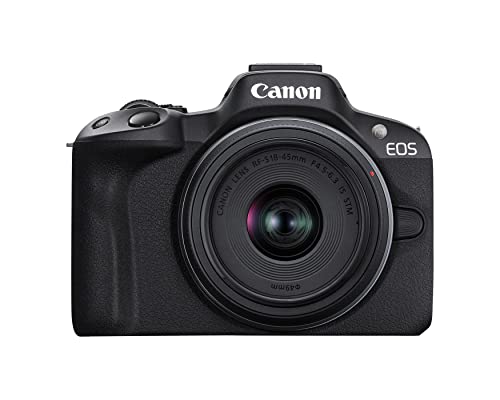
Canon EOS R50 — Best first system camera for YouTube
The R50 is where serious channels most sensibly begin. It offers the beginner a guided, friendly interface and the growing channel a real system: interchangeable lenses, a microphone input, clean oversampled footage that survives the platform’s compression with its face intact, and autofocus from the professional lineage that holds the presenter through the talking head, the unboxing and the whiteboard turn. Canon’s colour does the new creator a particular kindness — skin looks healthy straight out of camera, so the first hundred videos need no colourist and the creator’s learning budget can be spent on titles, hooks and editing, where channels are actually won.
Its YouTube-specific virtues compound quietly. The files edit happily on ordinary laptops. The body is small enough for the bedroom studio and the borrowed location alike. The stills shoot the thumbnails with a photographer’s control. And the upgrade path — lenses first, a second body later, the same menus throughout — means the channel’s growth never requires relearning its tools, which is worth more across two years than any single specification.
The honest edges: no in-body stabilisation, so the tripod and the desk are its native habitats and walking shots want help; the lens system’s widest budget options are still maturing; and the longest batch days will teach battery management. None of these has ever killed a channel. Friction and discouragement kill channels, and the R50 is engineered, top to bottom, against both.
- Role: the channel’s first system camera
- Footage: clean, oversampled, compression-proof
- Autofocus: professional-lineage subject holding
- Audio: microphone input for the voice’s future
- Stills: thumbnails with real control
Strengths
- Beginner-proof and growth-proof in one body
- Faces look right with zero colour skill
- A system the channel can grow inside for years
Trade-offs
- No in-body stabilisation
- Wide budget lens choice still developing
- Batch days need battery discipline
Buy it with the kit zoom and one decision made in advance: the corner where it will live, set up permanently. The R50’s friendliness plus a standing set is the closest thing YouTube has to a turnkey channel, and the first hundred videos will prove it.
Best for: new and growing channels in any seated or studio format. Not suited for: walking-tour channels or productions needing in-body stabilisation

Sony ZV-E10 II — Best for serious solo channels
When the channel becomes the job, the ZV-E10 II is the instrument the job deserves. Its autofocus is the finest solo servant in this guide — the eye held through every performance, the product snapped into focus the moment it is presented, the background separation handled like a lens twice the price’s. Its lens mount opens the whole E-mount world, so every format the channel grows into — the low-light evening piece, the wide room tour, the compressed telephoto look of the professional interview — is a lens away rather than a system away. Its audio architecture, from the directional array to the digital shoe, lets the voice reach broadcast quality inside the same small body.
For the platform specifically, its footage has the dense, clean character that the encoder rewards, its colour profiles let a channel build a recognisable look and keep it for years, and its USB power and streaming manners cover the live format without a second system. It is, in the full sense, a production department that fits on a desk tripod — which is why it anchors so many channels whose viewers assume a crew.
The costs are the professional’s: lenses are a real budget, the setup afternoon is real, and stabilisation is the tripod’s job. A hobbyist will be happier with the R50 or the compacts. But the creator whose analytics pay the rent will find this the cheapest ceiling-removal on the platform — the purchase after which the camera never again appears in the list of reasons a video underperformed.
- Role: the serious solo production instrument
- Autofocus: the finest subject servant here
- Lenses: the full E-mount world
- Audio: array, input and digital shoe
- Live: USB power and clean streaming
Strengths
- No production ceiling at solo scale
- Footage the platform’s encoder flatters
- One body for long-form, Shorts and live
Trade-offs
- Lens investment follows
- Tripod-dependent stabilisation
- More camera than a hobby requires
Standardise it as the channel’s house camera: one colour profile, one audio chain, one framing language across every format. Channels become brands through exactly that consistency, and this body is built to be standardised on.
Best for: full-time and aspiring full-time creators, courses, review and commentary channels. Not suited for: casual uploaders, or walking formats without support

DJI Osmo Pocket 3 — Best for moving and travel channels
Some channels’ subject is a place, a market, a kitchen, a coastline — content that cannot be brought to a desk — and for those channels the Pocket 3 is not an option but the answer. Its gimbal makes the walking shot a dolly shot; its tracking keeps the presenter framed while they work; its wireless microphone keeps the voice at studio quality across a noisy street. The footage has the floating, expensive motion that viewers read as production value before they can name it, and the whole instrument deploys from a coat pocket in the time a thought takes, which is the tempo travel content is actually made at.
Its platform manners are thoroughly modern: vertical framing for Shorts without a rig change, quick transfer to the phone for the same-day upload that travel schedules demand, and low-light performance that respects the evening market and the dawn start. Channels built on it publish at a cadence tripod channels envy, because the friction per video approaches zero — and cadence, on YouTube, is a growth strategy all by itself.
Its limits are the seated studio’s: a fixed lens that will not do the tight interview frame, session lengths that want charging planned, and stills that are serviceable rather than photographic. The travel creator who also needs the studio piece will pair it with a desk body in time. As the moving channel’s single camera, it has no rival in this guide and few anywhere.
- Role: travel, food, walking and world-as-subject channels
- Stabilisation: three-axis gimbal
- Audio: wireless microphone pairing
- Formats: horizontal and vertical natively
- Workflow: phone transfer for same-day uploads
Strengths
- The moving video that looks produced
- Near-zero friction per upload
- The presenter’s voice anywhere
Trade-offs
- Fixed lens framing
- Long days need charging planned
- Stills are incidental
Build the channel’s grammar on its strengths: the walking introduction, the tracked demonstration, the gimbal reveal of the place itself. Viewers subscribe to a way of seeing as much as to a subject, and the Pocket 3 gives a channel a way of seeing that is unmistakably its own.
Best for: travel, food, city, craft-in-the-world and documentary channels. Not suited for: seated studio formats as the only camera, or stills-led channels

Sony ZV-1F — Best zero-friction start
The ZV-1F exists to abolish the gap between deciding to start a channel and starting it. Fixed wide lens — no lens decision. Forward screen — no framing doubt. Face-first autofocus — no focus ritual. A body that fits the pocket and a price class that fits the experiment. For the talking-head formats — commentary, education, reaction, the video essay — it produces clean, presentable footage from the first afternoon, and its USB webcam mode covers the live format and the video call with the same device.
Its channel virtues are the sustainable ones: it is always ready, so the idea filmed today is not the idea forgotten by the weekend; its files are modest, so the laptop keeps up; its operation is so simple that the creator’s entire learning budget goes to the platform’s real curriculum — titles, thumbnails, hooks, retention — instead of to camera craft. More channels die of deferred starts and production friction than of any image shortcoming, and this camera is the antidote to both.
The ceiling is real and should be respected: no zoom, no lenses, low light that serves rather than glows. The channel that grows past it graduates to the R50 or the ZV-E10 II with its audience intact and its back catalogue consistent. As a first camera — and, for many talking-head channels, a permanent one — it is the most honest value in this guide.
- Role: the talking-head channel launched today
- Lens: fixed wide, self-framing
- Screen: fully forward-facing
- Also: USB webcam for live and calls
- Files: light on the editing laptop
Strengths
- Zero friction between idea and upload
- Every learning hour goes to the platform, not the camera
- Pocketable, always present
Trade-offs
- No zoom or lens growth
- Low light adequate only
- Ambitious formats will outgrow it
Its ritual is the standing corner: same chair, same light, same distance, so the channel’s look is set by the room rather than renegotiated per video. Consistency is the small channel’s production value, and no camera here makes it cheaper to keep.
Best for: commentary, education, reaction and essay channels starting now. Not suited for: moving formats, distant subjects, or low-light production

GoPro HERO13 Black — Best for action and outdoor channels
The action channel’s camera lives a life no other in this guide survives: mounted on the helmet, the board, the boat and the bike; rained on, crashed, frozen and baked; expected to produce the channel’s hero footage from inside the experience itself. The HERO13 is that life’s definitive instrument. Its stabilisation turns violent motion into watchable film; its sealed body treats weather as a filming condition rather than an ending; its lens options frame the cockpit, the trail and the wave; and its ecosystem of mounts is the difference between a channel that films what it does and a channel that films what it can reach.
Its YouTube manners suit the format’s rhythm: quick capture for the moment that will not repeat, time-lapse and interval modes for the journey between the moments, and footage robust enough in quality to headline a video rather than garnish it. Outdoor and sports channels also inherit its second career as the B-camera of every other format — the angle in the engine bay, on the workbench, under the waterline — which is why so many desk channels end up owning one too.
Its limits are its nature: the ultra-wide view is wrong for the talking head, the audio at distance is the action camera’s usual apology, and indoor low light is not its homeland. The action channel that also talks should pair it with a desk pick from this guide. As the camera of record for everything wet, fast and falling, it stands alone.
- Role: action, outdoor and sports channels
- Build: sealed, crash-tolerant
- Stabilisation: benchmark, gyro-backed
- Modes: time-lapse and interval for journeys
- Mounts: the deepest ecosystem here
Strengths
- Hero footage from inside the experience
- Weather is a condition, not a cancellation
- Every channel’s eventual B-camera
Trade-offs
- Wrong lens for talking heads
- Distance audio needs help
- Indoor low light is not its strength
Tether every mount and format the card in camera before the day’s first run: action channels lose their best footage to preventable mechanics, not to image quality, and the HERO13’s owner should be as disciplined about the small things as the camera is about the violent ones.
Best for: sports, outdoors, motoring, marine and adventure channels. Not suited for: seated formats, interviews, or quiet indoor production

Logitech StreamCam — Best for desk and streaming formats
The desk is a broadcast studio now, and the StreamCam is its native camera: built for the commentary channel, the live show, the reaction video and the recorded presentation that make up the platform’s desk economy. It mounts on the monitor in seconds, frames in both horizontal and vertical for the long-form and the Short from the same seat, tracks the face within its frame as the presenter leans and gestures, and delivers a feed the streaming software simply accepts. Its image, tuned for the lit desk, has the clean, bright character that desk formats are judged by.
Its decisive virtue is the absence of everything: no batteries, no cards, no setup ritual, no reason for the live show to start late or the commentary to wait for tomorrow. Desk channels publish on cadence or die, and the StreamCam’s cadence cost is zero — sit down, and the studio is live. Paired with the desk microphone every serious desk channel owns, it produces the format’s complete product with a simplicity the mirrorless bodies, for all their quality, cannot match at this seat.
Its boundaries are the desk’s walls: it does not travel, does not zoom across a room, and its low light is the webcam class’s. The creator whose channel leaves the desk needs another pick as the main camera — but a remarkable number of successful channels never leave the desk, and for them this unassuming cylinder is not the budget option. It is the correct one.
- Role: desk commentary, live shows, reaction formats
- Framing: horizontal and vertical from one mount
- Tracking: face-following within the frame
- Operation: permanently ready with the computer
- Feed: streaming-software native
Strengths
- Zero-friction daily and live production
- Both orientations from the same seat
- The desk format’s complete camera
Trade-offs
- Desk-bound entirely
- Low light is webcam class
- No role in room-scale or outdoor formats
Stage the desk as the set it is: the camera at eye level, one soft light, the background curated to the channel’s single intentional shelf. The StreamCam will hold that staging faithfully for a thousand videos, which is the consistency desk audiences subscribe to.
Best for: commentary, gaming-adjacent, reaction, live and presentation channels. Not suited for: any format that stands up or goes outside
How Does a Channel Grow Through Its Camera Stages?
Channels that last tend to climb the same staircase, and knowing the steps prevents buying the wrong one twice. The first stage is proof: the creator learning whether they can publish at all, on the simplest camera that does not embarrass the content — the ZV-1F’s and the phone’s country. The second stage is identity: the format settles, the corner becomes a set, the audience starts recognising the look, and the first system camera — the R50’s stage — locks that identity in with room to spare. The third stage is production: formats multiply, a second angle appears, live joins the mix, and the graduate body — the ZV-E10 II — becomes the house standard while the earlier cameras retire into B-roles rather than drawers. The fourth stage, which most channels sensibly never reach, is the crew stage, where the camera question dissolves into a production company’s.
Two rules govern the climbing. Never skip the stage your content has not reached, because each stage’s camera teaches the skills the next stage assumes — the creator who learns framing on a fixed lens owns a skill the zoom buyer rents. And never let the back catalogue’s look break at a stage change: match the new camera’s colour to the channel’s established face before the first upload, because subscribers experience an unmotivated visual rupture as a stranger wearing the channel’s name. Growth on YouTube is a continuity business, and the camera staircase, climbed in order and in character, is how the continuity survives success.
Why Do Thumbnails Belong in a Camera Guide?
Because the thumbnail is the video’s first frame in every sense that matters commercially, and on this platform the click precedes the content. The cameras with serious stills — the R50 and the ZV-E10 II with their photographer’s control, the G7-class compacts in spirit — shoot thumbnail frames as part of the session: the expressive pose against the set’s own background, at a resolution that survives the crop and the text. Channels that treat the thumbnail as a session task rather than an edit-suite rescue publish faster and click harder, and the habit begins with a camera whose stills the creator trusts.
The discipline is small and total: before the set is struck, while the light and the costume are still the video’s, shoot the thumbnail frames deliberately — three expressions, two framings, the prop in hand. Ninety seconds. The creators who do this own a library of on-brand images; the ones who do not own a folder of video stills and regrets. A YouTube camera is a stills camera for exactly ninety seconds per video, and those seconds are among the highest-value it will ever record.
How Do You Film a Two-Person or Interview Format Solo?
The interview is the solo creator’s graduation exercise: two faces, one operator who is also one of the faces. The working pattern is the locked wide and the trusted autofocus — the mirrorless picks in this guide, framed to hold both chairs with the geometry of a conversation, focus mode set to follow faces rather than hunt between them, audio solved with two microphones or one well-placed pair because the guest’s voice is the episode’s content. The second camera, when it comes, is the guest’s close-up: any compact in this guide, framed before they arrive, started with the master and forgotten, because a guest who watches their host fiddle with cameras gives the interview of a person watching someone fiddle with cameras.
Hospitality is a technical specification here. The guest’s experience of the session — the offered water, the two-minute sound check framed as conversation, the test question that lets them hear the room’s kindness — determines the performance the cameras receive. Solo interviewers who ritualise the welcome record better interviews on modest cameras than technicians with flagships and no manners. Buy the camera whose setup is shortest, and spend the saved minutes on the guest.
How Do the Six YouTube Cameras Compare?
| Camera | Channel stage | Formats covered | Audio path | Signature strength |
|---|---|---|---|---|
| Canon EOS R50 | First system camera | Long-form, Shorts, stills | Microphone input | Friendly growth |
| Sony ZV-E10 II | Serious solo production | All, plus live | Array, input, digital shoe | No ceiling |
| DJI Osmo Pocket 3 | Moving channel | Long-form, Shorts | Wireless pairing | Gimbal footage anywhere |
| Sony ZV-1F | Launch | Long-form, Shorts, live via USB | Built-in array, input | Zero friction |
| GoPro HERO13 Black | Action channel | Long-form, Shorts | Built-in; external for speech | Survival and stabilisation |
| Logitech StreamCam | Desk channel | Long-form, Shorts, live | Built-in; pairs with desk mics | Streaming-native simplicity |
A note on the two compacts’ rows: their modesty in the formats column is a stage statement, not a quality one. The ZV-1F’s long-form has launched channels whose later stages are chronicled in the rows above it, and the StreamCam’s desk formats include some of the platform’s most durable careers. Stages are climbed, not ranked.
The stage column is the buying logic. Channels do not need the best camera; they need the camera whose stage matches their own, with a growth path that does not strand the back catalogue’s look when they advance. Every row here honours that logic at its level.
How Should You Set Up a YouTube Filming Session?
Like a shift, not an inspiration. The corner stands ready — camera mounted, light positioned, background set — so the session begins with the script rather than the setup. Film the test clip and watch it as the viewer will: on the platform’s terms, at the size a phone offers, listening for the room in the voice. Record the pieces in the order the energy demands — the hardest segment first, the easy connective tissue last — and keep the camera rolling through the small mistakes, because the edit forgives a stumble and the restart costs the performance its thread.
Audio gets the session’s one non-negotiable: the microphone placed, the levels set against the full presenting voice, the headphones worn for the test. Image gets its own: exposure and white balance set for the room as lit and then left alone, because the platform’s viewers forgive a modest frame and never forgive a wandering one. End the session with the factory’s closing ritual — cards offloaded to two places, batteries on charge, the next session’s titles already in the document — because a channel’s continuity is built in these ten minutes more than in any filming hour.
Between the filming and the edit sits the ingest, and it deserves its doctrine: copy the cards before anything is formatted, verify that the copies open, and only then clear the cards in the camera for the next session. Name the session’s folder with the date and the video’s working title while the filming is still warm in memory. The creator who has lost a video to a formatted card speaks of it the way sailors speak of weather; the ritual exists so that you never join that conversation.
What Mistakes Do New Channels Make with Their Cameras?
The flagship-first mistake leads: the beginner who buys the production ceiling before the first video, discovers the setup friction of a serious system, and publishes three videos in two months. Its mirror is the false economy — the camera so limited that every video carries an apology, teaching the creator that filming is a struggle. Between them sits the correct first purchase, which this guide’s R50 and ZV-1F verdicts describe from two directions: capable enough to be proud of, simple enough to use on a tired evening.
A further mistake hides in the upload itself: exporting from the edit at settings that strangle the file before the platform can, then blaming the camera for the smear. Upload the master-quality export the connection tolerates, let the platform build its ladder from the best source, and judge your camera by the original file on your own screen — never by a compressed stream viewed on a train. Creators have returned good cameras over artefacts their own export settings manufactured; the test clip, viewed locally, is the antidote to that expensive misunderstanding.
The technical mistakes are the platform’s usual suspects. Audio from across the room, because the camera was placed for the picture. Exposure and white balance left wandering, so the creator’s face changes climate mid-sentence. Vertical and horizontal treated as separate productions, doubling the work the Short should have cost. And the archive sin: footage living on cards until a card fails, taking a month of uploads into folklore. YouTube rewards the consistent and the findable; the camera system that serves those two virtues, at whatever price class, is the one that builds channels.
What Do Retention Graphs Teach You About Your Camera Work?
The analytics page is the camera’s report card, written by strangers. The dips have signatures a creator learns to read: the cliff at forty seconds where the introduction’s framing was static and the voice distant; the slow bleed through the middle where the shot never changed and the eye wandered off; the spike — the graph’s one compliment — where viewers rewatched the demonstration, which tells you the close-up earned a permanent place in the format. None of these are content verdicts alone. They are production verdicts, and they translate directly into camera practice: a second angle for the middle’s long explanations, a reframing rhythm the edit can cut on, the microphone moved closer after the third comment about echo.
The mature creator films for the graph without becoming its slave. Patterns across twenty videos — not one video’s tantrum — justify equipment decisions: the recurring low-light dip that buys the faster lens, the live chat’s recurring audio complaint that buys the microphone chain, the Shorts’ framing losses that buy the vertical-native workflow. This is the empirical method the budget section prescribed, with the platform itself as the laboratory. The camera you need next is written in your own analytics, in a hand your audience holds; the skill is learning to read it without flinching.
How Do You Keep a Channel’s Look Consistent Across Years and Cameras?
Consistency is the quiet asset: the subscriber who clicks a two-year-old video and a new one in the same session should feel one channel, not a hardware timeline. Its mechanics are unglamorous. A house colour — whether a camera profile chosen once or a light grading recipe in the edit — applied to everything regardless of which body shot it. A framing language: the same shot sizes for the same segments, so the audience’s spatial memory of the channel never resets. A set that evolves by inches rather than by redesigns. And an audio chain that changes only under protest, because the voice’s sound is the channel’s most intimate signature and viewers notice its alteration before they notice a new camera’s arrival.
When a stage change does bring a new body, smuggle it in: match its colour to the house look in test recordings before the first upload, introduce it on a format where its strengths motivate the difference, and never apologise for it on camera — audiences take their cue from the creator’s confidence, and the catalogue’s continuity, honestly maintained, survives any single upgrade. Every pick in this guide earned its place partly by accepting a house look graciously; a channel is a promise, and its cameras are the promise’s handwriting, which should change only as handwriting does — slowly, and without ever becoming someone else’s.
What Should a Channel’s First Production Budget Actually Buy?
In order: the camera from this guide that matches the format; the microphone that sits close to the voice; one soft light; the tripod that does not tremble; and storage enough that no card is ever formatted in hope. That order surprises beginners, who expect the camera to consume the budget entire, and it is the order every working creator eventually arrives at by the expensive road. The reasoning is the platform’s: viewers judge the voice first, the light second, the frame’s stability third, and the camera’s pedigree not at all — they have never once subscribed to a sensor. Spend like a viewer, and the channel’s money lands where the audience lives.
Keep a final slice of the budget unspent for the first fifty videos’ evidence. The channel will diagnose its own real shortage — the wide lens for the small room, the second body for the interview, the gimbal for the format that took off — and the diagnosis, bought then, is worth three speculative purchases made now. YouTube production is an empirical science conducted one upload at a time; the budget that respects that is the budget that lasts to monetisation and beyond.
How Should a Channel Prepare for Its First Sponsored or Client Video?
The sponsored video is the moment the hobby’s habits are audited by a professional’s expectations, and the camera system either passes as a business or is exposed as a pastime. The sponsor cares about three deliverables: the video itself, on schedule; the usage rights and versions agreed in the contract; and a production that does not embarrass the brand in front of its own audience. The camera contribution is reliability theatre as much as quality — the session that starts on time because the corner stands ready, the files backed up before the client leaves the call, the second angle that saves the segment the sponsor’s product needed reshot. The mirrorless picks in this guide, standardised and ritualised, pass that audit at solo scale; the compacts pass it for the formats they own, provided the creator’s rituals match their cameras’ simplicity with professional discipline.
Practically: rehearse the sponsored format once on an unsponsored video, deliver a test export at the sponsor’s specified settings before the real deadline exists, and keep the raw files until the contract’s retention clause expires. Channels graduate from income to business on exactly this boring competence, and the camera — by then an old, trusted, standardised friend — is the least of it, which is the highest compliment a working camera can be paid.
Final Recommendation
Buy for your stage and your format, and let the channel’s growth — not the shop’s hierarchy — set the sequence. Then do the thing the camera cannot do for you: publish the first video this week, imperfect and entire, because the platform’s curriculum begins at upload one and every camera in this guide is, in the end, only a way of getting there sooner and more often. Starting a talking-head channel: the Sony ZV-1F today, or the Canon EOS R50 if a system camera’s growth appeals from the start. Filming the world: the DJI Osmo Pocket 3, with the GoPro HERO13 Black where the world is wet and violent. Broadcasting from the desk: the Logitech StreamCam and a real microphone. And when the analytics turn into income, the Sony ZV-E10 II removes the ceiling while keeping the solo workflow that built the channel. Whichever you choose, light the corner, place the microphone, keep the corner standing — and publish on schedule, because on YouTube the best camera is the one attached to a channel that uploads.
Related guides
- Best Compact Cameras for HD Video: Codecs, Bitrates, Mic Inputs and Recording Endurance Compared
- Best Channel for Wireless Video Surveillance Cameras: 1, 6 or 11, Surveyed Properly
- Best Cameras for YouTube Skit Channels: Fast Setups, Many Characters, Dialogue First
- Best Cameras for Yutube: First-Camera Picks for Starting a YouTube Channel Solo
- Best Cameras for Sarting YouTube: First Cameras for Starting a Channel From Zero
Frequently Asked Questions
Do I need 4K for YouTube?
Not for the viewer, who mostly watches at lower resolutions — but recording above delivery resolution buys reframing, cleaner downsampled files and some future-proofing, and the platform’s encoder treats a strong upload kindly. The deciding factors should be your edit machine’s comfort and your format’s needs; a clean, well-lit HD production outperforms a noisy, badly lit 4K one on the platform every time.
Can I start a channel with my phone?
Yes, and many successful channels did. The dedicated cameras in this guide earn their place as the friction appears: audio that needs a real path, autofocus that must serve a performer, endurance across batch days, and formats the phone frames awkwardly. Start with the phone if the alternative is not starting; graduate when its limits, specifically named, begin costing you videos.
What is more important: the camera or the microphone?
For retention, the microphone — viewers leave bad audio faster than modest pictures, and the voice is most formats’ content. The correct sequence is a capable camera from this guide, then the microphone placed close, then light, then the camera upgrade. Channels that invert the sequence own beautiful footage of people leaving.
How do I film Shorts with the same camera?
By treating vertical as a framing, not a production: the flip-screen and vertical-aware picks here reframe in seconds, and the wise workflow shoots the Short during the long-form session, in the same light and look, while the set stands. Keep the subject centred with headroom the crop can use, and the same camera covers both formats in one afternoon.
Which camera is best for livestreaming on YouTube?
The one matched to your seat: the StreamCam or a webcam-class camera for the desk show’s zero-friction reliability; a mirrorless body with a clean feed and USB or capture-card path for the produced stream’s quality. In both cases the audio chain and the network decide the stream’s reputation more than the camera does — test the full chain, live and unlisted, before the audience is invited.
How often should a channel upgrade its camera?
When a named limitation costs views or videos — the low light that ruins the evening format, the fixed lens that cannot frame the new series — and not before. Channels are built by catalogues, not cameras; the upgrade that arrives after a hundred videos, chosen from evidence, serves the next hundred better than any launch-day flagship serves the first.
What about recording podcasts and video essays for the platform?
Both are desk formats wearing long-form clothes, and both are served by the desk logic in this guide: the StreamCam’s zero-friction reliability for the weekly show, the mirrorless bodies where the programme’s look is part of its brand. The podcast’s second camera — the guest’s angle, even over a remote call’s local recording — follows the two-angle discipline described earlier. What neither format forgives is the voice recorded badly; the microphone budget precedes the second camera in every sane version of these productions.
Does the camera matter for Shorts?
Less than for long-form — the Short is watched small, fast and often on a phone that forgives — but the same virtues apply in miniature: a face the autofocus holds, a voice recorded close, a frame composed for vertical from the start rather than cropped in regret. The picks here with native vertical manners save the reframing labour, which, across a daily Shorts habit, is the difference between a format that feeds the channel and one that starves it of time.
What about filming with two cameras for one video?
The two-angle production — the wide and the close, cut together — is the classic graduation after the first stage, and any two picks in this guide pair for it if their colour is matched in tests before the session. Start both with a spoken marker or a clap for sync, let both run the whole take, and resist the third angle until the two-angle edit feels easy. The second camera is the highest-value production upgrade a solo channel can buy, ahead of any single body’s replacement.
Should I film in a flat colour profile and grade?
Only when the channel’s look genuinely needs it and the edit schedule can afford it. Grading is a per-video tax forever; the creators who pay it happily are the ones whose brand is a look. Everyone else should choose the camera whose straight-out colour already resembles the channel they want — Canon’s warmth and Sony’s profiles both offer honest defaults — and spend the saved hours on the next video. The audience subscribes to the subject and the voice, and forgives the colour science entirely.
How long should my videos be, and does the camera care?
The platform rewards the length the content earns — retention, not duration, is the metric — and the camera cares only through endurance: the batch session’s batteries, the long video’s file sizes, the interview’s uninterrupted hour. Choose the length by the subject’s needs and the audience’s patience, and let the camera decision follow the session pattern that length creates, which is precisely how the picks in this guide were matched to their formats.
Is a webcam enough for a serious channel?
For desk formats, it can be the whole answer for a long time — the StreamCam class of camera, a real microphone and a staged desk produce commentary and live content that audiences judge by the voice and the ideas. The webcam’s ceiling arrives with formats that stand up, move or darken. Seriousness on YouTube is a property of the catalogue, not the camera class, and desk channels prove it daily.
What settings should I lock in for every video?
White balance matched to your light, exposure set manually for your face, the frame rate matched to your region and format, and your house colour profile. Locking those four turns every session into a continuation rather than a negotiation, and it is the single habit that most separates channels that look produced from channels that look lucky.
How do I choose between the Canon and Sony creator lines?
By the growth you foresee and the menus your hands prefer. Canon’s R50 offers the friendlier adoption and colour that flatters without work; Sony’s ZV-E10 II offers the deeper lens world and the finest autofocus servants. Both build channels that outgrow their first bodies gracefully. Handle both if you can; the one whose interface disappears fastest in your hands is the right system, because you will operate it tired, weekly, for years.
Related Guides
Creators planning their next stage usually continue into our guide to cameras for recording yourself our guide to affordable 4K cameras for YouTube our guide to cameras for live streaming on YouTube


