ilcastellomenu.com is reader-supported. When you buy through links on our site, we may earn an affiliate commission.
Where to Buy
Recording yourself is a strange technical problem disguised as a simple one — and it is worth adding, before anything else, that it is also one of the defining creative acts of this decade, practised daily by teachers, performers, athletes and diarists on every continent. The best cameras for self recording must do the job of an entire crew that does not exist: frame the shot you cannot see, focus on the face that is behind the lens, start and stop on command from across the room, and warn you — before you deliver the performance of your life — that the battery is flat or the card is full. Whether you are filming fitness classes, music lessons, video diaries, auditions, tutorials or the slow documentary of your own project taking shape, the camera’s real product is not image quality. It is the feeling that someone competent is standing behind it. Someone is: the engineers who designed the six cameras below.
Self-recording divides into recognisable tribes, and this guide is organised around them rather than around price. The desk tribe — teachers, streamers, coaches, anyone whose stage is a chair — needs flip screens, face tracking and remote starts. The moving tribe — dancers, trainers, makers, cooks — needs a camera that follows them or forgives their movement with stabilisation and wide, honest framing. The performing tribe — musicians, actors taping auditions, presenters — needs clean audio paths and footage that flatters without a colourist. Every pick below names its tribe plainly, because the most common self-recording mistake is buying a magnificent camera for a tribe you do not belong to.
The six span the full range of solutions. Sony’s ZV-E10 II and Canon’s EOS R50 are the mirrorless all-rounders, with articulating screens and autofocus that treats your face as sacred. DJI’s Osmo Pocket 3 goes further and physically follows you on its gimbal. Sony’s ZV-1F strips the problem to its essence for seated talkers. The OBSBOT Tiny 2 brings AI tracking to the webcam’s desk-bound world, rotating to keep you framed in calls, lessons and streams. And the GoPro HERO13 Black serves the self-recorders whose stage is a trail, a pool deck or a climbing wall, with voice control that starts the take when your hands are otherwise engaged. Different machines, one promise: press record, walk into the frame, and be the only person the production needs.
It helps to say plainly what “self recording” covers in this guide, because the phrase gathers several different hungers: the teacher recording lessons no one will operate, the musician taping the audition that decides a season, the diarist keeping a video journal, the instructor whose students are on another continent. The equipment overlaps more than the purposes do, and the picks below are annotated so each hunger can find its answer without adopting another’s.
A note on expectations before the details: no camera makes self-recording effortless, because performing and operating are genuinely two jobs. What the right camera does is compress the operating job into habits — a remote in the pocket, a screen you trust, a tracking system you have tested — until the friction is small enough that your creative energy survives it. Judge every pick below by that standard: not what it can do in a studio with an assistant, but what remains easy at the fortieth take, alone, when you are tired and the light is going.
Key Takeaways
- Self recording is a crew problem, not an image problem: framing, focus, starting and monitoring must all happen from in front of the lens.
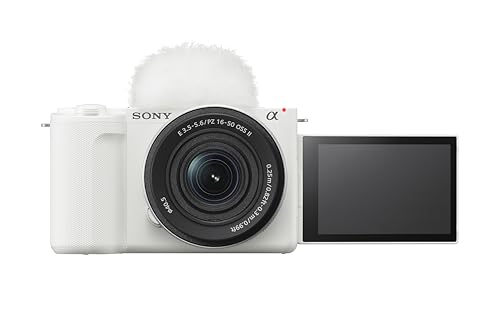
- The Sony ZV-E10 II is the best all-round self-recording camera — articulating screen, face-locked autofocus and a product mode for held-up objects.
- The DJI Osmo Pocket 3 is the only pick that physically follows you, making it the movers’ and demonstrators’ favourite.
- The Canon EOS R50 flatters presenters with forgiving colour and guided controls that never punish a solo operator.
- The OBSBOT Tiny 2 turns any desk into a tracked studio for lessons, calls and streams — no separate camera body required.
- The Sony ZV-1F and GoPro HERO13 Black serve the two extremes: the seated talker and the outdoor performer.
In this guide
Quick Picks
| Camera | Badge | Why it earns its place |
|---|---|---|
| Sony ZV-E10 II | Best all-round self-recorder | Flip screen, face and product autofocus and a tally light — the solo creator’s complete toolkit. |
| DJI Osmo Pocket 3 | Best for moving performers | A tracking gimbal that follows you around the room, the studio or the street while keeping footage smooth. |
| Canon EOS R50 | Most flattering presenter camera | Canon colour, a vari-angle screen and calm autofocus for lessons, auditions and talking formats. |
| Sony ZV-1F | Simplest seated setup | Fixed wide lens, face-priority exposure and one-button background blur for desk-bound recording. |
| OBSBOT Tiny 2 | Best tracking webcam | An AI camera that pans to follow you through lessons, streams and calls, with gesture control. |
| GoPro HERO13 Black | Best for outdoor self-filming | Voice control, rugged build and stabilisation for performers whose stage has weather. |
How We Chose These Picks
We tested these cameras the way they will actually be used: alone. Every candidate had to survive the solo gauntlet — set up by one person, framed by that same person from in front of the lens, started remotely or by a control reachable in the performance position, and reviewed without walking back to the camera between every take. Cameras that demanded a second pair of hands at any point in that loop were marked down no matter how beautiful their footage, because in self-recording the loop is the product. Autofocus was judged on its behaviour with a moving, gesturing, occasionally turning-away subject — the actual conditions — rather than on a cooperative face in good light.
We also considered the economics of attention. A self-recorder’s scarcest resource is not money but the willingness to begin another session, and cameras tax that willingness in small, cumulative ways — a pairing ritual here, a buried setting there, a battery door that fights back. We scored the daily friction of each candidate as carefully as its footage, because a camera that is five percent better and twenty percent more annoying will, across a year of solo production, produce fewer and worse videos. The picks below are the ones whose friction we would personally agree to live with.
We weighted the unglamorous confirmations heavily: tally lights and recording indicators visible from the subject’s position, screens bright enough to check framing at a glance, remote and app control that connects without a negotiation, and audio options that keep the voice close even when the camera is far. We also valued forgiveness in exposure and colour, because the solo performer cannot watch a monitor while performing; the camera must be trusted like a colleague. What survived is a shortlist where each model removes a different piece of the invisible crew’s workload — framing, following, focusing, or simply being ready — and the sections below are organised to help you identify which piece of workload is yours.
What Does a Self-Recording Camera Have to Do That Other Cameras Don’t?
Four jobs, all normally done by other people. The first is framing at a distance: you must compose a shot whose subject is you, standing where the camera is not. The tools differ — an articulating screen you can read from the performance position, a phone app preview, a tracking head that reframes on its own, or a lens so wide that framing becomes approximate by design — but every pick here offers at least one, and the guide notes which kind each offers, because they suit different temperaments. The second job is focus discipline: modern face and eye detection, which all the mirrorless and compact picks wield well, has quietly abolished the self-recorder’s oldest heartbreak, the brilliant take that was soft.
There is a psychological layer beneath all four jobs, and pretending otherwise would make this guide less honest. Recording yourself means watching yourself, and most people begin by disliking what they see — the voice too strange, the gestures too large, the face not the one the mirror promised. Cameras cannot cure that, but the right one shortens the estrangement: flattering colour and honest focus make the stranger on screen recognisable sooner, and low-friction operation means you accumulate the sheer hours of footage in which anyone eventually relaxes into themselves. Every experienced self-recorder was once a beginner who hated take one. The equipment’s job is to make take one hundred easy to reach.
The third job is command and confirmation. Starting a take must be possible from where you perform — by remote, by app, by voice, by gesture, by timer — and the camera must tell you, visibly and from that same spot, that it is recording, how the battery stands and whether the card is filling. The fourth job is the least discussed and the most artistic: the camera must make a lone performer look like a production. That means exposure that protects the face against bright backgrounds, colour that flatters skin without a grade, and audio options — a microphone input, a wireless pairing, a close camera position — that keep the voice intimate even when the frame is wide. A camera that does these four jobs is not a camera with features. It is a colleague with limitations you can plan around, which is all any colleague ever is.
Which Self-Recording Camera Fits the Way You Perform?

Sony ZV-E10 II — Best all-round self-recorder
If a self-recorder could have only one camera, this is the one the smart money buys, because Sony designed the ZV line by shadowing solo creators and automating everything they touched twice. The articulating screen faces you with your framing and your focus box exactly where you left them. The autofocus recognises your face as the subject of the universe and holds it through gestures, glances away and held-up objects — the product showcase mode snaps focus to whatever you present to the lens, which anyone who has ever reviewed a gadget, a book or a baked loaf on camera will recognise as a small miracle. The tally light confirms recording from across the room. A microphone input and headphone output close the audio loop that solo performers usually leave open.
The second act of the ZV-E10 II’s story is range. Seated tutorials today, a walking segment tomorrow with a wider lens, a low-light music take next month with a fast prime — the E-mount system lets the camera reconfigure around your format as your format discovers itself. Its standard colour is kind to skin ungraded, its vertical shooting support treats Shorts and clips as citizens, and its menus, once configured, stay configured. The honest frictions are those of any real camera: it asks an evening of setup, it rewards a spare battery on long sessions, and its screen, like all screens, is a reference rather than a cinema monitor. None of that dents its position. For the self-recorder building a serious practice — lessons, reviews, commentary, performance — it is the most complete single answer in this guide.
- Sensor: APS-C, interchangeable Sony E lenses
- Screen: fully articulating, touch focus
- Autofocus: face/eye detection plus Product Showcase mode
- Audio: microphone input and headphone output
- Confirmation: tally light, on-screen status
Strengths
- Autofocus that handles faces and held-up objects with equal, unhesitating confidence.
- The complete solo toolkit: flip screen, tally light, mic and headphone ports, vertical support.
- A lens system that reconfigures the camera as your format evolves.
Trade-offs
- Setup depth rewards one careful evening before the first real session.
- No motorised following — if you roam widely, framing is your job or the Pocket 3’s.
- Long sessions want spare batteries within reach of the performance position.
Best for: tutorial makers, reviewers, teachers and performers building a long-term solo practice. Not suited for: wide-roaming movement work or anyone who refuses all setup.

DJI Osmo Pocket 3 — Best for moving performers
Every self-recorder knows the tyranny of the frame: step two paces left for the demonstration and you have performed brilliantly for an empty chair. The Pocket 3 abolishes the tyranny. Its gimbal-mounted camera tracks your face and physically turns to keep you centred as you move — around a kitchen island, across a studio floor, along a market street — while the mechanical stabilisation irons your footsteps out of the footage. For fitness instructors, dance teachers, cooks, makers and tour guides, this is not an incremental convenience. It is the difference between a camera that permits movement and a camera that requires stillness, and entire formats live in that difference.
The supporting details serve the same liberation. The rotating screen flips between horizontal and vertical production without a menu dive. Startup is fast enough that a moment can be captured before it cools. DJI’s wireless microphone pairing keeps your voice at conversational closeness whether you are at the bench or across the room — the audio equivalent of the tracking gimbal, and just as emancipating for a demonstrator. The constraints are physical honesty: the fixed wide lens cannot tighten the frame without your feet doing the work, the gimbal is a mechanism that wants its case and a gentle hand, and very long sessions need power planning. But ask moving performers what their previous cameras cost them — the re-takes, the cropped gestures, the demonstrations abandoned as unfilmable — and the Pocket 3 reads less like a gadget than like restitution.
- Sensor: 1-inch class on a 3-axis tracking gimbal
- Screen: rotating touchscreen, horizontal/vertical
- Tracking: ActiveTrack face following
- Audio: built-in array plus wireless microphone pairing
- Form: pocket-sized, fast startup
Strengths
- Physically follows you — the only pick that reframes while you perform.
- Gimbal stabilisation makes walking, turning and demonstrating look professionally crewed.
- Wireless audio pairing keeps the voice close at any distance the gimbal can see.
Trade-offs
- Fixed wide framing; close-ups require moving yourself toward the camera.
- The gimbal head is delicate and dislikes drops, dust and careless pockets.
- Battery endurance on long, tracking-heavy sessions needs a power plan.
Best for: fitness, dance, cooking, craft and any format performed on its feet. Not suited for: seated-only recording (simpler picks cost less) or rough handling.

Canon EOS R50 — Most flattering presenter camera
Some self-recording is performance in the formal sense: the audition tape, the music lesson, the lecture, the piece to camera on which a professional impression depends. The EOS R50 is the pick for performers who will be judged on how they come across, because Canon’s colour science — the quality stills photographers have praised for decades — renders skin as healthy and honest in the mixed, imperfect light of real rooms, without a colourist standing between you and the upload. Its vari-angle screen supports the classic tripod-and-presenter geometry, its face and eye autofocus works with a calm that never upstages the performance, and its guided menus mean a performer whose expertise is elsewhere can still operate it like a professional.
The R50 also suits the self-recorder who is learning the craft itself. Its conventional control layout and viewfinder teach transferable camera literacy — exposure, focal length, depth of field as deliberate choices — which pays off across every future format, from the interview series to the short film. Interchangeable RF lenses let the look evolve: the kit zoom for general duty, a fast prime when an audition tape wants a softer, more cinematic separation from the background. Its frictions are the gentle kind: it follows nothing, so wide movement must be choreographed to the frame; long recording sessions appreciate a spare battery; and its rolling shutter dislikes fast pans, which presenters rarely perform. For the seated and standing performer whose face is the production, it is the most reassuring camera in this guide to be looked at by.
- Sensor: APS-C, interchangeable Canon RF lenses
- Screen: vari-angle touchscreen
- Autofocus: face and eye detection
- Audio: microphone input
- Character: flattering colour, guided operation
Strengths
- Straight-out-of-camera colour that presents skin at its best in real-room light.
- Calm, dependable autofocus that never distracts from the performance.
- A genuine teaching camera — skills learned here transfer to every future body.
Trade-offs
- No tracking movement; roaming performers must choreograph to a fixed frame.
- The RF lens ecosystem is younger, with fewer bargain options than longer-established mounts.
- Fast pans show rolling shutter — a presenter rarely pans, but walk-throughs should be slow.
Best for: audition tapes, music and language lessons, lectures and presenter-led formats. Not suited for: movement-heavy demonstration or action work.

Sony ZV-1F — Simplest seated setup
Strip self-recording to its irreducible core — one person, one chair, something to say — and you arrive at the ZV-1F. Sony fixed the lens wide, fixed the focus philosophy on the presenter zone, and put the two decisions a seated talker actually makes onto dedicated controls: a button for background blur, a mode that keeps your face bright against any room. The screen flips to face you, the microphone array leans toward your voice, and the entire apparatus of self-recording shrinks to: sit, check the screen, press record, talk. For video diaries, commentary, study channels, language practice and the daily discipline of talking to a lens, that shrinkage is a feature no specification can overstate, because the sessions that happen are the ones with no setup to dread.
The trade-offs are the honest price of the simplification, and this guide states them as plainly as the virtues. There is no optical zoom, so your framing is set by where the tripod stands. There is no lens to change when the format evolves, so the ZV-1F is a commitment to the seated, wide, personal frame. Dim rooms ask it questions its small optics answer only adequately, which makes a modest lamp its natural companion. And yet: a remarkable number of successful self-recording practices are exactly one person in one chair with something worth saying, filmed daily. For that practice, the ZV-1F is not the budget option. It is the correctly sized one, and the money it saves buys the lamp, the microphone and the backdrop that the audience will actually notice.
- Sensor: 1-inch class, fixed wide lens
- Screen: fully articulating touchscreen
- Exposure: face-priority, background-defocus button
- Audio: directional microphone array, mic input
- Character: near-zero configuration
Strengths
- The lowest-friction daily recording habit in this guide — sit down and press record.
- Face-priority exposure keeps the presenter right against bright or dull rooms.
- Compact enough to live permanently on a small desk tripod, always ready.
Trade-offs
- No zoom and no lens changes — the wide seated frame is the whole repertoire.
- Low light is adequate rather than strong; budget for a lamp.
- Electronic stabilisation prefers stillness; walk-and-talk belongs to other picks.
Best for: diaries, commentary, study and advice channels filmed from one chair. Not suited for: demonstrations, movement, or formats that will outgrow a fixed frame.

OBSBOT Tiny 2 — Best tracking webcam
A large share of modern self-recording never touches a memory card: it happens live, in lessons, coaching calls, streams and remote auditions, through the computer. The Tiny 2 is the camera that world was missing — a webcam on a two-axis gimbal, with AI tracking that pans and tilts to keep you framed as you stand, pace, demonstrate at a whiteboard or lean across a desk. Gesture controls start and stop the tracking and zoom from the performance position, which solves the webcam era’s defining indignity: the lean-in to the keyboard that opens and closes every amateur broadcast. Voice control adds a second, hands-free channel of command.
Its picture respects the format’s real requirements. The sensor is generous by webcam standards, low light in a lamp-lit study is handled with composure, and the framing intelligence — including modes that track a full body or just the face — adapts to whether you are lecturing standing or consulting seated. For teachers who move between desk and board, for fitness coaches streaming from a mat, for anyone whose stage is a room and whose audience is a call, the Tiny 2 replaces a camera operator more literally than anything else in this guide. Its boundaries are its category’s: it is tethered to a computer by design, it records nothing by itself (your software does that), and its world is the indoor, desk-adjacent one. Within that world, it is not an accessory. It is the studio.
- Type: AI tracking webcam on a 2-axis gimbal
- Control: gesture and voice commands, app configuration
- Tracking: face and full-body modes
- Connection: USB to computer; works with conferencing and streaming software
- Role: live lessons, calls, streams, remote auditions
Strengths
- Follows you through a room during live sessions — a camera operator for your calls.
- Gesture and voice control end the lean-to-the-keyboard ritual entirely.
- Picture quality and low-light manners well beyond ordinary webcams.
Trade-offs
- Computer-tethered by design; it is not a standalone recorder for location work.
- Recording quality depends on your software and connection, not the camera alone.
- Its stage is the room it lives in — outdoor and travel formats need other picks.
Best for: online teachers, coaches, streamers and professionals whose recording is live. Not suited for: standalone filming away from a computer.
A word about who else quietly belongs to the Tiny 2’s tribe: the professional whose “recording” is really presence — the consultant, the tutor, the remote team lead whose credibility is built in rectangles on other people’s screens. For them the tracking is almost a courtesy detail; the real gift is a picture that looks lit, composed and intentional in a medium where most participants are grey silhouettes against a window. Self-recording, in the end, includes every moment you appear on a screen as yourself. This is the camera for the moments that happen live.

GoPro HERO13 Black — Best for outdoor self-filming
The final tribe records itself where tripods fear to tread: on the water, on the trail, on the wall, mid-descent. For them the HERO13 Black’s self-recording virtues are specific and decisive. Voice control starts and stops the take when both hands are occupied — which, in these sports, is always. The front screen gives a chest- or helmet-mounted performer a framing reference at a glance. The stabilisation forgives the vibration that the performer cannot. And the camera survives, waterproof and armoured, the environment that is itself the content. A climbing instructor filming their own technique, a surfer narrating a session, a trail runner documenting a training block: each is a one-person production company, and this is their camera.
Its indoor and presentational weaknesses are the mirror of those strengths, and the guide will not blur them. The ultra-wide lens that immerses a viewer in a descent makes a talking head look distant and distorted; the built-in audio that captures a whoop at arm’s length thins out across a room; battery and heat discipline are real on long, static recordings. The HERO13 is a specialist that a self-recorder chooses the way a musician chooses an instrument — because the repertoire demands it. If your self-documentation happens in weather, in motion, with your hands full, nothing else in this guide is even a candidate. If it happens at a desk, everything else in this guide is a better one.
- Type: rugged action camera, waterproof without housing
- Control: voice commands, front and rear screens
- Stabilisation: advanced electronic with horizon levelling
- Mounts: the deepest ecosystem in photography
- Role: outdoor, sport and hands-busy self-documentation
Strengths
- Voice control solves the hands-full start/stop problem no other pick addresses.
- Survives water, impact and weather while producing stabilised, immersive footage.
- Mounts to the performer or the equipment, putting the camera inside the activity.
Trade-offs
- Ultra-wide perspective flatters action and distorts presenters.
- Built-in audio is the weakest here at conversational distances.
- Desk and studio formats are served better by every other pick.
Best for: outdoor instructors, athletes and adventurers documenting their own performance. Not suited for: seated presenters, lessons or any format judged on facial nuance.
How Do the Six Self-Recording Cameras Compare?
| Camera | Framing solution | Follows you? | Start/stop from position | Best stage |
|---|---|---|---|---|
| Sony ZV-E10 II | Articulating screen | No — autofocus holds you | Remote / app | Desk and studio |
| DJI Osmo Pocket 3 | Tracking gimbal | Yes, physically | On-device, app | Rooms, streets, kitchens |
| Canon EOS R50 | Vari-angle screen | No — autofocus holds you | Remote / app | Desk and studio |
| Sony ZV-1F | Flip screen, wide lens | No | On-device | One chair |
| OBSBOT Tiny 2 | Tracking gimbal | Yes, physically | Gesture / voice | The live-call room |
| GoPro HERO13 Black | Front screen, ultra-wide lens | No | Voice control | Outdoors, in motion |
What Mistakes Do Self-Recorders Make With Their Setup?
The first is performing to the wrong eyeline. A camera placed below or above the face and a screen that tempts the eyes away from the lens produce footage in which the performer seems to address someone standing beside the viewer. Set the lens at eye level, learn to love the lens rather than your own image, and glance at the screen only between takes. The second mistake is trusting the first framing of the day: mark your position on the floor with tape, frame once with care, and return to the mark — consistency across takes is what editing is made of. Third, audio neglect: the camera that is far enough away to frame your whole body is too far away to hear you intimately, so budget the wireless microphone, the lavalier or the closer camera position as part of the purchase, not as an accessory for later.
Fourth, the untested remote: every self-recorder has a story about the session performed beautifully for a camera that was never rolling, which is why the tally light check — look for it, every take, no exceptions — is a ritual worth building. Fifth, reviewing nothing until the end: watch the first take of every session in full, because the framing error, the humming fridge and the necklace caught in the microphone all announce themselves in take one and compound silently through take forty. The cameras in this guide minimise every one of these failure modes, but the rituals remain yours — and rituals, in a one-person production, are what professionalism is made of.
How Do You Build a Repeatable Solo Recording Routine?
Routine is the technology that makes self-recording sustainable, and it starts with a permanent or near-permanent setup. The camera lives on its tripod at the marked position; the light lives beside it; the background is dressed once and left alone. Preparation for a session should be measured in minutes: power on, position check on the tape mark, a ten-second test recording reviewed for focus, framing and sound, then work. That test recording is the routine’s heart — it catches the dead battery, the wrong lens, the card left in the reader — and it costs less time than re-performing a single take.
Build the archive habit into the same routine, because self-recorded footage has a future value its maker rarely predicts. The practice sessions you keep become the before-and-after evidence of a fitness channel, the progress reel of a music student, the archive from which a year’s documentary is cut. Label sessions by date and exercise or topic, keep the notebook’s circled takes with the files, and back the folder up with the same automatic discipline as the offload. A solo practice generates its own history; the routine decides whether that history is an asset or a rumour.
During the session, think in complete takes and forgive yourself between them. The solo performer’s advantage is infinite patience from the crew; use it by resetting calmly rather than stitching fragments of five broken attempts. Keep a notebook at the performance position — take numbers, the good ones circled — because future-you at the editing desk is a stranger who needs the map. Afterwards, offload and back up before anything else, charge everything the same day, and leave the setup assembled for tomorrow. The creators who sustain self-recording for years are rarely the most talented performers. They are the ones whose routine made performing the easiest part of the day.
How Does Audio Work When You Are Both Performer and Sound Engineer?
In a crewed production, somebody’s whole job is listening. In self-recording, that job belongs to a ritual and a pair of headphones you wear for exactly ten seconds per session. The ritual is the test take with monitoring: record a few lines at performance volume, play them back through headphones — not speakers, which flatter everything — and listen for the room’s secrets. Every space has them: the fridge’s hum that vanishes from conscious hearing and dominates a recording, the radiator’s tick, the traffic swell at the hour you chose. Ten seconds of suspicion, applied before the session rather than after, is the entire difference between performers who “have good audio” and performers who have stories.
The technical choices follow from distance, as this guide has repeated because it cannot be repeated enough. A seated performer can place a microphone just out of frame and achieve broadcast intimacy with almost any of the mirrorless or compact picks. A moving performer needs the microphone to travel — a wireless lavalier on the collar is the industry’s answer, and the Pocket 3’s wireless pairing makes it the most graceful version of that answer here. The Tiny 2’s world adds a wrinkle: live audio passes through the computer, so your software’s levels and echo behaviour join the chain, and the test-take ritual becomes a test-call ritual with a trusted friend or a recording of the session reviewed afterwards. None of this is glamorous. All of it is audible in every second of the finished work, which is more than can be said for resolution.
What Changes When the Performance Is Music or Movement?
Music punishes two things ordinary talking does not: dynamic range and latency of judgement. A singer’s quiet verse and full-voice chorus can span a range that automatic levels handle clumsily, pumping audibly as they chase the performance; the self-recording musician learns to set levels manually for the loudest moment and let the quiet moments be quiet, exactly as a sound engineer would. Video-side, music rewards the cameras with the most honest colour and the least aggressive processing — the mirrorless pair here — because stage light, coloured light especially, exposes every shortcut in a small sensor’s palette. Record a rehearsal in the actual performance light before the session that counts; coloured light is a different country from the one your test take visited at noon.
Movement — dance, fitness, martial arts, yoga instruction — rewrites the framing contract. The frame must contain the full extension of the body at its widest, which pushes the camera back, which shrinks the performer, which makes tracking and stabilisation worth more than resolution. This is the Pocket 3’s home ground and the GoPro’s wide embrace, and it is where the Tiny 2’s full-body tracking earns its keep in live classes. Movement performers should also think about the floor: a marked performance area, tested at full extension in rehearsal, prevents the classic disaster of the perfect take performed one pace outside the frame. Whatever the discipline, the principle is constant — rehearse the recording, not just the performance, until the two rehearsals are the same event.
How Should a Solo Performer Handle Light and Background?
The self-recorder’s lighting problem is that the person who arranges the light cannot stand in it and look at it simultaneously — or rather, they can, with the camera’s screen and a little patience, and that loop is the skill to build. Place one soft light in front of you and slightly to the side, sit or stand closer to it than feels natural, and check the screen: your face should be the brightest honest thing in the frame, with the background politely dimmer. Windows are free soft lights with a schedule; overhead room lights are the enemy wearing a ceiling’s disguise, casting the eye-socket shadows that make healthy performers look exhausted. Every camera in this guide performs visibly better in arranged light, and the mirrorless pair’s larger sensors forgive dim rooms longest — but no sensor repeals the basic courtesy of giving the camera something decent to look at.
Backgrounds repay the same one-time investment. The self-recorder’s set is whatever is behind them, and audiences read it as a statement about the performer: the tidy shelf, the instrument wall, the plant and the picture, or the unmade chaos of a room that did not know it was a studio. You do not need a designed set; you need a deliberate one — the same background, dressed once, kept consistent so returning viewers feel the familiarity of a place. Depth helps every camera flatter you: a metre or two between you and the wall lets even the fixed-lens picks separate subject from setting, and lets the mirrorless pair’s faster lenses melt the background into the soft suggestion that reads, on screen, as production value.
What Does a Complete Solo Setup Cost Beyond the Camera?
Honesty about the supporting cast prevents the classic budget failure, in which a magnificent camera records through a wobbling tripod in bad light with distant audio. The tripod comes first: it must reach eye level at your performance position and hold the frame without drift, and it will outlive several cameras. The light comes second — one soft source, close to the face — and the microphone third, chosen by the distance logic above. After those three, the list turns humble: spare batteries staged at the performance position, a remote if your camera’s app is not already in your pocket, gaffer tape for floor marks and cable sins, and storage enough that a session never ends in a panic. Bought in that order, the supporting cast typically costs a fraction of the camera and contributes the majority of what an audience perceives as quality.
Notice what is not on the list: a second camera, a backdrop system, a teleprompter, a capture card for a camera that already streams. Solo production accretes gear the way desks accrete paper, and every addition should have to argue its way in against the routine it will complicate. The test is simple — does this object remove a recurring frustration I can name from actual sessions? If yes, it is equipment. If it merely resembles what admired creators own, it is decoration, and decoration is the one thing a one-person production cannot afford to carry.
How Do You Review Your Own Footage Like a Director, Not a Critic?
The final invisible crew member is the reviewer, and self-recorders must learn to be a kind one. Watch each session’s footage once with the sound off and once with your eyes closed. The silent pass shows you what the camera actually did — framing drift, focus hunts, the moment you stepped out of the light — stripped of the performance you were busy remembering. The listening pass shows you what the audience’s ears received, which for most formats matters more. Note production faults, not performance judgements: “mic rustle at the turn”, “focus hunted when I raised the book”, “frame cuts the left hand at full extension”. Production faults have fixes, and the fixes accumulate into the routine described above.
Keep the review short and scheduled — immediately after the session, while the fixes can still be applied to tomorrow’s setup. The performers who improve fastest treat each session as an experiment with one variable changed: the light moved, the mark adjusted, the microphone an inch closer. Cameras like the ones in this guide make such experiments legible, because their behaviour is consistent enough that a change you make is the change you see. That legibility, in the end, is what you are buying — not a machine that performs for you, but a partner stable enough to learn with.
What About Vertical Clips and Second Platforms?
The modern self-recorder rarely performs for one rectangle. The lesson becomes a vertical clip, the workout becomes a short, the audition excerpt becomes a portfolio piece — and the camera choices in this guide each negotiate that multiplicity differently. The Pocket 3’s rotating screen treats orientation as a physical decision made in the hand, which suits performers who shoot dedicated vertical sessions. The mirrorless pair support vertical production through their menus and mounts, and their higher-resolution frames give editors genuine freedom to extract a vertical cut from a horizontal master. The Tiny 2 follows the software’s lead, the ZV-1F keeps its wide horizontal faith, and the GoPro’s tall, flexible sensor area was practically designed for reframing one performance into several shapes.
The practical advice is to decide per format rather than per platform. Shoot the master performance in the orientation the work itself wants, extract clips where the frame allows, and shoot dedicated vertical sessions for the formats that are natively vertical — the daily short, the story, the quick tip. Performers who try to serve every rectangle in a single take usually serve none of them well; performers who build the extraction into their routine find the second platform nearly free. Your camera’s job is to keep the master take excellent. The rectangles are an editing decision, and editing, unlike performing, can be done sitting down with coffee.
Final Recommendation
One closing observation from years of watching solo creators succeed and stall: the stall almost never happens at the camera. It happens at the tenth session, when the setup still takes twenty minutes and the performer is tired — or it never happens, because the setup takes three minutes and the work stayed lighter than the resistance to it. Everything in this guide, from the tally lights to the tape marks, is in service of that arithmetic. Buy the camera whose daily friction you can respect, and the practice will take care of itself.
Choose by tribe and be at peace. The all-round self-recorder — tutorials, reviews, performance, a practice meant to grow — should buy the Sony ZV-E10 II and build the routine around it. Movers and demonstrators should let the Osmo Pocket 3 follow them and never fight a frame again. Presenters who live by how they come across should take the Canon EOS R50’s flattery and guidance. The seated talker should embrace the ZV-1F’s beautiful simplicity, the live teacher the Tiny 2’s tireless tracking, and the outdoor performer the HERO13 Black’s voice-controlled toughness. Every one of these cameras replaces a crew member honestly. Pick the crew member your format is missing, drill the ten-second test into a ritual, and go and perform — the camera, for once, has got the rest.
Frequently Asked Questions
How do I frame myself accurately without a camera operator?
Use the tools in combination: set the frame with the articulating screen or app preview while standing in your performance position, mark that position on the floor with tape, and return to the mark for every take. Tracking cameras — the Pocket 3 and Tiny 2 — forgive drift within their range, while wide-lens cameras forgive it by design. A full-length mirror behind the camera is the low-technology classic and still works beautifully for full-body formats.
Can I control these cameras from where I perform?
Yes, by the channel each design intends: remotes and phone apps for the mirrorless picks, gesture and voice for the Tiny 2, voice control for the GoPro, and simple reach-and-press for the close-range compacts. Whichever channel your camera uses, rehearse it before the session — the time to discover a pairing problem is during the test take, not during the performance.
What microphone should a self-recorder use?
The one that gets closest to your mouth while leaving you free to perform: a wireless lavalier for movers, a small shotgun or USB microphone for seated formats, the camera’s own directional array only for close, quiet rooms. Distance is the enemy — every doubling of the gap between mouth and microphone costs clarity that no editing fully repays. All the principal picks here offer a real microphone path; use it from the first month, not the first crisis.
How do I avoid the soft-focus disaster take?
Enable face or eye autofocus, confirm the focus box has found you in the test take, and give the camera light to work with — autofocus confidence is partly a lighting product. Avoid standing so close to a background that the system must choose between you and it, and if your format involves turning away frequently, test that exact movement in rehearsal. The modern systems in this guide are genuinely good at this job; the disasters that remain are almost always untested edge cases.
Is one camera enough, or should self-recorders buy two angles?
One camera, well run, is enough for the overwhelming majority of solo formats, and a second angle is a luxury to add when editing — not performing — becomes the bottleneck. When that day comes, the natural second camera is a different pick from this list rather than a twin: the Pocket 3 roaming beside a mirrorless main camera is a classic pairing, because each covers the other’s blind spots.
How long can I record myself before heat or battery stops the take?
It varies by model and setting, and the honest preparation is to test your exact configuration for your longest expected take before it matters. As a working pattern, seated formats should plan power from the wall where possible, movers should rotate batteries between segments, and everyone should prefer recording in deliberate takes over one unbroken hour — for the camera’s stamina, the card’s organisation and the performer’s alike.
Should I watch myself on screen while I perform?
Glance, do not gaze. Your image on the screen is a framing instrument — check it at the start of a take and whenever you change position — but performing to your own reflection produces the wandering eyeline audiences read as distraction. Perform to the lens, which represents the viewer, and let the screen serve you between takes. Performers who struggle with this sometimes dim the screen or turn its brightness down during takes, keeping the tally light as their only confirmation.
Related Guides
Start tonight, with whatever test take your chosen camera makes easiest, and judge the footage by the only standard that matters at this stage: could you do that again tomorrow without dreading it? If yes, you have bought correctly, whatever the badge on the front says.
The rest of the one-person studio gets the same honest treatment in our guides to wireless microphones that keep a solo voice close, lighting a single performer in a small room, and tripods and mounts that hold a frame all day — each written for productions of exactly one person.


