ilcastellomenu.com is reader-supported. When you buy through links on our site, we may earn an affiliate commission.
Where to Buy
Multi-camera live production rewrites what a camera is for. The best cameras for SlingStudio are not necessarily the finest stills cameras or the most cinematic solo shooters; they are the ones that behave as reliable citizens of a switched live system — feeding a clean HDMI signal for hours, sipping external power without complaint, holding their colour and exposure steady beside three sibling cameras, and never, ever deciding to overheat, sleep or update themselves in the middle of a wedding’s first dance or a school concert’s finale.
A word of honest context belongs at the front. SlingStudio’s hub-based system built its reputation by letting small crews switch several cameras — some wired over HDMI, some wireless through CameraLink units, phones included — from a single console or tablet. Whatever the current state of any one platform’s hardware line, the camera requirements that era defined remain the requirements of every small multi-camera rig: clean output, stamina, matchable pictures, and controls that can be locked down so a well-meaning volunteer cannot wander into a menu at the worst possible moment.
Six cameras below meet those requirements at six different altitudes of budget and ambition. Two full-frame bodies anchor the professional end, where a paid livestream simply may not fail. Two creator-class APS-C bodies cover the schools, churches and podcast studios where most multi-camera work actually happens. A dials-first Fujifilm serves the operator who matches cameras by eye and by hand, and Sony’s ZV-E10 II brings purpose-built streaming manners at the price point where many production teams buy their second and third angles.
Each model is linked on Amazon in the Quick Picks table and beside its detailed review. Read the sections on power and on matching colour before assembling a rig: in live production, the cameras are the easy part, and the system around them is where broadcasts are saved or lost.
Key Takeaways
- Panasonic’s LUMIX S5II is the live-production anchor: clean HDMI, serious recording stamina and monitoring tools that make matching cameras straightforward.
- Sony’s Alpha 7 IV brings full-frame low-light strength to evening events, with the lens shelf a growing production company will eventually need.
- Canon’s EOS R6 Mark II serves hybrid crews who shoot stills at the same events they stream, with colour audiences find instantly familiar.
- Sony’s ZV-E10 II is the value angle camera: streaming-ready manners at a price that lets a team buy matched pairs.
- Canon’s EOS R50 gives schools and churches an approachable first production camera that volunteers can be taught in an afternoon.
- Fujifilm’s X-T5 suits operators who match by dials and by eye, with high-resolution stills as a bonus for event coverage.
In this guide
Quick Picks
| Camera | Badge | Why it earns its place |
|---|---|---|
| Panasonic LUMIX S5II | Best production anchor | Clean output, stamina and tools built for long live work. |
| Sony Alpha 7 IV | Best for evening events | Full-frame files and focus for dim halls and stages. |
| Canon EOS R6 Mark II | Best hybrid stills and stream | One body covers the photos and the broadcast at the same event. |
| Sony ZV-E10 II | Best value angle | Creator-ready streaming manners for second and third cameras. |
| Canon EOS R50 | Best for volunteer crews | Friendly menus a school or church team can learn fast. |
| Fujifilm X-T5 | Best for hands-on matchers | Dials and colour for operators who balance cameras manually. |
How Did We Choose Cameras for a SlingStudio-Style Rig?
Clean HDMI output was the non-negotiable gate. A production camera must be able to send its picture without focus boxes, exposure readouts or menu clutter tattooed across the frame — or must let every one of those overlays be switched off, permanently, in a menu a producer can verify during setup. Bodies that dim their output, downgrade it oddly, or fall asleep mid-event were cut without regard to their stills reputations.
Stamina under live conditions came second, and it is a compound test: recording and output duration without thermal shutdown in a warm hall, external power options that run a camera for a full event day, and tally and status information a director can trust from across the room. A camera that is brilliant for forty minutes is a highlight-reel tool; live production is measured in hours, and the grading here reflects that arithmetic.
Matchability closed the selection. In a switched show, the audience sees camera two’s picture a half-second after camera one’s, and any difference in colour temperature, contrast or exposure shouts. We favoured cameras with honest colour profiles, manual white balance that can be set to a number and locked, and — ideally — siblings: bodies from the same family match each other with a fraction of the effort a mixed rig demands, a truth the recommendations below lean on deliberately.
What Does Clean HDMI Actually Mean, and Why Does It Rule This Guide?
Clean output means the signal leaving the camera is the picture and only the picture: no autofocus rectangle wandering across a soloist’s face, no red recording dot, no battery icon counting down in the corner of a couple’s first dance. It sounds like a small thing until a director cuts to the wide shot and the entire congregation reads the camera’s settings off the screen. Verifying it is a setup ritual, not a hope — connect the actual cable, to the actual hub or switcher, and look at the programme feed with a director’s suspicion before doors open.
Resolution and frame-rate behaviour ride along with the definition. The production chain — hub, switcher, encoder, platform — will settle on a house standard, commonly 1080p at a fixed frame rate for streams of this class, and every camera must be able to speak that standard natively and consistently. A camera that outputs a different cadence forces conversions that soften pictures and, in the worst cases, judder movement in a way audiences feel without naming.
Finally, clean output must survive the event’s full length at the chosen settings. Some bodies quietly restrict output quality or duration when hot, when recording internally at the same time, or when particular modes are engaged. The picks below were chosen because their output manners are documented, predictable and boring — and in live production, boring output is the highest praise a camera can earn.
What Are the Best Cameras for SlingStudio Rigs?
Two anchors, two hybrids, two value angles — arranged by the size of the promise each production makes to its audience.

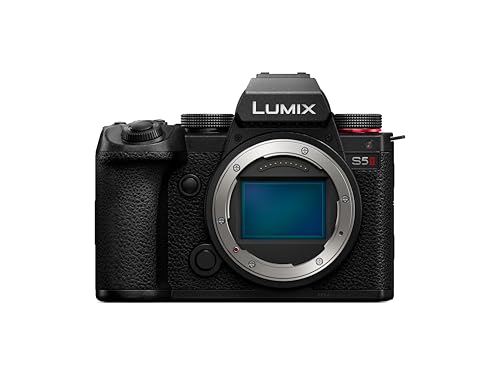
Panasonic LUMIX S5II — Best production anchor
Every rig needs a camera the director trusts absolutely, and the S5II has become that camera for small production teams by accumulating the exact virtues live work rewards. Its HDMI output is clean and configurable, its full-frame image gives a hall’s mixed lighting a fighting chance, and its monitoring toolkit — waveforms and scopes that show exposure as data rather than opinion — makes it the natural reference camera against which a rig’s other angles are matched. Panasonic built its reputation in broadcast-adjacent video, and this body feels like that heritage made affordable.
Stamina is the second half of the anchor’s job description. The S5II was engineered with active cooling considerations that earlier generations of mirrorless video bodies lacked, and in practice it runs long events — conferences, graduations, full-length concerts — at production settings without the thermal negotiations that haunt its rivals. USB power delivery and dummy-battery options let it live on mains for a permanent installation, the podcast studio or church corner where the same rig serves every week of the year.
Its costs are the professional’s usual ones. The body plus L-mount glass is a real investment, its autofocus — though transformed by phase detection — still cedes a whisker of tenacity to Sony’s best in chaotic stage light, and its richest colour modes ask the production to finish footage properly rather than stream it raw. For the anchor position, where the wide master shot lives and failure is unforgivable, none of that outweighs the central fact: this is the camera on this list most plainly designed to be relied upon, in public, for hours.
- Class: full-frame mirrorless, L mount
- Output: clean, configurable HDMI feed
- Tools: waveform monitoring for matching
- Power: USB and dummy-battery options
- Role: master wide shot, permanent installs
Strengths
- Built to be relied on for hours
- Matching tools lead this class
- Cooling manners suit long events
Trade-offs
- Investment-level cost with lenses
- Focus a shade behind Sony’s best
- Richest colour needs finishing work
A regional theatre’s streaming programme supplies the field evidence: this body as the fixed master wide, two seasons of productions, never a dropped feed or a thermal farewell — while fancier cameras rotated through the close-up positions and occasionally disgraced themselves. Directors develop superstitions about anchor cameras, and they are earned exactly this way, one uneventful triumph at a time.
Corporate town-hall producers report the same temperament in a drier parish: the camera lives in the ceiling corner of the meeting space, powered, cabled and forgotten, which is the highest compliment installed equipment can be paid.
Best for: the master camera position in any serious small rig. Not suited for: minimal budgets or one-camera casual streaming

Sony Alpha 7 IV — Best for evening events
Evening is where amateur production goes to be humbled. Reception halls, theatres and winter weddings all conspire in dim, mixed, magenta-tinged light, and the cameras feeding the switcher must render faces in that light as if it were noon. The Alpha 7 IV’s full-frame sensor is this guide’s answer to the evening problem: clean high-sensitivity output that keeps a programme feed presentable when the house lights drop, married to autofocus that holds a speaker, a soloist or a couple through the gloom without hunting for the exit signs.
Sony’s ecosystem argument compounds in production. The E-mount catalogue covers every focal length a venue can demand, from the wide that takes in a whole stage to the telephoto that isolates a reader at a lectern, and the body’s colour science matches its cheaper E-mount siblings — including the ZV-E10 II elsewhere in this list — closely enough that a Sony-only rig can be balanced in minutes rather than measured in arguments. For a growing production company, that family resemblance is a genuine financial asset.
The debits deserve their sentence. Long, hot 4K sessions ask thermal planning, and a prudent director feeds the switcher a 1080p house standard the body can sustain indefinitely rather than the headline mode it can sustain briefly. Menus reward a configured-once discipline, ideally saved and documented so a second operator inherits the setup rather than reinventing it. None of this troubles the evening events it was chosen for; it merely asks the production to behave like one.
- Class: full-frame mirrorless, E mount
- Low light: clean evening output
- Focus: face and eye priority for speakers
- Family: matches E-mount sibling cameras
- Role: close-ups and dim venues
Strengths
- Evening halls stop defeating the feed
- Sibling matching saves setup hours
- Lens shelf answers every venue
Trade-offs
- Headline modes need thermal respect
- Menus punish improvisation
- Real lenses multiply the budget
A wedding videographer’s two-body Sony rig tells the commercial story: the couple watches a stream that looks like a film still from their own day, the venue’s fairy lights and candle-glow rendered as atmosphere rather than noise — and the enquiry rate from guests who watched remotely does the rest of the marketing for the following season.
University lecture capture is its weekday parish: dim auditoria, a lecturer pacing out of the light and back, and a feed that must remain legible to students watching at midnight before an exam. Legibility in bad light is a less glamorous virtue than cinema, and a more billable one.
Best for: evening events, weddings and dim venues in a Sony-family rig. Not suited for: mixed-brand rigs on a tight setup schedule

Canon EOS R6 Mark II — Best hybrid stills and stream
Many event crews live a double life: the client wants photographs for the album and a stream for the relatives, from the same small team, at the same ceremony. The R6 Mark II is the double agent this guide assigns to that life. As a stills camera it is a professional instrument — fast, weather-sealed, with subject detection that finds faces in a crowd scene instantly. As a production camera it feeds a clean signal with Canon’s famously agreeable colour, the colour that audiences raised on Canon images read as “correct” without knowing why.
Operationally, its virtues are calm ones. Menus are the friendliest in the professional class, so a photographer pressed into director duty at short notice can configure output, lock white balance to a number, and disable every overlay with confidence rather than hope. RF lenses cover the event range superbly, and the body’s stamina at a sensible house-standard output suits full ceremonies and conference days, provided the thermal common sense this guide keeps recommending is applied to headline recording modes.
Where it concedes: Panasonic’s monitoring toolkit is deeper for colour-matching purists, Sony’s family ladder is longer for a rig that will grow camera by camera, and Canon’s own menu labels for output settings require one careful reading of the manual before the first event rather than during it. For the hybrid crew — and there are more of them than any other kind — those are acceptable tolls on the only body here that can headline both halves of the booking.
- Class: full-frame mirrorless, RF mount
- Hybrid: professional stills plus clean feed
- Colour: broadly trusted, audience-friendly
- Menus: friendliest in the pro class
- Role: weddings, conferences, school events
Strengths
- One body headlines both bookings
- Colour needs little persuasion
- Volunteers learn it without fear
Trade-offs
- Matching tools trail the Panasonic
- Output settings need manual study
- Headline modes ask thermal planning
A school events team — one teacher, two sixth-formers, a hall that hosts everything from nativity plays to prize evenings — standardised on this Canon and reports the outcome every production team actually wants: the stream simply happens now, competently, while the stills come home good enough for the prospectus. Versatility, reliably delivered, is a production value.
Its silent-shutter stills during streamed ceremonies deserve a line of their own: the photographer can work a quiet service without the congregation, or the microphone, ever knowing — a courtesy hybrid crews are hired for.
Best for: crews shooting stills and stream at the same event. Not suited for: colour-matching perfectionists or Sony-family rigs

Sony ZV-E10 II — Best value angle
Multi-camera economics are brutal arithmetic: the second and third angles must be bought two and three times, so a body that costs flagship money multiplies into a rig nobody can fund. The ZV-E10 II breaks that arithmetic honourably. It was designed for creators, which means its streaming manners — clean output, USB power, face-priority autofocus, a screen the operator can read from the front — arrive standard, in a body priced so that a production can own a matched pair and still afford the cables to connect them.
Matched is the operative word. Two or three of these, wearing the same lens family and the same settings card, produce angles that cut together almost without colour work, because the cameras agree with each other by birth. The APS-C sensor’s low-light manners cover lit halls and stages comfortably, and the E-mount lens shelf — shared with the Alpha 7 IV above — lets a rig standardise on glass across its cheap and expensive bodies alike, a producer’s economy that compounds every season.
Its boundaries are honestly drawn. In-body stabilisation is absent, which costs it nothing on the tripods and mounts where production cameras live. Low light beyond a lit hall’s generosity will show the sensor’s size beside its full-frame sibling, and long sessions deserve the powered, ventilated setup discipline this guide prescribes for the whole class. As the second, third and fourth citizens of a rig — the choir angle, the lectern close-up, the audience reaction shot — it has no equal at its price.
- Class: APS-C mirrorless, E mount
- Streaming: creator-designed output manners
- Power: USB for permanent positions
- Matching: identical siblings cut seamlessly
- Role: second and third angles, studios
Strengths
- Matched pairs stay affordable
- Shares lenses with pro Sony bodies
- Setup a small team can standardise
Trade-offs
- No stabilisation for roaming use
- Very dim venues show its size
- Needs powered, ventilated setup care
A podcast network’s studio makes the arithmetic visible: three of these on arms around one table, a fourth on the shelf as the hot spare, and a total camera budget below one flagship body — while the programme’s look, angle for angle, is the one viewers describe as “like television”. Angle cameras are where multi-camera value actually lives, and this is the angle camera perfected.
Church plants and school studios copy the pattern weekly for the same reason: the rig can grow one identical camera at a time, each new angle arriving pre-matched to the family it joins.
Best for: second and third angles, studios and growing Sony rigs. Not suited for: the darkest venues or handheld roaming positions

Canon EOS R50 — Best for volunteer crews
Most of the world’s livestreams are not crewed by professionals. They are crewed by a teacher’s lunchtime volunteers, a church’s media rota, a sports club’s injured winger — willing people whose enemy is not image quality but complexity, and whose productions fail at the menu screen, not the sensor. The R50 is this guide’s answer for them: Canon’s plain-language menus, guided setup that explains itself, clean output once configured, and colour that makes a school hall look like the fond memory it will become.
The producer’s workflow writes itself. Configure the body once — output clean, white balance locked to the hall’s number, sleep timers banished, power by adapter — then tape a one-page card to the tripod: switch on, check the feed, press nothing else. The R50’s friendliness survives that card; volunteers who fear the flagship bodies handle this one with the confidence of long practice, because Canon designed its interface for exactly their hands.
Limitations ride along honestly. There is no headphone monitoring, so the audio chain must be verified by meter and test recording — a fine discipline for a rota to learn. Low light is a crop sensor’s usual negotiation, and the body’s recording stamina at headline settings deserves the same thermal respect as its betters. None of these will be the reason a school concert stream fails; the reasons streams fail are human and procedural, and this camera is the list’s strongest reducer of both.
- Class: APS-C mirrorless, RF mount
- Menus: guided, plain-language design
- Colour: warm and forgiving in halls
- Workflow: suits a one-page setup card
- Role: schools, churches, clubs, first rigs
Strengths
- Volunteers stop fearing the kit
- Configured once, it stays configured
- Colour flatters amateur lighting
Trade-offs
- No headphone socket for monitoring
- Dim halls stretch the sensor
- Headline modes need thermal care
A parish media team’s Christmas tells the tale in rota form: nine services, seven different volunteer operators, one camera, zero failed streams — an outcome the team attributes, correctly, less to training than to a body that never once presented a volunteer with a decision they could get wrong in public.
School sports days extend the pattern outdoors: the same body that streams the assembly films the football final for the parents’ channel, its friendliness surviving the transition from tripod to touchline without a settings seminar.
Best for: volunteer-crewed productions in schools, churches and clubs. Not suited for: audio engineers who monitor live on headphones

Fujifilm X-T5 — Best for hands-on matchers
Some directors match cameras the way chefs season — by eye, by hand, by accumulated certainty — and they want controls that answer a fingertip rather than a menu tree. The X-T5 serves that temperament completely. White balance, exposure and sensitivity live on engraved dials and deliberate controls; a director walking the rig before doors can set, verify and lock each camera’s manners by touch, and read the whole rig’s state from across the room by the dials’ positions alone. In an age of software, that legibility is a production feature.
The picture it feeds is a pleasure to match with. Fujifilm’s colour science — its film-inspired renderings — gives a switched show a house look that audiences describe as warm and expensive, and the forty-megapixel sensor means the same body covers the event’s stills at exhibition quality when the stream ends. For the boutique production — the acoustic concert series, the gallery talk, the wedding with a film look as its selling point — the X-T5 is less a compromise than a signature.
Its production debits are real and should be priced in. Video stamina at the highest settings is a stills camera’s stamina, so house-standard output and sensible sessions are the discipline; autofocus for faces is capable rather than class-leading; and matching it to non-Fujifilm siblings costs more colour work than any same-family pairing in this guide. Choose it when its operator’s hands and its house look are the point, and it will repay the choice in every frame the audience sees.
- Class: APS-C mirrorless, X mount
- Controls: dials for exposure and balance
- Colour: film-inspired house look
- Stills: very high resolution bonus
- Role: boutique streams, concerts, talks
Strengths
- Rig state readable at a glance
- A look audiences call expensive
- Stills coverage at exhibition level
Trade-offs
- Video stamina is a stills body’s
- Cross-brand matching takes work
- Face focus trails the specialists
An acoustic music venue’s monthly stream supplies the portrait: one operator, two of these Fujifilms, dials taped at the matched settings like a sound engineer’s console, and a programme whose warmth viewers praise in comments that use the word “cinema” more than any small stream deserves. Signature looks are built from exactly such deliberate limitations.
Gallery and museum talks are its second parish — quiet rooms, precious light, an audience that notices colour — where the body’s discretion and rendering turn documentation into something closer to portraiture.
Best for: hands-on directors building a warm house look. Not suited for: marathon sessions or fast-growing mixed rigs
How Do the Six Production Cameras Compare in a Rig?
| Camera | Format | Rig strength | Best use |
|---|---|---|---|
| Panasonic LUMIX S5II | Full frame | Stamina and matching tools | Master wide, installs |
| Sony Alpha 7 IV | Full frame | Evening image quality | Close-ups in dim venues |
| Canon EOS R6 Mark II | Full frame | Stills plus stream | Hybrid event crews |
| Sony ZV-E10 II | APS-C | Matched-pair value | Angles and studios |
| Canon EOS R50 | APS-C | Volunteer-proof menus | Schools and churches |
| Fujifilm X-T5 | APS-C | Dials and house look | Boutique productions |
Build the rig from the anchor outward. Choose the master camera for stamina, the close-up camera for your venue’s light, and the angles for how perfectly they match the family you have started — in that order, and the table becomes a shopping list rather than a beauty parade.
How Should You Power a Camera That Must Never Stop?
Live power is a philosophy before it is a cable: the camera must not know the event has a middle. Batteries are for cameras that move; production positions run on mains through dummy batteries or USB power delivery, with the battery retained, where the body allows, as an uninterruptible reserve against the kicked-out plug — the single most common cause of the mysterious mid-service camera death that every veteran has witnessed exactly once.
Cable craft is the philosophy’s liturgy. Power and HDMI runs are taped, ramped or routed where feet, chair legs and processional routes cannot find them; every connector is seated with a tug test during setup; and the director’s checklist includes a physical walk of every cable before doors, because the fault that ends a stream is almost never electronic. It is a plug, half-seated since the rehearsal, waiting for a vibration.
Finally, rehearse the failure. Pull the master camera’s power during a practice stream and watch the team execute the recovery — spare body, re-patch, director’s announcement — in calm, timed conditions. A rig whose failures have been rehearsed is a different instrument from one whose failures are merely feared, and audiences can tell the difference without knowing why.
What Mistakes Do People Make Building a Small Live Rig?
Mixing everything leads the parade: four cameras from four families, four colour sciences, four menu dialects, and a director spending the event as a full-time colourist instead of watching the show. The second error is shopping by headline mode — configuring the rig at the maximum resolution and frame rate the brochures advertise, then meeting the thermal ceiling forty minutes into the first paid event. House standards exist to be sustainable; set one the whole chain, cameras included, can hold until the hall empties.
Audio neglect is the quiet third. A switched picture with a single camera’s room microphone sounds exactly like what it is, so the production’s audio deserves its own plan — a feed from the venue’s desk or a dedicated microphone position, monitored by a human whose only job is listening. Add the procedural sins — no rehearsal at full length, no spare camera, no cable walk — and the pattern completes itself: live rigs fail on systems, not sensors. This guide’s cameras were chosen to remove the sensor from that list of suspects.
How Do You Match Colour Across Cameras Before Doors Open?
Start by removing every variable the cameras will otherwise decide privately. White balance goes manual, to a number, the same number, on every body — measured from a grey card at the main subject’s position under the event’s actual lighting. Picture profiles go to the flattest, most honest setting the family shares; contrast and saturation embellishments are disabled; exposure is set by waveform or meter at each position rather than by the rear screen’s optimism.
Then look, because instruments finish what eyes begin. Put all angles on the multiview, cut between them on a static scene — the empty stage, the lectern, a volunteer’s face held in position — and adjust the outliers toward the anchor camera, never the anchor toward the outliers. The S5II’s scopes make this arithmetic; the Fujifilm’s dials make it tactile; same-family rigs make it nearly unnecessary, which is the strongest argument in this guide for buying siblings.
Lock everything, label everything, and photograph the rig’s settings with a phone before doors. When a well-meaning hand restores a camera to its defaults at the worst moment — and the season will provide the moment — that photograph is the difference between a two-minute recovery and a cancelled stream.
Why Does the Director’s Position Matter as Much as the Cameras?
Because switching is a performance given under the same pressure as the one on stage. The director needs the multiview where their eyes already are, the programme feed large enough to judge, a talkback or hand-signal line to camera operators, and a seat out of the audience’s sightlines and the venue’s draughts. Small productions routinely spend their whole budget on cameras and seat the director behind a pillar with a laptop on their knees — then blame the cameras for a show that felt hesitant.
Rehearsal is the director’s lens cleaning. A full-length practice, with stand-ins walking the entrances and the readers reading, teaches the show’s geography to the only person who must know it completely: which camera owns which moment, where the surprises live, when to rest the close-up and let the wide shot breathe. The cameras in this guide will all execute a rehearsed show beautifully; none of them can rehearse it for you.
Keep the director’s checklist physical — paper, pencil, the running order annotated in rehearsal ink. Screens fail, batteries die and software updates choose their moments; paper has never once restarted itself during a wedding.
How Should a One-Person Crew Run a Two-Camera Stream?
By making one camera do the safe work and the other do the brave work. The safe camera is the locked wide master — the S5II’s natural post, or any pick here on a tripod — framed to contain the whole event acceptably if nothing else ever happens. The brave camera is the operated close-up, and the one person’s hands belong to it. If the operator is called away, faints, or simply needs both hands for a crisis, the director’s cut home is always the wide, and the show survives.
Automate the rest without shame. Fixed focus zones, locked exposures, a switcher within arm’s reach of the operated camera’s position, and audio taken as a single trusted feed rather than a mix to ride — every simplification is a failure removed from the evening in advance. Solo operators who attempt the full professional ballet produce neither ballet nor stream; the two-camera discipline above produces both, modestly and reliably, which is what audiences actually reward.
Grow the crew before growing the rig. A second human — even a volunteer whose whole job is watching the programme feed and the audio meter — adds more reliability than a third camera ever will, a truth this guide offers as its most economical sentence.
Final Recommendation
Anchor the rig with the Panasonic LUMIX S5II, close up with the Sony Alpha 7 IV when evenings run dim, and let the Canon EOS R6 Mark II carry the hybrid stills-and-stream booking single-handed. Multiply Sony ZV-E10 IIs for angles that match by birth, hand the Canon EOS R50 to volunteer crews without a moment’s worry, and build a boutique look on the Fujifilm X-T5 when the director’s hands prefer dials. Then power everything from the mains, match it before doors, rehearse the failure — and direct the show.
Frequently Asked Questions
What is clean HDMI and how do I check my camera has it?
It is an output signal carrying only the picture, without focus boxes, icons or menus. Check by connecting the camera to a monitor or your hub, cycling its display settings until the feed is bare, and confirming it stays bare while focusing and recording — during setup, never during the show.
Can I mix camera brands in one rig?
You can, and many rigs do, but you will pay for it in colour-matching time before every event and in menu dialects your crew must learn. Same-family cameras match faster and forgive more; mix deliberately, for a specific strength, rather than by accumulation.
How do I stop a camera overheating during a long stream?
Feed the switcher a sustainable house standard rather than the headline mode, power externally so battery heat is removed from the equation, give the body air, and test at full event length in rehearsal. The anchor picks here were chosen for exactly this stamina.
Do production cameras need to record internally too?
A local recording on at least the master camera is cheap insurance — it is the copy that survives a network failure and the source for highlights afterwards. Record the programme feed where your system allows, and treat the in-camera cards as the archive of last resort.
What frame rate and resolution should a small rig standardise on?
Match your venue’s lighting frequency and your platform’s expectations — for most small productions a 1080p house standard at a consistent rate is the sustainable, professional choice. Consistency across every camera matters more than any headline number.
Is wireless camera connection reliable enough for live work?
Wireless links of the CameraLink type earned their place in halls and sanctuaries where cables cannot run, provided line-of-sight and distances are respected and rehearsed. Keep the master camera wired whenever physics allows; wireless should solve geography, not decorate it.
How Do You Choose Lens Positions for a Hall You Have Never Worked?
Walk the room as three people in turn: the audience member, the performer and the camera. From the audience’s seats, note where the action’s geography truly lives — the lectern, the centre stage, the aisle’s processional line — because camera positions serve that geography, not the room’s symmetry. From the performer’s mark, check what each proposed camera will see behind the subject: the exit sign, the kitchen door and the fire extinguisher have ended more beautiful shots than any lens flaw, and repositioning a camera six feet at setup costs nothing compared to cropping them out for a season.
The classic triangle still earns its keep: a wide master that owns the whole stage, a close position at roughly forty-five degrees for faces in three-quarter view, and a detail or reverse angle — hands at a keyboard, the congregation, the signing table — to give the director somewhere to go during long speeches. Heights matter as much as distances; a camera at seated eye level flatters speakers, while the master rides higher to keep heads from eating the stage.
Mark every position physically before the rig is built: tape on the floor, a photograph from the tripod’s exact height, a note of the lens and the framing agreed. Venues get re-set by other people’s events, and the team that can rebuild its rig from tape marks and photographs in twenty minutes owns a professional advantage no camera purchase provides.
What Audio Plan Does a Switched Show Actually Need?
One trusted feed, deliberately sourced, beats four improvised ones every time. The hierarchy is stable across venues: a feed from the house mixing desk where one exists, a dedicated microphone at the action’s centre where it does not, and camera microphones only as the emergency reserve whose use the audience will notice. Assign one human — in small crews, the director’s second pair of ears on a headphone — to listen to the programme audio continuously, because audio failures announce themselves to listeners long before they appear on any meter the director is watching.
Sync is the audio plan’s quiet foundation. Every wireless hop, converter and camera in the chain adds its spoonful of delay, and a switched show whose close-up runs two frames behind its wide shot’s sound will feel subtly wrong to every viewer. Measure the chain’s delay in rehearsal with a clap visible to all cameras, compensate once in the switcher or encoder, document the number, and stop thinking about it — that is what measuring is for.
Record the room as well as the feed. Applause, laughter, a congregation’s response: a whisper of ambient sound under the main feed is the difference between a broadcast that feels attended and one that feels embalmed, and it costs one microphone, placed high and central, that nobody has to operate.
How Should a Rig Be Documented So Anyone Can Run It?
Write the rig down as if the entire regular team will be ill on the same Sunday — because across a long enough season, they will be. The document that saves that Sunday has four parts: a labelled diagram of every cable and connection, a settings card per camera with each menu value that matters, a startup sequence in numbered order, and a fault page listing the five failures this rig has actually had and the fix that worked each time. Photographs of correct states — the switcher’s panel, a camera’s rear screen, the cable runs — are worth paragraphs of prose.
Store the document in the room, in paper, in the case with the spare cables. Cloud documents are admirable until the venue’s network is the thing that has failed, and the stand-in operator at 8 a.m. needs the answer in their hands, not in a login screen. Version it like software: every time the rig changes, the card changes the same day, initialled by whoever changed it.
Productions that keep this discipline discover its compounding return: new volunteers become useful in one event instead of five, visiting teams can guest-run the rig, and the regular crew’s holidays stop being negotiations with disaster. Documentation is the least photogenic purchase in live production and, hour for hour, the most valuable one in this entire guide.
Why Do Rehearsals Need to Run at Full Length?
Because live failures are duration-dependent and therefore invisible to short tests. The camera that is serene for twenty minutes meets its thermal ceiling at fifty; the wireless link that never dropped in soundcheck drops when two hundred phones arrive; the volunteer who was confident in rehearsal’s first half is fatigued and error-prone by the second. A full-length rehearsal is the only instrument that measures the rig as the audience will experience it — as a duration, with a middle and an end, staffed by humans.
Run it with the real running order, the real entrances, the real lighting states, and stand-ins who move at performance speed. Directors learn the show’s cutting rhythm; operators learn which of their instincts the show punishes; and the production learns its true setup time, which is always longer than the estimate and therefore the number doors-open planning must use.
Treat the rehearsal’s faults as the rig’s gift. Every failure found at full length in an empty hall is a failure the audience will never meet, which is why veteran producers speak of disastrous rehearsals with genuine affection. The show that frightens you on Thursday is the show that behaves on Saturday.
How Do You Stream From a Venue With Poor Internet?
First, measure honestly, at the event’s actual hour, on the actual connection the stream will use — venue bandwidth at 9 a.m. on a Tuesday is a rumour, not a specification. Wired connections outrank wireless by an order of reliability; where only wireless exists, position and elevation of the access point become production decisions, and a bonded or secondary connection moves from luxury to insurance for any event somebody is paying to watch.
Then design the show the connection can carry. A stable stream at a modest resolution beats an ambitious one that buffers through the vows, every time, in every audience survey ever taken. Lower the house standard, protect the audio — listeners forgive soft pictures far sooner than broken sound — and record the master locally at full quality, as this guide has already advised, so the event’s permanent record is better than its transmission had to be.
Communicate the plan to the client before the day. Audiences and organisers forgive a known limitation announced in advance; they do not forgive discovering it during the first hymn. The production’s professionalism is measured less by the bandwidth it wishes it had than by the grace with which it spends the bandwidth it has.
What Does Growth Look Like for a Small Production Team?
Sensible growth is boring in the best way: the same again, then one thing more. A second identical angle camera before a fancier master; a dedicated audio human before a third angle; the documented rig before the bigger venue. Each addition integrates into a system the team already understands, rather than restarting the learning curve at the moment the stakes rise — the pattern the ZV-E10 II’s matched-pair economics and the R50’s volunteer-proofing both exist to serve.
Resist the flagship temptation at each stage. The money a growing team does not spend on a hero camera buys the cables, cases, spares, training evenings and rehearsal pizzas that reliability is actually made of — and audiences, who cannot see your sensor but can see your show never failing, will register the investment precisely where it was made.
Finally, keep a showreel of the rig’s own history. Productions, like the singers in another of this site’s guides, are hired on evidence; a quiet archive of competent streams, growing slowly more ambitious, is the small team’s best argument for the bigger booking — and the cameras above are ready to be its instruments for years.
How Should the Crew Communicate During a Live Show?
Quietly, briefly and in a vocabulary agreed before doors. Professional crews speak in camera numbers and verbs — “ready two”, “take two”, “hold the wide” — because a director’s sentence is an instruction only if an operator can execute it inside a second. Small teams can borrow the whole discipline with two headsets and one rehearsal: the director talks, operators answer with the smallest possible confirmation, and nobody discusses anything else on the circuit until the show ends. The audience never hears this conversation, but they feel its competence in every unhurried cut.
Hand signals are the backup dialect, rehearsed for the moment a headset dies: a raised hand for standby, a point for the cut, a flat palm for hold what you have. Church and school teams, whose venues frown on visible technology, sometimes run entire services on signals alone, and discover that the constraint improves everyone’s attention — operators watching the director watch the show, which is the correct direction of gaze.
After the show, the debrief is part of the communication system rather than an optional extra: three sentences each — what failed, what nearly failed, what to change — recorded in the rig document while the cables are coiled. Crews that debrief in this miniature form stop repeating their failures within a season; crews that rely on memory repeat them with impressive fidelity.
A closing observation from the directors consulted for this guide, offered to every team assembling its first rig: audiences remember two things about a stream — whether it failed, and how the people in it looked while it succeeded. Everything in these pages serves those two memories. Buy the cameras that protect the first, match them so the second flatters, and then go and be forgotten by your audience in the best possible way: absorbed, from the first minute, in the event itself rather than in your machinery.
How Do You Price a Rig When the Client Only Sees the Stream?
Honestly, and in the order the audience experiences it. Reliability first — the anchor camera, the power discipline, the spare body — because a stream that fails is worth nothing regardless of its lenses. Matching second, because mismatched angles are the flaw every viewer notices without vocabulary. Reach and beauty third, in the lenses and the boutique bodies, bought with what remains. Teams that present this order to clients find it strangely persuasive: it is, after all, simply the audience’s own priorities, itemised.
Keep one line in every budget for the unphotogenic — cables, cases, tape, a second headset, the rehearsal evening’s room hire. Productions are remembered for their streams, but they are built, invisibly, out of exactly that line.
Choose the rig, then, the way a director chooses a crew: for temperament under pressure, for manners in company, and for the near-certainty that when the hall fills and the lights change, nobody on the team — silicon or human — will improvise something regrettable.
Related Guides
Go deeper with our walkthrough for setting up a two-camera church stream, our colour-matching notes in matching colour across camera brands, and our walkthrough for event audio feeds for small productions.


