ilcastellomenu.com is reader-supported. When you buy through links on our site, we may earn an affiliate commission.
Where to Buy
Two platforms, two geometries, one afternoon of filming: that is the working reality behind the search for the best cameras for youtube and instagram, and it is a harder brief than either platform alone. YouTube rewards the wide, patient, horizontal frame; Instagram’s Reels, Stories and much of its feed reward the tall, immediate, vertical one. A camera serving both must either record with enough spare picture to carve two honest frames from one take, turn its screen and its thinking sideways without fuss, or reframe after the fact entirely.
This guide ranks cameras as double agents. We cared less about which body makes the finest single-platform footage — our specialised guides argue that case elsewhere — and more about the dual-format working day: framing once with both crops in mind, extracting a vertical that looks composed rather than amputated, pulling a still for the feed from the same session, and publishing to both platforms on the same evening without a second shoot.
Six cameras passed that dual test, by four different strategies. One records the sensor’s full height so both frames live inside the master. One rotates its screen and its whole posture for vertical work. One shoots a sphere and lets the editor choose the frame afterwards. And three simply carry enough resolution, colour consistency and handling grace that a carefully framed horizontal take yields a vertical version nobody would call a compromise.
Key Takeaways
- The Panasonic LUMIX S5II leads here because full-height recording keeps both frame shapes native.
- DJI’s Osmo Pocket 3 rotates between horizontal and vertical faster than any rival.
- Sony’s ZV-E10 II gives creators sharp footage with headroom to crop a clean vertical.
- The Insta360 X4 lets you choose the frame after filming, in any direction at all.
- Canon’s EOS R50 keeps dual-platform work friendly for smaller channels.
- Fujifilm’s X-T5 serves creators whose Instagram is stills-led and YouTube colour-led.
In this guide
Quick Picks
| Camera | Badge | Why it earns its place |
|---|---|---|
| Panasonic LUMIX S5II | Best dual-frame master | Open-gate recording captures the sensor’s full height, so vertical and horizontal are both first-class. |
| DJI Osmo Pocket 3 | Best rotating dual shooter | Its screen physically rotates between horizontal and vertical, and the gimbal keeps both steady. |
| Sony ZV-E10 II | Best crop-headroom creator body | Sharp oversampled footage and creator handling that make the protected-centre method easy. |
| Insta360 X4 | Best reframe-after-filming camera | It records in every direction at once, so the frame — wide, tall or square — is chosen in the edit. |
| Canon EOS R50 | Best friendly dual starter | Forgiving colour and simple handling for channels building both platforms at once. |
| Fujifilm X-T5 | Best stills-led dual camera | A photographic flagship whose film looks give a stills-first Instagram and a characterful YouTube. |
How Did We Judge the Best Cameras for YouTube and Instagram?
Framing headroom was the first test. A dual-platform take is composed with a protected centre: the subject lives where both crops can see them, and the camera’s job is to deliver enough resolution and clean detail that the vertical extraction still looks intentional on a phone held close. Bodies whose screens show crop guides, whose recording uses the sensor generously, or whose resolution survives the carve were scored ahead of prettier cameras that spend their whole frame on the horizontal version alone.
The second test was posture. How quickly does the body become a vertical camera — screen turned, grip sensible, menus readable, a tripod plate that does not fight the rotation? Creators film vertical natively more often than purists admit, especially for Stories and quick Reels, and a camera that treats the tall frame as a first-class citizen rather than an edit-room rescue earns real hours across a year of dual publishing.
Stills closed the judging, because Instagram remains a photographic platform wearing a video crown. Every pick had to pull a feed-worthy still from the same session — a frame grab that holds up, or a proper photograph taken without changing cameras — and keep its colour consistent across video and stills, so a creator’s grid and their channel look like one author. Battery honesty across a mixed day was checked too, because a body that dies during the vertical session after surviving the horizontal one has failed the dual brief as surely as a soft lens. Audio, finally, was judged for both rooms: the watched-with-sound YouTube video and the thumb-stopping Reel competing in a noisy feed.
What Does ‘Shoot Once, Publish Twice’ Actually Demand From a Camera?
It demands a master take with manners. The subject stays near the centre column of the frame, gestures stay inside a narrower stage than the lens can see, and backgrounds are chosen so that neither crop amputates anything important — a sign, a second person, the product’s working end. Cameras that display vertical guide lines over a horizontal picture turn that discipline from guesswork into habit, and habit is what survives a busy filming day.
It also demands editorial honesty about what each version is. The vertical cut is not the video rotated; it is a re-edit with its own pacing — closer, faster, captioned for silent autoplay, opened on the strongest three seconds. A camera serving this workflow must therefore deliver detail that survives being enlarged within the frame, because the vertical version routinely uses a portion of the picture at full screen size.
Why Do Some Creators Film Natively Vertical Instead of Cropping?
Because certain subjects are born tall. A person standing, a building rising, a dress on a model, a waterfall, a guitar lesson’s hands-over-fretboard — these compose better in the tall frame than any crop of a wide shot can manage, and filming them natively lets the creator use the whole sensor for the platform where the audience actually is. The dual-platform professional therefore works in both directions: horizontal masters with protected centres for considered pieces, native vertical for the tall and the spontaneous.
The cameras below were chosen to make that two-direction life painless. Screens that turn fully, bodies that balance on a small tripod in portrait orientation, and in one case a rotating screen built into a gimbal — these are not novelties. They are the difference between a creator who serves the tall frame willingly and one who serves it resentfully, late, and badly cropped.
Which Six Cameras Work Honestly in Both Directions?
The six divide by strategy: full-height recording, rotating hardware, reframing after the fact, and three bodies whose resolution and colour make the protected-centre method sing.

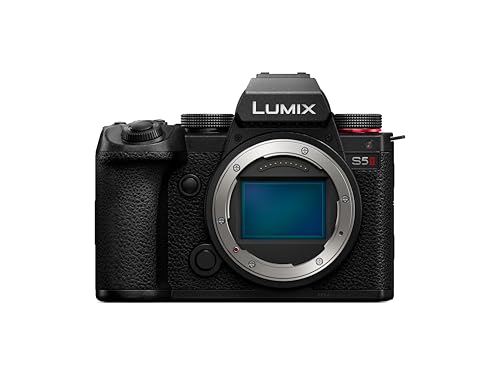
Panasonic LUMIX S5II — Best dual-frame master
The S5II’s claim on this guide is a single elegant feature with a hundred consequences: it can record using the full height of its sensor, the mode filmmakers call open gate. A dual-platform creator filming that way owns a master with genuine spare picture above and below the horizontal frame, so the vertical version is composed from real recorded detail — not from a desperate crop of a frame that was already fully spent. The Reel looks shot, not salvaged, and that distinction is visible to every viewer who has ever winced at an amputated upload.
Around that feature sits a body built for the long dual day. Cooling keeps a full session of masters recording without thermal negotiation; stabilisation keeps the walking B-roll — the material both platforms devour — calm in either orientation; and the colour arrives consistent enough that the YouTube long cut and the Instagram extracts feel like one production. Dual card slots protect a day whose footage must feed a week of posts.
Its screen and handling treat the tall frame respectfully, and the L-mount gives the dual creator lens choices from compact walkabout glass to serious portrait optics as the channels grow. Editors praise the files for the same reason publishers do: they hold together under reframing, grading and the gentle enlargement the vertical version so often demands.
The honest costs are size, menu depth and a lens shelf still building toward the biggest systems’ breadth. For a creator whose living is made in two frame shapes, though, this is the most complete answer here — the camera that makes ‘shoot once, publish twice’ a description of the hardware rather than a hope pinned on the edit.
- Format: full-frame mirrorless, L mount
- Recording: full-height open-gate options
- Endurance: fan cooling for long dual sessions
- Stabilisation: calm walking footage both ways
- Storage: dual slots for a week’s raw material
Strengths
- Vertical versions composed from real spare picture
- Long sessions without thermal interruptions
- Colour consistent across both platforms’ cuts
Trade-offs
- Body is a handful for minimalist kits
- Menus ask for a proper setup afternoon
- Lens catalogue still growing toward rivals
Best for: professional dual-platform creators filming masters weekly. Not suited for: casual posters who only ever publish one format.

DJI Osmo Pocket 3 — Best rotating dual shooter
The Pocket 3 treats the two frame shapes as equals in the most literal way in this guide: turn its screen and the camera’s whole posture follows, vertical as native as horizontal, with the gimbal keeping either orientation equally calm. A creator walking a market can film the wide establishing pass for YouTube, rotate, and film the tall, close, personal pass for Reels thirty seconds later, with no tripod gymnastics, no menu expedition and no change in how the footage feels.
That fluency changes what gets published. Vertical content stops being a weekly obligation extracted from horizontal footage and becomes a spontaneous habit — the reaction, the detail, the vertical-only moment filmed because the camera made it effortless. Meanwhile its horizontal footage remains good enough to anchor the channel’s travel and diary uploads, especially where a larger camera would be left behind or would change the behaviour of everyone in the room.
Sound, the silent killer of dual workflows, is a strength rather than a footnote: capable built-in microphones for the quick tall takes, and wireless pairing for the considered horizontal pieces, so a day’s mixed filming arrives with one consistent voice. Face tracking serves the walking presenter in both orientations, keeping the creator centred while they think about their sentences instead of their framing.
One fixed lens and one viewpoint remain the permanent terms, and battery life suits an outing rather than a festival. Within those terms, no camera here publishes to both platforms with less friction per hour of filming, which is why so many larger rigs now travel with a Pocket 3 as their dual-format scout and second unit.
- Format: gimbal-stabilised pocket camera
- Screen: rotates to native vertical filming
- Movement: three-axis steadiness in both shapes
- Audio: built-ins plus wireless microphone pairing
- Carry: pocket-sized for spontaneous vertical work
Strengths
- Vertical filming as fast as horizontal
- Both orientations equally steady on foot
- One consistent voice across mixed days
Trade-offs
- Fixed lens, single viewpoint forever
- Battery measured in outings
- Files prefer gentle grading only
Best for: mobile creators publishing daily to both platforms. Not suited for: studio creators needing interchangeable lenses.

Sony ZV-E10 II — Best crop-headroom creator body
The ZV-E10 II serves the dual creator through the quality of its master frame. Its footage is detailed enough that the vertical extraction — the centre column of a carefully framed horizontal take — holds together at phone-screen size without the softness that betrays a rescue job. Paired with screen guides and a creator’s control layout, it makes the protected-centre discipline nearly automatic: frame wide, keep the subject in the safe column, and both platforms are served before the edit begins.
Sony’s creator furniture earns its keep twice in this workflow. Product-showcase focus handles the held-up item shot that both a YouTube review and an Instagram Reel demand in the same session; the tally light and turning screen keep solo framing honest; and the stills side produces feed photographs in the same colour language as the video, so the grid and the channel match without a conversion ritual.
The E mount is the growth argument. A dual creator can start with one versatile zoom, add a bright prime for evening Reels, then a wider lens for interiors, all on a body small enough to remain the everyday carry. Footage from it also cuts kindly beside bigger Sony bodies, so a channel graduating to a full-frame main camera keeps this one as the natural second angle rather than starting its colour matching from zero.
Electronic stabilisation crops a little of the frame and asks for gentle walking, and there is no viewfinder for the traditionalists. For the creator whose two platforms are fed from one desk, one bag and one pair of hands, it is the most balanced dual tool here after the Panasonic — and considerably smaller in both bag and budget.
- Format: APS-C mirrorless, E mount
- Image: detailed footage with cropping headroom
- Creator tools: product focus, tally, turning screen
- Stills: feed photographs in matching colour
- System: deep lens shelf for both platforms’ needs
Strengths
- Vertical crops stay sharp at phone size
- One session yields matching video and stills
- Lens path grows in every direction
Trade-offs
- Electronic stabilisation trims the view
- Walking shots need a gentle technique
- No viewfinder for bright-day filming
Best for: desk-and-bag creators feeding both platforms weekly. Not suited for: viewfinder loyalists or heavy walking filmmakers.

Insta360 X4 — Best reframe-after-filming camera
The X4 abolishes the dual-format problem by refusing to frame at all. Its twin lenses record the whole sphere around it, and the creator chooses the shot afterwards: the wide YouTube view following the action, the tall Reel tracking the same moment from a different virtual angle, even a second subject entirely, all from one unrepeatable take. For sports, travel chaos, family events and any scene where the interesting thing refuses to announce its direction in advance, this is not a convenience — it is insurance against the missed frame in both formats simultaneously.
The reframing software has matured into a genuinely editorial tool. Keyframed virtual camera moves let one static recording become a panning YouTube shot and a subject-locked vertical clip, and the export pipeline delivers each platform’s version without a traditional timeline for simple pieces. Creators who think in moments rather than compositions — the wave, the goal, the dog’s decision — find the workflow liberating in direct proportion to how unpredictable their subjects are.
As a stills source it grabs frames from the sphere, which serves the feed adequately for action subjects, though a deliberate photograph from the other picks will outclass it. Its footage also asks more of the editing machine and the creator’s patience than a conventional file, and its low-light manners trail the larger sensors here, as physics insists.
Judged as a dual-platform specialist rather than a universal camera, it is unique in this guide: the only body for which ‘which frame shape?’ is a question that can be answered next week. Channels built on movement and surprise will find that answer worth the workflow; seated, scripted channels should take one of the conventional bodies and never look back.
- Format: dual-lens 360 action camera
- Framing: chosen after filming, any direction
- Exports: platform-ready versions from one take
- Mounts: sticks, helmets, bikes and selfie poles
- Stills: frame grabs for action-led feeds
Strengths
- Never misses the moment in either format
- One take becomes several different shots
- Invisible-stick shots look impossible and easy
Trade-offs
- Editing asks more time and power
- Low light trails the bigger sensors
- Deliberate stills are better elsewhere here
Best for: action, travel and event creators with unpredictable subjects. Not suited for: scripted desk channels filming one seated angle.

Canon EOS R50 — Best friendly dual starter
The R50’s dual-platform gift is morale. Its colour flatters people identically in the long YouTube cut and the fifteen-second Reel, its menus do not punish a beginner for filming in portrait on Tuesday and landscape on Thursday, and its small body is as happy on a vertical desk mount as on a horizontal tripod. For a creator building two audiences simultaneously — the stage where most dual strategies collapse under their own complexity — a camera this encouraging is a strategy in itself.
The protected-centre method works well on its footage. Detail is honest, skin tones need no correction pass before either platform sees them, and its stills produce the clean, bright feed photographs that smaller Instagram accounts live on. A creator can film the week’s main video, extract the vertical, shoot the product stills and record a Story update without the body ever leaving the desk or the colour ever changing its accent.
Canon’s lens mount gives the pairing a future: the kit zoom for everyday dual work, a compact prime when evening Reels begin, a wider option when the filming room shrinks. The body also moonlights gracefully as the household camera, which matters to creators whose channels began at the kitchen table and whose equipment must justify itself to a family as well as to an audience.
Its sensor is the smaller format, its native lens shelf is still filling in, and marathon sessions in hot rooms deserve the usual rehearsal. None of that prevents it being the dual starter we would hand to a talented beginner with two empty platforms and one year to fill them both.
- Format: APS-C mirrorless, RF mount
- Colour: flattering and consistent in both cuts
- Handling: compact on vertical or horizontal mounts
- Stills: bright feed photographs from the same body
- Menus: beginner-friendly in both orientations
Strengths
- Both platforms get the same flattering colour
- Simple enough to sustain a two-channel habit
- Stills and video share one colour voice
Trade-offs
- Smaller sensor than the full-frame leader
- Native lens choice still developing
- Long hot takes want a trial run first
Best for: new creators growing YouTube and Instagram together. Not suited for: professionals needing full-frame low-light reach.

Fujifilm X-T5 — Best stills-led dual camera
Some dual creators are photographers who publish video, and the X-T5 is their body. Its stills are the strongest in this guide — high-resolution, colour-rich, made through dials that keep a photographer’s hands fluent — so the Instagram grid, the platform half of the brief that is still photographic, is served at flagship level. The video then arrives with Fujifilm’s film-inspired colour already on it, giving the YouTube half a look that viewers recognise as authored rather than default.
Resolution is its dual-format mechanism. The generous sensor lets a horizontal master yield a vertical crop with detail to spare, and lets a single still serve the feed, the story crop and the thumbnail from one exposure. Creators who shoot hybrid days — a location photographed for the grid in the morning, filmed for the channel in the afternoon — carry one body and one colour philosophy instead of a camera bag’s worth of compromises.
Handling rewards the deliberate. Physical dials set exposure without menus, aperture rings on many lenses keep the photographer’s grammar intact in video mode, and the stabilisation settles conversational handheld work in either orientation. This is not the fastest dual workflow here; it is the most considered, and its owners tend to publish less often and be recognised more.
Low light belongs to the full-frame Panasonic, autofocus in chaos rewards a calmer operator than the Sony asks for, and the lens investment is its own ecosystem. For the stills-led creator, those are acceptable tolls on the road to a grid and a channel that look unmistakably like one person’s work.
- Format: APS-C mirrorless, X mount
- Stills: the strongest photographic output here
- Colour: film-inspired looks for both platforms
- Resolution: headroom for crops in every direction
- Controls: physical dials for deliberate shooting
Strengths
- Instagram stills at flagship quality
- YouTube footage with a recognisable look
- One body, one colour philosophy, both platforms
Trade-offs
- Low light trails the full-frame pick
- Focus prefers a deliberate operator
- Its lens system is a separate investment
Best for: photographers whose YouTube channel extends their grid. Not suited for: speed-led creators publishing daily video first.
How Do the Six Dual-Platform Cameras Compare?
| Camera | Dual strategy | Signature strength | Typical owner |
|---|---|---|---|
| Panasonic LUMIX S5II | Full-frame mirrorless | Full-height masters | The professional dual publisher |
| DJI Osmo Pocket 3 | Pocket gimbal | Rotating native vertical | The daily mobile creator |
| Sony ZV-E10 II | APS-C mirrorless | Crop headroom | The weekly desk-and-bag creator |
| Insta360 X4 | 360 action camera | Reframe afterwards | The action and event channel |
| Canon EOS R50 | APS-C mirrorless | Friendly consistency | The two-platform beginner |
| Fujifilm X-T5 | APS-C mirrorless | Resolution and colour | The stills-led creator |
Match the strategy to the subject. Predictable, seated, scripted work thrives on masters and crops; unpredictable movement belongs to the reframing camera; spontaneous daily publishing belongs to the rotating pocket body; and a stills-led account should start from the Fujifilm and let its video inherit the grid’s colour.
How Should You Frame One Take So Both Crops Look Deliberate?
Compose for the intersection and decorate the union. The subject, the product and every essential gesture live inside the centre column both frames share; the wider horizontal frame is then dressed with context — the room, the landscape, the second person — that enriches the YouTube version without containing anything the vertical audience will feel cheated of. Test the discipline by cropping your last take both ways before filming the next: the frames that fail teach the rule faster than any diagram.
Mind the vertical thirds as well as the horizontal ones. In the tall crop, faces sit higher, headroom shrinks, and captions will claim the bottom of the frame on Instagram whether you planned for them or not. Leave the lower strip of the vertical composition quiet — no hands, no product labels, no second face — and both platforms’ furniture, from progress bars to caption blocks, will sit on empty space instead of on your subject.
What Publishing Rhythm Lets One Filming Day Feed Both Platforms All Week?
Cut the long version first, while the day’s memory is fresh, and mark the vertical moments during that edit rather than in a separate pass. Most dual creators find three honest vertical pieces inside a considered horizontal video: the opening claim, the demonstration, the verdict. Published across the week with the long video at its head, those extracts stop being leftovers and become the channel’s invitation system, each one pointing at the full piece.
Plan the week’s shapes on one line of the diary before the filming day — long, tall, tall, still — so the camera is picked up already knowing its four jobs. Stills ride the same day almost free. One deliberate photograph per filming session — the setup, the product, the presenter in the location — stocks the grid and the stories for days, and frame grabs from the master cover the rest. The rhythm that sustains dual publishing is therefore a single well-run filming day with four outputs planned before the camera is switched on, not four productions competing for the same tired creator.
Which Mistakes Make Dual-Platform Channels Look Cheap on Both Platforms?
The amputated vertical leads: heads halved, products cropped mid-label, a second speaker reduced to an elbow. It announces that one platform was an afterthought, and audiences price afterthoughts accurately. The protected-centre discipline, a reframing camera, or native vertical filming — any of the strategies in this guide — exists to prevent exactly that announcement.
Inconsistent colour between platforms follows closely. A viewer who meets the Reel first and the channel second should recognise the same author; when the vertical version is graded differently, cropped from a different profile or exported from a forgotten preset, the two halves of the brand stop vouching for each other. Lock one colour habit per camera, per platform pair, and defend it for a season before judging it.
Finally, do not let the tail publish the dog. Vertical extracts should be cut for their own platform’s grammar — fast, close, captioned, complete in themselves — not exported as the first forty seconds of the long video with the edges missing. Each version deserves its own small edit; the cameras above make the shared filming cheap, but the publishing craft remains stubbornly, properly human.
How Do Captions and On-Screen Text Change the Way You Should Film?
They claim territory. On Instagram especially, the lower third belongs to captions, the top to interface furniture, and the sides to the viewer’s thumb; a dual creator films with that furniture already imagined, keeping faces and products in the calm middle band of the tall frame. Filming a test take and viewing it inside the actual app, furniture and all, teaches more in five minutes than a month of filming blind and hoping the crop is kind.
Text also changes pacing decisions at the camera. A sentence that will be captioned can be filmed in a wider, calmer frame; a demonstration that must be read — a label, a setting, a before-and-after — needs the close, steady, well-lit treatment on the day, because no caption rescues an illegible original. The bodies here, with their reliable focus on faces and products, let a creator make those calls confidently in the moment.
What Should a Dual Creator Do About Music, Trends and Platform Differences?
Film the substance so it survives the trend. A demonstration, a transformation, a journey and a verdict are reusable in every format cycle; a dance built on this week’s audio is a mayfly. Cameras cannot choose content, but a dual workflow can be arranged so the evergreen material is always captured in the highest-quality master the kit allows, while trend pieces are filmed fast and light on the pocket body — matching the production weight to the content’s lifespan.
Respect each platform’s contract with its viewer. YouTube’s audience has chosen to sit down; Instagram’s has been interrupted mid-scroll. The same take can serve both only when the edit honours both contracts — the long version allowed its breathing room, the tall version earning its first seconds. Creators who blame the platforms for the difference burn out; creators who film with both contracts in mind find the dual day becomes easier every month.
How Should You Light a Room That Must Flatter Two Frame Shapes?
Light the centre column first. The subject, lit well and slightly separated from the background, carries both crops; the wider frame’s edges can fall into gentle shadow without either audience noticing a fault. A single soft source in front and to one side, a background practical for depth, and a wall’s bounce for fill will serve a desk, a kitchen or a workshop in both orientations, and every camera in this guide gathers such modest arrangements flatteringly.
Check both frames on the actual screens before the session, not after it. The tall crop magnifies a harsh shadow and crops away a forgiving edge; the wide frame exposes the lamp you hid from the vertical. Two minutes of checking with the camera in both postures prevents the most common dual-platform reshoot, and builds the habit that separates dual professionals from horizontal filmmakers with a cropping habit.
How Do You Keep a Consistent Look Across a Phone, a Camera and Two Platforms?
Anchor everything to the camera and let the phone visit. When a phone must contribute — the spontaneous story, the behind-scenes clip — film it in the same light as the main body where possible, and accept its footage as texture rather than as a match shot. Viewers forgive a clearly-labelled glimpse; they notice when two cameras disagree about the colour of the same face in the same scene, cut together as equals.
Within the camera’s own output, consistency is a settings discipline: one picture profile for the platform pair, white balance set deliberately per room, and exposure judged on faces in both orientations. The picks above were favoured partly for how predictably they behave once set — a dual creator has twice the publishing surface on which inconsistency can show, and half the time to correct it.
What Does a Dual Creator’s Second Year Need That the First Did Not?
A system for volume. The first year runs on enthusiasm and a card reader; the second runs on templates — export presets per platform, caption styles saved, a framing checklist taped to the tripod, a weekly rhythm that produces the long video, its verticals and its stills as one operation. Cameras support that system when their settings can be saved, recalled and reproduced after a firmware update or a borrowed-body weekend, which is a quiet virtue shared by every body in this guide.
The second year also needs an honest division of labour between bodies, if a second body arrives: one owns the masters, the other owns the spontaneous and the vertical-native. Creators who assign those roles clearly — Panasonic for the considered pieces, Pocket for the daily tall habit, or the X4 for the unpredictable — stop re-deciding the kit every session, and the publishing calendar absorbs the saved decisions as energy.
How Should You Test a Camera for Dual Duty Before Committing to It?
Film one real subject three ways in a single afternoon: a horizontal master with a protected centre, a native vertical piece, and a still for the grid. Publish all three, privately if you prefer, and judge them on the phone and the television where their audiences live. The camera that survives that afternoon without a workaround — no soft crop, no posture fight, no colour mismatch — has passed the only dual test that predicts ownership.
Then inspect the boring evidence: how long the transfers took, whether the battery finished the afternoon, whether the files from both orientations organised themselves sensibly. Dual publishing multiplies small frictions by two platforms and fifty weeks; the test afternoon that surfaces them is the cheapest research a creator will ever do, and every body in this guide was ranked by agents who ran versions of exactly that test.
Why Does the Vertical Version Deserve Its Own Opening Seconds?
Because the two platforms make different promises in the first breath. The YouTube opening can afford a greeting and a roadmap; the Reel’s opening is a stranger’s thumb deciding in one second whether the next thirty exist. Filming with that difference in mind — capturing one clean, close, declarative moment during every session, usable as the vertical’s opening — gives the editor the raw material for an honest hook instead of a desperate crop of the long video’s throat-clearing.
Creators who shoot that moment deliberately, on whichever body is fastest to hand, find their vertical publishing stops feeling like an extract and starts behaving like a trailer made by the film’s own director. It is the smallest habit in this guide and, across a year of dual publishing, very possibly the most valuable one.
How Can a Small Channel Appear Established on Both Platforms Without Doubling Its Work?
By publishing less, in more shapes. One strong filming day, cut four ways — the long video, two verticals, a set of stills — presents a channel that seems to be everywhere, because it is: in the subscription feed, the reels feed, the grid and the stories, all from a single production effort. The cameras above were chosen to maximise the number of respectable shapes one day can become, which is the true arithmetic of appearing established.
Visual consistency does the rest of the impersonation. The same colour, the same framing habits, the same presenter energy in every shape tells both audiences that a settled professional is at work, even when the professional is one person at a kitchen table with a Pocket 3 and a plan. Dual publishing, done this way, is not twice the work of single publishing; it is the same work, framed twice, by a camera chosen for exactly that trick.
How Should a Dual Creator Handle Live Sessions and Stories Differently From Edited Videos?
Live and story formats forgive production and punish absence, which reverses the edited workflow’s values. The camera for them should be the one already charged, already mounted, already trusted — for most dual creators the pocket body or the desk body in its everyday posture — because a story filmed in the moment on a modest camera out-publishes a polished intention that waited for the main rig. Treat spontaneity as its own department, with its own permanently-ready equipment.
Keep the colour promise even here. A story that looks like the channel — same room, same light, same framing habits — reinforces the brand between uploads, while a jarringly different glimpse spends recognition the edited videos worked to earn. The picks in this guide make that consistency easy precisely because the same body can serve the ceremony and the corridor, the premiere and the postcard, without changing its accent.
What Storage and Backup Habits Suit a Creator Publishing in Two Directions?
Dual publishing doubles the derivatives, not the masters, and the archive should reflect that mercy. Keep the master takes and the project files with full backup honours; keep the exported platform versions in a single dated folder per video, since they can be regenerated from the project if a drive fails. What must never exist in only one place is the master — the one asset neither platform’s copy can replace at full quality.
Name the derivatives by platform and shape from the start, so a tired creator at midnight never uploads the tall file to the wide slot. It happens, publicly, to careful people; a naming liturgy adopted once — title, platform, shape, date — abolishes the error for the life of the channel, and costs nothing but the ten minutes it takes to write the rule on the wall above the desk.
How Do You Decide Which Platform Gets a Piece First When Both Want It?
By where the piece’s energy lives. A revelation, a transformation or a face telling a story belongs to the tall frame first, where intimacy is the currency; a landscape, a process or a performance with width in it belongs to the horizontal premiere, with the vertical cut as its herald. Filming with both destinies in mind — the close declarative moment banked for the Reel, the wide master protected for the long cut — lets the editor make that call from riches rather than from leftovers.
Stagger the publications so each platform’s version advertises the other without cannibalising it: the vertical as the invitation on the day, the long version as the destination, the stills as the week’s reminders. Dual publishing at its best is one story told in instalments across two rooms, and the cameras in this guide were chosen because their footage survives being instalments — consistent, detailed and recognisably authored in every shape it takes.
Why Do Some Dual Channels Grow on One Platform and Stall on the Other?
Usually because one platform is receiving originals and the other is receiving evidence. Viewers can tell when a version was composed for them and when it was merely derived at them, and they reward the composed one with the attention that algorithms then amplify. The cure is rarely more content; it is one deliberate native piece per platform per week, filmed with that platform’s grammar first — the tall, close, immediate piece for Instagram, the wide, patient, structured piece for YouTube — with the shared masters filling the rest of the calendar.
The cameras here support that cure asymmetrically on purpose. The rotating pocket body and the reframing action camera make native vertical cheap; the full-height Panasonic makes native-feeling derivatives honest; the mirrorless trio make native horizontal a pleasure. A channel stalling on one side should audit which of its pieces are native to that side before it audits anything else, because the answer is usually visible in a single afternoon’s filming plan.
How Should a Dual Creator Pack for a Trip That Must Feed Both Platforms Daily?
Pack one master body, one spontaneous body and nothing that duplicates either role. The master — the Panasonic or a mirrorless pick — owns the considered pieces at each stop; the Pocket 3 owns the corridor, the market dash and the vertical diary; and the phone returns to being a publishing terminal rather than a camera of last resort. Two chargers, cards counted by days rather than by hope, and a nightly ten-minute emptying ritual keep the trip’s footage organised while the trip is still available to be enjoyed.
Decide the trip’s shapes before departure: one long video per destination, verticals as the daily pulse, stills as the grid’s souvenirs. A creator who knows the shapes in advance films each stop once, properly, in both postures, instead of discovering at the airport that the whole journey exists only in wide. The dual discipline, packed well, weighs almost nothing — it is a way of seeing the trip, carried in whichever of these bodies fits the day.
What Makes a Follower Cross From One Platform to the Other?
An unfinished story. The vertical that shows the result and withholds the method; the long video that references the moment only the grid saw; the still that promises a film. Cross-platform audiences are built from these deliberate incompletions, each version complete enough to satisfy and open enough to invite. Filming with the crossing in mind — banking the method shots for YouTube, the result shots for Instagram, the portrait for the grid — turns two audiences into one community that commutes.
Consistency of identity seals the commute. The same face, colour and framing habits in both rooms tell the travelling viewer they have arrived at the right address, which is why this guide treats colour discipline and protected framing as audience strategy rather than as technique. A dual creator’s camera is, in the end, a passport office: it stamps the same identity in two shapes, and the six bodies above are the ones whose stamps never smudge.
What Is the Easiest Way to Add a Second Angle for Both Platforms at Once?
Lock the humble camera wide and let the main body work. A Pocket 3 or an X4 fixed on the room gives the editor a rescue angle for the long video and, because both record generously, a differently-framed vertical source when the main crop fails. The pairing costs little in money or attention, and it converts the dual creator’s worst day — the missed moment, the blocked frame — into a choice between two good ones.
Keep the second body’s settings married to the first: same frame rate family, same colour intention, same audio reference recorded at the start. Ten seconds of clapping or a spoken slate at the session’s head synchronises a week of dual-platform editing more reliably than any software promise, and it is a habit every professional set in the world still observes.
How Often Should a Dual Creator Revisit Their Framing Habits?
Once a season, with evidence. Pull the last dozen verticals and a dozen horizontals, lay them side by side, and look for the recurring wound: the caption sitting on a chin, the product drifting out of the safe column, the wide shots whose centres are empty. Habits drift as rooms, lenses and formats change, and a seasonal audit — an hour, twice a year — keeps the dual discipline fitted to the channel as it actually is.
Change one habit at a time and mark the date in the publishing diary, so the effect can be read in the following month’s numbers. Dual craft improves like any other: by small, measured corrections, made on evidence, with a camera that stays constant while the creator’s eye does the growing.
Final Recommendation
For the dual-platform professional, the Panasonic LUMIX S5II is this guide’s reference answer: full-height masters, cooled endurance and colour that keeps the long cut and its vertical children recognisably one family. The DJI Osmo Pocket 3 is its perfect complement and, for mobile creators, a complete dual answer in a pocket. Between them, the Sony, Canon, Insta360 and Fujifilm divide the remaining temperaments — crop headroom, reframing freedom, beginner friendliness and stills-led colour.
Keep one page in the publishing diary for shapes alone — which pieces ran tall, which ran wide, and what each earned — because a season of that page teaches a creator their own audience’s true geometry more honestly than any platform’s advice column. Whichever body you choose, adopt the discipline that makes any of them work: protect the centre, film one deliberate vertical opening, bank a still per session, and cut each version for its own platform’s contract. Two audiences, one filming day, no amputations — that is the whole craft, and these six cameras are the ones that practise it best.
Frequently Asked Questions
Can one camera really serve YouTube and Instagram equally well?
Yes, with the right strategy. Full-height recording, a rotating screen, reframing after the fact, or disciplined protected-centre framing all produce honest versions for both platforms from one body — the six picks here each embody one of those strategies.
Is it better to crop a horizontal video or film vertically from the start?
Both, for different material. Considered pieces suit a horizontal master with a protected centre, which yields the long video and its verticals from one take; tall, spontaneous subjects — people standing, buildings, performances — often compose better filmed natively vertical, which the Pocket 3 and the mirrorless picks handle gracefully.
Which pick is best if Instagram stills matter as much as video?
The Fujifilm X-T5. Fujifilm’s X-T5, without close competition: flagship stills, film-inspired colour that carries into its video, and one unmistakable look shared by grid and channel alike.
How do I stop captions covering my subject in vertical videos?
Film with the platform’s furniture in mind: keep faces and products in the middle band of the tall frame and leave the lower strip quiet. A test take reviewed inside the actual app teaches the safe zones faster than any diagram.
What if my subject moves unpredictably, like sport or children?
Consider the Insta360 X4, which records in every direction and lets you choose wide, tall or square framings afterwards from the same take. For calmer unpredictability, the Pocket 3’s gimbal and tracking keep a moving presenter centred in either orientation.
Do I need two cameras to publish on both platforms well?
No. Every pick here serves both platforms alone. A second body helps as a locked wide angle or a spontaneous vertical tool, but the discipline — protected centres, deliberate openings, one colour habit — matters more than the second purchase.
Related Guides
Dual creators will also find ammunition in our guides to cameras for videos for YouTube, judged as studio tools, cameras chosen for Instagram-first stills and reels, pocket gimbal cameras for daily vertical publishing.


