Working from home turned the webcam from an occasional accessory into the most public-facing object on the desk. It carries the morning standup, the client presentation, the interview and the call where a contract gets argued over, and it does all of that from a room that was never designed as a studio: a window on the wrong side, a ceiling light behind the chair, a radiator ticking under the desk. The camera built into a laptop lid was specified for thinness, not for any of this, and its two habits — sitting too low and giving up in dim light — are the reason so many home workers look like witnesses in a documentary rather than colleagues in a meeting.
A quick note on how this page works before the picks: this article contains affiliate links, and if you buy through one of them this site may earn an affiliate commission at no extra cost to you. That income keeps guides like this one free to read, and it never changes which cameras get picked — every model below earned its place on its manufacturer documentation, its fit for daily meetings and its behaviour in ordinary rooms, not on any commercial arrangement.
The six cameras here were chosen on a deliberately narrow axis: the recurring video meeting, one person at a desk, in the light the room already has. That axis is worth stating because it is not the only one on this site. A companion guide elsewhere in the system judges webcams by the ring light bundled beside them; lighting hardware is not the criterion here, and a model that happens to carry a small built-in lamp is still judged on its sensor, its microphone and its framing first. Streaming features get the same treatment. A camera that also records polished video earns credit for it only where that ability serves a working day — a recorded training session, a webinar, a presentation captured for colleagues in another time zone.
Three questions sort the field faster than any specification table. Does the camera hold a face together in the mixed, mediocre light of a real room? Does it frame one seated person without swallowing the whole bookcase behind them? And when the call ends, does a piece of physical plastic close over the lens? The picks below answer those questions in different orders of priority: a 4K flagship that treats meetings as its second job, a 1080p daily driver built around light correction, an accessible 2K model with the widest view in the list, a creator camera with manual controls and no microphone at all, an enterprise model managed like office equipment, and a 4K camera small enough to forget in a laptop bag.
Every figure quoted in this guide — resolution, frame rate, field of view, microphone reach, sensor size — comes from the manufacturer’s own published documentation for that exact model, and where a maker publishes a range or a condition, the article says so rather than rounding it into a promise. Webcam marketing leans heavily on the single biggest number a camera can print on its box; the sections that follow are organised to make that number the last thing a buyer needs, not the first.
In this guide
Quick picks: best work from home webcams
| # | Product | Where to buy |
|---|---|---|
| 1 | Logitech MX Brio | Check on Amazon |
| 2 | Anker PowerConf C200 | Check on Amazon |
| 3 | Elgato Facecam MK.2 | Check on Amazon |
| 4 | Poly Studio P5 | Check on Amazon |
| 5 | OBSBOT Meet 2 | Check on Amazon |
What to look for in a webcam for working from home
Image quality is decided by the light already in the room
A home office rarely offers the even, frontal light that camera sensors prefer. The typical arrangement is a window to one side, which lights half a face and abandons the other, or a window behind the chair, which turns the sitter into a silhouette while the garden outside renders in perfect detail. Sensor size and lens aperture are the hardware half of the answer: a physically larger sensor with a wider aperture gathers more light per pixel, and the figures are printed plainly in the documentation — the cameras below span sensors from a quarter-inch class up to a half-inch, with apertures between f/1.8 and f/2.4. The software half is the manufacturer’s light-correction system, which lifts shadows, tames bright windows and balances colour automatically. Logitech calls its current versions RightLight, Anker describes automatic brightness correction, Poly lists automatic low-light compensation, and the effect aimed at is the same: a face that stays readable at four in the afternoon in November, when the room’s only real light source is the monitor itself. High dynamic range support, where a maker offers it, is the specific tool for the window-behind-the-chair problem, because it holds detail in the bright background and the shaded face at the same time instead of choosing one.
Resolution, and what a meeting actually sends
The honest starting point is that the major meeting platforms compress outgoing video hard. A 1080p feed is the practical ceiling of what colleagues receive on most calls, group galleries are often delivered lower still, and a 4K sensor spends most meetings sending a fraction of what it can capture. That does not make resolution meaningless; it relocates its value. A higher-resolution sensor gives the camera’s digital zoom and auto-framing something to crop from, so a tightened frame at 1080p output still looks clean instead of smeared. It also serves the second shift many home cameras now work: recording. A camera that captures 2K or 4K gives recorded presentations, lessons and product walkthroughs a shelf life that a soft 1080p capture does not. Frame rate follows the same logic. Meetings run at 30 frames per second, and a camera whose ceiling is 30 loses nothing there; the 60-frame modes on two picks below matter for recording motion — a hand sketching, a prototype turning — rather than for the standup. Buy resolution for cropping headroom and recording, buy 1080p without apology for meetings alone, and treat any claim that 4K will transform a Zoom gallery as marketing arithmetic.
Field of view and framing for one person at a desk
Field of view, quoted diagonally by every maker here, decides how much of the room joins the call. At 90 degrees and beyond, a camera shows the shelves, the door and anyone passing behind the chair; at 65 degrees it shows a head and shoulders and very little else. Neither is correct in isolation — a presenter who gestures and moves wants width, a worker in a shared room wants the narrow crop — which is why most of these cameras offer two or three switchable views rather than one fixed lens. The second framing tool is auto-framing, sold under names such as RightSight and AI auto framing: the camera detects the sitter and pans, tilts and zooms digitally to keep them centred as they lean, stand or shift. It is genuinely useful for anyone who thinks on their feet, and genuinely pointless for anyone who sits still, and it always spends some of the sensor’s resolution to buy its movement, which is one more reason the higher-resolution picks pair naturally with it. A fixed, well-chosen crop set once in the companion app remains the zero-effort option, and two picks below offer nothing else — a limitation only if the sitter moves.
The microphone is half the meeting
Colleagues forgive a soft picture far sooner than they forgive bad sound, and the microphone array is where these six cameras differ most sharply. The patterns matter more than the counts. Beamforming pairs, used by both Logitech picks, aim their pickup forward and use processing to discount noise arriving from the sides. A single directional microphone, the Poly approach, narrows its attention to the person directly in front of it by design. Omnidirectional pairs, fitted to the Anker and the OBSBOT, hear the whole room evenly, which suits two people sharing a desk and penalises a home with a washing machine in the next room. Published pickup ranges run from about 1.2 metres to a claimed 3 metres, and the honest reading of those numbers is that they describe a quiet room; every array in this list is at its best within arm’s length of the chair. One pick breaks the pattern entirely: the Elgato has no microphone whatsoever, a deliberate omission that assumes a separate microphone or headset, and it is scored that way below rather than excused. Buyers who already wear a headset for calls can treat microphone quality as a backup feature; buyers who rely on the camera’s own audio should rank this section above resolution.
A physical privacy shutter is not a software setting
The case for a shutter is simple: software can be wrong, settings can reset, and an indicator light reports what the camera believes rather than what it sees. A piece of plastic over the lens is verifiable from across the room. The six picks implement the idea four ways. Two Logitech models and the Poly use rotating or sliding covers built into the body, the Anker’s cover is a red iris that also cuts power to the camera when closed — visible from the doorway, which is the point — the Elgato slides a built-in shield across its lens, and the OBSBOT relies on a magnetic cover plus an automatic sleep mode, the one arrangement here whose cover is a separate piece that can be left in a drawer. None of these is a reason to buy a camera alone, but in a room that doubles as a bedroom or a family space, the difference between a shutter that lives on the camera and a cap that lives somewhere in the house is the difference between privacy that happens and privacy that is intended.
Mounting: the clip, the tilt and the tripod thread
Every camera here clips to the top of a monitor or laptop lid, and the details of that clip decide where the lens actually points. A mount that tilts lets the camera look slightly down at the sitter, which is the flattering and natural angle; a mount with a standard quarter-inch tripod thread also fits the small desktop tripods and monitor-arm adapters that put a camera at true eye level beside an external display. Two picks add a presenter’s trick: a Show Mode that tilts the camera down toward the desk and flips the image the right way up, so a sketch, a document or a piece of hardware can be shared without a second camera or a phone held overhead. Laptop users who travel between desk and kitchen table should note the mount’s footprint as well — the OBSBOT’s magnetic base is the only one here designed to come off and go back on in seconds, while the enterprise Poly assumes it will be clamped once and managed from a desk.
Certification, software and the plug-and-play baseline
All six cameras speak the standard USB video protocol, so all six work in Zoom, Microsoft Teams and Google Meet the moment they are plugged in, with no driver hunt on Windows or macOS. Certification is the layer above that baseline: where a manufacturer lists a camera as certified for Teams or Zoom, the platform’s own programme has verified the device, and in managed workplaces that label is sometimes a purchasing requirement rather than a preference. The companion applications are where the real differences live. Logi Tune unlocks the framing and desk-sharing features on the Logitech pair, Elgato’s Camera Hub exposes manual exposure and stores settings on the camera itself, Poly Lens manages the Studio P5 the way IT departments manage fleets, AnkerWork switches the C200’s field of view, and OBSBOT Center runs the Meet 2’s framing modes. A buyer who never installs any of them still gets a working camera from every pick; a buyer who wants the features printed on the box should budget the five minutes the software takes, and check whether a work laptop’s admin policy allows it.
With those axes set — light first, framing second, sound always, resolution in its proper place — the six picks resolve into six distinct answers rather than six versions of the same camera.
How to read a webcam specification sheet without being misled
Webcam documentation is more honest than webcam marketing, and the gap between the two is where most disappointment is manufactured. The resolution line is the first place to look carefully: a camera’s top mode should be a native capture mode of its sensor, and where a maker also lists lower modes, the frame rate attached to each one matters more than the headline — a camera that reaches its best resolution only at 30 frames per second is a different tool from one that holds 60 at the resolution below it. Field of view is quoted diagonally by convention across this category, which flatters every lens equally and at least keeps the six figures in this guide comparable with one another; a horizontal figure, where one is published, is always the smaller and more truthful-feeling number.
Digital zoom deserves the same scepticism. Every camera here zooms by cropping its sensor, which means zoom quality is really a question about how much resolution the crop can spare: a 4K sensor cropped to a quarter of its frame still delivers a full 1080p picture, while a 1080p sensor cropped the same way delivers a quarter of one. This is the mechanical reason the higher-resolution picks pair their zoom and framing features with confidence and the 1080p picks treat zoom as a convenience. Microphone figures carry their own fine print. Pickup ranges are measured in quiet rooms, noise reduction is a processing claim rather than a physical one, and the pattern of the array — beamforming, directional, omnidirectional — predicts real-world behaviour better than any distance figure. Certification lines reward a close read as well: a platform’s logo can mean the device passed that platform’s own programme, or merely that it works with the platform, and the manufacturers in this list use the stronger claim only where it applies. The discipline throughout is the one this guide applies to itself: a feature counts when the maker’s documentation for that exact model says it, in the configuration being sold.
The six best work from home webcams

Logitech MX Brio — the 4K flagship that treats meetings as its second job
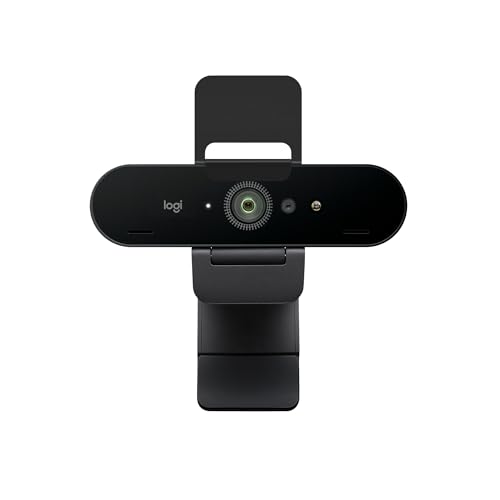
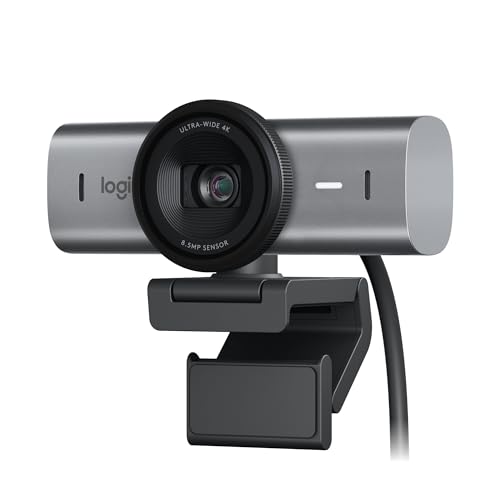
The MX Brio is Logitech’s most advanced webcam, built around an 8.5-megapixel Sony STARVIS sensor that captures 4K at 30 frames per second or 1080p at 60. Logitech publishes the reasoning behind the hardware plainly: the sensor’s pixels are 70 percent larger than those in the older Brio 4K, and its RightLight 5 processing claims twice the face visibility in difficult light, with automatic exposure, white balance and noise reduction working continuously. In the terms of the section above, this is the pick that attacks the ordinary-room problem with the most sensor and the most processing at once, and it is the only camera here whose image chain was clearly designed by people expecting it to be judged next to dedicated recording cameras.
Framing offers the full menu. Three fields of view — 90, 78 and 65 degrees — cover the shared-room crop and the presenter width, a 4x digital zoom tightens further, and RightSight auto-framing, switched on in the Logi Tune software, keeps a moving sitter centred by cropping into that large sensor, which is exactly the workload a 4K sensor is for. Show Mode tilts the camera down to share notes or hardware on the desk, flipping the image upright. The dual beamforming microphones use AI-assisted noise reduction with a published pickup range of up to 1.5 metres, the joint-longest reach claimed by any camera here that also localises sound, and the lens ring rotates a built-in privacy shutter closed between calls. Fine manual controls — ISO, shutter speed, tint, vibrance — sit in Logitech’s software for the minority who want them, and the camera is certified for Zoom, Microsoft Teams and Google Meet. A business twin, the MX Brio 705, carries the same hardware into managed fleets.
Strengths:
- 4K capture from an 8.5-megapixel STARVIS sensor with the strongest published low-light claims in this list
- RightSight auto-framing that crops into a 4K sensor, so reframed shots stay clean at meeting resolutions
- Dual beamforming microphones with AI noise reduction and a 1.5-metre published pickup range
- Built-in rotating privacy shutter, Show Mode for desk sharing, and certification for Zoom, Teams and Meet
- Manual image controls in Logitech software for recorded presentations and webinars
Trade-offs:
- The premium position in this list, priced as a flagship rather than an accessory
- Full 4K and the framing features ask for a USB 3.0-capable port and the Logi Tune software to be installed
- The aluminium body is the heaviest here with its mount and cable attached
- Most meeting platforms will compress its output to 1080p or below, so the 4K spend serves cropping and recording
Who it suits: Home workers whose camera works two shifts — daily meetings plus recorded presentations, webinars or client-facing video — and anyone presenting to rooms where looking sharp is part of the job rather than a nicety.
For the home worker who records as well as meets, the MX Brio is the camera that covers both jobs without compromise, so check price on Amazon.
Check price on Amazon: Logitech MX Brio
Logitech Brio 500 — the 1080p daily driver built around light correction
The Brio 500 accepts the argument made earlier in this guide — that meetings live at 1080p — and spends its entire budget on making that 1080p look right in bad rooms. Its 4-megapixel sensor records 1080p at 30 frames per second or 720p at 60, behind a glass autofocus lens, and the headline system is RightLight 4 with HDR: automatic light correction that lifts a shaded face, holds a bright window behind the chair from blowing out to white, and keeps colour plausible while it does so. For the most common home-office failure mode — a worker sitting between a dark room and a bright window — this is the most targeted engineering in the list, delivered by the camera most buyers here will actually purchase.
The framing tools mirror the flagship’s at meeting scale. The field of view switches between 90, 78 and 65 degrees, RightSight auto-framing in Logi Tune keeps the sitter centred through the same crop-based movement, and Show Mode tilts the camera down to share the desk with the image flipped upright. Two stereo microphones with noise reduction are published with a pickup range of up to 1.22 metres, honest numbers for one person at a desk. The privacy shutter is integrated into the body and closes with a dial on the side, the universal clip carries a quarter-inch tripod thread, and the camera is certified for Microsoft Teams, Zoom and Google Meet. The cable is a hardwired USB-C lead, which removes a connector to lose and fixes the cable length at what Logitech provides. In a range where many 1080p cameras are anonymous boxes, the Brio 500’s identity is its processing: it exists to fix the light, then get out of the way.
Strengths:
- RightLight 4 with HDR aimed directly at the window-behind-the-chair problem most home offices have
- RightSight auto-framing and Show Mode carried down from the flagship tier
- Integrated privacy shutter operated by a side dial, without moving the camera’s aim
- Certified for Teams, Zoom and Meet, with autofocus and a glass lens at a mid-range position
- Three switchable fields of view plus 4x digital zoom for shared rooms and presenters alike
Trade-offs:
- A hard ceiling of 1080p, with 30 frames per second at full resolution — no recording headroom
- The hardwired USB-C cable cannot be swapped for a longer or shorter one
- Auto-framing and Show Mode live in the Logi Tune software rather than on the camera
- Microphone reach is published at 1.22 metres, the shortest claim among the microphone-equipped picks
Who it suits: The full-time home worker whose meetings are the job — several calls a day in a room with imperfect light — and who wants the fixes automated rather than a control panel to learn.
If the daily standup happens in a room the light forgot, the Brio 500 is the correction applied at the source, so check price on Amazon.

Anker PowerConf C200 — 2K headroom and the widest view at an accessible tier
The C200 is the value argument of this list, and it makes that argument with resolution rather than with cuts. Its 5-megapixel sensor, a 1/2.7-inch unit, records 2K at 2560 by 1440 and 30 frames per second — a step above the 1080p that meetings consume, which buys cleaner digital cropping and sharper recorded material without entering flagship territory. Autofocus works from 15 centimetres to 3 metres, automatic brightness correction handles the exposure side, and the field of view is the widest offered here: 95 degrees at full width, switchable to 78 or 65 in the AnkerWork software. A small presenter in a small room can show a whiteboard corner at 95 degrees and crop to a head-and-shoulders portrait at 65, from the same fixed lens.
Audio and privacy are specified with unusual candour for the tier. The dual stereo microphones run automatic gain control and noise cancellation, and Anker publishes a voice pickup distance of 3 metres — the longest claim in this guide, and one to read as a quiet-room figure, though it does suit the worker who takes calls while moving between desk and shelves. The privacy cover is the most theatrical here: a switch on top slides a bright red iris across the lens and cuts the camera’s power as it closes, so the blocked state is visible from across the room and is electrical as well as physical. The adjustable clip doubles as a stand, a tripod thread is built in, and the connection is USB-C. What the C200 does not have is auto-framing — the frame chosen in the software is the frame that stays — and every resolution it offers runs at 30 frames per second. For a seated worker in a set position, neither absence is felt on a call.
Strengths:
- 2K recording above meeting resolution, giving crops and recordings real headroom at this tier
- The widest field of view in the list at 95 degrees, switchable down to 65 in software
- Dual stereo microphones with gain control and noise cancellation, published at 3 metres of pickup
- A privacy cover that visibly blocks the lens and switches the camera off as it closes
- Autofocus from 15 centimetres, useful for holding objects and documents up to the lens
Trade-offs:
- No auto-framing of any kind — the composition set in AnkerWork is fixed until changed
- Every resolution is capped at 30 frames per second, including 720p
- Field-of-view switching requires the AnkerWork application rather than a control on the camera
- Omnidirectional pickup hears the whole room, including the noises a directional design would discount
Who it suits: Budget-conscious home workers and students who want resolution headroom and a wide, flexible frame, sit in one place to take their calls, and would rather spend the savings on a chair.
For a first dedicated webcam that already out-resolves the meetings it joins, the C200 makes the sensible case, so check price on Amazon.
Check price on Amazon: Anker PowerConf C200

Elgato Facecam MK.2 — the image-control pick, with no microphone by design
The Facecam MK.2 comes from Elgato’s streaming catalogue, and its specification reads like a small camera rather than a meeting accessory: a Sony STARVIS CMOS sensor of 1/2.5 inches — the second-largest in this list — behind a fixed-focus f/2.4 prime lens with an 84-degree field of view, sending uncompressed 1080p at 60 frames per second over USB 3.0, with 720p available at up to 120. HDR support runs to 1080p at 30. The fixed focus is set for the desk distance, covering roughly 30 to 120 centimetres, which removes autofocus hunting from calls entirely: nothing in the frame breathes or pulses as the sitter moves. For the home worker whose camera also records training videos, course material or a video podcast, this is the pick that behaves like equipment rather than a peripheral.
The software story continues past the manual controls. Camera Hub adds face tracking that keeps the subject composed inside the 84-degree frame, background blur for rooms that cannot be tidied, and integration with NVIDIA’s broadcast effects on machines with the graphics hardware to run them. Elgato also publishes the camera’s place in a wider desk ecosystem — its settings can ride along with the company’s other control hardware — which matters to the recording audience and not at all to the meeting audience. For work-from-home purposes the relevant summary is narrower: this is the one pick whose image can be deliberately art-directed, exposure locked against a bright window rather than negotiated with it, and that deliberateness is what its buyers are paying for.
Control is the other half of its identity. Elgato’s Camera Hub software exposes manual exposure, ISO and white balance alongside face tracking and background blur, and the camera stores its settings in onboard memory, so the image tuned on Monday survives a move to another computer. A sliding privacy shutter is built into the body — an upgrade the MK.2 made over its predecessor’s loose cap — and the mount carries a quarter-inch thread. Then there is the omission that defines the pick’s audience: there is no microphone, at all, by deliberate design. Elgato assumes its buyers own a microphone or headset, and for the meeting-only buyer that assumption adds a second purchase to the first. Judged as a camera, this is arguably the most serious imaging device here; judged as the only device on a desk, it is incomplete, and the guide scores it as exactly that.
Strengths:
- Uncompressed 1080p at 60 frames per second from a large STARVIS sensor, with HDR at 30
- Fixed focus tuned for desk distance — no autofocus hunting or pulsing on calls
- Manual exposure, ISO and white balance in Camera Hub, with settings stored on the camera itself
- Built-in sliding privacy shutter and a mount with a standard tripod thread
- High frame rates at 720p for recording motion, demonstrations and fast-moving subjects
Trade-offs:
- No microphone whatsoever — a headset or separate microphone is a required second purchase
- Fixed focus means no close-up flexibility beyond its 30-to-120-centimetre working range
- Uncompressed video needs a USB 3.0 connection; older ports fall back to compressed formats
- No auto-framing, and no meeting-platform certification programme behind it
Who it suits: Home workers who already own a good microphone or headset and whose camera doubles as recording equipment — trainers, course creators and presenters who want manual control over their image.
For the desk that already has a microphone and wants a camera with real controls, the Facecam MK.2 is the specialist worth its caveat, so check price on Amazon.
Check price on Amazon: Elgato Facecam MK.2

Poly Studio P5 — the enterprise pick, managed like office equipment
The Studio P5 is what a webcam looks like when it is designed to be issued by an IT department rather than chosen from a shelf. The camera itself is a compact 1080p unit — 1920 by 1080 at 30 frames per second from a 4-megapixel sensor — with autofocus, a 4x digital zoom with electronic pan and tilt, and a fixed 80-degree field of view that frames one person and deliberately little of the room behind them. Poly publishes automatic low-light compensation rather than a named HDR system, and the framing philosophy matches the audience: fixed framing, no auto-following, a picture that looks the same in every call from every issued unit in the fleet.
The professional details accumulate around the edges. The single microphone is unidirectional, tuned for a personal workspace, with a published frequency response of 50 hertz to 16 kilohertz — it is built to favour the voice in front of it over the room around it. An integrated privacy shutter rotates closed over the lens, a status light reports call and mute state at a glance, and the body hides a USB-A port that accepts Poly’s wireless headset adapters, so one desk connection can serve camera and headset together. The camera is certified for Microsoft Teams and Zoom, and Poly Lens software — desktop or cloud — lets an administrator configure and update units centrally, the only management story of its kind in this list. The connections are from the USB-A era, the ceiling is 1080p at 30, and there is no auto-framing to follow a presenter around a room. None of that is an accident. This is the pick for the worker whose employer has opinions, or whose home desk is expected to behave like a branch office.
Strengths:
- Certified for Microsoft Teams and Zoom, with Poly Lens software for central management and updates
- A unidirectional microphone specified for personal workspaces, favouring the speaker over the room
- Integrated privacy shutter plus a status light that shows call and mute state
- A built-in USB-A port for Poly headset adapters, tidying the camera-and-headset combination
- A fixed, consistent 80-degree frame that suits standardised home-office setups
Trade-offs:
- 1080p at 30 frames per second is the ceiling, with no higher-resolution mode for recording
- Fixed framing only — no auto-framing for presenters who move
- USB-A connectivity belongs to the previous port generation and may need an adapter on newer laptops
- A single microphone where most rivals fit a pair
Who it suits: Employees in managed environments, anyone whose workplace standardises on Poly or Teams-certified hardware, and home workers who value a consistent, supportable setup over headline specifications.
For the home desk that has to behave like a branch office, the Studio P5 is the professional’s quiet answer, so check price on Amazon.
Check price on Amazon: Poly Studio P5

OBSBOT Meet 2 — 4K and AI framing in a camera that weighs almost nothing
The Meet 2 is the outlier of this list: a 4K webcam that weighs 40.5 grams without its mount, in a body 45 millimetres wide. Inside it sits a half-inch CMOS sensor — the largest here — with an f/1.8 aperture, the fastest lens in the group, capturing 4K at 30 frames per second or 1080p at 60. Phase-detection autofocus keeps the image locked as the sitter moves, and the 79.4-degree field of view is a deliberate middle setting: wide enough for a desk and its occupant, narrow enough to keep the rest of the room at the edges. OBSBOT built its name on AI camera work, and the Meet 2’s framing is its party piece — software modes for a close-up, an upper-body shot and a group composition, reframing digitally as people enter, leave or shift, in landscape or in the portrait orientation the camera adopts when it is rotated onto its side.
The rest of the specification follows the small-and-clever theme. Dual omnidirectional microphones carry noise reduction and automatic gain control, a magnetic mount snaps the camera onto a screen or stands it on the desk, and a standard quarter-inch thread waits underneath for tripod use. Privacy is handled by a magnetic cover that ships with the camera and by a sleep mode that rests the lens when idle — effective, though the cover is the one loose piece in this guide, and loose pieces migrate. The connection is USB-C running at USB 2.0 speeds, which means the 4K stream travels compressed; the companion OBSBOT Center software runs the framing modes and the background effects, some of which ask for a capable graphics processor on the computer. For the hybrid worker who takes calls from two desks and a kitchen table, no other pick here treats the camera as luggage.
Strengths:
- 4K capture from the largest sensor and fastest lens in this list, in a 40.5-gram body
- AI auto framing with close-up, upper-body and group modes, in landscape or portrait
- Phase-detection autofocus that holds focus on a moving sitter
- Magnetic mounting that makes the camera genuinely portable between desks
- Dual microphones with noise reduction and automatic gain control
Trade-offs:
- Privacy rests on a separate magnetic cover and a sleep mode rather than a built-in shutter
- The USB 2.0 connection means the 4K feed is compressed, unlike the Elgato’s uncompressed stream
- Framing is digital only — there is no gimbal, so the view crops rather than truly follows
- Some background effects in the software call for a discrete graphics card on Windows machines
Who it suits: Hybrid workers who move between desks and homes, laptop-first workers short on space, and anyone who wants 4K and active framing without a permanent installation on one monitor.
For the worker whose office is wherever the laptop opens, the Meet 2 packs the most camera into the least bag space, so check price on Amazon.
Check price on Amazon: OBSBOT Meet 2
How the six compare
The table below compresses the sections above into the distinctions that actually separate these cameras. It is qualitative on purpose: the numbers that matter — field of view, microphone pattern, shutter type — are given as the manufacturers publish them, and the verdicts are about fit for the working day rather than rank.
| Camera | Top video mode | Field of view | Framing | Microphone | Privacy | Best read as |
|---|---|---|---|---|---|---|
| Logitech MX Brio | 4K at 30 fps | 90 / 78 / 65 degrees | Auto-framing plus Show Mode | Dual beamforming, AI noise reduction | Built-in rotating shutter | The flagship for meetings plus recording |
| Logitech Brio 500 | 1080p at 30 fps | 90 / 78 / 65 degrees | Auto-framing plus Show Mode | Stereo pair, noise-reducing | Built-in shutter on a side dial | The daily driver for difficult room light |
| Anker PowerConf C200 | 2K at 30 fps | 95 / 78 / 65 degrees | Fixed frame, set in software | Stereo pair, gain control and noise cancellation | Sliding cover that also cuts power | The accessible pick with the widest view |
| Elgato Facecam MK.2 | 1080p at 60 fps, uncompressed | 84 degrees | Fixed focus, face tracking in software | None — a separate microphone is required | Built-in sliding shutter | The controlled image for people who record |
| Poly Studio P5 | 1080p at 30 fps | 80 degrees | Fixed framing, digital zoom | Single directional microphone | Integrated shutter, status light | The managed, certified office unit |
| OBSBOT Meet 2 | 4K at 30 fps | 79.4 degrees | AI framing in three modes, portrait or landscape | Dual omnidirectional, noise reduction | Magnetic cover plus sleep mode | The portable 4K camera for moving desks |
Two pairings inside the table are worth drawing out for buyers hesitating between neighbours. Between the two Logitech models, the honest question is whether the camera will ever record anything that outlives a meeting: if it will, the MX Brio’s sensor and manual controls are the whole argument, and if it will not, the Brio 500 delivers the same framing tools, the same shutter logic and the same certifications at the resolution meetings actually use. Between the two 4K cameras the question is permanence — the MX Brio assumes a settled desk and rewards it, the Meet 2 assumes the desk is provisional and packs accordingly. And the Facecam MK.2 stands as the reminder that a comparison table cannot capture an absence: its row is competitive on every imaging line and empty on the one line a meeting-only buyer cannot skip.
Read across the rows and the real pattern emerges: resolution is the least interesting column. The MX Brio and the Meet 2 share a 4K ceiling and almost nothing else — one is a fixed flagship for a settled desk, the other a travelling camera that happens to resolve 4K. The Brio 500 and the Studio P5 share 1080p and sit at opposite ends of the personality scale, one built to fix a family’s front room, the other to satisfy a procurement policy. The C200 quietly holds two records — widest view, longest published microphone reach — at the accessible end, while the Facecam MK.2 holds the list’s only absolute: no microphone, and no apology for it.
Setting up a home webcam so the first call goes well
Position matters more than settings. The lens belongs at eye level or a fraction above it, close enough to the screen that looking at colleagues and looking near the camera become nearly the same glance. A monitor-top clip achieves this on most desks; a small tripod on the tripod thread achieves it better beside a large external display, where the top of the screen can sit well above the sitter’s eyeline. Face a light source rather than sitting with one behind the chair — the oldest advice in video calling, and still the single change that outperforms every feature in this guide. A window to the side is workable, a window in front is ideal, and a lamp bounced off a wall covers the evening calls.
Audio deserves the same five minutes, because it is the half of the call colleagues remember. Sit at the normal working distance, speak at the normal working volume, and listen to a short recording made inside the meeting platform rather than trusting how the room sounds from the chair. If the voice arrives thin or the room arrives with it, the fixes in order are distance, then pattern, then hardware: move closer to the array, favour a beamforming or directional pick over an omnidirectional one in a noisy home, and accept a headset for the calls that matter most. Two of the picks here are designed to cooperate with that last step — the Poly even hosts the adapter for its own headset line — and none of them is insulted by it.
Then spend five minutes in the companion software before the first real meeting. Set the field of view once, deliberately: the narrow crop for a shared room, the wide one for presenting. Switch auto-framing on only if movement is genuinely part of the working style, because a frame that re-composes itself during a still call reads as restlessness. Check the microphone the platform has selected — meeting software is loyal to old defaults and will happily use a laptop’s built-in microphone after a new camera is plugged in. The desk itself deserves a thought at this point: a camera at eye level pairs naturally with a screen raised to match, which is a matter of the desk and its layout as much as of the camera.
Mistakes that catch home workers out
One more error belongs to the physical desk rather than the specification sheet: buying a camera without picturing where it will actually sit. A clip shaped for a thin laptop lid can wobble on a thick desktop monitor, a mount that grips a flat bezel can struggle against the curve of an ultrawide screen, and a camera that lives on a laptop travels every time the laptop does — including to the rooms with the worst light in the house. The tripod thread fitted to every pick here is the quiet insurance against all three, since a small stand decouples the camera’s position from the screen’s entirely. Buyers with a fixed desk and a fixed monitor can ignore the point; buyers whose setup changes weekly should treat the mount as a feature, not packaging.
The commonest error is buying resolution for an audience that cannot receive it: a 4K camera feeding a gallery view that the platform delivers at a fraction of that size, while the room’s light — the thing colleagues actually judge — goes unaddressed. The second is ignoring the microphone until the first complaint, usually by choosing the one camera in a shortlist that omits one, or by sitting three metres from an array specified for one. The third is leaving the camera perched on a laptop lid below chin height, an angle no sensor can redeem, when a tripod thread and a small stand were included in the design for exactly this reason. The fourth is treating the privacy question as a software preference: a shutter that exists on the body gets used, while a cap in a drawer and a settings toggle both quietly stop happening by the second month. Finally, there is the assumption that certification and software are decoration. On a personal machine they nearly are; on a work laptop with an admin policy, the uncertified camera and the uninstalled companion app are how a buyer ends up owning the hardware and missing the features printed on its box.
Frequently asked questions
Is 1080p enough for working from home, or is 4K worth it?
For meetings alone, 1080p is enough, because the major platforms compress outgoing video to around that level or below. A 4K camera earns its premium in two other places: auto-framing and digital zoom, which crop into the larger sensor and stay sharp, and recording, where presentations and lessons keep the full resolution. Buyers who neither move on camera nor record are paying for headroom they will not spend.
Why does one camera in this list have no microphone?
The Elgato Facecam MK.2 omits a microphone deliberately, on the assumption that its audience owns a headset or a separate microphone and prefers to choose one. That is a reasonable design for a recording desk and a genuine extra cost for a meeting-only buyer, which is why the guide treats the omission as a defining condition of the pick rather than a footnote.
Do these webcams work with Zoom, Microsoft Teams and Google Meet?
All six use the standard USB video protocol and work in all three platforms when plugged in, on Windows and macOS alike. Beyond that baseline, certification varies by model as the manufacturers publish it: the Logitech pair is certified across the major platforms, the Poly Studio P5 is certified for Teams and Zoom, and the remaining picks rely on the universal protocol, which in practice means they simply work.
What field of view suits a single person at a desk?
Somewhere between 65 and 80 degrees covers a head-and-shoulders frame with a little context and keeps most of the room out of the call. Wider settings around 90 degrees and above suit presenters who move, gesture or share a whiteboard. Most cameras here offer switchable views, so the practical answer is to choose the narrowest setting that still contains the way the sitter actually works.
Is a physical privacy shutter really necessary?
Strictly, no — software controls and indicator lights exist. Practically, a shutter is the only privacy measure that can be verified at a glance and cannot be undone by a settings reset or an update. In a room that is also a bedroom or a family space, that verifiability is the feature. Five of the six picks build the cover into the body; the OBSBOT’s magnetic cover works the same way provided it is kept with the camera.
The bottom line
Choose by the working day, not by the box. The Brio 500 is the default answer for the full-time home worker in ordinary light; the MX Brio is the step up for anyone who records, presents or wants framing headroom; the C200 covers the accessible tier with more resolution and width than its position suggests. The Facecam MK.2 serves the desk that already owns a microphone and wants control, the Studio P5 serves the desk that answers to an IT department, and the Meet 2 serves the worker whose desk keeps changing. Every one of them will make its owner look more deliberate than a laptop lid camera does — the differences are in which second job each one is quietly best at.
Pick the camera that makes an ordinary Tuesday standup look deliberate, and the rest of the home office can stay exactly as improvised as it already is.