A thermal label printer is one of those purchases that pays for itself quietly. If you sell online, every order needs a shipping label, and printing those labels on a regular inkjet or laser printer means cutting, taping, and wasting full sheets of paper and expensive ink. A thermal label printer prints a 4×6 shipping label directly onto adhesive label stock with no ink at all — the heat from the print head darkens the paper — and the label peels off and sticks straight onto the parcel. It is faster, cheaper per label, and far less fiddly, and for anyone shipping more than a few parcels a week it changes the packing routine completely. All seven printers on this list do the same core job: they print 4×6 shipping labels over Bluetooth or USB for a small business, an online seller, or a home office. The differences are in the details that matter day to day — how the printer connects to your phone or computer, how easy the label roll is to load, how fast it prints when you have twenty parcels waiting, and how well its software works with the selling platform you use. A printer that fights your phone or your marketplace account will cost you more time than it saves, so compatibility matters as much as print quality. This guide compares seven thermal label printers, from unbranded workhorses to established names like MUNBYN, JADENS, Rongta, KNAON, labelhive, and Labeer. Each one was checked against its current Amazon listing, and every pick below is a complete printer — not label paper, not a replacement part. Read the comparison table for a fast overview, then dig into the individual sections for the strengths and trade-offs that matter for your shipping volume, your devices, and the platforms you sell on. One practical note before the list: buy the right label stock with the printer. These printers use direct thermal 4×6 labels, usually on a roll or in a fanfold stack, and the label size and the way it feeds matter. Check whether the printer takes rolls, fanfold, or both, and order a pack of labels with the printer so you can test it the day it arrives.
In this guide
Quick picks: best thermal label printers
| # | Product | Where to buy |
|---|---|---|
| 1 | Thermal Shipping Label Printer 4×6 Bluetooth Label Maker for Small Business | Check on Amazon |
| 2 | KNAON Bluetooth Thermal Shipping Label Printer, 4×6 Portable Thermal Address Label Printer for Small Business | Check on Amazon |
| 3 | labelhive Bluetooth Thermal Shipping Label Printer, Wireless 4×6 Printer | Check on Amazon |
| 4 | Rongta Bluetooth Shipping Label Printer, Wireless 4×6 Thermal Label Printer for Shipping Packages | Check on Amazon |
| 5 | Labeer Bluetooth Thermal Shipping Label Printer, Wireless 4×6 Label Printer | Check on Amazon |
| 6 | MUNBYN Bluetooth Thermal Label Printer, Wireless 4×6 Shipping Label Printer | Check on Amazon |
| 7 | JADENS Bluetooth Thermal Shipping Label Printer, Wireless 4×6 Label Printer | Check on Amazon |
Quick comparison
| Product | Key traits |
|---|---|
| Thermal Shipping Label Printer 4×6 Bluetooth Label Maker for Small Business | 4×6 Bluetooth thermal label printer, small business |
| KNAON Bluetooth Thermal Shipping Label Printer, 4×6 Portable Thermal Address Label Printer for Small Business | 4×6 Bluetooth portable thermal label printer, address labels |
| labelhive Bluetooth Thermal Shipping Label Printer, Wireless 4×6 Printer | 4×6 Bluetooth wireless thermal label printer |
| Rongta Bluetooth Shipping Label Printer, Wireless 4×6 Thermal Label Printer for Shipping Packages | 4×6 Bluetooth wireless thermal label printer, shipping packages |
| Labeer Bluetooth Thermal Shipping Label Printer, Wireless 4×6 Label Printer | 4×6 Bluetooth wireless thermal label printer, home and office |
| MUNBYN Bluetooth Thermal Label Printer, Wireless 4×6 Shipping Label Printer | 4×6 Bluetooth wireless thermal label printer, small business |
| JADENS Bluetooth Thermal Shipping Label Printer, Wireless 4×6 Label Printer | 4×6 Bluetooth wireless thermal label printer, Android/iPhone/Windows |

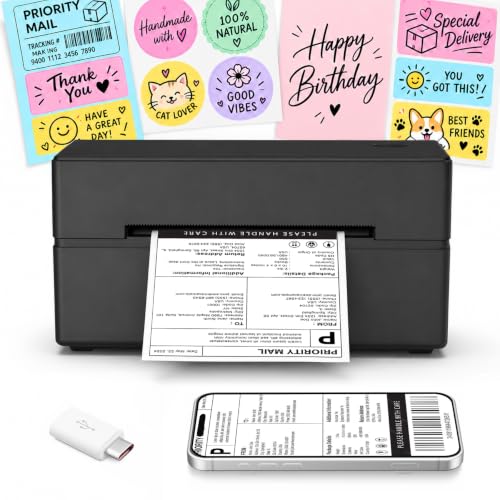
1. Thermal Shipping Label Printer 4×6 Bluetooth Label Maker for Small Business
What stands out
The unbranded 4×6 Bluetooth thermal label printer is the simplest option on this list, and simplicity is its selling point. It prints standard 4×6 shipping labels over Bluetooth, it is aimed squarely at small businesses printing USPS and other carrier labels, and it does the job with no ink, no toner, and no complicated setup. For a seller who is moving from a regular printer to a dedicated label printer for the first time, this is the lowest-cost way to find out how much time a thermal printer saves — and for many sellers, the answer is enough to justify the purchase within the first week of use.
Trade-offs to weigh
The trade-offs are support and polish. An unbranded printer will have thinner documentation and less responsive after-sales support than a MUNBYN or JADENS, and the companion app may be simpler or less frequently updated. Compatibility with specific selling platforms should be checked on the listing before ordering, because a generic printer may not have the same ready-made integrations as the bigger names. If you ship a high volume every day, the build quality and the software support of a branded printer may be worth the extra cost.
Who it fits best
Best for first-time buyers and low-volume sellers who want the cheapest working 4×6 thermal printer, and for anyone testing whether a dedicated label printer fits their workflow before spending more.
In daily use
In everyday use, the Thermal Shipping Label Printer 4×6 Bluetooth Label Maker for Small Business settles into a routine quickly. Set it up once, the way you like it, and give yourself a few days to adjust before judging it. The first session is about learning the layout and the feel; the second and third are where it starts to feel natural. Keep it clean, keep it in the conditions it was designed for, and it will stay consistent. If it has parts that wear — cables, surfaces, moving components — a quick check now and then keeps small issues from becoming real ones, and keeping the packaging and documentation for the first weeks makes any return or exchange far simpler.
Before you buy
Before buying the Thermal Shipping Label Printer 4×6 Bluetooth Label Maker for Small Business, check two practical things. First, measure and compare: check the dimensions, the capacity, and the compatibility details listed on the product page against what you already own and the space you have. A product that does not fit your setup will never feel right, whatever its specifications say. Second, think about your routine — where it will live, how it will be stored, and what it needs to connect to. None of this is difficult, but all of it is easier to plan before the product arrives than after.
Check price on Amazon: Thermal Shipping Label Printer 4×6 Bluetooth Label Maker for Small Business
2. KNAON Bluetooth Thermal Shipping Label Printer, 4×6 Portable Thermal Address Label Printer for Small Business
What stands out
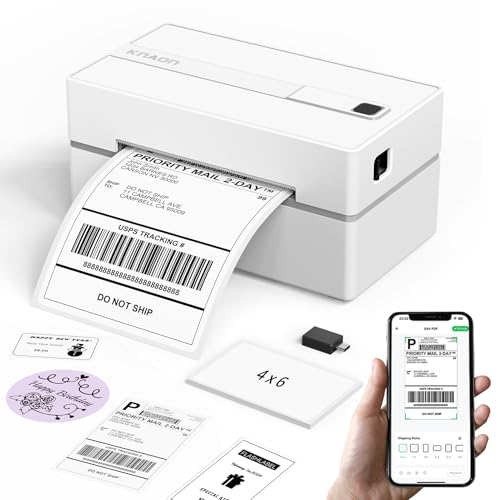
The KNAON Bluetooth thermal label printer is the portable pick, and portability is genuinely useful in a packing setup. A compact printer that connects over Bluetooth can sit on a packing bench, move between rooms, or travel to a market stall or a temporary workspace without needing a wired connection to a computer. It prints 4×6 shipping labels and address labels for small businesses, and the portable design means it can print from a phone as easily as from a computer. For sellers who pack orders in different places, or who run a small business from a home that doubles as a warehouse, that flexibility is worth having.
Trade-offs to weigh
The compromises are the usual ones for a compact printer. A smaller printer usually holds a smaller label roll, so high-volume sellers will reload more often, and the compact design may print a little slower than a larger desktop model when there is a queue of labels waiting. KNAON is a smaller brand than MUNBYN or JADENS, so the software and support may be less polished, and compatibility with your selling platform should be confirmed on the listing. Battery life, if the printer is battery-powered, should also be checked — a printer that needs frequent charging is less portable in practice than it looks.
Who it fits best
Best for sellers who pack in different places or who print mainly from a phone, and for small businesses that need a label printer they can move around rather than one fixed to a desk.
In daily use
Day to day, the KNAON Bluetooth Thermal Shipping Label Printer, 4×6 Portable Thermal Address Label Printer for Small Business is the kind of product you stop thinking about, which is the highest praise it can earn. It does its job the same way every time, without quirks or surprises, and lets you focus on the work or the game instead of the hardware. That consistency matters more than any single feature. Treat it reasonably — a clean desk, a suitable surface, and storage that protects it when it is not in use — and it will keep that consistency for a long time. The best products are the ones that fade into the background.
Before you buy
A few checks before you order the KNAON Bluetooth Thermal Shipping Label Printer, 4×6 Portable Thermal Address Label Printer for Small Business will save disappointment. Confirm the key details on the listing match what you expect — the exact model name, the included accessories, and the variant — since similar-looking models can differ in important ways. Check the return policy and the warranty terms so you know your options if it arrives damaged or does not suit you. And if you are replacing something you already own, compare the new product with the old one on the points that mattered most, rather than on headline features you may never use.

3. labelhive Bluetooth Thermal Shipping Label Printer, Wireless 4×6 Printer
What stands out
The labelhive Bluetooth thermal label printer is the all-rounder for online sellers and home offices. It is a wireless 4×6 printer aimed at small businesses, online sellers, and home offices, which covers the three places these printers actually live. Bluetooth keeps the desk free of cables, the 4×6 format matches the standard shipping label size used by the major carriers, and the wireless design means it can sit on a packing bench away from the computer and still print on demand. For a seller who prints labels in batches throughout the day, the combination of wireless connection and standard label size is the practical core of the job.
Trade-offs to weigh
The trade-offs are the ones shared by most printers in this class. The brand is smaller than MUNBYN or JADENS, so the companion app and the platform integrations may be less mature, and the print speed and the label capacity should be checked on the listing against your daily volume. The printer’s exact label loading — roll or fanfold — should also be confirmed, because buying the wrong label stock is the most common first-week frustration with any thermal printer. Check the listing for the supported label types before ordering.
Who it fits best
Best for online sellers and home-office shippers who want a wireless 4×6 printer for everyday use, and for anyone setting up a packing station where a cable-free printer keeps the bench tidy.
In daily use
Over a full week of use, the labelhive Bluetooth Thermal Shipping Label Printer, Wireless 4×6 Printer shows its character in small ways. The feel stays the same from the first day to the last, nothing loosens or rattles, and the finish holds up to regular handling. If you switch between tasks, you will appreciate that it does not need a different setup for each one: configure it once for the way you actually use it and leave it alone. If you share the space with work or family, the same product should handle those jobs without feeling out of place, which is a useful bonus for a single-product setup.
Before you buy
When the labelhive Bluetooth Thermal Shipping Label Printer, Wireless 4×6 Printer arrives, spend a little time setting it up properly. Follow the included instructions, check that everything listed as included is actually in the box, and test the main functions within the first day or two. Then leave the settings alone for a week. Constant tweaking is the enemy of getting used to a product, and most people get better results from a stable setup than from a perfect one. If something feels wrong after a few days, change one thing at a time so you know what actually helped.
Check price on Amazon: labelhive Bluetooth Thermal Shipping Label Printer, Wireless 4×6 Printer
4. Rongta Bluetooth Shipping Label Printer, Wireless 4×6 Thermal Label Printer for Shipping Packages
What stands out
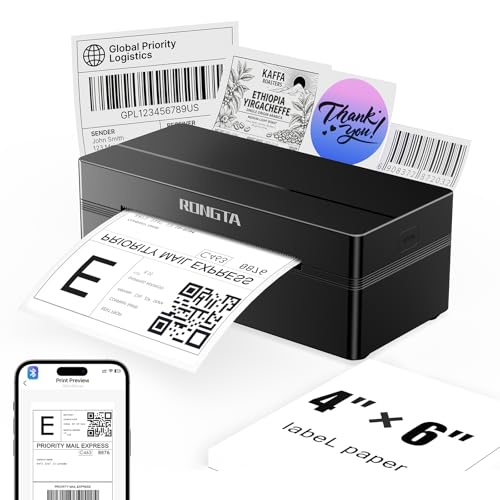
The Rongta Bluetooth shipping label printer is the established-brand pick, and Rongta’s history in receipt and label printing shows in the design. It is a wireless 4×6 thermal label printer for shipping packages, with Bluetooth and support for phones and computers, and it is built for the daily work of printing shipping labels rather than for occasional use. Rongta is a known name in this category, which means the hardware is generally solid, the drivers and apps are maintained, and the printer is more likely to work with the selling platforms and carrier tools that small businesses actually use. For a seller who prints every day, that reliability is the point.
Trade-offs to weigh
The compromises are modest. Rongta’s printers are workmanlike rather than stylish, and the companion app is functional rather than beautiful. The printer may cost slightly more than the unbranded options on this list, and the label loading and the supported label sizes should still be checked on the listing — even established brands vary between models. The print speed is adequate for a small business but may not match a larger desktop printer for very high volumes.
Who it fits best
Best for daily shippers who want a known brand and reliable software, and for small businesses that print labels every day and need a printer that simply works.
In daily use
In everyday use, the Rongta Bluetooth Shipping Label Printer, Wireless 4×6 Thermal Label Printer for Shipping Packages settles into a routine quickly. Set it up once, the way you like it, and give yourself a few days to adjust before judging it. The first session is about learning the layout and the feel; the second and third are where it starts to feel natural. Keep it clean, keep it in the conditions it was designed for, and it will stay consistent. If it has parts that wear — cables, surfaces, moving components — a quick check now and then keeps small issues from becoming real ones, and keeping the packaging and documentation for the first weeks makes any return or exchange far simpler.
Before you buy
Before buying the Rongta Bluetooth Shipping Label Printer, Wireless 4×6 Thermal Label Printer for Shipping Packages, check two practical things. First, measure and compare: check the dimensions, the capacity, and the compatibility details listed on the product page against what you already own and the space you have. A product that does not fit your setup will never feel right, whatever its specifications say. Second, think about your routine — where it will live, how it will be stored, and what it needs to connect to. None of this is difficult, but all of it is easier to plan before the product arrives than after.

5. Labeer Bluetooth Thermal Shipping Label Printer, Wireless 4×6 Label Printer
What stands out
The Labeer Bluetooth thermal shipping label printer is the home-and-office pick, and it is designed for sellers whose packing station is also their desk. It is a wireless 4×6 label printer for small business, home, and office use, which means it is quiet, compact, and easy to keep on a desk without dominating it. Bluetooth connection means no cable between the printer and the computer or phone, and the 4×6 format covers the standard shipping label. For a seller working from a spare room or a home office, a printer that fits the space and stays out of the way matters as much as the print itself.
Trade-offs to weigh
The trade-offs are volume and brand support. A compact home-office printer is not built for the highest shipping volumes, and a seller printing hundreds of labels a day will reload and wait more than with a larger desktop model. Labeer is a smaller brand, so the app and the platform compatibility should be confirmed on the listing before ordering, and the label type — roll or fanfold — should be checked so the first label order is the right one. The printer is best judged as a home-office tool, not as a warehouse machine.
Who it fits best
Best for home-based sellers and small offices that need a compact wireless label printer on the desk, and for anyone whose packing station shares space with everyday work.
In daily use
Day to day, the Labeer Bluetooth Thermal Shipping Label Printer, Wireless 4×6 Label Printer is the kind of product you stop thinking about, which is the highest praise it can earn. It does its job the same way every time, without quirks or surprises, and lets you focus on the work or the game instead of the hardware. That consistency matters more than any single feature. Treat it reasonably — a clean desk, a suitable surface, and storage that protects it when it is not in use — and it will keep that consistency for a long time. The best products are the ones that fade into the background.
Before you buy
A few checks before you order the Labeer Bluetooth Thermal Shipping Label Printer, Wireless 4×6 Label Printer will save disappointment. Confirm the key details on the listing match what you expect — the exact model name, the included accessories, and the variant — since similar-looking models can differ in important ways. Check the return policy and the warranty terms so you know your options if it arrives damaged or does not suit you. And if you are replacing something you already own, compare the new product with the old one on the points that mattered most, rather than on headline features you may never use.
Check price on Amazon: Labeer Bluetooth Thermal Shipping Label Printer, Wireless 4×6 Label Printer

6. MUNBYN Bluetooth Thermal Label Printer, Wireless 4×6 Shipping Label Printer
What stands out
The MUNBYN Bluetooth thermal label printer is the best-known name on this list, and it earns that position on software and support. MUNBYN has built its reputation on label printers for small businesses, and its printers are widely used by online sellers, which means the companion app is mature, the platform integrations are well tested, and there is a large community of users to learn from. It prints wireless 4×6 shipping labels over Bluetooth, it works for shipping packages for small businesses, and it is the printer most likely to work with your selling platform and your phone without a fight. For a seller who wants the lowest-risk purchase, this is the default choice.
Trade-offs to weigh
The compromises are price and the sheer number of similar MUNBYN models. It costs more than the unbranded printers here, and MUNBYN sells several models that look alike but differ in connectivity and label support, so check the exact model on the listing before ordering. The printer is also a desktop design rather than a portable one, so it belongs on a packing bench rather than in a bag. None of that matters for the core job — printing shipping labels reliably, every day — which is what MUNBYN is built for.
Who it fits best
Best for sellers who want the safest, best-supported choice, especially if you sell on a major marketplace and want a printer with proven integrations and a mature app.
In daily use
Over a full week of use, the MUNBYN Bluetooth Thermal Label Printer, Wireless 4×6 Shipping Label Printer shows its character in small ways. The feel stays the same from the first day to the last, nothing loosens or rattles, and the finish holds up to regular handling. If you switch between tasks, you will appreciate that it does not need a different setup for each one: configure it once for the way you actually use it and leave it alone. If you share the space with work or family, the same product should handle those jobs without feeling out of place, which is a useful bonus for a single-product setup.
Before you buy
When the MUNBYN Bluetooth Thermal Label Printer, Wireless 4×6 Shipping Label Printer arrives, spend a little time setting it up properly. Follow the included instructions, check that everything listed as included is actually in the box, and test the main functions within the first day or two. Then leave the settings alone for a week. Constant tweaking is the enemy of getting used to a product, and most people get better results from a stable setup than from a perfect one. If something feels wrong after a few days, change one thing at a time so you know what actually helped.
Check price on Amazon: MUNBYN Bluetooth Thermal Label Printer, Wireless 4×6 Shipping Label Printer

7. JADENS Bluetooth Thermal Shipping Label Printer, Wireless 4×6 Label Printer
What stands out
The JADENS Bluetooth thermal shipping label printer is the compatibility pick, and it is explicit about it: the listing notes compatibility with Android, iPhone, Windows, and other systems, which covers the devices most sellers actually use. It is a wireless 4×6 label printer for small businesses, and the broad device support means it can print from a phone on the packing bench, a tablet at a market stall, or a Windows computer at a desk. JADENS is an established name in this category, and the combination of wide compatibility and a standard 4×6 format makes it a flexible choice for sellers whose setup changes or who use more than one device.
Trade-offs to weigh
The trade-offs are the usual ones for this class. The printer is a desktop design, so it is not as portable as the KNAON, and the print speed and label capacity should be checked against your daily volume on the listing. The companion app and the platform integrations are solid but not quite as widely documented as MUNBYN’s, so if you use an unusual selling platform, confirm compatibility before ordering. The label loading — roll or fanfold — should also be confirmed so your first label order matches the printer.
Who it fits best
Best for sellers who print from several different devices, especially a mix of phone and computer, and for anyone who wants broad compatibility stated up front rather than discovered after purchase.
In daily use
In everyday use, the JADENS Bluetooth Thermal Shipping Label Printer, Wireless 4×6 Label Printer settles into a routine quickly. Set it up once, the way you like it, and give yourself a few days to adjust before judging it. The first session is about learning the layout and the feel; the second and third are where it starts to feel natural. Keep it clean, keep it in the conditions it was designed for, and it will stay consistent. If it has parts that wear — cables, surfaces, moving components — a quick check now and then keeps small issues from becoming real ones, and keeping the packaging and documentation for the first weeks makes any return or exchange far simpler.
Before you buy
Before buying the JADENS Bluetooth Thermal Shipping Label Printer, Wireless 4×6 Label Printer, check two practical things. First, measure and compare: check the dimensions, the capacity, and the compatibility details listed on the product page against what you already own and the space you have. A product that does not fit your setup will never feel right, whatever its specifications say. Second, think about your routine — where it will live, how it will be stored, and what it needs to connect to. None of this is difficult, but all of it is easier to plan before the product arrives than after.
Check price on Amazon: JADENS Bluetooth Thermal Shipping Label Printer, Wireless 4×6 Label Printer
Buying guide
Direct thermal: no ink, ever
All the printers on this list are direct thermal, which means the print head heats the label paper itself and no ink, toner, or ribbon is needed. That is the main running-cost advantage: your only consumable is the label stock. The trade-off is that direct thermal prints fade over time, especially in heat and sunlight, so these labels are for shipping, not for archiving. If you need labels that last for years — product labels, asset tags — you need a thermal transfer printer that uses a ribbon, which is a different category. For shipping labels that live on a parcel for a few days, direct thermal is exactly right.
Label size and loading: roll or fanfold
The standard shipping label is 4×6 inches, and all seven printers here print it. What varies is how the labels feed: some printers take a roll, some take a fanfold stack, and some take both. Check which type your printer takes before ordering labels, because the wrong stock will not feed. Also check the maximum roll diameter the printer accepts — a large roll lasts longer but may not fit a compact printer. Order a pack of labels with the printer so you can test it on arrival, and keep a spare pack on hand so a busy shipping day is never stopped by an empty roll.
Connectivity: Bluetooth, USB, and your devices
Bluetooth lets the printer sit away from the computer and print from a phone, which suits a packing bench. USB is simpler and more reliable for a printer that never moves. Most printers here offer Bluetooth, and several also offer USB. Before ordering, check that the printer’s app works on your phone — Android and iPhone support varies by model — and that it works with the computer you use. A printer that cannot talk to your phone is a poor buy for a seller who prints from a phone.
Platform compatibility matters most
A label printer is only useful if it prints the labels your selling platform produces. Before buying, check that the printer works with the marketplaces and carrier tools you use — the listing and the manufacturer’s app description will usually state this. The safest approach is to choose a printer with a mature app and a large user base, like MUNBYN or JADENS, because platform support is better tested. If you use a less common platform, confirm compatibility explicitly rather than assuming it, and test the printer with a real order as soon as it arrives.
Print speed, volume, and the cost per label
Print speed matters when there is a queue of parcels waiting: a printer that prints a label in a second or two keeps the packing line moving, while a slow one becomes the bottleneck. For a seller shipping a few parcels a day, any printer here is fast enough; for a seller shipping dozens or hundreds, speed and label capacity matter more, and a larger desktop model is worth considering. The cost per label is mostly the cost of the label stock, so compare label prices when you compare printers — a cheap printer with expensive labels is not a bargain. Buy labels in bulk once you know the printer works, and keep the print head clean with the cleaning routine in the manual.
Frequently asked questions
Do thermal label printers need ink?
No. Direct thermal printers like the ones on this list print by heating the label paper itself, so there is no ink, toner, or ribbon to buy. Your only consumable is the label stock. The print head does need occasional cleaning, and the labels themselves will fade over months in heat and sunlight, but for shipping labels that live on a parcel for a few days, that does not matter.
What size labels do these printers use?
All seven printers on this list print standard 4×6 inch shipping labels, which is the size used by the major carriers and marketplaces. Some also print smaller address labels. Check whether your printer takes label rolls, fanfold stacks, or both, and order the matching stock — the wrong feed type will not work, and it is the most common first-week mistake with a new label printer.
Can I print from my phone?
Yes, if the printer supports Bluetooth and has an app for your phone. Most printers on this list offer Bluetooth and an app for Android and iPhone, and the JADENS listing explicitly notes compatibility with Android, iPhone, and Windows. Check the app’s compatibility with your phone model and your selling platform before ordering, and test it with a real label as soon as the printer arrives.
Will a thermal label printer work with my selling platform?
It depends on the printer and the platform. The established brands — MUNBYN, JADENS, Rongta — have the widest platform support and the most mature apps, which is why they are the safest choice if you sell on a major marketplace. Check the listing and the app description for your platform by name before ordering, and test with a real order during the return window so you can exchange the printer if it does not integrate.
How long do thermal labels last?
Direct thermal labels are designed for shipping, not for archiving. The print will stay readable for weeks to months in normal conditions, but it fades faster in heat and direct sunlight. That is fine for a parcel that is delivered within days. If you need a label that lasts for years — a product label, an asset tag, a barcode that must scan months later — you need a thermal transfer printer that uses a ribbon instead.
How do I keep a thermal printer working well?
Keep the print head clean, following the cleaning routine in the manual, and use label stock that matches the printer’s specifications. Store label rolls away from heat and sunlight, which can darken the paper before it is even printed. Load the roll correctly — a misaligned roll causes skewed prints and jams — and keep the printer’s firmware and app updated so platform compatibility stays current.
Conclusion
The best thermal label printer is the one that works with your devices and your selling platform without a fight. The MUNBYN is the safest default, with the most mature app and the widest platform support, and the JADENS is the compatibility pick for sellers who print from several different devices. The Rongta is the reliable established-brand choice for daily shipping, the KNAON is the portable pick for sellers who pack in different places, and the labelhive and Labeer cover the online-seller and home-office ground. The unbranded 4×6 printer is the cheapest way to start if you ship only a few parcels a week. Whichever you choose, order the right 4×6 label stock with it, confirm the platform compatibility on the listing, and test it with a real order on the day it arrives.