The best airprint laser printers solve a small problem that used to be a large one: printing from an iPhone or an iPad. AirPrint is Apple's way of printing without drivers, without apps, and without a computer in between: open the document on the phone, tap print, and the printer on the same WiFi network does the rest. A laser printer with AirPrint is the combination that makes sense for a home or a small office, because laser printing is cheap per page, the toner does not dry out, and the printer is ready whenever the phone asks it to print.
A note on what the listings actually say. The printers in this guide were found through AirPrint searches, and their listings describe wireless and mobile printing. The word AirPrint itself does not always appear in the short listing title, so this guide says plainly, as the earlier Mac printer guide did, that buyers should confirm AirPrint on the listing before buying. Every printer below is a genuine laser printer from Brother, HP or Canon, and every one of them is the kind of printer that supports AirPrint in its class: wireless, mobile-ready, and made for phones and tablets as well as computers.
Eight printers made the list, from the compact Brother HL-L2405W to the colour Canon imageCLASS MF753Cdw. They cover mono and colour, print-only and all-in-one, duplex and single-sided, and each one was chosen because it is a laser printer, not an inkjet wearing a similar name. What follows is what each printer does well, where it falls short, and who should buy it. The eight printers below were all checked the same way: the listing had to be a laser printer returned by an AirPrint search, not an inkjet, a cartridge, or an accessory.
In this guide
Quick picks: best airprint laser printers
| # | Product | Where to buy |
|---|---|---|
| 1 | Brother HL-L2405W Wireless Compact Monochrome Laser Printer | Check on Amazon |
| 2 | Brother HL-L2460DW Wireless Compact Monochrome Laser Printer | Check on Amazon |
| 3 | Brother DCP-L2640DW Wireless Compact Monochrome Multi-Function Printer | Check on Amazon |
| 4 | HP LaserJet M110w Monochrome Laser Printer | Check on Amazon |
| 5 | Canon imageCLASS LBP122dw Wireless Monochrome Duplex Laser Printer | Check on Amazon |
| 6 | Canon Color imageCLASS MF753Cdw II All-in-One Color Duplex Laser Printer | Check on Amazon |
| 7 | Canon Color imageCLASS LBP646Cdw Wireless Laser Printer | Check on Amazon |
| 8 | HP LaserJet M207dw Monochrome Laser Printer | Check on Amazon |
How the picks were chosen
The picks were chosen from the site's own product search, looking only at laser printers returned by AirPrint searches. A listing was dropped if it was an inkjet printer, because the keyword says laser, or if it was a cartridge, a drum, or an accessory. The remaining printers were sorted by type: mono print-only first, then mono all-in-one, then colour, because most buyers want to know the cheapest way to print in black and white before they pay for colour.
Duplex printing was counted next, because it decides how much paper a printer saves. A duplex printer prints on both sides automatically, and a printer without it needs the pages turned by hand. The Brother HL-L2460DW, the Canon LBP122dw, the Canon MF753Cdw, the Canon LBP646Cdw and the HP LaserJet M207dw in this guide all print duplex, and the guide says so for each one, because duplex is the feature that matters most after the printing itself.
Finally, each printer was checked against the way it will actually be used. A printer for a home office needs to be quiet and compact, so the Brother HL-L2405W earns its place. A printer for a family needs to copy and scan as well, so the all-in-one picks earn theirs. A printer for a small office needs colour and duplex, so the Canon colour picks earn theirs. The notes below say which use each printer fits. A printer for a home office was judged on size and quietness, while a printer for a small office was judged on colour and its document feeder, because the two buyers need different things.
Quick comparison
| Product | Standout detail |
|---|---|
| Brother HL-L2405W Wireless Compact Monochrome Laser Printer | Compact mono, mobile printing |
| Brother HL-L2460DW Wireless Compact Monochrome Laser Printer | Compact mono with duplex |
| Brother DCP-L2640DW Wireless Compact Monochrome Multi-Function Printer | Mono all-in-one, copy and scan |
| HP LaserJet M110w Monochrome Laser Printer | Smallest HP mono laser |
| Canon imageCLASS LBP122dw Wireless Monochrome Duplex Laser Printer | Fastest mono, 30 ppm, duplex |
| Canon Color imageCLASS MF753Cdw II All-in-One Color Duplex Laser Printer | Colour all-in-one, feeder, fax |
| Canon Color imageCLASS LBP646Cdw Wireless Laser Printer | Colour laser, 26 ppm, duplex |
| HP LaserJet M207dw Monochrome Laser Printer | Fast HP mono with duplex |

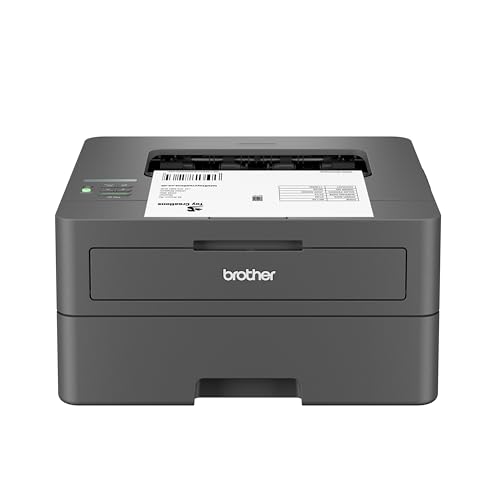
1. Brother HL-L2405W Wireless Compact Monochrome Laser Printer
Key specs
Brother HL-L2405W wireless compact monochrome laser printer, mobile printing, black and white output.
Strengths
- The compact size fits on a small desk or a shelf, where larger printers do not.
- Mobile printing means phones and tablets can print to it over WiFi.
- The mono laser output is sharp for documents and cheap per page.
Trade-offs
- There is no duplex printing, so double-sided pages need turning by hand.
- There is no scanner or copier, so it prints only.
- The paper tray is small, so it needs refilling more often in a busy household.
Who it fits
A buyer who wants the smallest, simplest laser printer for a desk, and who prints in black and white.
Best for: Home printing, schoolwork and documents.
Not suited for: Buyers who need to copy, scan, or print double-sided automatically.
In daily use
Set it up on the home WiFi first, then print a test page from the phone, because the test confirms the printer is on the network before anything important needs printing. Keep the toner in mind: laser toner does not dry out, so a printer that sits unused for a month still prints on the first try.
The Brother HL-L2405W is the compact pick: the smallest laser printer here, for the desk with no room to spare.
Before you buy
Before buying the Brother HL-L2405W Wireless Compact Monochrome Laser Printer, confirm AirPrint on the listing, because the short listing titles in this guide describe mobile printing without always naming AirPrint. The printers here were found through AirPrint searches, and the confirmation takes a minute on the listing page, where the specifications name the printing methods the printer supports.
Check price on Amazon: Brother HL-L2405W Wireless Compact Monochrome Laser Printer

2. Brother HL-L2460DW Wireless Compact Monochrome Laser Printer
Key specs
Brother HL-L2460DW wireless compact monochrome laser printer, duplex, mobile printing, black and white output.
Strengths
- Duplex printing saves paper by printing on both sides automatically.
- Mobile printing covers phones and tablets over WiFi.
- The compact design still fits a small desk, despite the duplex feature.
Trade-offs
- There is no scanner or copier, so it prints only.
- The mono output means colour documents print in shades of grey.
- The setup asks for WiFi details, which takes a few minutes.
Who it fits
A buyer who prints documents double-sided and wants the cheapest duplex laser printer.
Best for: Documents, schoolwork and home office printing.
Not suited for: Buyers who need colour, copying, or scanning.
In daily use
Turn duplex on as the default in the printer's settings, because a duplex printer used single-sided is a duplex printer wasted. Print the first double-sided document from the phone to confirm the AirPrint path works, and the rest of the printing will follow.
The Brother HL-L2460DW is the duplex pick: the cheapest way to print double-sided, in a printer that still fits a small desk.
Before you buy
Before buying the Brother HL-L2460DW Wireless Compact Monochrome Laser Printer, check whether the printer is mono or colour, because the two cost different amounts to run. A mono printer is cheaper to buy and cheaper per page, and a colour printer is worth its cost only if colour is actually printed. The choice should be made on the printing that will really happen, not the printing that might.
Check price on Amazon: Brother HL-L2460DW Wireless Compact Monochrome Laser Printer

3. Brother DCP-L2640DW Wireless Compact Monochrome Multi-Function Printer
Key specs
Brother DCP-L2640DW wireless compact monochrome multi-function printer, copy, scan, duplex, mobile printing.
Strengths
- Copy and scan are included, so the printer does the whole home-office job.
- Duplex printing saves paper on longer documents.
- Mobile printing covers phones and tablets as well as computers.
Trade-offs
- There is no fax, so a household that still faxes needs a different model.
- The mono output means colour is not available.
- The multi-function design is larger than the print-only models.
Who it fits
A home office buyer who wants to print, copy and scan in one compact machine.
Best for: A home office that prints, copies and scans in black and white.
Not suited for: Buyers who need colour or fax.
In daily use
Try the copy function on the first day, with a document that matters, because a multi-function printer is only as good as its scanner, and the test shows whether the copies are sharp. Set duplex as the default, and the paper savings start immediately.
The Brother DCP-L2640DW is the all-in-one pick: the compact mono printer that also copies and scans.
Before you buy
Before buying the Brother DCP-L2640DW Wireless Compact Monochrome Multi-Function Printer, measure the desk, because a laser printer is bigger than it looks in a photo, and the all-in-one models are bigger still. Leave room for the paper tray and for the pages to come out, because a printer that does not fit the desk ends up on the floor, where it is never used.
Check price on Amazon: Brother DCP-L2640DW Wireless Compact Monochrome Multi-Function Printer
4. HP LaserJet M110w Monochrome Laser Printer
Key specs
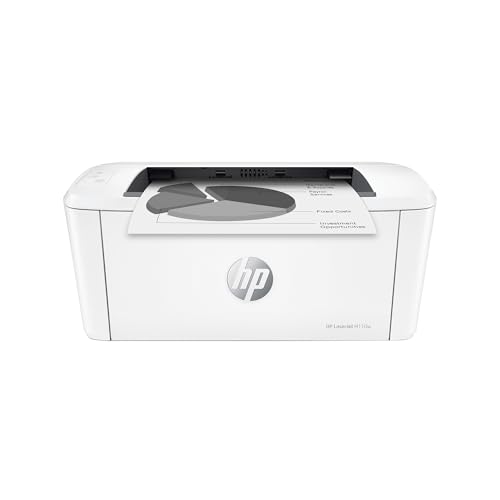
HP LaserJet M110w, monochrome laser printer, fast black-and-white printing, mobile printing, wireless printing.
Strengths
- The M110w is the smallest HP laser printer in this guide, and it fits anywhere.
- Fast black-and-white printing suits a household that prints in bursts.
- Mobile and wireless printing cover phones, tablets and computers.
Trade-offs
- There is no duplex printing in the listing.
- There is no scanner or copier.
- The toner cartridge is small, so heavy users will replace it often.
Who it fits
A buyer who wants the smallest HP laser printer for occasional black-and-white printing.
Best for: A small desk, a shelf, or a printer that is used in bursts.
Not suited for: A busy office that prints hundreds of pages a week.
In daily use
Keep it where it will be used, because a printer on a shelf in another room is a printer that is never used. Print a test page from the phone on the first day, and confirm the AirPrint path works, because the test takes a minute and the confidence lasts.
The HP LaserJet M110w is the tiny pick: the smallest HP laser printer here, for the smallest space.
Before you buy
Before buying the HP LaserJet M110w Monochrome Laser Printer, think about duplex, because a duplex printer halves the paper used on long documents, and the saving starts on the first day. If the household prints long documents, the duplex models in this guide are worth their small extra cost, and the default should be set to duplex from the start.
Check price on Amazon: HP LaserJet M110w Monochrome Laser Printer

5. Canon imageCLASS LBP122dw Wireless Monochrome Duplex Laser Printer
Key specs
Canon imageCLASS LBP122dw, wireless monochrome duplex laser printer, print only, mobile ready, 30 pages per minute.
Strengths
- 30 pages per minute is the fastest mono printing in this guide.
- Duplex printing is included, so double-sided documents print automatically.
- Mobile ready means phones and tablets can print to it.
Trade-offs
- It prints only, with no copy or scan.
- The mono output means no colour.
- The 30 pages per minute speed matters only for long documents.
Who it fits
A buyer who prints long documents and wants them fast and double-sided.
Best for: Long documents, reports and schoolwork.
Not suited for: Buyers who need colour or scanning.
In daily use
Set duplex as the default and the printer will halve the paper use on long documents without being asked. The 30 pages per minute speed shows on a long print run, and the printer is quiet enough to sit on the desk while it works.
The Canon LBP122dw is the fast pick: the quickest mono printer here, with duplex included.
Before you buy
Before buying the Canon imageCLASS LBP122dw Wireless Monochrome Duplex Laser Printer, confirm AirPrint on the listing, because the short listing titles in this guide describe mobile printing without always naming AirPrint. The printers here were found through AirPrint searches, and the confirmation takes a minute on the listing page, where the specifications name the printing methods the printer supports.
Check price on Amazon: Canon imageCLASS LBP122dw Wireless Monochrome Duplex Laser Printer

6. Canon Color imageCLASS MF753Cdw II All-in-One Color Duplex Laser Printer
Key specs
Canon Color imageCLASS MF753Cdw II, all-in-one color duplex laser printer, wireless, scanner, copier, fax, auto document feeder.
Strengths
- Colour printing, copying, scanning and fax are all in one machine.
- Duplex printing saves paper on colour documents too.
- The auto document feeder copies and scans multi-page documents without hand-feeding.
Trade-offs
- The price is the highest in this guide, because it does the most.
- The colour toner costs more than mono toner, so colour should be used where it matters.
- The machine is larger than the mono printers, so it needs desk space.
Who it fits
A small office buyer who wants one machine for colour printing, copying, scanning and fax.
Best for: A small office that needs colour and a document feeder.
Not suited for: A household that prints only in black and white.
In daily use
Set the colour default to black and white, and print in colour only when the document needs it, because colour toner costs more and the setting saves it. Try the document feeder with a multi-page document on the first day, because it is the feature that makes this printer a small-office machine.
The Canon MF753Cdw II is the complete pick: the colour all-in-one for the small office that needs everything in one machine.
Before you buy
Before buying the Canon Color imageCLASS MF753Cdw II All-in-One Color Duplex Laser Printer, check whether the printer is mono or colour, because the two cost different amounts to run. A mono printer is cheaper to buy and cheaper per page, and a colour printer is worth its cost only if colour is actually printed. The choice should be made on the printing that will really happen, not the printing that might.
Check price on Amazon: Canon Color imageCLASS MF753Cdw II All-in-One Color Duplex Laser Printer
7. Canon Color imageCLASS LBP646Cdw Wireless Laser Printer
Key specs
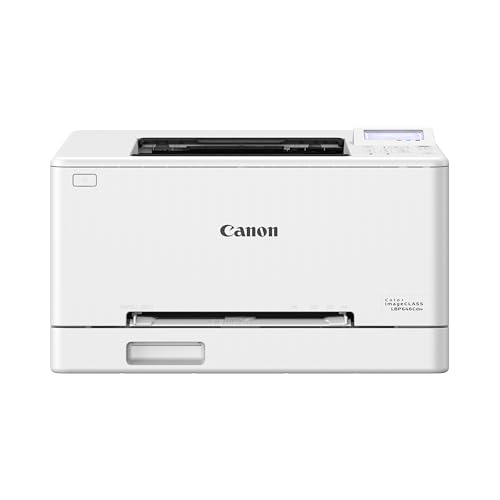
Canon Color imageCLASS LBP646Cdw, wireless laser printer, duplex, 26 pages per minute, print only, white.
Strengths
- Colour printing at 26 pages per minute suits a household that prints in colour regularly.
- Duplex printing is included, so colour documents print double-sided.
- The print-only design is simpler than an all-in-one, with less to learn.
Trade-offs
- There is no copy or scan, so a separate scanner is needed for those jobs.
- Colour toner costs more than mono toner.
- The white finish shows dust and marks.
Who it fits
A buyer who wants colour laser printing without the all-in-one extras.
Best for: Colour documents, schoolwork and home printing.
Not suited for: Buyers who need to copy or scan.
In daily use
Print a colour test page from the phone first, to confirm the AirPrint path and the colour quality in one step. Keep the colour default sensible: print everyday documents in mono, and save colour for the pages that need it, because the toner lasts longer that way.
The Canon LBP646Cdw is the colour pick: the colour laser printer for buyers who print in colour but do not need to copy or scan.
Before you buy
Before buying the Canon Color imageCLASS LBP646Cdw Wireless Laser Printer, measure the desk, because a laser printer is bigger than it looks in a photo, and the all-in-one models are bigger still. Leave room for the paper tray and for the pages to come out, because a printer that does not fit the desk ends up on the floor, where it is never used.
Check price on Amazon: Canon Color imageCLASS LBP646Cdw Wireless Laser Printer

8. HP LaserJet M207dw Monochrome Laser Printer
Key specs
HP LaserJet M207dw, monochrome laser printer, duplex, fast black-and-white printing, wireless printing, automatic two-sided printing.
Strengths
- Duplex printing is automatic, so double-sided documents need no hand-turning.
- Fast black-and-white printing suits a busy household.
- Wireless printing covers phones, tablets and computers.
Trade-offs
- There is no scanner or copier.
- The mono output means colour documents print in grey.
- The printer is larger than the M110w, so it needs more desk space.
Who it fits
A buyer who wants a fast HP mono printer with duplex, for a busy household.
Best for: A household that prints a lot, double-sided.
Not suited for: Buyers who need colour or scanning.
In daily use
Set duplex as the default on the first day, and the paper savings will show within a week. The M207dw is the step up from the M110w, and the step is worth it for a household that prints every day, because the duplex and the speed are used daily.
The HP LaserJet M207dw is the busy-household pick: the fast HP mono printer with duplex, for printing that never stops.
Before you buy
Before buying the HP LaserJet M207dw Monochrome Laser Printer, think about duplex, because a duplex printer halves the paper used on long documents, and the saving starts on the first day. If the household prints long documents, the duplex models in this guide are worth their small extra cost, and the default should be set to duplex from the start.
Check price on Amazon: HP LaserJet M207dw Monochrome Laser Printer
Buying guide: best airprint laser printers
Laser or inkjet: the choice that matters first
Laser printers use toner, which does not dry out, and they print sharp text cheaply. Inkjet printers use liquid ink, which dries out if the printer sits unused, and they print photos better. A household that prints documents should buy laser. A household that prints photos should buy inkjet. The keyword asks for laser, and every printer in this guide is a laser printer, with no inkjet in the list.
AirPrint: how it works, and what to confirm
AirPrint lets an iPhone, iPad or Mac print to a printer on the same WiFi network, without drivers and without an app. The printer and the phone must be on the same network, and the printer must support AirPrint. The printers in this guide were found through AirPrint searches, and their listings describe mobile printing, but the word AirPrint does not always appear in the short listing title, so buyers should confirm AirPrint on the listing before buying, as the earlier Mac printer guide advised.
Mono or colour: pay for colour only if it is used
A mono printer prints in black and white, and it costs less to buy and less to run. A colour printer prints in colour, and its toner costs more. A household that prints mostly documents should buy mono, and a household that prints children's schoolwork, photos, or colour charts should buy colour. The colour printers in this guide are for the households that will actually use colour.
Duplex saves paper and money
A duplex printer prints on both sides automatically, and it halves the paper used on long documents. The Brother HL-L2460DW, the Canon LBP122dw, the Canon MF753Cdw II, the Canon LBP646Cdw and the HP LaserJet M207dw in this guide all print duplex. Set duplex as the default, and the savings start without any further thought.
All-in-one or print-only
An all-in-one printer copies and scans as well as printing, and it costs more and takes more space. A print-only printer is smaller, simpler and cheaper. A home office that copies and scans should buy the all-in-one. A household that only prints should buy the print-only model, and use a phone to scan the rare document that needs it.
Toner does not dry out, and that matters
Laser toner is a powder, and it does not dry out if the printer sits unused for a month. Inkjet ink dries out, and an inkjet printer that sits unused can need a new cartridge before it prints again. A household that prints rarely should buy laser, because the printer will work on the first try after a month away, and that reliability is worth more than the price difference.
Size the printer to the desk
A laser printer is bigger than it looks in a photo, and the all-in-one models are bigger still. Measure the desk before ordering, and leave room for the paper tray and for the pages to come out. A printer that does not fit the desk ends up on the floor, and a printer on the floor is a printer that is never used.
What to do when AirPrint cannot find the printer
Check first that the phone and the printer are on the same WiFi network, because that is the cause most of the time. If they are, restart the printer and the phone, which clears the connection. If the printer still does not appear, check the printer's WiFi settings, and confirm the printer is connected, because a printer that has dropped off the network cannot be found by any phone.
Keep spare toner, not spare printers
A spare toner cartridge is worth keeping, because a printer that runs out of toner on the night before a deadline is a printer that cannot help. Toner does not expire quickly, so a spare cartridge on the shelf is cheap insurance, and it is far cheaper than a second printer bought in a panic.
Print a test page monthly
A laser printer that sits unused for a month should still print on the first try, because toner does not dry out. Print a test page monthly anyway, because the test confirms the printer is still on the network, still has toner, and still prints, before the night it is really needed.
Usage and care
Keep the printer on and connected to WiFi, because a printer that is switched off cannot receive a print from a phone, and a printer that has dropped off the network needs to be reconnected before it works. A laser printer uses little power when idle, so leaving it on is cheap.
Shake the toner cartridge gently when the printer warns it is low, because the powder settles and a shake can give a few dozen more pages. Replace the cartridge when the print fades, not when the warning first appears, because the warning is early and the cartridge usually has life left.
Clean the printer's paper path occasionally, with a dry cloth and the printer's own cleaning cycle, because dust in the paper path causes jams and marks on the page. Keep the paper dry and flat, because damp or curled paper jams more often than any fault in the printer.
Common mistakes
The most common mistake is buying an inkjet printer when a laser was wanted, because the listings look alike and the inkjet is often cheaper. Check the listing for the word laser before ordering, and check that the printer uses toner, not ink. The second most common mistake is not confirming AirPrint, and then finding the printer needs an app to print from a phone.
The second mistake is printing everything in colour. Colour toner costs more than mono toner, and a colour printer used for everyday documents wastes it. Set the default to black and white, and print in colour only when the document needs it, and the toner will last far longer.
The third mistake is putting the printer where the WiFi is weak. A printer at the far end of the house, behind thick walls, can drop off the network, and then AirPrint cannot find it. Put the printer where the WiFi is strong, or connect it by cable where the printer offers it, and the printing will work every time.
Laser printers and photos
A laser printer prints text beautifully and photos adequately, but it is not a photo printer. A household that prints photos regularly should buy an inkjet photo printer as well, and use the laser printer for documents. The two printers do different jobs, and expecting one to do both is the mistake that disappoints.
Laser printers for a small office
A small office needs a printer that can be shared: wireless, duplex, and with a paper tray that does not need refilling every hour. The Canon MF753Cdw II in this guide is the small-office machine, with its document feeder and fax, and the Brother and HP duplex models are the smaller-office choices. Put the printer where everyone can reach it, and set duplex as the default, and the office printing will take care of itself.
Laser printers and home schooling
A household with children at school prints constantly: homework, worksheets, projects and permission slips, and a mono laser printer with duplex is the cheapest way to do it. The Brother HL-L2460DW and the HP LaserJet M207dw in this guide are the schoolwork printers, with duplex saving paper on every long document, and toner that does not dry out over the holidays.
Laser printers and the paperless myth
The paperless office never arrived, and the printers in this guide are proof that paper still matters: permission slips, contracts, boarding passes and homework all still need printing. A laser printer is the household's answer to that reality, and the right one is the printer that is ready when the document is needed, not the printer that needs a new cartridge first.
Final recommendation
If one printer has to win this guide, it is the Brother HL-L2460DW, because it is the cheapest duplex laser printer here, and duplex is the feature that saves paper every day. The Brother HL-L2405W is the best choice for the smallest desk, and the Canon MF753Cdw II is the best choice for a small office that needs colour and a document feeder.
For most buyers, the choice comes down to duplex and colour. Buyers who print documents should buy mono with duplex: the Brother HL-L2460DW or the HP LaserJet M207dw. Buyers who print in colour should buy the Canon LBP646Cdw, or the MF753Cdw II if they also need to copy and scan. And every buyer should confirm AirPrint on the listing before ordering.
Whatever printer is chosen, set it up on the home WiFi on the first day, print a test page from the phone, and set duplex as the default. A laser printer is a quiet, reliable device, and the habits around it decide whether it prints when it is needed.
Frequently asked questions
What is AirPrint?
AirPrint is Apple's way of printing without drivers or apps: an iPhone, iPad or Mac prints to a printer on the same WiFi network, directly from the document. The printer and the phone must be on the same network, and the printer must support AirPrint. The printers in this guide were found through AirPrint searches, and buyers should confirm AirPrint on the listing before buying.
Is a laser printer better than an inkjet printer?
For documents, yes: laser printing is sharp, cheap per page, and the toner does not dry out. For photos, no: inkjet printers print photos better. A household that prints documents should buy laser, and a household that prints photos should buy inkjet, or one of each.
Do I need a computer to print from an iPhone?
No, not with AirPrint: the phone prints directly to the printer over WiFi, with no computer in between. The phone and the printer must be on the same network, and the printer must support AirPrint. A test page from the phone on the first day confirms the setup works.
What is duplex printing?
Duplex printing prints on both sides of the paper automatically, without the pages being turned by hand. It halves the paper used on long documents, and it should be set as the default. Several printers in this guide print duplex, and the guide names them.
How long does laser toner last?
Toner lasts far longer than inkjet ink, because it is a powder that does not dry out. A cartridge prints hundreds or thousands of pages, and a printer that sits unused for a month still prints on the first try. Shake the cartridge gently when the printer warns it is low, and replace it when the print fades.
Can I print from an Android phone to these printers?
Yes, through the printer maker's app or through the Android printing system, because these printers support mobile printing generally. AirPrint is Apple's system, and Android phones use the maker's own app instead. The printers in this guide support mobile printing, so both kinds of phone can print to them.
How do I print from an iPhone to a laser printer?
Open the document, tap the share button, tap print, and choose the printer, which must be on the same WiFi network as the phone. The printer needs to support AirPrint, which the printers in this guide were chosen for, and the buyer should confirm AirPrint on the listing before buying, as this guide advises.
Why is my printer not showing up on AirPrint?
Usually because the phone and the printer are on different WiFi networks, or because the printer has dropped off the network. Check both are on the same network, restart the printer and the phone, and check the printer's WiFi settings. A printer at the far end of the house with weak WiFi may need to be moved closer to the router.
Can a laser printer print photos?
It can, but not well: laser printers print text beautifully and photos adequately, with less colour depth than an inkjet photo printer. A household that prints photos regularly should buy an inkjet photo printer as well, and use the laser printer for documents, which is what it is made for.
How often should I replace the toner?
When the print fades, not when the warning first appears, because the warning is early and the cartridge usually has life left. Shake the cartridge gently when the warning appears, and it will often give a few dozen more pages. Toner does not dry out, so a cartridge that sits unused for a month still works.
More from ilcastellomenu.com
Mac-compatible printers: more picks