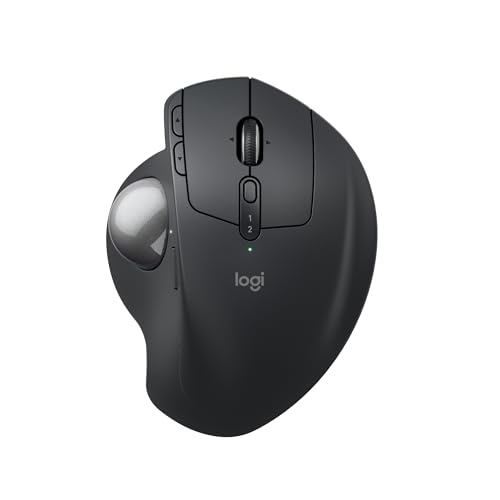
Sixty bucks is the sweet spot for a gaming mouse. Below it you start trading away sensor quality, build, and the wireless performance that actually matters in a game; above it you pay for features most players never notice — a few thousand extra DPI, a marginally lighter shell, or a brand badge. Around the sixty-dollar mark you can buy a mouse with a genuinely good sensor, a shape that fits your hand for hours, and either a reliable wired connection or wireless that feels wired. That is the whole point of this guide: the best gaming mice you can buy for around sixty bucks, without paying for anything you will not use. The mice in this guide cover the main shapes and styles. The Logitech G305 and Razer Viper V3 HyperSpeed are light wireless mice for fast, low-sensitivity play. The Logitech G502 HERO and Razer DeathAdder Essential are ergonomic wired mice with more buttons and a shape that fills the palm. The Razer Orochi V2 is a small, long-battery travel mouse that also games well. The Redragon M612 and the ATTACK SHARK X3 are the value picks — one wired and cheap, one ultra-light and wireless — that show how far budget mice have come. This guide compares seven gaming mice around the sixty-buck mark, from the classic G502 HERO to the 49-gram ATTACK SHARK X3. Each one was checked against its current Amazon listing, and every mouse below is a complete gaming mouse — sensor, switches, and cable or receiver included — not a mouse shell, a replacement cable, or an accessory. Read the comparison table for a fast overview, then dig into the individual sections for the strengths and trade-offs that matter for your grip, your games, and your hand size. One practical note before the list: grip matters more than specifications. A palm grip suits a larger ergonomic mouse like the G502 HERO or the DeathAdder Essential; a claw or fingertip grip suits a lighter mouse like the Viper V3 or the X3. If you can, compare the dimensions on the listing with a mouse you already own — a mouse that is too big or too small will hurt your aim more than any sensor difference.
In this guide
Quick picks: best gaming mouse 60 bucks
| # | Product | Where to buy |
|---|---|---|
| 1 | Logitech G305 LIGHTSPEED Wireless Gaming Mouse, Hero 12K Sensor, Black | Check on Amazon |
| 2 | Logitech G502 HERO Wired Gaming Mouse, HERO 25K Sensor | Check on Amazon |
| 3 | Razer DeathAdder Essential Ergonomic Wired Gaming Mouse, Black | Check on Amazon |
| 4 | Razer Viper V3 HyperSpeed Wireless PC Gaming Mouse, 82g, Black | Check on Amazon |
| 5 | Razer Orochi V2 Wireless Gaming Mouse, 950 Hr Battery, 60g, White | Check on Amazon |
| 6 | Redragon M612 Wired RGB Optical Gaming Mouse 8000 DPI | Check on Amazon |
| 7 | ATTACK SHARK X3 49g Ultra-Lightweight Wireless Gaming Mouse, White | Check on Amazon |
Quick comparison
| Product | Key traits |
|---|---|
| Logitech G305 LIGHTSPEED Wireless Gaming Mouse, Hero 12K Sensor, Black | G305, wireless, Hero 12K, lightweight, 6 buttons |
| Logitech G502 HERO Wired Gaming Mouse, HERO 25K Sensor | G502 HERO, wired, HERO 25K, RGB, adjustable weights |
| Razer DeathAdder Essential Ergonomic Wired Gaming Mouse, Black | DeathAdder Essential, wired, 6400 DPI, ergonomic, 5 buttons |
| Razer Viper V3 HyperSpeed Wireless PC Gaming Mouse, 82g, Black | Viper V3 HyperSpeed, wireless, 82g, 30K DPI, 280 hr battery |
| Razer Orochi V2 Wireless Gaming Mouse, 950 Hr Battery, 60g, White | Orochi V2, wireless, 60g, 950 hr battery, 2 wireless modes |
| Redragon M612 Wired RGB Optical Gaming Mouse 8000 DPI | M612, wired, RGB, 8000 DPI, remapping keys |
| ATTACK SHARK X3 49g Ultra-Lightweight Wireless Gaming Mouse, White | X3, wireless, 49g, PAW3395 sensor, Bluetooth and 2.4G |

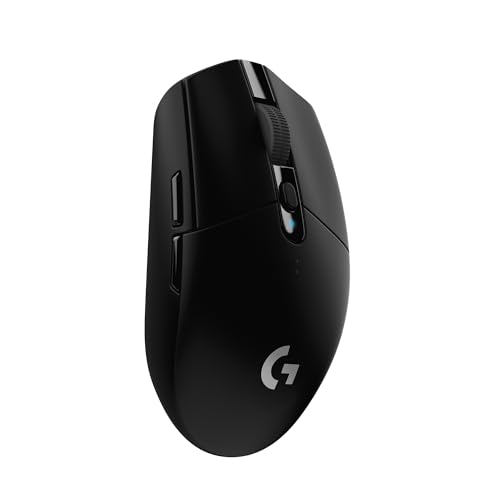
1. Logitech G305 LIGHTSPEED Wireless Gaming Mouse, Hero 12K Sensor, Black
What stands out
The Logitech G305 LIGHTSPEED is the default recommendation in this price range, and it has held that position for years for good reason. It is a light wireless gaming mouse with Logitech’s Hero 12K sensor, six programmable buttons, and a battery life measured in months rather than days on a single AA battery. The wireless connection is the same LIGHTSPEED technology Logitech uses in its flagship mice, so there is no lag, no stutter, and no reason to feel you are using a budget mouse. The shape is a compact, symmetrical design that suits claw and fingertip grips, and it works on PC and Mac without fuss.
Trade-offs to weigh
The trade-offs are the battery and the buttons. A single AA battery keeps the mouse simple and light, but it means you replace batteries instead of recharging — a small ongoing cost and a little waste. The six buttons are enough for most games but fewer than the eleven on the G502 HERO, so MMO players who bind many abilities will want more. The symmetrical shape is also less comfortable for palm-grip players with large hands, who should look at the DeathAdder Essential or the G502 HERO instead.
Who it fits best
Best for most gamers who want a reliable, light wireless mouse at a sensible cost, especially claw and fingertip players and anyone buying their first serious gaming mouse.
In daily use
In everyday use, the Logitech G305 LIGHTSPEED Wireless Gaming Mouse, Hero 12K Sensor, Black settles into a routine quickly. Set it up once, the way you like it, and give yourself a few days to adjust before judging it. The first session is about learning the layout and the feel; the second and third are where it starts to feel natural. Keep it clean, keep it in the conditions it was designed for, and it will stay consistent. If it has parts that wear — cables, surfaces, moving components — a quick check now and then keeps small issues from becoming real ones, and keeping the packaging and documentation for the first weeks makes any return or exchange far simpler.
Before you buy
Before buying the Logitech G305 LIGHTSPEED Wireless Gaming Mouse, Hero 12K Sensor, Black, check two practical things. First, measure and compare: check the dimensions, the capacity, and the compatibility details listed on the product page against what you already own and the space you have. A product that does not fit your setup will never feel right, whatever its specifications say. Second, think about your routine — where it will live, how it will be stored, and what it needs to connect to. None of this is difficult, but all of it is easier to plan before the product arrives than after.
Check price on Amazon: Logitech G305 LIGHTSPEED Wireless Gaming Mouse, Hero 12K Sensor, Black

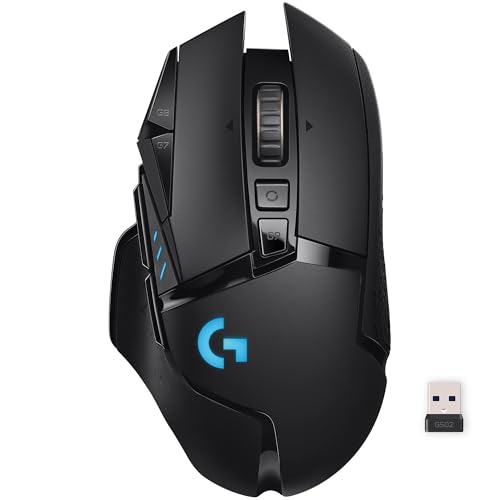
2. Logitech G502 HERO Wired Gaming Mouse, HERO 25K Sensor
What stands out
The Logitech G502 HERO is the classic gaming mouse, and its staying power tells you everything. It is a wired ergonomic mouse with the HERO 25K sensor, eleven programmable buttons, RGB lighting, and an adjustable weight system that lets you add or remove small weights to tune the feel. The shape is a right-handed ergonomic design that fills the palm, the thumb rest is comfortable over long sessions, and the sensor tracks accurately at any sensitivity you are likely to use. For players who want one mouse that does everything — shooters, strategy, and everyday work — the G502 HERO is still the reference point.
Trade-offs to weigh
The trade-offs are weight and the cable. Even with the weights removed, the G502 HERO is heavier than the light mice on this list, and low-sensitivity players who make large, fast flicks will feel the difference. The cable is a standard braided cable rather than a modern ultra-flexible one, so it can drag slightly on the desk unless you use a mouse bungee or route it well. Wired also means no wireless freedom, though for a desktop setup that rarely matters.
Who it fits best
Best for palm-grip players who want many buttons and a comfortable ergonomic shape, especially MMO and strategy players and anyone who uses the same mouse for work and play.
In daily use
Day to day, the Logitech G502 HERO Wired Gaming Mouse, HERO 25K Sensor is the kind of product you stop thinking about, which is the highest praise it can earn. It does its job the same way every time, without quirks or surprises, and lets you focus on the work or the game instead of the hardware. That consistency matters more than any single feature. Treat it reasonably — a clean desk, a suitable surface, and storage that protects it when it is not in use — and it will keep that consistency for a long time. The best products are the ones that fade into the background.
Before you buy
A few checks before you order the Logitech G502 HERO Wired Gaming Mouse, HERO 25K Sensor will save disappointment. Confirm the key details on the listing match what you expect — the exact model name, the included accessories, and the variant — since similar-looking models can differ in important ways. Check the return policy and the warranty terms so you know your options if it arrives damaged or does not suit you. And if you are replacing something you already own, compare the new product with the old one on the points that mattered most, rather than on headline features you may never use.
Check price on Amazon: Logitech G502 HERO Wired Gaming Mouse, HERO 25K Sensor

3. Razer DeathAdder Essential Ergonomic Wired Gaming Mouse, Black
What stands out
The Razer DeathAdder Essential is the ergonomic wired mouse for players who want comfort above all else. It is a right-handed ergonomic design with a 6400 DPI optical sensor, five programmable buttons, and rubber side grips that keep the mouse secure in the hand during long sessions. The shape is the most comfortable on this list for palm-grip players: it fills the hand naturally, the buttons fall where the fingers expect them, and the mouse stays comfortable after hours of play. It is also the simplest mouse here — plug it in, install the software if you want to remap the buttons, and play.
Trade-offs to weigh
The trade-offs are the sensor and the features. A 6400 DPI sensor is more than enough for any game — almost nobody plays above 3200 DPI — but it is the lowest headline number on this list, and the mouse has no RGB lighting beyond the basics and no adjustable weights. The five buttons are fewer than the G502 HERO’s eleven, so players who bind many abilities will miss the extra buttons. It is a mouse that does the essentials very well and skips the extras.
Who it fits best
Best for palm-grip players who want the most comfortable wired mouse in this range, especially anyone with larger hands and players who value comfort over extra buttons.
In daily use
Over a full week of use, the Razer DeathAdder Essential Ergonomic Wired Gaming Mouse, Black shows its character in small ways. The feel stays the same from the first day to the last, nothing loosens or rattles, and the finish holds up to regular handling. If you switch between tasks, you will appreciate that it does not need a different setup for each one: configure it once for the way you actually use it and leave it alone. If you share the space with work or family, the same product should handle those jobs without feeling out of place, which is a useful bonus for a single-product setup.
Before you buy
When the Razer DeathAdder Essential Ergonomic Wired Gaming Mouse, Black arrives, spend a little time setting it up properly. Follow the included instructions, check that everything listed as included is actually in the box, and test the main functions within the first day or two. Then leave the settings alone for a week. Constant tweaking is the enemy of getting used to a product, and most people get better results from a stable setup than from a perfect one. If something feels wrong after a few days, change one thing at a time so you know what actually helped.
Check price on Amazon: Razer DeathAdder Essential Ergonomic Wired Gaming Mouse, Black

4. Razer Viper V3 HyperSpeed Wireless PC Gaming Mouse, 82g, Black
What stands out
The Razer Viper V3 HyperSpeed is the lightest serious wireless mouse in this price range, and its 82-gram weight is the headline. It is a wireless PC gaming mouse with a 30K DPI optical sensor, up to 280 hours of battery life, mechanical switches, and a symmetrical shape that suits claw and fingertip grips. The HyperSpeed wireless connection is fast and stable, the battery lasts for months of normal play, and the light weight makes fast flicks and tracking noticeably easier than with a heavier mouse. For competitive shooter players on a budget, this is the strongest pick on the list.
Trade-offs to weigh
The trade-offs are the shape and the simplicity. The symmetrical shape is excellent for claw and fingertip grips but less comfortable for palm-grip players, who will prefer the DeathAdder Essential. There are fewer buttons than on the G502 HERO, and the mouse is deliberately plain — no RGB lighting to speak of, no adjustable weights, no thumb rest. It is built for performance rather than comfort or looks, and buyers who want a mouse that also feels premium in the hand may prefer the G502 HERO.
Who it fits best
Best for competitive shooter players who want the lightest wireless mouse in this range, especially claw and fingertip players who prioritise speed and tracking.
In daily use
In everyday use, the Razer Viper V3 HyperSpeed Wireless PC Gaming Mouse, 82g, Black settles into a routine quickly. Set it up once, the way you like it, and give yourself a few days to adjust before judging it. The first session is about learning the layout and the feel; the second and third are where it starts to feel natural. Keep it clean, keep it in the conditions it was designed for, and it will stay consistent. If it has parts that wear — cables, surfaces, moving components — a quick check now and then keeps small issues from becoming real ones, and keeping the packaging and documentation for the first weeks makes any return or exchange far simpler.
Before you buy
Before buying the Razer Viper V3 HyperSpeed Wireless PC Gaming Mouse, 82g, Black, check two practical things. First, measure and compare: check the dimensions, the capacity, and the compatibility details listed on the product page against what you already own and the space you have. A product that does not fit your setup will never feel right, whatever its specifications say. Second, think about your routine — where it will live, how it will be stored, and what it needs to connect to. None of this is difficult, but all of it is easier to plan before the product arrives than after.
Check price on Amazon: Razer Viper V3 HyperSpeed Wireless PC Gaming Mouse, 82g, Black

5. Razer Orochi V2 Wireless Gaming Mouse, 950 Hr Battery, 60g, White
What stands out
The Razer Orochi V2 is the small mouse on this list, and its 950-hour battery is the feature that makes it special. It is a 60-gram wireless gaming mouse with two wireless modes — HyperSpeed and Bluetooth — an 18K DPI sensor, and a compact shape that fits small hands and travels well. The battery life is extraordinary: months of play on a single AA battery, which means you can take it on a trip and forget the charger entirely. The Bluetooth mode pairs with a laptop or tablet for work, and the HyperSpeed mode is the one for gaming, so one mouse covers both jobs.
Trade-offs to weigh
The trade-offs are size and buttons. The compact shape is excellent for small hands and fingertip grips but cramped for large hands and palm grips — players with big hands should try the DeathAdder Essential or the G502 HERO first. There are fewer buttons than on the larger mice here, and the small size means the mouse can feel less stable during very fast movements. It is a mouse designed for portability and battery life, and it makes no apology for that.
Who it fits best
Best for gamers with small hands, laptop gamers, and anyone who wants a travel mouse with extraordinary battery life.
In daily use
Day to day, the Razer Orochi V2 Wireless Gaming Mouse, 950 Hr Battery, 60g, White is the kind of product you stop thinking about, which is the highest praise it can earn. It does its job the same way every time, without quirks or surprises, and lets you focus on the work or the game instead of the hardware. That consistency matters more than any single feature. Treat it reasonably — a clean desk, a suitable surface, and storage that protects it when it is not in use — and it will keep that consistency for a long time. The best products are the ones that fade into the background.
Before you buy
A few checks before you order the Razer Orochi V2 Wireless Gaming Mouse, 950 Hr Battery, 60g, White will save disappointment. Confirm the key details on the listing match what you expect — the exact model name, the included accessories, and the variant — since similar-looking models can differ in important ways. Check the return policy and the warranty terms so you know your options if it arrives damaged or does not suit you. And if you are replacing something you already own, compare the new product with the old one on the points that mattered most, rather than on headline features you may never use.
Check price on Amazon: Razer Orochi V2 Wireless Gaming Mouse, 950 Hr Battery, 60g, White

6. Redragon M612 Wired RGB Optical Gaming Mouse 8000 DPI
What stands out
The Redragon M612 is the cheapest proper gaming mouse on this list, and it proves that a low cost does not have to mean a bad mouse. It is a wired RGB optical gaming mouse with 8000 DPI, remappable keys, and a stable lag-free wired connection. The RGB lighting looks the part, the buttons are programmable through Redragon’s software, and the sensor tracks accurately for any game most players will play. For a first gaming mouse, a second mouse for a spare setup, or a mouse for a younger player, it is hard to beat on value.
Trade-offs to weigh
The trade-offs are refinement and build. The M612 is heavier and less polished than the Logitech and Razer mice here: the cable is stiffer, the clicks feel less crisp, and the finish is plain plastic rather than the textured grips of the DeathAdder. The 8000 DPI sensor is fine for play but it is not in the same class as the Hero 25K or the 30K sensor in the Viper V3, and the software is simpler. These are fair compromises at this level, but players who can spend a little more will notice the difference in the G305 or the G502 HERO.
Who it fits best
Best for budget buyers and first-time gaming mouse owners who want a real gaming mouse for the lowest cost on this list.
In daily use
Over a full week of use, the Redragon M612 Wired RGB Optical Gaming Mouse 8000 DPI shows its character in small ways. The feel stays the same from the first day to the last, nothing loosens or rattles, and the finish holds up to regular handling. If you switch between tasks, you will appreciate that it does not need a different setup for each one: configure it once for the way you actually use it and leave it alone. If you share the space with work or family, the same product should handle those jobs without feeling out of place, which is a useful bonus for a single-product setup.
Before you buy
When the Redragon M612 Wired RGB Optical Gaming Mouse 8000 DPI arrives, spend a little time setting it up properly. Follow the included instructions, check that everything listed as included is actually in the box, and test the main functions within the first day or two. Then leave the settings alone for a week. Constant tweaking is the enemy of getting used to a product, and most people get better results from a stable setup than from a perfect one. If something feels wrong after a few days, change one thing at a time so you know what actually helped.
Check price on Amazon: Redragon M612 Wired RGB Optical Gaming Mouse 8000 DPI

7. ATTACK SHARK X3 49g Ultra-Lightweight Wireless Gaming Mouse, White
What stands out
The ATTACK SHARK X3 is the ultra-light surprise of this list, and its 49-gram weight is lighter than mice costing several times as much. It is a wireless gaming mouse with a PAW3395 sensor, Bluetooth 5.2 and 2.4G wireless plus wired mode, and a compact, low-profile shape. The sensor is a genuine gaming-grade sensor, the wireless connection is stable, and the weight makes it one of the easiest mice here to move quickly. For players who want the lightest possible mouse without paying flagship money, the X3 is a remarkable value.
Trade-offs to weigh
The trade-offs are brand and build. ATTACK SHARK is a newer, smaller brand than Logitech or Razer, so long-term support, software updates, and warranty service are less established. The build is light and functional rather than premium, and the shape is compact, which suits claw and fingertip grips but not large palm-grip hands. The battery life is good but not in the same class as the Orochi V2’s 950 hours. Buyers who want the reassurance of a big brand should choose the G305 instead.
Who it fits best
Best for players who want the lightest wireless mouse available at this level, especially competitive players on a tight budget and anyone curious about ultra-light mice.
In daily use
In everyday use, the ATTACK SHARK X3 49g Ultra-Lightweight Wireless Gaming Mouse, White settles into a routine quickly. Set it up once, the way you like it, and give yourself a few days to adjust before judging it. The first session is about learning the layout and the feel; the second and third are where it starts to feel natural. Keep it clean, keep it in the conditions it was designed for, and it will stay consistent. If it has parts that wear — cables, surfaces, moving components — a quick check now and then keeps small issues from becoming real ones, and keeping the packaging and documentation for the first weeks makes any return or exchange far simpler.
Before you buy
Before buying the ATTACK SHARK X3 49g Ultra-Lightweight Wireless Gaming Mouse, White, check two practical things. First, measure and compare: check the dimensions, the capacity, and the compatibility details listed on the product page against what you already own and the space you have. A product that does not fit your setup will never feel right, whatever its specifications say. Second, think about your routine — where it will live, how it will be stored, and what it needs to connect to. None of this is difficult, but all of it is easier to plan before the product arrives than after.
Check price on Amazon: ATTACK SHARK X3 49g Ultra-Lightweight Wireless Gaming Mouse, White
Buying guide
Grip style: palm, claw, or fingertip
Your grip decides which mouse fits. Palm grip — the whole hand rests on the mouse — suits larger ergonomic mice like the G502 HERO and the DeathAdder Essential. Claw grip — the palm arches and the fingertips control the mouse — suits medium, symmetrical mice like the Viper V3 and the G305. Fingertip grip — only the fingertips touch the mouse — suits small, light mice like the Orochi V2 and the X3. If you do not know your grip, watch how you hold your current mouse for a few minutes: the answer will be obvious.
Wired or wireless
Wireless mice in this range are genuinely good now: the G305, Viper V3, Orochi V2, and X3 all use fast, stable wireless that feels the same as wired in play. Wireless is better if you hate cables or travel with the mouse. Wired is better if you never want to think about batteries and you play at a fixed desk — the G502 HERO, DeathAdder Essential, and M612 are all wired and never need charging. Either way, the connection is not the deciding factor any more; the shape and the sensor are.
Sensor: what the numbers actually mean
DPI is the most quoted and least important number on a gaming mouse. Almost nobody plays above 3200 DPI, so a 6400 DPI sensor is already more than enough — the DeathAdder Essential proves it. What matters is the sensor’s tracking accuracy, its behaviour at low sensitivity, and whether it spins out during fast flicks. All seven mice here have sensors that track accurately in real play; the differences between them are smaller than the differences in shape and weight. Do not buy a mouse for its DPI number.
Weight: light is fast, heavy is steady
Light mice — the 49-gram X3, the 60-gram Orochi V2, the 82-gram Viper V3 — make fast flicks and tracking easier, and competitive shooter players usually prefer them. Heavier mice — the G502 HERO with its weights, the DeathAdder Essential — feel steadier and more controlled, and many players aim better with a little weight in the hand. There is no right answer: it depends on your sensitivity and your games. Low-sensitivity players who make big arm movements usually prefer light mice; high-sensitivity players often prefer a little weight.
Buttons and software
Count the buttons you actually use. Five buttons are enough for most shooters; eleven buttons matter for MMOs and strategy games where you bind many abilities. All seven mice here have software for remapping buttons and adjusting sensitivity, though Logitech’s and Razer’s software is more polished than Redragon’s or ATTACK SHARK’s. Check that the software works on your operating system before you buy — most of it is Windows-first, with Mac support varying by brand.
Mouse pads and surfaces
A gaming mouse is only as good as the surface it moves on. A large cloth mouse pad gives you consistent tracking, room for low-sensitivity arm movements, and a soft surface that protects the mouse feet — and it also protects the desk. Hard pads are faster and easier to clean but they wear mouse feet out sooner. Whatever pad you choose, keep it clean: dust and crumbs change how the sensor tracks, and a dirty pad is the most common cause of a mouse that feels inconsistent. A pad that covers the keyboard area as well as the mouse area keeps the whole setup at one height, which is more comfortable over long sessions.
Frequently asked questions
What is the best gaming mouse for 60 bucks?
For most players, the Logitech G305 LIGHTSPEED is the best gaming mouse around sixty bucks: it is light, wireless, reliable, and its sensor is excellent. Competitive shooter players should look at the Razer Viper V3 HyperSpeed for its lighter weight and longer battery. Palm-grip players should choose the Logitech G502 HERO or the Razer DeathAdder Essential. The best mouse depends on your grip and your games, not on any single specification.
Is a wireless gaming mouse as good as a wired one?
Yes, at this level. The wireless mice here — the G305, Viper V3, Orochi V2, and X3 — use fast 2.4G wireless that feels the same as wired in play, with no lag you can notice. The main difference is batteries: wireless mice need charging or battery swaps, while wired mice never do. If you play at a fixed desk and never want to think about power, wired is simpler. If you hate cables, wireless is better.
How many DPI do I need for gaming?
Almost nobody needs more than 3200 DPI, and most competitive players use between 400 and 1600 DPI with a low in-game sensitivity. A 6400 DPI sensor is already more than enough. Do not choose a mouse by its DPI number — choose it by shape, weight, and grip. The sensor quality matters, but every mouse on this list tracks accurately in real play.
What grip style should I use?
Use the grip that feels natural. Palm grip suits large ergonomic mice and is the most comfortable for long sessions. Claw grip gives you more control for fast aiming and suits medium, symmetrical mice. Fingertip grip gives you the finest control and suits small, light mice. There is no best grip — the best mouse is the one that fits the grip you already use.
Are cheap gaming mice any good?
Yes, far better than they used to be. The Redragon M612 and the ATTACK SHARK X3 are genuine gaming mice with good sensors and programmable buttons, and either one will serve a casual or competitive player well. The difference from the Logitech and Razer mice is refinement — cable quality, click feel, software polish, and long-term support — rather than basic performance. If your budget is tight, a cheap gaming mouse is a far better buy than a cheap office mouse.
How long do gaming mouse batteries last?
It varies widely. The Razer Orochi V2 lasts up to 950 hours on a single AA battery, the Viper V3 HyperSpeed lasts up to 280 hours, and the G305 lasts for months on one AA battery. Rechargeable wireless mice need charging every few days to weeks depending on use. Wired mice never need charging at all. If battery life matters to you, the Orochi V2 is the clear leader on this list.
Should I use a mouse bungee with a wired mouse?
A mouse bungee holds the cable up and off the desk, which stops the cable dragging and catching during play. It is a small, cheap accessory and it makes a real difference with a wired mouse like the G502 HERO, the DeathAdder Essential, or the M612, whose cables are stiffer than the ultra-flexible cables on flagship mice. If you play with a wired mouse and you have ever felt the cable catch mid-flick, a bungee is worth trying. Wireless mice do not need one at all.
Conclusion
The best gaming mouse for around sixty bucks is the one that fits your hand and your games. The Logitech G305 LIGHTSPEED is the best all-round choice for most players, the Razer Viper V3 HyperSpeed is the pick for competitive shooters, and the Logitech G502 HERO and Razer DeathAdder Essential are the picks for palm-grip players who want comfort and buttons. The Razer Orochi V2 is the travel and battery-life pick, the Redragon M612 is the best value, and the ATTACK SHARK X3 is the lightest mouse on the list. Check your grip, compare the dimensions with a mouse you already own, and buy the mouse that fits — a mouse that fits your hand will improve your aim more than any sensor specification.