The best wireless gaming trackball mouse solves a problem a normal mouse cannot: it lets you aim without moving your wrist. Instead of sliding a mouse across the desk, you roll a ball with your thumb or fingers while the device stays still — which means no wrist strain from sweeping movements, no running out of desk space, and no cable dragging in the middle of a game. This guide compares eight wireless trackballs suited to gaming, from Logitech's adjustable MX Ergo S to Kensington's large-ball Expert and Elecom's programmable EX-G, and explains the difference between thumb-ball and finger-ball designs. Every pick was verified against its Amazon listing for the exact brand and model, and only wireless models were included — no wired trackball slipped in. The guide also covers the practical side of living with a trackball: how to clean it, how to set the buttons up once and leave them alone, and how to know whether the thumb-ball or the finger-ball style fits a particular hand. A trackball is a device that rewards a little patience, and the guide is written for someone buying their first one as much as for someone replacing a worn-out favourite. The guide also looks at the long term: a trackball that is comfortable on day one can still disappoint after a year if the ball wears, the buttons loosen, or the software stops being updated. The picks below were chosen with that in mind, favouring designs that have been sold for years and brands that still support their products.
In this guide
Quick picks: best wireless gaming trackball mouse
| # | Product | Where to buy |
|---|---|---|
| 1 | Logitech MX Ergo S Wireless Trackball Mouse | Check on Amazon |
| 2 | Logitech MX Ergo Plus Wireless Trackball | Check on Amazon |
| 3 | Logitech Ergo M575S Wireless Trackball Mouse (Graphite Blue Ball) | Check on Amazon |
| 4 | Kensington Expert Wireless Trackball Mouse (K72359WW) | Check on Amazon |
| 5 | Kensington Orbit Wireless Trackball (K70990WW) | Check on Amazon |
| 6 | Kensington SlimBlade Pro Wireless Trackball (K72080WW) | Check on Amazon |
| 7 | Elecom EX-G Wireless Trackball Mouse | Check on Amazon |
| 8 | ProtoArc EM02 Wireless Trackball Mouse | Check on Amazon |
How the picks were chosen
The picks were chosen from Amazon listings returned by the site's own product search, and every model was verified by its full listing title before it was included — a step that matters here, because search results mix wired trackballs, regular mice, and bundles into a wireless search. A trackball only made the list if its full title confirms wireless operation: Bluetooth, 2.4GHz, or both. Wired models, bundles, and regular mice that appeared in the results were excluded, as were renewed listings. The eight that remain cover both control styles — thumb-ball and finger-ball — across Logitech, Kensington, Elecom, and ProtoArc, with programmable buttons, adjustable angles, and multi-device connection weighed alongside comfort. Wireless operation was verified for every pick: a trackball only made the list if its full listing title confirms Bluetooth, 2.4GHz, or both. Wired trackballs, regular mice, and bundles that appeared in the search results were excluded, as were renewed listings. The eight that remain cover both control styles across four brands, so the guide can compare the approaches honestly rather than pushing one style.
Quick comparison
| Product | Best for |
|---|---|
| Logitech MX Ergo S Wireless Trackball Mouse | Adjustable angle, 6 buttons, USB-C |
| Logitech MX Ergo Plus Wireless Trackball | Extra 10-degree wedge |
| Logitech Ergo M575S Wireless Trackball Mouse (Graphite Blue Ball) | Affordable, Bluetooth + Bolt |
| Kensington Expert Wireless Trackball Mouse (K72359WW) | Large 55mm finger ball |
| Kensington Orbit Wireless Trackball (K70990WW) | Scroll ring, ambidextrous |
| Kensington SlimBlade Pro Wireless Trackball (K72080WW) | Low profile, dual wireless |
| Elecom EX-G Wireless Trackball Mouse | 6 buttons, tilt scroll |
| ProtoArc EM02 Wireless Trackball Mouse | Adjustable angle, 3 devices |

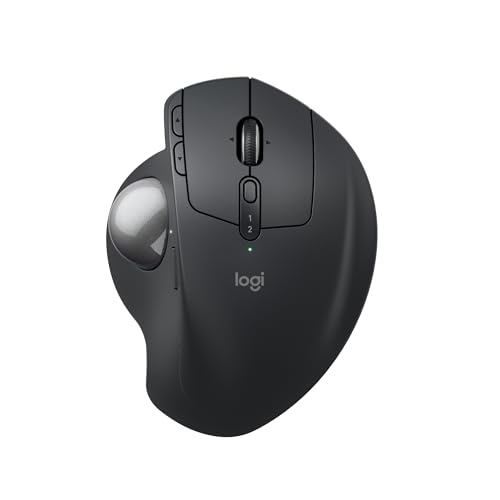
1. Logitech MX Ergo S Wireless Trackball Mouse
Advanced wireless trackball mouse (MX Ergo S) with USB-C, a rechargeable battery, Bluetooth and an encrypted dongle, six programmable buttons, and an advanced ergonomic design, in graphite.
Strengths
- The adjustable hinge lets the angle change, so the hand rests in a more natural position than on a flat mouse.
- A rechargeable battery with USB-C means no disposable batteries to buy or replace.
- Six programmable buttons give real control for gaming, with bindings for the actions used most.
Trade-offs
- It is the most expensive Logitech trackball here, which is hard to justify for casual use.
- Thumb-ball control takes a few days to learn for anyone used to a normal mouse.
- The ball and the socket need regular cleaning, or tracking gets sticky.
Who it fits
Gamers with wrist strain who want the most adjustable, most programmable wireless trackball Logitech makes.
Best for: a premium wireless trackball for gaming with wrist comfort in mind
Not suited for: anyone who wants a trackball that works perfectly on the first day
In daily use
In daily use the MX Ergo S settles into a routine quickly: the thumb rolls the ball, the hand stays still, and the wrist stops doing the work that used to ache by evening. Set the angle with the hinge, bind the buttons once, and leave the settings alone for a week while the thumb learns the new movement. Keep the ball and the socket clean — a quick wipe every few days keeps tracking smooth — and charge it with any USB-C cable when the battery runs low.
Before you buy
Before you buy, check that a thumb-ball trackball suits your hand: it is a different movement from a finger-ball or a normal mouse, and it takes a few days to feel natural. Confirm the size against your hand, since the MX Ergo is a full-size device, and check whether you want Bluetooth, the dongle, or both — this model offers both, which covers a laptop and a desktop.
Check price on Amazon: Logitech MX Ergo S Wireless Trackball Mouse

2. Logitech MX Ergo Plus Wireless Trackball
Wireless trackball (MX Ergo Plus) with an extra 10-degree wedge, for PC and Mac.
Strengths
- The extra 10-degree wedge gives a steeper, more ergonomic angle than the standard MX Ergo.
- Wireless freedom means no cable dragging on the desk during a game.
- PC and Mac compatibility covers both platforms without a second device.
Trade-offs
- The listing gives fewer specifics than the MX Ergo S, so check the product page for the exact features before ordering.
- The steeper angle suits some hands and not others — it is a matter of fit, not quality.
- As with any trackball, the learning curve is real for the first few days.
Who it fits
Gamers who tried a flat trackball and want a steeper angle, or anyone whose wrist prefers more tilt.
Best for: a steeper-angle wireless trackball for gaming
Not suited for: anyone unsure whether they like a tilted trackball at all
In daily use
In daily use the MX Ergo Plus is for the gamer who already knows they like a trackball and wants more angle: the wedge lifts the hand into a position that feels natural for long sessions, and the thumb does the aiming while the wrist rests. It is a quiet, steady device — no cable, no dragging, no wrist movement to track. Give it a week before judging it, since the thumb needs time to learn precision, and keep the ball clean so the tracking stays smooth.
Before you buy
Before you buy, think about whether you have used a trackball before: the Plus is a refinement for existing trackball users more than a first trackball. Check the wedge angle against your comfort — a steeper tilt helps some wrists and annoys others. Also confirm the connection type on the listing, since this model's details are thinner than the MX Ergo S.
Check price on Amazon: Logitech MX Ergo Plus Wireless Trackball

3. Logitech Ergo M575S Wireless Trackball Mouse (Graphite Blue Ball)
Wireless Bluetooth trackball mouse (Ergo M575S) in graphite with a blue ball, with easy thumb control, precise and smooth tracking, Bluetooth, and a Logi Bolt USB receiver.
Strengths
- The M575S is the affordable way into a quality wireless trackball, at a fraction of the MX Ergo's cost.
- Bluetooth plus the Logi Bolt receiver covers a laptop, a desktop, and a second device.
- Thumb control with a smooth ball is easy to learn, and the shape suits most hands.
Trade-offs
- It has fewer programmable buttons than the MX Ergo S, so heavy customisation is limited.
- The plastic body is lighter and plainer than the premium models here.
- It runs on a battery rather than recharging by USB-C, so a spare battery is worth keeping.
Who it fits
First-time trackball users and budget-conscious gamers who want wireless thumb control without the premium cost.
Best for: a first wireless trackball for gaming on a budget
Not suited for: anyone who needs six programmable buttons and a rechargeable battery
In daily use
In daily use the M575S is the trackball that converts sceptics: it is light, the ball rolls smoothly, and the thumb learns the movement within a few days. It pairs by Bluetooth to a laptop and by the Bolt receiver to a desktop, so one mouse covers both machines. Keep a spare battery in the drawer, wipe the ball and socket weekly, and give the thumb a week to build precision before deciding whether trackballs are for you.
Before you buy
Before you buy, check the battery type on the listing and keep a spare, since this model does not recharge by cable. Confirm the size suits your hand — the M575S is a medium, comfortable shape for most people. Also check whether you need more programmable buttons: if the answer is yes, the MX Ergo S is the step up.
Check price on Amazon: Logitech Ergo M575S Wireless Trackball Mouse (Graphite Blue Ball)

4. Kensington Expert Wireless Trackball Mouse (K72359WW)
Wireless trackball mouse (K72359WW) in black, a large finger-ball design from Kensington's Expert line.
Strengths
- The large 55mm ball gives fine, precise control with the fingers, which suits aiming in games.
- A finger-ball design spreads the work across several fingers instead of loading the thumb.
- The Expert line is a long-running, well-known trackball family with a proven shape.
Trade-offs
- The listing is thin on details, so check the product page for the connection and battery before ordering.
- A large finger-ball trackball takes up real desk space and takes longer to learn than a thumb-ball.
- It is a desk-bound design, not a travel mouse.
Who it fits
Gamers who prefer a finger-ball trackball and want precise, large-ball control for aiming.
Best for: a large finger-ball wireless trackball for precise gaming
Not suited for: anyone who wants a compact travel trackball
In daily use
In daily use the Expert Wireless is a desk anchor: it stays in one place, the fingers roll the large ball with small, precise movements, and the wrist barely moves at all. That stillness is the point — in a long gaming session, the hand stays relaxed while the fingers do the work. It takes longer to learn than a thumb-ball, so give it two weeks before judging it, and clean the ball and the bearings regularly, since dust is the enemy of smooth tracking.
Before you buy
Before you buy, check the desk space: this is a large device that needs room beside the keyboard. Confirm the connection and battery details on the product page, since the listing is brief. Also think about ball style — a finger-ball suits precise aiming, but a thumb-ball is easier to learn, so choose by experience, not by looks.
Check price on Amazon: Kensington Expert Wireless Trackball Mouse (K72359WW)

5. Kensington Orbit Wireless Trackball (K70990WW)
Wireless trackball with a scroll ring (K70990WW) in black and red, with a 40mm ball.
Strengths
- The scroll ring around the ball gives smooth, precise scrolling without a wheel to reach for.
- Wireless freedom with a compact, ambidextrous-friendly shape that suits either hand.
- The 40mm ball is a good middle size — large enough for precision, small enough to stay nimble.
Trade-offs
- It has fewer buttons than the gaming-focused trackballs here, so customisation is limited.
- The ambidextrous shape is less sculpted than the ergonomic thumb-ball models, so long sessions depend on fit.
- The listing gives fewer gaming specifics, so check the product page for the details that matter to you.
Who it fits
Gamers who want a simple, ambidextrous wireless trackball with a scroll ring, and who value scrolling as much as aiming.
Best for: a simple wireless trackball with a scroll ring for gaming and everyday use
Not suited for: anyone who needs many programmable buttons for complex games
In daily use
In daily use the Orbit Wireless is the quiet achiever: the ball aims, the ring scrolls, and the hand stays in one place through a whole evening. It suits a desk shared with work, since the same device handles documents and browsing without feeling out of place, and the ambidextrous shape means either hand can use it. Keep the ball and the ring clean — a sticky ring is the first sign it needs a wipe — and give the fingers a few days to learn the scroll ring's feel.
Before you buy
Before you buy, check whether the scroll ring suits you: it is a different feel from a wheel, and some people love it while others prefer a wheel. Confirm the size against your hand, since the Orbit is a compact design, and check the battery and connection details on the listing before ordering.
Check price on Amazon: Kensington Orbit Wireless Trackball (K70990WW)

6. Kensington SlimBlade Pro Wireless Trackball (K72080WW)
Wireless trackball (K72080WW) with a rechargeable battery, Bluetooth and 2.4GHz connection options, in black and grey.
Strengths
- Two connection options — Bluetooth and 2.4GHz — cover a laptop, a desktop, and a second device.
- A rechargeable battery means no disposable batteries to buy.
- The low, wide SlimBlade shape suits a relaxed hand position with the fingers spread across the ball.
Trade-offs
- The flat, low shape is a matter of taste — some hands prefer a sculpted grip.
- The listing is brief, so check the product page for button count and battery life.
- It is a premium-priced trackball, which is hard to justify for casual use.
Who it fits
Gamers who want a low, wide finger-ball trackball with dual wireless connections and a rechargeable battery.
Best for: a low-profile wireless trackball with Bluetooth and 2.4GHz
Not suited for: anyone who prefers a tall, sculpted ergonomic grip
In daily use
In daily use the SlimBlade Pro is the trackball for a clean desk: it sits low, the fingers rest across the large ball, and the hand stays relaxed through long sessions. Switching between Bluetooth and the 2.4GHz receiver covers a laptop and a desktop without replugging anything, and the rechargeable battery means it is always ready. Keep the ball clean and the surface dust-free, since a low trackball shows dirt quickly, and give the flat shape a week before deciding whether it fits.
Before you buy
Before you buy, check the shape against your hand: the SlimBlade is low and wide, which suits some grips and not others. Confirm the battery life and charging details on the listing, and check whether you need both connection types — if one is enough, a simpler model may do. Also confirm the button layout covers the actions you use most.
Check price on Amazon: Kensington SlimBlade Pro Wireless Trackball (K72080WW)

7. Elecom EX-G Wireless Trackball Mouse
2.4GHz USB wireless trackball mouse with an ergonomic design, thumb control, smooth precise tracking, six programmable buttons, and a tilt scroll, for Windows and Mac.
Strengths
- Six programmable buttons with a tilt scroll give real gaming control at a fair cost.
- Thumb control with a smooth roller ball is easy to learn and precise once the thumb adjusts.
- The ergonomic shape is sculpted for the hand, which helps in long sessions.
Trade-offs
- It uses a 2.4GHz USB receiver rather than Bluetooth, so it needs a free USB port.
- Elecom's software is less polished than Logitech's, so button programming takes a little patience.
- It is a right-handed design, so left-handed gamers should look elsewhere.
Who it fits
Right-handed gamers who want six programmable buttons and a tilt scroll in an affordable wireless trackball.
Best for: an affordable wireless trackball with six buttons and tilt scroll
Not suited for: left-handed gamers or anyone who needs Bluetooth
In daily use
In daily use the EX-G is a capable gaming trackball: the thumb aims, the six buttons cover the actions that matter, and the tilt scroll handles sideways movement without reaching for a key. It is a comfortable, sculpted shape that suits a long evening of play, and the 2.4GHz connection is steady with no noticeable lag. Keep the receiver in a front USB port for the best signal, clean the ball weekly, and spend a little time with the software to set the buttons once.
Before you buy
Before you buy, check that you are right-handed, since this is a right-handed design. Confirm the USB receiver is acceptable — there is no Bluetooth on this model — and check the software support for your operating system. Also confirm the size: the EX-G is a full-size trackball, so small hands should check the fit first.
Check price on Amazon: Elecom EX-G Wireless Trackball Mouse

8. ProtoArc EM02 Wireless Trackball Mouse
Wireless trackball mouse (EM02) with a 0/15-degree adjustable angle, in grey, with two ergonomic modes, thumb control, three-device Bluetooth and 2.4G connection, and a rechargeable battery.
Strengths
- The adjustable angle gives two ergonomic modes, so the hand can switch between flat and tilted.
- Three-device connection covers a laptop, a desktop, and a tablet from one mouse.
- A rechargeable battery with no disposable cells to replace keeps it simple.
Trade-offs
- ProtoArc is a smaller brand than Logitech or Kensington, so long-term support is less certain.
- The adjustable hinge adds a moving part that could loosen over time.
- Software and documentation are thinner than the big brands offer.
Who it fits
Gamers who want an adjustable-angle trackball that connects to three devices, at a lower cost than the big brands.
Best for: an adjustable-angle wireless trackball for three devices
Not suited for: anyone who wants the polish and support of a major brand
In daily use
In daily use the EM02 is the flexible option: tilt it flat for precise work, angle it up for a long gaming session, and switch between three devices with a button press. The thumb learns the ball quickly, and the rechargeable battery means it is always ready. It is a good first trackball for someone who is not sure which angle they prefer, since the hinge lets them try both. Keep it charged, keep the ball clean, and give the thumb a week to build accuracy.
Before you buy
Before you buy, check the size and the weight against your hand, since the EM02 is a full-size device. Confirm the three-device switching covers the machines you use, and check the charging details on the listing. Also weigh the brand: ProtoArc costs less than Logitech, but the software and support are simpler.
Check price on Amazon: ProtoArc EM02 Wireless Trackball Mouse
Buying guide: best wireless gaming trackball mouse
Thumb-ball or finger-ball
The first choice is the control style. A thumb-ball trackball, like the Logitech MX Ergo and M575S, is controlled by the thumb while the fingers rest on the buttons — it is easier to learn and suits gaming, since the thumb aims while the fingers click. A finger-ball trackball, like the Kensington Expert and SlimBlade, is controlled by the index and middle fingers rolling a larger ball — it gives finer precision for aiming, but it takes longer to learn. Try to handle both styles before buying, since the choice is personal and hard to change later.
Give the learning curve a week
No trackball feels natural on the first day. The thumb or fingers need time to learn small, precise movements, and most people take a week to reach their normal accuracy. Do not judge a trackball after one evening, and do not keep switching sensitivity settings while learning — pick one setting, leave it alone for a week, and let the hand adapt. After that week, most trackball users find they aim as well as they did with a normal mouse, with far less wrist movement.
Check the buttons and the software
Gaming needs buttons, and trackballs vary widely: some have two, some have six or more programmable ones. Count the actions you actually use in your main game and make sure the trackball covers them. Check the software too — Logitech's is the most polished, Elecom's takes patience, and smaller brands offer less. A trackball with buttons you cannot program is just a pointing device, so confirm the software supports your operating system before ordering.
Keep the ball clean
A trackball's worst enemy is dust. The ball rolls on small bearings or a socket, and a dirty ball tracks badly, sticks, or jumps — which feels like a faulty mouse but is really a cleaning job. Wipe the ball and the socket every few days with a dry cloth, and keep the desk free of crumbs. It takes thirty seconds and makes the difference between a trackball that feels precise and one that feels broken.
Wireless range and battery
A wireless trackball needs a reliable connection and a sensible power plan. Bluetooth suits a laptop and a second device, while a 2.4GHz receiver gives the lowest lag for gaming on a desktop — the best models offer both. Rechargeable models charge by USB-C and are always ready; battery models need a spare cell in the drawer. Check the connection type against the machines you use, and keep the receiver in a front USB port for the best signal.
Set the sensitivity once and leave it alone
The biggest favour a new trackball user can do themselves is to pick one sensitivity setting and leave it alone for a week. Constant tweaking while the hand is still learning makes it impossible to know whether the settings or the hand are the problem. Start in the middle of the range, play normally for several days, and only then adjust — a small change at a time. Most people find their ideal setting is lower than they first guessed, since a trackball rewards small, precise movements rather than fast sweeps. Once the setting is right, the hand learns it quickly and the accuracy follows.
Check the size against your hand
Trackballs come in different sizes, and the fit matters more than the brand. A large trackball suits a large hand and gives the fingers room to work, while a smaller one suits a smaller hand and a tighter grip. Before buying, compare the trackball's size with a mouse that already fits — the length, the width, and the height all matter. A trackball that is too large forces the hand to stretch, which causes strain rather than relieving it, while one that is too small cramps the fingers. If the hand size is uncertain, a medium, well-known design like the Logitech M575S is the safest starting point, since it fits the widest range of hands.
Using and caring for your pick
Use the trackball on a clean, flat surface with room for the hand to rest naturally — the device stays still, so the desk space it needs is the device itself, not a runway. Clean the ball and the socket every few days, and keep crumbs and dust away from the desk. Charge a rechargeable model when it warns you, not when it dies mid-game, and keep a spare battery for battery models. If the tracking feels sticky, clean the ball first before changing any settings. Store the receiver in the mouse or in a safe place when travelling, since a lost receiver is hard to replace. Keep a small cleaning routine: wipe the ball and the socket every few days, keep the desk free of crumbs, and check the receiver is in a front USB port for the best signal. If the trackball is rechargeable, charge it when it warns rather than when it dies. If it takes a battery, keep a spare in the drawer. And if the hand aches after a long session, check the posture first — the wrist should rest naturally, the elbow should be supported, and the trackball should sit close to the keyboard, not stretched out to the side. When travelling with a trackball, keep it in a padded sleeve or a compartment of its own, since a hard knock can damage the ball bearings. Remove the receiver and store it in the mouse if the model allows, and keep a spare battery or a charging cable in the bag. A trackball travels better than a normal mouse in one respect: it needs no desk space to work, so it functions on a train tray table, a sofa arm, or a small hotel desk where a normal mouse would be useless.
Common mistakes to avoid
The most common mistake is judging a trackball after one day — the learning curve is real, and a week is the fair trial. The second is buying a wired trackball by accident, so check the title for wireless, Bluetooth, or 2.4GHz before ordering. The third is ignoring the ball style: a thumb-ball and a finger-ball feel completely different, and choosing the wrong one is the most expensive mistake here. The fourth is letting dust build up and blaming the mouse for sticky tracking. And the fifth is buying a trackball with too few buttons for the games played, then finding the actions that matter have nowhere to live. The sixth mistake is buying a trackball for someone else without knowing their ball preference — a thumb-ball and a finger-ball feel completely different, and a gift chosen wrong will sit unused. The seventh is using a trackball on a dirty desk and blaming the device for sticky tracking. And the eighth is forgetting the receiver: a 2.4GHz receiver left in a laptop bag or lost in a drawer turns a wireless trackball into a paperweight, so keep it in the mouse or in a safe place.
Final recommendation
For most gamers, the Logitech MX Ergo S is the strongest all-round choice: an adjustable angle, six programmable buttons, USB-C charging, and a proven ergonomic design cover gaming properly. If the budget is tighter, the Logitech Ergo M575S gives the same thumb-ball idea for far less, and it is the best first trackball in this guide. If precision matters most, the Kensington Expert Wireless with its large finger ball is the pick, and the ProtoArc EM02 is the flexible budget option with an adjustable angle and three-device connection. Whichever you choose, give it a week, keep the ball clean, and pick the ball style that fits your hand. The rest of the range covers the other needs: the Kensington Orbit Wireless is the simple, ambidextrous choice for someone who wants a scroll ring and no fuss, while the Elecom EX-G gives six programmable buttons and a tilt scroll at a fair cost for right-handed gamers. The Kensington SlimBlade Pro is the low, wide option for a relaxed hand, and the ProtoArc EM02 is the flexible budget pick with an adjustable angle and three-device connection. The guide's other picks round out the range for different hands and budgets: the Kensington Expert Wireless suits a large hand and precise finger control, the Elecom EX-G gives right-handed gamers six buttons and a tilt scroll, and the Kensington Orbit Wireless is the simple, ambidextrous option for someone who wants a scroll ring and no fuss.
Frequently asked questions
Are trackball mice good for gaming?
Yes, once the learning curve is past. A trackball aims with the thumb or fingers while the device stays still, which gives precise control without wrist movement. Most users take about a week to match their normal-mouse accuracy, and competitive players who use trackballs value the stillness and precision. The key is choosing the right ball style and giving it a fair trial.
What is the difference between a thumb-ball and a finger-ball trackball?
A thumb-ball trackball is controlled by the thumb while the fingers click the buttons — it is easier to learn and suits gaming. A finger-ball trackball uses a larger ball rolled by the index and middle fingers — it gives finer precision but takes longer to learn. Thumb-ball models include the Logitech MX Ergo and M575S; finger-ball models include the Kensington Expert and SlimBlade.
Do wireless trackballs have lag?
A good 2.4GHz wireless trackball has no noticeable lag for gaming, and Bluetooth is fine for most play. The models in this guide use 2.4GHz receivers, Bluetooth, or both. For competitive play, use the 2.4GHz receiver in a front USB port; for everyday gaming and work, Bluetooth is perfectly usable.
How do I clean a trackball mouse?
Remove the ball — most models let it pop out with a push from underneath or a twist — and wipe the ball and the socket with a dry cloth. Clean the small bearings or contact points inside the socket, remove any dust, and put the ball back. It takes a minute, and doing it every few days keeps tracking smooth.
Can I use a trackball mouse with a laptop?
Yes — wireless trackballs are ideal for laptops, since they need no desk space to slide around. Bluetooth models pair directly, and 2.4GHz models use a small receiver in a USB port. A trackball works on a train seat, a sofa, or a small desk where a normal mouse would run out of room.
How long does it take to learn a trackball mouse?
Most people take about a week to reach their normal accuracy with a trackball, and two weeks to feel fully comfortable. The thumb or fingers need time to learn small, precise movements. The fair trial is a week of normal use with one sensitivity setting — judging a trackball after one evening is like judging a musical instrument after one lesson.
Are trackball mice better for wrist pain?
Many people with wrist strain find a trackball helps, because the wrist stays still while the thumb or fingers do the work — there is no sweeping movement across the desk. A trackball is not a medical device, and anyone with persistent pain should speak to a clinician, but the stillness is the reason trackballs have a loyal following among people who work at a computer all day.
Can I use a trackball mouse for work as well as gaming?
Yes — the same device handles documents, browsing, and spreadsheets without feeling out of place, which is one of the trackball's advantages. The Orbit Wireless and the M575S are particularly good dual-purpose devices. The programmable buttons that serve gaming also serve work, for actions like copy, paste, and switching windows.
Can I use a trackball mouse with a Mac?
Yes — the trackballs in this guide list PC and Mac compatibility, including the Logitech MX Ergo S and M575S and the Kensington models. The software for button programming is available for both platforms, though the features vary slightly by brand. A trackball that connects by Bluetooth pairs directly with a MacBook, while a 2.4GHz model uses its receiver in a USB port or a USB-C adapter.