The best wireless gaming mouse 50 list covers eight wireless mice that disappear in the hand. A wireless mouse has no cable to drag, no cord to catch on the desk edge, and no tether to fight during a fast flick, and the modern wireless link is as responsive as a cable for nearly every player. The eight mice in this guide are all wireless gaming mice from the brands that make them best: Logitech, Razer, Corsair and SteelSeries, covering light and ergonomic shapes, and the sensors that competitive players trust.
Weight is the first number to understand. A light mouse, under 70 grams, makes fast flicks and long sessions easier, which is why competitive shooter players prefer them. A heavier mouse, around 100 grams, feels steadier and more controlled for strategy games and desktop work. The mice here range from the 54-gram Razer Viper V3 Pro to the heavier Logitech G502 models, so the choice is a real one.
The sensor is the second number. The Hero 2, Focus Pro 30K and 35K optical sensors in this guide all track cleanly at high speed, which is the single most important quality in a gaming mouse. The differences between them are small in practice, and the shape and the weight matter more than the sensor number. The notes below say what each mouse does best, and which grip it suits.
In this guide
Quick picks: best wireless gaming mouse 50
| # | Product | Where to buy |
|---|---|---|
| 1 | Logitech G502 LIGHTSPEED Wireless Gaming Mouse, Black | Check on Amazon |
| 2 | Logitech G502 X Lightspeed Wireless Gaming Mouse, Black | Check on Amazon |
| 3 | Razer DeathAdder V3 Pro Wireless Gaming Mouse, 63g | Check on Amazon |
| 4 | Logitech G Pro X Superlight 2 Lightspeed Wireless Gaming Mouse, Black | Check on Amazon |
| 5 | Razer Viper V3 Pro Wireless Esports Gaming Mouse, 54g, Black | Check on Amazon |
| 6 | Razer Viper V3 HyperSpeed Wireless PC Gaming Mouse, 82g, Black | Check on Amazon |
| 7 | Corsair Dark Core RGB Pro SE Wireless Gaming Mouse, Qi Charging | Check on Amazon |
| 8 | SteelSeries Aerox 5 Wireless Gaming Mouse, Black | Check on Amazon |
How the picks were chosen
The picks were chosen from the site's own product search, looking only at wireless gaming mice from Logitech, Razer, Corsair and SteelSeries. A listing was dropped if it was for a wired mouse, a renewed unit, a grip tape, or a mouse pad. One listing that looked promising, the Corsair Dark Core RGB Pro, came back as a renewed unit in the full title check, so the Dark Core RGB Pro SE is used instead. The remaining mice were sorted by brand and weight, so the guide covers the main wireless mice with a real choice in each.
The sensor and the weight were the second test. Every pick below has a modern optical sensor from a known family, and a weight that suits its shape. A mouse that tracks well at high speed, without acceleration or angle snapping, will feel better than a mouse with a bigger number on the box, and the notes below say which mice are light and which are ergonomic.
Finally, each mouse was checked for the grip it suits. Palm, claw and fingertip grips need different shapes, and a mouse that fights the hand will never feel right, whatever its sensor can do. The notes below say which grip each mouse suits, so the buyer can match the mouse to the hand.
Quick comparison
| Product | Standout detail |
|---|---|
| Logitech G502 LIGHTSPEED Wireless Gaming Mouse, Black | Logitech G502 LIGHTSPEED, 11 buttons, adjustable weights |
| Logitech G502 X Lightspeed Wireless Gaming Mouse, Black | Logitech G502 X Lightspeed, 13 buttons, optical switches |
| Razer DeathAdder V3 Pro Wireless Gaming Mouse, 63g | Razer DeathAdder V3 Pro, 63g, Focus Pro 30K |
| Logitech G Pro X Superlight 2 Lightspeed Wireless Gaming Mouse, Black | Logitech G Pro X Superlight 2, lightweight, HERO 2 |
| Razer Viper V3 Pro Wireless Esports Gaming Mouse, 54g, Black | Razer Viper V3 Pro, 54g, 35K optical sensor |
| Razer Viper V3 HyperSpeed Wireless PC Gaming Mouse, 82g, Black | Razer Viper V3 HyperSpeed, 82g, 30K sensor |
| Corsair Dark Core RGB Pro SE Wireless Gaming Mouse, Qi Charging | Corsair Dark Core RGB Pro SE, Qi charging, 18000 DPI |
| SteelSeries Aerox 5 Wireless Gaming Mouse, Black | SteelSeries Aerox 5 Wireless, 74g, 9 buttons |

1. Logitech G502 LIGHTSPEED Wireless Gaming Mouse, Black
Key specs
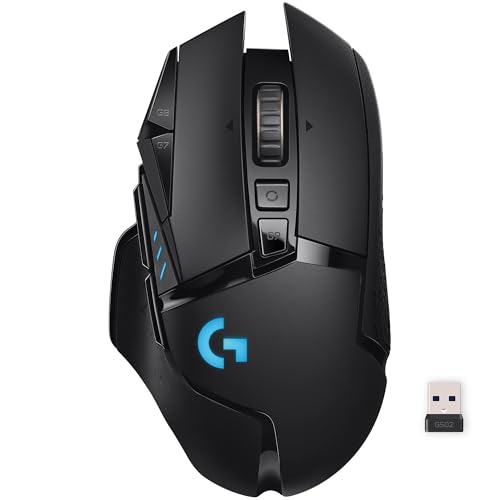
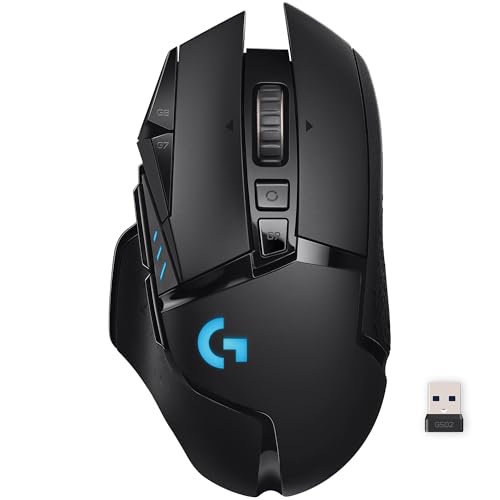
Wireless gaming mouse, RGB, adjustable weights, 11 programmable buttons, POWERPLAY compatible.
Strengths
- Eleven programmable buttons cover shooters, strategy and MMO games without a second device.
- The adjustable weight system lets the mouse be tuned to the hand.
- The LIGHTSPEED wireless link is the same technology Logitech uses in its more expensive models.
Trade-offs
- The G502 is heavier than the light mice here, even with no weights installed.
- The shape is firmly right-handed, so left-handed players should look elsewhere.
- The mouse runs on a battery, so a spare should be kept nearby for long sessions.
Who it fits
A palm-grip player who wants one mouse for everything, with buttons and weight tuning.
Best for: All-round gaming, strategy, and work, with many programmable buttons.
Not suited for: A competitive shooter player who wants the lightest possible mouse.
In daily use
The G502 LIGHTSPEED is the do-everything mouse: the buttons cover every bind, the weight tunes to the hand, and the wireless link never feels slow. It is the mouse for the player who wants one mouse for every game.
The versatile pick, and the best wireless mouse for a player who wants buttons and weight tuning.
Before you buy
Before buying the Logitech G502 LIGHTSPEED Wireless Gaming Mouse, Black, check the dimensions against a mouse already liked. Measure the hand against the mouse length and width on the listing, because a mouse that is too small or too large will never feel right, whatever its sensor can do.
Check price on Amazon: Logitech G502 LIGHTSPEED Wireless Gaming Mouse, Black

2. Logitech G502 X Lightspeed Wireless Gaming Mouse, Black
Key specs
Wireless gaming mouse for PC and Mac, optical switches, 13 buttons, LIGHTSPEED wireless.
Strengths
- Thirteen buttons and optical switches give the G502 X more binds and a faster click than the original.
- The LIGHTSPEED wireless link is responsive and reliable.
- The updated shape is lighter than the original G502, while keeping the familiar feel.
Trade-offs
- The G502 X is still heavier than the light esports mice here.
- The sheer number of buttons can overwhelm a player who only needs two side buttons.
- The shape is right-handed only.
Who it fits
A player who wants the newest G502, with more buttons and optical switches.
Best for: Shooters, strategy and MMO games, with many binds.
Not suited for: A player who wants a light, simple mouse with few buttons.
In daily use
The G502 X is the updated classic: the same versatile shape, with optical switches that click faster and thirteen buttons for every bind. It is the mouse for the player who uses the extra buttons every day.
The updated G502, and the best wireless mouse for a button-heavy setup.
Before you buy
A few checks before you order the Logitech G502 X Lightspeed Wireless Gaming Mouse, Black will save disappointment. Confirm the grip the mouse suits, palm, claw or fingertip, check whether the mouse needs software for the features wanted, and confirm the battery type, disposable or rechargeable, so the right spares are at hand.
Check price on Amazon: Logitech G502 X Lightspeed Wireless Gaming Mouse, Black

3. Razer DeathAdder V3 Pro Wireless Gaming Mouse, 63g
Key specs
Wireless gaming mouse, 63g lightweight, Focus Pro 30K optical sensor, optical switches Gen-3.
Strengths
- At 63 grams, the DeathAdder V3 Pro is light enough for fast aim work.
- The Focus Pro 30K sensor tracks cleanly at high speed.
- The ergonomic right-handed shape supports the palm and thumb naturally.
Trade-offs
- The shape is firmly right-handed, so left-handed players should look elsewhere.
- There are fewer programmable buttons than on a button-heavy mouse.
- The light weight means the mouse can feel insubstantial to a player used to a heavier mouse.
Who it fits
A player with medium to large hands who wants a light, ergonomic wireless mouse.
Best for: Competitive shooters, and long sessions where comfort matters.
Not suited for: A left-handed player, or a player who needs many programmable buttons.
In daily use
The DeathAdder V3 Pro is the ergonomic mouse made light: the shape that has supported palms for years, at a weight that moves fast. It is the mouse for the player who wants comfort and speed in one shape.
The light ergonomic pick, and the best wireless mouse for palm-grip shooter players.
Before you buy
When the Razer DeathAdder V3 Pro Wireless Gaming Mouse, 63g arrives, spend ten minutes setting it up properly. Install the software once, set two or three sensitivity steps, and bind the side buttons to the actions needed in the main game. Then leave the settings alone for a week and let the hand learn the mouse.
Check price on Amazon: Razer DeathAdder V3 Pro Wireless Gaming Mouse, 63g

4. Logitech G Pro X Superlight 2 Lightspeed Wireless Gaming Mouse, Black
Key specs
Wireless gaming mouse, lightweight, LIGHTFORCE hybrid switches, HERO 2 sensor, LIGHTSPEED wireless.
Strengths
- The Superlight 2 is one of the lightest mice in this guide, which makes fast flicks easier.
- The HERO 2 sensor is Logitech's best, tracking cleanly at high speed.
- The LIGHTFORCE hybrid switches give a crisp, reliable click.
Trade-offs
- There are only five programmable buttons, so complex binds need another device.
- The shape is simple and symmetrical, with no sculpted grip for the thumb.
- The cost is higher than the other Logitech mice here.
Who it fits
A competitive shooter player who wants the lightest Logitech mouse available.
Best for: Esports and fast-paced shooters, where weight and sensor matter most.
Not suited for: A player who needs many buttons, or a sculpted ergonomic shape.
In daily use
The Superlight 2 is the mouse for the player who counts grams: it is light, it tracks cleanly, and it gets out of the way. Set the sensitivity once, and the mouse does the rest.
The esports pick, and the best wireless mouse for competitive play.
Before you buy
Before buying the Logitech G Pro X Superlight 2 Lightspeed Wireless Gaming Mouse, Black, check the dimensions against a mouse already liked. Measure the hand against the mouse length and width on the listing, because a mouse that is too small or too large will never feel right, whatever its sensor can do.
Check price on Amazon: Logitech G Pro X Superlight 2 Lightspeed Wireless Gaming Mouse, Black

5. Razer Viper V3 Pro Wireless Esports Gaming Mouse, 54g, Black
Key specs
Wireless esports gaming mouse, 54g lightweight, 35K DPI optical sensor, Gen-3 optical switches.
Strengths
- At 54 grams, the Viper V3 Pro is the lightest mouse in this guide.
- The 35K optical sensor is Razer's best, tracking cleanly at the highest speeds.
- The symmetrical shape suits claw and fingertip grips, and the switches are fast and reliable.
Trade-offs
- The symmetrical shape will not suit palm-grip players who want a sculpted rest.
- There are few programmable buttons, so complex binds need another device.
- The light weight can feel too light for a player used to a heavier mouse.
Who it fits
A competitive esports player who wants the lightest mouse Razer makes.
Best for: Esports, fast shooters, and claw or fingertip grips.
Not suited for: A palm-grip player, or a player who needs many programmable buttons.
In daily use
The Viper V3 Pro is the lightest mouse in this guide for a reason: at 54 grams, it moves with almost no effort, and the 35K sensor keeps up with the fastest flicks. It is the mouse for the player whose aim is the priority.
The lightest pick, and the best wireless mouse for esports.
Before you buy
A few checks before you order the Razer Viper V3 Pro Wireless Esports Gaming Mouse, 54g, Black will save disappointment. Confirm the grip the mouse suits, palm, claw or fingertip, check whether the mouse needs software for the features wanted, and confirm the battery type, disposable or rechargeable, so the right spares are at hand.
Check price on Amazon: Razer Viper V3 Pro Wireless Esports Gaming Mouse, 54g, Black

6. Razer Viper V3 HyperSpeed Wireless PC Gaming Mouse, 82g, Black
Key specs
Wireless PC gaming mouse, 82g, 30K DPI optical sensor, up to 280-hour battery life.
Strengths
- The 280-hour battery life means weeks of play between battery changes.
- At 82 grams, the mouse is light enough for fast aim work without feeling insubstantial.
- The 30K optical sensor tracks cleanly at high speed.
Trade-offs
- The battery life is measured at a low polling rate, and faster polling shortens it.
- There are fewer programmable buttons than on a button-heavy mouse.
- The mouse runs on a battery rather than a rechargeable cell, so spares are needed.
Who it fits
A player who wants a light wireless mouse with a very long battery life.
Best for: Long sessions, and a mouse that is rarely charged or refilled.
Not suited for: A player who needs many buttons, or a rechargeable mouse.
In daily use
The Viper V3 HyperSpeed is the mouse for the player who forgets about batteries: weeks of play, a light shell, and a sensor that tracks cleanly. It is the most practical light mouse in this guide.
The battery-life pick, and the best wireless mouse for long sessions without charging.
Before you buy
When the Razer Viper V3 HyperSpeed Wireless PC Gaming Mouse, 82g, Black arrives, spend ten minutes setting it up properly. Install the software once, set two or three sensitivity steps, and bind the side buttons to the actions needed in the main game. Then leave the settings alone for a week and let the hand learn the mouse.
Check price on Amazon: Razer Viper V3 HyperSpeed Wireless PC Gaming Mouse, 82g, Black
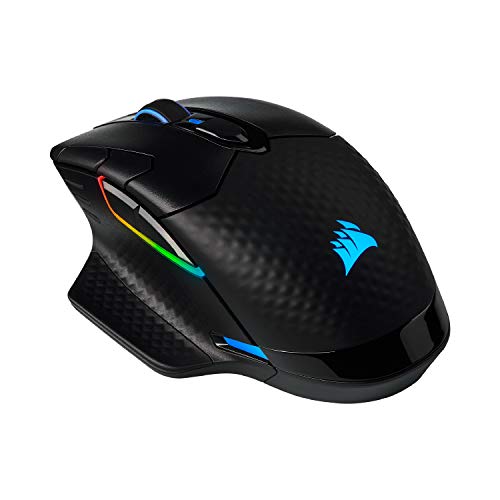
7. Corsair Dark Core RGB Pro SE Wireless Gaming Mouse, Qi Charging
Key specs
Wireless FPS and MOBA gaming mouse, Qi charging, 18000 DPI, 8 programmable buttons, sub-1ms wireless.
Strengths
- Qi wireless charging means the mouse charges on a charging pad without a cable.
- Eight programmable buttons cover FPS and MOBA games.
- The 18000 DPI sensor and sub-1ms wireless link are responsive enough for competitive play.
Trade-offs
- The Dark Core is heavier than the light esports mice here.
- The Qi charging needs a compatible charging pad, which is sold separately.
- The shape is large, and small-handed players may find it too big.
Who it fits
A player who wants Qi charging and a versatile FPS and MOBA mouse.
Best for: FPS and MOBA games, and a desk with a Qi charging pad.
Not suited for: A competitive shooter player who wants the lightest possible mouse.
In daily use
The Dark Core RGB Pro SE is the mouse for the desk with a charging pad: set it down, and it charges. The eight buttons cover the game, the sensor keeps up, and the mouse is always ready.
The Qi charging pick, and the best wireless mouse for a charging-pad desk.
Before you buy
Before buying the Corsair Dark Core RGB Pro SE Wireless Gaming Mouse, Qi Charging, check the dimensions against a mouse already liked. Measure the hand against the mouse length and width on the listing, because a mouse that is too small or too large will never feel right, whatever its sensor can do.
Check price on Amazon: Corsair Dark Core RGB Pro SE Wireless Gaming Mouse, Qi Charging

8. SteelSeries Aerox 5 Wireless Gaming Mouse, Black
Key specs
Wireless gaming mouse, holey RGB design, ultra-lightweight, water resistant, Bluetooth and 2.4 GHz.
Strengths
- The holey design keeps the mouse light while letting air through, which suits sweaty palms.
- Bluetooth and 2.4 GHz mean the mouse connects to a PC, a laptop and a tablet.
- The water-resistant design protects against spills and sweat.
Trade-offs
- The holey shell lets dust in, and the mouse needs cleaning more often.
- The 9-button layout is good, but the side buttons are small.
- The battery life is shorter than the Viper V3 HyperSpeed.
Who it fits
A player who wants a light, ventilated mouse that connects to several devices.
Best for: Multi-device use, and long sessions where the palms get warm.
Not suited for: A player who wants the longest battery life, or a solid shell.
In daily use
The Aerox 5 is the mouse for the player with warm hands: the holes let air through, the mouse stays light, and the Bluetooth connection means it works with the laptop as well as the gaming PC. It is the most versatile mouse in this guide.
The ventilated pick, and the best wireless mouse for multi-device use.
Before you buy
A few checks before you order the SteelSeries Aerox 5 Wireless Gaming Mouse, Black will save disappointment. Confirm the grip the mouse suits, palm, claw or fingertip, check whether the mouse needs software for the features wanted, and confirm the battery type, disposable or rechargeable, so the right spares are at hand.
Check price on Amazon: SteelSeries Aerox 5 Wireless Gaming Mouse, Black
Buying guide: best wireless gaming mouse 50
Sensor first, everything else second
The sensor determines whether aim feels consistent. Look for an optical sensor from a known family, such as Logitech's Hero, Razer's Focus Pro, or the sensors in the Corsair and SteelSeries mice here, and do not be swayed by huge DPI numbers alone. Most players use between 400 and 3200 DPI, so a sensor that tracks cleanly at those settings matters far more than a headline figure.
Weight changes how a mouse feels
A light mouse, roughly under 70 grams, makes fast flicks and long sessions easier, which is why competitive shooter players prefer them. A heavier mouse, around 100 grams or more, can feel steadier and more controlled for strategy games and desktop work. There is no universally right weight, only the weight that matches the grip and the games.
Wired or wireless is now a lifestyle choice
Modern wireless links from the major brands are effectively as responsive as a cable for most players, and battery life now stretches into weeks or months on some models. Wired mice still win on simplicity, with no batteries and no charging. Wireless mice win on desk freedom and travel. Choose based on whether charging a battery or managing a cable is the bigger bother.
Shape and grip matter more than brand
There are three common grips: palm, where the whole hand rests on the mouse; claw, where the palm sits high and the fingers arch; and fingertip, where only the fingertips touch. Large ergonomic mice suit palm grips, symmetrical and compact mice suit claw and fingertip grips, and small mice suit smaller hands. Compare the length and width of a mouse with one already liked before buying.
Buttons, software and extras
Extra buttons are useful for games with many abilities, but they add weight and complexity. Software matters for remapping buttons and adjusting sensitivity, though many players set a mouse once and never open the software again. RGB lighting, weight tuning and free-spinning scroll wheels are nice extras, but they should never come before sensor, weight and shape.
Battery and charging
A wireless mouse needs a plan for power. Some mice run on a disposable battery, some recharge by cable, and some, like the Dark Core RGB Pro SE here, charge on a Qi pad. Check the battery life on the listing, keep a spare battery or the cable nearby, and charge the mouse overnight so a low battery never ends a match.
Usage and care
A wireless mouse lasts longest when it is kept clean and the sensor lens is kept free of dust. Wipe the sensor lens with a soft cloth, keep the feet clean, and use a decent mousepad, because a dirty pad wears the feet and affects tracking. Charge the mouse overnight, or keep a spare battery in the drawer, and store the receiver in the mouse when travelling so it is not lost.
For the best tracking, use the mouse on a mousepad rather than a bare desk, and keep the desk free of crumbs and dust near the sensor. Set the sensitivity once, with two or three steps for different games, and leave it alone for a week. Constant tweaking is the enemy of consistent aim, and most players improve faster with a stable setup than with a perfect one.
A wireless mouse should be stored with its receiver in the mouse when travelling, because a lost receiver means a mouse that cannot connect. Keep a spare battery or the charging cable in the desk drawer, and charge the mouse overnight so it is ready for the next session. If the mouse has a power switch, turn it off when not in use, because that extends the battery life by days.
Common mistakes
The most common mistake is buying a mouse by sensor number alone, and ending with a shape that does not fit the hand. The second is buying a heavy mouse for fast shooters, where a light mouse is better. The third is ignoring the battery, and finding the mouse dead mid-game. The fourth is using the mouse on a dirty desk or a worn mousepad, which makes the tracking inconsistent.
Another mistake is changing the sensitivity constantly, which stops the hand learning the mouse. Set the sensitivity, leave it alone for a week, and change one thing at a time if something feels wrong. And do not buy a renewed mouse when a new one was intended: the battery and the switches have already lived a previous life.
Another mistake is using a mouse on a glass desk or a shiny surface, which confuses the sensor and makes the tracking jump. Use a mousepad, which gives the sensor a consistent surface to read. And do not ignore a double-clicking button: a button that double-clicks is wearing out, and it should be replaced or repaired before it ruins a game. A mouse that double-clicks is a mouse that needs attention, not a setting to work around.
Polling rate: what it means and what it does not
Polling rate is how often the mouse reports its position to the computer, measured in hertz. A 1000Hz polling rate means the mouse reports a thousand times a second, which is the standard for gaming mice, and a 8000Hz polling rate means eight thousand times a second, which is the newest high end. A higher polling rate makes the cursor smoother and the response faster, but the difference between 1000Hz and 8000Hz is small in practice, and most players cannot feel it. A higher polling rate also uses more battery, which shortens the life of a wireless mouse. For most players, 1000Hz is enough, and the sensor, the weight and the shape matter far more than the polling rate number. The mice in this guide run at 1000Hz or more, which is the right range for gaming.
Mouse feet, mousepads and the desk
A mouse is only as good as the surface it moves on. The small feet under the mouse, usually made of PTFE, slide on the mousepad, and they wear down over time, which makes the mouse feel rough and inconsistent. A decent mousepad protects the feet and gives a consistent surface, and a large pad covers the whole area the mouse moves in. A bare desk wears the feet faster and gives an inconsistent glide, because the surface is hard and uneven. Replace the feet when they feel rough, and replace the mousepad when it is worn smooth in the middle. A clean pad and fresh feet make a mouse feel new again, and they cost very little.
Wireless technology: how the link stays fast
A modern wireless gaming mouse uses a 2.4GHz link with a small receiver, and the best links are as fast as a cable. The receiver should be close to the mouse, ideally on a short extension cable on the desk, because a receiver plugged into the back of a computer has a weaker signal through the case. Some mice also offer Bluetooth, which is convenient for a laptop but slower than the 2.4GHz link, so the 2.4GHz link should be used for gaming and Bluetooth for travel. The polling rate, the sensor and the link all work together, and a mouse with a good sensor and a bad link will still feel slow. The mice in this guide all use a proven 2.4GHz link, which is why they feel as responsive as a wired mouse.
Choosing between light and ergonomic
The choice between a light mouse and an ergonomic mouse is the choice between speed and comfort. A light mouse, such as the Viper V3 Pro at 54 grams, moves faster and tires the hand less, which suits competitive shooters. An ergonomic mouse, such as the DeathAdder V3 Pro, supports the palm and the thumb, which suits long sessions and larger hands. Many players own both: a light mouse for shooters and an ergonomic mouse for everything else. The hand decides: a player with large hands will be happier with an ergonomic mouse, and a player with small hands will be happier with a light symmetrical mouse. Try the shape before buying, or buy from a seller with a fair return policy.
Final recommendation
For most players, the Logitech G502 LIGHTSPEED is the best all-round wireless gaming mouse in this guide: versatile, comfortable, and loaded with buttons. The Razer Viper V3 Pro is the best for esports, at 54 grams with a 35K sensor, and the Logitech G Pro X Superlight 2 is the best Logitech esports mouse. The Razer DeathAdder V3 Pro is the best light ergonomic mouse, the Viper V3 HyperSpeed is the best for battery life, and the Corsair Dark Core RGB Pro SE is the best for Qi charging. The SteelSeries Aerox 5 is the best for multi-device use. Pick the shape that fits the grip, the weight that fits the games, and the sensor will take care of the rest.
If only one mouse is bought, make it the one that fits the hand, at a weight that suits the games played most. A mouse that fits is worth more than a mouse with a bigger sensor number, and the mice in this guide all track well enough that the shape is the deciding factor.
The mouse is the link between the hand and the game, and it is used more than any other part of the setup. Choose the shape that fits the grip, the weight that fits the games, and a sensor that tracks cleanly. The mice in this guide all do that, and the right one is the one that disappears in the hand.
Frequently asked questions
Is a wireless gaming mouse as good as a wired one?
Yes, for most players. Modern wireless links from Logitech, Razer, Corsair and SteelSeries are effectively as responsive as a cable, and battery life now stretches into weeks or months on some models. A wired mouse still wins on simplicity, with no battery to charge, but wireless lag is largely a thing of the past.
What weight gaming mouse should I buy?
For fast-paced shooters, a light mouse under 70 grams makes flicks easier and reduces fatigue. For strategy games and desktop work, a heavier mouse around 100 grams can feel steadier. There is no universally right weight, only the weight that matches the grip and the games.
What DPI should I use?
Most players use between 400 and 3200 DPI, with 800 or 1600 DPI being common starting points. Higher DPI is not automatically better; it only changes how far the cursor moves for a given hand movement. Choose a DPI that lets the player turn comfortably without lifting the mouse constantly.
How long does a wireless gaming mouse battery last?
It depends on the mouse and the polling rate. The Viper V3 HyperSpeed in this guide lists up to 280 hours, which is weeks of play, while other mice last days or weeks depending on use. Check the battery life on the listing, and keep a spare battery or the cable nearby for long sessions.
Should I buy a renewed gaming mouse?
No, for a mouse that will be used every day. A renewed mouse has switches and a battery that have already lived a previous life, and the saving is small next to the cost of a new mouse. This guide links only new mice, and the Corsair Dark Core RGB Pro listing that came back as renewed was replaced with the new SE version.
What is the best grip for a gaming mouse?
There is no single best grip, only the grip that fits the hand. A palm grip rests the whole hand on the mouse and suits large ergonomic mice. A claw grip arches the fingers and suits medium mice with a high back. A fingertip grip touches only with the fingertips and suits small, light mice. The grip is decided by the hand, not by the game, and the mouse should be chosen to match it.
How do I clean a gaming mouse?
Wipe the shell with a soft, slightly damp cloth, and clean the sensor lens with a dry soft cloth, because dust on the lens affects tracking. Clean the scroll wheel with a dry cloth, and remove dust from around the buttons with a soft brush. Do not use household cleaner, and do not get water inside the mouse. Clean the mouse once a month, and the feet will last longer and the tracking will stay consistent.
Do I need a mousepad for a gaming mouse?
Yes. A mousepad gives the sensor a consistent surface to read, protects the mouse feet, and covers the area the mouse moves in. A bare desk wears the feet faster and gives an inconsistent glide, because the surface is hard and uneven. A large mousepad is better than a small one, because the mouse never runs off the edge during a fast flick.