The best indoor cameras without subscription solve the most annoying problem in home security: the camera that works fine until the free trial ends, and then demands a monthly fee to show you what it recorded. A camera without a subscription records to local storage, usually a microSD card, and lets you watch live and recorded video through a free app, with no monthly bill and no footage held hostage. That is not a compromise: the cameras in this guide record in 1080p, 2K, or 4K, pan and tilt to follow movement, see in the dark, and talk back through two-way audio, all without a subscription. The seven picks cover the current range: eufy supplies the 4K Indoor Camera E30, Reolink supplies the E1, TP-Link supplies the Kasa EC70 and EC71 and the Tapo C101, C120, and C211. Every camera here is a current listing, with the brand and model confirmed.
What makes one no-subscription indoor camera better than another comes down to how it stores video, how it sees in the dark, and how it moves. Local storage is the heart of the matter: a camera that records to a microSD card works without any cloud plan, while a camera that only records to the cloud is useless without one. Night vision matters next, because an indoor camera is often watching a dark room, and infrared night vision that reaches across the room is worth more than a higher resolution that goes blind at night. Pan and tilt matter too, because a camera that can turn to follow a person or a pet covers a whole room from one spot, while a fixed camera only sees what is in front of it. This guide weighs those points for each camera rather than ranking them on resolution alone.
In this guide
Quick picks: best indoor cameras without subscription
| # | Product | Where to buy |
|---|---|---|
| 1 | eufy Security 4K Indoor Camera E30 | Check on Amazon |
| 2 | REOLINK 4MP 2K Indoor Camera E1 | Check on Amazon |
| 3 | Kasa 1080p Indoor Pan/Tilt Security Camera EC71 | Check on Amazon |
| 4 | Kasa 1080p Indoor Pan/Tilt Security Camera EC70 | Check on Amazon |
| 5 | Tapo 2K Pan Tilt Security Camera C211 (2-Pack) | Check on Amazon |
| 6 | Tapo 2K+ Indoor/Outdoor Wired Security Camera C120 | Check on Amazon |
| 7 | Tapo 1080P Indoor Security Camera C101 | Check on Amazon |
How the picks were chosen
The picks were chosen from current indoor camera listings, with three hard filters. First, the camera must be a complete indoor security camera that works without a subscription, sold new rather than renewed. Second, the brand and model in the listing must match the camera exactly, so there is no guessing about which version is on offer. Third, the camera must cover a real use case: watching pets, babies, elderly relatives, or the home itself, with local storage and a free app. Within those filters the guide favours variety: one eufy 4K camera, one Reolink pan-and-tilt camera, two Kasa pan-and-tilt cameras, and three Tapo cameras at different resolutions and designs.
Local storage support was weighed alongside resolution, night vision, pan and tilt, two-way audio, and app quality. A camera that records to a microSD card and lets you watch the recordings in a free app earns points, because that is the whole point of a no-subscription camera. The eufy E30 earns its place as the only pick whose listing states no subscription outright, while the Kasa, Tapo, and Reolink models earn theirs through local storage and free basic features. The guide says plainly what each camera does without a plan, so you can match the pick to the room you actually want to watch.
Quick comparison
| Product | Standout detail |
|---|---|
| eufy Security 4K Indoor Camera E30 | 4K, pan and tilt, AI tracking, no subscription stated |
| REOLINK 4MP 2K Indoor Camera E1 | 4MP 2K, pan and tilt, 360-degree view, Wi-Fi 6 |
| Kasa 1080p Indoor Pan/Tilt Security Camera EC71 | 1080p, pan and tilt, motion detection and tracking, 2-way audio |
| Kasa 1080p Indoor Pan/Tilt Security Camera EC70 | 1080p, pan and tilt, motion detection and tracking, 2-way audio |
| Tapo 2K Pan Tilt Security Camera C211 (2-Pack) | 2K, pan and tilt, 2-pack, motion detection, 2-way audio, siren |
| Tapo 2K+ Indoor/Outdoor Wired Security Camera C120 | 2K+, indoor and outdoor, person, pet and vehicle detection |
| Tapo 1080P Indoor Security Camera C101 | 1080p, motion detection, 2-way audio, siren, night vision |
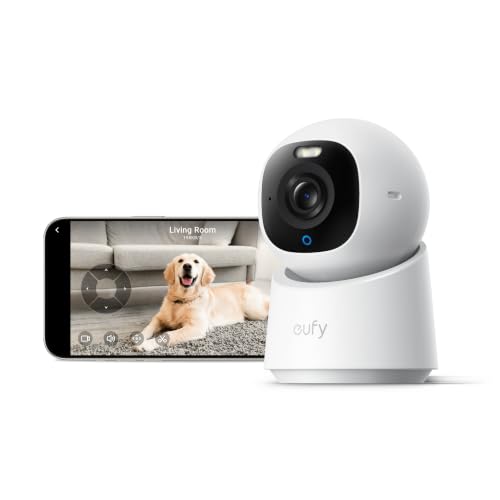
1. eufy Security 4K Indoor Camera E30
Key specs
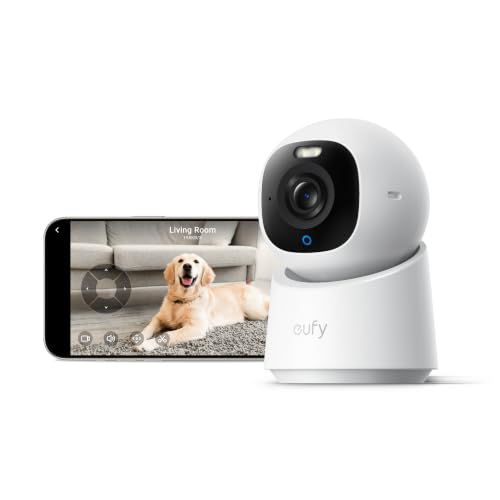
eufy Security 4K Indoor Camera E30, no subscription, works as pet camera, nanny and baby camera, pan and tilt, AI tracking, AI detection. The E30 is the no-subscription pick in this guide.
Strengths
- The listing states no subscription outright, so there is no doubt about how the camera is meant to be used.
- 4K resolution gives the sharpest image in this guide, with detail that 1080p cameras cannot match.
- Pan and tilt with AI tracking follows a person or a pet around the room automatically.
Trade-offs
- 4K video uses more storage and more bandwidth than 1080p, so the microSD card fills faster.
- The AI features work best with good lighting, and the camera is larger than the compact Tapo models.
- As the premium pick here, it costs more than the 1080p cameras.
Who it fits
Buyers who want the sharpest no-subscription indoor camera, with 4K video and AI tracking, for pets, babies, or the home.
Best for: the sharpest no-subscription indoor camera with AI tracking.
Not suited for: buyers who need the cheapest camera or the smallest one.
In daily use
In daily use, the E30 is the camera for people who want the best picture without a monthly bill. The 4K resolution shows detail that makes it easy to tell what a pet is doing or whether a baby is sleeping soundly, and the pan-and-tilt AI tracking follows movement around the room without you having to steer it. The no-subscription design means the recordings stay on your local storage and the app stays free, which is the whole point. Keep the lens clean, keep the camera's firmware updated, and place it where it can see the room it is meant to watch, and it will do its job quietly for years.
Before you buy
Before buying the eufy Security 4K Indoor Camera E30, check two practical things. First, confirm how the camera stores video: a microSD card slot means local storage without a subscription, while a camera that only records to the cloud needs a plan. Second, check where the camera will live: a plug-in camera needs a socket nearby, a pan-and-tilt camera needs space to turn, and a camera watching a baby or a pet needs a view of the whole area, not just a corner.
Check price on Amazon: eufy Security 4K Indoor Camera E30

2. REOLINK 4MP 2K Indoor Camera E1
Key specs
REOLINK 4MP 2K indoor camera E1, plug-in Wi-Fi 6 security camera, 360-degree pet camera with phone app, baby monitor. The E1 is the pan-and-tilt Reolink in this guide.
Strengths
- The 360-degree pan-and-tilt design covers a whole room from one spot, so one camera does the work of several fixed ones.
- Wi-Fi 6 gives a faster, more stable connection than older Wi-Fi, which matters for smooth live video.
- 4MP 2K resolution is a clear step up from 1080p, with sharper detail on faces and pets.
Trade-offs
- It needs a plug socket nearby, since it is a plug-in camera rather than a battery one.
- The pan-and-tilt motor adds moving parts, which is one more thing that can wear over years of use.
- Reolink's app is capable but less polished than the eufy or Tapo apps for some buyers.
Who it fits
Buyers who want one camera to cover a whole room, with pan and tilt, 2K video, and Wi-Fi 6.
Best for: covering a whole room with one pan-and-tilt camera.
Not suited for: buyers who need a battery camera or the simplest possible app.
In daily use
In daily use, the E1 is the camera for the room rather than the corner. Mount it on a shelf or a table, and the pan-and-tilt motor sweeps the room, following a pet or a child as they move, while the 2K resolution keeps the picture sharp enough to see what is happening. The Wi-Fi 6 connection keeps the live view smooth, and the phone app lets you steer the camera from anywhere. Keep it plugged in near the area it watches, keep the firmware updated, and it will cover a whole room from a single spot, which is more than a fixed camera can do.
Before you buy
A few checks before you order the REOLINK 4MP 2K Indoor Camera E1 will save disappointment. Confirm the resolution and the field of view in the listing, and check whether the listing includes a microSD card, since most cameras need one bought separately. If you want to watch from outside the home, confirm the app works remotely without a plan. And if the camera will watch a baby, check that the night vision is infrared rather than a visible light, which would disturb sleep.
Check price on Amazon: REOLINK 4MP 2K Indoor Camera E1

3. Kasa 1080p Indoor Pan/Tilt Security Camera EC71
Key specs
Kasa 1080p indoor pan/tilt wired security camera, baby and pet monitor, EC71, motion detection and tracking, 2-way audio, night vision. The EC71 is the Kasa pan-and-tilt camera in this guide.
Strengths
- Pan and tilt with motion detection and tracking follows movement around the room automatically.
- Two-way audio lets you talk to a pet, a child, or a visitor through the camera.
- 1080p resolution with night vision covers a dark room clearly at a sensible price.
Trade-offs
- 1080p is the lowest resolution in this guide, so the image is less detailed than the 2K and 4K models.
- It is a wired camera, so it needs a plug socket nearby and cannot be placed anywhere.
- The motion tracking can be distracted by pets or moving curtains if the sensitivity is set too high.
Who it fits
Buyers who want a Kasa pan-and-tilt camera for babies and pets, with two-way audio, at a sensible price.
Best for: a pan-and-tilt baby and pet camera with two-way audio.
Not suited for: buyers who need 2K or 4K detail or a battery-powered camera.
In daily use
In daily use, the EC71 is the camera for the nursery and the living room. The pan-and-tilt motor follows a crawling baby or a wandering pet, the two-way audio lets you soothe from another room, and the night vision keeps the picture clear after dark. The 1080p resolution is enough to see what matters, and the Kasa app is straightforward to use. Keep it plugged in where it can see the room, set the motion sensitivity to suit the room rather than leaving it at maximum, and it will watch quietly without demanding attention.
Before you buy
When the Kasa 1080p Indoor Pan/Tilt Security Camera EC71 arrives, spend a little time setting it up properly. Place it where it can see the room, connect it to Wi-Fi, insert the microSD card, and test the live view and the recordings before relying on it. Then leave the settings alone. Constant adjustment is the enemy of a good setup, and most people get better results from a stable position than from a perfect one. If the alerts are too frequent, lower the motion sensitivity before moving the camera.
Check price on Amazon: Kasa 1080p Indoor Pan/Tilt Security Camera EC71

4. Kasa 1080p Indoor Pan/Tilt Security Camera EC70
Key specs
Kasa 1080p indoor pan/tilt wired security camera, baby and pet monitor, EC70, motion detection and tracking, 2-way audio, night vision. The EC70 is the entry-level Kasa pan-and-tilt camera in this guide.
Strengths
- Pan and tilt with motion detection and tracking covers a room from one spot, like the EC71.
- Two-way audio and night vision cover the basics of a baby and pet monitor.
- As the entry-level Kasa model, it is the most affordable pan-and-tilt camera in this guide.
Trade-offs
- 1080p is the lowest resolution in this guide, so the image is less detailed than the 2K and 4K models.
- It is a wired camera, so it needs a plug socket nearby.
- As the older model, it may lack some of the EC71's refinements in tracking and app features.
Who it fits
Buyers who want the most affordable Kasa pan-and-tilt camera for babies and pets.
Best for: an affordable pan-and-tilt baby and pet camera.
Not suited for: buyers who need 2K or 4K detail or the newest features.
In daily use
In daily use, the EC70 does the same core job as the EC71 for less money: it pans and tilts to follow movement, it talks back through two-way audio, and it sees in the dark. The 1080p picture is clear enough to see what a baby or a pet is doing, and the Kasa app is simple to use. The differences from the EC71 are in refinement rather than in the basics, so buyers who want the essentials at the lowest price will be happy here. Keep it plugged in where it can see the room, and it will watch without fuss.
Before you buy
Before buying the Kasa 1080p Indoor Pan/Tilt Security Camera EC70, check two practical things. First, confirm how the camera stores video: a microSD card slot means local storage without a subscription, while a camera that only records to the cloud needs a plan. Second, check where the camera will live: a plug-in camera needs a socket nearby, a pan-and-tilt camera needs space to turn, and a camera watching a baby or a pet needs a view of the whole area, not just a corner.
Check price on Amazon: Kasa 1080p Indoor Pan/Tilt Security Camera EC70

5. Tapo 2K Pan Tilt Security Camera C211 (2-Pack)
Key specs
Tapo 2K pan tilt security camera for baby monitor and dog camera, C211, 2-pack, motion detection, 2-way audio, siren, night vision. The C211 2-pack covers two rooms for the price of one purchase.
Strengths
- A 2-pack covers two rooms, or a room and a spare, in a single purchase.
- 2K resolution is sharper than 1080p, with clearer detail on faces and pets.
- Motion detection, two-way audio, a siren, and night vision cover the full set of indoor camera features.
Trade-offs
- Two cameras mean two plug sockets and two spots to find, which is more setup than a single camera.
- The siren is useful as a deterrent but can startle pets and children if triggered accidentally.
- Tapo's app is capable but the free features vary, so check what is included without a plan.
Who it fits
Buyers who want two 2K pan-and-tilt cameras, for two rooms or a room and a spare, in one purchase.
Best for: covering two rooms with 2K pan-and-tilt cameras.
Not suited for: buyers who only need one camera or the sharpest 4K image.
In daily use
In daily use, the C211 2-pack is the camera for the whole home. Put one in the living room and one in the nursery, or one watching the front door and one watching the pets, and both are controlled from the same Tapo app. The 2K resolution is sharp enough to see detail, the pan-and-tilt covers each room from one spot, and the two-way audio lets you talk back. The siren is there if you need it, though most owners will never use it. Keep both cameras plugged in where they can see their rooms, keep the firmware updated, and the pair will watch the home together.
Before you buy
A few checks before you order the Tapo 2K Pan Tilt Security Camera C211 (2-Pack) will save disappointment. Confirm the resolution and the field of view in the listing, and check whether the listing includes a microSD card, since most cameras need one bought separately. If you want to watch from outside the home, confirm the app works remotely without a plan. And if the camera will watch a baby, check that the night vision is infrared rather than a visible light, which would disturb sleep.
Check price on Amazon: Tapo 2K Pan Tilt Security Camera C211 (2-Pack)

6. Tapo 2K+ Indoor/Outdoor Wired Security Camera C120
Key specs
Tapo 2K+ indoor/outdoor wired security camera, baby monitoring, C120, person, pet, and vehicle detection. The C120 is the indoor-and-outdoor Tapo in this guide.
Strengths
- The indoor and outdoor design means one camera can watch a room or a doorway, inside or out.
- Person, pet, and vehicle detection reduces false alerts compared with simple motion detection.
- 2K+ resolution is sharper than standard 2K, with clearer detail.
Trade-offs
- It is a wired camera, so it needs a plug socket nearby, indoors or out.
- As a fixed camera rather than a pan-and-tilt one, it only sees what is in front of it.
- The outdoor use needs a sheltered spot and proper cable routing, which adds setup work.
Who it fits
Buyers who want one Tapo camera that can watch indoors or outdoors, with smart detection and 2K+ video.
Best for: a flexible indoor and outdoor camera with smart detection.
Not suited for: buyers who need pan and tilt to cover a whole room.
In daily use
In daily use, the C120 is the camera for the doorway and the room alike. Indoors, it watches a baby or a pet with person and pet detection that cuts down on false alerts. Outdoors, in a sheltered spot, it watches a door or a driveway with vehicle detection that a simple motion sensor cannot match. The 2K+ resolution is sharp, and the wired connection keeps the video steady. Keep it plugged in, keep the lens clean, and place it where its fixed view covers what matters, since it cannot pan to follow movement.
Before you buy
When the Tapo 2K+ Indoor/Outdoor Wired Security Camera C120 arrives, spend a little time setting it up properly. Place it where it can see the room, connect it to Wi-Fi, insert the microSD card, and test the live view and the recordings before relying on it. Then leave the settings alone. Constant adjustment is the enemy of a good setup, and most people get better results from a stable position than from a perfect one. If the alerts are too frequent, lower the motion sensitivity before moving the camera.
Check price on Amazon: Tapo 2K+ Indoor/Outdoor Wired Security Camera C120

7. Tapo 1080P Indoor Security Camera C101
Key specs
Tapo 1080P indoor security camera, baby monitor, dog camera, C101, motion detection, 2-way audio, siren, night vision. The C101 is the simplest Tapo in this guide.
Strengths
- The simplest Tapo in this guide, it covers the basics: motion detection, two-way audio, a siren, and night vision.
- 1080p resolution is enough to see what matters in a room, at the lowest price in this guide.
- The compact design fits on a shelf or a table without taking up space.
Trade-offs
- 1080p is the lowest resolution in this guide, so the image is less detailed than the 2K and 4K models.
- As a fixed camera, it only sees what is in front of it, with no pan or tilt.
- The siren can startle pets and children if triggered accidentally.
Who it fits
Buyers who want the simplest, cheapest Tapo camera for a baby, a dog, or a single room.
Best for: a simple, affordable indoor camera for one room.
Not suited for: buyers who need pan and tilt or 2K detail.
In daily use
In daily use, the C101 is the camera for one room and one job. Put it on a shelf where it can see the baby, the dog, or the door, plug it in, and it watches quietly: motion detection alerts you, two-way audio lets you talk back, night vision keeps the picture clear after dark, and the siren is there if you need it. The 1080p picture is clear enough for the job, and the compact size means it fits anywhere. Keep it plugged in, keep the lens clean, and it will do its job without fuss or a monthly bill.
Before you buy
Before buying the Tapo 1080P Indoor Security Camera C101, check two practical things. First, confirm how the camera stores video: a microSD card slot means local storage without a subscription, while a camera that only records to the cloud needs a plan. Second, check where the camera will live: a plug-in camera needs a socket nearby, a pan-and-tilt camera needs space to turn, and a camera watching a baby or a pet needs a view of the whole area, not just a corner.
Check price on Amazon: Tapo 1080P Indoor Security Camera C101
Buying guide: best indoor cameras without subscription
Local storage: the heart of no-subscription
A camera without a subscription records to local storage, usually a microSD card, and lets you watch live and recorded video through a free app. That is the whole point: no monthly bill, and no footage held hostage. Check that the camera has a microSD slot, and buy a card made for continuous recording, since a cheap card will wear out faster under constant writing. Check the maximum card size the camera supports, and remember that higher resolutions fill a card faster: 4K video uses far more space than 1080p. The eufy E30 states no subscription outright, and the Kasa, Tapo, and Reolink models here all work with local storage and free basic features.
Resolution: 1080p, 2K, or 4K
For most indoor use, 1080p is enough to see what matters: who is in the room, what a pet is doing, whether a baby is sleeping. 2K adds visible sharpness that helps with faces and detail, and 4K, like the eufy E30's, gives the clearest picture of all. But resolution is not everything: a 1080p camera with good night vision will be more useful at night than a 4K camera that goes blind in the dark. Buy the resolution your room needs, and remember that higher resolutions need larger microSD cards and more bandwidth.
Night vision and two-way audio
An indoor camera is often watching a dark room, so night vision matters more than resolution. Infrared night vision lets the camera see in complete darkness without a visible light, which is essential for a baby's room. Check the night vision range in the listing, and remember that a camera facing a window will struggle with glare at night. Two-way audio is the other feature that matters daily: it lets you talk to a pet, soothe a child, or speak to a visitor through the camera, and it turns a watcher into a communicator.
Pan and tilt versus fixed
A pan-and-tilt camera covers a whole room from one spot, following movement automatically, which is why the eufy E30, the Reolink E1, the Kasa EC70 and EC71, and the Tapo C211 all pan and tilt. A fixed camera, like the Tapo C120 and C101, only sees what is in front of it, so placement matters more. If the room is large or the subject moves around, pan and tilt is worth having. If the camera watches one spot, like a crib or a door, a fixed camera is simpler, cheaper, and has no moving parts to wear out.
Privacy, placement, and the app
An indoor camera watches your home, so privacy deserves thought. Place cameras in living areas, nurseries, and entrances, not in bedrooms or bathrooms, and tell household members and visitors where the cameras are. Use a strong password for the camera app and enable two-factor authentication where it is offered. Place the camera where it can see the room without facing a window directly, keep it plugged in and its firmware updated, and check the recordings regularly so you know the system works before you need it.
Usage and care
Use your indoor camera the same way every day and it will give you consistent results. Keep it plugged in and its firmware updated, since makers improve detection, night vision, and security over time. Keep the lens clean with a soft, dry cloth, since a dusty lens softens the image more than any setting can fix. Check the recordings regularly, so you know the microSD card is working and the camera is recording, and format the card in the camera every few months, since continuous recording wears cards out. And keep the camera's position stable: a camera that moves every day is a camera that misses things.
For the best results, set the motion sensitivity to suit the room rather than leaving it at maximum. A camera facing a window, a fan, or a curtain will alert constantly at high sensitivity, while a camera in a quiet room can use a higher setting. Use detection zones where the app offers them, so the camera watches the crib or the door rather than the whole room. And keep a spare microSD card ready, since a card that fails is a camera that stops recording, and the cost of a spare is far less than the cost of a missed recording.
Common mistakes
The most common mistake is buying a camera that needs a subscription and discovering it only when the free trial ends. Check the listing and the app before buying: the eufy E30 states no subscription outright, and the cameras here all work with local storage. The second mistake is forgetting the microSD card, which most cameras need bought separately. The third is placing the camera facing a window, which causes glare at night and false alerts in the day. The fourth is setting the motion sensitivity too high and getting so many alerts that you stop checking them. Fix the storage, the placement, and the sensitivity first, and the camera will do the rest.
Another mistake is assuming that a higher resolution fixes a bad position. A 4K camera in the wrong spot will miss more than a 1080p camera in the right one, so place the camera where it can see the room before worrying about pixels. A related mistake is never checking the recordings until you need them, and discovering the card failed weeks ago. Check the recordings weekly, format the card regularly, and keep a spare. Finally, do not forget privacy: tell household members and visitors where the cameras are, use a strong password, and enable two-factor authentication where it is offered.
Final recommendation
The best indoor camera without subscription depends on the room you want to watch. The eufy Security 4K Indoor Camera E30 is the sharpest pick, with 4K video, AI tracking, and no subscription stated outright. The REOLINK E1 covers a whole room with pan and tilt and Wi-Fi 6, the Kasa EC71 and EC70 cover babies and pets with pan, tilt, and two-way audio, and the Tapo C211 2-pack covers two rooms in one purchase. The Tapo C120 watches indoors or outdoors with smart detection, and the Tapo C101 is the simplest, cheapest camera for one room. Choose the resolution your room needs, check the local storage, and place the camera where it can see.
If you take one idea from this guide, let it be this: a camera without a subscription is not a compromise, it is a choice. Local storage, a free app, and no monthly bill give you the same watchful eye without the ongoing cost, and the cameras here prove it with 1080p, 2K, and 4K video, pan and tilt, night vision, and two-way audio. Buy the camera that fits the room, buy a microSD card made for continuous recording, and check the recordings weekly. Whichever camera you choose, set it up once, and let it watch quietly, with no bill at the end of the month.
Frequently asked questions
Do indoor cameras really work without a subscription?
Yes, if they record to local storage. The cameras in this guide record to a microSD card and let you watch live and recorded video through a free app, with no monthly fee. The eufy E30 states no subscription outright, and the Kasa, Tapo, and Reolink models here all work with local storage and free basic features. Check the listing before buying, since some cameras only record to the cloud and need a plan.
What size microSD card do I need for an indoor camera?
It depends on the resolution and how long you want to keep recordings. A 1080p camera uses far less space than a 4K one, so a 128GB card lasts longer on a 1080p camera than on the eufy E30. Buy a card made for continuous recording, check the maximum size the camera supports, and remember that the card will fill and overwrite the oldest recordings, so check the footage regularly if you want to keep something.
Can I watch my indoor camera when I am away from home?
Yes, through the camera's free app, which lets you watch live video and recordings from anywhere with an internet connection. The cameras here all offer remote viewing without a subscription, though the exact features vary by brand. Check the app's remote features before buying if away-from-home viewing matters to you, and use a strong password with two-factor authentication where it is offered.
Is night vision important for an indoor camera?
Yes, because an indoor camera is often watching a dark room. Infrared night vision lets the camera see in complete darkness without a visible light, which is essential for a baby's room. Check the night vision range in the listing, and avoid placing the camera facing a window, which causes glare at night. A camera with good night vision is more useful after dark than a higher-resolution camera without it.
What is the difference between pan-and-tilt and fixed cameras?
A pan-and-tilt camera can turn to follow movement and cover a whole room from one spot, which is why the eufy E30, the Reolink E1, the Kasa models, and the Tapo C211 all pan and tilt. A fixed camera, like the Tapo C120 and C101, only sees what is in front of it, so placement matters more. If the subject moves around, pan and tilt is worth having; if the camera watches one spot, a fixed camera is simpler and cheaper.
Are indoor cameras without subscription private?
They can be, if you set them up properly. Local storage means the recordings stay in your home rather than on a company's servers, which is a privacy advantage. But you should still use a strong password for the camera app, enable two-factor authentication where it is offered, keep the firmware updated, and tell household members and visitors where the cameras are. Place cameras in living areas and entrances, not in bedrooms or bathrooms.
How long do microSD cards last in a security camera?
A card made for continuous recording lasts far longer than a standard card, but all cards wear out eventually under constant writing. Check the recordings weekly, format the card in the camera every few months, and replace it when the camera reports errors or the recordings stop. Keep a spare card ready, since a card that fails is a camera that stops recording, and the cost of a spare is far less than the cost of a missed recording.
More from ilcastellomenu.com
Best Surveillance Cameras for Ring Video Doorbell