The best keyboards for Logic Pro come in two kinds, and this guide covers both, because a Logic Pro user needs both. The first kind is the shortcut keyboard: a Mac keyboard with colour-coded Logic Pro shortcuts printed on the keys, so you can learn the program's commands without memorising them. The Logickeyboard Titan and ASTRA2, the KB Covers shortcut keyboard and the Editors Keys backlit keyboard are all in this guide, and each one is made for Apple Logic Pro X on a Mac. The second kind is the MIDI controller keyboard: a piano-style keyboard that plays Logic Pro's software instruments, from the compact Akai MPK Mini to the 61-key Novation Launchkey and Arturia KeyLab. Every keyboard below is a current listing with its brand and model confirmed, and each one states its keys and its Logic Pro connection in the listing.
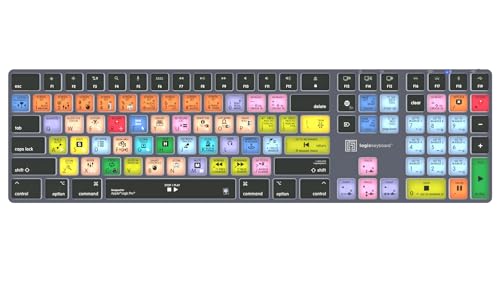
What separates a good Logic Pro keyboard from a poor one depends on which kind you mean. For a shortcut keyboard, the keys matter most: colour-coded shortcuts that are easy to read, backlighting for a dark studio, and a layout that matches your Mac. The Logickeyboard Titan is wireless and backlit, the ASTRA2 is backlit and wired, the KB Covers keyboard is wired and backlit with colour-coded shortcuts, and the Editors Keys keyboard is backlit for macOS. For a MIDI controller, the keys and the controls matter most: velocity-sensitive keys that respond to how hard you play, pads for drums, knobs and faders for mixing, and a USB connection that works with Logic Pro without extra drivers. The Akai MPK Mini models lead on portability, the M-AUDIO Keystation 49 leads on simplicity, and the Novation Launchkey 61 and Arturia KeyLab Essential 61 lead on full-size control.
One honest note about the category is worth stating up front. Logic Pro is Apple's music software for the Mac, and it works with two very different keyboards: a typing keyboard with shortcuts printed on it, and a musical keyboard that plays notes. A buyer who searches for keyboards for Logic Pro could mean either, and this guide covers both rather than pretending one of them does not exist. The guide also says plainly which products are not keyboards at all: the silicone keyboard cover, the mouse pad with shortcuts printed on it, and the Pro Tools and Premiere Pro keyboards that appeared in the search results were all excluded, because a cover is not a keyboard, a mouse pad is not a keyboard, and a Pro Tools keyboard is not a Logic Pro keyboard.
In this guide
Quick picks: best keyboards for logic pro
| # | Product | Where to buy |
|---|---|---|
| 1 | Logickeyboard Titan Wireless Backlit Keyboard for Logic Pro X | Check on Amazon |
| 2 | Logickeyboard ASTRA2 Backlit Keyboard for Apple Logic Pro X | Check on Amazon |
| 3 | KB Covers Logic Pro Shortcut Keyboard | Check on Amazon |
| 4 | Editors Keys Logic Pro X Keyboard for MacOS | Check on Amazon |
| 5 | Akai Professional MPK Mini Plus 37-Key USB MIDI Keyboard Controller | Check on Amazon |
| 6 | M-AUDIO Keystation 49 MK3 USB MIDI Controller | Check on Amazon |
| 7 | Novation Launchkey 61 MK4 USB MIDI Keyboard Controller | Check on Amazon |
| 8 | Arturia KeyLab Essential mk3 61-Key USB MIDI Keyboard Controller | Check on Amazon |
How the picks were chosen
The picks were chosen from current Logic Pro keyboard listings, with three hard filters. First, the product must be a keyboard for Logic Pro: either a shortcut keyboard made for Apple Logic Pro X on a Mac, or a MIDI controller keyboard that plays Logic Pro's software instruments, which rules out the keyboard covers, the mouse pads, the Pro Tools keyboards, the Premiere Pro keyboards and the generic Mac keyboards that appeared in the search results. A cover that sits on a keyboard is not a keyboard. Second, the listing must name the exact brand and model, so the Logickeyboard Titan and the Logickeyboard ASTRA2 are treated as the distinct keyboards they are. Third, the keyboard must be a current, new listing.
Within those filters the guide favours variety: four shortcut keyboards for Logic Pro, from the wireless Logickeyboard Titan to the wired KB Covers and Editors Keys models, and four MIDI controllers, from the compact Akai MPK Mini Plus to the full-size Novation Launchkey 61 and Arturia KeyLab Essential 61. Shortcut clarity and backlighting were weighed for the typing keyboards, while key count, velocity sensitivity, pads and DAW integration were weighed for the MIDI controllers. The guide also favours keyboards whose listings state their key count and connection, so buyers can compare them honestly.
One judgement call is worth stating plainly. The Akai MPK Mini Plus II and the Akai MPK Mini IV are near-identical 25-key controllers, and this guide includes the MPK Mini Plus and the MPK Mini IV in different sizes rather than two listings of the same 25-key model, so the four MIDI picks are four different keyboards: a 37-key Akai, a 49-key M-AUDIO, a 61-key Novation and a 61-key Arturia. The guide also notes where a listing is for a white version of a keyboard rather than a different model, so buyers are not misled into thinking a colour is a new product.
Quick comparison
| Product | Standout detail |
|---|---|
| Logickeyboard Titan Wireless Backlit Keyboard for Logic Pro X | Wireless, backlit, for Logic Pro X, Mac |
| Logickeyboard ASTRA2 Backlit Keyboard for Apple Logic Pro X | Backlit, for Apple Logic Pro X, Mac |
| KB Covers Logic Pro Shortcut Keyboard | Wired, backlit, colour-coded Logic Pro shortcuts |
| Editors Keys Logic Pro X Keyboard for MacOS | Backlit shortcut keyboard, macOS |
| Akai Professional MPK Mini Plus 37-Key USB MIDI Keyboard Controller | 37-key, USB, velocity-sensitive, 8 MPC pads |
| M-AUDIO Keystation 49 MK3 USB MIDI Controller | 49-key, synth-action, pitch and mod wheels |
| Novation Launchkey 61 MK4 USB MIDI Keyboard Controller | 61-key, USB-C, semi-weighted, 16 pads |
| Arturia KeyLab Essential mk3 61-Key USB MIDI Keyboard Controller | 61-key, USB, Analog Lab V software included |
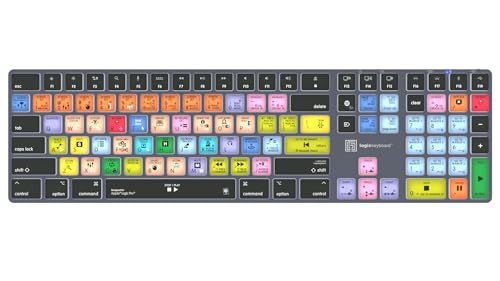
1. Logickeyboard Titan Wireless Backlit Keyboard for Logic Pro X
Key specs
Wireless backlit keyboard for Logic Pro X, for Mac. The Logickeyboard Titan is the wireless shortcut pick in this guide.
Strengths
- Wireless design keeps the desk tidy, with no cable between the keyboard and the Mac.
- Backlit keys with Logic Pro shortcuts printed on them make the commands easy to find in a dark studio.
- Made specifically for Logic Pro X on a Mac, so the shortcuts match the software exactly.
Trade-offs
- Wireless keyboard needs charging or batteries, unlike a wired model that never runs out.
- Listing does not state the battery life in the visible title, so confirm it before ordering.
- Titan is a premium shortcut keyboard, so it costs more than a standard Mac keyboard.
Who it fits
Logic Pro users who want a wireless, backlit shortcut keyboard for a tidy Mac studio.
Best for: a studio where the keyboard should be free of cables and easy to read in the dark.
Not suited for: anyone who wants a wired keyboard that never needs charging.
In daily use
In daily use, the Logickeyboard Titan is the shortcut keyboard that makes Logic Pro easier to learn. The colour-coded shortcuts are printed on the keys, so you can see the command for splitting, looping or bouncing without opening a menu, and the backlighting keeps them readable in a dark studio. The wireless design means the keyboard can sit where your hands are, not where the cable reaches. Charge it after a session, keep it paired to the Mac, and the Titan will quietly teach you Logic Pro every time you use it.
Check price on Amazon: Logickeyboard Titan Wireless Backlit Keyboard for Logic Pro X

2. Logickeyboard ASTRA2 Backlit Keyboard for Apple Logic Pro X
Key specs
Backlit keyboard for Apple Logic Pro X, for Mac. The Logickeyboard ASTRA2 is the wired backlit shortcut pick in this guide.
Strengths
- Backlit keys with Logic Pro shortcuts printed on them, for a Mac running Apple Logic Pro X.
- Wired design means no battery to charge and no wireless link to drop.
- ASTRA2 is a dedicated shortcut keyboard, so every key is labelled for Logic Pro.
Trade-offs
- Wired design means a cable to the Mac, which some buyers will find untidy.
- Listing does not state whether the keyboard is full-size or compact in the visible title, so confirm the layout before ordering.
- Dedicated shortcut keyboard costs more than a standard Mac keyboard.
Who it fits
Logic Pro users who want a backlit shortcut keyboard that never needs charging.
Best for: a studio desk where a wired keyboard is fine and reliability matters most.
Not suited for: anyone who wants a wireless keyboard, or a standard keyboard without shortcuts.
In daily use
In daily use, the Logickeyboard ASTRA2 is the reliable shortcut keyboard: plug it into the Mac, and the Logic Pro shortcuts are there on the keys, backlit and easy to read. There is no battery to charge, no pairing to lose, and no wireless delay. It suits a studio desk where the keyboard stays in one place and the work is what matters. Learn the colour-coding as you go, and within weeks you will reach for the shortcuts without looking, which is the point of a keyboard like this.
Check price on Amazon: Logickeyboard ASTRA2 Backlit Keyboard for Apple Logic Pro X

3. KB Covers Logic Pro Shortcut Keyboard
Key specs
Wired backlit keyboard for Mac, colour-coded Logic Pro shortcuts, music production keyboard. The KB Covers shortcut keyboard is the colour-coded pick in this guide.
Strengths
- Colour-coded Logic Pro shortcuts make the commands easy to find at a glance, even for a beginner.
- Wired backlit design gives a lit keyboard that never needs charging.
- Made for music production on a Mac, so the layout suits a studio workflow.
Trade-offs
- Wired design means a cable to the Mac.
- KB Covers is a smaller brand than Logickeyboard, so its long-term support is less proven.
- Listing does not state the key count in the visible title, so confirm the layout before ordering.
Who it fits
Logic Pro beginners who want colour-coded shortcuts that are easy to learn.
Best for: a home studio where the keyboard should teach the software as you use it.
Not suited for: anyone who wants a wireless keyboard, or the most established shortcut brand.
In daily use
In daily use, the KB Covers shortcut keyboard is the one for learning Logic Pro. The colour-coding groups the shortcuts by function, so editing commands are one colour and mixing commands are another, and you can find the right key without thinking. The backlighting keeps the colours readable in a dark room, and the wired design means it always works. It is the keyboard to buy when you are new to Logic Pro and want the software to feel less intimidating, because the answers are printed on the keys in front of you.
Check price on Amazon: KB Covers Logic Pro Shortcut Keyboard

4. Editors Keys Logic Pro X Keyboard for MacOS
Key specs
Backlit shortcut keyboard for macOS, for Logic Pro X. The Editors Keys keyboard is the macOS shortcut pick in this guide.
Strengths
- Backlit shortcut keyboard made for Logic Pro X on macOS, so the shortcuts match the software.
- Editors Keys specialises in shortcut keyboards for creative software, with a clear layout.
- Backlighting keeps the shortcuts readable in a dark studio.
Trade-offs
- Listing does not state whether the keyboard is wired or wireless in the visible title, so confirm the connection before ordering.
- Editors Keys is a specialist brand, so the keyboard costs more than a standard Mac keyboard.
- Shortcut keyboards are specific to Logic Pro X, so they are less useful if you switch software.
Who it fits
Logic Pro X users on macOS who want a backlit shortcut keyboard from a specialist maker.
Best for: a studio where the keyboard should be dedicated to Logic Pro and nothing else.
Not suited for: anyone who switches between several programs and wants a standard keyboard.
In daily use
In daily use, the Editors Keys keyboard is the specialist's shortcut keyboard: every key is labelled for Logic Pro X on macOS, the backlighting keeps the labels readable, and the layout is designed by people who make shortcut keyboards for a living. It suits a studio where Logic Pro is the main tool and the keyboard should serve it and nothing else. Keep it on the desk, learn the shortcuts it shows you, and it will repay its cost in the time it saves you every session.
Check price on Amazon: Editors Keys Logic Pro X Keyboard for MacOS

5. Akai Professional MPK Mini Plus 37-Key USB MIDI Keyboard Controller
Key specs
37-key USB MIDI keyboard controller, velocity-sensitive mini keys, 8 MPC pads, 64-step sequencer. The Akai MPK Mini Plus is the compact controller pick in this guide.
Strengths
- 37 velocity-sensitive keys give more range than a 25-key mini controller, in a portable size.
- 8 MPC pads bring Akai's drum pad feel to Logic Pro's Drum Machine Designer.
- 64-step sequencer lets you build patterns without touching the mouse.
Trade-offs
- Mini keys are smaller than full-size keys, so players with large hands may find them cramped.
- 37 keys cover three octaves, so wide piano parts need octave shifting.
- Compact controller has fewer knobs and faders than a full-size model.
Who it fits
Producers who want a portable MIDI controller with pads and a sequencer for Logic Pro.
Best for: a bedroom studio or a travelling setup where space is limited.
Not suited for: pianists who need full-size keys, or a 61-key range.
In daily use
In daily use, the Akai MPK Mini Plus is the controller that fits in a backpack and still does the job. The 37 keys cover enough range for bass lines, chords and melodies, the 8 MPC pads feel right for drums, and the 64-step sequencer lets you build a pattern on the hardware rather than on the screen. It connects to Logic Pro over USB with no extra drivers, and it works with the software's instruments straight away. It is not a piano, and it does not pretend to be, but for making beats and sketching ideas, it is the most portable controller here.
Check price on Amazon: Akai Professional MPK Mini Plus 37-Key USB MIDI Keyboard Controller

6. M-AUDIO Keystation 49 MK3 USB MIDI Controller
Key specs
Synth-action 49-key keyboard, assignable controls, pitch and mod wheels, USB MIDI controller. The M-AUDIO Keystation 49 MK3 is the simple full-size pick in this guide.
Strengths
- 49 full-size synth-action keys give a proper keyboard feel at an affordable cost.
- Pitch and mod wheels are essential for expressive playing in Logic Pro.
- Assignable controls let you map knobs and buttons to Logic Pro's parameters.
Trade-offs
- Synth-action keys are lighter than semi-weighted keys, so pianists may want more resistance.
- No drum pads, so beats need the keyboard or a separate pad controller.
- Simple design means fewer controls than the Novation or Arturia models here.
Who it fits
Buyers who want a simple, affordable 49-key MIDI controller with full-size keys for Logic Pro.
Best for: a first MIDI keyboard for learning Logic Pro's instruments.
Not suited for: anyone who needs drum pads, or semi-weighted keys.
In daily use
In daily use, the M-AUDIO Keystation 49 MK3 is the straightforward MIDI keyboard: plug it into the Mac over USB, open Logic Pro, and play. The 49 full-size keys cover four octaves, the pitch and mod wheels let you bend notes and shape sounds, and the assignable controls map to whatever parameter you need. It does not have pads or a screen, and it does not need them: it is a keyboard, and it does the keyboard's job well. For a first MIDI controller, or a second keyboard for a studio that already has pads, it is the right choice.
Check price on Amazon: M-AUDIO Keystation 49 MK3 USB MIDI Controller

7. Novation Launchkey 61 MK4 USB MIDI Keyboard Controller
Key specs
USB-C MIDI keyboard controller, 61 semi-weighted keys, 16 pads with polyphonic aftertouch. The Novation Launchkey 61 MK4 is the full-size performance pick in this guide.
Strengths
- 61 semi-weighted keys give a piano-like feel with enough resistance for expressive playing.
- 16 pads with polyphonic aftertouch let you play drums and chords with real expression.
- USB-C connection is modern and fast, and the controller works with Logic Pro's instruments.
Trade-offs
- 61 keys make the controller large, so it needs a wide desk and a dedicated space.
- Full-size controller costs more than a compact model such as the Akai MPK Mini.
- Polyphonic aftertouch needs software that supports it to show its full benefit.
Who it fits
Keyboard players who want a full-size, semi-weighted controller with pads for Logic Pro.
Best for: a studio where the MIDI keyboard is the main instrument, not an accessory.
Not suited for: anyone with a small desk, or who wants the most portable controller.
In daily use
In daily use, the Novation Launchkey 61 MK4 is the controller for players: 61 semi-weighted keys that feel like a real instrument, 16 pads with aftertouch that respond to how hard you press, and a USB-C connection to the Mac. It suits a studio where the keyboard is the centre of the setup, and where the player wants to perform rather than just enter notes. Give it a wide desk, learn the pad layout, and it will be the controller you reach for every time you open Logic Pro.
Check price on Amazon: Novation Launchkey 61 MK4 USB MIDI Keyboard Controller

8. Arturia KeyLab Essential mk3 61-Key USB MIDI Keyboard Controller
Key specs
61-key USB MIDI keyboard controller with Analog Lab V software included. The Arturia KeyLab Essential mk3 61 is the software-bundle pick in this guide.
Strengths
- Analog Lab V software included gives thousands of sounds to play in Logic Pro from day one.
- 61 keys give a full range for piano parts, chords and melodies.
- Arturia is a respected name in software instruments, so the controller pairs well with its sounds.
Trade-offs
- 61 keys make the controller large, so it needs a wide desk.
- Analog Lab V is a separate program, so it needs installing and learning alongside Logic Pro.
- Essential range is Arturia's affordable line, so it has fewer premium features than the full KeyLab mk3.
Who it fits
Buyers who want a 61-key controller with a large sound library included for Logic Pro.
Best for: a studio that needs sounds as well as keys, in one purchase.
Not suited for: anyone with a small desk, or who already owns a sound library.
In daily use
In daily use, the Arturia KeyLab Essential mk3 61 is the controller that gives you sounds as well as keys. The Analog Lab V software that comes with it holds thousands of instrument sounds, from pianos to synthesisers, and they play in Logic Pro as soon as the controller is connected. The 61 keys give you the range to play them properly, and the controller's knobs and pads map to the software's controls. It needs a wide desk and a little time to install the software, but for a buyer who wants an instrument collection and a keyboard in one box, it is the best value here.
Check price on Amazon: Arturia KeyLab Essential mk3 61-Key USB MIDI Keyboard Controller
Buying guide: best keyboards for logic pro
Shortcut keyboard or MIDI controller
A shortcut keyboard is a typing keyboard with Logic Pro commands printed on the keys, and it helps you learn and use the software faster. A MIDI controller is a musical keyboard that plays Logic Pro's software instruments, and it helps you make music. Most Logic Pro users benefit from both, but if you can only buy one, pick the shortcut keyboard if you spend your time editing and mixing, and the MIDI controller if you spend your time playing and recording.
Shortcut keyboards: what to look for
Look for colour-coded shortcuts that are easy to read, backlighting for a dark studio, and a layout that matches your Mac. Wireless is tidier, wired is more reliable, and the choice depends on your desk. Check that the keyboard is made for Logic Pro X specifically, not for Pro Tools or Premiere Pro, because the shortcuts are different and a keyboard for the wrong program will teach you the wrong commands.
MIDI controllers: keys, pads and controls
Key count decides the range: 25 keys are portable, 37 keys cover three octaves, 49 keys cover four, and 61 keys give a full range for piano parts. Velocity-sensitive keys respond to how hard you play, which matters for expressive parts. Pads are for drums, knobs and faders are for mixing, and a sequencer lets you build patterns on the hardware. Pick the controller that matches how you make music, not the one with the most features.
Logic Pro and the Mac: compatibility
Logic Pro runs only on a Mac, and every keyboard in this guide is made for a Mac, so compatibility is straightforward. Shortcut keyboards connect over USB or wirelessly and work as soon as they are plugged in or paired. MIDI controllers connect over USB and appear in Logic Pro's settings without extra drivers, though some, such as the Arturia KeyLab, come with software of their own to install. Check that your Mac has a free USB port, or a USB-C adapter if the controller uses USB-C and your Mac does not.
Learning Logic Pro: a practical path
Logic Pro is a deep program, and the fastest way to learn it is a little at a time. Start with recording and arranging: load a software instrument, play a few notes on a MIDI controller, and arrange them on the timeline. Then learn editing: splitting, looping and quantising, which a shortcut keyboard makes faster. Then learn mixing: volume, panning and effects, which the knobs and faders on a MIDI controller help with. A shortcut keyboard teaches you the commands as you use them, and a MIDI controller teaches you the music as you play it. Learn five things a week, and in a few months the program will feel like yours.
Studio setup: keyboard, screen and sound
A Logic Pro studio needs three things in the right place: the keyboard where your hands rest, the screen at eye level, and the sound where you can hear it clearly. Put the MIDI controller in front of you and the shortcut keyboard beside it or below it, so you can reach both without stretching. Use studio monitors or good headphones for sound, because laptop speakers will not show you what a mix really sounds like. Keep the desk tidy, because a studio with cables everywhere is a studio where things get knocked over.
Software instruments: where the sound comes from
Logic Pro includes a large library of software instruments, from pianos and drums to synthesisers and strings, and a MIDI controller is how you play them. The sounds are already on your Mac, so a controller such as the Akai MPK Mini or the Novation Launchkey gives you access to them immediately, with no extra purchase. The Arturia KeyLab Essential adds thousands more sounds through its included Analog Lab V software. Start with Logic Pro's own instruments, learn what they can do, and only buy more sounds when you know what is missing.
Usage and care
Set up a shortcut keyboard by plugging it into the Mac or pairing it over wireless, then open Logic Pro and try a few shortcuts: the ones for splitting, looping and bouncing are the most useful to learn first. Set up a MIDI controller by connecting it over USB, opening Logic Pro, and checking that it appears in the MIDI settings, then load a software instrument and play a few notes to confirm the keys, the pads and the wheels all respond. Keep the keyboard where your hands rest naturally, with the screen at eye level, because a keyboard that is too high or too low will strain your wrists over a long session.
Learn the shortcuts a few at a time, rather than trying to memorise them all at once: pick five commands you use every session, learn their keys, and add five more each week. For a MIDI controller, learn the pads and the knobs alongside the keys, because they are what make a controller faster than a mouse. Keep the keyboard clean, with a soft cloth for the keys and a brush for the gaps, and do not eat over it, because crumbs under the keys are the most common cause of a sticky key. Update Logic Pro and the controller's software together, so they stay compatible.
Common mistakes
The most common mistake is buying a keyboard for the wrong program: a Pro Tools keyboard will not teach you Logic Pro, and a Premiere Pro keyboard will not help you make music. Another is buying a MIDI controller with too few keys, so every piano part needs octave shifting. A third is buying a shortcut keyboard and never learning the shortcuts, so it becomes an expensive standard keyboard. Buyers also forget to check the connection: a USB-C controller needs a USB-C port or an adapter, and a wireless keyboard needs charging.
Do not buy a silicone keyboard cover and expect it to work like a shortcut keyboard, because a cover sits on top of your existing keys and wears out, while a real shortcut keyboard has the commands printed on the keys themselves. Do not buy a mouse pad with shortcuts printed on it and call it a keyboard, because it is a desk mat. Do not ignore velocity sensitivity: a controller without it will play every note at the same volume, which sounds mechanical. And do not leave a wireless keyboard uncharged, because it will die in the middle of a session.
Final recommendation
For most Logic Pro users, the Logickeyboard Titan is the best keyboard for Logic Pro in this guide: a wireless, backlit shortcut keyboard that teaches you the software every time you use it. If you want a wired shortcut keyboard that never needs charging, the Logickeyboard ASTRA2 is the pick, and if you are learning Logic Pro, the KB Covers keyboard with its colour-coded shortcuts is the easiest to learn from. If you make music rather than edit it, the Akai MPK Mini Plus is the portable MIDI controller to buy, and the Novation Launchkey 61 MK4 is the full-size controller for players who want semi-weighted keys and pads.
The M-AUDIO Keystation 49 MK3 is the pick for a simple, affordable MIDI keyboard with full-size keys, and the Arturia KeyLab Essential mk3 61 is the pick for buyers who want a sound library included with their controller. Whichever keyboard you choose, check that it is made for Logic Pro, not for another program, and learn a few shortcuts or a few chords each week: a keyboard is only as good as the practice you put into it.
Logic Pro rewards the time you put into it, and the right keyboard makes that time more productive. A shortcut keyboard teaches you the software, a MIDI controller lets you play it, and together they turn a Mac into a studio. Buy the keyboard that matches how you work, learn a little each week, and the music will follow.
Frequently asked questions
What is the best keyboard for Logic Pro?
The Logickeyboard Titan is the best shortcut keyboard in this guide: wireless, backlit, and made specifically for Logic Pro X on a Mac. The Akai MPK Mini Plus is the best portable MIDI controller, and the Novation Launchkey 61 MK4 is the best full-size MIDI controller. Most Logic Pro users benefit from one of each.
Should I buy a shortcut keyboard or a MIDI controller for Logic Pro?
Buy a shortcut keyboard if you spend your time editing and mixing, because it teaches you Logic Pro's commands and speeds up your workflow. Buy a MIDI controller if you spend your time playing and recording, because it lets you play Logic Pro's software instruments. Many users eventually own both.
Do MIDI controllers work with Logic Pro?
Yes, MIDI controllers connect to a Mac over USB and appear in Logic Pro's MIDI settings without extra drivers. The Akai, M-AUDIO, Novation and Arturia controllers in this guide all work with Logic Pro's software instruments, and some, such as the Arturia KeyLab, come with their own sound software to install as well.
What is the difference between a shortcut keyboard and a normal keyboard?
A shortcut keyboard has Logic Pro's commands printed on the keys in colour, so you can see the shortcut for splitting, looping or bouncing without opening a menu. A normal keyboard has no labels, so you must memorise the commands. A shortcut keyboard costs more, but it teaches you the software every time you use it.
How many keys should a MIDI controller for Logic Pro have?
25 keys are portable but limited, 37 keys cover three octaves, 49 keys cover four octaves, and 61 keys give a full range for piano parts. Pick 25 or 37 keys for a portable setup, 49 keys for a first full-size controller, and 61 keys if you play piano parts or want the full range without octave shifting.
Can I use a Windows keyboard with Logic Pro?
Logic Pro runs only on a Mac, and a Windows keyboard will work as a typing keyboard but will not have the Mac layout or the Logic Pro shortcuts. A shortcut keyboard made for Logic Pro on a Mac, such as the Logickeyboard models in this guide, is the better choice, because its keys match the software and the operating system.
Do I need a MIDI controller to use Logic Pro?
No, Logic Pro has a musical typing feature that lets you play software instruments from the computer keyboard, and you can enter notes with the mouse. A MIDI controller makes playing faster, more expressive and more enjoyable, because velocity-sensitive keys respond to how hard you play, but it is not required to start making music.
More from ilcastellomenu.com
Best Keyboards for Composition: keyboards for writing music
Best Keyboards for Business Use: keyboards for work
Best Customizable Keyboards for Android: custom keyboard picks