As an Amazon Associate, this site may earn an affiliate commission from qualifying purchases made through links on this page, at no extra cost to you.
In this guide
Quick picks: best keyboards for hard typers
| # | Product | Where to buy |
|---|---|---|
| 1 | Keychron K8 Tenkeyless Wireless Mechanical Keyboard | Check on Amazon |
| 2 | Logitech MX Keys S Wireless Keyboard | Check on Amazon |
| 3 | Logitech MX Keys Advanced Wireless Illuminated Keyboard | Check on Amazon |
| 4 | Das Keyboard 4 Professional Wired Mechanical Keyboard | Check on Amazon |
| 5 | Ducky One 3 100% Mechanical Gaming Keyboard | Check on Amazon |
| 6 | Razer BlackWidow V4 Mechanical Gaming Keyboard | Check on Amazon |
| 7 | Logitech MX Mechanical Wireless Illuminated Performance Keyboard | Check on Amazon |
A keyboard for hands that type hard
The best keyboards for hard typers are built for hands that hit the keys with force, all day, every day. A hard typer bottoms out every keystroke, types fast, and wears through cheap keyboards in months: keys that chatter, switches that die, legends that fade, and a case that flexes under the pressure. The seven keyboards in this guide are the ones built to survive that treatment, with mechanical switches rated for millions of presses, sturdy cases, and keycaps that keep their legends.
A hard typer needs three things from a keyboard, and they are all in the picks below. The first is a switch that can take punishment: tactile or clicky mechanical switches with a clear actuation point, so the finger knows when the key has registered without hammering it to the bottom. The second is a case that does not flex, because a flexing case makes typing feel mushy and wears the switches unevenly. The third is keycaps that survive, because a legend that fades in six months makes a keyboard useless for touch typists who still glance down.
The picks cover the main answers to the hard-typing problem: full mechanical boards with hot-swappable switches, a classic Cherry MX Blue board with a metal top, a low-profile board for fast typists who want less travel, and a gaming board with clicky switches and a wrist rest. Every switch type, layout, and connection detail comes from the product listings, so the comparison table lets you match the board to your hands.
Price is the other thread through this guide. A keyboard for a hard typer is a tool that earns its cost in months of reliable typing, and the cheapest board that dies in a year is the most expensive one of all. The picks below range from a proven workhorse to a premium mechanical board, and the buying guide explains where the money goes and where it can be saved.
How the picks were chosen
The shortlist started with durability. A keyboard only made the cut if its listing showed a mechanical switch, a sturdy case, or a design made for heavy use: Cherry MX switches, hot-swappable sockets, an aluminium top, or a low-profile mechanical design. Membrane keyboards, replacement switch packs, keyboard toys, and combo sets that bundle a mouse were set aside, because they are not the product this guide is about.
After durability, the picks were judged on switch feel, layout, and keycaps. A hard typer needs a tactile or clicky switch with a clear actuation point, because a linear switch with no feedback encourages even harder bottoming out. A full-size layout suits a typist who uses the number pad, while a tenkeyless layout suits a smaller desk and a shorter reach to the mouse. Doubleshot keycaps keep their legends longer than printed ones, so they earned a closer look.
The final check was the connection and the daily experience. A wireless board that pairs with three devices suits a typist who moves between a computer, a tablet, and a phone, while a wired board never needs charging and never drops a keystroke. Backlighting matters for evening typing, and a wrist rest matters for long sessions, so the picks below note both. The trade-offs under each pick say where it falls short, so a reader can choose with open eyes.
The best keyboards for hard typers, reviewed

1. Keychron K8 Tenkeyless Wireless Mechanical Keyboard
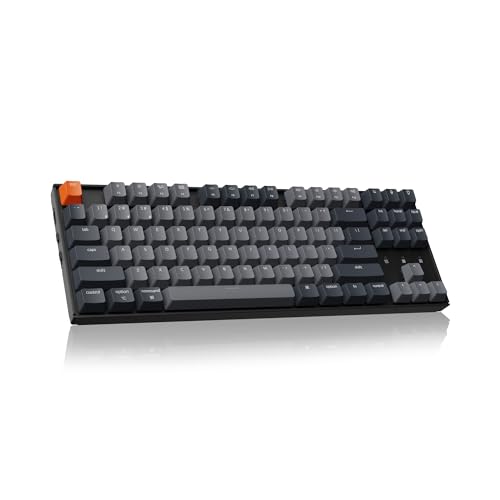
A tenkeyless wireless mechanical keyboard for Mac and Windows, with white backlight, Bluetooth, multitasking, and a Type-C wired connection, fitted with Brown switches. The customisable pick in this guide, with a switch type that suits hard typists.
Strengths
- Brown tactile switches: Brown switches give a tactile bump without a loud click, so a hard typer gets feedback without hammering the keys to the bottom.
- Hot-swappable design: The switches can be replaced without soldering, so a worn or dead switch is a five-minute fix rather than a new keyboard.
- Bluetooth and wired: Bluetooth pairs with three devices and the Type-C cable works wired, so the board moves between machines without fuss.
Trade-offs to weigh
- Tenkeyless layout: There is no number pad, so a typist who enters numbers all day will miss it or need a separate pad.
- White backlight only: The backlight is white rather than RGB, which is fine for typing but less colourful than a gaming board.
- Needs switch knowledge: Hot-swapping is easy, but a buyer who has never changed a switch should read the guide before ordering spares.
Who it fits best
The pick for a typist who wants a mechanical board that can be repaired and customised, with a tactile switch that rewards firm typing.
In daily use
In everyday use, the Keychron K8 Tenkeyless Wireless Mechanical Keyboard settles into a routine quickly. Set it up once, the way you like it, and give yourself a few days to adjust before judging it. The first session is about learning the layout and the feel; the second and third are where it starts to feel natural. Keep it clean, keep it in the conditions it was designed for, and it will stay consistent.
Before you buy
Before buying the Keychron K8 Tenkeyless Wireless Mechanical Keyboard, check two practical things. First, measure and compare: check the dimensions, the capacity, and the compatibility details listed on the product page against what you already own and the space you have. Second, think about your routine — where it will live, how it will be stored, and what it needs to connect to.
Best for: Typists who want a repairable tenkeyless board with tactile Brown switches and multi-device Bluetooth.
Not suited for: Number-pad users, or anyone who wants a full-size board with a loud clicky switch.
Check price on Amazon: Keychron K8 Tenkeyless Wireless Mechanical Keyboard

2. Logitech MX Keys S Wireless Keyboard
A low-profile wireless keyboard in graphite with fluid, precise keys, USB-C charging, a 10-day battery, pairing with three devices, smart backlit keys that adapt to the environment, and a Logi Bolt USB receiver. The quiet low-profile pick for a hard typist who wants speed.
Strengths
- Low-profile speed: The low-profile keys need less travel, so a fast typist can keep up a high speed with less finger movement.
- Smart backlighting: The backlight adapts to the room and to the hands above the keys, so the legends stay visible without wasting battery.
- Three-device pairing: Pairing with three devices suits a typist who moves between a computer, a tablet, and a phone during the day.
Trade-offs to weigh
- Scissor switches: The keys use a scissor mechanism rather than mechanical switches, so the feel is different and the switches cannot be replaced.
- 10-day battery: Ten days is good for a backlit board, but shorter than a non-backlit keyboard, so charging is a weekly habit.
- Low-profile feel: A hard typer who loves deep key travel may find the short travel unsatisfying compared with a full mechanical board.
Who it fits best
A good fit for a fast typist who wants a quiet, low-profile board for an office, with smart backlighting and multi-device pairing.
In daily use
Day to day, the Logitech MX Keys S Wireless Keyboard is the kind of product you stop thinking about, which is the highest praise it can earn. It does its job the same way every time, without quirks or surprises, and lets you focus on the work or the game instead of the hardware. That consistency matters more than any single feature.
Before you buy
A few checks before you order the Logitech MX Keys S Wireless Keyboard will save disappointment. Confirm the key details on the listing match what you expect — the exact model name, the included accessories, and the variant — since similar-looking models can differ in important ways. Check the return policy and the warranty terms so you know your options if it arrives damaged or does not suit you.
Best for: Fast office typists who want a quiet low-profile board with smart backlighting and three-device pairing.
Not suited for: Mechanical-switch fans, or hard typists who want deep travel and a switch they can replace.
Check price on Amazon: Logitech MX Keys S Wireless Keyboard

3. Logitech MX Keys Advanced Wireless Illuminated Keyboard
An advanced wireless illuminated keyboard with tactile, responsive typing, backlighting, Bluetooth, USB-C, and a metal build, working with macOS, Windows, Linux, iOS, and Android, in black. The established MX Keys, proven over years of heavy daily use.
Strengths
- Metal build: The metal build resists flex under hard typing, so the board feels solid after years of daily use.
- Tactile responsive keys: The keys give a clear tactile response, so a hard typer knows when a key has registered without bottoming out hard.
- Works everywhere: Support for macOS, Windows, Linux, iOS, and Android means the board follows the typist across machines and tablets.
Trade-offs to weigh
- Older model: The MX Keys is an older design than the MX Keys S, so it lacks the newest smart-backlight features.
- USB-C charging only: The board charges over USB-C and needs a cable, so a dead battery mid-day means a wired pause.
- Full-size footprint: A full-size board takes desk space, so a small desk may feel crowded compared with a tenkeyless board.
Who it fits best
The pick for a typist who wants the proven MX Keys experience: a metal build, tactile keys, and a board that works with every machine in the house.
In daily use
Over a full week of use, the Logitech MX Keys Advanced Wireless Illuminated Keyboard shows its character in small ways. The feel stays the same from the first day to the last, nothing loosens or rattles, and the finish holds up to regular handling. If you switch between tasks, you will appreciate that it does not need a different setup for each one: configure it once for the way you actually use it and leave it alone.
Before you buy
When the Logitech MX Keys Advanced Wireless Illuminated Keyboard arrives, spend a little time setting it up properly. Follow the included instructions, check that everything listed as included is actually in the box, and test the main functions within the first day or two. Then leave the settings alone for a week. If something feels wrong after a few days, change one thing at a time so you know what actually helped.
Best for: Heavy daily typists who want a proven metal board with tactile keys that works on any system.
Not suited for: Mechanical-switch fans, or small desks where a tenkeyless board would fit better.
Check price on Amazon: Logitech MX Keys Advanced Wireless Illuminated Keyboard

4. Das Keyboard 4 Professional Wired Mechanical Keyboard
A wired mechanical keyboard with Cherry MX Blue switches, a 2-port USB 3.0 hub, a volume knob, an aluminium top, and 104 keys, in black. The classic hard-typer board, built like a tool rather than a toy.
Strengths
- Cherry MX Blue switches: Blue switches click loudly and feel tactile, which is exactly what a hard typer who loves feedback wants from a board.
- Aluminium top: The aluminium top plate stops the case flexing under hard typing, so the board feels solid for its whole life.
- USB hub and volume knob: Two USB 3.0 ports and a volume knob put the extras a typist actually uses within reach, without a separate hub.
Trade-offs to weigh
- Loud click: Blue switches are loud, so this board suits a private office or a home, not a shared open-plan desk.
- Wired only: There is no wireless option, so the board needs a USB cable and a port, and it cannot move to a tablet.
- No backlighting: There is no backlight, so evening typing depends on the room light rather than the keys.
Who it fits best
The pick for a hard typer who loves a loud click, a metal board, and a keyboard that feels like it was built to last a decade.
In daily use
In everyday use, the Das Keyboard 4 Professional Wired Mechanical Keyboard settles into a routine quickly. Set it up once, the way you like it, and give yourself a few days to adjust before judging it. The first session is about learning the layout and the feel; the second and third are where it starts to feel natural. Keep it clean, keep it in the conditions it was designed for, and it will stay consistent.
Before you buy
Before buying the Das Keyboard 4 Professional Wired Mechanical Keyboard, check two practical things. First, measure and compare: check the dimensions, the capacity, and the compatibility details listed on the product page against what you already own and the space you have. Second, think about your routine — where it will live, how it will be stored, and what it needs to connect to.
Best for: Hard typists who want Cherry MX Blue click, an aluminium top, and a board built to last.
Not suited for: Shared offices, or anyone who needs wireless, backlighting, or a quiet board.
Check price on Amazon: Das Keyboard 4 Professional Wired Mechanical Keyboard

5. Ducky One 3 100% Mechanical Gaming Keyboard
A 100 percent mechanical gaming keyboard with Cherry Silent Red switches, RGB lighting, hot-swap switches, Quack Mechanics, and PBT doubleshot keycaps, in black. The quiet mechanical pick for a hard typer who shares a room.
Strengths
- Cherry Silent Red switches: Silent Red switches are smooth and quiet for a mechanical board, so a hard typer can type fast without the click carrying across the room.
- PBT doubleshot keycaps: Doubleshot PBT keycaps keep their legends and their texture for years, which matters when the keys take a daily pounding.
- Hot-swap switches: The switches can be swapped without soldering, so a dead switch or a different feel is a quick fix, not a new keyboard.
Trade-offs to weigh
- Linear feel: Silent Red switches are linear, with no tactile bump, so a hard typer who wants feedback may prefer a tactile switch.
- Full-size footprint: A 100 percent layout takes a wide desk, so a small workspace may feel crowded.
- Gaming styling: The RGB lighting and gaming branding suit a gaming desk better than a plain office, though the lighting can be turned off.
Who it fits best
The pick for a hard typer who wants a mechanical board with durable keycaps and quiet switches, in a room shared with other people.
In daily use
Day to day, the Ducky One 3 100% Mechanical Gaming Keyboard is the kind of product you stop thinking about, which is the highest praise it can earn. It does its job the same way every time, without quirks or surprises, and lets you focus on the work or the game instead of the hardware. That consistency matters more than any single feature.
Before you buy
A few checks before you order the Ducky One 3 100% Mechanical Gaming Keyboard will save disappointment. Confirm the key details on the listing match what you expect — the exact model name, the included accessories, and the variant — since similar-looking models can differ in important ways. Check the return policy and the warranty terms so you know your options if it arrives damaged or does not suit you.
Best for: Hard typists who want quiet mechanical switches and doubleshot PBT keycaps that survive years of use.
Not suited for: Typists who want a tactile bump or a click, or small desks where a tenkeyless board fits better.
Check price on Amazon: Ducky One 3 100% Mechanical Gaming Keyboard

6. Razer BlackWidow V4 Mechanical Gaming Keyboard
A mechanical gaming keyboard with Green switches, tactile and clicky feel, Chroma RGB, six dedicated macro keys, a magnetic wrist rest, doubleshot ABS keycaps, and Snap Tap. The feature-packed clicky board for a hard typer who also games.
Strengths
- Green clicky switches: Green switches give a loud, tactile click that hard typists love, with a clear actuation point on every press.
- Magnetic wrist rest: The wrist rest supports the wrists during long typing sessions, which matters when the hands type hard all day.
- Six macro keys: Six dedicated macro keys put shortcuts and abilities within reach without taking the hands off the home row.
Trade-offs to weigh
- Loud click: Green switches are loud, so this board suits a home office or a gaming room, not a shared desk.
- ABS keycaps: The doubleshot ABS keycaps are good, but they shine and wear faster than PBT keycaps under heavy use.
- Gaming size: A full-size gaming board with macro keys is wide, so it needs a desk with room to spare.
Who it fits best
The pick for a hard typer who also games, and wants a clicky board with a wrist rest, macro keys, and lighting to match the setup.
In daily use
Over a full week of use, the Razer BlackWidow V4 Mechanical Gaming Keyboard shows its character in small ways. The feel stays the same from the first day to the last, nothing loosens or rattles, and the finish holds up to regular handling. If you switch between tasks, you will appreciate that it does not need a different setup for each one: configure it once for the way you actually use it and leave it alone.
Before you buy
When the Razer BlackWidow V4 Mechanical Gaming Keyboard arrives, spend a little time setting it up properly. Follow the included instructions, check that everything listed as included is actually in the box, and test the main functions within the first day or two. Then leave the settings alone for a week. If something feels wrong after a few days, change one thing at a time so you know what actually helped.
Best for: Hard typists who game and want clicky Green switches, a wrist rest, and macro keys.
Not suited for: Shared offices, or typists who want PBT keycaps and a quiet board.
Check price on Amazon: Razer BlackWidow V4 Mechanical Gaming Keyboard
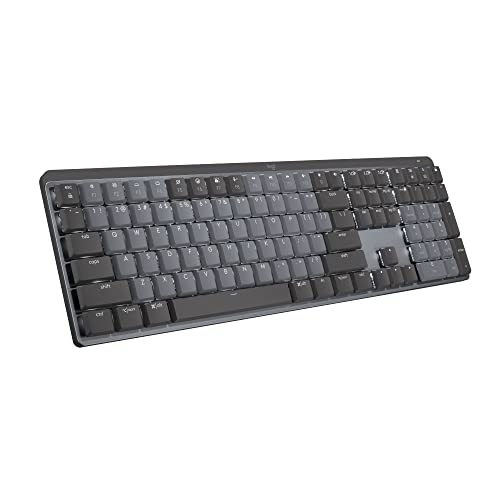
7. Logitech MX Mechanical Wireless Illuminated Performance Keyboard
A low-profile wireless illuminated mechanical keyboard with clicky switches, a full-size layout, three-device Bluetooth pairing, smart backlighting that auto-adjusts, USB-C charging, and up to 15 days of battery. The low-profile mechanical pick for a hard typist who wants both worlds.
Strengths
- Low-profile mechanical switches: Mechanical switches in a low-profile body give the click and feel of a mechanical board with less travel and a slimmer desk presence.
- Clicky switch option: The clicky switches give the tactile and audible feedback a hard typer wants, without the height of a full mechanical board.
- 15-day battery: Fifteen days of battery covers two working weeks, so charging is a rare chore rather than a routine.
Trade-offs to weigh
- Low-profile keycaps: The low-profile keycaps cannot be swapped for standard keycaps, so customisation is limited.
- Smart backlight needs light: The auto-adjusting backlight depends on the room light, so a very dark room may need manual adjustment.
- Full-size width: A full-size layout takes desk space, so a small desk may feel crowded compared with a tenkeyless board.
Who it fits best
The pick for a hard typer who wants a mechanical feel in a slim board, with a clicky switch, a long battery, and three-device pairing.
In daily use
In everyday use, the Logitech MX Mechanical Wireless Illuminated Performance Keyboard settles into a routine quickly. Set it up once, the way you like it, and give yourself a few days to adjust before judging it. The first session is about learning the layout and the feel; the second and third are where it starts to feel natural. Keep it clean, keep it in the conditions it was designed for, and it will stay consistent.
Before you buy
Before buying the Logitech MX Mechanical Wireless Illuminated Performance Keyboard, check two practical things. First, measure and compare: check the dimensions, the capacity, and the compatibility details listed on the product page against what you already own and the space you have. Second, think about your routine — where it will live, how it will be stored, and what it needs to connect to.
Best for: Hard typists who want a slim mechanical board with clicky switches and a 15-day battery.
Not suited for: Typists who want full-height key travel, or anyone who wants to swap keycaps freely.
Check price on Amazon: Logitech MX Mechanical Wireless Illuminated Performance Keyboard
Quick comparison: the seven keyboards for hard typers at a glance
All seven keyboards below are built for heavy daily typing. The differences are switch type, layout, connection, and whether the board is mechanical or low-profile.
| Product | What it is best at |
|---|---|
| Keychron K8 Tenkeyless Wireless Mechanical Keyboard | Repairable tenkeyless, Brown tactile switches, Bluetooth |
| Logitech MX Keys S Wireless Keyboard | Quiet low-profile, smart backlight, 10-day battery |
| Logitech MX Keys Advanced Wireless Illuminated Keyboard | Proven metal board, tactile keys, works everywhere |
| Das Keyboard 4 Professional Wired Mechanical Keyboard | Classic Cherry MX Blue, aluminium top, USB hub |
| Ducky One 3 100% Mechanical Gaming Keyboard | Quiet mechanical, Silent Red, PBT doubleshot keycaps |
| Razer BlackWidow V4 Mechanical Gaming Keyboard | Clicky Green switches, wrist rest, 6 macro keys |
| Logitech MX Mechanical Wireless Illuminated Performance Keyboard | Slim mechanical, clicky switches, 15-day battery |
How to buy a keyboard for hard typing
Start with the switch, because it decides how the board feels after a thousand keystrokes a day. Tactile switches give a bump when the key registers, clicky switches add a sound to the bump, and linear switches give neither. A hard typer usually does best with a tactile or clicky switch, because the feedback tells the finger to stop pressing, which reduces the force of each bottom-out. A linear switch encourages harder presses, which is the opposite of what a hard typer needs.
Check the switch rating and the repairability together. A switch rated for fifty million presses will outlast a switch rated for five million, and a hot-swappable board lets a dead switch be replaced in minutes without soldering. A keyboard that cannot be repaired is a disposable keyboard, and a hard typer will discover that sooner than anyone else. The Keychron and Ducky picks in this guide are hot-swappable for exactly this reason.
Choose the layout by the work. A full-size board with a number pad suits data entry and accounting, while a tenkeyless board suits a smaller desk and a shorter reach to the mouse. A typist who never uses the number pad gains desk space and shoulder comfort from a tenkeyless board, while a typist who enters numbers all day will miss the pad within an hour. There is no right layout, only the layout that matches the work.
Check the keycaps, because they are the part the fingers touch. Doubleshot keycaps keep their legends for years, while printed legends fade under heavy use, and PBT plastic resists shine better than ABS. A hard typer who types eight hours a day will wear through printed legends in months, so doubleshot PBT is worth seeking out, and the Ducky pick in this guide offers it.
Check the connection and the battery if the board is wireless. A wireless board that pairs with three devices suits a typist who moves between machines, while a wired board never needs charging and never drops a keystroke. Battery figures assume typical use, and backlighting shortens them, so a board rated for fifteen days with the light off may give a week with it on. Keep the charging cable in the desk drawer either way.
Finally, think about the noise the board makes. A clicky board is satisfying in a private office and disruptive in a shared one, so a hard typer in an open-plan office should choose a tactile or silent switch rather than a clicky one. The Das Keyboard and the BlackWidow in this guide are loud by design, while the Ducky Silent Red and the MX boards are the quiet answers to the same problem.
Typing hard without hurting your hands
Typing hard is a habit, and a good keyboard can retrain it. A tactile switch tells the finger when the key has registered, so the typist can learn to stop pressing at the actuation point rather than hammering to the bottom. Give it a week: type more lightly, trust the bump, and let the fingers float rather than pound. The hands will tire less, and the switches will last longer.
Posture matters as much as the board. Sit with the elbows at ninety degrees, the wrists straight, and the feet flat, and keep the keyboard at a height where the wrists do not bend up or down. A wrist rest helps for long sessions, but it should support the palms, not the wrists themselves, and the hands should hover while typing rather than resting on the rest.
Day to day, a keyboard for a hard typer needs a little cleaning. Crumbs and dust under the keys cause sticking and missed presses, so turn the board upside down and shake it gently every month, and blow the dust out with compressed air. Keycaps can be pulled off and washed on a hot-swappable board, but check the manual first, because not every board is made to have its caps removed.
If a key starts chattering or dying, check the switch before replacing the board. On a hot-swappable board, swap the switch with one from a rarely used key and see if the problem moves with it. If it does, the switch is faulty and a replacement costs little. If it does not, the board itself may need cleaning or a firmware update.
Take breaks, because no keyboard can fix a hand that never rests. A hard typer who types for hours without a break will develop pain whatever the board, so stand up, stretch the fingers, and shake the hands out every hour. A keyboard that fits the hands and a routine that respects them are the two halves of the same answer.
Common mistakes with keyboards for hard typers
The most common mistake is buying a membrane keyboard for hard typing. A membrane board feels soft at first, but it wears quickly under hard use, and the keys go mushy and unresponsive within months. A mechanical board costs more and lasts years, so the cheap board is the expensive one in the end.
The second mistake is choosing a linear switch. A linear switch gives no feedback when the key registers, so a hard typer presses harder and harder to be sure, which tires the hands and wears the switches faster. A tactile or clicky switch gives the feedback that lets the finger stop pressing, which is the whole point.
The third mistake is ignoring the keycaps. Printed legends fade under heavy use, and ABS keycaps shine and go slippery within a year of hard typing. Doubleshot PBT keycaps cost more and last far longer, so they are worth seeking out on a board that will see eight hours a day.
The fourth mistake is buying a loud board for a shared office. A Cherry MX Blue or Razer Green board is satisfying to type on and miserable to sit next to, so a hard typer in a shared room should choose a tactile or silent switch. The people around the desk will notice the difference before the typist does.
The fifth mistake is never cleaning the board. Dust and crumbs under the keys cause sticking, chatter, and missed presses, and a board that is never cleaned will fail years before its switches wear out. A monthly shake and a blast of compressed air cost minutes and add years.
These guides on this site cover neighbouring questions in more depth.
- Best keyboards for Galaxy Tab A 10.1
- Best keyboards for iPad Air 10.5
- Best headset for loud keyboards
The short answer
For most hard typers, the Das Keyboard 4 Professional is the best starting point: Cherry MX Blue switches, an aluminium top, and a build that feels like a tool rather than a toy. If the office is shared, the Ducky One 3 with Silent Red switches gives the mechanical feel without the noise. And if the desk is small or the work moves between machines, the Keychron K8 with its hot-swappable Brown switches is the flexible pick.
Whatever you choose, pick a tactile or clicky switch, check that the keycaps will survive, and give your hands a week to learn the lighter touch the switch allows. A keyboard that fits the hands and survives the typing is a keyboard that earns its place on the desk.
One last thought: the best keyboard for a hard typer is the one that is still working in three years. Switches can be replaced, keycaps can be swapped, and a case that does not flex will outlast them all. Buy for durability first, and let the lighting and the extras follow.
Frequently asked questions
What switch is best for hard typers?
A tactile or clicky switch is usually best, because the bump or click tells the finger when the key has registered, so the typist stops pressing instead of hammering to the bottom. Cherry MX Brown and Blue, and Razer Green, are good examples.
Are mechanical keyboards better for hard typing?
Yes, in most cases. Mechanical switches are rated for tens of millions of presses, they can often be replaced without soldering, and they give clearer feedback than a membrane board, which wears out faster under hard use.
Will a loud keyboard bother my coworkers?
Yes, if it has clicky switches such as Cherry MX Blue or Razer Green. In a shared office, choose a tactile Brown switch or a silent switch such as Cherry Silent Red, which give the feedback without the noise.
What are doubleshot keycaps?
Doubleshot keycaps are made by moulding the legend as a separate piece of plastic, so the letter cannot wear off. They last far longer than printed legends, which fade under heavy typing, and PBT plastic resists shine better than ABS.
Can I replace a dead switch myself?
Yes, on a hot-swappable keyboard such as the Keychron K8 or the Ducky One 3, where switches pull out without soldering. On a soldered board, replacing a switch needs soldering tools and skill, so most owners replace the board instead.
Is a wrist rest worth it?
Yes, for long sessions. A wrist rest supports the palms and keeps the wrists straight, which reduces strain. The Razer BlackWidow V4 in this guide includes a magnetic wrist rest, and a separate rest works with any board.