The best Epson color printers cover a wide range, from a family printer that forgets about ink for years to a small-office workhorse that prints 25 pages a minute, and this guide compares six of them side by side. Epson is the one printer brand that sells both ideas at once: the EcoTank supertank printers that fill from bottles and the cartridge printers of the Expression and WorkForce lines, and the right choice depends entirely on how much you print and what you print. A household printing homework and photos needs a different machine from a small office printing reports, and a photo enthusiast needs a different machine again. Every printer below is an Epson colour all-in-one with wireless printing, verified against its own listing before it was included, and each one is described with the specifications the listing actually states. Read the comparison table first, then the individual reviews, and finish with the buying guide to match an Epson to your printing habits.
In this guide
Quick picks: best epson color printers
| # | Product | Where to buy |
|---|---|---|
| 1 | Epson EcoTank ET-4800 Wireless Color All-in-One Supertank Printer | Check on Amazon |
| 2 | Epson EcoTank ET-2900 Wireless All-in-One Color Supertank Printer | Check on Amazon |
| 3 | Epson Expression Premium XP-7100 Wireless Color All-in-One Inkjet Printer | Check on Amazon |
| 4 | Epson Expression Home XP-4205 Wireless Color All-in-One Inkjet Printer | Check on Amazon |
| 5 | Epson WorkForce Pro WF-4830 Wireless Color All-in-One Inkjet Printer | Check on Amazon |
| 6 | Epson Expression Photo XP-8800 Wireless Color All-in-One Inkjet Printer | Check on Amazon |
How we chose the best Epson color printers
We started with the Epson colour printers people actually buy: wireless all-in-one machines from the EcoTank, Expression and WorkForce lines, with print, scan and copy in one box. Each candidate was checked against its own listing for the details that decide a purchase — the ink system, print speed, paper capacity, automatic two-sided printing, a document feeder, and the display — and any machine whose listing did not support its claims was left out. We deliberately included both ink systems, because the cartridge-versus-tank decision is the biggest one an Epson buyer makes, and we covered the three uses that dominate Epson sales: family printing, home-office printing and photo printing. Running costs matter as much as the machine, so we noted included ink, page yields and trial services wherever the listing states them. The six printers below range from a friendly home machine to a 33,000-page monthly duty cycle office printer, and each one earned its place on verified specifications, not on promises.
Quick comparison
| Product | Key traits |
|---|---|
| Epson EcoTank ET-4800 Wireless Color All-in-One Supertank Printer | EcoTank supertank, wireless, cartridge-free, ADF, Ethernet, up to 10 ppm, fax |
| Epson EcoTank ET-2900 Wireless All-in-One Color Supertank Printer | EcoTank supertank, wireless, up to 3 years of ink, 3,600 black / 6,500 colour pages, 11 ppm |
| Epson Expression Premium XP-7100 Wireless Color All-in-One Inkjet Printer | Expression Premium, wireless, 5-colour ink, 30-sheet ADF, duplex, up to 15.8 ppm |
| Epson Expression Home XP-4205 Wireless Color All-in-One Inkjet Printer | Expression Home, wireless, 2.4-inch colour display, duplex, up to 10 ppm, borderless photos |
| Epson WorkForce Pro WF-4830 Wireless Color All-in-One Inkjet Printer | WorkForce Pro, wireless, 4800 x 2400 dpi, 25 ppm black / 12 ppm colour, 50-sheet ADF, 500-sheet capacity |
| Epson Expression Photo XP-8800 Wireless Color All-in-One Inkjet Printer | Expression Photo, wireless, 6-colour Claria Photo HD ink, 4.3-inch touchscreen, 4×6 photo in 10 seconds |

1. Epson EcoTank ET-4800 Wireless Color All-in-One Supertank Printer
The Epson EcoTank ET-4800 is the colour printer for a home office that prints every day and is tired of cartridges. It is a wireless colour all-in-one supertank printer with print, scan, copy and fax, an automatic document feeder, Ethernet, and cartridge-free printing from high-capacity ink tanks filled with Epson’s keyed EcoFit bottles. The listing states print speeds of up to 10 pages per minute, and it describes the Micro Piezo Heat-Free Technology as producing sharp text and impressive colour photos and graphics on virtually any paper type. The tank system is the whole point: you fill the tanks from bottles, you see the ink level, and you stop buying small cartridges every few weeks. The ET-4800 also cuts cartridge waste, which matters if you print in volume and dislike throwing plastic away. For a home office printing documents, forms and the occasional photo, it is the most practical Epson in this guide — not the fastest, not the prettiest, but the one that keeps printing without fuss or frequent ink orders.
Strengths
- Cartridge-free supertank printing with keyed EcoFit bottles that cannot be mixed up.
- Print, scan, copy and fax with an automatic document feeder and Ethernet.
- Micro Piezo Heat-Free Technology for sharp text and vivid colour on many paper types.
Trade-offs
- Print speeds of up to 10 ppm are modest for a busy office.
- A tank printer costs more up front than a cartridge machine.
- No borderless photo printing is highlighted, so photo fans should check the specs.
Who it fits
Home offices and households that print documents daily and want to stop buying cartridges.
Best for: a home office that prints every day and wants low ink costs with fax and Ethernet.
Not suited for: a photo studio needing borderless large prints, where a photo printer fits better.
Setting it up
Unbox the printer where it will live and check the contents against the listing: the printer, the power cable, the ink bottles or cartridges, and the setup sheet. For an EcoTank, fill the tanks slowly from the keyed EcoFit bottles — each bottle only fits its own tank, so you cannot mix the colours up — and wait for the ink to settle before switching on. For a cartridge machine, fit the cartridges until they click. Load plain paper, switch on, and run the first alignment and nozzle check. Connect to Wi-Fi from the control panel, install the Epson Smart Panel app on your phone and the driver on your computer, then print a colour test page and a photo to check the whole chain before the box goes away.
In daily use
In everyday use, an Epson colour printer earns its keep by being ready, and the habits that keep it ready are small ones. Leave it switched on or in sleep so it can run its short cleaning cycles, and print something in colour at least once a week — a printer that sits unused for a month is the one that clogs. Keep the paper tray closed when you are not printing so dust does not settle on the top sheet, and store photo paper flat in its packet. Check the ink levels on the display or in the app now and then rather than waiting for a faded page mid-document, and run the nozzle check if a colour starts printing faintly. For tank printers, top the tanks up before they run dry, because running a tank dry can pull air into the lines.
Check price on Amazon: Epson EcoTank ET-4800 Wireless Color All-in-One Supertank Printer

2. Epson EcoTank ET-2900 Wireless All-in-One Color Supertank Printer
The Epson EcoTank ET-2900 is the colour printer for a family that prints a lot and wants to forget about ink for years at a time. It is a wireless colour all-in-one supertank printer with print, scan and copy, supersized ink tanks, and uniquely keyed EcoFit bottles that make refilling simple, with no mess and no mix-ups. The listing states enough ink to last up to three years, printing up to 3,600 pages in black or 6,500 in colour, and each replacement ink bottle set is equivalent to about 80 cartridges. Those numbers are the argument for the ET-2900 in one sentence: you buy ink by the bottle, rarely, instead of by the cartridge, constantly. The 11 pages-per-minute speed and the 1.44-inch colour screen keep everyday jobs moving, and the compact design fits virtually any workspace. Epson calls EcoTank the world’s best-selling supertank printer line, and the ET-2900 is the family-sized version of that idea — simple to refill, cheap to run, and sized for a home that prints homework, forms and photos every week.
Strengths
- Enough ink included for up to 3,600 black or 6,500 colour pages.
- Keyed EcoFit bottles that only fit their own tank, so refills cannot go wrong.
- A compact design with a 1.44-inch colour screen that fits a home desk.
Trade-offs
- No automatic document feeder is stated, so multi-page copying is manual.
- No fax function is stated, which matters for a home office that still faxes.
- A tank printer costs more up front than a basic cartridge machine.
Who it fits
Families and home users who print every week and want years of ink without cartridge orders.
Best for: a family printer where ink costs and simple refills matter most.
Not suited for: an office that copies multi-page documents daily, where a feeder machine fits better.
Setting it up
Give yourself half an hour and a clear desk. Remove the tape and packing from the paper trays and the scanner lid, fill the tanks or fit the cartridges, and load a small stack of plain paper. Power on and follow the display prompts for alignment and the first nozzle check — skipping the alignment leaves text slightly out of register. Connect the printer to your Wi-Fi network, add it in the Epson app, and print a test page from your phone and from your computer. If you use the rear feed for photo paper or card, test it with one sheet first, and set the paper type in the driver so the printer lays down the right amount of ink.
In daily use
Day to day, the printer should fade into the background: you send a page from your phone or laptop, it prints, and you move on. The details that matter are paper and settings. Use plain paper that is not damp or curled, set the paper type in the driver to match what is loaded, and do not overfill the tray past the marker line. For photos, use genuine photo paper and the borderless setting, and let the print dry for a minute before stacking it. If a page jams, pull it out slowly in the direction of the paper path and check for torn corners before closing the cover, and wipe the scanner glass with a dry lint-free cloth when scans show streaks.
Check price on Amazon: Epson EcoTank ET-2900 Wireless All-in-One Color Supertank Printer
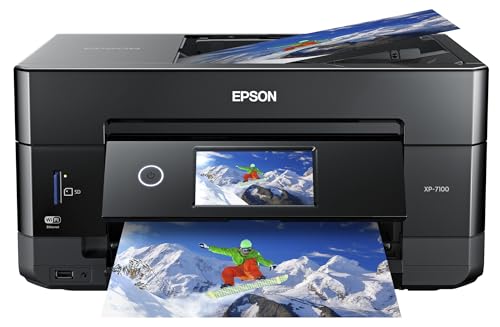
3. Epson Expression Premium XP-7100 Wireless Color All-in-One Inkjet Printer
The Epson Expression Premium XP-7100 is the colour printer for a home that prints photos and documents in equal measure and wants both to look good. It is a wireless colour all-in-one inkjet printer with a five-colour ink system, a 30-page automatic document feeder, automatic two-sided printing, copying and scanning, and multiple media feeds for specialty paper. The listing states print speeds of up to 15.8 pages per minute and describes sharp text for documents alongside vivid colour photos and graphics, with borderless photo printing for home and photo projects. Five inks — the extra photo black alongside the standard colours — is what lifts the XP-7100 above a basic home printer: documents stay crisp while photos gain depth and richer blacks. The 30-page feeder is generous for this price, and the multiple media feeds mean you can keep plain paper loaded while feeding photo paper or card from another tray. For a creative household that prints school projects, invitations and photos as well as letters, the XP-7100 is the most versatile Epson in this guide.
Strengths
- A five-colour ink system for sharper photos with deeper blacks.
- A 30-page automatic document feeder and automatic two-sided printing.
- Multiple media feeds for plain paper, photo paper and specialty media.
Trade-offs
- Cartridge ink costs more per page than a tank printer for heavy use.
- A photo-capable machine, so it is larger than the simplest home printers.
- No Ethernet port is stated, so wired networking is not an option.
Who it fits
Creative households printing photos, invitations and school projects alongside documents.
Best for: a home that prints photos and documents equally and wants five-ink quality.
Not suited for: a high-volume office, where a tank printer’s running costs fit better.
Setting it up
Place the printer with room behind it for the rear paper feed and space above to open the scanner lid fully. Fill the ink tanks or fit the cartridges, load plain paper in the front tray, and switch on. Run the alignment page, then the nozzle check, and only then connect to Wi-Fi and install the software. Set the default paper size and type in the driver to match the paper you actually use, because the wrong paper setting is the most common cause of dull photos. Print a borderless photo on photo paper and a two-sided document to confirm both paths work, and keep the quick-start sheet until you have printed a few jobs without trouble.
In daily use
Over a week of ordinary use, a good Epson colour printer is the machine you stop thinking about, which is the highest praise it can earn. It sits on the desk, wakes from sleep in seconds, and prints the homework, the letter, the label or the photo without drama. The parts you actually touch are the paper trays, the output slot and the touchscreen or display, so keep those clean and clear of clutter. With a tank printer, a glance at the tanks tells you the ink state; with a cartridge machine, the app does the same. Looked after this way — regular use, the right paper, the right settings — an Epson colour printer stays consistent for years, and the prints look the same in December as they did in January.
Check price on Amazon: Epson Expression Premium XP-7100 Wireless Color All-in-One Inkjet Printer

4. Epson Expression Home XP-4205 Wireless Color All-in-One Inkjet Printer
The Epson Expression Home XP-4205 is the colour printer for a home that wants good photos without paying for a photo printer. It is a wireless colour all-in-one inkjet printer with print, scan and copy, automatic two-sided printing, borderless photo printing, and a large 2.4-inch colour display for setup and everyday use. The listing states print speeds of up to 10 pages per minute and describes crisp documents and vibrant borderless photos with rich colours, driven by Epson’s heat-free technology and a permanent printhead. The big display is the XP-4205’s best feature for a family: setup, copying and photo printing are all done from a screen you can actually read, and the Epson Smart Panel app on your phone makes the rest easy. Automatic duplex printing saves paper on every two-sided job, and borderless photos mean the prints look finished straight out of the tray. For everyday home printing with photos that look like photos, the XP-4205 is the friendliest Epson in this guide.
Strengths
- A large 2.4-inch colour display that makes setup and copying easy.
- Borderless photo printing with vibrant colours at a home-printer price.
- Automatic two-sided printing that saves paper on every document.
Trade-offs
- Print speeds of up to 10 ppm are modest for long documents.
- Cartridge ink costs more per page than a tank printer for heavy use.
- No automatic document feeder is stated, so multi-page copying is manual.
Who it fits
Families and first-time buyers who want good photos and an easy display at a modest price.
Best for: everyday home printing with borderless photos and a screen anyone can use.
Not suited for: a home office copying multi-page documents daily, where a feeder fits better.
Setting it up
Unbox the printer where it will live and check the contents against the listing: the printer, the power cable, the ink bottles or cartridges, and the setup sheet. For an EcoTank, fill the tanks slowly from the keyed EcoFit bottles — each bottle only fits its own tank, so you cannot mix the colours up — and wait for the ink to settle before switching on. For a cartridge machine, fit the cartridges until they click. Load plain paper, switch on, and run the first alignment and nozzle check. Connect to Wi-Fi from the control panel, install the Epson Smart Panel app on your phone and the driver on your computer, then print a colour test page and a photo to check the whole chain before the box goes away.
In daily use
In everyday use, an Epson colour printer earns its keep by being ready, and the habits that keep it ready are small ones. Leave it switched on or in sleep so it can run its short cleaning cycles, and print something in colour at least once a week — a printer that sits unused for a month is the one that clogs. Keep the paper tray closed when you are not printing so dust does not settle on the top sheet, and store photo paper flat in its packet. Check the ink levels on the display or in the app now and then rather than waiting for a faded page mid-document, and run the nozzle check if a colour starts printing faintly. For tank printers, top the tanks up before they run dry, because running a tank dry can pull air into the lines.
Check price on Amazon: Epson Expression Home XP-4205 Wireless Color All-in-One Inkjet Printer

5. Epson WorkForce Pro WF-4830 Wireless Color All-in-One Inkjet Printer
The Epson WorkForce Pro WF-4830 is the colour printer for a small office that measures a printer in pages per minute and pages per tray. It is a wireless colour all-in-one inkjet printer with print, copy, scan and fax, automatic two-sided printing, a 50-sheet automatic document feeder, and a 500-sheet paper capacity, and the listing states print resolution up to 4800 x 2400 dpi for sharp detail. Speed is the headline: 25 pages per minute in black and 12 in colour, with a maximum monthly duty cycle of 33,000 pages, which puts it in a different class from the home printers in this guide. Connectivity covers USB, Ethernet, Bluetooth Low Energy and Wi-Fi, so it fits a wired office network as easily as a wireless one. The 500-sheet capacity means the tray holds a full ream, and the 50-sheet feeder means a thick document copies itself while you do something else. If your Epson colour printer is a work tool rather than a household convenience, the WF-4830 is the machine in this guide built for that job.
Strengths
- Print speeds of 25 ppm black and 12 ppm colour for long office documents.
- A 500-sheet paper capacity and a 50-sheet automatic document feeder.
- Print resolution up to 4800 x 2400 dpi with USB, Ethernet, Bluetooth and Wi-Fi.
Trade-offs
- A larger, heavier machine that needs a proper office desk or stand.
- Cartridge ink costs more per page than a tank printer at high volumes.
- More machine than a household needs, so light users pay for capacity they will not use.
Who it fits
Small offices and home businesses printing long colour documents every day.
Best for: a small office that needs speed, a big tray and a feeder in one Epson.
Not suited for: a student printing a few pages a week, where a compact home printer is enough.
Setting it up
Give yourself half an hour and a clear desk. Remove the tape and packing from the paper trays and the scanner lid, fill the tanks or fit the cartridges, and load a small stack of plain paper. Power on and follow the display prompts for alignment and the first nozzle check — skipping the alignment leaves text slightly out of register. Connect the printer to your Wi-Fi network, add it in the Epson app, and print a test page from your phone and from your computer. If you use the rear feed for photo paper or card, test it with one sheet first, and set the paper type in the driver so the printer lays down the right amount of ink.
In daily use
Day to day, the printer should fade into the background: you send a page from your phone or laptop, it prints, and you move on. The details that matter are paper and settings. Use plain paper that is not damp or curled, set the paper type in the driver to match what is loaded, and do not overfill the tray past the marker line. For photos, use genuine photo paper and the borderless setting, and let the print dry for a minute before stacking it. If a page jams, pull it out slowly in the direction of the paper path and check for torn corners before closing the cover, and wipe the scanner glass with a dry lint-free cloth when scans show streaks.
Check price on Amazon: Epson WorkForce Pro WF-4830 Wireless Color All-in-One Inkjet Printer

6. Epson Expression Photo XP-8800 Wireless Color All-in-One Inkjet Printer
The Epson Expression Photo XP-8800 is the colour printer for a home where the photos matter as much as the documents. It is a wireless colour all-in-one inkjet printer with six-colour Claria Photo HD ink, a flush 4.3-inch colour touchscreen with an Easy Mode, separate trays for plain and photo paper, and a rear feed for specialty paper. The listing promises lab-quality photos and borderless prints up to 8.5 by 11 inches, and a 4 by 6 inch borderless photo in as fast as 10 seconds, which is the kind of speed that makes printing a stack of photos feel effortless rather than a chore. Six inks are what make the difference: the extra colours widen the range the printer can reproduce, so skin tones, skies and shadows come out the way they looked on screen. The separate paper trays mean you can keep plain paper loaded for documents while photo paper waits in its own tray, and the rear feed handles thicker specialty media. For a household that prints photos to keep, frame or give away, the XP-8800 is the photo printer in this guide.
Strengths
- Six-colour Claria Photo HD ink for lab-quality photos with a wide colour range.
- A 4 by 6 inch borderless photo in as fast as 10 seconds.
- A 4.3-inch touchscreen with Easy Mode and separate plain and photo paper trays.
Trade-offs
- Cartridge ink costs more per page than a tank printer for heavy photo printing.
- A photo-focused machine, so it is larger and pricier than a basic home printer.
- Borderless prints are up to 8.5 by 11 inches, not larger formats.
Who it fits
Households and hobbyists who print photos to keep, frame or give away.
Best for: a home photo printer with six inks and fast borderless prints.
Not suited for: an office printing mostly black-and-white reports, where a WorkForce fits better.
Setting it up
Place the printer with room behind it for the rear paper feed and space above to open the scanner lid fully. Fill the ink tanks or fit the cartridges, load plain paper in the front tray, and switch on. Run the alignment page, then the nozzle check, and only then connect to Wi-Fi and install the software. Set the default paper size and type in the driver to match the paper you actually use, because the wrong paper setting is the most common cause of dull photos. Print a borderless photo on photo paper and a two-sided document to confirm both paths work, and keep the quick-start sheet until you have printed a few jobs without trouble.
In daily use
Over a week of ordinary use, a good Epson colour printer is the machine you stop thinking about, which is the highest praise it can earn. It sits on the desk, wakes from sleep in seconds, and prints the homework, the letter, the label or the photo without drama. The parts you actually touch are the paper trays, the output slot and the touchscreen or display, so keep those clean and clear of clutter. With a tank printer, a glance at the tanks tells you the ink state; with a cartridge machine, the app does the same. Looked after this way — regular use, the right paper, the right settings — an Epson colour printer stays consistent for years, and the prints look the same in December as they did in January.
Check price on Amazon: Epson Expression Photo XP-8800 Wireless Color All-in-One Inkjet Printer
Buying guide
Tank or cartridge: the big decision
The first choice is the ink system, and it matters more than the brand or the model. EcoTank printers such as the ET-4800 and ET-2900 fill from bottles: the ET-2900 states enough ink for up to 3,600 black pages or 6,500 colour pages, and a replacement bottle set equals about 80 cartridges. If you print every day, a tank printer is cheaper per page and far less bother. Cartridge printers such as the Expression and WorkForce models cost less up front and suit lighter printing, because the ink does not sit in the machine for months. Work out your monthly pages first — under fifty pages a month, buy cartridges; over two hundred, buy a tank — and the rest of the decision gets much easier.
Print speed and paper capacity
Match speed and tray size to your busiest day, not your quietest. The WorkForce Pro WF-4830 prints at 25 pages per minute in black with a 500-sheet capacity and a 50-sheet feeder, which is built for an office that prints reports all day. The Expression Home XP-4205 prints at up to 10 pages per minute with a small home tray, which is fine for homework and letters. Between them, the XP-7100 at up to 15.8 pages per minute and the ET-4800 at up to 10 cover family and home-office use. A bigger tray also means fewer refills: the WF-4830 holds a full ream, while the home machines need topping up every week or two.
Photos: how many inks do you need?
Photo quality follows the ink count. A standard four-colour printer prints good photos, a five-colour machine such as the Expression Premium XP-7100 adds depth with its extra photo black, and a six-colour machine such as the Expression Photo XP-8800 with Claria Photo HD ink or the EcoTank Photo range reproduces a wider range of colours, including skin tones and shadows. If you print photos to frame or give away, six inks are worth it; if you print the occasional snapshot for the fridge, four inks are enough. Also check the borderless sizes: the XP-8800 prints borderless up to 8.5 by 11 inches, which covers the prints most homes actually make.
Displays, feeders and connections
The features that save time after you buy are a document feeder, automatic duplex printing and a readable display. The WF-4830 has a 50-sheet feeder, the XP-7100 has a 30-page feeder, and the ET-4800 has a feeder too, while the smaller home machines expect you to place each page on the glass. Automatic two-sided printing is standard on the XP-7100, XP-4205 and WF-4830 and saves paper on every report. For displays, the XP-8800’s 4.3-inch touchscreen with Easy Mode and the XP-4205’s 2.4-inch colour display are the easiest to use, and all six printers connect wirelessly and print from phones through the Epson Smart Panel app.
Setting up and looking after your printer
Set the printer up where it will live, with room behind it for the rear feed and space above to open the scanner lid. For a tank printer, fill the tanks slowly from the keyed bottles and wait for the ink to settle before switching on; for a cartridge machine, fit the cartridges until they click. Load plain paper, run the alignment and nozzle check, connect to Wi-Fi, and install the driver and the Epson Smart Panel app. Print a colour test page, a two-sided document and a borderless photo to check every path you will use. Leave the printer switched on or in sleep so it can run cleaning cycles, print in colour at least once a week, and keep paper flat and dry. For tank printers, top the tanks up before they run dry; for cartridge machines, check ink levels in the app before a big job.
Common mistakes to avoid
The most common mistake is choosing the wrong ink system: buying a cartridge printer and then printing hundreds of pages a month, or buying a tank printer and printing five pages a month while the ink ages. The second mistake is skipping the alignment and nozzle check on the first day and then wondering why the text looks slightly off. The third is using the wrong paper setting in the driver — plain paper settings on photo paper produce dull prints, and photo settings on plain paper waste ink. The fourth is leaving a printer unused for months and then blaming the machine for clogged nozzles; inkjet printers need regular use. Finally, do not accept an ink delivery trial without reading the terms, and remember that a photo printer’s cartridges cost more per page than a tank printer’s bottles when you print in volume.
What to check on the listing before you order
Confirm the exact model name on the listing matches the one in this guide, including the numbers: an ET-2900 is not an ET-2800, an XP-7100 is not an XP-710, and a WF-4830 is not a WF-4820. Check that the listing states the features you are buying it for — the ink system, the feeder, duplex printing, the tray size — and that the box includes starter ink or bottles. Check the connectivity your computers use: Wi-Fi, Ethernet, USB. Read the returns policy before ordering, and keep the box until you have printed, copied and scanned successfully. If the listing mentions a trial ink service, note the trial length and the monthly cost after it ends.
Our final recommendation
For most homes, the Epson EcoTank ET-2900 is the pick that gets the balance right: up to three years of ink, simple keyed refills, and a compact design at a family price. If you run a home office with fax and Ethernet, the EcoTank ET-4800 adds those without giving up the tank system. If photos matter most, the Expression Photo XP-8800 with six-colour Claria Photo HD ink is the photo printer in this guide, and the Expression Premium XP-7100 is the versatile middle ground with five inks and a 30-page feeder. If you print long office documents every day, the WorkForce Pro WF-4830 is the only machine here with the speed, the 500-sheet tray and the 33,000-page duty cycle for that job. Whichever you pick, confirm the model number, the ink system and the feeder on the listing before ordering — those three checks prevent almost every bad purchase in this category.
Frequently asked questions
Are Epson EcoTank printers better than cartridge Epsons?
For heavy printing, yes: the ET-2900 states up to 3,600 black pages or 6,500 colour pages from the included ink, and a replacement bottle set equals about 80 cartridges, so the cost per page is far lower. For light printing of a few pages a week, a cartridge machine such as the XP-4205 is cheaper overall.
Which Epson color printer is best for photos?
The Expression Photo XP-8800, with six-colour Claria Photo HD ink, borderless prints up to 8.5 by 11 inches, and a 4 by 6 inch photo in as fast as 10 seconds. The Expression Premium XP-7100 with five inks is the next best choice for mixed photo and document printing.
What is the fastest Epson color printer here?
The WorkForce Pro WF-4830, at 25 pages per minute in black and 12 in colour, with a 500-sheet capacity and a maximum monthly duty cycle of 33,000 pages. It is built for small offices rather than homes.
How do I stop my Epson color printer clogging?
Leave it switched on or in sleep so it can run cleaning cycles, and print in colour at least once a week. If a colour prints faintly, run the built-in nozzle check from the control panel before replacing anything.
Related reading
If you want to compare more options before deciding, these guides on the same site cover closely related printers:


