The best printers cleaning kit is the bottle that saves a printer you were about to replace, and this guide compares six of them side by side. A clogged printhead is the most common reason a working inkjet printer gets thrown away: one colour fades, then disappears, the pages come out streaked or blank, and the owner assumes the printer is finished. In most cases the printer is fine and the nozzles are simply blocked with dried ink, and a cleaning solution applied to the printhead dissolves that ink and restores the print. The six kits below are all printhead cleaning solutions for inkjet printers, ranging from 100 millilitres to 250 millilitres, and all of them work with the common home brands — Epson, HP, Canon and Brother. Every kit was verified against its own listing before it was included, and each one is described with the specifications the listing actually states. Read the comparison table first, then the individual reviews, and finish with the buying guide to match a kit to your printer and your clog.
In this guide
Quick picks: best printers cleaning kit
| # | Product | Where to buy |
|---|---|---|
| 1 | Absonic Printer Cleaning Kit for Epson and HP Inkjet Printers, 100mL | Check on Amazon |
| 2 | Fosgoit Printhead Cleaning Kit for Epson, HP, Canon and Brother Inkjet Printers, 100mL | Check on Amazon |
| 3 | Printer Cleaning Kit with 20mL Syringe for Epson, HP and Brother Inkjet Printers, 100mL | Check on Amazon |
| 4 | Wawocs Printhead Cleaning Kit for Epson, HP and Canon Inkjet Printers, 100mL | Check on Amazon |
| 5 | Spaceink Printhead Cleaning Kit for Epson, HP, Canon and Brother Printers, 200mL | Check on Amazon |
| 6 | Osinkjet Printhead Cleaning Kit for Epson, HP and Canon Inkjet Printers, 250mL | Check on Amazon |
How we chose the best printers cleaning kit
We started with the printhead cleaning kits people actually buy for home inkjet printers: cleaning solutions in bottles from 100 to 250 millilitres, with a syringe and tube for applying the fluid to the printhead. Each candidate was checked against its own listing for the details that decide a purchase — the volume, the brands and models supported, the ink types covered, and the tools included — and any kit whose listing did not support its claims was left out. We deliberately included a range of volumes, because a household cleaning one printer once needs a different bottle from a household maintaining several printers or a sublimation printer that clogs regularly. Compatibility matters more than brand here, so we favoured kits that name the printers they support, including specific models, and we noted the ink types — dye, pigment and sublimation — wherever the listing states them. The six kits below range from a first-timer’s kit with a large syringe and video support to the largest bottle in the guide for the worst clog, and each one earned its place on verified specifications, not on promises.
Quick comparison
| Product | Key traits |
|---|---|
| Absonic Printer Cleaning Kit for Epson and HP Inkjet Printers, 100mL | 100mL printhead cleaning solution, for Epson, HP, Canon and Brother inkjet printers |
| Fosgoit Printhead Cleaning Kit for Epson, HP, Canon and Brother Inkjet Printers, 100mL | 100mL printhead cleaning solution, for Epson EcoTank, HP, Canon and Brother inkjet printers |
| Printer Cleaning Kit with 20mL Syringe for Epson, HP and Brother Inkjet Printers, 100mL | 100mL cleaning fluid with large 20mL syringe, for Epson, HP and Brother inkjet printheads |
| Wawocs Printhead Cleaning Kit for Epson, HP and Canon Inkjet Printers, 100mL | 100mL printhead cleaner solution for flushing nozzles, for Epson, Canon, Brother and HP |
| Spaceink Printhead Cleaning Kit for Epson, HP, Canon and Brother Printers, 200mL | 200mL printhead nozzle cleaner, for Epson, HP, Canon, Brother, EcoTank, Lexmark, Kodak and Samsung |
| Osinkjet Printhead Cleaning Kit for Epson, HP and Canon Inkjet Printers, 250mL | 250mL printhead cleaning kit, for Epson, HP, Canon and Brother inkjet printers |

1. Absonic Printer Cleaning Kit for Epson and HP Inkjet Printers, 100mL
The Absonic Printer Cleaning Kit is the cleaning kit for a household with more than one brand of printer. It is a 100-millilitre printhead cleaning solution for inkjet printers, and the listing describes it as a printhead nozzle cleaner for Epson, HP, Canon and Brother inkjet printers, with a printer head cleaner solution for flushing nozzles and cleaning printheads. The listing also names Samsung, Lexmark and DTF printers among the compatible types, which makes this the widest-compatibility kit in this guide. A clogged printhead is the most common reason a working printer gets replaced: one colour fades, then disappears, and the owner assumes the printer is finished. A cleaning solution applied to the nozzles dissolves the dried ink that blocks them, and a 100-millilitre bottle is enough for several cleanings across more than one printer. For a home with an Epson in one room and a Canon in another, the Absonic kit is the single bottle that covers both.
Strengths
- Works with Epson, HP, Canon, Brother and other inkjet printers in one bottle.
- 100 millilitres of solution, enough for several cleanings.
- Designed to dissolve dried ink blocking the printhead nozzles.
Trade-offs
- No syringe size is stated in the title, so check the listing for the included tools.
- A cleaning solution, not a replacement printhead — a physically damaged head cannot be fixed.
- Needs the printer’s own cleaning cycle afterwards to bring ink back into the head.
Who it fits
Households with more than one brand of inkjet printer and a clogged printhead to rescue.
Best for: cleaning a clogged printhead across Epson, HP, Canon and Brother printers.
Not suited for: a printer with a physically damaged printhead, where no solution can help.
Setting it up
Read the instructions on the bottle before you start, and work on a protected surface with paper towels and gloves nearby. Check which printers the kit supports — most kits in this guide work with Epson, HP, Canon and Brother inkjet printers — and confirm your model is listed. Power the printer off, open the cover, and find the printhead or the ink cartridge bay as the instructions direct. Draw the cleaning solution into the syringe if one is included, and apply it slowly to the printhead nozzles or the ink inlet as directed, without forcing it. Let the solution sit for the time stated, usually ten to thirty minutes, then run a printhead cleaning or power cleaning cycle from the printer’s control panel, followed by a nozzle check pattern. Repeat the cycle once if the pattern is still broken, and print a test page before returning the printer to normal use.
In daily use
In everyday use, a cleaning kit earns its keep by saving a printer that would otherwise be replaced, and the habits that keep a printer healthy are small ones. Print in colour at least once a week, because a printer that sits unused for a month is the one that clogs. Keep the printer switched on or in sleep so it can run its short cleaning cycles, and keep the paper tray closed so dust does not settle on the paper and reach the printhead. If a colour starts printing faintly, run the built-in nozzle check first — it is a two-minute job — and only reach for the cleaning kit when the built-in cycles do not fix it. A kit is a rescue tool, not a daily routine, and using it only when needed keeps the printhead in good shape.
Check price on Amazon: Absonic Printer Cleaning Kit for Epson and HP Inkjet Printers, 100mL

2. Fosgoit Printhead Cleaning Kit for Epson, HP, Canon and Brother Inkjet Printers, 100mL
The Fosgoit Printhead Cleaning Kit is the cleaning kit for an Epson EcoTank owner with a clogged nozzle. It is a 100-millilitre printhead cleaning solution for inkjet printers, and the listing describes it as a cleaner for Epson, HP, Canon and Brother inkjet printers, including Epson EcoTank and WorkForce models, with a cleaning solution for print heads and ink cartridges. EcoTank printers deserve a special mention here: their tanks hold so much ink that owners print for years without thinking about the printhead, and then a long holiday leaves the nozzles clogged. A cleaning kit made for EcoTank and WorkForce models is exactly the rescue those printers need, and the Fosgoit kit is formulated for the ink those machines use. The 100-millilitre bottle covers several cleanings, and the kit’s compatibility list covers the common home and office brands, so one bottle serves the whole household. For an EcoTank that has started printing streaks, this is the first kit to try.
Strengths
- Formulated for Epson EcoTank and WorkForce inkjet printers as well as HP, Canon and Brother.
- 100 millilitres of solution, enough for several cleanings.
- Cleans print heads and ink cartridges, not just the nozzles.
Trade-offs
- No syringe size is stated in the title, so check the listing for the included tools.
- A cleaning solution, not a replacement printhead — a physically damaged head cannot be fixed.
- Needs the printer’s own cleaning cycle afterwards to bring ink back into the head.
Who it fits
Epson EcoTank and WorkForce owners with a clogged printhead, and households with several printer brands.
Best for: rescuing a clogged EcoTank or WorkForce printhead without a service call.
Not suited for: a printer with a physically damaged printhead, where no solution can help.
Setting it up
Give yourself half an hour and a clear desk with newspaper or paper towels underneath, because cleaning solution stains. Read the kit’s instructions twice: the method differs between flushing a printhead directly and cleaning through the ink inlet, and using the wrong method wastes solution. Draw the fluid into the syringe, remove the ink cartridges if the instructions tell you to, and apply the solution gently — never force it, because pressure can damage the nozzles. Let it soak for the stated time, then replace the cartridges, run a cleaning cycle from the control panel, and print a nozzle check. If the pattern improves but is not perfect, wait an hour and run one more cycle rather than flushing again immediately, since too much cleaning wastes ink and can flood the printhead.
In daily use
Day to day, the printer should fade into the background: you send a page, it prints, and you move on. The details that matter are ink and paper. Use ink that matches the printer, store spare cartridges upright in a cool cupboard, and use plain paper that is not damp or curled, because curled paper jams and damp paper feeds badly. If a print shows streaks or missing colours, check the ink levels first, then run a nozzle check, then a cleaning cycle from the control panel. Only when those steps fail should you open the cleaning kit, and when you do, follow the instructions exactly — more solution and more force do not clean better, they risk damage. A kit used properly restores a clogged printhead; a kit used impatiently can finish it off.
3. Printer Cleaning Kit with 20mL Syringe for Epson, HP and Brother Inkjet Printers, 100mL
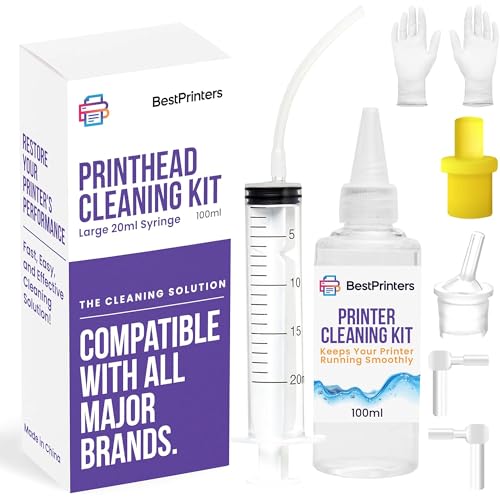
The Printer Cleaning Kit with a large 20-millilitre syringe is the cleaning kit for someone who wants the right tool in the box, not just the fluid. It is a 100-millilitre printer cleaning fluid kit for Epson, HP and Brother inkjet printheads, and the listing highlights the large 20-millilitre syringe included with the kit, alongside video support on the maker’s channel. The syringe matters more than it sounds: cleaning a printhead means pushing solution through the nozzles slowly and steadily, and a large syringe gives better control than a small one, with fewer refills mid-job. The listing states a high success rate for restoring print quality on inkjet printers, and it advises running a printhead or power cleaning after use to bring ink back into the printhead — the step many people skip, then wonder why the first page after cleaning looks faint. The kit is aimed at fixing discoloration, missing colours, low-quality prints, blank pages and streaks, which are the classic signs of a clogged head. For a first-time cleaner, the syringe and the video support make this the easiest kit in this guide to use well.
Strengths
- A large 20-millilitre syringe for controlled, steady application.
- Video support to walk a first-time user through the cleaning steps.
- Aimed at the classic clog signs: streaks, missing colours and blank pages.
Trade-offs
- A cleaning solution, not a replacement printhead — a physically damaged head cannot be fixed.
- Needs a printhead or power cleaning cycle afterwards to restore ink flow.
- The 100-millilitre bottle is smaller than the 200 and 250-millilitre kits here.
Who it fits
First-time users cleaning a clogged printhead who want the right syringe and video guidance.
Best for: a first cleaning job, where the large syringe and video support matter most.
Not suited for: a printer with a physically damaged printhead, where no solution can help.
Setting it up
Work slowly and keep the solution off the printer’s electronics and your clothes. Check the kit’s compatibility list for your printer brand and model, and confirm the solution type matches your ink: most kits in this guide work with dye, pigment and sublimation inks, but read the label. Apply the solution with the syringe and tube as directed, let it soak, and then run the printer’s own cleaning cycle followed by a nozzle check. Print a colour test page to confirm every colour is back, and wipe any spills immediately with a damp cloth. Store the remaining solution upright with the cap tight, away from children and pets, and keep the syringe and tube clean for the next use.
In daily use
Over a week of ordinary use, a good cleaning kit is the box you are glad to have on the shelf, which is the highest praise it can earn. It sits in the cupboard next to the spare paper, and when a printer starts printing streaks after a holiday, it saves a service call or a replacement. The parts you actually use are the bottle, the syringe and the tube, so keep them clean and capped between uses, and note the expiry date if the bottle has one. Check the compatibility list before buying, keep the instructions with the kit, and remember that prevention beats cleaning: regular printing, the right ink and a dust-free tray keep most printheads clear without any kit at all.

4. Wawocs Printhead Cleaning Kit for Epson, HP and Canon Inkjet Printers, 100mL
The Wawocs Printhead Cleaning Kit is the cleaning kit for a household that wants the compatibility list spelled out before buying. It is a 100-millilitre printhead cleaner solution for flushing printer nozzles, and the listing states wide compatibility with all inkjet printers including Epson, Canon, Brother and HP, naming specific models such as Epson WF2750, WF3720, WF7620, WF7710 and WF7720, Epson EcoTank ET-2800, ET-2803, ET-4800, ET-8500 and ET-2400, HP 8600, 8610, 8620, 6968, 8210, 8710, 8715, 8725, 8720 and 8730, and Canon G3260, MX922, TS6320, TR8520 and TS9020. That level of detail is genuinely useful: a buyer can check their exact model against the list instead of guessing from the brand name. The listing also states that the solution will not corrode the printer nozzle and causes no damage to the printer, which is the worry that stops many people from cleaning a printhead themselves. For a household with a specific printer model and a clogged head, the Wawocs kit is the one whose compatibility you can verify before you order.
Strengths
- A detailed compatibility list naming specific Epson, HP and Canon models.
- Stated not to corrode the nozzle or damage the printer.
- 100 millilitres of solution for flushing clogged nozzles.
Trade-offs
- A cleaning solution, not a replacement printhead — a physically damaged head cannot be fixed.
- Needs the printer’s own cleaning cycle afterwards to bring ink back into the head.
- The 100-millilitre bottle is smaller than the 200 and 250-millilitre kits here.
Who it fits
Owners who want to check their exact printer model against a compatibility list before buying.
Best for: cleaning a named Epson, HP or Canon model with a verified-compatible kit.
Not suited for: a printer with a physically damaged printhead, where no solution can help.
Setting it up
Read the instructions on the bottle before you start, and work on a protected surface with paper towels and gloves nearby. Check which printers the kit supports — most kits in this guide work with Epson, HP, Canon and Brother inkjet printers — and confirm your model is listed. Power the printer off, open the cover, and find the printhead or the ink cartridge bay as the instructions direct. Draw the cleaning solution into the syringe if one is included, and apply it slowly to the printhead nozzles or the ink inlet as directed, without forcing it. Let the solution sit for the time stated, usually ten to thirty minutes, then run a printhead cleaning or power cleaning cycle from the printer’s control panel, followed by a nozzle check pattern. Repeat the cycle once if the pattern is still broken, and print a test page before returning the printer to normal use.
In daily use
In everyday use, a cleaning kit earns its keep by saving a printer that would otherwise be replaced, and the habits that keep a printer healthy are small ones. Print in colour at least once a week, because a printer that sits unused for a month is the one that clogs. Keep the printer switched on or in sleep so it can run its short cleaning cycles, and keep the paper tray closed so dust does not settle on the paper and reach the printhead. If a colour starts printing faintly, run the built-in nozzle check first — it is a two-minute job — and only reach for the cleaning kit when the built-in cycles do not fix it. A kit is a rescue tool, not a daily routine, and using it only when needed keeps the printhead in good shape.
Check price on Amazon: Wawocs Printhead Cleaning Kit for Epson, HP and Canon Inkjet Printers, 100mL

5. Spaceink Printhead Cleaning Kit for Epson, HP, Canon and Brother Printers, 200mL
The Spaceink Printhead Cleaning Kit is the cleaning kit for a household that cleans more than one printer, or the same printer more than once. It is a 200-millilitre printhead nozzle cleaner for inkjet printers, and the listing describes compatibility with Epson, HP, Canon, Brother, EcoTank, Lexmark, Kodak and Samsung printers, working with original and factory inks, dye, sublimation and thermal transfer inks. Two hundred millilitres is twice the volume of the 100-millilitre kits in this guide, which matters if you maintain several printers or a printer that clogs regularly — a sublimation printer, for example, clogs more readily than a standard inkjet when left unused. The listing describes comprehensive printhead reconditioning for clogged heads, blocked nozzles and routine maintenance, so the kit is meant for regular care as well as rescue. For a home with two or three printers, or a sublimation printer that needs attention every few months, the Spaceink kit is the best value in this guide by volume.
Strengths
- 200 millilitres of solution — twice the volume of the 100-millilitre kits.
- Works with dye, sublimation and thermal transfer inks as well as standard inks.
- Compatibility across Epson, HP, Canon, Brother, EcoTank, Lexmark, Kodak and Samsung.
Trade-offs
- A larger bottle costs more up front than the 100-millilitre kits.
- A cleaning solution, not a replacement printhead — a physically damaged head cannot be fixed.
- Needs the printer’s own cleaning cycle afterwards to bring ink back into the head.
Who it fits
Households with several printers, and sublimation printer owners who clean regularly.
Best for: maintaining several printers or a sublimation printer with one large bottle.
Not suited for: a printer with a physically damaged printhead, where no solution can help.
Setting it up
Give yourself half an hour and a clear desk with newspaper or paper towels underneath, because cleaning solution stains. Read the kit’s instructions twice: the method differs between flushing a printhead directly and cleaning through the ink inlet, and using the wrong method wastes solution. Draw the fluid into the syringe, remove the ink cartridges if the instructions tell you to, and apply the solution gently — never force it, because pressure can damage the nozzles. Let it soak for the stated time, then replace the cartridges, run a cleaning cycle from the control panel, and print a nozzle check. If the pattern improves but is not perfect, wait an hour and run one more cycle rather than flushing again immediately, since too much cleaning wastes ink and can flood the printhead.
In daily use
Day to day, the printer should fade into the background: you send a page, it prints, and you move on. The details that matter are ink and paper. Use ink that matches the printer, store spare cartridges upright in a cool cupboard, and use plain paper that is not damp or curled, because curled paper jams and damp paper feeds badly. If a print shows streaks or missing colours, check the ink levels first, then run a nozzle check, then a cleaning cycle from the control panel. Only when those steps fail should you open the cleaning kit, and when you do, follow the instructions exactly — more solution and more force do not clean better, they risk damage. A kit used properly restores a clogged printhead; a kit used impatiently can finish it off.

6. Osinkjet Printhead Cleaning Kit for Epson, HP and Canon Inkjet Printers, 250mL
The Osinkjet Printhead Cleaning Kit is the cleaning kit for the worst clog in the house. It is a 250-millilitre printhead cleaning kit for Epson, HP and Canon inkjet printers, and the listing describes high-efficiency active factors that break down various types of inkjet printer blockage, solving blurred printing caused by printhead clogging while avoiding damage to the nozzle. Two hundred and fifty millilitres is the largest bottle in this guide, and the listing states that the volume ensures thorough cleaning — enough solution for a stubborn clog that needs a long soak and a second flush, with plenty left over for the next time. The kit is described as tailored to stubborn clogs, nozzle blockages and routine maintenance, so it covers both the rescue and the regular care. For a printer that has sat unused for months and now prints nothing but streaks, the Osinkjet kit is the one with enough solution and enough strength to bring it back.
Strengths
- 250 millilitres — the largest bottle in this guide, for stubborn clogs.
- High-efficiency active factors that break down ink blockages.
- Described as avoiding damage to the nozzle while cleaning thoroughly.
Trade-offs
- A larger bottle costs more up front than the 100-millilitre kits.
- A cleaning solution, not a replacement printhead — a physically damaged head cannot be fixed.
- Needs the printer’s own cleaning cycle afterwards to bring ink back into the head.
Who it fits
Owners facing a stubborn clog after months of disuse, and anyone who wants the largest bottle.
Best for: rescuing a badly clogged printhead with a long soak and a second flush.
Not suited for: a printer with a physically damaged printhead, where no solution can help.
Setting it up
Work slowly and keep the solution off the printer’s electronics and your clothes. Check the kit’s compatibility list for your printer brand and model, and confirm the solution type matches your ink: most kits in this guide work with dye, pigment and sublimation inks, but read the label. Apply the solution with the syringe and tube as directed, let it soak, and then run the printer’s own cleaning cycle followed by a nozzle check. Print a colour test page to confirm every colour is back, and wipe any spills immediately with a damp cloth. Store the remaining solution upright with the cap tight, away from children and pets, and keep the syringe and tube clean for the next use.
In daily use
Over a week of ordinary use, a good cleaning kit is the box you are glad to have on the shelf, which is the highest praise it can earn. It sits in the cupboard next to the spare paper, and when a printer starts printing streaks after a holiday, it saves a service call or a replacement. The parts you actually use are the bottle, the syringe and the tube, so keep them clean and capped between uses, and note the expiry date if the bottle has one. Check the compatibility list before buying, keep the instructions with the kit, and remember that prevention beats cleaning: regular printing, the right ink and a dust-free tray keep most printheads clear without any kit at all.
Buying guide
How much solution do you need?
Match the bottle to the job. A 100-millilitre bottle such as the Absonic, Fosgoit or Wawocs kit is enough for several cleanings of one printer, which covers most households cleaning a single clogged head. A 200-millilitre bottle such as the Spaceink kit suits a home with two or three printers, or a sublimation printer that needs attention every few months. A 250-millilitre bottle such as the Osinkjet kit is for the worst clog — a printer that sat unused for months and needs a long soak and a second flush, with solution left over for next time. Do not buy the largest bottle for a single small job if you will not use the rest before it expires, and do not buy the smallest bottle for a printer that clogs every few months.
Compatibility: check your exact model
A cleaning kit only helps if it works with your printer and your ink, so check the compatibility list before ordering. The Wawocs kit names specific models — Epson WF2750, WF3720, EcoTank ET-2800, ET-4800 and ET-8500, HP 8600, 8610 and 8710, Canon G3260 and MX922, among others — so a buyer can verify their exact model. The Spaceink kit covers dye, sublimation and thermal transfer inks as well as standard inks, which matters for sublimation printers that clog more readily. The Fosgoit kit is formulated for Epson EcoTank and WorkForce models. If your printer is not on the list, check with the seller before ordering rather than guessing, and never use a solvent meant for one ink type on another without checking the label.
Syringe, soak and the cleaning cycle
The tools and the method matter as much as the fluid. A large syringe, such as the 20-millilitre syringe in the kit with the video support, gives better control than a small one, with fewer refills mid-job. Apply the solution slowly and never force it, because pressure can damage the nozzles. Let it soak for the time stated — usually ten to thirty minutes — then run the printer’s own printhead or power cleaning cycle, followed by a nozzle check pattern. That last step is the one people skip: the cleaning cycle brings ink back into the printhead, and without it the first page after cleaning looks faint. If the pattern improves but is not perfect, wait an hour and run one more cycle rather than flushing again immediately.
When a kit cannot help
A cleaning kit dissolves dried ink, and that is all it does. It cannot fix a physically damaged printhead, a failed pump, a broken cable or a printer whose electronics have failed, and no amount of solution will help those. If the nozzle check pattern is completely blank after two cleaning cycles and a soak, or if the printer reports a hardware error, the problem is beyond a kit and needs a service call or a replacement. A kit also cannot fix faded prints caused by empty ink: check the ink levels first, because a cartridge that is genuinely empty looks exactly like a clogged head. Use the kit for what it is — a rescue for dried ink — and do not expect it to repair a broken machine.
Setting up and looking after your printer
Store the kit upright with the cap tight, away from children and pets, and keep the syringe and tube clean between uses. Work on a protected surface with paper towels and gloves, and read the instructions twice before starting, because the method differs between flushing a printhead directly and cleaning through the ink inlet. Apply the solution slowly, let it soak for the stated time, then run the printer’s own cleaning cycle and a nozzle check. Print a colour test page to confirm every colour is back, and wipe any spills immediately with a damp cloth. To keep the printer healthy afterwards, print in colour at least once a week, leave the printer switched on or in sleep so it can run cleaning cycles, and keep the paper tray closed so dust does not reach the printhead. Prevention beats cleaning: regular use and the right ink keep most printheads clear without any kit at all.
Common mistakes to avoid
The most common mistake is forcing the solution through the printhead under pressure, which can damage the nozzles permanently — apply it slowly and let it soak. The second is skipping the printer’s own cleaning cycle after the soak, then concluding the kit did not work when the first page looks faint. The third is using the kit before checking the ink levels: an empty cartridge looks exactly like a clogged head. The fourth is cleaning too often, which wastes ink and can flood the printhead; use the kit only when the nozzle check shows a real blockage. Finally, do not store the bottle on its side or with the cap loose, and never use a cleaning solution meant for one ink type on another without checking the label — the wrong solvent can damage the printhead it was meant to save.
What to check on the listing before you order
Confirm the exact product on the listing matches the one in this guide, including the volume: a 100-millilitre bottle is not a 200-millilitre bottle, and the price should match the size. Check that the listing names your printer brand and model in its compatibility list, and that the solution type matches your ink — dye, pigment or sublimation. Check what tools are included: a syringe and tube should be in the box, and the syringe size matters for control. Read the returns policy before ordering, and keep the box and instructions until you have completed a cleaning and a nozzle check successfully. If the listing mentions video support, watch it before you start rather than after you have already applied the solution.
Our final recommendation
For most households, the Absonic 100-millilitre kit is the pick that gets the balance right: the widest compatibility across Epson, HP, Canon and Brother in a single bottle at a modest size. If you are cleaning for the first time, the kit with the large 20-millilitre syringe and video support is the easiest to use well. If you own an Epson EcoTank, the Fosgoit kit is formulated for it, and if you want to verify your exact model before ordering, the Wawocs kit names its models. If you maintain several printers or a sublimation printer, the Spaceink 200-millilitre kit is the best value by volume, and if you face the worst clog in the house, the Osinkjet 250-millilitre kit has the solution and the strength for a long soak. Whichever you pick, confirm the volume, the compatibility list and the included tools on the listing before ordering — those three checks prevent almost every bad purchase in this category.
Frequently asked questions
What is a printers cleaning kit?
A printers cleaning kit is a bottle of cleaning solution with a syringe and tube for applying it to an inkjet printhead, used to dissolve dried ink that blocks the nozzles. The kits in this guide range from 100 to 250 millilitres and work with Epson, HP, Canon and Brother inkjet printers.
How do I use a printer cleaning kit?
Apply the solution slowly to the printhead nozzles or ink inlet as the instructions direct, let it soak for the stated time, then run the printer’s own printhead or power cleaning cycle followed by a nozzle check. Never force the solution, and always run the cleaning cycle afterwards to bring ink back into the head.
Will a cleaning kit fix a printer that prints blank pages?
It will if the cause is dried ink blocking the nozzles, which is the most common cause of blank or streaked pages. It will not help if the printhead is physically damaged, the pump has failed, or the ink is simply empty — check the ink levels and run a nozzle check first.
How much cleaning solution do I need?
A 100-millilitre bottle covers several cleanings of one printer. A 200-millilitre bottle suits several printers or a sublimation printer that clogs regularly, and a 250-millilitre bottle is for a stubborn clog that needs a long soak and a second flush.
Related reading
If you want to compare more options before deciding, these guides on the same site cover closely related printers:


