Disclosure: As an Amazon Associate, ilcastellomenu.com earns from qualifying purchases. Links to Amazon on this page are affiliate links; they cost you nothing extra. Listing details such as price and availability change often, so check the current Amazon listing before you buy.
The rtx vs gtx graphics cards question confuses buyers because the two names overlap in shops and second-hand listings: GTX cards were NVIDIA’s gaming line for a decade, RTX is its successor, and both still circulate today. The short answer is that RTX cards add dedicated ray-tracing hardware and access to DLSS — features GTX cards simply do not have — while GTX cards survive as budget new purchases and tempting used deals. This comparison explains what actually differs under the names, so you can judge any specific GTX-vs-RTX choice on facts rather than letters.
The most important context: GTX is a closed chapter. The last GTX generations (the 16-series, such as the GTX 1650 and 1660 Super) are capable 1080p cards, but NVIDIA’s development, driver features, and game optimisations now centre on RTX. That does not make a cheap GTX card a bad buy for the right person — it makes it a buy that should be made with open eyes, especially second-hand. If you are choosing a card from scratch rather than weighing these two lines specifically, How to Choose a Graphics Card gives the full framework.
Quick verdict
For any new purchase at a mainstream budget, choose RTX: DLSS alone is worth it, because it extends the card’s useful life in demanding games, and ray-tracing support future-proofs you for titles that increasingly assume it. A GTX card makes sense in two narrow cases — a very tight budget for esports and older games at 1080p, or a used bargain priced clearly below equivalent RTX cards — and even then, go in knowing exactly which features you are giving up (they are listed honestly below).
In this guide
Side-by-side comparison
| Criterion | GTX (e.g. 16-series) | RTX (20/30/40/50-series) |
|---|---|---|
| Ray tracing hardware | None — software fallback is impractically slow | Dedicated RT cores; playable ray tracing with DLSS |
| DLSS upscaling | Not supported | Supported (version and frame generation vary by generation) |
| AI / tensor cores | None | Yes — powers DLSS and other AI features |
| Typical VRAM | 4–6 GB on later models | 6–24 GB depending on tier and generation |
| Media encoding | NVENC (older generation on most GTX models) | NVENC, newer generations; AV1 encode on recent series |
| Driver feature support | Still receives drivers, but new features target RTX | Full current feature development |
| Where you find them | Budget new-old stock and the used market | The current new market at every tier |
| Best role today | Esports, older titles, tight-budget 1080p | Everything from 1080p to 4K, current and upcoming games |
The defining difference: ray tracing and DLSS
RTX cards carry two extra kinds of hardware that GTX cards lack entirely: RT cores, which accelerate the ray-tracing calculations explained in What is Ray Tracing, and tensor cores, which run the AI models behind DLSS. DLSS renders the game at a lower internal resolution and reconstructs a sharp image, recovering much of the performance ray tracing costs — and in purely rasterised games it is simply free performance headroom. Newer RTX generations add frame generation, which inserts AI-generated frames to smooth high-refresh play. GTX owners get none of this: their fallback upscaler is AMD’s FSR or in-game resolution scaling, which work but generally trail DLSS in image quality.
How much this matters depends on your library. In competitive esports titles — which avoid ray tracing and run fast on anything — a GTX card’s disadvantage is small. In modern single-player releases, the gap is the difference between playable-with-ray-tracing and not attempting it, and between DLSS-extended longevity and a card that ages at the speed of raw raster performance alone.
Performance generations, honestly compared
Do not compare by name similarity: an RTX 3050 and a GTX 1660 Super sound like neighbours, but they belong to different eras with different feature sets, and their raw speed is closer than their capabilities. The general pattern is that each RTX generation moved performance up while adding features — the 20-series introduced the hardware, the 30-series made it mainstream, the 40-series added frame generation and better efficiency, and the newest generation continues that arc. A high-end older GTX card (the GTX 1080 Ti is the famous example) still has respectable raw speed, which is why used listings tempt people — but raw speed is the only column it wins, and it wins it against entry RTX cards, not against the tiers its price often approaches. When vetting any used card, run it through How to Test a Graphics Card before money changes hands.
VRAM, encoding, and the quieter differences
Later GTX cards shipped with 4–6 GB of VRAM, which is now the binding constraint in texture-heavy games at 1080p — the capacity story told in What is Vram on a Graphics Card. RTX cards range wider and higher, and even entry models generally offer more headroom. Streamers should also note the encoder gap: most GTX cards carry an older NVENC generation (the GTX 1650’s original variant is notably weaker; the 1650 Super and above improved it), while RTX cards encode more efficiently, with recent series adding AV1. If you record or stream, that difference is felt daily, not just in benchmarks.
Who each line suits
- Choose RTX if: you are buying new at any mainstream tier; you play current single-player games; you want ray tracing, DLSS, or frame generation; you stream; or you keep cards for many years and want the longest feature runway.
- Choose GTX if: the budget is genuinely minimal; the workload is esports, older games, or a home/office PC that games lightly at 1080p; or you found a used card priced so far below RTX equivalents that the missing features are fairly paid for — verified working via proper testing.
- Avoid: paying near-RTX money for GTX hardware because the model number ‘sounds’ high, and any used flagship GTX priced on nostalgia rather than capability.
Final recommendation
Treat GTX as the value-engineered past and RTX as the present. For the builds most readers are making — a PC to play current games at 1080p or 1440p for several years — an entry or mid-range RTX card from the shortlists in Best Graphics Cards for Gaming Under 300 or best graphics cards under 500 is the rational buy. Reserve GTX for the specific budget and used-market cases above, and if you are weighing NVIDIA’s older line against AMD’s current value cards as well, nvidia vs amd graphics cards widens the comparison helpfully.
RTX vs GTX graphics cards: the generational map
Placing the names on a timeline clarifies everything. The GTX era runs from the 700-series through the 10-series (the beloved GTX 1060 and flagship 1080 Ti) and ends with the 16-series (1650, 1660 and their Super/Ti variants), which shared their generation with the first RTX cards but without the RT and tensor hardware. RTX begins with the 20-series, matures through the 30-series (mainstream ray tracing and DLSS 2), gains frame generation and a large efficiency leap in the 40-series, and continues into the current generation with further AI features. Two consequences follow for buyers. First, ‘GTX’ spans a decade of capability — a GTX 1660 Super and a GTX 760 share a badge and almost nothing else, so always judge the specific model and year, never the letters alone. Second, the RTX feature set compounds by generation: newer RTX cards do not just run faster, they unlock newer DLSS versions and frame-generation modes that older RTX cards cannot, which matters when comparing a discounted older RTX against a current one.
That compounding is the quiet argument that settles most real-world RTX-vs-GTX decisions. A used GTX card’s price must compensate not only for its lower raw speed but for every feature year it stands behind — DLSS, frame generation, modern encoding, driver focus — over the whole period you will own it. Occasionally a listing does price all that in, and then a GTX card is a rational, even savvy, buy for light gaming. More often the discount reflects only the speed gap, and the feature gap comes free of charge to the seller. Do the full accounting before admiring the headline saving.
Specific match-ups buyers actually face
- Used GTX 1660 Super vs new entry RTX: raw speed is close; the RTX card adds DLSS, ray tracing, warranty, and years of driver runway. The GTX wins only at a clearly lower price and for a light-gaming brief.
- GTX 1080 Ti (used flagship nostalgia) vs current mid-range RTX: the old flagship’s raw raster speed still charms, but it drinks power, lacks every modern feature, carries real age-related failure risk, and its VRAM advantage is its one modern virtue. Sentiment aside, the new card is the better ownership proposition for most.
- New-old-stock GTX 1650 vs integrated graphics: a legitimate ultra-budget step up for esports in a desktop without a card — but compare against simply saving toward entry RTX, and against a strong modern iGPU, which has narrowed this card’s niche considerably.
- GTX anything vs your current RTX: never a downgrade path. If you own RTX already, GTX listings are not ‘deals’, they are exits from features you currently use.
Every match-up resolves the same way: price the features, not just the frames. Do that honestly and the RTX-vs-GTX question stops being a naming puzzle and becomes arithmetic — which is all it ever was, once the letters are translated into capabilities.
The encoder and creator angle, in full
Gamers dominate the RTX-vs-GTX conversation, but creators may feel the gap more sharply. Video editors working in modern versions of the major editors lean on GPU acceleration for effects, colour, and increasingly AI-assisted features — background removal, speech enhancement, smart reframing — several of which are built on the tensor-core hardware that GTX cards simply do not have. Streamers meet the divide at the encoder: the NVENC generation in RTX cards (and the improved one in later GTX 16-series models) produces visibly cleaner output at streaming bitrates than the older encoder in the original GTX 1650 and the 10-series, and RTX adds AV1 encoding in recent generations for platforms that accept it. A hobbyist streamer on a tight budget can absolutely start on a later GTX card — people did for years — but the upgrade path leads to RTX for reasons that have nothing to do with frame rates. When a purchase serves two masters, list both masters’ requirements before pricing the compromise.
Driver support and the end of the road
Every architecture eventually reaches the end of full driver support, moving from regular game-ready releases to a legacy cadence and then to security-only or nothing. GTX generations are simply closer to that horizon than RTX ones — the oldest GTX families have already crossed into legacy status in recent years, while the 16-series continues to receive support as of writing. The practical meaning for a buyer: a GTX card’s remaining years of optimised, secure driver support are fewer and less certain, which belongs in the value calculation beside VRAM and raw speed, particularly for a card intended to serve a long time in a family or office machine where ‘it still gets updates’ is a security property, not a gaming one. An inexpensive card that ages out of support quickly can be the expensive choice measured per supported year.
If you already own GTX: the upgrade calculus
Current GTX owners face a happier version of this comparison — not ‘which badge?’ but ‘when, and to what?’ The triggers that justify the move are concrete: a new game you care about lists DLSS or ray tracing as its intended experience; your card’s VRAM has become the setting you always lower first; you have started streaming or editing and met the encoder ceiling; or a monitor upgrade has raised the resolution your card must feed. When one of those fires, the destination is rarely the entry RTX card — owners upgrading from a once-mid-range GTX usually land happiest one RTX tier above the minimum, buying several years of feature runway in a single step. Sell or hand down the GTX card honestly (its next owner, briefed by this very comparison, can price it fairly), test the new card properly on arrival, and the generational jump will feel like what it is: not a letter change, but a capability era change.
The one-sentence summary to carry into any shop
If this whole comparison must survive as a single sentence in your head while a salesperson talks, let it be this: GTX cards render yesterday’s games with yesterday’s tools at yesterday’s prices — fairly, when the price truly reflects all three yesterdays — while RTX cards add the ray tracing, AI upscaling, and encoding that define how games are built and played now, and the gap between those two toolkits widens with every release. Price the toolkit, not the letters. A GTX card bought knowingly, cheaply, for light work is a rational purchase that this guide endorses in its narrow lane; an RTX card bought for a modern library is the default this guide recommends without hesitation; and any card of either family bought on the strength of its badge alone is a mistake wearing two different costumes. You now own the translation key — RT cores, tensor cores, DLSS, VRAM, encoder generation, driver runway — and with it, no listing in either family can confuse you again.
What the letters cost: a value framing
Translate the comparison into ownership terms and the pricing logic sharpens. A graphics card’s cost is not its purchase price but its price divided by the years it remains genuinely fit for your games — and fitness is where the two families diverge over time. The GTX card starts cheaper and its fitness erodes on two slopes at once: raw performance falling behind new releases, and features (DLSS generations, ray tracing, encoder quality, driver focus) that it never had becoming the assumed baseline of new games. The RTX card starts dearer and erodes mainly on the first slope, because its toolkit keeps it eligible for the optimisations each new release ships with. This is why a modest used discount on GTX hardware so often disappoints by year two, and why the honest question is never ‘how much cheaper is it?’ but ‘how much cheaper is it per year of fitness, for my games?’ Run that division with your real numbers — expected years, your actual library, the specific prices in front of you — and the comparison resolves itself without any help from badge loyalty, including loyalty to the newer badge.
There is one more cost column, easy to forget: your time. A card at the edge of its capability generates settings-tweaking, forum-reading, and compromise-managing in proportion to its inadequacy, while a card comfortably inside its brief disappears into the games themselves. Time is the currency gaming is played for in the first place; a purchase that taxes it weekly to save money once has the exchange rate backwards.
The verdict for parents, offices, and second PCs
Not every buyer is outfitting a main gaming rig, and the secondary-machine verdict deserves its own clarity. For a child’s first PC playing Minecraft, Roblox, and school-friendly titles, a sensibly priced GTX card — or even a strong iGPU — is not a compromise but a correct specification, with the RTX upgrade path waiting for the day their library grows up. For an office PC that must drive multiple monitors and never game, the cheapest reliable card of either family that offers the right outputs wins, and that is often a low-end GTX or GT model bought for its ports rather than its polygons. For a second PC — the living-room box, the guest machine, the hand-me-down — a retired GTX card is frequently the perfect citizen: known history, zero additional spend, capability matched to casual duty. The RTX-vs-GTX question, answered well, is always ‘which machine, which games, which budget?’ — and in these three rooms of the house, GTX’s answer is frequently the right one.
Gear mentioned in this guide
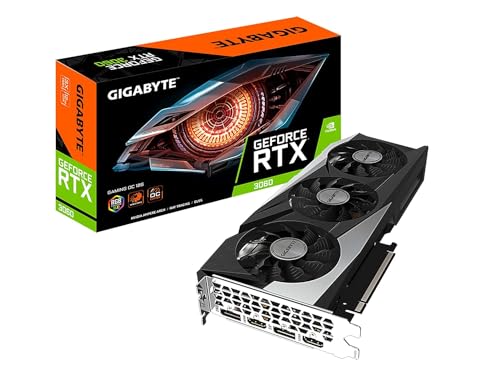
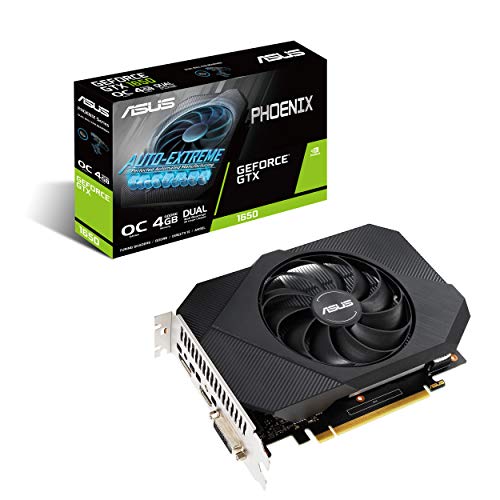
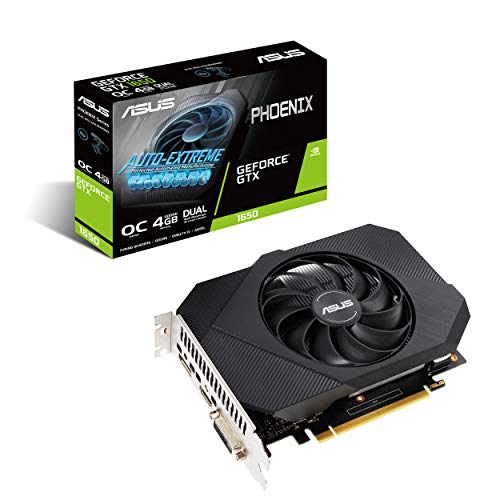
The two naming eras in one glance: a GTX 1650 representing the GTX line’s later years, and an RTX 3050 representing the entry point of the RTX line.
- ASUS Phoenix NVIDIA GeForce GTX 1650 OC Edition — Check on Amazon
- MSI Gaming GeForce RTX 3050 Ventus 2X XS 8G OC — Check on Amazon

One game, three ways: a worked example of the RTX difference
Abstract feature lists hide what the RTX badge actually buys, so follow one demanding modern game through three setups. On a GTX card, you play at native resolution with traditional lighting: shadows and reflections are approximated with the tricks raster rendering has refined for decades, settings are chosen to hold your frame-rate target, and the image is good — games looked great this way for years. On an RTX card at native resolution with ray-traced effects enabled, reflections show the actual scene, shadows soften and contact correctly, and lighting bounces in ways the approximations imitate but do not match; the cost is a substantial frame-rate drop, which is why this mode is often a screenshot mode rather than a play mode on mid-range cards.
The third way is how most RTX owners actually play: ray-traced effects on, with upscaling reconstructing the image from a lower internal resolution and, on supported generations, frame generation inserting additional frames. The result aims to deliver most of the ray-traced image at a frame rate close to the GTX card’s plain native run — trading a small amount of image purity, most visible if you pause and inspect fine detail, for lighting quality the GTX card cannot produce at any setting. Whether that trade delights you depends on your eyes and your games, which is why the honest verdict in this comparison has always been conditional. What is not conditional is the direction of travel: new releases increasingly design their best presentation around the third way, and GTX owners are progressively locked out of the top rung of settings rather than merely a few frames behind. Readers deciding between generations should also work through the broader graphics card choosing guide, because resolution and monitor decide how much of this difference you will ever see.
The feature stack, layer by layer: what each RTX generation added
RTX is not one feature but an accumulating stack, and which layers you get depends on the generation — a fact used listings rarely make clear. The foundation, present in every RTX card, is dedicated ray-tracing hardware and AI acceleration cores, which unlock ray-traced effects and DLSS upscaling. Later generations improved the AI upscaling quality, then added frame generation — using AI to create additional frames between rendered ones — and the newest layers refine that generation further and improve ray reconstruction, where AI cleans up ray-traced lighting itself. Two practical consequences follow. First, an older RTX card is not feature-equal to a newer one even when their names look close: check which DLSS capabilities a specific model supports before assuming. Second, GTX cards sit outside this stack entirely, relying on the cross-brand upscaling options that run on any hardware, which work respectably but are not the same tools.
Beyond gaming, the generations diverge in the media engine. Newer RTX cards carry newer video encoders with support for more efficient codecs and higher-quality streaming output, while the GTX line spans everything from quite old encoders to decent ones depending on the model. For a card destined for a streaming or editing machine, the encoder generation printed in a detailed specification matters more than the three letters on the box, a point our roundup of the best graphics cards for video editing develops with specific workloads.
Latency tools and the competitive exception
One RTX-associated feature deserves separate mention because it cuts against the usual more-effects story: latency reduction. Competitive players care about the delay between mouse and screen, and the RTX ecosystem’s latency tools — working with supported games and high-refresh monitors — target exactly that, while frame generation, which adds frames, can add a small amount of latency even as it adds smoothness. The practical lesson is that RTX features are a menu, not a bundle you enable wholesale: the same card that uses frame generation for a cinematic single-player game should have it off, and latency tools on, for a competitive one. GTX owners are not helpless here — in-game limiters and low-latency settings exist — but the dedicated tooling is part of what the newer line sells.
Buying GTX or RTX second-hand: different risks, different checks
The used market is where these two lines meet most often, and they carry different risks. Used GTX cards are older almost by definition, so the inspection emphasis is age: fan condition, dust, thermal behaviour under a soak test, and whether the specific model’s driver support still covers your games. Their virtue is price and simplicity — they ask little of a power supply and nothing of your settings knowledge. Used RTX cards add a second layer of diligence: verify the exact model and memory configuration, because similar names span wide performance gaps, and confirm the card is genuine, since popular RTX models have been targets for relabelled fakes sold through dubious channels. A recognised benchmark run on the day of purchase, compared against published results for that model, is the fastest authenticity and health check there is; our graphics card testing guide lays out the full sequence.
Whichever line you buy used, remember that the first owner may have run settings you would not: ask about mining or workstation use, favour sellers who can show the card running, and use a purchase channel with buyer protection. The savings on both lines are real; they are simply earned with an hour of verification rather than assumed.
Power, heat and noise across the generational divide
Because the GTX line is older, its cards were designed under older efficiency expectations — but the comparison is subtler than newer equals cooler. Performance per watt has improved across RTX generations, so an RTX card delivering a given frame rate usually does so on less power than a GTX card straining to match it. Run flat out at their respective maximums, though, a high-end RTX card can draw far more than any GTX card ever did, because its performance ceiling is far higher. The practical reading: match the card to the job and both lines behave; ask a GTX card to fake a workload beyond it and it will be hot, loud and still short of the target, while an RTX card sized correctly for the same job often completes it quietly at partial load. For small cases and modest power supplies, check the specific model’s draw and connector needs rather than trusting the family name — the details in our power consumption explainer show how to verify in minutes.
The GTX owner’s field guide to modern settings menus
If you keep a GTX card in 2026, your main skill is translation, because modern games label their settings for an RTX world. Upscaling options will list several technologies; choose the cross-platform one available to your card and treat its quality mode as your default, dropping to balanced in the most demanding scenes. Ray-tracing toggles should simply stay off — not because the picture is bad without them, but because software ray tracing on hardware without dedicated acceleration costs more than any GTX card can spare. Settings that matter most to you are the traditional levers, in this order of value: shadow quality and distance, volumetric effects, reflections set to their screen-space or off modes, and texture quality balanced against your card’s memory. Anti-aliasing choices deserve care, since some modern pipelines assume temporal upscaling is present; if a game’s native image looks shimmery, the upscaling route usually looks better and runs faster on GTX hardware than native rendering with legacy anti-aliasing.
Frame-rate targets deserve honesty too. A GTX card paired with a 60 Hz monitor remains a perfectly coherent system, and locking demanding games to a stable rate the card can hold produces a smoother experience than unlocked settings swinging widely. The owners who enjoy GTX cards longest are the ones who tune for consistency rather than chasing the settings labels of a newer era — a theme our choosing guide returns to for every generation.
What an upgrade from GTX to RTX actually feels like, week by week
Owners crossing this divide often expect a single dramatic moment; the reality is a series of smaller ones, and knowing them helps you judge a new card fairly. The first session usually brings the settings-menu moment: options that were greyed out or unwise are suddenly available, and the temptation is to enable everything at once. Resist it for one session — run your familiar games at your old settings first, note the improvement in headroom and noise, and you will have a baseline that makes the next steps measurable. The second moment comes with the first ray-traced game played properly, with upscaling set up deliberately rather than defaulted; play it in a reflective, night-time or wet environment, where the difference this article describes is at its largest, rather than judging from a bright desert level where raster tricks were already convincing.
The quieter upgrades accumulate over weeks. Streams and recordings improve if your GTX card’s encoder was old. Older games you replay run at your monitor’s ceiling with the card barely audible. A demanding new release, the kind that would have forced a settings excavation on the GTX card, simply runs at a sensible preset. And one honest disappointment should be expected too: plenty of your favourite games will look almost exactly as they did, because they were built for the raster era and use none of the new stack. That is not the upgrade failing; it is the library being what it is, and it is why this comparison always advises timing the jump to the games you are about to play rather than the ones you have finished.
Keeping a GTX card useful after it leaves the main PC
The end of a GTX card’s front-line career is rarely the end of its usefulness, and planning its second life improves the value maths of upgrading. The classic roles: a living-room PC driving a television at 1080p for the enormous back catalogue of games that never needed more; a child’s or guest machine where its simplicity is a virtue; a home server or media box where its video decode handles playback duties; a troubleshooting spare, kept in its box, that can prove in five minutes whether a future fault is your new card or everything else. Each role favours the GTX traits this article has noted — modest power needs, no dependence on current features, drivers that simply work for older titles.
Before retiring the card to any of these, give it the courtesy of a service: clean the fans and heatsink, run the benchmark-and-soak sequence from the testing guide to confirm it is healthy, and note its driver version and condition in the PC log. A card stored clean and verified is an asset; a card stored dusty and suspect is e-waste waiting for a decision. And if none of the roles fits your household, sell it while its condition is documented and its support window, though narrowing, still exists — the next owner’s esports machine is a perfectly honourable second career for a card that served you well.
How long each line can realistically stay in a main PC
Longevity is where the two lines diverge most honestly. A GTX card bought today — almost always used — should be planned as a one-to-three-year solution for undemanding roles, with the understanding that its driver support is in its final chapter and that each year’s new releases will assume more of the RTX feature stack. That is not a condemnation; a cheap card that serves an esports machine or a living-room PC faithfully for two years has done its job completely. An RTX card’s horizon depends on its generation and memory: newer generations with generous VRAM can reasonably anchor a main PC for four years or more, because their limitation will arrive gradually through settings rather than suddenly through missing features. The middle case — an early RTX card with modest memory — sits between the stools: its features remain supported while its capacity ages, and its owners feel texture and resolution limits before they feel feature limits.
Planning with these horizons written down changes how the prices compare. A used GTX card that costs little and serves two years can be better value than a discounted early RTX card that costs notably more and serves three — or the reverse, if the RTX card’s features unlock the specific new games you are buying it for. Value lives in the match between the card’s realistic horizon and your actual replacement rhythm, which is why this comparison ends, as it began, with your monitor, your games and your habits rather than with the letters on the box.
The settings audit to run the day any new card arrives
Whether the new card is RTX or a replacement GTX, one short audit prevents most first-week confusion. Set the monitor to its native resolution and full refresh rate, because new drivers frequently default to safe values. Enable variable refresh if your display supports it. In your two most-played games, walk the graphics menu deliberately: choose the upscaling technology your card supports best rather than the one the game preselects, set ray tracing consciously — on with balanced upscaling for RTX, off for GTX — and cap the frame rate a little below the monitor’s maximum for smoothness. Save a benchmark result and a screenshot of the settings in your PC log. That half hour converts a new card from a collection of defaults into a configured tool, and it gives every future troubleshooting session a known-good reference point to return to. Owners who skip the audit often spend months using a fraction of what they bought, in either direction of this comparison.
Disposing, selling or handing down: closing the loop responsibly
When either line of card finally leaves your household, a few minutes of preparation protects you and helps its next owner. Wipe nothing on the card itself — graphics cards store no personal data — but do remove your overclocking profiles and driver accounts from the PC it leaves, and note the card’s exact model, memory size and condition honestly if you sell it, including any quirks you know: a fan that ticks at one speed, coil whine in menus, a port you never tested. Test every output once before listing or gifting it, and include the power cable or adapter the card needs if your supply provided one, because a missing adapter is the most common reason a good used card gets returned as faulty. If the card is genuinely dead, prefer electronics recycling over a drawer or a bin; the materials are valuable and the drawer helps no one. Handled this way, the GTX-to-RTX transition this article describes becomes a relay rather than a cliff — hardware passing to the roles it still serves, with honest information travelling with it.
Whichever side of this comparison your next card comes from, judge it after a fortnight of ordinary use rather than on the first evening. Drivers settle, settings get tuned, and the qualities that matter — stability in your games, noise at your desk, features you actually open — only reveal themselves across real sessions, not in a single excited benchmark run.
Frequently asked questions
Can GTX cards do ray tracing?
Technically the driver allows ray tracing on some GTX models, but without RT cores the performance is so low that it is a curiosity, not a feature. For practical purposes: no. Playable ray tracing starts with RTX hardware, ideally paired with DLSS.
Is an RTX 3050 better than a GTX 1660 Super?
In raw raster speed they are close, with the 1660 Super sometimes edging ahead; in capability the RTX 3050 wins clearly — DLSS, ray-tracing hardware, more modern encoding support, and a longer driver-feature runway. For a new purchase the 3050 is the better buy; a much cheaper used 1660 Super can still make sense for esports-focused 1080p.
Why are GTX cards still sold new?
Old stock, ultra-budget system builds, and basic display-output needs keep the tail of the line moving. They are legitimate products for light use — just be sure the price reflects that you are buying last-generation capability without DLSS or ray tracing.
Will GTX cards keep getting driver updates?
GTX cards continue to receive driver releases, though the cadence and feature development favour RTX, and support for older architectures is eventually retired over time. A GTX 16-series card is fine today; a much older GTX card is living on borrowed time.
What about GTX vs RTX for video editing?
Both use NVENC for hardware encoding in most editors, but RTX cards add tensor-core acceleration for AI-assisted features that creative apps increasingly use, plus access to NVIDIA’s Studio driver programme. For a editing-first machine, RTX is the clear recommendation.
Can an RTX card work properly in a much older PC?
Generally yes, provided the power supply meets the card’s needs and the case fits it. The PCIe slot is backwards compatible, so an older motherboard will run a modern RTX card, though a very old processor will limit frame rates in some games and older platforms can lack features such as the fastest storage or the newest connectivity. Many owners deliberately stage upgrades this way — card first, platform later — and it works, as long as expectations about the interim bottleneck are honest.
Is a GTX card still a sensible buy for esports titles?
It can be, for the right games and monitor. Popular competitive titles are built to run widely, and a healthy GTX card holds high frame rates in many of them at 1080p, especially with competitive settings. The cautions are age and support rather than capability: buy a verified, well-kept card, understand that driver attention for the line is winding down, and accept that some newer competitive releases increasingly assume upscaling features the card lacks. For a tight budget aimed at established titles, that trade can still make sense.
If RTX cards support DLSS, can they also use FSR?
Yes. FSR’s upscaling runs on a wide range of hardware including RTX cards, and some games offer both options, letting you compare them directly on your own screen. This matters for the comparison because it narrows the practical gap slightly: a GTX card’s upscaling option and an RTX card’s extra option are not the same thing as an RTX card having upscaling and a GTX card having none. The differences that remain — quality at aggressive settings, frame generation support, ray reconstruction — are the ones this article’s verdict rests on.
Do RTX cards need a bigger power supply than GTX cards?
Model by model, not by family. Entry RTX cards sip power much like the GTX cards they replaced, while flagship RTX cards exceed anything the GTX line contained. Always check the specific card’s recommended supply wattage and connector type against your unit, and remember that newer high-end models introduced a newer power connector that may need an adapter or a native cable from a modern supply. The badge tells you the era; the specification sheet tells you the truth.
The bottom line
GTX walked so RTX could run: the older line still renders esports and yesterday’s games perfectly well, but it lacks the ray-tracing hardware and DLSS that define modern gaming value. Buy RTX for anything current, buy GTX only when the price honestly pays you for the features you are surrendering — and if you are still deciding your tier, the framework in graphics card buying guide will place you in minutes.