Disclosure: As an Amazon Associate, ilcastellomenu.com earns from qualifying purchases. Links to Amazon on this page are affiliate links; they cost you nothing extra. Listing details such as price and availability change often, so check the current Amazon listing before you buy.
The nvidia vs amd graphics cards debate has run for two decades, and the honest answer has been the same for most of it: both make excellent cards, and the winner depends on which tier you are buying, which features you value, and what your local prices look like on the day you shop. This comparison works through the criteria that genuinely differ — ray tracing, upscaling, VRAM, drivers, creative software, power, and value — so you can pick a side for reasons that apply to your PC rather than someone else’s.
One framing note before the details: compare cards within the same tier and generation, not brand flagships against each other. An AMD card a tier above an NVIDIA card will usually beat it at most things, and vice versa. The shortlists in Best Nvidia Graphics Cards for Gaming and Best Amd Graphics Cards for Gaming show how the two line-ups stack tier by tier.
Quick verdict
If you care most about ray tracing, DLSS, streaming, or creative applications built on CUDA, NVIDIA is the safer default. If you care most about traditional gaming performance and VRAM capacity for your money, and your games are mostly rasterised (no heavy ray tracing), AMD frequently offers the stronger value. If neither description sounds like you, buy whichever tier-appropriate card is better priced when you shop — the day-to-day experience of gaming on either is far more similar than forum arguments suggest.
In this guide
Side-by-side: the criteria that matter
| Criterion | NVIDIA GeForce | AMD Radeon |
|---|---|---|
| Ray tracing performance | Stronger, especially at high settings | Good on recent generations, a step behind at matched tiers |
| Upscaling | DLSS — widely regarded as the quality benchmark; frame generation on recent generations | FSR — works on almost any GPU; quality improved greatly, still usually second in fine detail |
| VRAM at a given tier | Often leaner; some tiers draw criticism for capacity | Often more generous at the same tier |
| Traditional (raster) gaming value | Competitive, sometimes at a premium | Frequently the price-performance leader |
| Creative / AI software | CUDA support is the industry default | Improving, but many apps still favour CUDA |
| Streaming encoding | NVENC is excellent and widely supported | AMF encoders are good and much improved |
| Drivers & software | NVIDIA App; huge install base, fast game-ready releases | Adrenalin — feature-rich, built-in tuning and recording |
| Power efficiency | Recent generations very efficient at the top | Competitive; varies by generation and tier |
Ray tracing and upscaling: NVIDIA’s home turf
Ray tracing — simulating light physically for reflections, shadows, and global illumination — is the most demanding feature in modern games, and NVIDIA built dedicated hardware for it earlier and has refined it longer. At matched tiers, GeForce cards generally hold up better when ray tracing is cranked up, and DLSS upscaling (with frame generation on recent generations) recovers much of the performance cost with image quality that is often hard to distinguish from native rendering. If your favourite games are the cinematic showcases — the ones whose trailers brag about lighting — this criterion may decide the whole comparison for you. Our explainer What is Ray Tracing covers what the technology actually does, so you can judge how much it matters for your library.
AMD’s answer is FSR, an upscaling technology that runs on virtually any graphics card, including NVIDIA and Intel ones — a genuine consumer-friendly advantage. Recent FSR versions have narrowed the quality gap considerably, and AMD offers its own frame-generation approaches. In games with light or no ray tracing, the practical gap between the brands shrinks to the point where VRAM and price matter more than logos.
VRAM and raster value: AMD’s counterpunch
AMD consistently fits more video memory at a given tier, and as games grow hungrier for texture memory — the trend detailed in What is Vram on a Graphics Card — that generosity translates into longer useful life, especially at 1440p. In traditional rendering without ray tracing, Radeon cards frequently match or beat similarly priced GeForce cards outright. If your library is esports titles, strategy games, older releases, and rasterised AAA games, AMD’s value case is strong and concrete rather than theoretical: more frames and more memory for the same money, as the picks in Best Bang for Buck Graphics Cards often reflect.
Drivers, software, and the ecosystem around the card
Both vendors now ship polished software suites. NVIDIA’s app focuses on driver delivery, game optimisation, and an overlay with recording; AMD’s Adrenalin packs in tuning, monitoring, recording, and per-game profiles in one place, which tweakers tend to love. Day-one drivers for major launches arrive quickly from both. Historically, AMD drivers carried a reputation for rougher edges; the modern reality is that both suites are mature, both occasionally ship a buggy release, and the rollback routine in how to update drivers on a graphics card is a skill worth having on either team. Creative professionals face a clearer split: video editors, 3D artists, and anyone running local AI tools will find CUDA support in their applications far more often than AMD equivalents, which makes NVIDIA the default workstation choice regardless of gaming value.
Power, heat, and noise
Efficiency leadership has swapped between generations, so check the specific cards you are comparing rather than assuming a brand trait: the figures and reasoning in graphics card power consumption explained show how to translate board power into PSU requirements and running costs. In practice, the partner model matters as much as the brand — a well-built three-fan cooler from either camp runs quieter than a cheap two-fan design on the rival chip. Read reviews of the exact model for noise, whichever logo is on the box.
Who each brand suits
- Choose NVIDIA if: you play ray-traced showcase games, want DLSS and frame generation, stream with NVENC, edit video or work in 3D/AI apps that use CUDA, or simply want the largest body of game-specific optimisation history behind you.
- Choose AMD if: you want maximum traditional gaming performance and VRAM per unit of money, play mostly rasterised titles and esports, prefer open standards like FSR that work everywhere, or enjoy an all-in-one software suite with deep built-in tuning.
- Choose either if: your games are light, your monitor is 1080p, or a specific model on either side is discounted into the tier above — a deal beats a doctrine.
Final recommendation by use case
For a 1440p or 4K gamer who enables ray tracing: NVIDIA, tier for tier. For a 1080p/1440p gamer chasing value in traditional titles: compare the specific models, with AMD often ahead. For a creator who games: NVIDIA for the CUDA ecosystem, unless your exact applications are verified to run equally well on Radeon. For a Linux user, AMD’s open-source driver support is a longstanding plus worth weighing. And for everyone: re-run this comparison at purchase time with live listings — the balance of value genuinely does shift with pricing, which is exactly why our roundups like best graphics cards for the money are maintained by tier rather than by brand loyalty.
NVIDIA vs AMD graphics cards at each tier
The brand balance is not uniform across the range, and pretending otherwise produces bad advice. At the flagship end, NVIDIA has recently stood alone — AMD has at times chosen not to contest the very top tier, so buyers seeking the absolute fastest card have had one option, with ray tracing and DLSS reinforcing it. In the upper-mid range the contest is real: AMD’s VRAM advantage and raster pricing press hard against NVIDIA’s feature lead, and the winner genuinely flips with pricing and with how much the buyer values ray tracing. In the mid-range and entry tiers — where most cards are actually sold — AMD frequently offers more memory and raw speed for the money, while NVIDIA counters with DLSS support that can matter more than either in demanding games, and Intel’s Arc lurks as a third option with excellent media features. The practical method is tier-first: decide your tier from your monitor, then run the brand comparison inside that tier with live prices, because a verdict imported from a different tier is trivia, not guidance.
Generational timing matters too. The two companies launch on offset cycles, so at any given moment one side’s line-up may be newer — with the efficiency and feature edges that brings — while the other side’s slightly older cards carry discounts that more than compensate. This is why evergreen brand verdicts age badly and why this guide scores durable criteria (ray-tracing hardware maturity, upscaling quality, VRAM policy, software ecosystems) rather than this month’s chart positions. Those criteria move slowly; prices move weekly; a sound purchase weighs the slow things heavily and the fast things at the moment of buying.
The second-order differences owners actually live with
- Resale and longevity: generous-VRAM cards age gracefully and resell honestly; feature-rich cards (DLSS generation support) hold value with gamers who know what frame generation does.
- Linux and open source: AMD’s open driver stack is a long-standing advantage for Linux desktops; NVIDIA’s Linux support has improved but the communities’ preference is established.
- Multi-monitor and idle behaviour: both brands have had generations with quirks in idle power on high-refresh multi-monitor setups; check your specific model’s reviews if your PC idles all day.
- Size and cooler ecosystems: at any tier, both brands offer compact and oversized partner designs; your case constrains the model, not the brand.
- Game bundles and promotions: both vendors periodically bundle major games with cards; a game you would have bought anyway is real value — count it, once, at the price you would actually have paid.
None of these decide a purchase alone, but together they explain why two informed buyers can run the same criteria table and land on different logos: they are weighting a life with the card, not a launch-day benchmark. That is the correct instinct. A graphics card is a three-to-six-year relationship with a piece of hardware; buy the one whose strengths match your habits and whose weaknesses you will never personally meet.
The ownership experience: a year with each brand
Benchmarks describe a day; ownership is a year. A year with NVIDIA typically means: day-one drivers for the big launches arriving like clockwork, DLSS quietly extending your card’s life in game after game, an encoder that streaming software treats as the default, and the occasional control-panel archaeology when a setting hides in the older panel rather than the new app. A year with AMD typically means: Adrenalin’s all-in-one suite handling tuning, recording, and per-game profiles without extra installs, FSR appearing in virtually every major release, the satisfaction of VRAM headroom as new games balloon, and the occasional title where ray tracing asks more than your tier happily gives. Neither year is a complaint thread unless your specific workload collides with the brand’s known weaker column — which is, for the last time in this guide, why the criteria table outranks the logo. Choose the year you would rather live, not the chart you would rather quote.
What about Intel Arc? The third chair at the table
Any honest modern comparison must seat Intel. Arc cards compete mainly at entry and mid tiers, where they bring strong media engines (excellent encoding, including AV1), competitive ray tracing for their class, generous VRAM at their prices, and XeSS upscaling. Their caveat is driver maturity: Intel has improved its drivers at a remarkable pace, fixing performance in older games that launched in a rough state, but the variance between titles remains wider than the two incumbents’. For a buyer whose games are current and mainstream, Arc is a legitimate value option worth benchmarking title by title; for a buyer who needs everything to simply work everywhere on day one, the incumbents’ boring maturity is itself a feature. Competition from a third serious vendor benefits every buyer at these tiers regardless of which card lands in the basket — a fact worth remembering the next time someone insists the market needs a ‘winner’.
A scoring worksheet for your own decision
- List your top five games and note which support ray tracing and DLSS/FSR — weight those criteria by your real library.
- Set your tier from your monitor; find the best current NVIDIA and AMD models inside it.
- Compare their VRAM, then their efficiency (board power), then their street prices on the day.
- If you stream or create, check your exact applications for CUDA or encoder requirements — a hard requirement outranks every soft preference.
- Score each card 1–5 on the criteria you weighted; buy the higher total, and do not re-litigate afterwards.
The worksheet’s real product is not the winner — it is the end of the argument. Brand debates persist because they are unfalsifiable in the abstract; your worksheet makes the question concrete, personal, and answerable in an afternoon. File it with your receipts: when upgrade time comes, you will see exactly which criteria reality rewarded and which you overweighted, and the next decision gets sharper still.
The verdict, updated for how people actually buy
Strip away the launch cycles and the forum folklore, and the modern state of this rivalry is almost disappointingly healthy: two mature platforms, each excellent at the centre of its strengths, each adequate everywhere else, separated at any given tier by criteria a buyer can actually enumerate. The era when one brand was simply ‘the gaming choice’ and the other a budget apology is over; what remains is fit. Fit to a monitor’s sync technology and resolution, fit to a library’s ray-tracing appetite, fit to a creator’s software list, fit to a case’s dimensions and a PSU’s connectors, fit to a budget on a particular week. Buyers who shop for fit end up happy on either logo, and buyers who shop for a tribe end up defending a purchase instead of enjoying it. The comparison table in this guide is deliberately the centrepiece, because tables end arguments that adjectives prolong — score your criteria, buy your winner, and go play something. The cards, whichever you choose, are very good now. That is the real headline, and it belongs to both of them.
How the answer changes for specific readers
Three quick portraits to make the criteria personal. The competitive player on a high-refresh 1080p monitor, playing rasterised esports titles: the brand question nearly vanishes — buy the tier’s best value with the most VRAM, which recent seasons have often made the AMD card, and spend the difference on the monitor or mouse. The cinematic single-player gamer at 1440p who enables every lighting feature: NVIDIA’s ray tracing and DLSS lead is not a preference but a description of their actual evenings, and the premium is buying the experience they specifically play for. The video editor who games on weekends: the editing software’s CUDA support decides before gaming criteria are even consulted, and any gaming-side sacrifice is repaid every working day. None of these readers is ‘the average user’ — nobody is — which is why this guide refuses to crown an average winner. Your portrait is in the criteria table; the brand is whichever column your life scores higher.
A final tiebreaker when the scores come out even
Sometimes the worksheet ties — same tier, similar money, criteria split down the middle. Break the tie with the soft factors that never make benchmark charts: which exact partner models are available to you with the better cooler and longer warranty; which card’s physical size suits your case without compromise; which software suite you would rather open every week; and, honestly, which one is in stock from a seller you trust at the moment you are ready to buy. A tie broken by availability and warranty is not a coin flip — it is the recognition that at parity, ownership details outrank spec-sheet decimals. Then stop researching. The hours after a well-made decision are worth more in games than in forums, whichever logo is on the card.

Gear mentioned in this guide
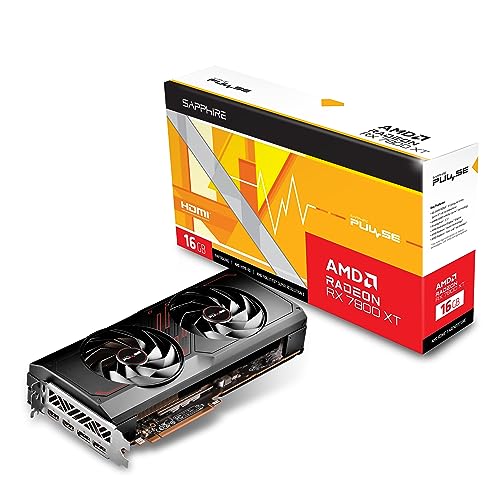
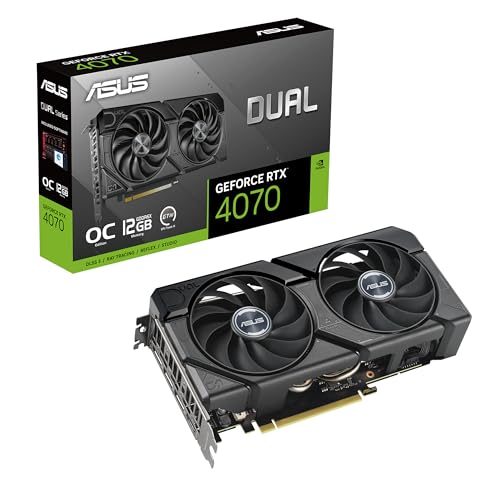
A representative card from each camp at a similar tier — NVIDIA’s RTX 4070 class and AMD’s RX 7800 XT class — linked so you can compare the current listings side by side.
- ASUS Dual GeForce RTX 4070 EVO OC Edition 12GB — Check on Amazon
- Sapphire Pulse AMD Radeon RX 7800 XT 16GB — Check on Amazon

Scenario head-to-heads: where the verdict flips in practice
Brand comparisons are usually argued as if one winner must exist. In practice the verdict flips by scenario, and walking through the common ones is more useful than any aggregate score. Each scenario below assumes cards of a similar class and era on both sides; the differences described are the ones owners actually notice after the first week.
The competitive player chasing high refresh
If your games are competitive titles played at 1080p or 1440p with settings turned down for visibility and frame rate, raw raster speed per unit of money and driver overhead matter most, and both brands field strong options. The deciding factors become specific: latency-reduction features, the quality of each vendor’s frame-rate limiting and overlay tools, and how the card behaves in your exact titles, because individual engines can favour one architecture. At this level, per-game benchmarks of the titles you play beat brand reputation entirely. Many competitive players could flip a coin between the brands’ equivalent tiers and be equally served — which is itself useful information, because it frees you to choose on cooler noise and availability.
The single-player player at 4K with every effect on
Here the balance tilts toward the features discussed in the ray tracing section of this comparison. Heavy lighting effects plus upscaling plus frame generation are the standard toolkit for making 4K high settings playable, and the maturity of each brand’s versions of those tools — especially how their upscaling handles fine detail and how widely their frame generation is supported — becomes a first-order difference rather than a footnote. Memory capacity matters too, because 4K texture sets are the largest in gaming. In this scenario, comparing the two brands on plain raster benchmarks alone will mislead you; compare them in the mode you will actually play, effects on and upscaling enabled.
The streamer and creator who games
For a one-PC streaming setup, the hardware encoder is a cast member, not a footnote. Encoder quality at streaming bitrates, support for modern codecs, and the surrounding software — background removal, noise suppression, capture utilities — differ between the brands and have historically been an NVIDIA strength, while AMD’s tools have closed much of the gap for straightforward recording and streaming. If your income or your audience depends on the stream, weight this scenario heavily and test with trial content before committing. Our roundups of the best graphics cards for streaming and the best graphics cards for video editing break the encoder and editing questions down by workload.
The Linux user and the tinkerer
Operating system changes the answer more than most comparisons admit. AMD’s open driver model integrates smoothly with Linux distributions, while NVIDIA’s Linux support has improved through its own driver options but remains a different experience in installation and updates. If you dual-boot, tinker, or run a home server with a GPU passed through to virtual machines, research your exact distribution and use case rather than assuming the Windows verdict travels. The same applies to older hardware on secondary machines, where driver availability for legacy operating systems can decide the question outright.
Ownership over three years: support, resale and quiet depreciation
A graphics card is a three-to-five-year relationship, and the brands age differently in ways spec sheets never mention. Driver support length is the first: both vendors support cards for many years, but feature support narrows before security and compatibility support ends — older generations stop receiving the newest upscaling or frame-generation features while still receiving game support. When you buy a card from an older generation at a discount, you are accepting an earlier start to that narrowing, which is fine if priced in and a surprise if not.
Resale value is the second. Cards from both brands hold value in proportion to their usefulness to the next buyer, which tracks VRAM capacity, encoder generation and efficiency more than launch prestige. Generous memory ages gracefully on the used market because it keeps a card eligible for newer games; efficient cards stay desirable for small and quiet builds. The third factor is software gravity: the longer you use one vendor’s recording tools, profiles and per-game settings, the more a brand switch costs you an afternoon of re-setup. None of this should lock anyone in — switching brands is a normal, healthy move when the other side offers the better card for your scenario — but going in with open eyes about the switching costs makes the worksheet in this guide produce a more honest answer.
How brand benchmarks mislead, and how to read them anyway
Both brands showcase the games and settings that flatter them, and both are technically telling the truth while doing it. A launch chart built on titles using one vendor’s sponsored features will show that vendor at its best; a value chart built on older raster-only titles will show the other at its best. Protect yourself with three habits. Compare cards in reviews that use one test system and a wide game selection, and look at the geometric mean across many titles rather than any single result. Insist on comparisons in the mode you will play — native, upscaled or frame-generated — because the ranking can genuinely change between modes. And check the test date and driver versions, because this comparison is unusually sensitive to software: features that decide it are updated several times a year, and a verdict from two driver generations ago may already be history. The step-by-step method for choosing a graphics card in our companion guide applies these habits in order.
The ecosystem around the card: monitors, laptops and handhelds
Your next card does not live alone. Variable refresh is the clearest example: modern implementations have largely converged, with most current monitors and both brands’ cards working together over standard connections, so the old rule that your monitor dictates your brand is mostly retired — but verify your specific monitor model, especially older ones, before assuming. Laptops create a different gravity: if your desktop and laptop share a brand, your driver habits, recording tools and settings knowledge transfer between them, which is a small but real convenience. Handheld PCs and living-room systems push toward efficiency and strong integrated graphics lineages, an area where the processor-side graphics discussed in our integrated versus dedicated graphics comparison become relevant. None of these ecosystem factors should override a clearly better card for your main scenario; they are tiebreakers with genuine daily value, which is exactly how the scoring worksheet earlier in this article treats them.
When the usual verdict flips: five edge cases worth knowing
Every general comparison hides exceptions, and naming them protects buyers whose situation is the exception. First, the tiny-PC builder: when a case limits card length, power and airflow, the best card is the most efficient one that fits, and efficiency leadership at a given tier can belong to either brand in a given generation — measure watts and millimetres, not loyalty. Second, the multi-monitor productivity user with gaming on the side: idle and desktop power draw with several high-refresh displays varies noticeably between architectures and generations, and a card that is marginally slower in games but far calmer on the desktop all day can be the better ownership proposition. Third, the VR player: headset support, reprojection quality and per-headset quirks have historically differed between the brands, and your specific headset’s community is a better oracle than any general review. Fourth, the buyer of a previous-generation flagship versus a current mid-range card: the older flagship may win raw benchmarks while losing on features, efficiency and remaining support — a trade this comparison’s tier section frames, and one where the right answer depends on how many of the newer features your games use. Fifth, the one-game player: if a single title dominates your hours, its engine’s preference is your verdict, full stop. Benchmark that game on both brands at your settings and let it overrule every general statement in this article, including ours.
A decision protocol you can run in one evening
If the worksheet earlier in this guide still leaves you torn, run this protocol. Write down your monitor, your five most-played games or programs, and your one hard constraint — budget class, case size, power supply or noise. Find two specific candidate cards, one from each brand, at the same tier and roughly the same street positioning. For each candidate, find test results in at least three of your five titles, in the mode you will actually play, from a single review source so the methodology matches. Note each card’s memory capacity, encoder generation, physical fit and connector needs against your system. Then score the ownership factors this article has covered: software you will use weekly, support horizon for the generation, and how each card fits your other machines and monitors.
Most readers find the decision resolves during that process, because the abstract brand question dissolves into two concrete products with concrete strengths in their actual games. If the scores land genuinely even, choose on the cooler and the noise — the qualities you will notice every single day — or on which card your monitor, laptop or friends’ systems match, and stop researching. The remaining difference, at that point, is smaller than the value of the evenings you would spend chasing it. Either card, bought at the right tier for your monitor, will feel like a good decision within a week of playing games instead of reading comparisons — and if you want the wider shortlist for your tier, the current best graphics cards for gaming roundup is the natural next stop.
What to do in the first week with whichever brand you chose
The comparison ends at purchase, but ownership quality is set in week one, and the routine is the same on both sides. Install the current driver cleanly, set your monitor’s full refresh rate and variable refresh, and run one benchmark you can repeat later as a baseline. Set a sane fan curve or confirm the stock behaviour is quiet enough at your desk. Explore exactly the features that decided your purchase — the upscaling mode, the encoder, the recording tools — in the programs you bought them for, while returns are still easy if a promised feature disappoints in your specific setup. Save your game profiles and note the driver version in a log. Owners who do this week-one hour rarely join the population of people unsure whether they bought the right brand; they have evidence, in their own games, that they did — and if the evidence says otherwise, they find out while changing their mind is still free.
Reading the two brands’ model names without a translator
Half of the confusion in this comparison is manufactured by naming. Both brands sell several generations at once, reuse familiar numbers across eras, and let partner companies attach overlapping badges — OC editions, gaming lines, compact lines — that describe coolers rather than chips. Protect yourself with one rule: identify the chip generation and the memory configuration first, and treat everything after that as trim. A current-generation mid-range chip with generous memory is a different purchase from a previous-generation chip wearing a similar number, even when a listing places them side by side, and benchmarks of the exact chip — not the family, not the trim — are the only ones that describe your candidate. The same rule rescues you in the used market, where yesterday’s flagship and today’s mid-range card often sit at similar asking prices with opposite strengths: the flagship brings raw speed and age, the newer card brings features, efficiency and a longer support runway. Neither is automatically right; the scenario sections above exist to decide between exactly that pair.
Why your monitor’s age can quietly favour one side
One overlooked variable is the display you already own. Very old high-refresh monitors sometimes implement variable refresh in ways tied to one ecosystem’s earlier standard, while essentially all modern panels are brand-agnostic. Before letting brand decide your card, spend two minutes confirming what your specific monitor supports over the connection you will use — HDMI and DisplayPort can differ on the same screen. If your panel is fully agnostic, cross this factor off with relief. If it is one of the older tied models, its remaining lifespan belongs in the equation: a monitor you will replace within a year should not dictate a card you will keep for four, but a beloved panel with years left can fairly cast a vote. This is the sort of unglamorous, system-level detail that decides real purchases far more often than the headline benchmark gap between two well-matched cards.
A note on arguing about brands productively
Brand debates generate heat because owners defend purchases, and purchases feel personal. If you are researching in forums and comment threads, filter for the posts that name a specific game, resolution, driver version and setting — those are data. Discount the posts that argue from identity, from a single benchmark screenshot without a test system, or from a launch-week verdict that later drivers revised. Both brands have shipped excellent cards and disappointing ones, sometimes in the same generation at different tiers, which is why tier-by-tier, game-by-game evidence is the only ground worth standing on. When you find reviewers who revisit cards after major driver updates and correct their earlier conclusions, keep them; they are rarer than they should be, and in a comparison this software-sensitive, the willingness to update a verdict is the strongest signal of trustworthiness there is. Your own log, started in week one, eventually becomes the most relevant review of all: it describes your games, your room and your ears, which no publication can test for you.
What changes if you also record, stream or edit on the same machine
Many buyers game and create on one PC, and that dual role deserves a final explicit pass because it can outweigh several gaming criteria at once. Recording and streaming lean on the hardware encoder and the vendor’s capture software every session, not occasionally, so small quality or convenience differences compound into hundreds of hours. Editing leans on codec support for your camera’s formats and on how your particular editor uses each vendor’s acceleration; two editors can rank the same two cards in opposite orders. If content work is even a third of your machine’s life, run the decision protocol from this article separately for your creative applications and combine the results, weighting by hours rather than by enthusiasm. It is common for gaming to call the contest a draw while creative work produces a clear winner — and that winner, not the draw, is the card you should buy, because the daily friction of the wrong tool in your editor or your stream setup will outlast any marginal frame-rate difference in games you finish in a month.
Finally, keep the receipt, the exact model name and the driver version from your first stable week together in your PC records. If the card ever needs warranty help, a driver rollback or a resale listing, those three details — gathered in a calm moment — are the difference between a five-minute task and an evening of archaeology through boxes, emails and half-remembered settings.
Frequently asked questions
Is NVIDIA or AMD better for gaming overall?
At the same tier, NVIDIA leads in ray tracing, upscaling quality, and creative software support; AMD often leads in VRAM capacity and traditional price-performance. ‘Overall’ depends on which of those your games and apps actually use — which is why this guide scores criteria rather than crowning a logo.
Do AMD drivers still have problems?
The reputation is largely historical. Modern Adrenalin drivers are mature and feature-rich, and NVIDIA ships the occasional buggy release too. Both vendors publish frequent game-ready updates; keeping drivers current and knowing how to roll back matters more than the brand on the box.
Can I use FSR on an NVIDIA card or DLSS on an AMD card?
FSR works on almost any modern GPU, including NVIDIA and Intel cards. DLSS is NVIDIA-only, requiring GeForce RTX hardware. This asymmetry is a real point in AMD’s favour for openness — and in NVIDIA’s favour if you own GeForce and get both options in many games.
Which brand is better for streaming?
NVIDIA’s NVENC encoder is the long-standing benchmark for quality and broad software support, and it is the default recommendation for serious streamers. AMD’s encoders have improved substantially and are perfectly serviceable for casual streaming; the gap matters most at low bitrates.
I have a FreeSync monitor. Must I buy AMD?
No. FreeSync is an open standard, and modern GeForce cards support adaptive sync over DisplayPort on most FreeSync monitors (look for ‘G-Sync Compatible’). G-Sync-branded monitors with the hardware module are the only displays that truly tie you to NVIDIA.
Can I run one brand’s card now and switch later without rebuilding my PC?
Yes. The card is a standard PCIe component in both cases, and switching brands means removing the old card, uninstalling the old driver cleanly, installing the new card and its driver — an hour’s careful work, covered by the driver guidance in this site’s updating guide. Your games, files and Windows installation are untouched. The main things that do not transfer are vendor-specific settings, recordings profiles and any features your games were using that belong to the other ecosystem, such as a particular upscaling mode.
Which brand’s cards hold their value better second-hand?
Neither brand holds value by badge alone. Used prices follow usefulness: memory capacity, efficiency, encoder generation and remaining driver support. Historically, cards with generous VRAM for their class and a modern encoder have aged best on the used market regardless of logo, because they stay eligible for new games and for streaming duty in a second machine. When you buy with resale in mind, those are the specifications to favour on either side.
Does either brand work better with an older CPU?
There are small differences in driver overhead between the vendors that can matter when the processor is genuinely old and the target is very high frame rates at low settings; in that narrow case, per-game testing or reviews using older CPUs are worth seeking out. For most older systems at 60 Hz or moderate refresh, the difference is minor next to the card tier itself, and the sensible advice is unchanged: buy the tier your monitor and games need, and do not expect any card to fully disguise a processor that has become the limit.
My friends all use one brand. Should that decide it for me?
It is a legitimate minor factor, not a deciding one. Shared brand means shared troubleshooting knowledge, comparable settings advice and easy comparisons when something misbehaves. If two cards are otherwise equal for your scenario, matching your circle is a reasonable tiebreak. If the other brand’s card is clearly better for your games, your encoder needs or your memory requirements, take the better card — you will spend far more hours using it than discussing it.
The bottom line
NVIDIA vs AMD is not a war with a winner; it is a checklist with two strong answers. Ray tracing, DLSS, streaming, and CUDA point one way; VRAM, raster value, and openness point the other. Score your own priorities against the table above, compare the specific models at your tier — the tier-matched shortlists in best graphics cards for gaming are a good place to start — and buy the card that wins your criteria, not the internet’s argument.