ilcastellomenu.com is reader-supported. When you buy through links on our site, we may earn an affiliate commission.
Where to Buy
This keyword means something different from its near-identical neighbours, and the difference matters: the best cameras for portraits android are, first of all, the cameras inside Android phones — the portrait modes, telephoto lenses and computational tricks that most portraits on earth are now made with. A companion guide in this series covers the studio discipline with dedicated bodies; this one starts in the pocket, judges the leading Android handsets as portrait instruments, and then asks honestly when a portrait deserves a real camera instead.
An Android portrait is a negotiation between optics and software. The phone’s lenses are small and its sensor smaller, so the handset manufactures what a big camera achieves with glass: the blurred background is computed, the skin is interpreted, the low light is assembled from many frames into one plausible face. At its best the result is startling — flattering, sharp-eyed, ready to share before the moment has cooled. At its worst it is wax skin, haloed hair and a background melted in the wrong places, and the portrait’s subject can tell the difference even when they cannot name it.
So the six picks below divide into two honest camps. Three are Android flagships discussed in prose — they are not in this site’s verified camera pool, so they carry no buying links and no invented details, only judgement. Three are dedicated cameras from the verified pool, included because every Android portraitist eventually meets the sitting — a wedding, a graduation, a grandparent’s eightieth — where the phone’s computation stops being enough and the portrait deserves optics instead of arithmetic.
Judge the phones here the way their portraits are actually judged: on the phone of the person photographed, in the family chat, at arm’s length and full of feeling. The dedicated cameras are judged by the sterner studio standard from the companion guide. A reader who knows which judgement their portraits must survive already knows which half of this list is theirs.
One more ground rule: portrait quality on Android varies more by software generation than by hardware badge, and it changes with updates. This guide therefore judges approaches and reputations — how each maker’s portrait mode treats skin, hair and glasses — rather than freezing a league table that next month’s update would quietly rewrite.
Key Takeaways
- Most Android portraits are computational: the blur is software, so the maker’s portrait-mode taste matters as much as its lenses.
- Google’s Pixel line is the natural-light portrait benchmark — restrained processing and skin tones that survive scrutiny.
- Samsung’s Galaxy Ultra models bring the strongest zoom portraits, pulling flattering compression from across a room or a venue.
- OnePlus flagships offer a colour-led portrait style with a devoted following and fast, fuss-free capture.
- A dedicated camera still wins the important sittings: the Canon EOS R50 is the kindest step up, the Fujifilm X100VI the most characterful.
- Shoot Android portraits at the native portrait focal lengths, in the best light available, and check hair edges and glasses before trusting the blur.
In this guide
Quick Picks
| Camera | Badge | Why it earns its place |
|---|---|---|
| Google Pixel 9 Pro | Best Android portrait processing | Restrained, believable skin and the most trustworthy portrait mode in the Android world. |
| Samsung Galaxy S25 Ultra | Best zoom portraits on Android | Long-reach portrait framing from across a venue, with a polished, vivid house style. |
| OnePlus 13 | Best colour-led Android portraits | A distinctive, colour-tuned portrait style with fast capture and a devoted following. |
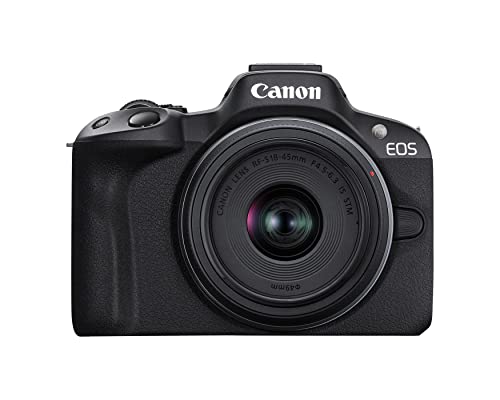
| Canon EOS R50 | Best step-up camera for phone portraitists | Real optical blur and kind Canon colour in a body a phone photographer can learn in a weekend. |
| Fujifilm X100VI | Best characterful portrait companion | A fixed-lens camera with film-born colour that makes everyday portraits feel authored. |
| Sony RX100 VII | Best pocket zoom for portraits | A pocket camera with a real zoom, for portraits from table distance to stage distance. |
How Did We Judge Android Phones as Portrait Cameras?
Portraits were made the way Android owners actually make them: at family gatherings, in cafés, on evening streets and across one long wedding where three flagships passed hand to hand among guests. No lab charts were consulted, because no grandmother has ever been photographed against one. Each phone’s portrait mode was used as its maker intended — point, tap, trust — and then pushed: backlit subjects, glasses wearers, children who treat stillness as a rumour, and hair against complicated backgrounds, which is where computational blur confesses its methods.
Skin was the first criterion and the harshest. A portrait mode that polishes a face into porcelain may flatter for a day and embarrass in a year; the phones ranked highest here are the ones whose processing respects texture — pores softened rather than deleted, character lines kept, and skin tones that stay believable across the range of faces a family actually contains.
Edge behaviour came second: the halo around a flyaway hairstyle, the earring that vanishes into the blur, the glasses frame the software cannot decide about. These artefacts are the signature of computational portraiture, and the differences between makers are differences of maturity — how many edge cases the software has been taught to respect.
The dedicated cameras were tested in the same gatherings, deliberately, as the control group: what the portrait looks like when the blur is optical, the skin is recorded rather than interpreted, and the file can be printed large enough to hang. The gap between the camps is real but narrower than camera marketing admits, and this guide’s verdicts try to price it honestly — in effort and money as well as in quality.
Finally, shareability was scored without snobbery. An Android portrait’s natural habitat is the message thread and the feed, seconds after the moment; a phone that makes a beautiful portrait and then complicates sharing it has misunderstood its own genre. The best Android portrait cameras respect the portrait’s whole life, from tap to thread.
A note on fairness in the judging: the phones were never asked to be cameras, and the cameras were never asked to be phones. Each was scored inside its own genre’s promises first — the handset as the always-present portraitist, the body as the deliberate one — and only then across the border. Verdicts that ignore genre produce the sterile league tables this guide exists to replace.
How Does Android Portrait Mode Actually Work?
The phone takes the portrait twice at once: once as a photograph and once as a measurement. Its lenses and sensors map the scene’s depth — what is near, what is far, where the face sits in the arrangement — and the software then blurs the measured background by degrees, imitating what a large sensor and a fast lens do with light alone. Modern flagships perform this trick dozens of times a second in the preview, which is why the blur swims live in the viewfinder as you compose.
The imitation succeeds in proportion to the scene’s cooperation. A single subject, cleanly separated from a background at a different distance, in kind light, gives the software an easy map and the portrait looks genuinely optical. Add a second face at a different depth, a hand raised near the lens, bicycle spokes, a veil, a wine glass — the map frays, and the blur betrays itself exactly where a viewer’s eye goes first.
Understanding this changes how a portraitist shoots on Android: the craft moves from operating a camera to staging for the algorithm. Distance between subject and background, tidy edges, light on the face rather than behind it — the phone portraitist arranges the scene so the computation can succeed, which is a real photographic skill wearing new clothes, and the sections below teach it as such.
Which Portrait Focal Length Flatters a Face on a Phone?
Faces are drawn by distance before they are drawn by lenses: stand close and features swell, stand back and they settle into their true proportions. Phone portrait modes offer stepped magnifications that are really instructions about distance — the wider settings tempt you close, the longer ones push you back across the room, and the sitter’s nose votes on the difference. The most flattering Android portraits are almost always made at the longer settings, from a conversational distance, where the face is recorded rather than approached.
The longer settings carry a second dividend: the background narrows. A tight field of view excludes the café’s clutter and the street’s signage, giving the depth software a simpler scene and the portrait a calmer stage. Portraitists who complain their phone portraits look busy are usually standing too close with too wide a view; the fix is footsteps, not settings.
There is a social geometry too. A portrait made from across a small table feels like a conversation; one made at arm’s length feels like an inspection. The longer portrait settings let the photographer stay in the conversation’s territory while the camera does the approaching — one of computational portraiture’s genuine kindnesses, and a reason the zoom-equipped flagships earn their portrait reputations.
When Does a Portrait Deserve a Dedicated Camera Instead?
When it must survive size. An Android portrait is engineered for the screen it was made on; the sitting that will be printed, framed and kept for decades asks for a file with optical depth and resolution in reserve. Weddings, milestone birthdays, the portrait of a parent that a family will eventually treasure — these are the occasions where the phone’s convenience is outvoted by the archive’s demands, and where the step-up cameras in this guide earn their place in an Android household.
When the light cannot be arranged. Computation is a fair-weather friend: in the dim restaurant, the candlelit room, the evening garden, the phone’s assembled portrait grows fragile — noise smoothed into wax, edges guessed, colours approximated. A dedicated camera’s larger sensor simply gathers the light that is there, and its portrait stays honest after the phone’s has become a painting of one.
And when the portrait is a practice rather than a moment — the photographer who shoots portraits weekly, who wants the discipline of real depth and real lenses — the phone becomes the sketchbook rather than the canvas. Many fine portraitists run exactly this dual life, and this guide’s second half is written for the moment the sketchbook starts asking for company.
Which Android Phones and Step-Up Cameras Make the Best Portraits?
Three handsets judged in prose, three cameras with verified links — read the halves as a before and an after, and locate your own portraits on the border between them.
Google Pixel 9 Pro — Best Android portrait processing
The Pixel’s portrait reputation rests on restraint. Where rivals polish, Google’s processing tends to record: skin keeps its texture, faces keep their age and their character, and the computed blur falls off with a patience that survives a second look. In the wedding test that anchored this guide’s judging, the Pixel’s portraits were the ones guests asked to have sent to them — the market’s own verdict, delivered without prompting.
Its portrait mode handles the classic traps with unusual maturity. Glasses stay glasses rather than dissolving at the rims, hair separates from backgrounds with fewer halos than the class average, and backlit faces — the family photograph’s eternal condition — are balanced without the grey, lifted look that betrays heavy computation. It is the phone for the portraitist who wants the software’s hand to be invisible.
The honest limits are the platform’s: the blur is still computed, so the chaotic background and the raised-hand portrait will still catch it out, and its files are made for screens rather than for the wall. Within the phone half of this guide, though, it sets the standard the others are measured against — the Android portrait camera for people who look closely.
- Type: Android flagship phone (prose-only pick)
- Portrait style: natural, texture-respecting processing
- Strength: skin tones across many faces
- Portrait mode: mature edge and glasses handling
- Best habitat: daylight and family gatherings
Strengths
- Skin that still looks like skin
- Fewest computational artefacts in its class
- Portraits guests actually ask for
Trade-offs
- Blur is computed, not optical
- Files are screen-first, print-second
- Chaotic scenes still catch the depth map
Pixel owners should learn its portrait mode’s one great discipline: give it separation. A step that moves the subject away from the wall or hedge behind them improves the Pixel’s blur more than any setting, because its software — like every depth system — rewards a scene it can read clearly.
The Pixel also makes the best argument for the phone as a family’s portraitist of record: its consistency across a whole day of mixed faces and mixed light means the album coheres, and coherence — one believable look across a wedding or a holiday — is what family archives are actually judged on in ten years’ time.
Best for: families and natural-light portraitists on Android. Not suited for: large prints or chaotic, layered scenes
Samsung Galaxy S25 Ultra — Best zoom portraits on Android
The Galaxy Ultra’s portrait case is built on reach. Its zoom range lets the portraitist stand where faces are flattered — well back — and still fill the frame, which transforms the candid portrait: the graduate crossing the stage, the speaker at the family toast, the child unaware on the far side of the garden. Phone portraiture usually means approaching; the Ultra means waiting, and waiting produces the more honest expressions.
Samsung’s house style is the Pixel’s opposite pole: vivid, polished, eager to please. Skin is smoothed more assertively, colours arrive celebration-ready, and the portraits are engineered to glow on a bright screen in a bright feed. Many sitters prefer exactly this — the portrait as a compliment — and a guide that pretended otherwise would be judging a different audience from the one these phones serve.
Its depth processing at long zoom is the caveat: the further the magnification, the more the portrait depends on software’s guesses, and edges at distance can waver where the Pixel’s closer portraits hold firm. Used at its portrait sweet spots rather than its extremes, though, the Ultra is the most versatile portrait instrument in the Android half of this guide — the one phone that covers the ceremony and the table alike.
- Type: Android flagship phone (prose-only pick)
- Portrait style: vivid, polished, compliment-first
- Strength: zoom portraits from a distance
- Portrait mode: strong at its sweet spots
- Best habitat: events, stages and venues
Strengths
- Flattering distance without losing the frame
- Portraits that arrive feed-ready
- One phone for ceremony and table
Trade-offs
- Processing polishes harder than purists like
- Long-zoom depth edges can waver
- Large and costly as flagships are
Event photographers in the family — the designated documenter of graduations and recitals — will feel the Ultra’s advantage most: the portrait of a face on a distant stage, framed tightly and lit by venue light, is a photograph the closer-range phones simply cannot attempt, and it is often the frame the whole day was for.
Samsung owners should audit the smoothing with a portrait of someone they love and know well: if the face reads as a younger cousin of itself, dial the processing back where the settings allow. A portrait’s compliment should be in the light and the moment, not in the erasure of the person.
Best for: event and family documenters who shoot from distance. Not suited for: purists wanting texture-first, unpolished skin
OnePlus 13 — Best colour-led Android portraits
OnePlus built its portrait identity around colour, tuning its flagship’s rendering with a famous camera house’s palette — and whatever one thinks of co-branding, the portraits have a look: rich, slightly romantic colour, skin rendered warm, and a house style a feed can recognise. For the portraitist whose work is personal and expressive rather than documentary, a phone with a point of view is not a gimmick; it is the beginning of a signature.
Capture speed is its second portrait virtue. Children, dogs and friends mid-laugh punish hesitation, and the OnePlus line’s responsiveness — quick to open, quick to focus, quick to fire — harvests expressions that more deliberate phones frame beautifully a half-second late. In the economy of family portraiture, the expression is the currency, and this phone is rich in it.
Its depth processing sits between the two rivals above: more character than the Pixel, less polish than the Samsung, with edge behaviour that is good rather than class-leading. It is the connoisseur’s choice in this half of the guide — the Android portrait phone for someone who has looked at all three renderings and chosen a flavour on purpose.
- Type: Android flagship phone (prose-only pick)
- Portrait style: colour-led, warm and romantic
- Strength: fast, responsive capture
- Portrait mode: capable depth handling
- Best habitat: expressive everyday portraiture
Strengths
- A recognisable colour signature
- Expressions caught before they fade
- Portraits with genuine mood
Trade-offs
- Edge handling good, not class-leading
- House style will not suit every taste
- Smaller portrait community and accessory world
OnePlus portraitists should lean into the phone’s colour rather than fight it toward neutrality: choose clothes, walls and hours of day that harmonise with its warm rendering, and the portraits acquire the coherence of a body of work — the phone rewarded as an artist’s tool instead of corrected as an engineer’s.
Its speed also suits the street portrait — the stranger asked politely, the market vendor, the busker — where the sitting lasts seconds and the camera must be a guest rather than an event. Phones are the street portraitist’s natural instrument, and this one’s manners are quick enough for the genre’s etiquette.
Best for: expressive portraitists who choose a colour flavour deliberately. Not suited for: studios needing neutral, matchable files

Canon EOS R50 — Best step-up camera for phone portraitists
Every Android portraitist who upgrades arrives with the same two questions — will it be hard, and will it be worth it — and the R50 is the kindest answer to both. Its eye detection does the focusing apprenticeship for you, its colour flatters faces with Canon’s long-practised warmth, and behind an affordable fast prime it produces the thing no portrait mode can compute: a background dissolved by light itself, with hair, glasses and earrings rendered by optics rather than negotiated by software.
The learning curve is real but mercifully short, because the phone has already taught the curriculum that matters — distance, light, timing, the flattering step back. What the R50 adds is control: aperture as a decision, focal length as a distance you choose, files that can be printed at the sizes family milestones deserve. Phone portraitists consistently report the same surprise: the camera is not harder, it is merely more honest about what it is doing.
As the household’s second portrait instrument it slots in without displacing the phone: the handset keeps the everyday, the R50 takes the sittings — birthdays, graduations, the grandparents’ portrait that will outlive everyone in the room’s phones. That division of labour, rather than any rivalry, is how most real families end up running both halves of this guide.
- Format: APS-C mirrorless
- Focus: eye detection for portraits
- Colour: warm, flattering Canon rendering
- Lenses: affordable fast primes in system
- Handling: guided, phone-graduate friendly
Strengths
- Optical blur no software has to fake
- A weekend learning curve for phone shooters
- Files that print at family-treasure sizes
Trade-offs
- A second device to carry and charge
- Lens is a further, worthwhile purchase
- Less instant sharing than a phone
Buy the fast prime with the body, not after it: the R50 with its kit lens will feel like a heavier phone, while the R50 behind a portrait prime feels like a different art. The lens is the upgrade the phone portraitist is actually shopping for; the body is its handle.
Phone portraitists will also find their staging instincts transfer perfectly: the separation they learned to give portrait mode — subject forward, background back — is exactly what optical depth rewards, so the Android years turn out to have been an apprenticeship for the camera all along.
Best for: Android portraitists ready for real sittings. Not suited for: pure everyday snapshots, where the phone already wins

Fujifilm X100VI — Best characterful portrait companion
The X100VI occupies the most interesting border in this guide: a real camera with a photographer’s soul that lives where the phone lives — in a jacket, at a café table, present for the unplanned portrait. Its fixed lens sits at the classic documentary distance, its film simulations give faces a palette with memory in it, and its leaf-quiet operation makes sittings feel like conversations. For portraits of friends, family and strangers in their own light, it has become a genuine phenomenon among photographers who also own phones.
Its portrait honesty is its signature: no computed blur pretending to be glass — the depth is whatever the lens and the distance honestly give — and colour that arrives with an opinion the sitter usually loves. Where the Android flagships interpret a face, the X100VI regards it, and people who have been photographed by both can feel the difference in how they held themselves.
The fixed lens is the commitment: no zoom to rescue a lazy position, no telephoto compression for the distant stage portrait. Its owners call that the discipline that improved them; its critics call it a limitation, and both are describing the same fact. As the portrait companion for someone whose phone covers the versatile everyday, it is the most characterful step sideways in this guide.
- Format: fixed-lens premium compact
- Colour: film simulations with portrait heritage
- Lens: classic fixed documentary focal length
- Operation: quiet, conversation-friendly
- Files: high-resolution, print-capable
Strengths
- Portraits that feel authored, not processed
- Always-carried size with real optics
- Colour sitters fall for
Trade-offs
- Fixed lens — your feet do the zooming
- No long-reach event portraits
- High demand has made it scarce
X100VI portraitists develop a recognisable working method — close, conversational, available light — and the method becomes a style faster than any equipment collection would. If your Android portraits already lean intimate and candid, this camera will feel less like an upgrade than like a homecoming.
Its built-in flash deserves a portraitist’s note: used gently for fill in daylight, it gives eyes their sparkle and faces their separation from bright backgrounds — a classic technique the phone’s processing imitates, here performed by actual light at the moment of exposure.
Best for: intimate, everyday portraitists wanting a signature. Not suited for: event reach or zoom-dependent shooting

Sony RX100 VII — Best pocket zoom for portraits
The RX100 VII answers the Android portraitist’s most practical frustration: the phone’s digital reach runs out exactly where family life happens — across the school hall, the restaurant, the garden. Its genuine optical zoom covers that territory from a pocket, with a sensor larger than any phone’s and processing that records rather than interprets, so portraits arrive with honest skin and edges the software never had to guess.
Its portrait mode is the photographer’s kind: real aperture, real focal length, eye autofocus that tracks a face through a recital’s fidgeting. The background blur is modest beside the R50’s prime — physics is physics — but it is optical, which means hair, glasses and raised hands are rendered by light and cannot produce the computational artefacts that haunt the phone half of this guide.
As a household instrument it has a particular social grace: it is the camera a parent can hand to a grandparent, a teenager, a spouse — point, zoom, shoot — with results a clear class above the phone’s in the same hands. Portraits are a family’s collective project, and the RX100 VII is the pick here that the whole family can operate.
- Format: premium compact with zoom lens
- Reach: genuine optical zoom in a pocket
- Focus: eye autofocus for faces
- Sensor: larger than any phone’s
- Handling: simple enough to hand to anyone
Strengths
- Real zoom where phones crop and guess
- No computational portrait artefacts
- The whole family can use it
Trade-offs
- Blur shallower than a fast prime gives
- Small controls for large hands
- Not a low-light specialist
School-hall portraitists should claim the aisle seat and let the zoom work: the RX100 VII at full reach, braced on a seat back, produces the tight stage portrait that phone galleries of the same evening will be full of attempts at — the difference between the keepsake and the thumbnail is usually this camera’s honest glass.
It also serves as the Android household’s travel portraitist: one pocket device for the holiday’s faces, freeing the phone for maps, messages and its battery’s other duties — a division of labour that travellers recognise as the real luxury.
Best for: families needing pocketable real zoom for portraits. Not suited for: shallow-depth studio-style sittings
How Should You Shoot Portraits on an Android Phone, Step by Step?
Start with light before settings: turn the sitter toward the day’s soft source — a window, open shade, the sky’s bright side — until the face is lit and the eyes hold catchlights. Portrait mode cannot manufacture light; it can only blur what light has already modelled, and nine-tenths of the difference between a phone portrait that glows and one that merely blurs is decided in this first ten seconds of positioning.
Then create the separation the software needs: the sitter a clear step or two away from whatever stands behind them, the background as plain as the location allows, stray branches and signage moved out of the frame by your own two steps sideways. Choose the longer portrait magnification, retreat to a conversational distance, and frame the face with room for the blur to breathe.
Take more frames than feels polite, varying the distance slightly, and inspect one at full size before the sitter leaves — zoom in on the hair’s edge and the glasses, because that is where the computation will have confessed, and a reshoot costs seconds now and is impossible tonight. The Android portraitist’s craft is this inspection habit; the phone does the arithmetic, but the photographer must audit it.
How Do You Pose People Who Hate Being Photographed?
Give them something true to do. The reluctant sitter’s stiffness is a portrait problem older than photography, and the phone’s informality is a genuine asset here: a portrait made mid-conversation, mid-walk, mid-laugh at a shared joke bypasses the performed face entirely. Android’s quick capture and quiet operation suit this hunting of unguarded moments better than any studio ritual — one area where the phone half of this guide beats the camera half on merit.
Angle the body, not just the face: shoulders turned slightly from the lens, weight settled, hands occupied with a cup, a railing, a child’s hand. The classic portrait instructions exist because they relax the sitter’s geometry, and they work identically whether the camera is a flagship phone or the R50 — posing is a human technology, indifferent to its instrument.
Show them a good one early. Nothing loosens a sitter like evidence that the camera is being kind, and the phone’s instant screen is the fastest confidence machine in portrait history. One flattering frame, shown warmly, buys ten minutes of generosity — spend them on the portraits that will matter.
Which Android Portrait Settings Are Worth Changing?
The defaults are designed for the average of all photographs, and portraits are not average photographs. Where your phone allows it, soften the beauty processing toward honesty — the setting that erases a face’s character is borrowing flattery against the portrait’s future, and sitters shown both versions usually choose the face they recognise. Keep the processing that helps — balanced backlight, sensible exposure — and dismiss the processing that replaces.
Turn off anything that reshapes: the portrait that narrows a jaw or enlarges eyes crosses from photography into fiction, and the sitter will know. The ethical line in computational portraiture is the same as the retouching line in the studio guide — temporary blemishes may be forgiven; the person’s actual face may not be revised.
Finally, protect the original: where the phone offers to save the un-blurred version alongside the portrait, accept the storage cost. The portrait mode’s taste will date — software styles age like hairstyles — and the unprocessed frame is the archive’s insurance, the version a future editor can reinterpret with future taste.
How Should You Direct a Portrait Session with Just a Phone?
The phone’s lightness is a directing style in itself: no tripod ceremony, no lens changes, no pauses in which a sitter’s expression cools. Work in bursts of conversation — talk, shoot through the talk, show a good frame, talk again — and let the session feel like a visit with photographs happening inside it. The portraits this produces have a looseness studio sittings envy, and it is the phone’s native genre advantage, worth more than any processing generation.
Move the sitter, not the settings: toward the window, along the wall until the background calms, into the shade’s edge where the light turns kind. A phone portraitist’s feet are their lighting department and their art department simultaneously, and the habit of repositioning before re-setting is the clearest mark of someone whose phone portraits outclass their equipment.
Close the session like a professional: review together, choose the sitter’s favourite together, send it before you part. The portrait’s social life begins at that send, and a photographer who delivers in the moment owns a reputation no camera in this guide can buy.
How Do the Six Portrait Options Compare Across the Phone–Camera Border?
Read the table as two instruments for two judgements: the phones are scored by the thread and the feed, the cameras by the print and the decade. Neither scoreboard is the honest one for the other half.
| Camera | Portrait character | Working strength | Best matched portraitist |
|---|---|---|---|
| Google Pixel 9 Pro | Natural and restrained | Believable skin, mature edges | The family portraitist of record |
| Samsung Galaxy S25 Ultra | Vivid and far-reaching | Zoom portraits at events | The designated event documenter |
| OnePlus 13 | Warm and colourful | Fast, expressive capture | The personal, stylistic portraitist |
| Canon EOS R50 | Optical and kind | Real blur, gentle learning curve | The graduate to real sittings |
| Fujifilm X100VI | Authored and intimate | Signature colour, fixed lens | The everyday documentary portraitist |
| Sony RX100 VII | Honest and pocketable | Real zoom, family-simple | The all-purpose household portraitist |
The border the table draws is not quality but consequence. A phone portrait’s consequences are immediate and social; a camera portrait’s are archival and physical. Most households need both kinds of consequence across a year, which is why the mature answer to this keyword is rarely a winner — it is a roster, with the phone starting every match and the camera fielded for the fixtures that matter.
If a single purchase must be chosen, choose by failure: if your portraits fail by artefact and flatness at the moments that matter, the R50 is the fix; if they fail by reach, the RX100 VII or the Galaxy’s zoom; if they fail by dullness of colour and feeling, the Pixel’s restraint or the Fujifilm’s character — depending on which direction your taste calls dullness from.
There is also a generational courtesy in the roster worth naming: the phone a parent upgrades from becomes the teenager’s first portrait camera, and the household’s portrait culture — its habits of light, distance and keeping — descends with the hardware. Equipment ages down a family; standards, if the family is lucky, age with it unchanged.
Why Do Phone Portraits Look Different Every Year?
Because the software’s taste is a moving target. Each generation of processing re-decides how skin should read, how far blur should fall, how aggressively a backlit face should be rescued — and a family’s archive, shot across five phones, quietly documents the history of computational fashion alongside the history of the children. Photographers who care about coherence across years either standardise on one maker’s taste or graduate the important sittings to a camera, whose rendering changes only when they decide it should.
There is no villain in this: the improvements are mostly real, and next year’s portrait mode will handle today’s edge cases with new grace. But the portraitist building a body of work — a child’s whole childhood, a community’s faces — should know which parts of their archive are authored by them and which by a software team’s annual judgement, and insure the irreplaceable sittings accordingly.
The practical insurance is cheap: the un-blurred originals saved, the milestone sittings given to a real camera or at least to the household’s best phone in its best light, and prints made while the files are young. Archives are not built by resolution; they are built by decisions taken before the moment becomes history.
How Should Families Print and Keep Phone Portraits?
Print the best few every year, at ordinary sizes, without ceremony. A phone portrait printed at the dimensions family photographs have always lived at looks entirely convincing — the computational artefacts that trouble a screen at full magnification vanish at album scale, and the portrait takes its proper place in the physical archive where phones, clouds and accounts cannot misplace it.
Keep the files with the same seriousness as the prints: the family chat is not an archive, and the portrait of a grandparent that lives only in a thread is a portrait on loan from a platform’s goodwill. A yearly habit — the favourites gathered, backed up in two places, the prints made — converts a decade of phone portraiture from a scroll into an inheritance.
And label them, while the labelling is easy: names, dates, places, in the file or on the print’s back. The portrait’s value compounds with its caption, and the family historian is always a future stranger — often your own grandchild — who will bless the ancestor who bothered.
What Is the Honest Future of Android Portraiture?
The computation will keep improving at exactly the places this guide criticised: edges will behave, glasses will survive, two faces at two depths will blur by their true distances. The gap between the phone’s portrait and the camera’s will narrow for the everyday sitting until, for most families, it effectively closes — and this guide’s phone verdicts are written in full knowledge that their shelf life is the shortest of any in the series.
What will not close is the difference in intention. A dedicated camera is a decision to make portraits as a practice — with light, distance and depth chosen rather than computed — and practices outlive technologies. The Android phone will remain the portrait camera of the world’s moments; the camera will remain the instrument of the world’s sittings. Knowing which of the two your next portrait is remains, as it has been throughout this guide, the whole skill.
How Do Self-Portraits and Group Portraits Behave on Android?
The self-portrait is Android portraiture’s most practised genre and its most distorted: the front camera’s wide view at arm’s length exaggerates exactly the features the sitter is inspecting, which is why the same face delights in a friend’s portrait and disappoints in its own. The remedies are distance by any means — a ledge, a timer, a friend’s longer arm — and the rear camera’s better optics whenever the framing can be trusted to a preview or a patient trial.
Group portraits stress the depth map differently: faces at several distances deserve several depths of blur, and the software that flatters a solo sitter may melt the second row’s ears or sharpen the wrong plane entirely. For the group photographs that matter — the whole family, once a year, actually assembled — the honest tools are a smaller blur or none, a stepped-back framing, and where the occasion is truly archival, the step-up camera whose optics need no guesses.
Both genres share one mercy: they are judged with love. The family does not audit the group portrait’s edges the way a photographer does, and the self-portrait’s audience is the most forgiving critic alive. Shoot these with the phone gladly — and reserve the scrutiny, and the camera, for the sittings where love’s forgiveness should not be the quality standard.
What Mistakes Do Android Portrait Photographers Make Most?
Standing too close with the wide lens. The arm’s-length portrait distorts the face it loves — features swelling toward the phone — and no portrait mode corrects perspective it cannot move. Step back, use the longer portrait magnification, and let distance do the flattering it has done for four centuries of painted portraits.
Trusting the blur without auditing it. The haloed hair, the vanished earring, the background melted through a shoulder — these are discovered at the family chat’s zoom, by everyone, if the photographer did not discover them first. One full-size inspection before the sitter leaves is the entire quality department of phone portraiture; staff it.
Shooting portraits in the worst light because the phone ‘handles it’. Computational rescue is a safety net, not a lighting plan. The dim, mixed, overhead light of real evenings produces the waxy, grey portraits that give phone photography its reputation — while the same phone, turned toward a window or a lamp’s soft side, produces portraits people frame.
Letting beauty processing rewrite the sitter. The reshaped jaw and enlarged eyes are not a portrait of the person who sat for you, and the sitter knows it even when they politely accept the file. Portraits are promises of recognition; keep the promise and reduce the processing to forgiveness, not revision.
Never printing or backing up the milestones. The portrait that matters most is statistically the one living only in a chat thread on a phone that will be replaced. The archive habits in this guide — originals saved, favourites backed up, best few printed yearly — are unglamorous and are the difference between a family’s portrait heritage and its highlights reel.
Upgrading the phone every year and the portraitist never. New processing flatters, but the skills in this guide — light, distance, separation, inspection — compound across every device you will ever own. A season spent deliberately practising them improves portraits more than the next three phone generations combined.
Assuming the newest phone is the portrait upgrade. Processing generations improve edges and rescue, but a portraitist whose light, distance and inspection habits are unpractised will make the same portrait on this year’s flagship as on last year’s — slightly cleaner, equally unconsidered. Upgrade the habits on the phone you own; they transfer free to every device that follows, which no trade-in programme offers.
Final Recommendation
For the Android household as it stands, the Pixel 9 Pro is this guide’s portrait benchmark, the Galaxy S25 Ultra its event specialist, and the OnePlus 13 its colourist — three philosophies of the computed portrait, each defensible, chosen by taste. For the sittings that outgrow computation, the Canon EOS R50 is the kindest graduation, the Fujifilm X100VI the most characterful companion, and the Sony RX100 VII the pocketable honest zoom.
Keep the border in its proper place: the phone for the moments, the camera for the milestones, and your own developing eye — trained on light, distance and the audit of edges — as the instrument that improves both. That eye, not any device in this guide, is the best portrait camera you will ever own on Android or anywhere else.
If this guide leaves one habit behind, let it be the audit: one portrait, zoomed to the hair’s edge, before the sitter walks away. That ten-second inspection — phone or camera, moment or milestone — is the whole difference between portraits that are hoped for and portraits that are known to have succeeded.
Frequently Asked Questions
Which Android phone takes the most natural-looking portraits?
By this guide’s testing and the verdict of the sitters themselves, the Pixel line’s processing is the most restrained: skin keeps texture, ages stay honest, and the computed blur behaves with unusual maturity around hair and glasses. Natural is a taste, though — Samsung’s polished style and OnePlus’s warm colour each have sitters who prefer them, and the right answer is the rendering of a face you know, judged by you.
Why does portrait mode blur things it should not?
Because the phone is guessing depth from flat images, and some geometry defeats the guess: thin objects, transparent things like glasses and veils, raised hands near the lens, and backgrounds at the same distance as the subject. The craft fixes are staging — separation behind the subject, tidy edges, nothing straying between lens and face — and the inspection habit: check the edges at full size while a reshoot is still possible.
Is a dedicated camera really better than a flagship phone for portraits?
For the sittings that matter most, yes — optically rather than computationally. A camera’s blur is made by light, so edges, hair and glasses are rendered rather than guessed; its sensor gathers dim light honestly; and its files print at sizes a phone portrait cannot. For the everyday portrait, the flagship phone is not merely adequate but often preferable — present, instant and shareable. The guide’s two halves are a roster, not a rivalry.
What focal length should I use for phone portraits?
Use the longer portrait option your phone offers and gain the framing with your feet: step back to a conversational distance and let the magnification do the approaching. Close, wide portraits distort the features nearest the lens; the stepped-back portrait flatters by perspective, narrows the background’s clutter, and gives the depth software a cleaner scene to read.
How can I make phone portraits look less processed?
Reduce the beauty processing toward its honest end, light the face from a soft direction instead of letting the phone rescue a backlit one, and save the un-blurred original where the phone allows it. Most of the processed look is the software compensating for bad light and close distance — fix the light and the distance, and the software’s hand lightens on its own.
Should I buy a camera or a better phone for family portraits?
Buy by failure, as this guide advises throughout. If the portraits fail at milestones — dim halls, big prints, a grandparent’s sitting — a camera like the R50 fixes failures a new phone only softens. If they fail in the everyday — missed moments, a phone too slow or too absent — the better phone is the honest purchase. Most families eventually own both, in that order of need rather than of marketing.
Related Guides
Android portraitists exploring the wider craft often turn next to our guide to cameras for portraits in the studio tradition our guide to cameras for pictures of people in everyday light our guide to cameras for a beginner shooting their first real portraits


