ilcastellomenu.com is reader-supported. When you buy through links on our site, we may earn an affiliate commission.
Where to Buy
A school camera lives a harder life than almost any other camera on earth. The best cameras for school are not chosen by a photographer; they are chosen by a teacher, an IT coordinator or a parent association, then handed to a rotating cast of students, borrowed across departments, dropped in corridors, left in gym bags and expected to work perfectly on the one morning the inspector visits. That reality — shared custody, rough handling, zero tolerance for complicated menus during a lesson — is the lens through which every pick below was judged. A school camera must be survivable, teachable and boring in all the ways that keep a lesson moving.
“School” also means several different jobs wearing one name. There is the media-studies camera, on which students learn framing, exposure and editing as actual curriculum. There is the documentation camera, which records the science fair, the school play and the football final for the website and the yearbook. There is the classroom camera, which films lessons for absent students and flips a whiteboard explanation into a revision resource. And there is the celebration camera — instant prints at the prom, photos for the corridor display — where the photograph is a souvenir rather than a file. A single purchase rarely serves all four jobs equally, so this guide names which job each pick is genuinely for, and which jobs it should never be volunteered for.
The six cameras below were chosen as a working fleet rather than six rivals. The Canon EOS R50 anchors the media classroom. The OM SYSTEM Tough TG-7 survives field trips and science departments. The GoPro HERO12 Black films sport and experiments from inside the action. The Sony ZV-1F runs the school news channel and recorded lessons. The Fujifilm Instax Mini 12 and Polaroid Go Generation 2 handle the instant, joyful, no-file-management end of school life. Together they cover a whole school’s photographic year — and each one, crucially, can be operated by a supervised student within one lesson of being handed it.
Consider, too, who actually presses the shutter in a school. Sometimes it is a teacher documenting evidence of learning for assessment. Sometimes it is a student reporter covering the netball final for the newsletter. Sometimes it is the office staff photographing the new building work for the governors, or a parent volunteer at the summer fair. A school camera must serve all of them without a training course standing between the person and the photograph — which is why this guide treats deep, expert-only controls as a liability in every pick except the one bought deliberately for teaching. Versatility of operator is a school specification as real as resolution, and it has eliminated more famous cameras from this shortlist than any image-quality test could.
A note on safeguarding and policy, because every school purchase should start there: cameras in schools operate under consent rules, and any camera a school buys should fit the school’s existing policy on photographing students, storing images and publishing them. The picks below were favoured partly because they work simply with memory cards and local files — a school can keep images on its own storage, under its own rules, without accounts or clouds getting involved unless the school deliberately chooses them. Technology should serve the policy, never smuggle in a new one.
Key Takeaways
- School cameras are judged on survival and simplicity first: shared custody and student operators punish delicate, complicated gear.
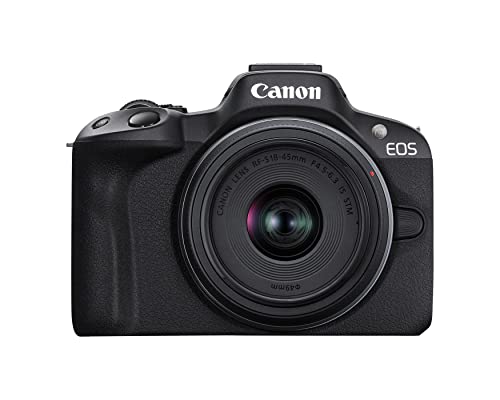
- The Canon EOS R50 is the media-classroom anchor — guided menus teach real camera skills while producing website-ready results.
- The OM SYSTEM Tough TG-7 is the field-trip and science pick: waterproof, drop-resistant and happy in student hands.
- The GoPro HERO12 Black records sport, experiments and performances from angles no handheld camera can reach.
- The Sony ZV-1F is the lesson-recording and school-news specialist: sit it down, flip the screen, press record.
- Instant cameras — Instax Mini 12 and Polaroid Go — cover celebrations and displays with zero file management or consent-to-cloud complications.
In this guide
Quick Picks
| Camera | Badge | Why it earns its place |
|---|---|---|
| Canon EOS R50 | Best for media studies | Guided menus that teach photography while delivering serious stills and video for the school website. |
| OM SYSTEM Tough TG-7 | Toughest school camera | Waterproof, crush-resistant and drop-proof — the camera a geography field trip cannot kill. |
| GoPro HERO12 Black | Best for sport and science | Mounts to goals, goggles, lab rigs and dashboards to film learning from inside the moment. |
| Sony ZV-1F | Best for recorded lessons | A fixed-lens presenter camera any teacher can run alone: flip screen, face priority, one button to blur the background. |
| Fujifilm Instax Mini 12 | Best instant for events | Point, shoot, print — celebration photos and corridor displays with no files, no accounts, no fuss. |
| Polaroid Go Generation 2 | Smallest instant camera | A pocketable instant camera for trips, rewards and art projects where tiny prints are the charm. |
How We Chose These Picks
We evaluated school cameras against the school day rather than the studio. The first filter was survival: could the camera plausibly endure a year of shared student use, being passed hand to hand, travelling in a minibus footwell and occasionally meeting the floor? The second filter was teachability in reverse — could a competent result be achieved by a student who received the camera ninety seconds ago, because in real lessons there is rarely more instruction time than that. The third was output fitness: files that drop straight into the school website, the editing software the media department already teaches, and the yearbook workflow, without conversion rituals.
We also weighted total cost of ownership the way a bursar would. A school camera’s true price includes the case that actually gets used, the spare battery that saves the school play, the memory cards that will be lost at a rate of roughly one per term, and — for the instant cameras — the film, which is a recurring budget line a school must plan honestly. Cameras requiring subscriptions, proprietary clouds or personal accounts were marked down, because school IT policies rightly distrust all three. What survived is a fleet where each member has a department, a job and a reason a governor could defend in a budget meeting.
What Makes a Camera Suitable for School Use?
Durability is the obvious answer, but the complete answer has four parts. The first is physical: sealed against dust and splashes, tolerant of drops, with a lens that retracts or sits protected rather than protruding hopefully into the world. The second is cognitive: an automatic mode that is genuinely good, because most school photographs are taken by people thinking about something else — a teacher mid-lesson, a student mid-experiment — and the camera must carry the technical load entirely during those moments. The third is administrative: standard memory cards, standard batteries or USB charging, files in universal formats, and no dependence on a phone app that a school device policy may not permit. The fourth is ethical fit: the camera should slot into the school’s consent and storage practices, keeping images as local files under the school’s control.
There is also the question of noise — not image noise, but the social kind. A school camera should be unobtrusive in a classroom and unremarkable in a corridor. Bulky professional bodies change the behaviour of everyone in front of them; students perform, teachers stiffen, and the candid documentation that makes school photography valuable evaporates. Every pick here is modest in size and presence, which is a deliberate editorial choice: the best school photographs are the ones where the room forgot the camera was there. Small cameras, quietly used, are how a school builds an honest visual record of itself rather than a gallery of poses.
Schools should also think in fleets, not heroes. Two mid-priced cameras that two classes can use simultaneously teach more photography than one flagship that one teacher guards. A small fleet also survives the inevitable: when (not if) a camera is damaged in October, the programme continues while it is repaired. Label everything, keep a simple sign-out sheet, assign each camera a home department, and store the fleet charged — a camera found dead before a trip teaches students only that equipment is unreliable. The picks below were chosen to make that kind of humble, workable system possible at several different budget shapes.
Which Camera Belongs in Which Part of the School?

Canon EOS R50 — Best for media studies
Every school fleet needs one camera that can teach. The EOS R50 earns that role because its guided interface explains settings as students change them — aperture stops being a mysterious letter and becomes a visible effect on the demonstration screen — while its fully manual modes wait patiently for the students who outgrow the guidance. That makes it a curriculum instrument, not just a recording device: the same body serves the beginner’s first auto-mode school-fair photos and the sixth-former’s deliberate portrait project. Its stills are strong enough for the prospectus and its video clean enough for the website, so the media department’s showcase work and its teaching work can share one camera without apology.
The R50’s school-specific virtues continue in the details. The vari-angle screen supports the tripod-and-presenter workflow of student news broadcasts and recorded revision lessons. Canon’s colour flatters the mixed lighting of classrooms, where fluorescent tubes conspire against skin tones. Interchangeable lenses let a department build capability gradually — a kit zoom this year, a fast prime for the drama department next. The honest cautions are equally school-shaped: it is the most delicate camera in this fleet and the most attractive to borrow permanently, so it should live with a named department, travel in a proper case and be signed out like the valuable teaching asset it is. Treat it as the fleet’s flagship and it will anchor a media programme for years.
- Sensor: APS-C
- Lens mount: Canon RF (interchangeable)
- Screen: vari-angle touchscreen with guided interface
- Microphone input: yes
- Best department: media studies, school marketing
Strengths
- Guided menus turn the camera itself into a teaching aid for exposure and focus concepts.
- Stills and video quality high enough for prospectus, website and yearbook showcase pages.
- A lens system the department can grow year by year as skills and budgets allow.
Trade-offs
- The least rugged pick here — it needs a case, a strap rule and a sign-out sheet.
- Interchangeable lenses add cost and one more thing for a busy department to track.
- Overkill for pure documentation jobs the tougher, simpler picks handle better.
Best for: media departments, photography clubs and schools building a real student portfolio programme. Not suited for: unsupervised field trips or being tossed into a general equipment pool.

OM SYSTEM Tough TG-7 — Toughest school camera
Ask a geography teacher what their department’s camera must survive and the list writes the TG-7’s design brief: rain on a river study, a drop onto wet rock, a dunking in the tray of pond water it was photographing, freezing mornings, dusty farm visits, and the inside of a Year 8 rucksack. The Tough series is engineered for exactly this abuse — waterproof, shockproof, crushproof and freezeproof as a matter of specification rather than hope — and that engineering changes student behaviour for the better. A camera students are not terrified of breaking is a camera students actually use, at the water’s edge and in the mud, where the best fieldwork photographs live.
Beyond the armour, the TG-7 carries features that read like they were specified by science departments. Its microscope-style close-up modes photograph leaf structures, rock crystals and circuit boards with a clarity that turns field notes into evidence. The built-in sensors can log position and environmental data alongside images, giving geography and science students genuine data-handling material. Underwater capability opens pond-dipping and marine studies that no other camera in this fleet can attend. The compromises are those of any rugged compact: a smaller sensor than the R50, a fixed lens, and image quality that is very good rather than exhibition-grade. A school does not buy the TG-7 to win photography competitions. It buys it so that in five years, after a hundred trips, it is still working — and in school budgeting, that arithmetic wins.
- Build: waterproof, shockproof, crushproof, freezeproof
- Lens: built-in zoom with macro/microscope modes
- Data: GPS and environmental sensor logging
- Charging: USB
- Best department: geography, science, outdoor education
Strengths
- Survives the drops, dunkings and weather that retire ordinary school cameras within a term.
- Close-up modes serve science coursework — specimens, crystals, components — exceptionally well.
- Sensor logging turns photographs into data for fieldwork write-ups and investigations.
Trade-offs
- Smaller sensor than the mirrorless pick, so low-light classroom shots are its weakest work.
- Fixed lens and rugged-compact controls offer less to teach advanced photography students.
- The toughness premium means it costs more than its image quality alone would suggest.
Best for: field trips, science departments and any camera destined for unsupervised student hands outdoors. Not suited for: low-light performance work or teaching interchangeable-lens photography.
One more school-shaped virtue deserves mention: the TG-7 is the camera a department can lend without a briefing. Its automatic modes are trustworthy, its lens is protected behind the armour, and there are no accessories to lose beyond a cable. Teachers building a trip kit learn to value this property above almost everything — the camera goes in the leader’s bag with the first-aid kit and the register, and it comes home with the photographs. Reliability of process, not peak image quality, is what fieldwork actually runs on.

GoPro HERO12 Black — Best for sport and science
The HERO12 Black sees the school from angles no other camera here can occupy: strapped to the chest of the cross-country runner, mounted beside the goal for the match report, fixed above the chemistry bench so the whole class can watch the reaction the front row usually monopolises, riding the robotics club’s creation as it navigates the course. For PE departments it is close to transformative — technique analysis, point-of-view footage for coaching, and sports-day coverage that puts parents inside the race. For science it is a patient observer that can be mounted, started and left to record an experiment’s full duration without a student cameraman blocking the view.
Its school virtues are practical ones. The stabilisation forgives the vibration of every mount a student can improvise. The body shrugs off rain, mud and the inevitable collision with the floor of the sports hall. Voice control and simple presets let a teacher start recording from across the room, hands full of equipment. Battery improvements in this generation matter in a school context, where charging discipline is aspirational at best. The cautions: the ultra-wide view distorts classroom scenes and flatters nobody in an interview, the tiny screen makes it a poor teaching camera for photographic concepts, and its footage style is unmistakably “action camera” — thrilling for sport, wrong for the school play. Deploy it where movement and viewpoint are the story, and keep it out of the auditorium.
- Build: waterproof, rugged, mountable
- Stabilisation: electronic, horizon-levelling
- Control: touch screen, voice control, presets
- Mounts: extensive accessory ecosystem
- Best department: PE, science, robotics and engineering clubs
Strengths
- Mounts anywhere, filming sport and experiments from viewpoints students find electrifying.
- Stabilisation and durability forgive student handling and hostile environments alike.
- Simple presets and voice control suit teachers operating it mid-activity, hands busy.
Trade-offs
- Wide, distorted perspective is wrong for performances, interviews and formal events.
- Teaches almost nothing about photography — it is a capture device, not a curriculum tool.
- Small batteries and cards demand a charging routine the department must actually keep.
Best for: PE departments, science demonstrations, clubs and any filming that happens inside the action. Not suited for: stage productions, formal portraits or teaching camera craft.

Sony ZV-1F — Best for recorded lessons
The recorded lesson became permanent school infrastructure years ago, and it created a specific camera job: sit in front of one teacher, alone, and make a clear, watchable video of them explaining something. The ZV-1F is almost comically well matched to that job. Its wide fixed lens frames a teacher and a portion of whiteboard from a tripod at the front of the class. Its face-priority exposure keeps the teacher’s face bright even when the board behind is glaring. The flip screen lets the teacher check framing between classes in seconds, the background-defocus button tidies a cluttered classroom backdrop, and the directional microphone hears the teacher rather than the corridor. A teacher with four minutes between lessons can run this camera. That is the whole review, and it is high praise.
The same qualities serve the student news team and the revision-video library: any format that is one person, talking, in one place. What the ZV-1F will not do is roam — its fixed lens and electronic stabilisation make it a tripod camera, and its low-light performance asks for the classroom lights to be on, which in a classroom they usually are. It also should not be the school’s only camera, because its specialism is narrow. But schools that adopted recorded lessons discovered that the bottleneck was never student demand; it was teacher time and technical friction. This camera attacks exactly that bottleneck, and a department that films its explanations once can help absent students, revising students and cover-lesson classes for years from the same footage.
- Sensor: 1-inch class
- Lens: fixed wide-angle
- Screen: fully articulating touchscreen
- Microphone: directional built-in array, mic input fitted
- Best department: any — recorded lessons, school news, revision libraries
Strengths
- Designed for a solo presenter: face priority, flip screen and one-button background blur.
- So simple that recording a lesson adds minutes, not a technician, to a teacher’s day.
- Directional audio favours the teacher’s voice over classroom and corridor noise.
Trade-offs
- Fixed lens means framing is set by tripod position — no zooming to the whiteboard detail.
- A tripod camera by nature; handheld roaming footage is its weakest mode.
- Too specialised to serve as a school’s only camera for events and sport.
Best for: recorded lessons, revision libraries, school news and teacher-created resources. Not suited for: roaming event coverage or departments needing one camera for everything.

Fujifilm Instax Mini 12 — Best instant for events
Not every school photograph should become a file. The Instax Mini 12 produces a physical print in about the time it takes a student to lose interest, and that physicality is its educational superpower: prints go straight onto corridor displays, into leaving books, onto the “our class” board, and home in blazer pockets to be stuck on fridges — the one distribution network no school website has ever matched. For celebrations, rewards, reading weeks, world-book-day costumes and the hundred small ceremonies of school life, an instant print is not a compromise on quality. It is a different and often better product.
The Mini 12 specifically suits schools because it removed the remaining ways to get an instant photo wrong. Exposure is fully automatic, a selfie mirror and close-up mode handle the distances students actually shoot at, and the operation is one shutter button deep — a supervised younger student can be the event photographer within a minute of instruction. The honest cost discussion belongs in every school’s decision: film is a per-shot expense, forever, and a trigger-happy event can consume a surprising stack of prints. Budget-holding teachers solve this the way they solve everything — a set number of packs per event, prints allocated with intent. Judged as what it is, a joy machine with a consumables budget, the Mini 12 is the easiest purchase in this entire guide to justify to anyone who has watched a child receive a photograph of themselves.
- Output: instant prints, credit-card sized
- Exposure: fully automatic with close-up/selfie mode
- Operation: single-button simplicity
- Running cost: film packs per event
- Best department: whole school — events, rewards, displays, younger years
Strengths
- Physical prints for displays, leaving gifts and celebrations — no files, accounts or uploads involved.
- Automatic everything makes it operable by supervised students of almost any age.
- Instant results create event energy that a promise to “put it on the website” never does.
Trade-offs
- Film is a permanent per-shot cost that events must budget for honestly.
- Small prints and simple optics mean no enlargements, no yearbook spreads, no second chances.
- Nothing to teach photography students beyond composition and the courage to press the button.
Best for: celebrations, displays, rewards and younger students’ first experience of photography. Not suited for: record-keeping, publications or any job needing a digital file.

Polaroid Go Generation 2 — Smallest instant camera
The Polaroid Go takes the instant idea and shrinks it until the camera itself becomes part of the charm. It is genuinely tiny — the smallest instant camera of its kind — producing small square-ish prints that students treat less like photographs and more like collectible cards: traded, annotated, taped into sketchbooks and stuck along the edge of the art-room wall. For art and design departments it is a medium as much as a camera, feeding collage, zine and mixed-media projects where the print’s smallness and softness are aesthetic choices rather than limitations. For trips and residentials, its size means it actually gets carried, in a pocket, all day.
Generation 2 improved the exposure reliability that instant cameras live or die by, and the camera keeps the operation essentially to aiming and pressing — though its prints, being the smallest here, reward subjects that are close, simple and boldly composed. The trade-offs mirror the Instax with the volume turned up: film cost per print is real, the tiny format forgives nothing in a busy scene, and there is no digital file unless someone photographs the print. A school choosing between the two instants is really choosing a print culture: the Instax Mini’s larger, cheaper-to-run prints for events and displays, or the Go’s miniature artefacts for art projects, rewards and portability. Many schools, sensibly, end up with one of each in different departments.
- Output: miniature instant prints
- Size: pocketable — the smallest instant format here
- Exposure: automatic, improved in Generation 2
- Running cost: film packs
- Best department: art and design, trips, rewards systems
Strengths
- Tiny size means it is carried all day on trips where bigger cameras stay in the bag.
- Miniature prints suit art projects, sketchbooks and collectible reward formats.
- Simple automatic operation keeps it accessible to supervised younger students.
Trade-offs
- The smallest prints here — group shots and detailed scenes lose their point.
- Film cost per print is the highest in this fleet relative to print size.
- Soft, characterful rendering is a style, not a record; keep it away from documentation duties.
Best for: art departments, residentials, rewards and projects built around physical prints. Not suited for: event coverage for displays, records, or any large-group photography.
Reading the table below, notice what it does not contain: a winner. Schools are tempted by league tables because budgets demand a single signature, but a fleet is a set of answers to different questions, and the honest comparison is between jobs, not numbers. The R50’s sophistication is wasted on a pond-dipping trip; the TG-7’s toughness is wasted in a tripod facing a teacher. The table’s real use is in the budget meeting — it shows, at a glance, that no row duplicates another, which is the definition of a fleet bought without waste.
How Do the Six School Cameras Compare?
| Camera | Primary job | Ruggedness | Student-proofing | Output |
|---|---|---|---|---|
| Canon EOS R50 | Teaching & showcase | Handle with care | Guided menus teach as they go | High-quality stills + video files |
| OM SYSTEM Tough TG-7 | Fieldwork & science | Waterproof, drop-proof | Built for unsupervised outdoors | Stills + video with data logs |
| GoPro HERO12 Black | Sport & experiments | Waterproof, mountable | Presets and voice control | Wide-angle action video |
| Sony ZV-1F | Recorded lessons | Tripod camera | One-button presenter workflow | Talking-head video |
| Fujifilm Instax Mini 12 | Events & displays | Simple, robust shell | Fully automatic | Instant prints |
| Polaroid Go Gen 2 | Art & trips | Pocketable | Fully automatic | Miniature instant prints |
What Mistakes Do Schools Make When Buying Cameras?
The most expensive mistake is buying one impressive camera instead of a fit-for-purpose fleet. A flagship body spends its life locked in one office, feared by students and unavailable to the three departments that could have had a working tool each for the same money. Buy for coverage: more lessons touched by a decent camera beats one lesson touched by a magnificent one. The second mistake is ignoring the accessories and consumables in the budget — the camera arrives, but there is no case, one battery, no spare cards and no film, so the purchase underperforms from its first week and the failure gets blamed on the camera rather than the budget line that was never written.
A related budgeting error deserves its own warning: buying the camera but not the permission to use it well. Schools occasionally spend the whole allocation on hardware and then discover that the trip the camera was bought for needs a risk assessment nobody scheduled, or that the staff member who championed the purchase has left. Tie the purchase to a named programme — the media course, the trip calendar, the lesson-recording initiative — with a named owner, and the camera’s value survives staff changes. Hardware without an owning programme becomes cupboard stock within two academic years, regardless of how wisely it was chosen.
Third, schools forget the workflow after the shutter. Photographs that live on a card until someone remembers them might as well not exist; build the habit of a named staff member offloading after every event into the school’s agreed storage, applying the consent rules the school already has, and deleting from the card only after the files are safe. Fourth, no sign-out system. Cameras without a home and a list become cameras that vanish — not through malice but through the entropy of a busy building. Fifth, buying for the photographer’s hobby rather than the school’s jobs: a teacher who shoots weddings at weekends will spec a camera for weddings. Spec for the school play, the field trip and the Tuesday-afternoon science lesson instead.
How Should a School Set Up Its Camera Fleet for the Year?
Begin with the summer audit nobody enjoys and everybody needs: gather every camera the school already owns, however old, and test each one honestly. Schools routinely discover a working camera in a departed teacher’s drawer, and equally routinely order a replacement for a camera whose only fault was a missing charger. The audit decides whether this year’s money buys capability the school lacks or duplicates what a cupboard already holds.
Start the year with an audit and a home. Every camera gets a labelled home — a department, a cupboard, a charging point — and a named adult responsible for it. Fit each with a strap, a case that will genuinely be used, a card and a spare if the budget allows, and write the camera’s name on all of it, because unlabelled accessories migrate. Set every camera to the same date, time and file conventions on day one; a year of school events becomes searchable rather than archaeological. Photograph the fleet, record serial numbers with the school office, and keep the simple sign-out sheet where the cameras live rather than in a system nobody opens.
Then build the two habits that make fleets work. The charge habit: cameras return to their charging point after every use, so “the battery was dead” never cancels a school play again. And the offload habit: after every event, one person moves the files to the school’s storage, applies the consent and selection rules, and only then clears the card. Teach a small team of student media volunteers these routines and the fleet becomes a programme rather than a purchase — students learn real production discipline, staff gain reliable coverage, and the cameras earn their budget line in the only currency schools ultimately trade in: a visible, documented year of school life.
What About Assemblies, Streams and Video Calls?
The modern school camera also moonlights as a broadcast device. Assemblies are streamed to classrooms, parents’ evenings have a remote option, and the school play may be watched live by a grandparent in another country. Each pick here relates to that duty differently. The ZV-1F and EOS R50 both serve well as the fixed camera for a streamed assembly or a recorded message from the headteacher — tripod, flip screen, microphone input for a feed from the hall’s sound desk where one exists. The GoPro is the wrong tool for a ceremony but the right one for streaming the fun run. The instant cameras, of course, sit this duty out entirely, which is part of their charm: not everything in a school should be broadcast, and the prints they make belong to the children in them.
Two practical notes for any school streaming events. First, audio decides whether a stream feels professional: an audience forgives a modest picture instantly and a echoing hall microphone never, so route the camera’s microphone input from the venue’s sound system whenever the setup permits, or place a recorder near a speaker as a poor-but-effective second choice. Second, rehearse the unglamorous parts — the cable run, the tripod position that does not block the fire exit, the member of staff whose only job is the red recording light. Schools stream rarely enough that every event feels like the first; a one-page checklist kept with the camera fixes that permanently.
How Should a School Split Its Budget Across the Fleet?
There are three sensible shapes. The single-camera school buys the EOS R50, a protective case, a spare battery and two cards, and accepts that field trips will be covered by staff phones under the school’s policy; this shape suits a small school whose photographic life centres on events and the website. The departmental school — the most common sweet spot — funds the R50 for media, the TG-7 for trips and science, and one instant camera for whole-school joy, spreading capability across the building so no single cupboard holds the entire investment. The programme school, running media coursework and a student news operation, adds the ZV-1F for the lesson-recording library and the HERO12 for sport, at which point the fleet covers essentially every photographic job a school generates in a year.
Whichever shape a school chooses, reserve a slice of the budget — a tenth is a sane rule — for the unphotogenic essentials: cases, straps, spare batteries, replacement cards, film for the instants, and one repair. Budgets that spend one hundred percent on camera bodies guarantee that the cameras spend their lives unprotected, uncharged or unfed, and the resulting failures get misdiagnosed as bad purchasing. The fleet above was selected so that every shape is defensible in a budget meeting: each camera’s job can be described in one sentence, and each sentence names a real event in the school year.
How Do These Cameras Cope With School Lighting?
School light is a conspiracy of the worst sources known to photography: fluorescent tubes that tint everything green, sports halls lit like caves, stage lighting designed for drama rather than cameras, and classrooms where one wall is a window and the other is a cave. The R50 copes best, its larger sensor and lens options holding detail and colour where smaller cameras smear. The ZV-1F’s face-priority exposure is specifically valuable in classrooms, rescuing the teacher’s face from the bright-whiteboard trap that defeats lesser automatics. The TG-7 and GoPro do honest work in daylight and outdoor gloom — their natural habitat — and merely adequate work under hall lighting. The instants simply flash and carry on, their small prints forgiving what a large screen would expose.
Staff can help any of these cameras enormously with three free techniques. Move the subject toward the light rather than raising the camera’s sensitivity: a student presenting beside the window photographs beautifully, the same student against the window becomes a silhouette. On stage, expose for the lit faces and let the backdrop fall dark — it looks theatrical because it is. And in the sports hall, get closer rather than zooming from the balcony; every camera here rewards proximity more than any setting in its menus. Technique is the one upgrade that transfers to every future camera the school will ever buy, which is why the media department’s real asset is not the R50. It is the student who has learned to look at the light first.
What Can Students Actually Learn From This Fleet?
A school camera earns its budget twice: once as a recording tool and once as a teaching instrument. The fleet above supports a natural ladder of learning. The instant cameras teach the oldest and most neglected photographic skill — selection. When every frame costs film, students compose before pressing, and the discipline of a finite roll improves their phone photography permanently. The TG-7 teaches observation: its macro modes reward the student who looks closely at a leaf, a hinge, a circuit, and its field data connects the photograph to measurement and evidence. The GoPro teaches viewpoint — the discovery that where the camera is matters as much as what it sees — which is the founding insight of all visual storytelling.
The R50 then teaches craft in the formal sense: exposure as a set of trade-offs the student makes deliberately, focus as a decision, lenses as different kinds of attention. A media department can build a whole key-stage progression on that ladder without buying another body, finishing with students who can walk up to any camera — including the ones in their pockets — and operate it intentionally. That outcome is worth more than any single school photograph, and it is the argument that wins budget meetings when the bursar asks why the school cannot simply use phones. Phones are cameras students already have. A fleet teaches them what their phones never will: that photography is a series of choices, and the choices can be learned.
How Should a School Handle Repairs, Loss and the Inevitable Accident?
Plan for breakage the way schools plan for weather: assume it, price it, and refuse to be surprised by it. Keep purchase records and serial numbers with the school office from day one, photograph the fleet annually for the asset register, and check whether the school’s existing insurance covers equipment taken off-site on trips — many policies do, with conditions about locked storage that a trip leader should know before the minibus leaves. When a camera is damaged, the fleet structure proves its worth: the programme continues on the remaining cameras while one is repaired, which is precisely why this guide favours several fit-for-purpose bodies over one flagship.
Loss prevention in a school is mostly choreography. Cameras live in one labelled place, travel in their cases, move on a sign-out sheet, and are counted back in by a named person — the same dull rituals that keep thirty calculators in a maths department. Students respond well to being trusted inside a system; the media volunteers who run the sign-out sheet often become the fleet’s fiercest guardians. And when the worst happens anyway, a school that bought sensibly can replace like-for-like from the same shortlist, keeping training, accessories and habits intact. Continuity is a purchasing strategy, not an accident.
How Does a School Get Staff Confident Enough to Use the Fleet?
The finest school camera is worthless in a cupboard, and cameras end up in cupboards when staff quietly fear them. The fear is rarely about photography; it is about breaking something expensive, losing the school’s photographs, or being defeated by a menu in front of thirty students. Every pick in this fleet was assessed against that fear. The instants and the TG-7 can be handed to any member of staff with a ten-second briefing. The ZV-1F asks for one demonstration. The R50 rewards a single twilight training session — an hour in which staff learn the three modes they will actually use, where the card goes, and how the sign-out sheet works — after which it stops being the media department’s mysterious property and becomes a school tool.
Schools that succeed with camera fleets usually appoint one enthusiast as the informal keeper: not an expert, just the person who knows where things live, keeps the batteries honest and answers the “which one do I take to the farm?” question. Laminated one-page guides tied to each camera bag — the five settings that matter, the offload routine, the keeper’s name — do more for fleet usage than any whole-staff training day. Confidence, in a school, is mostly the knowledge that a mistake is recoverable and help has a name. Design for that and the cameras will be out of the cupboard every week of the year.
There is a student version of the same principle. A short induction — how to hold it, where the strap goes, what the sign-out sheet means, what to do when the battery dies mid-event — turns borrowers into custodians. Schools that run this induction through their media club find that students police the fleet’s care standards more strictly than staff ever could, because the equipment has become partly theirs. Trust, structured by a few clear rituals, is the cheapest protective case a school can buy.
Final Recommendation
Whichever shape your school chooses, make the decision once, document it, and then spend the saved deliberation time on the habits — charging, offloading, signing out — that determine whether the purchase is still earning its keep in year three. Committees revisit camera choices endlessly because hardware feels like the decision; veterans know the rituals were the decision all along.
If a school can buy only one camera, buy the Canon EOS R50 and a good case: it teaches, it showcases, and it covers the widest range of school jobs at a quality the website and yearbook will respect. If the budget stretches to a fleet — and it should — pair it with the Tough TG-7 so that fieldwork stops being a risk assessment about equipment, and let departments argue happily over the rest. Add the ZV-1F wherever recorded lessons matter, the HERO12 wherever sport and science need a witness inside the action, and an instant camera wherever the school wants photographs that end up on fridges rather than servers. The governing principle is simple: schools do not need the best camera. They need the right cameras, in the right departments, charged, labelled and used without fear. Buy for the school day you actually have, and every one of these six will still be serving it years from now.
Frequently Asked Questions
How many cameras does a school actually need?
Most schools are well served by a small fleet rather than a single camera: one teaching/showcase body for media work, one rugged camera for trips and science, and then specialists — a lesson-recording camera, an action camera, an instant camera — as departments demonstrate the need. Two cameras used weekly beat five cameras used termly, so grow the fleet in step with real demand.
Are instant cameras appropriate for younger students?
With supervision, they are among the most appropriate first cameras of all: the operation is a single button, the result is immediate and physical, and there are no files to manage, upload or worry about. Schools should still apply their normal consent rules to any photograph of a student, print or digital — the medium changes, the safeguarding does not.
What about photographing students — do these cameras raise privacy issues?
The cameras themselves are neutral; the school’s consent, storage and publishing policies govern everything. This fleet was chosen partly because it works with local memory cards and school-controlled storage, so images stay inside the school’s existing rules rather than flowing into personal accounts or third-party clouds by default. Always follow your school’s policy first and let it shape how each camera is deployed.
Should a school buy a camcorder instead for the school play?
For long, continuous stage recordings, a dedicated camcorder’s zoom range and recording stamina remain genuinely convenient, and none of the picks here pretends otherwise. But for the other ninety percent of school filming — lessons, sport, trips, news, events — the cameras in this guide are more versatile, and the play can be covered respectably by the R50 on a tripod at the back with a microphone feed from the desk where the school’s setup allows it.
How long should a school camera last?
Plan on a service life of several academic years for the digital picks, with batteries and cards treated as consumables along the way. The rugged TG-7 and the GoPro typically outlast gentler cameras in school service simply because their design assumes abuse. A simple annual check — clean, update, test before the autumn term — keeps a fleet dependable far longer than most schools expect.
Can students use these cameras for exam coursework?
Yes — media and photography courses generally accept work from any camera the student can control deliberately, which is exactly why the R50 anchors this fleet: its manual modes let coursework demonstrate intentional technique, while its guided modes let beginners reach presentable results early in the course. Check your exam board’s current guidance on equipment and file requirements, then standardise the department on settings that satisfy it.
Should each department buy its own camera, or should the school share one fleet?
Sharing wins on cost and loses on availability; the workable compromise most schools land on is a hybrid — a shared core fleet with a booking sheet, plus departmental ownership of the specialists that are used weekly, like the science department’s TG-7. What matters is that every camera has exactly one home and one responsible adult, whichever model the school chooses, because cameras with two homes end up with none.
What should a school do with photographs at the end of the year?
Treat the year’s images as an archive, not a by-product. The offload habit described above should end each term with a curated selection — the events, the teams, the leavers — copied into the school’s long-term storage under its retention policy, with the working folders cleared for the new year. Yearbook teams, new staff and future anniversary displays will all be grateful; unlabelled cards in a drawer help none of them.
Related Guides
Schools building out their media kit will find the same fleet-thinking applied in our guides to the best tripods and mounts for classroom filming, simple audio setups that make recorded lessons easy to hear, and how to organise a school media club that students actually run — each written for real timetables and real budgets rather than studio fantasies.


