ilcastellomenu.com is reader-supported. When you buy through links on our site, we may earn an affiliate commission.
Where to Buy
A smart home camera is a promise made in two directions. Outwardly, it promises vigilance: the parcel seen arriving, the dog checked on at lunch, the toddler’s nap monitored from the kitchen, the elderly parent’s hallway confirmed quiet at midnight. Inwardly — and this is the half brochures whisper — it promises discretion: that the watching stays yours, the footage stays private, and the little eye in the corner works for the household and nobody else. The best cameras for smart home keep both promises, and this guide grades them on both.
The market divides along one great fault line: subscription ecosystems versus local-storage independence. On one side stand the polished cloud services, where clips live in an app of genuine elegance and clever detection arrives as a monthly service. On the other stand cameras that record to a memory card in your own hallway, ask for no monthly tribute, and keep working — in their recording, at least — when the internet sulks. Neither side is morally superior; they suit different households, different budgets and different feelings about where family footage should sleep.
Six cameras below map that territory honestly. Three indoor specialists cover the nursery, the living room and the pet’s favourite crime scenes; one battery camera takes the vigilance outside to gardens, gates and sheds without a single cable; and two pan-and-tilt all-rounders patrol whole rooms from a single shelf, following the action like tiny, tireless sentries. Each verdict weighs the subscription question as heavily as the picture, because over five years the service often costs more than the camera.
All six are linked on Amazon in the Quick Picks table and beside their full reviews. Read the privacy section before installing anything: where a camera points, what it hears, and who can watch are household decisions that deserve the same care as the purchase itself.
Key Takeaways
- Wyze’s Cam v4 is the value astonishment of the list: colour night vision and local recording at a price that invites whole-house coverage.
- Ring’s Indoor Cam brings the most polished app and neighbourhood ecosystem, with a physical privacy shutter for the living room.
- Blink’s Outdoor 4 runs for seasons on batteries, taking watchfulness to gates and gardens no cable could reach.
- Blink’s Mini 2 is the simple, compact indoor watcher for hallways, garages and a first smart camera in any home.
- eufy’s Indoor Cam E220 pans and tilts to follow pets and toddlers, recording locally without demanding a subscription.
- TP-Link’s Tapo C210 matches that patrol ability inside the Tapo ecosystem, a strong alternative smart-home platform.
In this guide
Quick Picks
| Camera | Badge | Why it earns its place |
|---|---|---|
| Wyze Cam v4 | Best value coverage | Colour night vision and card recording at a multi-room price. |
| Ring Indoor Cam (2nd Gen) | Best app experience | Polished ecosystem and a physical shutter for privacy hours. |
| Blink Outdoor 4 | Best for gardens and gates | Battery endurance measured in seasons, not weeks. |
| Blink Mini 2 | Best simple indoor watcher | Compact, uncomplicated coverage for halls and garages. |
| eufy Indoor Cam E220 | Best pet and toddler patrol | Pan, tilt and tracking with local storage and no required plan. |
| TP-Link Tapo C210 | Best Tapo-ecosystem patrol | Room-covering movement inside a broad smart-home platform. |
How Did We Choose Cameras for a Smart Home?
Detection quality decided the first cut, because a camera that cries wolf trains its household to ignore it — and an ignored camera is furniture. We favoured models whose motion detection can be tuned by sensitivity, zone and, where offered, by the distinction between a person, a pet and a passing shadow. The goal is a notification history a homeowner trusts enough to act on at 3 a.m., which is a far stricter standard than any laboratory’s.
Storage economics formed the second filter. Every pick was priced as a five-year citizen, not a checkout impulse: the camera, plus its cloud plan if its best features live there, plus cards and batteries if they do not. Some households happily pay monthly for polish and off-site safety; others regard a subscription for a hallway camera as a small monthly insult. Both are represented below, labelled plainly, so the choice is made with eyes open.
Privacy engineering closed the selection. Physical shutters, indicator lights that cannot be fully hidden, local recording options, two-factor account security and honest mute controls were all scored as features, not fine print — because a camera inside a home is a guest with perfect memory, and the household should choose how much it is allowed to remember.
Why Does the Subscription Question Matter More Than the Sensor?
Run the five-year arithmetic and the answer stops being philosophical. An inexpensive camera attached to a mid-priced cloud plan can cost several times its purchase price before it is replaced, while a slightly dearer camera recording to a card in the hallway costs, after day one, approximately nothing. The cloud buys real things for that money — clips safe from a burglar who steals the camera itself, person detection polished by enormous data, an app refined by thousands of engineers — and for many households those things are worth every penny. But they should be bought knowingly, as a service, rather than discovered as a surprise in the second month.
Local storage has its own honest debits. The card sits inside the camera, so the footage shares the camera’s fate; cards wear out and must be treated as consumables; and reviewing a week’s hallway history on a card-based app lacks the cloud’s buttery timeline. Hybrids exist — several picks below record locally while offering optional cloud — and for most households the hybrid is the sweet spot this guide quietly recommends: independence by default, services by choice.
There is also the question of continuity. A cloud camera whose maker discontinues the service becomes a paperweight with a lens; a card-recording camera is indifferent to its maker’s fortunes. Households building a long-term smart home should weight that resilience — it is the closest thing consumer electronics offers to a guarantee.
What Are the Best Cameras for Smart Home Watching?
Two ecosystem champions, two independent value heroes, and two patrolling all-rounders — divided by where they watch and how they are paid for.

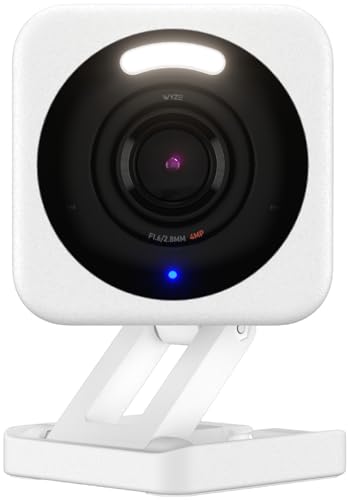
Wyze Cam v4 — Best value coverage
Wyze built its name on a single subversive proposition — that a genuinely good home camera should cost less than a family takeaway — and the Cam v4 is that proposition’s most complete form. Its headline party trick is colour night vision: where rivals render the night garden or nursery in ghostly monochrome, the v4 uses ambient light with a sensitivity that keeps colours legible, so the 2 a.m. notification shows a grey cat or a red-jacketed stranger rather than a grey ghost. For identification, which is the entire point of a security camera, that difference is not cosmetic.
The independence ledger is equally strong. A microSD card in the base records continuously or by event without any plan at all, the app offers a respectable free tier of functionality, and optional cloud services sit on top as an invitation rather than a toll. Weather resistance extends its parish outdoors under eaves and porches, so one model can standardise a whole house — nursery, porch, garage, garden gate — at a total cost rival ecosystems charge for two rooms.
Expectations should be set like an adult’s. The app, while capable, lacks the final polish of Ring’s, the company’s cloud upsells are persistent, and a camera this inexpensive invites buying several — at which point Wi-Fi discipline and notification tuning, covered later in this guide, become the household’s real project. None of that dents the central verdict: per room, per year, per honest feature, this is the most coverage money can buy.
- Format: compact indoor-outdoor camera
- Night: colour vision from ambient light
- Storage: microSD local recording, optional cloud
- Power: wired, weather-resistant shell
- Role: whole-house standardisation
Strengths
- Night footage identifies, not suggests
- No plan required for real recording
- Cheap enough to cover every room
Trade-offs
- App polish trails Ring’s ecosystem
- Cloud upsells are persistent
- Several units demand Wi-Fi discipline
A landlord of two small rental houses tells the economic story plainly: six of these across both properties, cards in every base, and a five-year cost below one year of a rival’s multi-camera subscription — while the colour night clips have twice identified the parcel thief that monochrome footage merely described. Value, at this level, stops being a compromise and becomes a strategy.
Pet households discover the second dividend. At this price, the camera pointed at the dog’s daytime kingdom stops being a decision, and the lunchtime check-in becomes a household ritual the whole family schedules around.
Best for: whole-house coverage, landlords and value-first households. Not suited for: app-polish perfectionists or subscription-service devotees

Ring Indoor Cam (2nd Gen) — Best app experience
Ring sells an experience before it sells a camera, and the experience is genuinely excellent. The app is the class standard — events laid out in a timeline a grandparent can navigate, sharing with family members handled gracefully, and integration with the wider Ring and Alexa world so complete that the camera feels less like a gadget than like a room’s new sense. For households already living in that ecosystem, this indoor model is the obvious citizen: it speaks the household language from the first minute.
Two design decisions deserve particular praise in a living-room camera. The physical privacy cover — a shutter the resident flips closed with a finger — answers the indoor camera’s deepest social problem more honestly than any software toggle: when the shutter is shut, the camera is blind, visibly, verifiably, to everyone in the room. And the form factor is discreet enough to sit on a bookshelf without the household feeling surveilled by its own furniture.
The subscription truth must be stated in the same breath. Ring’s best detection intelligence and its stored video history live inside its paid plan, and without it the camera is largely a live-view device with alerts — a fact buyers should meet in this paragraph rather than in their first month’s settings screen. Households who accept the plan get a superb, coherent system; households who resent it should walk further down this list, where the Wyze and eufy keep their recording at home.
- Format: compact indoor camera
- Privacy: physical shutter cover built in
- Ecosystem: Ring app and Alexa integration
- Storage: cloud history via subscription plan
- Role: living rooms, nurseries, ecosystem homes
Strengths
- The app every rival is judged against
- A shutter guests can see and trust
- Family sharing handled gracefully
Trade-offs
- Recording history needs the paid plan
- No local storage independence
- Ecosystem lock-in is real
A family caring for a father in the early stages of memory loss describes the camera’s true parish: the hallway view checked from a daughter’s phone at midnight, the two-way talk that reassures without a 3 a.m. drive across town, the shutter he can close himself when grandchildren visit — technology that supports independence rather than replacing it. Ecosystem polish, in that house, is not a luxury feature; it is what makes the help usable by everyone providing it.
Holiday-home owners form the second parish: a Ring household at the main address extends to the cottage without a second app, a second password or a second learning curve for the relatives who share the watching.
Best for: Ring and Alexa households wanting the smoothest daily experience. Not suited for: subscription refusers or local-storage loyalists

Blink Outdoor 4 — Best for gardens and gates
Every home has places the cables cannot go: the bottom gate, the shed, the driveway’s far post, the rental flat’s balcony where drilling is forbidden. The Outdoor 4 was designed for exactly those exiles. It runs on batteries with an endurance measured in seasons — Blink’s multi-year claims assume modest traffic, but even discounted generously, the practical meaning is a camera you install in spring and think about again at Christmas. Weatherproof, cable-free and small enough to mount on a fence post with two screws, it extends the household’s eyes to wherever the household’s worries live.
The Blink way of working is unhurried and sensible. Motion clips are stored via the Sync Module to local media or to Blink’s optional cloud, the app is admirably plain, and the camera’s detection can be zoned and scheduled so the neighbour’s cat stops filing reports. Video quality serves identification at garden distances honestly, and the two-way talk has talked more delivery drivers through gate codes than any feature in this guide.
Its compromises are the battery camera’s eternal pair, accepted knowingly. There is no continuous recording — a battery cannot afford vigilance without sleep — so the camera is a witness of events rather than a historian of everything. And the richest detection features join the familiar subscription story, though the local Sync Module route keeps a genuinely plan-free configuration available. For the perimeter, where the alternative is no camera at all, those are trades the whole street has already made.
- Format: battery outdoor camera
- Endurance: seasons on a set of cells
- Storage: Sync Module local or optional cloud
- Mounting: anywhere, no cable required
- Role: gates, gardens, sheds, driveways
Strengths
- Watchfulness where cables cannot go
- Battery life measured in seasons
- Plan-free local setup is possible
Trade-offs
- Events only, never continuous
- Best detection sits behind the plan
- Needs its Sync Module partner
An allotment association’s shed row supplies the field test: three of these across the plots, one winter of storms, and a spring discovery of exactly which night the tools were taken — plus, unexpectedly, a celebrated film of the fox who had been blamed for them, exonerated by the same footage. Perimeter cameras acquit as often as they accuse, and allotments now budget for them like padlocks.
Wildlife is the surprise second career: the same patience that watches a gate watches a bird table, a hedgehog house or a pond at night, and many owners report the nature films outnumber the security events within a month.
Best for: perimeters, gardens and anywhere wiring would be a project. Not suited for: continuous-recording duties or indoor nurseries

Blink Mini 2 — Best simple indoor watcher
Not every room needs a sentinel with a résumé; some need a small, honest eye that a non-technical household can install in ten minutes and forget for a year. The Mini 2 is Blink’s answer indoors: a compact wired camera that plugs in, joins the same plain-spoken app as its outdoor sibling, and watches a hallway, a garage or a sleeping baby’s door with a minimum of ceremony. Its predecessor sold in the millions on exactly that simplicity, and this generation adds weather resistance and improved night clarity while keeping the personality — none, deliberately — that made the original a household appliance.
Simplicity, done properly, is a feature set. The Mini 2’s setup is a QR code and a password; its notifications arrive through the same Blink account as the garden’s Outdoor 4, so a mixed household runs one app, one plan decision and one mental model; and its size lets it perch on a picture rail or a fridge top without announcing itself to every visitor. As the first camera in a cautious household — the trial that decides whether smart watching suits the family’s temperament — it is the gentlest possible beginning.
The honest limits match its station. Storage follows Blink’s pattern of cloud plan or Sync Module local recording, so the subscription conversation must still be had, merely at a smaller scale. There is no pan or tilt, no colour night magic of the Wyze kind, and the field of view, while generous, cannot cover a large open-plan room from one corner. Buy it for the rooms where simple watching is the whole brief, and it will never disappoint; ask it to be a patrol camera, and the two patrollers below are waiting.
- Format: compact wired indoor camera
- Setup: minutes, one app for the house
- Night: improved infrared clarity
- Storage: cloud plan or Sync Module local
- Role: hallways, garages, first cameras
Strengths
- Installed before the kettle boils
- Shares an app with outdoor siblings
- Small enough to forget entirely
Trade-offs
- Fixed view, no patrol movement
- Storage still involves a plan choice
- Large rooms exceed one unit
A first-time buyer in a terraced house gives the miniature its definitive review: bought for the garage after a neighbour’s break-in, installed by a self-confessed technophobe in one episode of a podcast, and expanded — this is the pattern — to a second unit in the hallway within the month. Simplicity is the gateway feature of the whole smart-home parish, and this camera is its most welcoming gate.
Student houses and first flats run the same play at smaller scale: one Mini by the front door, housemates all sharing the app, and the eternal mystery of the finished milk finally, definitively, solved.
Best for: first-time households and simple single-room watching. Not suited for: large open-plan spaces or patrol duties

eufy Indoor Cam E220 — Best pet and toddler patrol
A fixed camera photographs a room; a pan-and-tilt camera follows a life. The E220 rotates through a full circle and tilts to match, and its subject tracking uses that freedom the way a good pet-sitter uses a hallway — following the dog’s patrol from sofa to door, keeping the crawling toddler centred as the expedition crosses the rug, and returning to its post when the excitement ends. For households whose indoor subjects move, which is to say households with animals or small humans, that following act changes the camera from a witness of doorways into a companion of the whole room.
eufy’s founding argument is independence, and the E220 makes it well. Recording lives on a microSD card in the camera; the app works without a subscription breathing down its neck; and the detection intelligence — distinguishing people from pets, and in its finer moments the sound of a baby’s cry from the sound of the television — runs on the device rather than in a rented cloud. Households uneasy about family footage travelling to distant servers will find this the most philosophically comfortable camera in the guide.
Moving parts ask their questions, and honesty must answer them. A motor is a thing that can wear, a tracking camera occasionally follows the wrong protagonist — the cat, gloriously, during the burglary of the dog’s dinner — and eufy’s app, while capable, lacks the last degree of Ring’s polish. The 2K-class picture is sharp enough that none of this matters much in practice. For the living room that contains a life worth following, this is the guide’s warmest recommendation.
- Format: pan-and-tilt indoor camera
- Tracking: follows pets and people
- Storage: local card, no plan required
- Detection: person, pet and cry alerts
- Role: living rooms, nurseries, pet patrol
Strengths
- The room’s action stays in frame
- Independence from subscriptions
- Detection that knows a baby’s cry
Trade-offs
- Motors are moving parts
- Tracking can pick the wrong star
- App polish a step behind Ring
A breeder of cavalier spaniels runs two of these in the whelping room and describes the outcome in one sentence: she has not missed a puppy’s first steps in three litters. The camera follows, the card remembers, and no monthly fee attends the miracle — a combination that breeders, shelters and rescues have adopted as standard equipment for exactly those reasons.
Toddler households report the comic version: the patrol footage, reviewed at bedtime, reveals the day’s expeditions in full — the biscuit tin’s security thoroughly, adorably compromised at 11 a.m. by a chair dragged in silence.
Best for: pet and toddler households wanting patrol without a plan. Not suited for: outdoor duty or app-polish absolutists

TP-Link Tapo C210 — Best Tapo-ecosystem patrol
TP-Link’s Tapo line is the smart home’s quiet empire: plugs, bulbs, sensors and cameras sharing one app and one philosophy of aggressive value. The C210 is that empire’s patrolling camera — pan and tilt covering a room’s full compass, tracking that follows the household’s moving members, night vision for the hours the room is dark, and local card recording that keeps the whole arrangement independent of subscriptions. For a household already lit and switched by Tapo, it is not merely a camera choice; it is the completion of a system.
The ecosystem argument deserves its weight. A Tapo household can bind the camera to the rest of the home’s behaviour — lights that answer the camera’s detection, routines that arm the watching when the last phone leaves the street — inside one app, without the intermediary services that mixed-brand homes must negotiate. TP-Link’s networking heritage shows in Wi-Fi manners that are, in this guide’s experience, conspicuously well-behaved: the C210 holds a connection in the far bedroom where lesser cameras file their resignations.
Its debits mirror its eufy rival’s, with an accent of its own. Motors wear, tracking occasionally chooses the curtain’s shadow over the burglar, and the Tapo app’s richness can overwhelm a first-time user for an evening before it becomes second nature. Picture quality sits a notch below the sharpest here. Against that stands a complete, coherent, plan-free patrol at a price that lets a household standardise on it room by room — the same compounding logic that won the Wyze its crown, wearing a pan-and-tilt crown of its own.
- Format: pan-and-tilt indoor camera
- Ecosystem: Tapo app and automations
- Storage: local card recording
- Network: strong Wi-Fi manners
- Role: living rooms, halls, Tapo homes
Strengths
- Automations with the whole Tapo home
- Patrol coverage from one shelf
- Connection holds in far rooms
Trade-offs
- App richness takes an evening to learn
- Picture a notch below the sharpest
- Tracking can chase shadows
A smart-home hobbyist’s hallway demonstrates the system argument in one routine: the C210 detects the evening’s first arrival, the Tapo lights answer before the key turns, and the camera’s patrol confirms the house is as it should be — three products behaving as one organism, which is the entire promise the word “ecosystem” was invented to keep.
Small shops and cafés borrow the same kit after hours: one patrolling camera over the till and the door, card recording, no contract — security at a scale and price a single-outlet business can actually sustain.
Best for: Tapo households and automation enthusiasts wanting patrol coverage. Not suited for: single-brand Ring or Blink homes, or outdoor mounting
How Do the Six Smart Home Cameras Compare Around the House?
| Camera | Placement | Household strength | Best use |
|---|---|---|---|
| Wyze Cam v4 | Indoor and sheltered outdoor | Value and colour night vision | Whole-house coverage |
| Ring Indoor Cam (2nd Gen) | Indoor | App and privacy shutter | Ecosystem living rooms |
| Blink Outdoor 4 | Outdoor, battery | Seasons of endurance | Gates and gardens |
| Blink Mini 2 | Indoor | Simplicity | Hallways and first setups |
| eufy Indoor Cam E220 | Indoor, pan-tilt | Tracking without a plan | Pets and toddlers |
| TP-Link Tapo C210 | Indoor, pan-tilt | Automations and patrol | Tapo smart homes |
Place each camera where its strength lives and the table becomes a floor plan: value and night colour everywhere, polish in the living room, endurance at the perimeter, patrol where the household’s life actually moves.
How Should You Place Cameras So They Help Instead of Annoy?
Height and angle decide everything. A camera at picture-rail height, tilted gently down, sees faces rather than the tops of heads, covers the room’s entrances in one frame, and stays above the reach of toddlers and the curiosity of guests. Aim for the doors and the valuables’ approaches, not for the room’s centre: intruders, toddlers and dogs all enter through the same geography, and a camera that owns the thresholds owns the story of the house.
Light is placement’s silent partner. A camera staring into a window spends its life as a silhouette machine, blinded at exactly the sunny hours when parcels arrive; angle it along the window wall instead, and the same light becomes its ally. Night brings the mirror-image trap: infrared reflects off glass, so a camera behind a window watches its own glow all night — outdoor watching belongs outdoors, which is the Blink’s whole argument.
Finally, place for the household’s feelings as carefully as for its security. Cameras belong in shared and threshold spaces — halls, living rooms, nurseries by parental choice, entrances — and their presence should be known, discussed and, where the Ring’s shutter philosophy applies, visibly switch-offable. A home that feels watched by its own cameras has installed them wrong, whatever the footage quality.
What Mistakes Do People Make With Home Cameras?
Notification negligence is the universal first error: a new camera at factory sensitivity reports every moth, headlight sweep and curtain breath, the household silences it within the week, and the one alert that mattered arrives to a muted phone in month three. Tune zones and sensitivity on day one, during a calm hour, and review the first week’s alerts like a probation report. The second error is password theatre — a camera account sharing the household’s oldest, most reused password — when the account guards the inside of a home. Unique password, two-factor on, sharing through the app’s family controls rather than by lending the login: non-negotiable, all three.
Coverage greed completes the trio. Six cameras bought in a weekend produce six untuned alert streams and a household that hates all of them; one camera, placed well and tuned honestly, then a second a month later, builds a system the family trusts. Add the quieter sins — a camera pointed at a neighbour’s garden, a card never checked until it failed, firmware ignored for a year — and the moral is consistent: home cameras fail socially and procedurally far more often than they fail optically.
How Do You Keep a Watching Camera Private?
Begin with the account, because the account is the real front door. A unique, strong password and two-factor authentication protect the footage more than any camera feature; family access should be granted person by person through sharing controls, so that access can be withdrawn when the dog-sitter’s week ends or the teenager’s friend moves away. Review the shared list seasonally, the way you would review who holds a house key — because that, precisely, is what it is.
Inside the home, use the privacy tools as daily manners rather than emergency measures. Schedules that sleep the living-room camera during family hours, geofenced arming that wakes the system when the last phone leaves, the Ring’s physical shutter, microphone muting where a room’s conversations are nobody’s archive — these convert a surveillance device into a household servant with understood hours. Guests deserve a mention of the cameras that share their visit; hosts who offer it find the mention costs nothing and buys complete ease.
And keep the firmware fed. Camera makers patch security flaws through updates that only protect households which install them, so automatic updates belong on, and a camera abandoned by its maker belongs, eventually, off the wall — the continuity argument from this guide’s subscription section, applied to safety.
Why Does Night Vision Decide More Purchases Than Daylight Quality?
Because the house’s interesting hours are dark. Parcels are stolen at dusk, toddlers climb at 2 a.m., foxes visit at four, and the elderly parent’s unsteady hallway trip happens in the small hours — the entire caseload of a home camera is nocturnal, while its daylight footage mostly documents the postman’s punctuality. A camera should therefore be chosen by its night manners first, and this list was: the Wyze’s colour rendition for identification, the patrollers’ infrared reach for room coverage, the Blink’s patient event-waking for the garden’s long dark.
Infrared has a personality worth knowing. It renders the world in silver and black, flatters nothing, and reflects betrayingly off nearby walls and glass, halving its own range in a careless placement. Colour night vision of the Wyze kind trades that reach for identification richness where some ambient light exists — a porch light, a street lamp, the nursery’s night-light. Match the technology to the room’s actual darkness rather than to the brochure’s demonstration, and test on the first night, while returning is still easy.
Audio completes the night picture, literally not at all and practically entirely. The cry, the crash, the dog’s particular bark that means a stranger rather than a squirrel — sound alerts from the eufy’s cry detection to simple audio recording turn a camera into a listening post for exactly the hours when the household is asleep and the house is on its own.
How Should a Household Grow From One Camera to a System?
In the order of worry, not the order of advertising. The first camera covers the household’s sharpest anxiety — the front door, the nursery, the dog — and earns its keep for a month while the family learns its manners and their own. The second answers the question the first one raised: usually the back door or the garden, which is where battery freedom earns its place. Only then does coverage become a project, and by then the household knows which ecosystem’s app it can stand, which storage philosophy it prefers, and how many notifications a sane family can metabolise.
Standardise ruthlessly once the direction is clear. One app, one account structure, one settings philosophy copied from camera to camera: the household that runs three ecosystems runs three half-learned systems and trusts none of them. The picks above were grouped with that discipline in mind — Blink pairs, Tapo and eufy independence, Ring’s polish, Wyze’s blanket value — so that whichever first camera a household chooses, its natural second and third are already on this page.
Keep a small map, literally, on paper: where each camera is, what it watches, when its card was last checked, whose phone receives its alerts. Systems fail at their undocumented edges, and a household map turns a drawer of gadgets into an estate that can be handed over — to a house-sitter, a grown child, a future buyer — as the working system it has become.
Final Recommendation
Blanket the house in Wyze Cam v4s if value and colour night vision lead your priorities; choose the Ring Indoor Cam when app polish and a visible privacy shutter matter most, and its plan is acceptable. Send the Blink Outdoor 4 to the perimeter and its Mini 2 sibling to the hallway, and let the eufy E220 or the Tapo C210 patrol the rooms where pets and toddlers write the day’s script — eufy for independence, Tapo for automations. Tune the alerts on day one, guard the account like a house key, and let the watching serve the household, never the reverse.
Frequently Asked Questions
Do I need a subscription for a home camera to be useful?
Not with the local-storage models here — the Wyze, eufy and Tapo record to memory cards with no plan, and Blink offers a local route through its Sync Module. Ring’s recording history is plan-based. Decide which philosophy suits the household before choosing the camera, not after.
Where should I never point a home camera?
At neighbours’ property beyond your own boundaries, and inside your own home, at spaces where guests have a reasonable expectation of privacy. Thresholds, shared rooms and entrances are the legitimate parish; tell guests the cameras are there, and use shutters and schedules generously.
How many cameras does an ordinary house need?
Most households settle at three to five: an entrance, a living space, a perimeter point, and one flexible watcher for the nursery, the pet or the garage. More than that usually reflects untuned alerts rather than real risk — grow in the order of worry, as this guide advises.
Will these cameras work if the internet goes down?
Local-recording models keep filming to their cards through an outage and show you the footage when service returns; cloud-dependent features pause. Battery and card independence — the Blink and Wyze pattern — is the resilient architecture for households that dislike surprises.
Can hackers watch my cameras?
The realistic protections are in your hands: a unique password, two-factor authentication, current firmware, and sharing granted per person rather than by lending logins. Cameras maintained that way present a hard target; cameras left at factory passwords are the ones in the cautionary tales.
What is the difference between the two patrolling cameras here?
Both pan, tilt and track with local recording. The eufy E220 leans into on-device detection, including cry alerts, as a standalone independent; the Tapo C210 leans into TP-Link’s wider automation ecosystem. Choose by the household’s existing platform and philosophy.
How Do Cameras Help With Elderly Parents Living Alone?
Gently, and only ever by agreement — that condition comes first, because a camera installed in a parent’s home without their genuine, ongoing consent is not care but surveillance, and it corrodes the relationship it claims to protect. Agreed properly, though, these cameras have become one of the kindest technologies in the modern family’s kit: the hallway check that confirms a morning routine has happened, the two-way conversation through the Ring or Blink when a phone goes unanswered, the fall’s aftermath noticed in minutes rather than discovered at the evening call.
Placement for care differs from placement for security. The goal is rhythm, not evidence: a camera that sees the kitchen door and the hallway learns the day’s shape — kettle by eight, newspaper by nine — so that an absent rhythm, not a dramatic event, is what alerts the family. Privacy shutters and schedules matter doubly here, because the parent’s dignity is the entire point of the independence the camera is protecting; the watched hours should be the agreed hours, and the parent should hold the power to end them.
Families report an unexpected dividend: the camera reduces the anxious check-in call, the one that begins “just making sure”, and replaces it with calls about grandchildren and gardens. Care that can see a little needs to interrupt less, and independence — the parent’s and the children’s alike — quietly grows in the space that leaves.
What Should Renters and Drilling-Free Households Choose?
The rental contract rewrites the shortlist in one stroke: nothing screwed into walls the tenant does not own, nothing wired through fabric they cannot alter, everything removable on moving day without a trace. Battery and shelf-sitting cameras inherit the earth under those rules — the Blink Outdoor 4 on its small mount or a stand, the indoor models perched on bookcases and fridge tops, the patrollers commanding whole rooms from a single piece of furniture. Adhesive mounts and door-frame clamps complete a toolkit that leaves the deposit intact.
Wi-Fi is the renter’s second landlord. Shared or distant-router connections punish cameras with weak radios, which is where the Tapo’s connection manners and the Blink’s low-bandwidth patience earn their paragraphs, and where a household should test one camera through a full week of evenings — the network’s rush hour — before standardising on it. A camera that buffers at 7 p.m. is not a security device; it is a screensaver with ambitions.
Portability is the renter’s compensation. A system built from these six travels to the next flat in one box, re-installs in an afternoon, and carries its tuned settings and learned geography with it in the app. Owners accumulate equity in houses; renters, with a plan-free camera kit, accumulate equity in a system — which, across three moves, can be worth more.
How Do You Stop Notifications From Eating the Household Alive?
Treat the first week as a tuning residency rather than a finished installation. Every alert in that week is data: the 6 a.m. shadow that files a daily report needs a zone trimmed; the spider who has adopted the porch camera needs the sensitivity lowered a notch and, frankly, evicting; the delivery window’s legitimate bustle needs a schedule. Households that do this work own cameras they still listen to in year three; households that skip it own cameras they muted in week two, which is to say cameras they no longer own in any sense that matters.
Person and pet filtering, where a camera or its plan offers it, is the second great silencer — the difference between “something moved” and “someone is at the door” is the difference between noise and news. Rich notifications with a thumbnail attached complete the discipline: a glanceable picture lets the household dismiss nine alerts in nine seconds and act on the tenth, which is the entire ergonomic point of the system.
Finally, route alerts by severity and by person. The nursery’s cry alert may deserve a sound at midnight; the garden’s cat bulletin does not. The teenager’s phone need not carry the shed’s reports, and the shed need not report to everyone. A notification system is a household’s nervous system, and like the original, it works best when most signals are handled quietly, below the level of alarm.
Why Does Wi-Fi Placement Decide Half of Camera Performance?
Because a smart camera is a radio that occasionally takes pictures. The wall between the router and the garden gate, the foil-backed insulation in the new extension, the neighbour’s competing network on the same channel — these invisible geographies decide whether the 3 a.m. event arrives as a clip or as a gap, and no sensor upgrade compensates for a starved connection. Walk the house with a phone’s signal readout before choosing positions, and treat a camera’s promised range as a fair-weather figure to be discounted by every wall in the way.
The remedies are architectural rather than heroic. A mesh node placed for the cameras as much as for the laptops; a camera moved six feet to escape a dead corner rather than amplified in place; the Sync Module or hub positioned centrally among its cameras instead of beside the router by habit. Households that draw the signal map once, on the paper system map this guide recommends, stop having mysterious camera problems — the mysteries were geography all along.
Bandwidth budgeting completes the picture for multi-camera homes. Several cameras uploading event clips simultaneously will find the ceiling of a modest connection at exactly the dramatic moments — storms, parties, the street’s collective alarm — so local-recording models and staggered sensitivities are not merely frugal choices; they are how a busy household’s system stays coherent under load.
How Should Footage Be Kept, Shared and Eventually Deleted?
A household’s footage is a family archive whether it intends to be or not, and it deserves the archive’s three habits. Keep deliberately: the clip of the toddler’s escape, the fox at the bird table, the night the storm took the fence — save these out of the rolling buffer into a named place before the card or the cloud overwrites them, because both will, on schedule, without sentiment. The cameras’ apps all allow the save; the discipline is remembering that the buffer is a conveyor, not a vault.
Share narrowly. The app’s per-person, per-camera sharing exists so that the dog-sitter sees the dog’s room for a week and nothing else, ever — use it at that granularity, review it when the week ends, and treat the shared list as the household’s key cabinet, audited with the seasons. Footage of other people — guests, neighbours, the postman’s daily round — should be shared beyond the household only for genuine cause, and the law in many places has opinions here that a family’s group chat does not override.
Delete on a rhythm. Rolling storage does most of it automatically, but the saved folder grows its own archaeology of alarms and adorableness; an annual pass — keep the treasures, release the rest — keeps the archive a pleasure rather than a liability, and keeps the household’s memory of its own home curated by its owners rather than accumulated by its machines.
What Does a Camera See That Its Owners Forget to Imagine?
The household’s ordinary life, in merciless completeness — and sitting with that fact for a moment improves every installation. The camera by the front door will know the household’s hours more precisely than any member does; the living-room patroller will hold a season of evenings, arguments, celebrations and naps. None of this is an argument against the cameras — the six above were chosen partly for how well they let a household govern exactly this knowledge — but it is an argument for installing them as a deliberate act of household policy rather than as a gadget impulse.
Families that thrive with cameras tend to share three habits. They talk about the system openly, including with children, at whatever level the child’s age makes honest. They use the off switches and shutters as visibly as the cameras themselves, so trust is a demonstrated practice rather than a settings page. And they review the system’s purpose once in a while — a new baby, a teenager’s changing privacy, a parent’s care needs — and adjust the watching to the family it serves, because families change faster than firmware.
Hold those habits and the camera settles into its proper station: neither an eye that never sleeps nor a spy in the corner, but a household tool like the lock and the lamp — unremarkable, governed, and there for the moments, welcome and unwelcome alike, when the house needs to tell its owners what happened while they were looking the other way.
Start, then, with one honest camera in the place the household worries about most, tune it until its alerts read like news, and let a month of quiet competence make the case for the second. That is how every good system in this guide was actually built — not in a weekend’s splurge, but in a season of small, kept promises between a house and the people who love it.
How Do You Choose Between Two Good Cameras at the Same Shelf?
When the shortlist narrows to equals, decide by the household’s existing gravity. A home already speaking Alexa leans Ring; a home already lit by Tapo leans Tapo; a home with no allegiances should choose by the five-year storage arithmetic and by which app’s free tier a week’s trial made least annoying. Borrow the tiebreaker shops cannot sell you: install one, live with its notifications through a full ordinary week — post, pets, weather and all — and let that week, rather than any specification table, cast the deciding vote for the rooms that follow.
And remember that the second camera is the true purchase. The first proves the concept; the second proves the system — its app, its storage philosophy, its manners at scale. Every verdict in this guide was written with the second and third units in mind, which is why ecosystems and independence were graded as heavily as lenses.
Related Guides
Round out the setup with our guide to placing cameras without annoying neighbours, our storage comparison in local storage versus cloud subscriptions, and our walkthrough for securing a smart home account.


