ilcastellomenu.com is reader-supported. When you buy through links on our site, we may earn an affiliate commission.
Where to Buy a Camera That Pays for Itself in Listings
The best digital cameras for ecommerce products are not judged the way other cameras are judged, because their photographs have a job interview to pass: a stranger, scrolling fast, decides in about a second whether your product looks trustworthy. This guide therefore ranks five verified camera bodies — and one prose-only lens class that matters as much as any body — by the virtues listings actually reward: colour that stays identical from the first product to the five-hundredth, macro reach for the details buyers zoom into, tethering that puts every frame on a real screen the moment it is taken, and files that make a white background stay white, product after product, month after month. The bodies link to their verified listings; the macro glass and lighting are discussed in prose, where they belong, because they are bought by specification rather than by brand loyalty.
One honesty note before the picks: the camera is the third most important purchase in product photography, behind light and process. This guide says so repeatedly, because a seller misled into buying a body when they needed a light tent and a tethering cable has been robbed politely, and we decline to do it.
Key Takeaways
- Consistency sells: the same white, the same colour, the same framing, every listing.
- Tethering is the feature that pays — see the frame on a monitor before the next fifty.
- Macro capability decides whether jewellery, watches and textures survive zooming buyers.
- Light matters more than the body; budget for it in the same order.
- Full-frame files forgive cropping for every marketplace’s different shape.
- A camera that speeds the workflow beats a camera that wins comparisons.
In this guide
Quick Picks
| Camera | Badge | Why it earns its place |
|---|---|---|
| Sony Alpha 7 IV | The catalogue workhorse | High-resolution full-frame files, dependable tethering and colour that stays put across a whole catalogue. |
| Canon EOS R6 Mark II | The colour-fidelity choice | Canon’s rendering flatters apparel and food, with focus speed that keeps a high-volume shooting day moving. |
| Fujifilm X-T5 | The high-resolution detail specialist | A dense APS-C sensor that resolves texture and stitching, in a body whose dials speed a studio routine. |
| Nikon Z50 II | The growing seller’s starter | An affordable system body with honest colour and room to add the macro lens when the shop grows into it. |
| Canon EOS R10 | The volume-listing sprinter | Fast, light and quick to tether — built for sellers listing dozens of items in a session. |
| A true macro lens for your mount | The prose-only detail instrument | Life-size reproduction for the close-ups that close sales, bought once and kept across bodies. |
How Did We Judge Cameras by the Standards of a Shop, Not a Gallery?
The evaluation began where listings begin: with a white background and a stopwatch. Each body was considered as the engine of a shooting session — fifty products, one afternoon, one pair of hands — and scored on the friction it adds or removes. How fast does the frame appear on the monitor when tethered? How reliably does focus land on the product’s near edge, frame after frame? How identical is the white across the first frame and the fiftieth, as lights warm and batteries fade?
The second test was the buyer’s zoom. Marketplace shoppers magnify listings mercilessly, hunting the stitching, the grain, the clasp, the flaw the seller hoped was invisible. Bodies were judged on the detail their files hold under that magnification — sensor resolution mattered here, but so did the discipline of the whole chain: a high-resolution body behind a soft kit lens fails the zoom test that a modest body behind the prose-only macro passes, which is why the lens gets its own pick.
The third test was colour as a business asset. A shop’s photographs must agree with each other — the navy jumper must be the same navy in March’s shoot and October’s — and with the product in the customer’s hands, because colour disagreement is the polite name for a large share of returns. Bodies with stable, well-profiled colour and proper custom white balance workflows scored as what they are: returns-reduction equipment.
Why Do Light and Background Decide More Sales Than the Camera Does?
Because the buyer’s eye reads light before it reads anything else. A product photographed in a large, soft, controlled light looks expensive, honest and calm; the same product under a ceiling bulb looks like a classified advertisement from a worse decade, and no sensor ever made can fully launder that first impression. The lighting kit this guide assumes — discussed in prose because it is bought by size and softness, not by badge — is some combination of a light tent or diffusion setup for small goods, two steady lights positioned by the geometry in the how-to sections below, and a background system, whether seamless paper, a sweep or a consistent surface, that makes “white” a repeatable decision instead of a daily negotiation.
The white background deserves its reputation as a discipline rather than a backdrop. Marketplaces reward it because it makes catalogues look unified and products comparable; buyers reward it because nothing competes with the object. Achieving it is a chain: light the background slightly brighter than the product, set a custom white balance from a grey reference under your actual lights, expose so the background renders near-white without clipping the product’s own pale edges, and check the first frame of every session tethered, on the monitor, at full size. The cameras below were chosen partly for how gracefully they support each link of that chain — custom white balance that is quick to set and stable once set, tethering that shows the truth immediately, and highlight warnings that catch a blown background before fifty products inherit it.
None of this diminishes the bodies; it locates them. A great camera inside a disciplined light-and-background process produces a catalogue. A great camera outside one produces fifty beautiful problems. Buy the process first in your planning, even if the parcels arrive in the other order.
Which Are the Best Digital Cameras for Ecommerce Products, From First Listing to Full Catalogue?
Three full-frame and high-resolution bodies for established catalogues, two accessible system cameras for growing shops, and the macro lens that outranks them all for detail work. Read by the size of your catalogue and the closeness of your products.

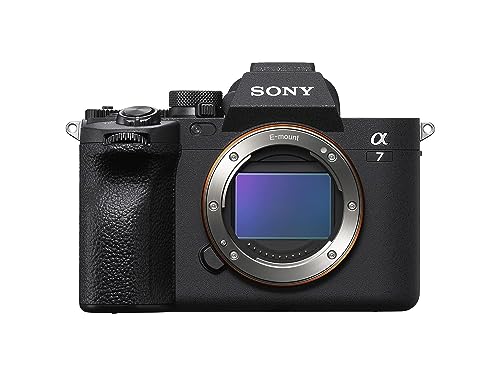
Sony Alpha 7 IV — The catalogue workhorse
The A7 IV is the body this guide would install in a growing product studio without a second thought, because its virtues are exactly a catalogue’s virtues. The full-frame sensor’s resolution gives every listing cropping freedom — shoot one master frame, derive the marketplace’s square, the website’s landscape and the social crop from it, all still sharp under a buyer’s zoom. Its tethering is mature and dependable, its custom white balance workflow is quick, and Sony’s colour, set carefully once, stays where you put it across a season of shoots.
The supporting cast matters at volume. Eye and subject detection are irrelevant to a handbag on a sweep, but the A7 IV’s focus precision at the product’s near edge, its focus-peaking and magnification aids for manual macro work, and its tolerance for long tethered sessions without drama are the unglamorous traits a shooting day is actually made of. The E-mount’s lens library — including the macro glass this guide’s final pick describes — is the deepest available, so the body never becomes the ceiling on the studio’s ambitions.
- Format: full-frame mirrorless, Sony E mount
- Files: high resolution for multi-crop listing workflows
- Tethering: mature wired and wireless options
- Focus: precise placement plus strong manual-focus aids
- Role: the established catalogue’s engine
Strengths
- One master frame serves every marketplace’s shape
- Colour stability across long, repetitive sessions
- Lens ecosystem covers macro to room-scale products
Trade-offs
- More resolution and cost than a small shop will use
- Full-frame lenses add up across a studio kit
- Menus reward an afternoon of deliberate setup
Sellers should also think about resale of a different kind: listings shot on a consistent, high-quality system age well. Marketplaces re-crop, re-compress and re-rank constantly, and the catalogue built on generous master files survives each platform change by re-deriving rather than re-shooting. The A7 IV is therefore less a camera purchase than a small insurance policy against the platforms’ future redesigns — the shoot happens once, properly, and pays out for years.
Buy it when the catalogue is your business’s front window and the shooting day is a fixture of the week. Smaller operations should start further down this list and arrive here by growth, not by hope.
Best for: established sellers, agencies and multi-marketplace catalogues. Not suited for: occasional listing or the tightest start-up budgets

Canon EOS R6 Mark II — The colour-fidelity choice
Some products are bought by their colour: the dress, the lipstick-adjacent cosmetics, the painted furniture, the food kit whose appetite appeal lives or dies in its reds. The R6 Mark II is this guide’s pick for those sellers, because Canon’s colour rendering — the house style refined over decades of making skin and fabric look like themselves — translates to product work as an unusual fidelity to the hues customers argue about in reviews. Set a custom white balance under your lights and the Canon holds the product’s colour with a loyalty that reduces the “not as pictured” species of return.
The body around the colour is a fast, modern full-frame tool: rapid and certain autofocus for the handheld lifestyle-adjacent shots that listings increasingly include, in-body stabilisation that forgives the quick handheld frame between tethered ones, and video capability strong enough that the same body shoots the product film the marketplace now rewards. For the seller whose catalogue mixes packshots with people — apparel on models, tools in hands — it is the most complete single body here.
- Format: full-frame mirrorless, Canon RF mount
- Colour: faithful, flattering rendering for apparel and food
- Stabilisation: in-body, steadying handheld listing shots
- Video: strong product-film capability from the same body
- Role: the colour-critical catalogue
Strengths
- Colour that agrees with the product in the customer’s hands
- One body covers packshots, worn shots and product video
- Fast handling keeps a long listing day moving
Trade-offs
- Resolution is ample rather than maximal for extreme crops
- RF macro glass is a considered investment
- Overkill for purely small-item, high-volume shops
Model shoots are where this body pulls ahead — the work pure packshot guides ignore and apparel sellers live by. Garments sell on bodies, and the R6 II’s eye detection, burst manners and colour make it the strongest people-and-product body in this list — the same camera that shot the flat lay on Tuesday shoots the lookbook on Saturday. A one-body shop whose products are worn, held or eaten should weight that versatility above the Sony’s extra resolution.
Choose it when your returns mention colour, or your listings include humans. It is the fidelity pick, and fidelity is a business metric disguised as a photographic one.
Best for: apparel, beauty, food and lifestyle-product sellers. Not suited for: macro-only catalogues needing maximum crop headroom

Fujifilm X-T5 — The high-resolution detail specialist
The X-T5 brings an APS-C sensor with resolution that embarrasses older full-frame bodies, and for product work that density is aimed at one target: texture. The weave of the fabric, the grain of the leather, the knurling on the tool handle, the engraving on the watch case — the details buyers zoom into when deciding whether a thing is made well — are exactly what this sensor resolves, especially behind a sharp lens. Sellers of crafted, premium, detail-led goods will find its files hold up under the marketplace magnifier with unusual composure.
Its body philosophy suits studio routine in a way menu-driven rivals should envy. The exposure controls are physical dials, visible at a glance and adjustable without screens, so a repetitive product workflow — same light, same settings, product after product — becomes muscle memory rather than menu memory. Fujifilm’s colour is also famously characterful; sellers must tame it to neutrality for catalogue accuracy, using custom white balance and the flatter profiles, but those who do the taming once inherit files of exceptional clarity.
- Format: APS-C mirrorless, Fujifilm X mount
- Sensor: very high resolution for texture and cropping
- Controls: physical dials for a repeatable studio routine
- Colour: characterful, tamable to catalogue neutrality
- Role: the detail-led product specialist
Strengths
- Resolves the textures premium buyers zoom into
- Dials make a repetitive workflow fast and consistent
- Smaller, lighter lenses than full-frame equivalents
Trade-offs
- Colour needs deliberate neutralising for catalogue work
- Tethering ecosystem is narrower than Sony’s or Canon’s
- APS-C files have less low-light forgiveness for lifestyle shots
Viewed a second time, the X-T5 is the crafts-seller’s camera in spirit as much as specification: its dials and its rendering suit the maker photographing their own work at the bench’s end, where the shooting setup is permanent and the products are singular rather than voluminous. A jeweller, a leatherworker, a small-batch maker of anything tactile will find its detail and its ritual congenial in a way the volume picks are not.
Buy it when your products are examined closely and bought slowly. Volume sellers should take the sprinter below instead.
Best for: crafted goods, textiles, watches and detail-led premium listings. Not suited for: high-volume tethered lines or colour-critical apparel at scale

Nikon Z50 II — The growing seller’s starter
Every catalogue in this guide’s upper half began as a seller with twelve products and a phone that was not quite coping. The Z50 II is the pick for that seller’s first real camera: an APS-C body with honest, well-mannered colour, a proper viewfinder and grip for the handheld shots, subject detection that helps when products come with pets or people attached, and — decisively — Nikon’s Z mount in front of it, so the macro lens and the better lights can be added in the order growth dictates rather than all on the first frightening invoice.
Its product virtues are foundational rather than exotic, and foundations are what a first system needs. Files are clean and detailed enough for every marketplace’s current demands; white balance can be set deliberately and held; the screen and controls make a small tabletop setup easy to run tethered or untethered while the shop is still small enough that tethering is a luxury. It is also a genuinely pleasant camera for the seller’s own life, which matters: equipment bought for a business and loved as an object gets maintained, insured and kept.
- Format: APS-C mirrorless, Nikon Z mount
- Colour: honest, stable rendering for general goods
- Handling: proper grip and viewfinder for mixed shooting
- Growth: Z-mount macro and lenses added as the shop grows
- Role: the first system camera for sellers
Strengths
- Accessible entry into a full professional mount
- Colour and files satisfy every current marketplace
- Serves the shop and the seller’s own photography alike
Trade-offs
- Resolution ceiling will meet a big catalogue eventually
- Tethering workflow is capable rather than class-leading
- No in-body stabilisation for handheld lifestyle frames
Order of purchase matters enormously here. Small sellers drown in advice to buy everything at once; the Z50 II supports the sane order — body and kit lens now, lights next (they will improve the photographs more), macro when the product range demands it, tethering discipline throughout. A camera that fits a growth sequence is worth more to a young business than a flagship that consumes the whole first year’s equipment budget and leaves the lighting to a ceiling bulb.
Buy it as the first rung, with the lights budgeted in the same breath. It will not be the last camera the business owns, and it is not supposed to be.
Best for: new and growing shops photographing general goods. Not suited for: established high-volume or macro-heavy catalogues

Canon EOS R10 — The volume-listing sprinter
Some sellers’ bottleneck is not quality but throughput: the vintage dealer with forty finds a week, the marketplace trader whose stock turns over faster than it can be photographed, the charity-shop and resale operations where listing speed is margin. The R10 is their pick — a light, fast APS-C body whose autofocus snaps onto products and people alike, whose handling never slows a session, and whose files are more than sufficient for marketplaces that compress uploads anyway. It is the camera as a listing tool, judged by items per hour at acceptable quality, and it wins that contest in this list.
Speed here is a system property: the body is light enough to shoot handheld around a product rather than tripod-bound, quick to move between the white sweep and the lifestyle corner, and happy working untethered with wireless transfer feeding the listing software while the next item is being arranged. Canon’s colour keeps general goods looking like themselves with minimal correction, and the RF mount leaves the macro and prime upgrades open when a product line justifies them.
- Format: APS-C mirrorless, Canon RF mount
- Handling: light and fast for handheld volume work
- Focus: quick, confident subject acquisition
- Transfer: wireless workflow into listing pipelines
- Role: the high-throughput listing camera
Strengths
- Items-per-hour is its native metric, and it excels
- Light enough for all-day handheld sessions
- Marketplace-grade files with minimal correction needed
Trade-offs
- Not the detail instrument the X-T5 is for premium close-ups
- Smaller buffer and battery than the full-frame pair
- White-background discipline still has to come from you
Delegation is where it quietly shines. Volume listing is often delegated — to a Saturday assistant, a family member, a new hire — and the R10’s forgiving automatic modes and plain Canon colour make it the easiest body here to hand over with a one-page process sheet and get consistent results back. In businesses where the photographer is whoever is free, consistency across operators is a feature no specification lists, and this Canon quietly leads the page in it.
Buy it when the queue of unlisted stock is the problem. When the problem becomes the quality ceiling of individual premium items, the bodies above are waiting.
Best for: resale, vintage and high-turnover sellers listing at volume. Not suited for: luxury detail work or large-format catalogue printing
A True Macro Lens for Your Mount — The prose-only detail instrument
The final pick is prose-only because it is a specification, not a product: a true macro lens, in whichever mount your chosen body wears, capable of life-size reproduction — the point at which a centimetre of product fills a centimetre of sensor. Kit zooms that advertise “macro” in their marketing focus close-ish and resolve softly; a real macro focuses to life size and resolves the engraving on a ring shank, the hallmarks on silver, the weave at a seam, with the flat, honest sharpness that buyers zooming into a listing are actually looking for. For jewellery, watches, coins, electronics details, cosmetics textures and any product whose value lives below the centimetre scale, this lens is not an upgrade to the system. It is the system.
Working with one teaches the genre’s central discipline: depth of field at life size is measured in millimetres, so focus stacking — a sequence of frames at stepped focus distances, combined in software — becomes the professional’s standard answer for a product that must be sharp front to back, and every body in this guide supports the workflow manually if not automatically. Light, too, changes character at macro distances: small, close, carefully flagged sources model tiny textures, and the lens’s working distance — how far its front sits from the subject at life size — decides whether your lights can even reach the scene, a specification to check before purchase rather than after.
- Specification: true 1:1 life-size reproduction
- Subjects: jewellery, watches, coins, textures, electronics
- Technique: focus stacking for front-to-back sharpness
- Longevity: outlives bodies; bought once per mount
- Role: the detail instrument of the whole guide
Strengths
- Resolves the details that close high-value sales
- Flat, honest rendering without close-up distortion
- Keeps its value and its role across body upgrades
Trade-offs
- Demands stacking and lighting skills at life size
- Working distance can crowd small lighting setups
- A specialist: wasted on room-scale products alone
Credibility is the real payoff here. Marketplace fraud has trained buyers to read close-ups as evidence, and the seller whose macro frames show the hallmark, the stitching and the honest scratch is making a credibility argument no description field can match. Shops that add a true macro routinely report the effect in the only currency that matters: fewer questions, fewer returns, faster sales on the detailed goods. Buy it when your products get small or your prices get serious — whichever arrives first.
Pair it with any body above and the combination outranks a flagship behind a kit zoom for detail work, every day of the week.
Best for: jewellery, watches, collectibles, cosmetics and crafted detail. Not suited for: sellers whose products are all room-scale
How Do the Six Ecommerce Solutions Compare Side by Side?
| Solution | Format | Native strength | Catalogue size |
|---|---|---|---|
| Sony Alpha 7 IV | Full frame | Cropping freedom and tethering | Large |
| Canon EOS R6 Mark II | Full frame | Colour fidelity, people and product | Medium to large |
| Fujifilm X-T5 | APS-C | Texture and detail resolution | Small to medium, premium |
| Nikon Z50 II | APS-C | Growth path and honest colour | Starting out |
| Canon EOS R10 | APS-C | Listing throughput | High turnover |
| True macro lens (prose) | Per mount | Life-size detail | Any, for small goods |
Choose by the catalogue’s bottleneck: if it is cropping freedom, take the Sony; colour returns, the Canon full-frame; texture, the Fujifilm; growth, the Nikon; throughput, the R10; and detail, the lens — possibly before any of them.
How Do You Set Up a Repeatable Product Shooting Station?
Fix everything that can be fixed, because repeatability is the product. The camera goes on a tripod that never moves during a session, at a marked position, with tape on the floor for the product’s place and the lights’ feet. Settings become a written recipe — manual exposure, fixed aperture for the depth your products need, the custom white balance made from a grey card under your lights, tethering live to the monitor. The first frame of every session is the reference product, re-shot and compared with last month’s version of the same shot; drift caught on frame one costs nothing, and drift caught at export costs the afternoon.
The session rhythm then becomes clerical, which is a compliment: product in, three angles by the shot list, the detail frame, the scale frame with a hand or a coin where the marketplace allows, product out, file named by SKU at capture rather than in a later archaeology session. Tethered naming is the unglamorous superpower here — a catalogue whose files are born organised never needs a weekend of renaming, and the bodies above all support the workflow through their makers’ software or the standard tethering suites.
Lighting geometry, stated once and then kept: one large soft source at forty-five degrees for shape, a fill at half power from the opposite side, the background lit separately and slightly brighter for the white look, and every reflective product — glass, chrome, jewellery — managed by moving the lights and flags rather than the camera, because reflections photograph the room, and the room must therefore be designed. A black card placed just out of frame gives glossy products their defining edge more reliably than any filter sold.
How Do You Photograph the Hard Products: Shiny, White, Transparent and Tiny?
Shiny products are photographed by photographing what they reflect. A watch or a kettle shows the room, so build the room it should show: large white cards for bright, clean reflections, black cards for the dark edges that give chrome its shape, and patience — moving a card two centimetres is the macro photographer’s exposure adjustment. White products on white backgrounds survive by edge light and restraint: light the background brighter than the product, let the product itself sit a shade of grey darker, and the eye reads the boundary instantly; blow the background to clipping and the product’s pale edges emigrate into it.
Transparent products — glassware, bottles, cosmetics — are lit from behind and the side, never the front: backlight makes glass glow and defines its walls, a dark background turns the edges luminous, and a single strip of light down one side gives a bottle its commercial silhouette. Tiny products return to the macro pick’s disciplines: life-size framing, focus stacking, tweezers and museum wax for positioning, and a blower’s constant attendance, because dust at life size is boulders. Each hard category is a lighting problem wearing a product’s clothes, which is why this guide keeps demoting the camera to third place — the bodies above all execute faithfully whatever the lights decide.
How Do Lifestyle Frames and Packshots Divide the Work Inside One Listing?
The packshot persuades the eye; the lifestyle frame persuades the imagination, and a mature listing needs both in a deliberate ratio. The packshot — product alone, background disciplined, colour faithful — answers “what exactly is it?” The lifestyle frame — the bag on a shoulder, the lamp lit in a room at dusk, the tool mid-task in a real hand — answers “what is it like to own?” Sellers who shoot only packshots produce catalogues that feel like evidence lockers; sellers who shoot only lifestyle produce catalogues buyers cannot verify. The bodies in this guide divide the labour by temperament: the full-frame pair and the X-T5 run the packshot line with tethered discipline, while the same bodies’ autofocus and stabilisation handle the lifestyle session in the afternoon, and the R10’s speed makes it the lifestyle sprinter for shops whose products are worn, carried and used outdoors.
Consistency must survive the genre change, which is where amateur catalogues quietly fall apart: the lifestyle frames drift warmer, looser, more “editorial,” until the product in them is a cousin of the product in the packshot. The defences are the same recipe discipline wearing different clothes — the same custom white balance family, a shared editing preset built once and applied without improvisation, and the reference product re-shot in lifestyle mode whenever a new location is used. A shop’s visual identity is nothing more than this consistency, maintained across genres and seasons until buyers recognise a listing before they read its title.
How Should a Seller Photograph Apparel Without a Fashion Budget?
Flat lay first: the garment smoothed on the background sweep, shaped with tissue and patience, shot from directly above with the camera on a tripod arm or a steady ladder position — the R10 and Z50 II both serve here, and the discipline is in the steaming, not the sensor. Ghost-mannequin effects, where the garment holds a body’s shape with nobody inside, are a software afternoon rather than a studio purchase, and marketplaces forgive their absence entirely when the alternatives are honest: the garment worn by the seller, a family member or a dress form, in the same light as the packshots, with the R6 Mark II’s eye detection and colour doing the heavy lifting described in its section.
Fit information is apparel’s detail photography: the fabric’s weave in a macro frame, the lining, the closure, the label with its sizes and care, the hem’s construction. Buyers zoom into clothing listings hunting exactly these evidences, and returns fall when the hunt succeeds. Colour, finally, gets the last word it always demands in apparel: photograph a grey card in the session’s first frame, describe colour in words as a backup — “true navy, darker than it may appear on bright screens” — and accept that the camera’s fidelity, however good, ends at the customer’s uncalibrated monitor. The shops with the fewest colour returns are not the ones with the best sensors; they are the ones whose whole chain, camera to caption, treats colour as a promise.
What Does the Editing Half of Product Photography Actually Involve?
Less than sellers fear, provided the shooting half behaved. The catalogue edit is a clerical process wearing an artist’s reputation: straighten, crop to the marketplace’s shapes from the master frame, confirm the background’s white against the reference value, apply the shared preset, and export in the sizes the platforms request. Anything beyond that — reshaping products, inventing colours, removing the honest scratch — crosses from editing into misrepresentation, and the returns and reviews will eventually say so in public.
Batch discipline is the edit’s real skill. Process by session, not by product, so the recipe’s consistency carries; name files by SKU at export if tethering did not do it at capture; keep the masters untouched and the exports disposable, because platforms will change their shapes again and the catalogue that can re-derive its sizes in an afternoon owns an advantage its competitors must re-shoot to match. This is where the A7 IV’s resolution and the whole guide’s master-frame philosophy pay their second dividend: the shoot is an asset, the exports are weather.
How Do You Photograph a Whole Catalogue When the Business Is One Person?
In batches, by category, against the calendar’s quiet edges — and with the station left standing between sessions, which is the one-person studio’s decisive luxury. A spare corner where the sweep, lights and tripod marks survive the week converts setup from an hour’s labour into a lid lifted and a switch thrown, and it is worth more to a solo seller than any body in this guide. Shoot new stock the day it arrives, in the standing light, before it is shelved; the photograph taken at intake is the listing that exists, while the photograph scheduled for a free afternoon is a rumour.
The solo workflow also argues for the accessible bodies more strongly than any review can: the Z50 II or R10, a kit lens, the standing lights and a shot list taped to the wall will out-produce, across a year, a flagship bought with the lighting budget and used under a ceiling bulb in a rebuilt-weekly setup. Solo sellers should read this guide’s rankings as a sequence rather than a contest — start where the system can be complete, lights and all, and let revenue, not reviews, promote the body when the catalogue’s bottleneck has genuinely moved into the camera.
How Do Marketplace Rules Quietly Dictate Your Camera Settings?
Each platform publishes image requirements that read like bureaucracy and function like a shooting script: minimum dimensions that decide how much resolution is enough, background expectations that range from encouraged to effectively mandatory, zoom features that reward files far larger than the displayed size, and prohibitions — on text overlays, props in the main frame, borders — that belong on the shot list taped to the studio wall. The wise seller builds the master frame to the strictest platform’s specification and derives the lenient ones downward, which is the operational reason this guide keeps praising resolution headroom: the strictest marketplace, not your favourite one, sets the catalogue’s technical floor.
Compliance also has a rhythm. Platforms revise their requirements, tighten background enforcement and introduce video and 360-degree incentives on their own schedules, and the catalogue built on generous masters and a standing station absorbs each revision as an export change. The catalogue built on minimal files and a dismantled setup absorbs it as a re-shoot. When sellers ask why this guide ranks a business camera by its headroom rather than its adequacy, the platforms’ revision history is the answer: adequacy expires, headroom renews.
What Should a Seller Measure to Know the Photography Is Working?
Three numbers, reviewed monthly, tell the truth that opinions about cameras cannot. Click-through rate from search results is the packshot’s report card — it grades the main frame’s light, clarity and honesty against competitors sharing the page. Conversion rate on the listing grades the full set: the angles, the detail frames, the scale evidence. Return rate with “not as pictured” among its reasons grades colour and candour, and it is the number that pays for cameras, because every avoided return refunds a small instalment of the studio.
Measure by cohort, not by anecdote: the fifty listings shot after the new station was built against the fifty before it, same categories, same season where possible. Sellers who run that comparison once stop arguing about equipment in the abstract, because the photography’s return on investment stops being a belief and becomes a row in a spreadsheet — and the next purchase, whether it is the macro lens or the full-frame body, gets justified or postponed by evidence the business itself produced. That is the fitting end of a camera guide for commerce: the camera as a line item that learned to defend itself.
How Do You Keep a Product Studio Safe, Insured and Boring in the Right Ways?
A studio is a workplace even when it is a spare bedroom, and its hazards are the unphotogenic kind: lights on stands at head height, cables crossing the floor’s walking lines, a tripod’s legs in the doorway. Tape the cables, weight the stands, and route the tethering lead so the day’s fiftieth product is not the one that pulls a laptop off the table. Batteries charge on a hard surface away from stock and packaging; lights cool before they are draped or stored; the backdrop paper’s roll lives where it cannot fall. None of this appears in camera reviews, and all of it appears, eventually, in the accounts of studios that skipped it.
Insurance and records close the discipline. The bodies and lenses in this guide represent a sum worth itemising for the business’s insurer, with serial numbers photographed — by the studio camera, naturally — and stored with the purchase records. Backups are the other insurance: the catalogue’s masters exist in two places before the card is formatted, because a lost shoot is a day’s labour and a lost archive is a season’s. Boring, complete, and cheaper than every alternative — the same verdict this guide keeps reaching about process, because process is where product photography actually lives.
When Should a Growing Shop Stop Doing Its Own Photography?
Later than most sellers fear, and earlier than most photographers admit. The arithmetic is honest: when the weekly hours at the station, costed at the owner’s real value, exceed a local studio’s rate for the same catalogue — or when the product line crosses into territory the home setup genuinely cannot serve, like room-sized furniture or campaigns — outsourcing becomes the rational line item rather than the surrender. Even then, the hybrid usually wins: the standing station keeps the everyday listing flow in-house, where speed lives, while the seasonal campaign and the hero products go to the professional whose lights are bigger.
Notice what the in-house years have built by that point: a shot list, a reference standard, a file discipline and an owner who can brief a photographer precisely and judge the results coldly. Shops that outsource from ignorance buy photographs they cannot evaluate; shops that outsource after two years at their own station buy exactly what they intend. The cameras in this guide are therefore also an education with resale value — the business that graduates to a studio does so as an informed customer, carrying its masters, its standards and its numbers with it. Nothing about that graduation wastes the equipment: the station remains for the daily listings, which were always its true home.
How Do Food and Drink Products Break the Usual Rules, and What Fixes Them?
Food refuses the packshot’s patience: it wilts, melts, sweats and dries on a schedule set by chemistry rather than by the photographer’s convenience, which is why food sellers work in reverse — lights, background and camera composed and tested on a stand-in first, the hero product admitted to the set only when every other element is proven, and the shutter fired within the food’s brief window of looking like itself. The R6 Mark II’s colour earns a second mention here, because appetite lives in warm accuracy, and the tethering monitor earns its loudest one, since a food frame cannot be re-shot after lunch. Steam, glisten and crumb are lit, not filtered: a low backlight for the steam, a hard small source for the glisten, and the discipline to photograph the portion a customer will actually receive, because food photography’s returns arrive as disappointment, and disappointment photographs badly in reviews.
What Mistakes Do Product Photographers Keep Making?
Rebuilding the setup every session, so the catalogue’s photographs disagree with each other and the shop looks like five shops. Consistency is a visual brand; the tape marks and the written recipe are brand guidelines by another name.
Shooting untethered at volume and discovering the systematic error — the drifting white, the soft focus, the background creeping grey — at export, fifty products too late. The monitor is the cheapest employee in the studio; employ it from frame one.
Finally, polishing the packshot and neglecting the evidence frames: the scale shot, the back, the clasp, the honest flaw on the vintage piece. Listings convert on completeness, and returns fall on candour. The camera that shoots the flaw clearly is doing marketing, not confessing.
Final Recommendation
Established catalogues should build on the Sony Alpha 7 IV for its cropping freedom and tethering maturity; colour-critical and people-inclusive sellers on the Canon EOS R6 Mark II; detail-led craft sellers on the Fujifilm X-T5; new shops on the Nikon Z50 II with lights bought in the same season; and high-turnover listers on the Canon EOS R10. Every one of them should buy the prose-only macro lens the moment small products or serious prices enter the catalogue, and every one should fund light and process before a second body is ever discussed.
One last discipline before the verdict, because it protects everything else in this guide: keep a small, dated sample of every product line’s first listing photograph, printed or pinned in the studio, as the shop’s visual memory. Platforms compress, monitors differ and memories flatter, but the pinned print tells the truth about whether this season’s catalogue is genuinely better than last season’s — and a business that can see its own progress on the wall makes its next equipment decision from pride and evidence, in that order.
And keep the habit that ties the whole guide together: once a quarter, order your own product, from your own listing, on a device you do not usually use, and read the photographs as the stranger who paid. Sellers who perform that small ceremony stop debating cameras in the abstract remarkably quickly, because the listing either persuades its own author or it does not — and when it does not, the fix is almost always in this guide’s unglamorous middle: the light, the white, the detail frame, the process.
A product photograph is a promise made at a distance. The right camera, inside a repeatable process, keeps that promise identically five hundred times — and shops are built on promises kept identically.
Frequently Asked Questions
Can I start with my phone and upgrade the camera later?
Yes, and the sane sequence is phone plus lights plus process first: a light tent, a fixed station and a shot list will improve phone photographs more than a camera improves unlit ones. Upgrade the body when the phone’s limits become specific — macro detail it cannot resolve, colour it cannot hold, tethering it cannot do — and the picks here will be waiting, in the order your growth reaches them.
What lens should a general-products seller buy first?
The kit zoom earns its keep for room-scale goods while you learn the station; the first deliberate purchase for most sellers is the true macro of the final pick if products run small, or a fast standard prime if lifestyle and worn shots dominate. Buy from your catalogue’s evidence — the frames you currently cannot make — rather than from a generic list, including this one.
How do I keep white backgrounds consistent across months?
Fixed lights, fixed positions, a custom white balance from a grey card each session, manual exposure that never drifts, and a reference product re-shot first every time and compared with its previous version. Consistency is a ritual, not a setting; the cameras here hold their part of it, and the tape marks on the floor hold yours.
Do I need tethering, or is it a luxury?
At five products, a luxury. At fifty, it is the difference between catching the session’s systematic error on frame two and on frame fifty — which is to say, between a reshoot of one product and a reshoot of the afternoon. Any body in this guide tethers adequately; the habit matters more than the implementation.
How many photographs does a good listing need?
Enough to answer the buyer’s questions in order: the whole product cleanly, the angles a hand would turn it through, the detail a zoom would hunt for, the scale a description cannot convey, and the flaw candour requires on used goods. Shot lists by category — five frames for this class, seven for that — keep the standard identical across whoever is shooting, which is the entire game.
Should product video come from the same camera?
Increasingly yes: marketplaces reward motion, and the R6 Mark II and A7 IV in particular shoot product film that matches their stills’ colour, so the catalogue’s look survives the format change. Keep video simple — a slow rotation, a hand demonstrating scale and function, the same lights as the stills — and the same station discipline applies.
What is the cheapest meaningful upgrade for a seller already shooting?
Almost never the camera. In order of usual impact: a second light to replace the ceiling’s contribution, a grey card and the custom-white-balance habit it enables, a tethering cable and the monitor discipline it creates, and a roll of proper background paper where a bedsheet currently serves. Each costs a fraction of any body in this guide and each attacks the errors buyers actually see. Upgrade the body when the files themselves — resolution, colour depth, macro reach — are demonstrably the catalogue’s ceiling, a diagnosis the tethered monitor makes honestly and the sales pages never will.
Should a seller photograph in RAW or JPEG for listings?
RAW, if the workflow can bear it — and a tethered, recipe-driven workflow usually can. The RAW file’s latitude rescues the background that drifted, the colour that warmed as the lights aged through the session, and the exposure that a glossy product fooled, all without degrading the master. Sellers whose volume forbids the processing step should shoot the largest, finest JPEG with the white balance set from the grey card, accepting a narrower rescue margin as the honest price of speed. What neither workflow may do is shoot small files “because the platform compresses anyway”: the platform’s compression is exactly why the master should start generous.
Related Guides
Continue with lighting setups for small product photography, read tethered shooting workflows for online sellers, or explore macro photography for jewellery and collectibles when the small goods take over.


