ilcastellomenu.com is reader-supported. When you buy through links on our site, we may earn an affiliate commission.
Where to Buy a Camera That Watches the Dog, Not Just the Room
Anyone searching for the best dog cameras for pet monitoring usually pictures one specific moment: the workday afternoon, the phone lifted during a quiet minute, and a dog asleep on the rug exactly where the morning left him. That moment is the product. Everything else — the resolution figures, the app diagrams, the alert settings — exists to make that check-in instant, calm and trustworthy, and to turn the less peaceful moments, the pacing, the barking at the window, the suspicious silence from the kitchen, into something you learn about while you can still do something useful, even if the useful thing is only talking through the speaker in a voice the dog knows.
Honesty about categories has to come before any ranking here. One beloved class of pet camera — the treat-tossing design, built around a reservoir of kibble and a little launcher that flings a piece across the room on command — is represented in this guide by a prose-only pick, because that specialist hardware is not part of our verified link pool. The remaining five picks are indoor cameras from that pool, and they are labelled throughout as what they genuinely are: monitoring substitutes that watch, listen and let you speak, without dispensing a single treat. For a great many dogs that trade is perfectly acceptable, and for some households — multiple rooms to cover, a tight budget, a dog on a managed diet — the substitute is honestly the smarter purchase. But the distinction is never blurred on this page.
Shopping for this category rewards buyers who think in routines rather than features. Decide where the dog actually spends the unattended hours, because a camera aimed at an empty hallway monitors nothing but your own optimism. Consider whether barking alerts matter more than motion alerts in your building, whether anyone will use two-way talk daily or only during thunderstorms, and whether footage should live in a cloud account or stay on a card inside the camera. Those four answers, given honestly, sort the six picks below more reliably than any specification chart, and the sections after the picks exist to help you give them.
Key Takeaways
- Treat tossing is a specialist feature: only dedicated pet cameras do it, and the one here is prose-only.
- Two-way talk is the feature owners actually use daily — judge its clarity before resolution bragging.
- Night vision decides the evening check-in, when most unattended hours actually happen.
- Bark and motion alerts need tuning, or the app becomes noise you learn to ignore.
- Placement beats specifications: aim at the dog’s real daytime territory, not the prettiest room.
- Local storage and cloud plans differ in cost and privacy — choose deliberately, not by default.
In this guide
Quick Picks
| Pick | Badge | Why it earns its place |
|---|---|---|
| Furbo Dog Camera (treat-tossing class) | The treat tosser, in prose | The specialist design that flings treats and flags barking — described honestly, without a link. |
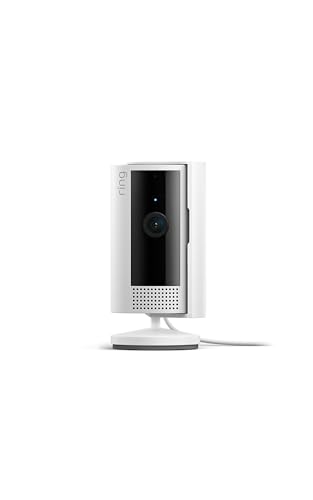
| Ring Indoor Cam (2nd Gen) | The privacy-shuttered watcher | A physical cover for the lens, tidy app alerts and easy talk for the main living space. |
| Wyze Cam v4 | The sharp-eyed value pick | Strong detail and colour night viewing at a price that makes a second room painless. |
| TP-Link Tapo C210 | The pan-and-tilt tracker | A motorised head that follows a wandering dog across the room instead of losing him at the frame’s edge. |
| eufy Indoor Cam E220 | The local-storage pan camera | Pan-and-tilt coverage with on-device smarts and card storage for subscription-shy homes. |
| Blink Mini 2 | The compact second-room pick | Small, simple and unobtrusive for hallways, kitchens and the dog’s secondary napping territories. |
How Did We Choose Cameras for an Audience That Cannot Read?
Dogs evaluate a camera by exactly two criteria: whether the voice that comes out of it sounds like their person, and whether anything edible follows. Humans carry the rest of the judgement, and our first test was the midday check-in itself — how many taps separate a locked phone from a live view of the dog, how quickly the picture steadies, and whether the dog is recognisably himself rather than a grey arrangement of pixels suggesting a mammal. Cameras that made that moment slow or muddy were marked down regardless of their other virtues, because a monitoring camera that is annoying to open becomes a camera that is never opened.
Audio received the second test, and it carried unusual weight. Two-way talk in this category is not a video-call novelty; it is the intervention tool — the familiar voice that settles a pacing dog, interrupts the opening bars of a barking session before the neighbours hear the chorus, and reassures an elderly animal who has woken confused in an empty house. We favoured cameras whose speakers stay intelligible at the volume a dog across a room can hear, and whose microphones let you hear the difference between a sigh, a whine and the early rumble of a bark, because those distinctions are the entire information content of an audio alert.
Alert quality formed the third pillar of the ranking. A pet household generates motion constantly — curtains, shadows, the dog himself changing position — so the useful alert is the specific one: sound detection that flags barking as barking, person-and-pet distinctions where the platform offers them, and sensitivity controls granular enough to silence the ceiling fan’s daily performance. Storage manners closed the assessment: what stays on a card in the camera, what travels to a cloud, what a subscription unlocks, and what remains free forever. No pick below is perfect across all four pillars, which is precisely why six of them exist.
Which Are the Best Dog Cameras for Pet Monitoring, From Treat Tosser to Second-Room Scout?
Furbo Dog Camera (treat-tossing class) — The treat tosser, in prose
Picture the interaction this class of camera was invented for. Mid-afternoon, the app shows a dog sitting very upright in front of a rounded little tower, staring at it with the focused optimism of a creature who has learned the rules of a slot machine. You tap a button at your desk across town; the tower chirps, flings a piece of kibble in a cheerful arc, and the dog pounces. Nothing else in this guide does that, and pretending otherwise would be a disservice — the treat-tossing pet camera, with the Furbo line as its best-known example, is a genuinely distinct species of device, part camera, part dispenser, part long-distance game between a dog and an absent owner.
Beyond the theatre, the design earns its following on monitoring merits. Barking alerts are a headline feature of the class, tuned to the sound owners most need flagged; the camera watches from the height and angle of a dedicated pet device rather than a repurposed security perch; and the treat mechanism doubles as a training and distraction tool — a tossed reward can redirect a dog who is winding up at the window, and can anchor a positive routine around the scary moment of the front door closing. Written in prose here because this specialist is outside our verified pool, it remains the benchmark against which the linked substitutes below should be measured: they watch and speak beautifully, and they toss nothing.
- Form: dedicated pet camera with treat reservoir and launcher
- Alerts: barking detection is a headline feature of the class
- Interaction: two-way talk plus remote treat tossing
- Placement: counter or shelf at dog height, near the main living area
- Role: the interactive specialist for separation-prone dogs
Strengths
- Treat tossing turns monitoring into interaction no substitute matches
- Bark-focused alerts speak directly to the owner’s main worry
- Purpose-built angle and height for dog-level viewing
Trade-offs
- Treat mechanism needs refilling, cleaning and treat-size discipline
- Determined dogs may treat the unit itself as the puzzle to defeat
- Full alert intelligence on this class typically leans on a subscription
Veterinary behaviourists add a caution this guide endorses: a treat tosser is a tool inside a separation plan, not the plan itself. A dog whose distress is genuine will not be argued out of it by flying kibble, and owners who watch real panic on any camera in this list should read that footage as information for a trainer or vet, not as a prompt to toss faster. Used for the much commoner case — a settled dog, a bored hour, an owner who misses him — the class is a small marvel of domestic technology, and its absence from our link pool is a gap we flag rather than paper over.
Best for: owners whose dogs respond to food games and who want interaction, not just observation. Not suited for: dogs on strict measured diets, or households wanting several rooms covered cheaply

Ring Indoor Cam (2nd Gen) — The privacy-shuttered watcher
Guests notice this camera’s best feature before its owners finish explaining it: a little plastic shutter that swings over the lens and clicks shut, turning the watcher visibly off. In a living room that doubles as the dog’s daytime headquarters, that physical gesture settles an argument every indoor camera provokes — the household can see, with eyes rather than settings menus, when it is being watched and when it is not. For the dog’s purposes the Ring covers the essentials with polish: a clear view of the main room, alerts that arrive promptly, and two-way talk that carries a familiar voice at a volume a resting dog lifts his head for.
Within the Ring ecosystem the camera behaves like a well-socialised member. Households already running a Ring doorbell meet a familiar app, familiar alert manners and one timeline for the front door and the dog’s sofa; households starting fresh meet an onboarding process that rarely survives contact with a non-technical relative as gracefully as this one does. The privacy shutter, the tidy mounting options and the unobtrusive size make it the pick most likely to be accepted — by partners, by guests, by landlords — as furniture rather than surveillance, and in the main room of a home that social acceptance is a genuine feature.
- Form: compact indoor camera with physical privacy shutter
- Viewing: live view and recorded events through the Ring app
- Audio: two-way talk for midday check-ins and settling
- Alerts: motion alerts with adjustable sensitivity
- Role: the main-room watcher for ecosystem households
Strengths
- Physical shutter ends the watched-feeling argument at home
- App and alerts feel polished and prompt
- Blends into a living room without visual complaint
Trade-offs
- Recorded history leans on Ring’s subscription for full value
- Fixed view — a dog who leaves the frame leaves the story
- No treat interaction; watching and talking are the whole offer
Owners of anxious dogs report a small ritual worth copying: the same phrase, through this camera’s speaker, at roughly the same hour each day, until the voice from the little box becomes part of the dog’s map of a normal afternoon. Consistency is what converts a gadget into a routine, and routines are what anxious animals actually trust. The Ring’s contribution is reliability — the ritual never fails because an app update rearranged the furniture — and reliability, in this category, is kindness delivered on schedule.
Best for: households wanting one polished watcher in the dog’s main room, especially Ring homes. Not suited for: owners avoiding subscriptions, or dogs whose territory spans several rooms

Wyze Cam v4 — The sharp-eyed value pick
Value picks usually ask forgiveness somewhere, and the interesting thing about the Wyze is locating where. The picture is not the place: this small camera delivers detail that embarrasses pricier rivals, including night viewing that can hold colour in low light where others surrender to grey — a real advantage when the evening check-in means distinguishing the dog asleep on the dark rug from the dog-shaped shadow of a laundry pile. Sound detection flags the barking household members care about, two-way talk is present and serviceable, and the whole package costs little enough that buying a second unit for the bedroom or kitchen stops being a decision and becomes an impulse.
Compromises live in the ecosystem’s manners rather than the hardware’s eyes. The app carries more settings, more upsells and more personality than some households want from a dog camera, and the richest alert intelligence sits behind Wyze’s subscription tier, though local recording to a memory card keeps the basics honest without it. None of that diminishes the central fact: per unit of money, no pick in this guide watches a dog more clearly, and for renters covering two rooms or owners building a small network of viewpoints, the arithmetic is close to unbeatable.
- Picture: high-detail image with colour night viewing in low light
- Audio: two-way talk plus sound detection for barking
- Storage: memory-card recording alongside cloud options
- Form: small body, easy shelf or mount placement
- Role: the clearest view per coin in this guide
Strengths
- Picture detail and night colour lead its price class
- Cheap enough to cover a second room without deliberation
- Card recording keeps working without a subscription
Trade-offs
- App experience is busier and more sales-minded than rivals
- Smartest alerts ask for the paid tier
- Speaker is serviceable rather than room-filling
Multi-dog households give this pick a particular logic. Two dogs rarely share one daytime territory politely — one takes the sofa, one takes the rug by the door, and the story of the afternoon is the negotiation between them. A pair of Wyze cameras, one per territory, tells that story completely for less than a single premium unit, and the owner checking in gets the soap opera in full rather than the half that happened to unfold in one frame. Coverage, in pet monitoring, is a form of understanding.
Best for: owners wanting the clearest picture for the money, or two rooms covered on a budget. Not suited for: households who want the quietest, simplest app above all

TP-Link Tapo C210 — The pan-and-tilt tracker
Fixed cameras share a quiet failure mode: the dog leaves. He starts the afternoon centre-frame on the rug, migrates to the cool tiles by the door, then relocates entirely to a bedroom the camera has never seen, and the owner’s check-in shows an empty room with excellent resolution. The Tapo C210 answers with a motorised head — pan and tilt movement that sweeps the room, follows detected motion across it, and lets the owner steer the view from the app to wherever the dog’s current headquarters happens to be. For open-plan spaces and restless dogs, that moving eye changes the product from a portrait into a patrol.
Tapo’s surrounding manners suit pet duty well. Night vision covers the evening hours when the dog’s solo shift runs longest, sound and motion alerts are configurable without a computer science degree, and local recording on a memory card keeps the household’s footage in the household’s drawer — a point privacy-minded owners weigh heavily, and one this guide refuses to treat as a niche concern. Two-way talk completes the standard kit. What the moving head adds beyond convenience is diagnostic: following a pacing dog through a full circuit of the room shows you the pacing, its route and its rhythm, in a way three disconnected fixed views never assemble.
- Movement: motorised pan and tilt with motion tracking
- Viewing: steerable live view from the Tapo app
- Storage: memory-card recording kept in the home
- Audio: two-way talk and sound alerts
- Role: the roving eye for open-plan rooms and restless dogs
Strengths
- Following view keeps a wandering dog in the story
- Card storage avoids subscription dependence
- Patrol positions can be preset for favourite spots
Trade-offs
- Motor movement is audible in a silent room
- Tracking can be distracted by curtains and shadows
- One moving camera still sees one room at a time
Placement craft matters more here than anywhere else in the guide. Mount the Tapo high in a corner and its sweep commands the whole room’s geography — sofa, door, water bowl, window of temptation — while a low shelf placement wastes the mechanism on a view of chair legs. Spend the first evening steering it through the dog’s known circuit and saving the viewpoints; the five minutes of choreography pays back every time a check-in becomes a quick tour rather than a hopeful stare at an empty rug.
Best for: open-plan homes and dogs who rotate through several daytime spots. Not suited for: light sleepers among dogs who startle at small motor sounds

eufy Indoor Cam E220 — The local-storage pan camera
Privacy concerns sort pet-camera buyers into two tribes — those content to rent their footage back from a cloud, and those who want the recordings physically inside their own home — and the E220 is the second tribe’s most complete representative here. It pans and tilts like the Tapo, records to a memory card in its own body, and performs a meaningful share of its detection thinking on the device itself, distinguishing people from pets with an intelligence that reduces the afternoon’s alert stream to events a human would endorse. The dog gets watched; the household’s life does not get shipped anywhere by default.
Picture quality supports the pitch, with detail fine enough to read a scene properly — which toy, which cushion, whether the chewing object is sanctioned — and the app integrates gracefully for homes already running eufy’s doorbells or security gear. Two-way talk, night vision and sound detection cover the pet-monitoring checklist without asterisks. The honest limitation is ecosystem gravity: eufy’s smartest features reward staying inside its app and its optional cloud, and Apple-centric households will find some integrations less complete than the marketing of a rival platform might promise. As a self-contained watcher, though, it asks very little and keeps its promises locally.
- Movement: pan-and-tilt coverage of a full room
- Detection: on-device distinction between people and pets
- Storage: memory-card recording inside the camera
- Audio: two-way talk for voice check-ins
- Role: the privacy-first room watcher
Strengths
- Local storage and on-device smarts respect the household
- Pet-aware alerts cut the notification clutter
- Pan coverage follows the dog’s room-wide routine
Trade-offs
- Deepest features favour staying within eufy’s app
- Card capacity bounds how far back footage reaches
- No treat function — observation and voice only
Elderly dogs give this camera its most moving use case. An old dog’s afternoon is a landscape of small events — the slow expedition to the water bowl, the careful rearrangement on the bed, the long sleep from which an owner, watching remotely, wants simple reassurance of breathing. The E220’s patient pan, its refusal to flood the phone with false alarms, and its clear enough picture to see a flank rise and fall make it the pick our testers kept nominating for the senior-dog household, where monitoring is less about mischief than about love with a checklist.
Best for: privacy-minded owners and households monitoring an elderly dog’s quiet afternoons. Not suited for: buyers wanting the deepest cloud history and longest event archives

Blink Mini 2 — The compact second-room pick
Every pet-monitoring system eventually discovers its second room — the kitchen where the counter-surfing happens, the hallway where the waiting happens, the spare bedroom where a cat-adjacent drama unfolds daily at noon. The Blink Mini 2 is built for exactly that supporting role: a small, plain, inexpensive camera that sits on a shelf, watches its assigned territory, sends its alerts and asks almost nothing of the household in return. As a household’s only dog camera it is adequate; as the second or third eye in a system anchored by a stronger main-room pick, it is close to ideal.
Blink’s virtues are the virtues of restraint. Setup is quick, the app is legible to the least technical member of the household, and the camera’s small footprint lets it live in rooms where a larger device would feel like an accusation. Night vision and two-way talk are present in honest, workmanlike form. The compromises follow the price faithfully: the richest recording history belongs to Blink’s subscription, the picture — while perfectly sufficient to confirm that the dog is on the kitchen rug and not on the kitchen counter — will not win detail contests against the Wyze above, and there is no movement of the camera itself. It watches one view, steadily, which for a doorway or a feeding station is exactly the assignment.
- Form: very compact indoor camera for shelves and corners
- Viewing: live view and alerts through the Blink app
- Audio: two-way talk in a small body
- Storage: cloud plans, with local options via Blink’s hub gear
- Role: the affordable second viewpoint
Strengths
- Size and price make extra rooms easy to cover
- Simple app suits the whole household
- Unobtrusive in kitchens, halls and spare rooms
Trade-offs
- Full recording value leans on a subscription
- Fixed view with no pan or tracking
- Picture detail trails the sharpest picks here
Think of the Mini 2 as the camera that answers specific questions. Is the dog waiting by the door or settled? Did the feeder get visited? Is the kitchen still a no-dog zone at noon? Fixed questions deserve fixed cameras, and the money saved against a premium unit funds the main-room pick that handles the open-ended watching. Systems built on that division of labour — one thoughtful camera, one or two simple ones — consistently satisfy their owners more than a single expensive eye straining to be everywhere.
Best for: adding a kitchen, hallway or feeding-station view to an existing setup. Not suited for: serving as the sole camera for a large, multi-room dog territory
How Do the Six Pet-Monitoring Picks Compare Side by Side?
| Pick | View | Pet-monitoring signature | Watch out for |
|---|---|---|---|
| Furbo Dog Camera (treat-tossing class) | Fixed, dog-height | Treat tossing plus bark alerts | Prose-only here; subscription leans |
| Ring Indoor Cam (2nd Gen) | Fixed | Privacy shutter; polished app | History leans on subscription |
| Wyze Cam v4 | Fixed | Detail and colour night view | Busy app; smart alerts are paid |
| TP-Link Tapo C210 | Pan and tilt | Tracks a wandering dog; card storage | Motor sound in quiet rooms |
| eufy Indoor Cam E220 | Pan and tilt | On-device pet detection; local card | Card bounds archive length |
| Blink Mini 2 | Fixed | Compact second-room coverage | Fixed view; subscription for history |
Where Should a Dog Camera Actually Sit in the Room?
Furniture decides more footage than firmware ever will. The dog’s territory, mapped honestly over one ordinary week, tells you where the camera belongs: the bed or rug where the long sleep happens, the door where the waiting happens, the window where the neighbourhood theatre plays, and the route between water bowl and all three. A camera that frames two of those landmarks sees the afternoon’s plot; a camera aimed at a photogenic but dogless corner records an interior design portfolio. Walk the room at your dog’s eye level before mounting anything, because the view from five feet up flatters rooms and betrays dogs, who live their lives in the bottom third of every frame.
Height involves a genuine trade. Placed low, near the dog’s own altitude, a camera captures faces, expressions and the subtle language of ears and posture that tell an owner whether a resting dog is relaxed or merely still — but a low camera is also within investigation range of a curious nose and a bored paw. Placed high, it survives everything and sees the room’s geography clearly, at the cost of reading the dog as a shape rather than a character. Households with puppies should start high and descend as manners improve; households with elderly dogs should favour the low, kind angle and accept the occasional nose-print on the lens as a production cost.
Light deserves its sentence too. A camera staring directly at a bright window spends the day negotiating with glare, silhouetting the very dog it was bought to watch whenever he crosses the interesting part of the room. Angle the view along the window wall rather than into it, test the picture at the brightest hour, and let the night-vision test happen after dark with the room exactly as the dog experiences it — lamps off, hallway light on, the real conditions of the evening shift.
How Do You Teach a Dog That the Talking Box Is Friendly?
Introduction protocol sounds precious until you have watched a sensitive dog bark at a disembodied voice for ten minutes. Begin with the camera silent and present for a day, a new piece of furniture with no opinions. Then use the talk feature while you are still in the house, voice first from another room, praise and a real treat delivered in person immediately after, so the box’s voice predicts good things arriving through the normal channels. Only then graduate to speaking from outside, briefly, cheerfully, and always ending the interaction before the dog’s excitement or confusion climbs.
Voice discipline matters as much as the dog’s learning. Owners who use the speaker to scold — the counter-surfer caught mid-reach, corrected from a office across town — teach the dog that the box is a scolding machine and, worse, that the owner’s voice predicts punishment without presence, a lesson that corrodes the recall and greeting rituals the household depends on in person. Keep the camera’s voice for greeting, reassurance and redirection toward a sanctioned activity. The footage can inform your in-person training later; the speaker itself should stay on the dog’s list of friendly phenomena.
Some dogs, honestly assessed, never bless the arrangement — the voice without the person is a puzzle that worries them each time, and the kindest configuration for those animals is alerts and viewing with the speaker left alone. Watching for that reaction, and respecting it, is part of what separates monitoring from mere surveillance of a creature who cannot consent to the distinction.
What Should Bark and Motion Alerts Be Tuned to Do?
Alert settings are an editorial decision about what deserves your attention during a working day, and the default settings of most cameras answer that question far too enthusiastically. Begin by separating the channels: sound alerts tuned to barking are the pet-monitoring signal, while general motion in a room containing a dog is close to a constant, and a phone that buzzes forty times before lunch trains its owner to ignore the forty-first, which is of course the one involving the skirting board and a determined set of teeth.
Schedules sharpen the system further. The hours when the house is empty deserve full alerting; the evening hours when the family is home and the dog is visibly asleep on someone’s feet deserve silence, and every pick in this guide can be taught that difference. Sensitivity, meanwhile, should be walked down from its maximum over the first week — start permissive, review what actually arrived, and tighten until the surviving alerts are ones you would thank the camera for at 2 p.m. in a meeting.
Review the alert archive weekly with fresh eyes, because it is a behavioural diary you did not know you were keeping. Patterns surface there that no single check-in reveals: the barking that always begins twenty minutes after departure, the pacing that clusters before thunderstorms, the long calm that proves the new routine is working. Owners who read that diary adjust departure rituals, walk timings and camera positions from evidence — and the dog, who cannot file reports, finally gets his afternoons represented accurately in household decisions.
How Does Night Change What a Pet Camera Needs to Do?
Evenings are the long shift. Workdays end, but dogs left through winter afternoons, evening classes, dinners and gym hours spend a large share of their unattended life in the dark or the half-dark, and a camera that performs beautifully at noon and dissolves into grain at seven has failed the larger half of its contract. Night vision in this guide was therefore judged on the stored and streamed result in a genuinely dark room, not on the brightness of a specification — whether the dog on the dark rug remains a dog, whether a trip to the water bowl reads as an event, whether eyes and posture survive.
Infrared viewing paints the world in grey, which owners should expect and forgive; what matters is contrast and range, the ability to keep the whole of the dog’s territory legible rather than a bright pool around the camera and darkness beyond the sofa. Colour night viewing, the Wyze’s party piece, helps where a little ambient light exists — a hallway lamp, streetlight through curtains — and those households will see their evenings in something closer to life. Either way, test before trusting: spend one evening checking in hourly, and let the camera’s night personality introduce itself on a calm night rather than during the thunderstorm when you actually need it.
Sleep itself is data worth handling gently. An ageing dog’s night restlessness, a puppy’s settling curve across the first month, a convalescing animal’s first full night of proper sleep — the camera witnesses all of it, and the wise owner watches trends rather than moments, bringing the pattern, not the panic, to the vet when something changes.
Which Privacy Habits Should a Pet Camera Household Adopt?
Indoor cameras ask a household to hold two truths: the dog deserves watching, and the humans deserve not to be watched casually. Practical habits reconcile them. Favour cameras and placements aimed at the dog’s territory rather than the family’s — the dog’s room, not the room where teenagers do homework and partners take calls. Use physical shutters where they exist, schedules where they do not, and tell guests plainly that a pet camera is present and where it points; the small social awkwardness of disclosure is cheaper than the larger one of discovery.
Account hygiene is the unglamorous half of the same sermon. A pet camera account guarded by a reused password is a window into the home protected by a curtain. Give the account a unique password, turn on the strongest sign-in protection the platform offers, keep the app and firmware current, and review the list of devices and shared users the way you would review who holds house keys — because that, functionally, is the list you are reviewing. Shared access for a dog walker or a visiting relative should be granted deliberately and retired when the visit ends.
Footage retention deserves one deliberate decision as well. Cloud archives that keep everything forever sound comforting until you consider that everything includes the household’s ordinary life in high definition; card-based systems that overwrite their oldest days impose a natural forgetting that many families, once they think about it, prefer. Neither answer is wrong. Choosing neither — drifting with a default you never read — is the only genuinely careless option on the table.
How Can Camera Footage Improve a Dog’s Actual Life?
Monitoring earns its keep when the watching changes something. The departure-distress case is the clearest: footage that shows a dog settling within fifteen minutes tells the owner the routine works, while footage that shows ninety minutes of pacing is a training brief — shorter departures, a graduated leaving programme, a trainer’s help — written in evidence instead of guilt. Owners routinely misjudge which of those dogs they own, because the greeting at the door tells only the story’s final page.
Health monitoring is the second honest use. Appetite changes show up at the bowl on camera before they show up anywhere else; a limp favouring one leg on the evening walk to the water bowl, a cough that happens only at night, a new habit of drinking at hours the household never witnesses — each is the kind of concrete, dated observation a vet can act on, and each is invisible to a household that is simply absent during those hours. Senior-dog owners in particular describe the camera less as a gadget than as a witness they deputise.
Enrichment closes the loop between watching and doing. If the footage shows the long empty stretch between noon and three, that is the hour for the frozen food toy left at departure, the dog walker’s visit, the treat-tossing interaction from the prose pick above. A camera that merely documents boredom is a mirror; a camera whose evidence rearranges the dog’s day is a tool, and the difference lies entirely in whether anyone acts on what it shows.
How Should Multi-Pet and Multi-Human Households Configure All This?
Cats redraw the monitoring map in ways dog people rarely predict. A household with both species discovers that the cat’s territory is vertical — shelves, wardrobes, the top of the refrigerator where no dog has ever been — and that the camera aimed faithfully at the dog’s rug records the cat as an occasional pair of eyes glowing at frame’s edge. The practical answer is rarely a dedicated cat camera; it is a wider view or a pan camera assigned to the shared room, and an acceptance that the cat, who did not consent to this surveillance either, will spend a portion of each day sitting directly in front of the lens, which owners report as the highlight of their working afternoons more often than any other footage.
Human multiplicity complicates the account rather than the picture. Partners, teenagers, dog walkers and visiting grandparents each arrive with a legitimate claim to see the dog and a different appetite for being seen themselves, and the sharing settings of every platform in this guide can express those differences — full access for the household’s core, view-only windows for the walker’s working hours — if somebody bothers to configure them. Somebody should. The default of one shared login, its password known to everyone who has ever fed the dog, is the single most common privacy failure this guide encounters in the wild, and it is entirely a failure of an afternoon’s admin rather than of any camera.
Shift-working households add a final wrinkle worth planning for: the dog’s unattended hours may be the night itself, in a house where a partner sleeps in the next room. Alerts tuned for the office become a phone buzzing on a pillow at 3 a.m.; schedules and quiet hours, set with the household’s actual rhythm rather than a nine-to-five assumption, are what separate a monitoring system that serves a family from one that a family serves. Every pick here can learn an unusual household’s hours. The learning has to be assigned to a human, and the first week — when enthusiasm for configuration is at its peak — is when to do it.
Why Does the First Fortnight With a Camera Change Owners More Than Dogs?
New owners check the app eleven times a day; the same owners, a month later, check it twice, and the decline is not neglect — it is calibration. The first fortnight teaches the household what its dog’s solitude actually looks like, and for most families the discovery is relief: the afternoon is mostly sleep, punctuated by rituals — the patrol of the windows, the long drink, the relocation to follow a patch of sun — that were always happening unobserved. Guilt built on imagined pacing dissolves in the face of filmed napping, and several owners describe the camera’s real purchase as permission to stop worrying at work, a benefit no specification sheet has ever listed.
Dogs, meanwhile, habituate on their own schedule. The head that lifts at every speaker crackle in week one barely rises by week three; the device becomes furniture, its little sounds absorbed into the house’s ordinary music. That habituation is the goal and should be protected — owners who keep the interactions novel, varied and rewarding preserve the tool’s usefulness for the moments that matter, while owners who narrate the dog’s entire afternoon through the speaker train him to ignore the voice entirely, which is the one outcome that makes the talk feature decorative.
Households should also expect one honest surprise: the camera changes behaviour at the human end of the lead. Departures get calmer because the owner can check; departures get later because the owner does check, once more, from the driveway. Walkers get booked for the hour the footage identified as the empty stretch. Treats get left in the puzzle toy the camera proved gets used. None of that is in the product description of any pick in this guide, and all of it is the product working — a witness whose evidence quietly reorganises the care of the animal it watches.
What Mistakes Do Dog-Camera Buyers Keep Making?
- Buying a treat tosser’s dream on a watcher’s budget. If tossing matters, buy the specialist class; if watching matters, the linked substitutes serve beautifully — but decide which product you actually want.
- Aiming at the room instead of the dog. A camera framing the sofa’s empty half records furniture. Map the dog’s real territory first, then place.
- Leaving every alert at factory enthusiasm. Forty notifications a day teach ignoring; tune sound and motion separately until alerts mean something.
- Using the speaker to scold. A voice that only punishes from nowhere frightens dogs and poisons the feature’s real use — reassurance.
- Forgetting the evening test. Most unattended hours are dark hours; a camera untested at night is a camera half bought.
- Sharing access and forgetting it. Walkers, sitters and ex-flatmates accumulate in sharing menus like keys under mats — audit them.
How Do Rentals, Travel and Absences Change the Setup?
Renters live under a rule the camera industry rarely mentions: nothing may be screwed into anything. Every pick in this guide passes that test — shelves, adhesive mounts and the tops of bookcases carry them all happily — but the renter’s real craft is the exit plan: a camera that leaves no trace, an account that holds no landlord’s footage, and a placement conversation held before the camera goes up rather than after it is discovered. Housesitters invert the problem: the camera stays, the humans change, and the configuration should change with them — sitter access granted for the trip’s dates, the household’s own alerts quieted, and a note left explaining the little eye on the shelf, because a sitter who discovers a camera writes a different review of the household than a sitter who was told about it over tea.
Final Recommendation
Start from the honest question of which product you are shopping for. If the dream is interaction — the tossed treat arcing across the rug at 3 p.m., the bark alert tuned by a company that thinks about dogs all day — then the treat-tossing class represented here in prose by the Furbo design is your destination, and no linked camera should be sold to you as its equivalent. That specialisation is real, it delights a particular kind of dog and owner enormously, and it sits outside this guide’s link pool for reasons of verification rather than merit.
For the much larger company of owners whose need is watching, listening and speaking, the linked picks divide the territory cleanly. Take the Ring Indoor Cam for the main room if polish and a privacy shutter matter, the Wyze Cam v4 for the clearest picture per coin or a two-room start, the Tapo C210 or the eufy E220 when the dog roams and the camera must roam with him — the eufy taking the privacy-first vote — and the Blink Mini 2 as the inexpensive second eye for kitchen, hallway or feeding station. Whichever combination you build, spend the first week tuning alerts, teaching the dog the voice is friendly, and testing the night view, because a pet camera’s real specification is the calm of the first check-in that shows you a dog asleep in his favourite place, entirely unbothered, exactly as hoped.
Frequently Asked Questions
Do I need a treat-tossing camera, or is a normal indoor camera enough?
For monitoring — seeing, hearing and speaking to your dog — a normal indoor camera is genuinely enough, and the linked picks here do that job well. Treat tossing adds interaction: a game, a distraction, a reward delivered remotely. Dogs who are food-motivated and mildly bored benefit most; dogs who are settled sleepers gain little, and dogs in real distress need a training plan more than flying kibble.
Will talking to my dog through a camera calm him or confuse him?
Either is possible, which is why the introduction protocol in this guide matters: pair the voice with good experiences while you are home first, keep early remote conversations brief and cheerful, and watch the footage for the verdict. A dog who lifts his head, wags and settles has voted yes. A dog who searches the room anxiously or barks at the device has voted no — respect that vote and use the camera silently.
How many cameras does a dog household actually need?
One, placed where the dog spends the unattended hours, covers most households honestly. A second earns its place when the territory splits — a kitchen with counter temptation, a door where waiting happens, a second sleeping spot. Beyond two, most owners are documenting rooms the dog visits briefly, and the alert stream grows faster than the understanding does.
Is cloud storage or a memory card better for pet footage?
Cloud storage survives a stolen or chewed camera and reaches further back, at the price of a subscription and your footage living elsewhere. A memory card keeps everything in the home, costs nothing monthly, and forgets its oldest days as it overwrites. Households divide by temperament on this, and both the Tapo and eufy picks above serve the card-first tribe while Ring, Blink and Wyze lean cloudward.
Can a pet camera help with separation anxiety?
It can help you see it accurately, which is the necessary first step — how long the distress lasts, what triggers it, whether a new routine is working. It cannot treat it alone. Persistent pacing, vocalising, destruction or self-harm on camera is information to take to a vet or a qualified behaviourist, and the camera’s role in that plan is honest measurement, not remote reassurance on loop.
What should I check during the first week with a new camera?
The night picture in the dog’s real sleeping conditions, the alert stream’s signal-to-noise after tuning, the speaker introduction while you are home, and the view at the brightest hour for glare. Also confirm who has shared access and that the account’s password is unique. A week of small verifications turns the camera into infrastructure you trust rather than an app you occasionally remember.
Related Guides
Neighbouring questions crowd around this one. Readers weighing a wider home setup may compare the best indoor cameras for home security for the household-security view of several picks shared here, or the best cameras for watching elderly relatives at home where the same privacy and night-view judgements apply to a different kind of care, and the best baby monitor cameras with two-way talk for the audio-first end of the monitoring spectrum.


