This article contains affiliate links, and ilcastellomenu.com may earn an affiliate commission when you buy through links on this page, at no extra cost to you. Every watch below was chosen because it runs Google Assistant natively on Wear OS, not because of any sponsorship, and the trade-offs are stated as plainly as the strengths.
In this guide
Quick picks: best smartwatches with google assistant
| # | Product | Where to buy |
|---|---|---|
| 1 | Google Pixel Watch 3 | Check on Amazon |
| 2 | Samsung Galaxy Watch 7 | Check on Amazon |
| 3 | Google Pixel Watch 2 | Check on Amazon |
| 4 | Samsung Galaxy Watch 6 | Check on Amazon |
| 5 | OnePlus Watch 2 | Check on Amazon |
Why Google Assistant Is the Feature That Decides This List
A smartwatch earns its place on your wrist in the moments when your phone is in another room, your hands are wet, or you are halfway through a run and cannot stop to type. In those moments, the voice assistant is not a bonus feature. It is the whole interface. Google Assistant on Wear OS can set timers while you cook, reply to a text while you cycle, start a workout, check the weather, control a smart home, and answer quick questions without a single tap. When it works well, the watch stops feeling like a small phone and starts feeling like a shortcut for your whole day.
That is exactly why this list is narrow on purpose. Plenty of smartwatches advertise a voice assistant, but many of them ship a cut-down version, a brand-specific assistant, or an assistant that only works when the phone is unlocked and nearby. The five watches in this guide all run Wear OS with Google Assistant built in at the system level, which means the same “Hey Google” wake phrase, the same routines, and the same smart home control you get from a Google speaker at home. They differ in how fast the assistant responds, how long the battery survives heavy voice use, how well the microphone hears you in a noisy kitchen, and how much health tracking you get alongside it.
One boundary needs to be stated before anything else, because it rules out a large share of readers: every watch in this guide pairs with Android phones only. Wear OS watches do not work with iPhones. If you carry an iPhone, none of these five will pair with it, and no software update is going to change that. This is an Android-only list, and it is better to say so on the first screen than to let anyone discover it after unboxing.
The second boundary is battery life. Wear OS is the most capable smartwatch platform Google has, but it is also the most power-hungry mainstream option, and using the assistant is one of the fastest ways to drain a small watch battery. Voice queries wake the screen, spin up the microphone, and often reach out over Wi-Fi or LTE. A watch that lasts two relaxed days can shrink to a single day when you lean on the assistant for timers, messages, and smart home commands from morning to night. Each review below treats battery life under real assistant use as a headline figure, not a footnote, because for this category it is the trade-off that decides whether people keep wearing the watch after the first month.
It is also worth naming who should skip this category entirely. If you want a watch mainly for multi-day outdoor navigation, a dedicated sports watch serves you better. If you rarely talk to voice assistants on your phone and find the idea faintly embarrassing in public, a watch will not convert you, because the interaction model is the same, only smaller. And if you cannot tolerate another device asking for a charger, choose from the long-battery end of this list or wait. The five watches below are for Android owners who already lean on Google Assistant, or want to, and would like that convenience moved from their pocket to their wrist.
How Google Assistant Actually Works on Your Wrist
On a Wear OS watch, Google Assistant lives in three places at once. You can raise your wrist and say the wake phrase, you can press and hold a side button or crown on most models, and you can tap the Assistant tile or complication on the watch face. All three routes open the same listening screen. Short requests, such as setting a timer, starting a stopwatch, or turning on a named light, are handled quickly and can complete even on a modest connection. Longer requests, such as dictating a message or asking a factual question, are passed through your phone’s connection or the watch’s own Wi-Fi or LTE radio.
That hand-off explains the one limitation new owners notice first: the assistant is only as capable as the connection behind it. With your phone nearby, almost everything works, including calls, message replies with full dictation, and control of every device in your Google Home setup. Leave the phone at home with a Bluetooth-only watch and the assistant becomes a much smaller tool. It can still run timers, alarms, and on-device settings, but anything that needs the internet, including most questions and all smart home control, will fail or ask you to reconnect. LTE models remove that leash for a monthly carrier fee, and for runners and parents who deliberately leave the phone behind, that difference is the entire reason to pay for the cellular version.
Smart home control deserves a special mention because it is where a wrist assistant beats a phone. Saying “turn off the living room lights” from bed, unlocking a routine that closes the garage and arms the alarm, or asking which door was left open all happen faster by voice than by opening an app. The watch mirrors the homes and devices in your Google Home app, so anything you can control from a Nest speaker, you can control from your wrist. The catch is naming. Assistant follows your device names literally, so a lamp called “Bedroom 2 Plug” will never answer to “bedside lamp” until you rename it in the app. Five minutes of renaming devices pays back every single day.
Google Assistant and Gemini Are Not the Same Thing Yet
Anyone shopping in 2026 will see two names in Google’s marketing, and the difference matters for what you can buy today. Google Assistant is the mature voice assistant that ships on every watch in this guide. It is fast, predictable, and deeply wired into timers, messages, calls, calendars, and Google Home. Gemini is Google’s newer AI system, and it is rolling out to Wear OS watches gradually, replacing Assistant on supported models through software updates rather than new hardware.
In practice, the two overlap on everyday commands but behave differently at the edges. Assistant is better at quick, structured tasks: it hears “set a timer for twelve minutes” and simply does it, every time, with minimal delay. Gemini is better at open-ended questions and follow-ups, where you might ask something conversational and then refine it. Gemini can also be slower on a watch, because more of the work happens in the cloud, and some familiar Assistant behaviors have changed or moved as the transition rolls out region by region and language by language.
The buying advice is simple: purchase the watch for the hardware, the battery, and the assistant experience it has now, not for a promised AI upgrade later. Every watch on this list either already handles Gemini’s arrival through updates or continues to run Assistant well. What separates them is microphone quality, speaker clarity, chip speed, and how gracefully they handle a day of heavy voice use. Those are the things the reviews below measure, because those are the things you will still care about a year from now.
Google Assistant in Daily Life: Where It Shines and Where It Frustrates
The honest test of a wrist assistant is not a demo command. It is a wet Tuesday. You are carrying shopping in from the car in the rain and say “Hey Google, open the garage” before you reach the door. You are elbow-deep in dishwater and set a pasta timer without touching anything. You are putting a child to bed and dim every light in the house to a warm glow with one whispered routine. You land from a run, hands shaking slightly, and dictate a note about how the session felt before the thought evaporates. In all of these, the watch wins because it is already on you, already awake, and needs nothing from your hands.
The pattern underneath every one of those moments is the same: the assistant shines on short, concrete, repeatable commands. Timers, reminders tied to a time or a place, quick calculations and conversions while cooking, adding items to a list the moment you notice the empty shelf, skipping a song, reading the next calendar event aloud, starting the exact workout you always start. These succeed so reliably that within a few weeks they stop feeling like features and start feeling like reflexes. Most owners use perhaps a dozen commands, but they use them dozens of times a day.
The frustrations are equally predictable, and pretending otherwise would make this guide useless. Long, ambiguous requests still stumble. Ask a compound question with two parts and you may get an answer to the wrong half. Dictation of names, unusual words, and addresses produces errors often enough that sending a long message by voice alone remains a gamble, and most people learn to dictate short replies and type the long ones. In loud environments, a train platform or a windy street, recognition drops for every watch in this guide, though the better microphones drop less. And when the phone connection is weak, the assistant’s pause stretches from a beat into an awkward silence that reminds you how much of the intelligence lives elsewhere.
None of that is a reason to skip the category. It is a reason to buy with your eyes open. The watches below were chosen because they handle the reliable ninety percent of voice tasks quickly and gracefully, and because their microphones, speakers, and chips minimize the frustrating ten percent. Set your expectations at “superb for commands, decent for conversation” and a Wear OS watch with Google Assistant will exceed them most days.
Calls, Messages, and Music: The Assistant’s Supporting Cast
Voice control rarely travels alone. The same microphone and speaker that serve the assistant also handle phone calls from the wrist, and here the watches separate quietly. On the Pixel and Galaxy models, callers consistently report clear audio in ordinary environments, and the speakers are loud enough for a kitchen conversation. The smaller brands are a step behind, fine for a quick “I’m outside” and less convincing for a real discussion. If you expect to take calls on the watch regularly, that difference is worth real money, and it is one reason the two big ecosystems dominate this category.
Messaging is where the assistant earns its daily keep. Dictating a short reply, choosing from smart reply suggestions, or having the assistant read an incoming message aloud while you drive are small acts that repeat so often they define the ownership experience. Wear OS handles the major messaging apps well, with full reply support for Google’s own services and solid support for the popular third-party platforms, though a few apps still limit the watch to notifications and canned replies. Knowing which of your apps supports real replies is worth five minutes of checking before you buy, because it changes how phone-free your day can become.
Music and media round out the picture. The assistant can start a playlist, skip a track, adjust volume, and identify what is playing through connected services, and media controls stay one swipe away during workouts. Downloaded playlists on the watch itself free runners from the phone for training sessions, while streamed music over LTE on the cellular models frees them entirely. None of this is unique to one watch here, but the smoothness of it, the absence of stutters and dropped connections, tracks closely with chip speed and software maturity, which is another quiet argument for the newer models.
What to Look for in a Smartwatch With Google Assistant
The chip inside, and why it matters more for voice than for anything else
Most smartwatch tasks forgive a slow processor. Telling the time, counting steps, and showing a notification ask almost nothing of the hardware. Voice assistance is the exception. Every query is a small race: wake the system, capture clean audio, process or transmit it, fetch the answer, and speak or display it before the pause becomes awkward. Newer chips shorten every leg of that race and support better noise handling for the microphone, which is why the current-generation Pixel and Galaxy models feel noticeably snappier with the assistant than older watches running the same software. When you compare two watches with identical feature lists, the one with the newer processor is usually the one whose assistant you will still be using next year, because speed is what turns a novelty into a reflex.
Assistant responsiveness and microphone quality
The single best predictor of whether you will still be using voice control in six months is how often the watch hears you correctly the first time. A strong microphone array picks up a normal speaking voice over kitchen noise, traffic, and wind, while a weak one forces you to raise your wrist to your mouth and repeat yourself, which quietly kills the habit. Newer chips also matter here. A faster processor shortens the pause between your command and the action, and that pause is the difference between a tool that feels instant and one that feels like a chore. When you read the reviews below, treat comments about recognition accuracy and response speed as core buying criteria, not polish.
Battery life measured in assistant use, not standby
Manufacturer battery figures assume a gentle day. Voice control is not gentle. Every query lights the screen, opens the microphone, and usually touches a network radio, and an always-listening wake phrase adds a small constant draw of its own. As a working rule, expect a Wear OS watch rated for a day and a half to give you about a day if you use the assistant the way this article assumes you will: timers, replies, smart home commands, and a tracked workout. Watches with larger batteries or clever dual-display designs stretch that to two days or more. Decide in advance whether you are willing to charge nightly, because that single habit question eliminates half this list.
Bluetooth, Wi-Fi, and LTE: know which connection your assistant needs
All five watches connect to your phone over Bluetooth and can borrow its internet through Wi-Fi. That covers most people most of the time. LTE versions add a standalone connection, so the assistant keeps working on a run, at the beach, or when your phone battery dies. The trade-offs are a higher purchase cost, a monthly carrier plan, and shorter battery life whenever the cellular radio is active. If you never leave your phone behind, skip LTE without regret. If leaving the phone behind is the point of owning the watch, LTE is not optional, and you should choose the watch whose battery tolerates it best.
Health and fitness tracking depth
Assistant gets you into this category, but health tracking is what keeps the watch on your wrist at night. The Pixel Watch line leans on Fitbit, with deep sleep tracking, heart rate monitoring, ECG, blood oxygen readings, and a large exercise library. Samsung’s watches use Samsung Health, which is strong on workouts and body composition on Galaxy models but reserves a few features for Samsung phones. The smaller brands offer competent basics: heart rate, sleep, GPS workouts, and notifications, with less polish in the apps. None of these devices is a medical instrument, and all of them should be read as trend trackers rather than diagnostic tools.
Phone compatibility beyond “Android”
Android-only is the headline, but there are footnotes. Samsung Galaxy Watch models pair with any modern Android phone, yet a handful of features, such as ECG and blood pressure tools where offered, are limited to Samsung Galaxy phones, and the setup flow pushes Samsung’s apps. Pixel Watch models work with any Android phone and keep their full feature set, which makes them the cleaner recommendation for people using other brands. Every watch here needs a reasonably recent version of Android and a Google account. If your phone is old enough that it no longer receives updates, confirm compatibility before you buy anything on this page.
Size, screen, and speaker
Watches in this guide come in one or two case sizes depending on the model, and the larger size almost always carries the larger battery, which loops straight back to assistant use. A bright screen matters more than a big one: you will read assistant answers outdoors, in sun, at a glance. The speaker is easy to overlook and hard to forgive. Assistant speaks its answers aloud, reads timers, and handles calls, so a thin, quiet speaker undermines the exact feature this list is built around. Where a model is notably loud or notably faint, the review says so.
Updates and longevity
Wear OS improves through software, and the assistant itself changes server-side, so update support decides how long a watch stays current. Google and Samsung publish the clearest update commitments and deliver them fastest. Smaller brands update more slowly and less predictably. A cheaper watch that stops receiving updates a year earlier is not necessarily cheaper over its life. If you plan to keep a watch three years or more, weight this section heavily.
Durability and water resistance
A watch you are encouraged to wear everywhere, including to bed and in the shower, needs to survive everywhere. Every model in this guide carries meaningful water resistance suitable for swimming and showering, and most add a military-grade durability certification or reinforced glass on top. The practical differences are in the details: domed glass looks wonderful and catches door frames, flat glass hides scratches better, and a metal case shrugs off knocks that would mark a softer finish. If your work or training is rough on wrists, weight the tougher designs and consider a case protector a normal accessory rather than an admission of defeat.
Comfort, bands, and wearing it overnight
Sleep tracking is half the health story on modern watches, which means the best watch is the one you can forget you are wearing at 3 a.m. Case thickness, weight, and the stock band matter more than any sensor specification here. Silicone sport bands are the default for a reason, but many owners sleep better in a soft nylon or fabric band, and every watch in this guide accepts alternative bands, though the Pixel line uses a proprietary connector while the others use standard quick-release pins. If you plan to track sleep seriously, budget for a softer band from day one and choose the smaller case size if you are between sizes.
Payments, storage, and the phone-free extras
Google Wallet on the wrist turns the watch into a payment card for transit and shops, and it works even in situations where pulling out a phone is awkward. Storage matters for a quieter reason: downloading music or podcasts to the watch lets runners leave the phone at home on Bluetooth models for tracked workouts with entertainment, even though the assistant itself still needs a connection for most requests. None of these extras should decide your purchase alone, but together they explain why two watches with the same assistant can feel very different to live with.
Setting Up the Assistant So It Actually Gets Used
Ten minutes of setup on the first day decides whether voice control becomes a habit or a forgotten menu item. Start by training the basics: enable the wake phrase if you want hands-free activation, knowing it costs a little battery, or disable it and rely on the button if you prefer the endurance. On Samsung models, dig into the button settings and set Google Assistant as the default assistant, because the watch may initially steer long presses toward Samsung’s own helper. Then open the Google Home app on your phone and rename your smart devices to the words you actually say. “Kitchen lights” beats a model number, every time, forever.
Next, build two or three routines rather than admiring the feature and moving on. A “good night” routine that locks the doors, dims the lights, sets an alarm, and reads tomorrow’s first calendar event turns four commands into one sentence. A “leaving home” routine that arms the alarm and adjusts the thermostat does the same in the morning. Routines are where the assistant stops being a remote control and starts being a member of the household staff, and the watch is the most natural place to trigger them because it is the device that is always with you.
Finally, tame the notifications. A watch that buzzes for every email trains you to ignore it, and an ignored watch gives its assistant no chances to help. Keep notifications to messages, calls, calendar, and the handful of apps whose alerts genuinely matter, and let the rest wait for your phone. Owners who do this consistently report the same discovery: the watch becomes calmer, the battery lasts longer, and the assistant, used a dozen times a day for things that matter, becomes the feature they would refuse to give up.
The Best Smartwatches With Google Assistant

Top pick
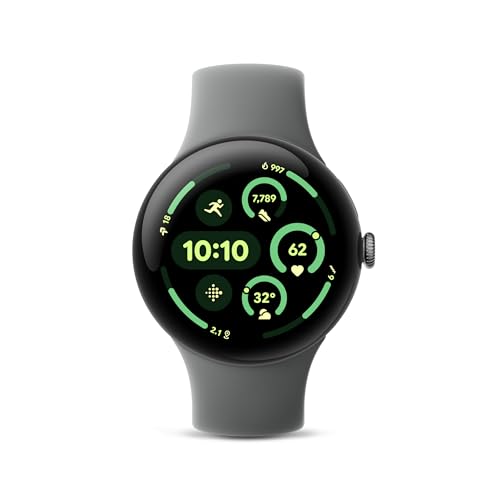
1. Google Pixel Watch 3: The Most Complete Google Assistant Experience
If your priority is the assistant itself, the Pixel Watch 3 is the watch Google designs around its own software, and it shows in the details. Assistant responses are the fastest in this guide, the microphone is tuned for natural speech at arm’s length, and the integration with Google services is seamless in a way third-party watches still chase. Ask it to add something to your shopping list, pull up a calendar event, or start navigation, and the answer arrives with the least friction of any watch here. It comes in two case sizes, 41mm and 45mm, and the larger model is the one most people should pick, because the extra battery capacity directly extends how freely you can use voice features through the day.
Strengths. The assistant experience is the headline: quick wake, accurate recognition in noisy rooms, and clean spoken replies through a clear speaker. Fitbit health tracking is the deepest in this list, covering sleep stages, heart rate variability, ECG, blood oxygen, skin temperature trends, and a large library of workout types, all presented in an app that explains what the numbers mean. The domed display is bright and easy to read outdoors, call handling through the watch is genuinely usable, and features like automatic workout detection and loss-of-pulse detection show how far the platform has matured. Setup with any Android phone is painless, and no feature is locked behind owning a specific phone brand.
Trade-offs. Battery life is the honest weakness. Even the larger model is a charge-it-every-night watch if you use the assistant heavily, track sleep, and log a GPS workout, and the smaller model gives you less margin still. The proprietary band system means your existing watch straps will not fit, and the rounded glass, while beautiful, is exposed to knocks in a way flat designs are not. Fitbit’s most advanced insights sit behind a subscription tier, so the full health picture costs extra over time.
Who it suits. The Pixel Watch 3 suits Android owners who want the assistant to be the main way they interact with their watch, who value health tracking enough to wear the watch overnight, and who accept nightly charging as the price of the smartest software in the category. If that trade sounds fair, check price on Amazon.
Check price on Amazon: Google Pixel Watch 3

2. Samsung Galaxy Watch 7: The Best All-Rounder for Most Android Owners
The Galaxy Watch 7 is the watch most Android owners should look at first, because it balances the assistant, the hardware, and the price of ownership better than anything else here. Google Assistant is fully supported alongside Samsung’s own software, and you can set the assistant as your default voice helper so a long press of the button goes straight to Google rather than to Samsung’s alternative. Performance is quick, the screen is excellent, and the health suite is broad, covering workouts, sleep with coaching-style feedback, heart rate, ECG, and body composition analysis on compatible phones.
Strengths. The hardware feels a step above most of this list: a bright, tough display, a choice of case sizes, and a rotating-touch bezel interface that makes menus fast to navigate with wet or gloved hands. Assistant queries are answered quickly, calls sound clear on both ends, and the dual-band GPS tracks runs accurately. Samsung’s update support is long and reliable, and the watch pairs with any modern Android phone, so you are not locked into Samsung’s handsets to use the core experience. Battery life edges out the Pixel Watch in day-to-day mixed use, which matters more than any single specification.
Trade-offs. A few of the most advertised health features only unlock with a Samsung Galaxy phone, which is an irritating asterisk for owners of other Android brands. The default setup nudges you toward Samsung’s apps and services before Google’s, so expect ten minutes of tidying preferences on day one. Battery life, while better than the Pixel, still means charging every day or two under heavy assistant use, and the charger is another proprietary puck to keep track of when you travel.
Who it suits. The Galaxy Watch 7 suits the Android owner who wants one watch that does everything well, plans to use the assistant daily without making it the entire personality of the device, and may already own a Galaxy phone that unlocks the complete feature set. For that buyer, check price on Amazon.
Check price on Amazon: Samsung Galaxy Watch 7

3. Google Pixel Watch 2: The Smart Value Route Into Google’s Ecosystem
The Pixel Watch 2 is the previous generation of Google’s watch, and that is precisely its appeal. It runs the same Wear OS software, answers to the same Google Assistant, and carries the same Fitbit health platform as its successor, in a slightly smaller single case size and with a slightly older chip. For buyers who care about what the assistant can do rather than owning the newest hardware, the functional gap in daily use is far smaller than the generational gap on paper. Voice queries are answered just as accurately, smart home control is identical, and message dictation works the same way.
Strengths. Everything that makes the Pixel line attractive is present: fast, accurate assistant responses, the full Fitbit health suite including ECG and blood oxygen tracking, automatic workout detection, and clean integration with Google services like Maps, Wallet, and Home. Charging is noticeably quick, which softens the daily-charging routine into a short top-up while you shower and dress. Because it is no longer the flagship, it frequently represents the best value in this entire guide while remaining fully supported with software updates.
Trade-offs. There is only one case size, and it is the smaller one, so the battery is the tightest of the Pixel models and large-wristed buyers may find the watch looks and feels small. The screen is less bright than the newer model’s, which shows in direct sunlight. You also give up the newest safety and health refinements of the current generation, and the update runway, while still solid, is shorter simply because the watch launched earlier.
Who it suits. The Pixel Watch 2 suits the value-minded Android owner who wants Google’s assistant and Fitbit tracking without paying flagship prices, has a smaller wrist or no objection to one, and is comfortable with a nightly charging habit. If that describes your priorities, check price on Amazon.
Check price on Amazon: Google Pixel Watch 2

4. Samsung Galaxy Watch 6: Proven Hardware With a Classic Option
The Galaxy Watch 6 remains an easy recommendation because Samsung’s formula was already right at this generation: a bright display, dependable performance, full Google Assistant support on Wear OS, and a choice between the standard model and a Classic variant with a physical rotating bezel that many long-time Galaxy Watch owners refuse to give up. The assistant behaves exactly as it does on the newer watch, smart home control included, and Samsung Health covers the essentials thoroughly, from sleep tracking with snore detection to a wide range of automatically detected workouts.
Strengths. The rotating bezel on the Classic model is a genuine usability advantage, letting you scroll messages and menus precisely without covering the small screen with a fingertip. Build quality is excellent, the displays are among the brightest in this guide, and the watch pairs with any Android phone while reserving only a small set of health extras for Galaxy handsets. Body composition measurement, skin temperature-based cycle tracking, and irregular heart rhythm notifications give it a health feature list that still compares well a generation later.
Trade-offs. Battery life is the familiar Wear OS story: a day to a day and a half depending on how hard you lean on the assistant, the always-on display, and GPS workouts. The chip is a step behind the current model, which you feel mainly as slightly longer pauses when the assistant handles complex requests or apps cold-start. As the older generation, its remaining years of software updates are fewer, which matters if you keep watches for a long time.
Who it suits. The Galaxy Watch 6 suits buyers who want Samsung’s polished hardware and the tactile pleasure of the rotating bezel, use the assistant as a daily tool rather than a novelty, and are happy to trade the newest chip for a more accessible route into the ecosystem. To see current availability, check price on Amazon.
Check price on Amazon: Samsung Galaxy Watch 6

5. OnePlus Watch 2: Two Brains, One Long-Lasting Watch
The OnePlus Watch 2 attacks the Wear OS battery problem with an unusual design: two chips and two operating systems sharing one case. A low-power system handles the basics quietly in the background, while the full Wear OS processor wakes for apps, workouts, and Google Assistant. In practice, you get the complete assistant experience, with voice commands, smart home control, and Google apps, alongside battery life that stretches to several days in smart mode and far longer in its power-saver mode. It is a clever answer to the category’s oldest complaint, executed well enough that the hand-offs between systems are nearly invisible.
Strengths. Endurance is the headline, but the rest of the watch holds up: a large, bright display in a single generously sized case, accurate dual-band GPS for runners, fast charging that refills a meaningful share of the battery in minutes, and a full Google app suite including Maps, Wallet, and Assistant with quick, reliable responses. Build quality feels premium, with a stainless steel case and sapphire-style glass, and the watch pairs happily with any Android phone, not just OnePlus handsets.
Trade-offs. One size means one fit, and the case is big and heavy enough that smaller wrists and sleep trackers who dislike bulk will notice it overnight. The health platform, while improving, is less deep than Fitbit’s and less mature than Samsung Health, and a few advanced health features found elsewhere are absent. The digital crown does not scroll, a small daily annoyance, and OnePlus’s update cadence, though better than the smallest brands, still trails Google and Samsung.
The dual-system design does ask one thing of its owner: a little trust during the first days. Switching between the quiet background system and full Wear OS is automatic, but notifications and tiles occasionally take a moment to resync after the watch wakes, and the power-saver mode trims the experience down to essentials, including stepping back from the full assistant. None of this amounts to a flaw so much as a personality: this is a watch engineered around endurance first, and everything else, the assistant included, is arranged to protect that priority. Owners who understand the bargain tend to love it. Owners who expected a Pixel with a bigger battery should buy the Pixel.
Who it suits. The OnePlus Watch 2 suits Android owners who want the genuine Google Assistant experience with battery life measured in days, especially runners who value GPS accuracy and anyone tired of nightly charging. If that combination sounds like your watch, check price on Amazon.
Check price on Amazon: OnePlus Watch 2
Quick Comparison: All Five Watches Side by Side
| Watch | Assistant experience | Battery character | Health platform | Best for |
|---|---|---|---|---|
| Google Pixel Watch 3 | Fastest, most deeply integrated | Nightly charging under heavy use | Fitbit, the deepest here | Assistant-first buyers |
| Samsung Galaxy Watch 7 | Fast, set Google as default | A day to two days, mixed use | Samsung Health, very broad | Most Android owners |
| Google Pixel Watch 2 | Same assistant, slightly older chip | Daily charging, fast top-ups | Fitbit, full suite | Value hunters |
| Samsung Galaxy Watch 6 | Full Assistant on proven hardware | A day to a day and a half | Samsung Health, broad | Rotating-bezel fans |
| OnePlus Watch 2 | Full Assistant, quick responses | Several days in smart mode | Good and improving | Runners who hate charging |
Read the table as a map of priorities rather than a ranking carved in stone. The assistant itself is the same Google software on all five; what changes is the hardware wrapped around it. Choose the Pixel Watch 3 if voice control is your primary interface and health tracking runs a close second. Choose a Galaxy Watch if you want the most polished all-round hardware. Choose the OnePlus if the charging cable is the reason every previous smartwatch ended up in a drawer. And if two models still feel tied after all of that, choose the one whose case size fits your wrist better, because the watch you comfortably wear every day will always outperform the theoretically better watch sitting at home.
Stretching the Battery Without Giving Up the Assistant
Because battery life is the tax every Wear OS owner pays, it is worth knowing which settings actually move the needle. The always-on display is the largest single drain for most people; switching to raise-to-wake typically buys back a meaningful share of a day. The always-listening wake phrase is the second cost, and it is the one most specific to this guide: if you find yourself pressing the button anyway, turning off hotword detection is free endurance. Screen timeout, tilt sensitivity, and how many tiles and complications refresh in the background each add smaller savings that compound.
Charging strategy matters as much as settings. These watches charge fastest in short bursts, so a top-up while you shower and dress can carry a Pixel or Galaxy model through the day and the following night’s sleep tracking more reliably than one long weekly charge. The OnePlus Watch 2 relaxes this discipline considerably, which is its entire appeal, but even it rewards a routine: same charger, same place, same time. Owners who build the habit stop thinking about battery within a fortnight. Owners who do not are the ones leaving frustrated complaints about endurance, a fate this guide is trying to spare you.
Pixel or Galaxy, New or Previous Generation: A Short Decision Guide
If you are torn between the two Pixel models, the question is size and screen. The Pixel Watch 3 adds a larger case option with a bigger battery and a brighter display; the Pixel Watch 2 offers the same assistant and Fitbit core for less money in a single smaller size. If you are torn between the Galaxy models, the Watch 7 brings a faster chip and the newest health software, while the Watch 6 keeps the beloved rotating bezel on its Classic variant and gives up very little in daily assistant use. In both families, the previous generation is the rational buy unless a specific new feature answers a specific need of yours.
Choosing across families is about ecosystems and endurance. Pick Google’s watches if Fitbit’s health platform and the purest assistant experience matter most. Pick Samsung’s if you want the most polished hardware and the widest feature net, especially with a Galaxy phone. Pick Mobvoi or OnePlus if every previous smartwatch died in a drawer because of charging, because for you the best assistant is the one still alive on your wrist on day three. There is no wrong answer among the five, only answers matched or mismatched to your habits, and your habits, honestly assessed, should make this decision in about a minute.
Privacy and the Always-Listening Question
A watch that answers to its name raises an obvious question, and it deserves a straight answer. With the wake phrase enabled, the watch listens locally for those specific words and only begins sending audio for processing once it hears them or you activate it deliberately. You can review and delete your assistant activity through your Google account controls, set recordings to auto-delete, or turn the wake phrase off entirely and summon the assistant by button, which many owners do after the novelty fades. The microphone can also be muted at the system level for meetings and private moments.
The health side collects more intimate data than the microphone does, and it is governed by the policies of Fitbit or Samsung Health rather than the assistant. Location history from GPS workouts, sleep patterns, and heart data all live in those accounts, and both platforms let you export or delete them. None of this makes these watches unusually invasive by the standards of modern phones, which collect more, but a watch is worn more hours a day than a phone is carried. Spend five minutes in the privacy settings when you set the watch up. It is the cheapest peace of mind in this entire guide.
Frequently Asked Questions
Do these smartwatches work with an iPhone?
No. Every watch in this guide runs Wear OS and pairs with Android phones only. There is no workaround, no companion app for iOS, and no partial mode worth using. iPhone owners who want a voice assistant on the wrist should look at the Apple Watch line instead, where Siri fills the same role inside Apple’s ecosystem.
What can Google Assistant on a watch actually do without my phone nearby?
On a Bluetooth model with the phone out of range, the assistant shrinks to on-device tasks: timers, alarms, stopwatch, and some settings changes. Anything needing the internet, including questions, message replies, and smart home control, needs the phone connection, Wi-Fi, or an LTE model with its own plan. LTE versions of the Pixel and Galaxy watches keep nearly the full assistant working when the phone stays home, at the cost of a carrier plan and faster battery drain.
Will Gemini replace Google Assistant on these watches?
Gradually, yes, on supported models, through software updates rather than new hardware. Gemini is rolling out across Wear OS region by region, and it handles open-ended questions more conversationally, while classic Assistant remains quicker and more predictable for timers, messages, and smart home commands during the transition. Buying any watch here today does not lock you out of that future, but you should buy for the experience the watch delivers now.
How long does the battery really last if I use the assistant a lot?
Plan on roughly a day from the Pixel Watch models and the Galaxy Watch models if you combine heavy voice use, an always-on display, sleep tracking, and a GPS workout, and expect two to several days from the OnePlus Watch 2, which is built specifically to stretch that figure. Turning off the always-on display and the always-listening wake phrase are the two changes that buy back the most time on any model.
Can I control my smart home from these watches?
Yes, and it is one of the best reasons to own one. Any device in your Google Home app, including lights, plugs, thermostats, locks, and cameras, can be controlled by voice from the wrist, and routines run exactly as they do from a Google speaker. The one preparation worth doing is renaming devices to the names you naturally say out loud, because the assistant follows your labels literally.
Whichever of these five ends up on your wrist, the real upgrade is the first evening you dim the house, set a timer, and answer a message without once reaching for your phone.