The best windows mixed reality headsets are a short list, and that is part of the point. Windows Mixed Reality was Microsoft's platform for PC virtual reality, built around inside-out tracking, motion controllers, and headsets from HP, Lenovo, Acer, Dell, and Samsung. The headsets shared one idea: plug a single cable into a Windows PC and step into virtual worlds without external base stations or a room full of sensors. That simplicity was the whole appeal. Earlier PC virtual reality needed lighthouses or cameras mounted on walls, calibrated and cabled, while a WMR headset needed a PC, a cable, and a clear patch of floor. Microsoft has since wound the platform down, so these headsets are now bought as remaining listings rather than current products, and anyone considering one should check that their Windows version still supports Windows Mixed Reality before spending anything. With that warning out of the way, the hardware itself still holds up well: sharp panels, comfortable designs, and tracking that needs nothing more than the headset itself. A WMR headset remains a cheap way into PC virtual reality for someone whose PC already meets the requirements and whose Windows version still runs the platform. This roundup covers six genuine Windows Mixed Reality headsets, from the sharp HP Reverb G2 to the light, simple Lenovo Explorer. Every model here was checked against its current listing for its exact brand and model, and the notes below stick to what the listing itself states about resolution, tracking, comfort, and what comes in the box, so you can tell a real WMR headset from the many VR headsets that are not.
In this guide
Quick picks: best windows mixed reality headsets
| # | Product | Where to buy |
|---|---|---|
| 1 | HP Reverb G2 | Check on Amazon |
| 2 | HP Reverb G2 V2 | Check on Amazon |
| 3 | HP Reverb Professional Edition | Check on Amazon |
| 4 | Lenovo Explorer | Check on Amazon |
| 5 | Acer AH101 | Check on Amazon |
| 6 | Dell Visor VRP100 | Check on Amazon |
How the picks were chosen
Each headset below was judged on the points that matter for Windows Mixed Reality specifically. First, platform: the listing had to show the headset is a genuine WMR device, not a standalone headset or a phone holder that happens to mention mixed reality, and several well-known headsets were excluded for exactly that reason. Second, resolution: WMR headsets ranged from 1440 by 1440 pixels per eye to 2160 by 2160, and that gap is visible in text and fine detail, so the sharper models earned their place at the top. Third, tracking: all WMR headsets use inside-out tracking with cameras on the headset, so the question is how many cameras and how well the controllers are followed when they move out of view. Fourth, comfort and fit: a headset you wear for an hour needs balanced weight, adjustable lenses, and decent face padding, and a headset that hurts after twenty minutes is a bad buy at any price. Fifth, what is in the box: controllers, cables, and adapters decide whether the headset works the day it arrives or needs extra purchases first. Sixth, refresh rate: 90Hz is the standard for comfortable motion, and a headset limited to 60Hz needs a clear warning. Finally, the platform warning: every pick is an older, discontinued model, so the guide below explains how to check compatibility before buying, because a headset that cannot run on your Windows version is not a bargain at any price.
Quick comparison
| Product | Best for |
|---|---|
| HP Reverb G2 | Sharpest image, best tracking |
| HP Reverb G2 V2 | Sharpest image, newest revision |
| HP Reverb Professional Edition | Widest field of view, lowest cost |
| Lenovo Explorer | Lightest, simplest setup |
| Acer AH101 | Best for HDMI PCs, 90Hz |
| Dell Visor VRP100 | Most comfortable, controllers included |
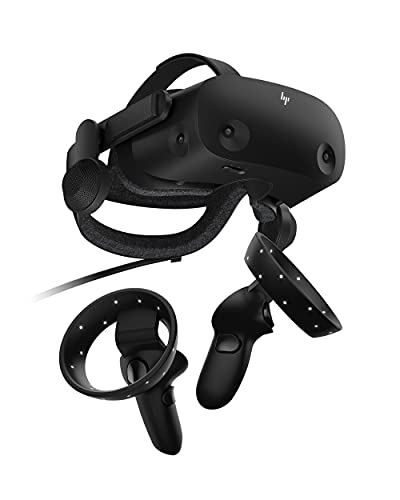
1. HP Reverb G2
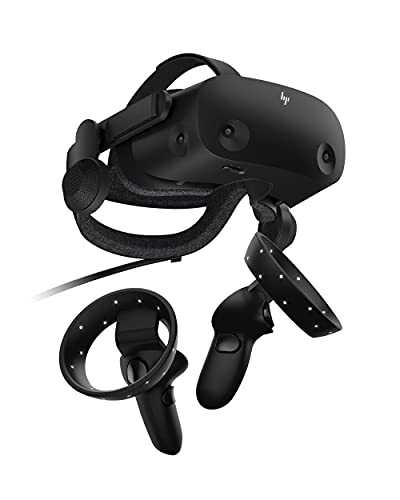
VR headset with controllers, adjustable lenses, and speakers from Valve. The listing states 2160 by 2160 LCD panels per eye, four cameras, an ergonomic design, and compatibility with SteamVR and Windows Mixed Reality. The box includes a 6-meter headset cable, two motion controllers, a DisplayPort to mini-DisplayPort adapter, and a power adapter. The four cameras are the most of any headset here, and the Valve speakers are a genuine upgrade over the small earpieces on cheaper headsets.
Strengths
- 2160 by 2160 panels per eye give the sharpest image in this roundup
- Four tracking cameras follow the controllers better than two-camera designs
- Speakers from Valve and adjustable lenses make long sessions comfortable
Trade-offs
- Needs a capable PC and a DisplayPort connection, so laptop users should check their ports
- Wired design with a 6-meter cable limits how far you can move
- Windows Mixed Reality support is wound down, so check your Windows version first
Who it fits
A PC gamer who wants the sharpest WMR image available and has a desktop with DisplayPort and the graphics power to drive it. It also suits someone who uses virtual desktops, since the high resolution makes text readable.
Best for: sharp PC virtual reality with the best WMR resolution
Not suited for: standalone play, or a PC without DisplayPort
In daily use
Set it up on a desktop with space to stand and turn: the four cameras track the controllers well across a wide area, and the high-resolution panels make text in virtual desktops readable instead of blurry, which is the test that separates this headset from the 1440-per-eye models. Adjust the lenses to match your eyes before your first session, since correct lens spacing is what keeps the image sharp at the edges, and route the 6-meter cable behind you so it never crosses your feet. The Valve speakers sit off the ears, which keeps long sessions cooler than sealed headphones do, and the ergonomic design spreads the weight so the headset does not press on one spot.
Before you buy
Confirm your PC has DisplayPort and the graphics power for 2160 by 2160 per eye, and confirm your Windows version still supports Windows Mixed Reality. Check that the listing includes both controllers, the cable, and the adapter.
Check price on Amazon: HP Reverb G2
2. HP Reverb G2 V2
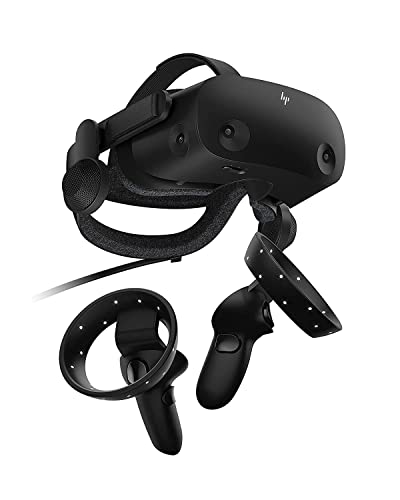
2022 HP Reverb G2 Virtual Reality Headset V2 version. The listing describes the same no-compromise design as the G2: 2160 by 2160 LCD panels per eye, immersive spatial audio, adjustable fit with increased cushion size, and a box that includes the headset, a 6-meter cable, two motion controllers, a DisplayPort to mini-DisplayPort adapter, and a power adapter. The V2 is the later revision of the G2, with updated fit and larger cushions.
Strengths
- Same 2160 by 2160 panels as the G2, the sharpest resolution here
- V2 revision of the G2 with the updated design and larger cushions
- Complete box: headset, controllers, long cable, adapter, and power supply
Trade-offs
- Same PC requirements as the G2, including DisplayPort and strong graphics
- Still a wired headset, so movement is limited by the cable
- As a WMR headset, it needs a Windows version that still supports the platform
Who it fits
A buyer who wants the G2's sharp image and prefers the later V2 revision with its updated fit. It also suits someone buying their first WMR headset, since the V2 is the most refined version of the best headset here.
Best for: the sharpest WMR image with the newest G2 revision
Not suited for: anyone without a DisplayPort-equipped PC
In daily use
Treat the V2 as the G2 with refinements: the same high-resolution panels, the same controller setup, and the same cable, with the fit improved by the larger cushions. The larger cushions matter more than they sound, because comfort decides how long you stay in virtual reality, and a headset that presses on your face after half an hour is a headset you stop using. Set the lens spacing first, then adjust the head strap so the weight sits evenly across your head, and the headset disappears faster than you expect. The spatial audio adds depth to games without headphones, and the 6-meter cable gives room to move.
Before you buy
Check the listing states the V2 version, confirm DisplayPort on your PC, and verify Windows Mixed Reality support on your Windows version. Compare the V2 and the original G2 listings carefully, since sellers sometimes mix them up.
Check price on Amazon: HP Reverb G2 V2
3. HP Reverb Professional Edition
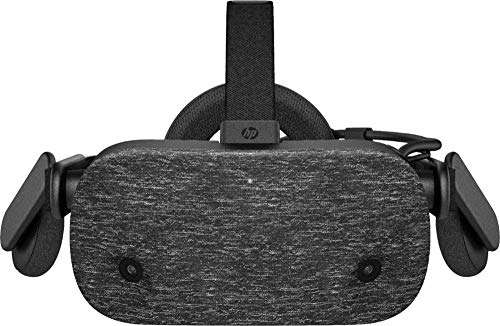
HP Reverb Virtual Reality Headset, Professional Edition. The listing states a 114-degree field of view, a wired PC connection, and a design built for PC virtual reality. This is the original HP Reverb, the professional-edition model of the first-generation WMR headset from HP, and its wide field of view is still its main attraction: it fills more of your vision than the narrower headsets in this roundup.
Strengths
- Wide 114-degree field of view fills more of your vision than narrower headsets
- Professional Edition build aimed at extended use
- Simpler setup than later models, with fewer parts to manage
Trade-offs
- Lower resolution than the Reverb G2 models in this roundup
- Older model, so listings are remaining stock and support is limited
- Wired PC connection with no standalone mode
Who it fits
A buyer who wants a wide field of view at the lowest cost in this roundup and accepts the older, lower-resolution panels. It also suits a professional user who needs a simple, proven headset for demonstrations or training.
Best for: wide field of view on a budget
Not suited for: reading small text or anyone who needs the sharpest panels
In daily use
The 114-degree field of view is the reason to choose this one: the virtual world fills more of your sight, which makes the experience feel bigger even though the panels are not as sharp as the G2, and the sense of presence in games benefits more from field of view than from resolution. Use it seated for virtual desktops and standing for games with a clear play area, and keep the cable routed behind you. Because it is the oldest model here, check the listing carefully for what is included before you buy, since a missing controller or cable turns a bargain into a hunt for spare parts.
Before you buy
Confirm the listing includes controllers and cables, and verify Windows Mixed Reality support on your Windows version before ordering. Check the field of view against your expectations, since a wide view is this model's whole case.
Check price on Amazon: HP Reverb Professional Edition

4. Lenovo Explorer
Lenovo G0A20001WW Explorer Mixed Reality Headset. The listing states a display resolution of 2880 by 1440, a comfortable design at less than one pound, setup in minutes, and four ways to interact with the virtual world. It combines virtual reality with a sense of presence for games and travel experiences from home, and its lightness is the feature you notice first.
Strengths
- Under one pound, the lightest headset in this roundup
- 2880 by 1440 display gives a clear image for games and virtual travel
- Sets up in minutes with no external sensors to place
Trade-offs
- Lower resolution than the HP Reverb G2 models
- Older WMR model, so it depends on a Windows version that supports the platform
- Fewer comfort adjustments than the heavier, more adjustable headsets
Who it fits
A first-time VR buyer who wants the lightest, simplest WMR headset and a quick setup. It also suits someone who is unsure about virtual reality and wants the cheapest, easiest way to try it properly.
Best for: light, simple first steps into PC virtual reality
Not suited for: the sharpest text or the widest field of view
In daily use
The Explorer is the headset to pick when weight matters: at less than a pound it sits lightly enough for long sessions without the neck strain heavier headsets cause, and the inside-out tracking means setup is a matter of minutes rather than an afternoon of sensor placement. Start with seated experiences to learn the controllers, then move to standing games once you know your play area and where the cable runs. The balanced design means it rarely needs adjusting mid-session, and the 2880 by 1440 display is clear enough for virtual travel and games. Four ways to interact, including the controllers, give you options as you learn.
Before you buy
Check that your Windows version supports Windows Mixed Reality, and confirm the listing includes the controllers. Keep the play area clear, since even a light headset cannot save you from tripping over the cable.
Check price on Amazon: Lenovo Explorer
5. Acer AH101
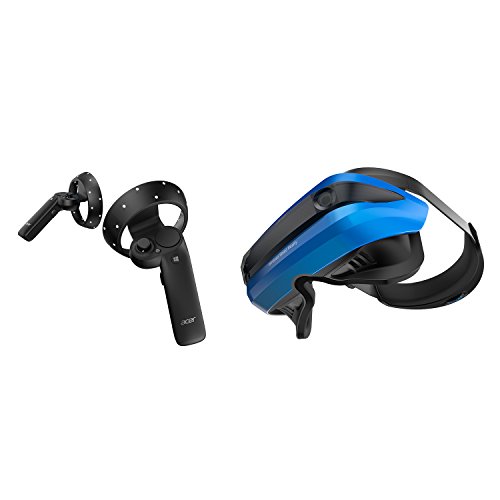
Acer AH101-D8EY Windows Mixed Reality Headset, model VD.R05AP.002. The listing states 2.89-inch displays at 2880 by 1440 resolution (1440 by 1440 per eye), a 90Hz refresh rate over HDMI 2.0 and 60Hz over HDMI 1.4, inside-out tracking with a built-in camera, and a 13-foot cable with HDMI and USB connections. Tracking sensors include a gyroscope, accelerometer, and magnetometer, which together keep the headset oriented as you move.
Strengths
- 90Hz refresh over HDMI 2.0 keeps motion smooth and comfortable
- Inside-out tracking needs no external sensors or wall mounts
- HDMI connection suits PCs and laptops that lack DisplayPort
Trade-offs
- 60Hz over HDMI 1.4, so the cable and port version matter a lot
- Older model with remaining-stock listings only
- Narrower ecosystem support than the HP models, as a WMR headset
Who it fits
A buyer whose PC or laptop has HDMI but no DisplayPort, and who wants a smooth 90Hz WMR headset. It also suits a laptop user, since many laptops have HDMI but no DisplayPort.
Best for: HDMI-based PCs and laptops without DisplayPort
Not suited for: anyone whose PC only has HDMI 1.4, which limits the headset to 60Hz
In daily use
Connect it over HDMI 2.0 to get the full 90Hz refresh, which makes head movement feel smoother and reduces the swimmy feeling cheaper headsets can cause, especially in fast games. The 13-foot cable gives enough room to stand and turn without feeling tethered, and the inside-out camera tracks without any sensors on the walls, so setup is quick. The gyroscope, accelerometer, and magnetometer work together to keep the view stable as you turn, and the 1440-by-1440-per-eye panels are sharp enough for games and virtual travel. Keep the play area clear, since the cable is long enough to catch on furniture.
Before you buy
Confirm your HDMI version: HDMI 2.0 gives 90Hz, HDMI 1.4 gives 60Hz, and that difference is the whole point of this headset. Also verify Windows Mixed Reality support on your Windows version.
Check price on Amazon: Acer AH101

6. Dell Visor VRP100
Dell VRP100 Visor with controllers. The listing states it is designed for Windows Mixed Reality, with 1440 by 1440 resolution per eye, a 90Hz refresh rate, a weight-balanced adjustable headband, premium face cushions, and Windows 10 as the operating system. Controllers are included, so the set is complete out of the box, and the weight-balanced design is the feature Dell emphasizes most.
Strengths
- 90Hz refresh rate keeps motion smooth for games
- Weight-balanced headband and premium cushions suit long sessions
- Controllers included, so it is ready to use out of the box
Trade-offs
- 1440 by 1440 per eye is less sharp than the Reverb G2's panels
- Older model sold as remaining stock, with limited support
- Needs a Windows version that still supports Windows Mixed Reality
Who it fits
A buyer who wants a comfortable, complete WMR set with controllers included and a smooth 90Hz display. It also suits someone who wears a headset for hours, since the balanced headband and premium cushions are built for exactly that.
Best for: comfortable long sessions with controllers in the box
Not suited for: the sharpest panels or a standalone headset
In daily use
The Visor's strength is comfort: the weight-balanced headband and premium cushions spread the load across your head, so the headset stays comfortable well into a long session instead of pressing on your forehead after half an hour. The 90Hz display keeps motion smooth, which matters most in games where you turn your head quickly, and the controllers in the box mean there is nothing else to buy before your first game. Adjust the headband until the weight sits evenly, and the 1440 by 1440 panels are sharp enough for most games and virtual travel, even if they cannot match the G2 for reading text. The flip-up style visor design, shared with other WMR headsets, lets you peek at the real world without removing the headset.
Before you buy
Confirm the listing includes the controllers, and verify Windows Mixed Reality support on your Windows version before buying. Check the headband adjustment range if you wear glasses.
Check price on Amazon: Dell Visor VRP100
Buying guide: best windows mixed reality headsets
Check Windows Mixed Reality support first
This is the most important step in this roundup. Microsoft has wound down the Windows Mixed Reality platform, and newer Windows versions no longer support it. Before buying any headset here, confirm that your exact Windows version still runs Windows Mixed Reality and the Mixed Reality Portal, and check the version number rather than assuming. A headset that cannot connect to its platform is not usable, no matter how good the hardware is, and there is no software fix for a removed platform. If your PC has already moved past supported versions, these headsets are not for you, and a standalone headset is the better buy.
Resolution and what it means
Resolution is stated per eye, so compare like with like. The HP Reverb G2 models offer 2160 by 2160 per eye, the sharpest here, and that shows in readable text and fine detail, which is why they lead this roundup. The Lenovo Explorer, Acer AH101, and Dell Visor offer 1440 by 1440 per eye, which is clear enough for games and virtual travel but softer for reading. If you plan to use virtual desktops or read a lot of text, resolution matters more than anything else, and the gap between 1440 and 2160 is easy to see. If you mostly play games, the gap matters less, since games rely on motion and depth more than on fine text. Also remember that higher resolution needs more graphics power, so the sharpest headset is only the best choice if your PC can drive it smoothly.
Refresh rate and comfort
Refresh rate decides how smooth head movement feels. The Acer AH101 and Dell Visor run at 90Hz, which is the standard for comfortable VR, but the Acer only reaches 90Hz over HDMI 2.0 and drops to 60Hz over HDMI 1.4, so the port version decides the experience. A lower refresh rate can feel swimmy and tiring, and it is the most common cause of discomfort in older headsets. Check both the headset's refresh rate and the port version on your PC, since the cable decides which rate you actually get, and do not assume a headset runs at its best rate on every connection.
Tracking without base stations
Every WMR headset tracks itself with cameras on the headset, so there are no base stations to mount, no sensors to calibrate, and no room setup beyond clearing the floor. The HP Reverb G2 uses four cameras, which follow the controllers across a wider area than two-camera designs, and that shows when you reach to the side or behind you. Even so, tracking works best in a well-lit room with a clear play area, and controllers can lose tracking when held behind your back, very close to the headset, or in a dark room. Keep the lights on and the play area clear.
Cables, ports, and PC requirements
These are wired PC headsets, so the cable and the port decide whether they work at all. The HP models need DisplayPort, while the Acer uses HDMI, and the Dell Visor connects over the standard WMR cable set. Check your PC's ports before ordering, and check the graphics requirements for the resolution you are buying: 2160 by 2160 per eye needs considerably more graphics power than 1440 by 1440, and a headset is only as good as the PC driving it. A weak PC will stutter even on a great headset, so match the headset to the machine you own.
SteamVR and the WMR ecosystem
One reason the HP Reverb G2 models lead this roundup is their stated compatibility with SteamVR as well as Windows Mixed Reality. SteamVR is the larger storefront for PC virtual reality, and a headset that works with it has access to far more games and experiences than one limited to the Microsoft store. That compatibility is stated in the G2 listing and is part of what makes the G2 the most versatile pick here. The other headsets in this roundup also work through the WMR platform, but the G2's SteamVR support gives it the broadest library, which matters once the novelty wears off and you want new things to play.
What to check in a remaining-stock listing
Because these headsets are discontinued, listings vary in what they include. Check that controllers are included, since a headset without controllers is only half a system, and check the cable, the adapters, and the power supply. Read the listing for the exact model code: HP Reverb G2 versus G2 V2, Acer AH101-D8EY, Dell VRP100, Lenovo G0A20001WW. A vague listing that does not state the model is a reason to ask the seller or move on. Also check the return policy, since an older headset is more likely to arrive with a fault than a new one.
Comfort, fit, and glasses
A headset lives on your face, so fit matters as much as resolution. Look for adjustable lenses, which the HP Reverb G2 states explicitly, and an adjustable headband, which the Dell Visor emphasizes with its weight-balanced design. The Lenovo Explorer's sub-pound weight is the simplest comfort advantage here: less weight means less pressure on your forehead and cheeks. If you wear glasses, check the lens spacing and the space inside the headset before buying, since a tight fit presses glasses into your face. Face cushions wear out, so check whether replacements are available for the model you choose, and try the headset on for at least twenty minutes before deciding it fits.
Using and caring for your pick
Store the headset in a cool, dry place away from direct sunlight, since sunlight through the lenses can damage the displays, and never leave it lens-up near a window. Wipe the lenses only with a soft microfiber cloth, never with paper or a shirt, and blow dust off before the cloth touches the glass. Clean the face cushions regularly and let them dry fully before the next session, since damp cushions are uncomfortable and unhygienic. Keep the cable untangled and routed behind you during play, and coil it loosely for storage rather than wrapping it tightly around the headset, since tight coils strain the wires over time. Take a break every 30 to 45 minutes, especially in your first weeks, and stop immediately if you feel unwell. Give new users a seated first session rather than a standing one, and keep a chair nearby even for standing games.
Common mistakes to avoid
The most common mistake is buying a WMR headset without checking Windows-version support, and discovering the platform no longer runs on the buyer's PC, which turns the headset into an expensive paperweight. A second is buying the sharpest headset for a PC that cannot drive it, which produces stutter rather than clarity, and gets blamed on the headset. A third is confusing these headsets with standalone headsets or phone holders: a Windows Mixed Reality headset needs a Windows PC, period, and no phone or console will run it. A fourth is ignoring the cable and port: a DisplayPort headset cannot run on a laptop with only HDMI, and an HDMI 1.4 port limits the Acer AH101 to 60Hz, which is a worse experience than the buyer expected. A fifth is buying a listing that omits the controllers or the cable, and discovering the missing parts cost more than the saving. A sixth is leaving the headset lens-up in sunlight, which can burn the displays. Finally, many buyers skip the play-area setup and trip over the cable on their first session.
Final recommendation
For the best image, the HP Reverb G2 is the clear pick: 2160 by 2160 panels per eye, four tracking cameras, and Valve speakers make it the sharpest WMR headset here, and the V2 revision is the one to prefer if both are listed, since its updated fit and larger cushions improve comfort. For the lightest and simplest start, the Lenovo Explorer sets up in minutes and weighs under a pound, which makes it the easiest first headset. For HDMI-only PCs, the Acer AH101 is the only pick here that runs at 90Hz over HDMI 2.0, and the Dell Visor VRP100 is the most comfortable complete set with controllers in the box. For the widest field of view on a budget, the original HP Reverb Professional Edition still earns its place. Whichever you choose, the best windows mixed reality headsets are only a good buy if your Windows version still supports the platform, so check that first, then pick the headset that matches your PC and your eyes. A headset that fits your ports, your graphics card, and your Windows version will give you years of virtual reality; one that does not will give you a return label.
Frequently asked questions
What is Windows Mixed Reality?
Windows Mixed Reality was Microsoft's platform for PC virtual reality, using headsets with inside-out tracking and motion controllers. The headsets connect to a Windows PC with a single cable and need no external sensors or base stations. Microsoft has wound the platform down, so support depends on your Windows version, and newer versions no longer include it. The headsets themselves were made by HP, Lenovo, Acer, Dell, and Samsung.
Do Windows Mixed Reality headsets still work?
They work on Windows versions that still support the platform, with a compatible PC and the right ports. Before buying, confirm your exact Windows version runs Windows Mixed Reality and the Mixed Reality Portal. On newer Windows versions without support, these headsets cannot be used, and there is no workaround.
Do I need a powerful PC for a WMR headset?
Yes, a desktop or laptop with the right ports and enough graphics power. The HP Reverb G2 models need DisplayPort and strong graphics for their 2160 by 2160 panels, while the Acer AH101 uses HDMI and needs HDMI 2.0 for its full 90Hz refresh. Check the headset's port and the resolution against your PC before buying, since a weak PC will stutter. As a rough guide, the 1440-per-eye headsets are far easier to drive than the 2160-per-eye G2 models, so match the headset to the machine you actually own rather than the one you plan to build.
What is the difference between the HP Reverb G2 and the G2 V2?
The G2 V2 is the later revision of the same headset, with the same 2160 by 2160 panels per eye and the same box contents, including the 6-meter cable and two controllers. The V2 brings updated fit and larger cushions, which improve comfort in long sessions. If both are listed, the V2 is the safer choice.
Can I use a WMR headset without a PC?
No. Windows Mixed Reality headsets are wired PC headsets and cannot run on their own. They need a Windows PC with the right port, enough graphics power, and a Windows version that still supports the platform. Standalone headsets are a different product class entirely, and phone-based VR viewers are not comparable.
Which WMR headset is best for a first-time buyer?
The Lenovo Explorer is the easiest first step: it weighs under a pound, sets up in minutes, and needs no external sensors. If you want the best image and your PC can drive it, the HP Reverb G2 V2 is the better long-term buy, since its 2160 by 2160 panels and four tracking cameras are a clear step up. Either way, check Windows Mixed Reality support on your Windows version before ordering.
Is it still worth buying a WMR headset today?
It can be, for the right buyer. If your Windows version still supports Windows Mixed Reality, your PC has the right ports and graphics power, and the listing includes controllers and cables, a WMR headset is one of the cheapest ways into PC virtual reality. The hardware is proven and the image quality, especially on the Reverb G2 models, still holds up. If any of those conditions fails, buy a standalone headset instead, since a WMR headset you cannot run is not a bargain, and check the listing carefully before spending anything.
What is inside-out tracking?
Inside-out tracking means the headset tracks itself using cameras built into the headset, rather than relying on external sensors or base stations placed around the room. Every WMR headset works this way: the cameras watch the room and the controllers, and the headset works out where it is. Setup is faster and there is nothing to mount on the walls, though tracking works best in a well-lit room with a clear play area. The HP Reverb G2 uses four cameras, which follow the controllers across a wider area than the two-camera designs on the earliest WMR headsets.